








An applicant tracking system (ATS) is software that streamlines the recruiting and hiring process. It assists not only with posting jobs and collecting applications, but evaluating resumes, scheduling interviews, and even assisting in hiring and onboarding.
ATS features vary per provider. At its most basic, it includes application and resume parsing and evaluation, basic email or text communication with the applicant, and a way to take notes on them. More advanced applicant tracking features include onboarding, background checks, and more.
To help you choose one for your business, here are the top ATS features you should consider when looking for an ATS provider.
- 1. Job Ad Creation and Posting
- 2. Career Page Builder
- 3. Application Receipt and Shortlisting
- 4. Automated Resume Analysis
- 5. Applicant Communication
- 6. Interview Scheduling and Video Conferencing
- 7. Candidate Testing
- 8. Automations
- 9. Analytics and Reporting
- 10. Mobile-Friendly Platforms
- Five Features That Affect ATS Functionality
- Applicant Tracking System Frequently Asked Questions (FAQs)
- Bottom Line
1. Job Ad Creation and Posting
Every ATS software should have tools to help you create and distribute your job ad to top job sites like Indeed and ZipRecruiter. Look for those that feature job templates or a job ad builder, as well as how many job sites it can post to. Note, however, that some are free, while others you’ll have to pay for—check out our roundups of the best job posting websites and best free job posting websites for some idea of what these are.
2. Career Page Builder
The best ATS make it easy to build a career page for your website or to post jobs and take applications through a page already made on your company site. This allows you a branded opportunity to show off your company and bring applicants to your job portal for applying.
3. Application Receipt and Shortlisting
When the average number of job applications per job is between 118 and 250, personally reviewing them all is nearly impossible. Some ATS software feature automations that can weed out the most unqualified, while creating shortlists so you have a smaller pool to work with. Many employ machine learning so the program adapts to your preferences or direction.
4. Automated Resume Analysis
Like applicant parsing, applicant tracking systems should also be able to analyze resumes using keywords, locations, skills, experience, and other criteria. Many even grant access to resumes of people who have not applied but are looking for work, increasing your candidate pool. The best ones allow you to store resumes so you can search them for future positions.
5. Applicant Communication
Your applicant tracking system should let you communicate with candidates—at least by email, preferably by text (when the applicant permits). These allow for quick communication with applicants while also consolidating it into one convenient platform. Some platforms even allow for sending automated templates, such as for interview scheduling or rejection notifications.
6. Interview Scheduling and Video Conferencing
At the very least, you should be able to schedule interviews with an included appointment calendar or links to other calendars like Google or Outlook. However, many ATS software include interview tools like automated questions for written or video-recorded interviews, or video conferencing for live interviews.
7. Candidate Testing
Tests for skills or particular qualities can help you quickly weed out unsuitable candidates. Many ATS offer tests for basic skills like grammar or word processing, as well as general skills like critical thinking. You may also be able to create a questionnaire or test for specific tasks, like programming.
8. Automations
The whole reason for using software is to save time. Look for ATS featuring automations, from workflow creation to automated messages and batch emailing to reach multiple candidates at once.
9. Analytics and Reporting
With good data, you can improve your hiring practices. Many ATS software include a candidate portal for getting feedback on the application process. Others analyze the candidate pool for demographics which can help with meeting legal compliance for diversity and equal opportunity. Some include EEO and other federal reports.
10. Mobile-Friendly Platforms
In 2021, 67% of job applications were completed via mobile devices. If your ATS isn’t mobile-optimized, you are severely limiting your applicant pool. Some platforms even offer in-house mobile software, allowing you to track applicants on the go on your cell phones and tablets.
Five Features That Affect ATS Functionality
There are some features that affect how an ATS is used—and should be considered when choosing software for your business. These include:
- Security. You will be storing personal information for your candidates, and if you have onboarding tools, even bank account information. You should look for bank-level security and encryption of data.
- Integrations. The best ATS software integrates with other systems, from background check tools to HRIS software to Google.
- Support. Is there someone you can contact 24/7? What do real-world users say about support? (Check Capterra or G2 for user reviews.)
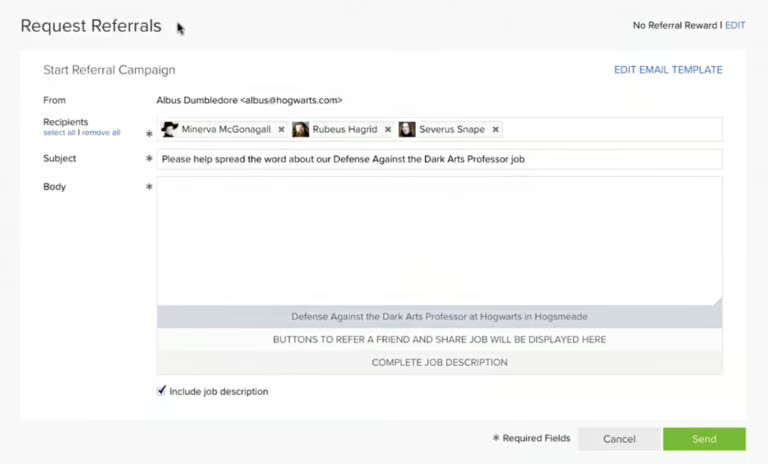
- Employee recommendations. Some applicant tracking systems have functions that let employees recommend people. Some have basic referral systems while others include reward tools like commissions if you hire the candidate.
- Onboarding. Some applicant tracking systems include onboarding tools like offer management tools, e-signature functions, hiring document storage, and more. Some integrate with HR systems so you can onboard through them.
Applicant Tracking System Frequently Asked Questions (FAQs)
Who should use an ATS?
In general, companies that have higher turnover or are in a hiring surge should consider an ATS solution. If you are only hiring on occasion, it may not be worth the investment, although there are some free versions that can save you time without costing you money.
How does an ATS work?
First, you post the job through the ATS. Many have templates to help with job ad creation and tools for placing it on multiple job boards at once. The ATS then filters resumes, ranks candidates, and in some cases, makes recommendations based on filters you’ve set.
Next, it allows you to reach out to candidates to arrange interviews. It tracks applicant progress, sometimes including notes such as from the interviewer. The best applicant tracking systems also have collaboration tools so you can communicate with your hiring team.
Finally, it enables you to send a hiring contract or rejection and keeps track of statistics to help you evaluate your hiring process.
What’s the difference between an ATS and a Candidate Relationship Management (CRM) system?
The primary difference is that an ATS tracks candidates who have applied to your company, while CRM systems are for targeting and reaching out to potential candidates to entice them to apply. As such, CRMs concentrate on communication and engagement and have a broader reach than an ATS.
How good is ATS software and finding the right candidate?
Based on trends—ATS are great for finding the right candidate. Surveys over the years have shown that the majority of ATS users say they find qualified candidates faster and more easily than they would have without the software. They also say that it has helped them with fairness and diversity hiring.
What are the dangers of using ATS software?
Like any HR tool, it’s as good as you use it. A study by Harvard Business Review1 said that 88% to 94% of recruiters believe ATS systems reject qualified candidates because recruiters use them too tightly to weed out candidates, often rejecting qualified candidates because their resumes lack the proper keyword or lack a “proxy,” such as college degree or certificate to indicate qualifications.
How much does ATS software cost?
This varies greatly. On the one end are free ATS, such as Indeed, which have limited tools but unlimited use; others, like Zoho Recruit, are free for one job at a time. Pay-for software may have monthly fees that can range from tens to hundreds of dollars a month or may charge by the number of users or jobs.
Bottom Line
The top ATS software features to look for are job posting capabilities (including to your own hiring page), resume filtering with programmable preferences, the ability to reach out to and interview candidates, a way to keep notes and evaluations, and the ability to hire the candidate you choose. These tools can cut your work by as much as 40 hours per job hire.
Now you know what to look for in an applicant tracking system. Next, examine several and find the ATS software that includes the features most important to you.
FAQ Sources:
