







The best appointment scheduling apps help small businesses reduce no-shows, prevent double bookings, and streamline customer bookings without constant back-and-forth messaging. A reliable appointment scheduling app should offer mobile-friendly booking pages, calendar syncing, automated reminders, real-time notifications, and an easy experience for both staff and customers.
After reviewing more than a dozen tools, I narrowed the list based on usability, scheduling features, integrations, pricing, and real-world fit. Whether you need a simple app for appointment scheduling, industry-specific booking tools, or the best app for scheduling appointments with payments and reminders, this guide compares the top options for small businesses.
Software | Best for… | Starting price per month, billed annually |
| Setmore | Free team scheduling for service businesses | Free or $5/user |
| SimplyBook.me | Custom-branded booking experiences | Free or $11.90 |
| Square Appointments | Combining appointment and payment management | Free or $49/location* |
| Zoho Bookings | Scheduling within the Zoho ecosystem | Free or $6/user |
| Acuity Scheduling | Client intake, classes, and paid appointments | $16 |
| Calendly | Coordinating individual and team meetings | Free or $10/seat |
| HubSpot Meeting Scheduler | Free CRM-connected sales scheduling | Free |
| Google Calendar | Appointment scheduling for Google Workspace users | Free or $7/user |
- Best appointment scheduling apps at a glance
- What makes Setmore the best free team scheduling software for service-based businesses?
- Setmore
- What makes SimplyBook.me the best appointment scheduling app for custom-branded booking experiences?
- SimplyBook.me
- What makes Square Appointments best for combining appointment and payment management?
- Square Appointments
- What makes Zoho Bookings the best for scheduling within the Zoho ecosystem?
- Zoho Bookings
- What makes Acuity Scheduling the best for client intake, classes, and paid appointments?
- Acuity Scheduling
- What makes Calendly the best for coordinating individual and team meetings?
- Calendly
- What makes HubSpot Meeting Scheduler the best for free CRM-connected sales scheduling?
- HubSpot Meeting Scheduler
- What makes Google Calendar the best for appointment scheduling for Google Workspace users?
- Google Calendar
- Methodology: How I evaluated the best appointment scheduling apps
- Frequently asked questions (FAQs)
- Bottom line
Best appointment scheduling apps at a glance
Software | Staff assignment or round-robin | Group or class booking | Payment collection at booking | My rating out of 5 |
| Setmore | ✓ | ✓ | △ | 4.66 |
| SimplyBook.me | ✓ | △ | △ | 4.60 |
| Square Appointments | ✓ | △ | ✓ | 4.58 |
| Zoho Bookings | ✓ | △ | △ | 4.57 |
| Acuity Scheduling | △ | ✓ | △ | 4.56 |
| Calendly | △ | ✓ | △ | 4.44 |
| HubSpot Meeting Scheduler | △ | ✕ | △ | 4.12 |
| Google Calendar | ✕ | ✕ | △ | 4.04 |
Legend:
✓ = included without a higher-tier requirement
△ = requires a paid plan, custom feature, add-on, or connected payment processor
✕ = unavailable as a native scheduling workflow.
Why you can trust Fit Small Business
How I chose the best appointment scheduling apps
I evaluated appointment scheduling apps based on how well they help customers book and small businesses manage availability, staff, payments, and no-shows. I compared pricing, essential and advanced scheduling features, usability, customer support, and overall value. Where possible, I tested the booking page setup, calendar syncing, reminders, payment collection, and recurring or group appointments. I also reviewed official documentation, support resources, and verified user feedback to assess each platform’s everyday performance.
What makes Setmore the best free team scheduling software for service-based businesses?
Why I chose Setmore
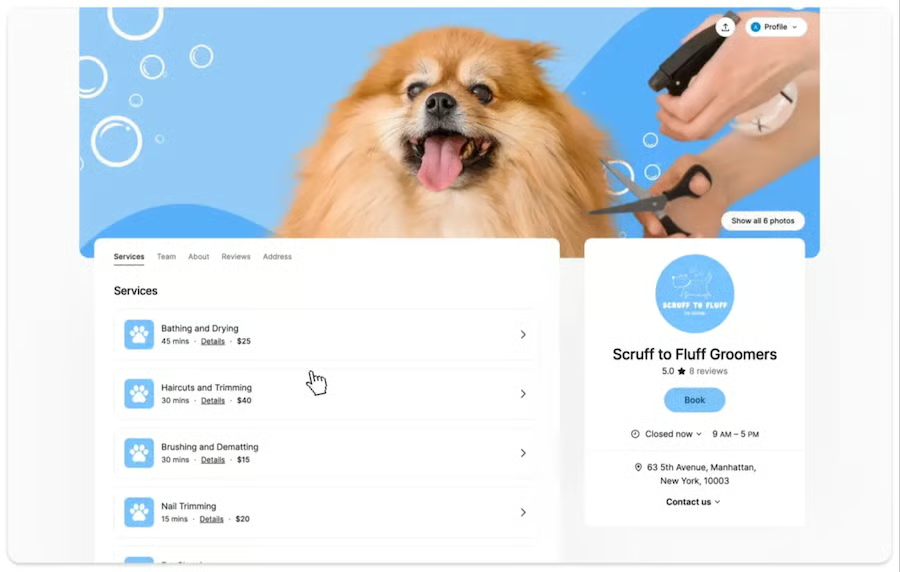
Setmore earns the top spot because its free plan works for small service teams, not only individual users. Businesses can create staff profiles and calendars, accept up to 200 appointments per month, offer classes, send email reminders, and collect payments without paying a subscription. This makes it particularly useful for salons, wellness providers, consultants, tutors, and other appointment-based businesses.
The trade-off is that recurring appointments, two-way calendar syncing, SMS reminders, and deeper customization require Setmore Pro. Even with those restrictions, its team-friendly free plan, straightforward booking experience, and integrated payment options provide the best overall balance of accessibility and practical scheduling tools.
Key features
- Staff scheduling: Create individual staff profiles and calendars, define working hours and time off, and manage appointments from a shared team view.
- Online booking page: Let customers select a service, staff member, and available time through a customizable page that can be shared or embedded on a website.
- Classes and group sessions: Schedule workshops, courses, or other multi-attendee sessions with fixed times, assigned instructors, and capacity limits.
- Automated notifications: Send booking confirmations and one email reminder on the free plan. Pro adds SMS and multiple reminder options.
- Payment collection: Accept online and in-person payments or deposits by connecting Square, Stripe, or PayPal.
Setmore pricing
| Free | Pro | |
|---|---|---|
| Monthly price, billed annually | $0 for 4 users | $5/user |
| Monthly price, billed monthly | $0 for 4 users | $12/user |
What makes SimplyBook.me the best appointment scheduling app for custom-branded booking experiences?
Why I chose SimplyBook.me
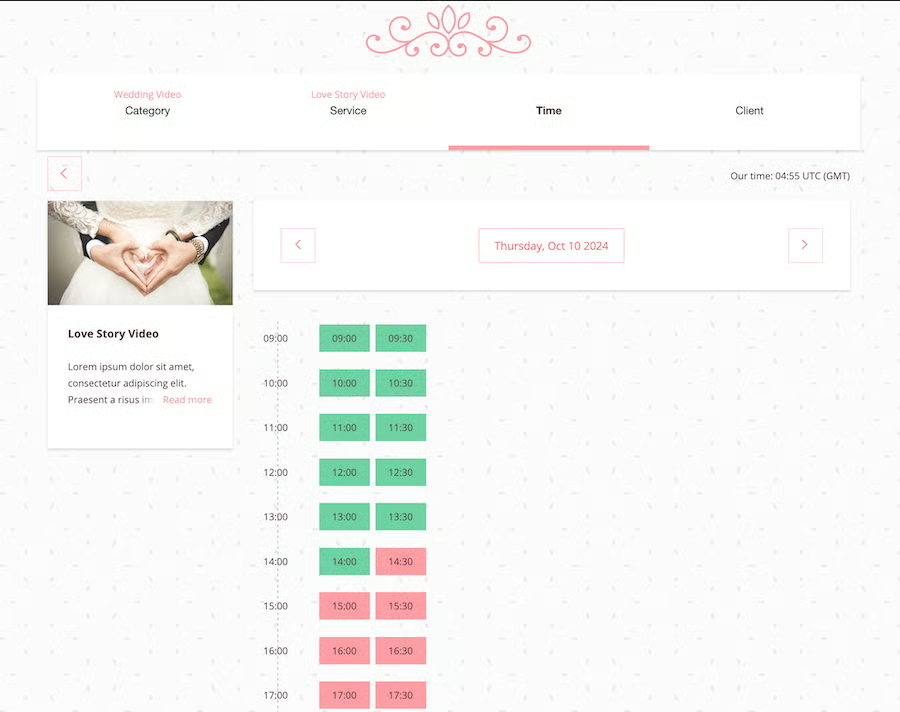
SimplyBook.me is my top recommendation for custom-branded booking experiences because it offers more control than a basic scheduling calendar. Businesses can create a branded booking website, list services in its marketplace, accept payments, sell memberships and add-ons, and activate custom features for intake forms, promotions, classes, and group bookings. These capabilities connect appointment scheduling with marketing, customer service, and broader sales management workflows.
The platform requires more configuration than simpler options, and each plan limits the number of bookings and custom features available. However, that flexibility makes SimplyBook.me a strong choice for businesses that want a scalable booking system tailored to their services, brand, and customer journey.
Key features
- Custom booking website: Create a customer-facing site using configurable templates, colors, service categories, and branding.
- Custom feature library: Add functionality for group bookings, classes, intake forms, recurring services, memberships, promotions, and other specialized workflows.
- Service and provider management: Configure services, prices, durations, staff availability, and booking limits for individual providers.
- Payments and sales tools: Collect payments, deposits, and tips while selling add-ons, packages, memberships, gift cards, and products.
- Marketing and retention: Generate repeat business using referrals, coupons, loyalty rewards, reviews, and booking links for websites and social platforms.
SimplyBook.me pricing
| Free | Basic | Standard | Premium | |
|---|---|---|---|---|
| Monthly price, billed annually | $0 for 1 user | $11.90/user | $24.90/user | $49.90/user |
| Monthly price, billed monthly | $0 for 1 user | $13.90/user | $29.90/user | $59.90/user |
Free trial: 14 days
What makes Square Appointments best for combining appointment and payment management?
Why I chose Square Appointments
Square Appointments combines scheduling, payments, and AI-assisted automation in one platform. Its AI assistant is available across all plans, including the free plan, and can help automate confirmations, cancellations, and rescheduling. The built-in Square POS also supports secure payment processing, estimates, invoices, and installment payments.
The platform delivers the most value for businesses already using Square, so it may be less ideal for teams committed to another payment processor. However, its AI tools, native payments, invoicing, customer management, and POS integration make it a strong operational choice for appointment-based businesses.
Key features
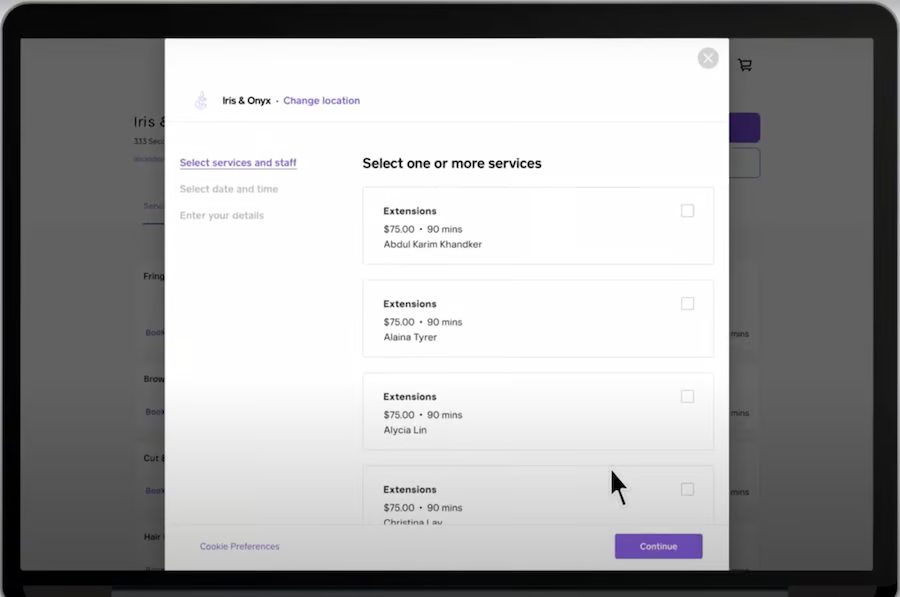
- Online booking: Accept appointments through a branded booking site, your website, Google, Instagram, or Facebook.
- Square Assistant: Lets clients confirm, cancel, or reschedule by text and automatically updates your calendar.
- Payment collection: Accept deposits and payments online, in person, or through a mobile device.
- No-show protection: Store cards on file and enforce prepayment, cancellation, or no-show policies.
- Square ecosystem: Connect appointments with Square POS, customer profiles, ecommerce, gift cards, inventory, and reporting.
Square Appointments pricing
- Free: $0 for 1 location
- Plus: $49/location/month
- Premium: $149/location/month
Free trial: 30 days
What makes Zoho Bookings the best for scheduling within the Zoho ecosystem?
Why I chose Zoho Bookings
Zoho Bookings is best for businesses that already use the Zoho ecosystem. It syncs appointments and customer data with Zoho CRM and Bigin, while custom workflows can update records, create invoices, and trigger follow-ups. This makes scheduling a natural extension of existing sales processes.
Custom booking forms collect prospect details before meetings, while routing tools direct customers to the right booking page or team member. These capabilities support lead qualification by giving sales reps useful context before each conversation.
The platform takes longer to learn than simpler schedulers, and several team features require a paid plan. Still, its native Zoho integrations, flexible booking types, and workflow automation make it a strong option for CRM-connected scheduling.
Key features
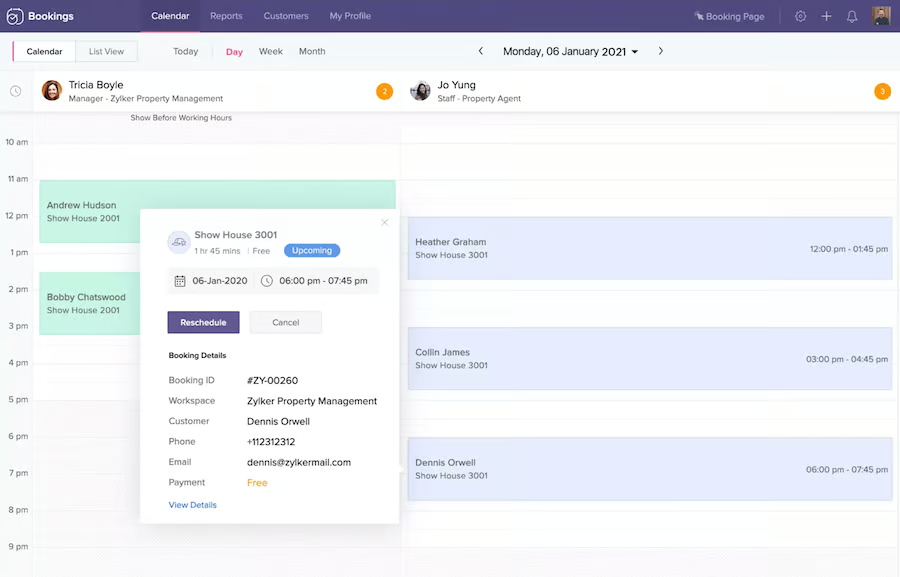
- Flexible booking types: Offers one-on-one, recurring, group, collective, and resource bookings, depending on the plan and add-ons.
- Zoho integrations: Connects with Zoho CRM, Bigin, SalesIQ, Books, Meeting, and other Zoho products.
- Custom forms and routing: Collects customer details and directs invitees to the appropriate booking page or staff member.
- Workflow automation: Sends reminders, updates CRM records, creates invoices, and triggers follow-up actions.
- Calendar and video integrations: Syncs external calendars and automatically generates supported video meeting links.
Zoho Bookings pricing
| Free | Basic | Premium | |
|---|---|---|---|
| Monthly price, billed annually | $0 for 1 user | $6/user | $9/user |
| Monthly price, billed monthly | $0 for 1 user | $8/user | $12/user |
Free trial: 15 days
What makes Acuity Scheduling the best for client intake, classes, and paid appointments?
Why I chose Acuity Scheduling
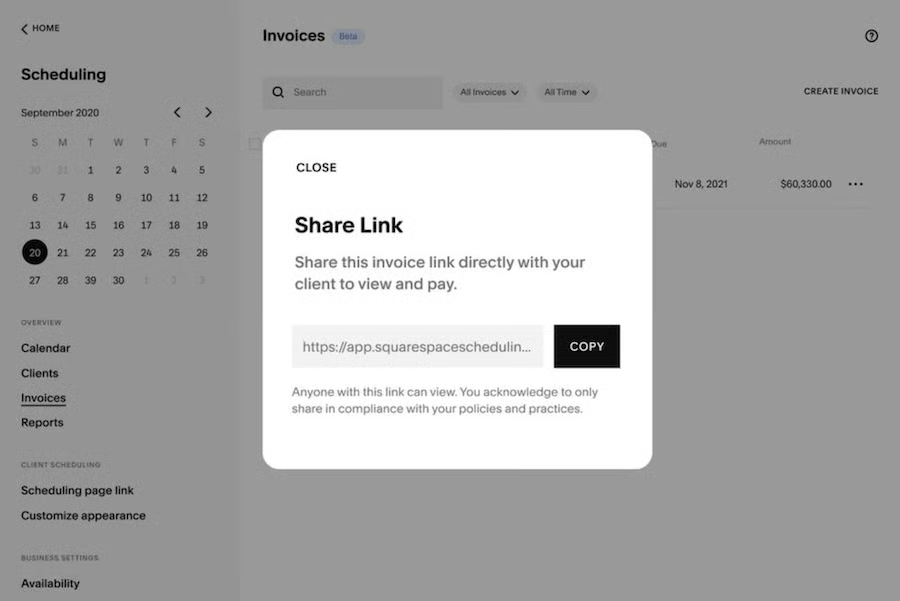
Acuity Scheduling is best for client intake, classes, and paid appointments. Custom forms capture client details, service requirements, and consent before each booking, while its scheduling tools accommodate one-on-one sessions, recurring services, group classes, and workshops.
Businesses can collect deposits or full payments, issue invoices, and sell packages, subscriptions, and gift certificates. This makes Acuity particularly useful for consultants, coaches, wellness providers, and fitness instructors that need scheduling and billing in one system.
Acuity has no free plan, and SMS reminders, waitlists, and advanced customization require higher tiers. However, its intake, scheduling, and payment tools create a polished experience from registration through checkout.
Key features
- Client intake forms: Gather contact details, requirements, consent, and other information during booking.
- Classes and recurring appointments: Schedule individual sessions, workshops, group classes, and repeat services.
- Payments and invoicing: Accept deposits or full payments through Stripe, Square, or PayPal and send branded invoices.
- Packages and subscriptions: Sell service bundles, memberships, gift certificates, coupons, and recurring plans.
- Calendar management: Sync external calendars, set availability and buffers, and manage staff or location schedules.
Acuity Scheduling pricing
| Starter | Standard | Premium | |
|---|---|---|---|
| Monthly price, billed annually | $16/user | $27/user | $49/user |
| Monthly price, billed monthly | $20/user | $34/user | $51/user |
Free trial: 7 days
What makes Calendly the best for coordinating individual and team meetings?
Why I chose Calendly
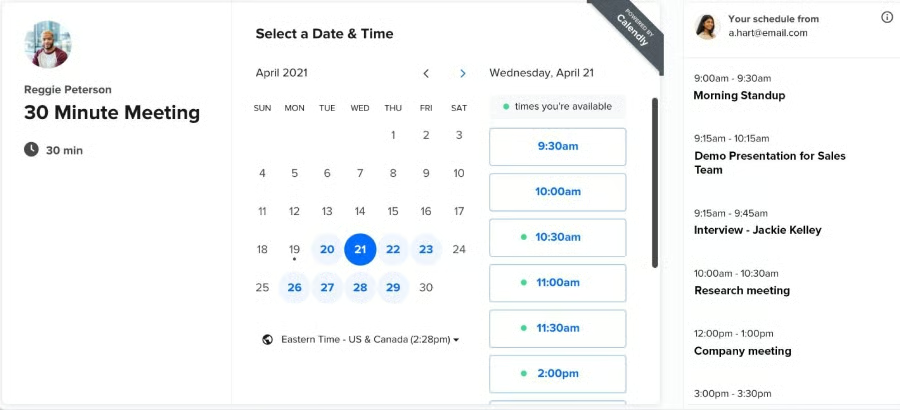
Calendly is best for one-on-one meetings because it makes availability sharing and calendar synchronization simple. In my review, its polling tools, meeting buffers, and embeddable booking pages stood out as practical features for consultants, sales reps, and small teams that need to reduce scheduling back-and-forth.
Its limitation is that it is lighter on customization and operational tools than more advanced appointment scheduling platforms. Still, Calendly balances that with speed, ease of use, and a capable free plan, making it one of the most approachable tools for individual meetings.
Key features
- Booking pages: Share a scheduling link or embed Calendly on a website so invitees can book available times.
- Availability controls: Set working hours, buffers, date overrides, booking limits, and minimum notice periods.
- Calendar and video sync: Connect Google or Microsoft calendars and generate meeting links through Zoom, Google Meet, Microsoft Teams, and other platforms.
- Team scheduling: Supports group and collective meetings, round-robin assignment, and lead routing on eligible plans.
- Workflows and payments: Automate reminders and follow-ups and collect payments through Stripe or PayPal on paid plans.
Calendly pricing
| Free | Standard | Teams | |
|---|---|---|---|
| Monthly price, billed annually | $0 for 1 user | $10/user | $16/user |
| Monthly price, billed monthly | $0 for 1 user | $12/user | $20/user |
Free trial: 14 days
What makes HubSpot Meeting Scheduler the best for free CRM-connected sales scheduling?
Why I chose HubSpot Meeting Scheduler
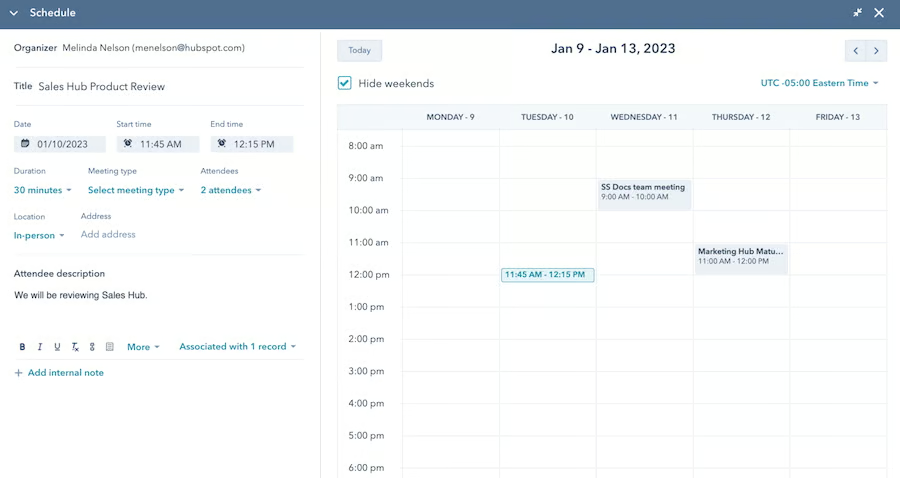
HubSpot Meeting Scheduler is best as a free appointment scheduling app for teams already using HubSpot CRM. It is simple, easy to set up, and automatically routes bookings into HubSpot so teams can connect appointments with contacts, deals, and communication history.
It lacks some of the deeper customization and advanced scheduling controls found in standalone tools. However, its free access, user-friendly setup, and native CRM connection make it a strong choice for businesses that want scheduling to support lead capture and sales follow-up. For HubSpot users, it’s the appointment booking tool closest to home, making it easier to centralize all your apps in one of the best sales management software.
Key features
- CRM-connected scheduling: Captures booking details and stores meeting activity in HubSpot Smart CRM.
- Free booking page: Free users can create one HubSpot-branded scheduling page to share or embed on a website.
- Calendar and video sync: Connects with Google Calendar or Office 365 and supports Zoom, Google Meet, and Microsoft Teams.
- Availability and reminders: Set meeting lengths, booking windows, notice periods, and buffers while sending confirmations and reminder emails.
- Team scheduling: Eligible paid plans add group and round-robin booking pages for coordinating or distributing meetings across representatives.
HubSpot Meeting Scheduler pricing
HubSpot CRM Free Tools
Cost: $0 for two users
Key Features:
- Appointment booking link with calendar sync to Google and Office 365
- Embed calendar on your website
- Group meetings and round-robin links for rep assignments
- Automated client data inclusion in the contacts database
- Shareable meeting link
- HubSpot CRM
What makes Google Calendar the best for appointment scheduling for Google Workspace users?
Why I chose Google Calendar
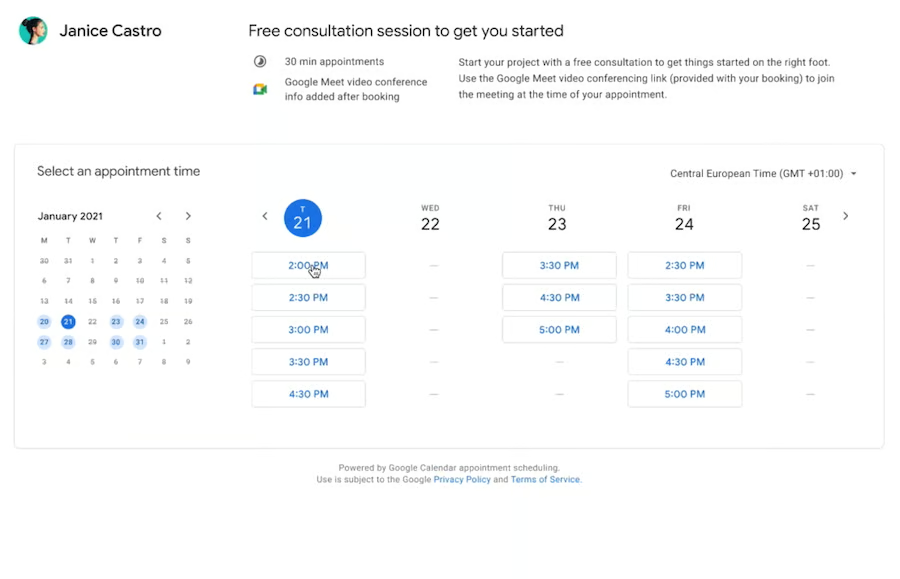
Google Calendar is best for appointment scheduling within Google Workspace. Teams can share calendars, coordinate staff availability, reserve rooms and resources, and automatically add Google Meet links — all within tools they already use.
Its customer-facing and service-management capabilities are more limited than those of dedicated scheduling apps. However, its familiar interface and close connections with Gmail, Meet, and Workspace make it a practical, low-friction choice for businesses that primarily need calendar-based appointment booking and team coordination.
Key features
- Appointment booking page: Lets customers choose an available time through a shareable or embeddable scheduling page.
- Shared calendars: Helps teams coordinate employee schedules, events, rooms, and other resources.
- Availability controls: Sets booking windows, appointment duration, buffer time, and daily booking limits.
- Calendar conflict prevention: Blocks unavailable times based on existing events; eligible plans can check multiple calendars.
- Google Meet integration: Automatically generates a video meeting link for virtual appointments.
- Premium scheduling tools: Eligible subscriptions add multiple booking pages, automated reminders, co-hosts, email verification, and payment collection.
Google Calendar pricing
| Google Workspace Business plans | Starter | Standard | Plus |
|---|---|---|---|
| Monthly price, billed annually | $7/user | $11.20/user | $17.60/user |
| Monthly price, billed monthly | $8.40/user | $13.44/user | $21.12/user |
Free trial: 14 days
Methodology: How I evaluated the best appointment scheduling apps
The best appointment scheduling apps make it easy for customers to book while helping small businesses manage availability, coordinate staff, prevent double bookings, collect payments, and reduce no-shows. I evaluated both the customer-facing booking experience and the administrative tools used to manage appointments and calendars.
When available, I tested booking page setup, calendar syncing, reminders, payment collection, and recurring or group appointments. I also reviewed pricing pages, product documentation, support resources, and verified user feedback.
I scored each platform using these criteria:
- Pricing (20%): I considered free-plan availability, starting prices, billing options, annual discounts, usage limits, scalability, and the cost of accessing essential features.
- Core scheduling features (25%): I evaluated confirmations and reminders, recurring appointments, calendar synchronization, real-time notifications, integrations, and mobile access.
- Advanced features (20%): I reviewed staff assignment and round-robin scheduling, group or class booking, payment collection, booking-page customization, video conferencing, and security controls.
- Ease of use (10%): I assessed setup, navigation, booking-page configuration, calendar management, and the customer booking experience.
- Customer support (10%): I reviewed support hours, live chat, phone and email availability, onboarding materials, tutorials, and knowledge-base quality.
- Expert score (15%): I considered practical feature quality, value for small businesses, verified user feedback, and how effectively each platform supports everyday scheduling workflows.
Frequently asked questions (FAQs)
What app is the best app to make appointments?
The best scheduling app depends on your business type, needs, and client base size. For example, if you’re meeting with prospects online, Calendly provides more than enough features to facilitate calendar synchronization for all attendees. On the other hand, if you want a booking app that weaves in marketing materials like coupons and discount codes, consider SimplyBook.me instead.
How do I let clients book appointments online?
The simplest way to let your clients book an appointment with you online is to embed your booking calendar on your website or social media page. Then, have them choose the date and time for an appointment. You can also include a call-to-action button linked to your calendar in your emails or ads.
What is the most common scheduling system?
The most common type of booking system is time-slot scheduling or stream scheduling. This system allows customers to choose from a list of available time slots, click on their choice, and fill out the necessary details. Then, they will receive a confirmation and follow-up notifications via email or text.
Bottom line
Online appointment booking helps small businesses manage schedules and serve customers more efficiently. Setmore is our top appointment scheduling app for its generous free plan, automated reminders, and practical service-booking tools. However, another platform may better fit your needs. SimplyBook.me offers more customization, Square Appointments combines scheduling with payment and POS tools, and Zoho Bookings connects appointments with Zoho’s CRM and sales ecosystem.
