







The best multi-line phone system for small businesses combines ease of use with advanced call handling to efficiently manage high call volumes. It can support 4 to 16 lines and includes features such as hold, transfer, and conferencing. Built-in support for Wi-Fi and Bluetooth ensures flexibility in hybrid office setups and compatibility with headsets, expansion modules, and unified communications platforms. Reliable audio quality and intuitive navigation make up the overall user experience.
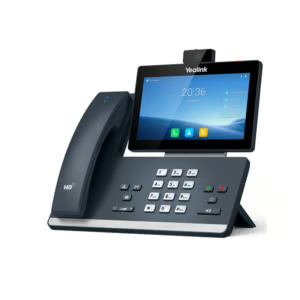
Yealink SIP-T58W Pro is my top pick for the best multi-line phone system because it combines a large touchscreen, strong audio quality, video calling, and support for multiple lines. These features make it a great fit for businesses that need a modern desk phone for high-volume call handling and unified communications.
In this guide, I’ve also reviewed several other top-rated models to help you find the right multi-line phone system that fits your team’s size, needs, and budget.
| Best multi-line phone systems | Best for | My rating |
|---|---|---|
| Yealink SIP-T58W Pro | Secure, high-quality interactions | 4.91 out of 5 |
| Nextiva X-885 | Quick-access workflows | 4.65 out of 5 |
| Cisco 8851 | Multiple deployment options | 4.62 out of 5 |
| Avaya J179 | Power users | 4.58 out of 5 |
| Grandstream GXV3370 | Integrated video | 4.37 out of 5 |
| Poly Edge E220 | Hybrid work | 4.25 out of 5 |
| Mitel 5320e | Entry-level users | 4.21 out of 5 |
Why you can trust Fit Small Business
- Best multi-line phone systems compared
- Yealink SIP-T58W Pro: Best overall for secure, high-quality interactions
- Nextiva X-885: Best for quick-access workflows
- Cisco 8851: Best for multiple deployment options
- Avaya J179: Best for power users
- Grandstream GXV3370: Best integrated video
- Poly Edge E220: Best for hybrid working
- Mitel 5320e: Best for entry-level users
- Methodology: How I evaluated the best multi-line phone systems
- How to choose the right multi-line phone systems
- Frequently asked questions (FAQs)
- Bottom line
Best multi-line phone systems compared
| Best multi-line phone systems | Phone setup | Key features |
|---|---|---|
| Yealink SIP-T58W Pro | Touchscreen desk phone for modern VoIP offices |
|
| Nextiva X-885 | Expansion-ready desk phone for high-volume teams |
|
| Cisco 8851 | Enterprise desk phone for Cisco-based environments |
|
| Avaya J179 | Business desk phone for Avaya phone systems |
|
| Grandstream GXV3370 | Android-based video phone for visual collaboration |
|
| Poly Edge E220 | Modern desk phone for small office users |
|
| Mitel 5320e | Legacy-compatible desk phone for Mitel users |
|
Take the quiz to know which multi-line phone system suits your business needs.
Question 1 of 3
Are your employees often on the go within the office and need wireless handset options or Bluetooth headset support for mobility?
Yealink SIP-T58W Pro: Best overall for secure, high-quality interactions
My expert opinion
I chose the Yealink T58W Pro as my overall best multi-line phone system for small business operations because it delivers advanced, future-ready capabilities tailored for modern teams. The wireless Bluetooth handset lets you move freely without sacrificing audio clarity, a standout feature I found helpful in hybrid setups. With its sleek design and intuitive interface, it’s a smart fit for users who want flexibility and high-quality communication in one device.
What really sets this phone apart is its Android 9.0 system, which allows users to install productivity apps directly onto the desk phone. You can run tools like calendars, messaging apps, or even video conferencing right from the touchscreen, so you don’t need to switch between devices. It also has built-in video and dual USB ports, making it a true productivity hub.
On the security side, Yealink boosts peace of mind with features such as data encryption, access control, and anti-exploitation protection. While it’s packed with premium features, the $302 starting price may stretch some small businesses’ budgets. If you need a more affordable alternative, the Cisco 8851 offers excellent call quality, expandability, and trusted reliability at a lower price point.
Pricing & specifications
| Vendors | Walmart | Amazon | 8x8 |
|---|---|---|---|
| Unit cost (new) | $343.99 | $302 | $412.28 |
Specifications:
- 17 hours of talk time and 46 hours of standby time
- 16 lines with up to 16 SIP accounts
- 10-party audio conferencing
- 3-way 720p 30fps HD video conferencing
- Speakerphone with HD acoustic chamber
- Advanced echo cancellation
- Excellent double-talk performance
- Built-in Power over Ethernet (PoE/PoE+) and Bluetooth
- 5-point touch screen
Standout features
- Android 9.0 system: Enables administrators to install third-party apps from the Google Play Store to improve collaboration and productivity.
- HD audio and video: Uses the latest optimal HD voice technology and noise-proof capabilities to maximize the acoustic performance of its handset, headset, and speakerphone.
- Security mechanisms: Adopts the Arm TrustZone technology for a reliable security defense system. Its upgraded Android version includes firmware and data encryption.
Nextiva X-885: Best for quick-access workflows
My expert opinion
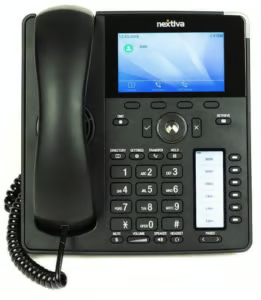
The Nextiva X-885 stands out for quick-access workflows thanks to its multi-page design and 12 programmable line keys. You can customize each key for frequent tasks like speed dial, call park, or transfer, which keeps essential functions just one press away. This layout is especially useful for receptionists or managers who need to juggle multiple calls throughout the day with minimal disruption.
Beyond its workflow-friendly layout, the X-885 offers excellent audio quality, a vibrant color display, and dual gigabit Ethernet ports for fast, stable connectivity. It supports up to 12 lines, which is ideal for busy offices or teams managing multiple departments. The phone is also PoE-capable and comes with a built-in USB port for headset connectivity, adding more flexibility to your setup.
While I admire Nextiva for delivering a strong mix of features and a user-friendly design, the user manual is very limited and doesn’t provide enough documentation. This can be a challenge for beginners new to multi-line phone systems or configuring VoIP hardware. If you want a modern desk phone that works right out of the box, I recommend the Mitel 5320e, which includes clearly labeled buttons for core calling features and a simpler setup experience.
Pricing & specifications
| Payment model | One-time | Monthly |
|---|---|---|
| Unit cost | $190 | $8.40 |
| Visit Nextiva | ||
Specifications
- 12 lines
- Colored LCD display
- 4.3″ screen size
- Power over Ethernet
- Gig Ethernet Ports
- Wi-Fi with USB dongle
- Bluetooth: Native (Built-in)
- Speed dialing
- RJ-9 headset input
- HD Voice
- 1 USB input
- Up to 3 expansion module connectivity
Standout features
- Warm transfer: Enables users to speak with the intended recipient before completing the transfer, ensuring they’re available and ready to take the call.
- Blind transfer: Transfers the call to another number without speaking to the recipient, whether or not they answer.
- Bluetooth native (built-in): Allows the desk phone to wirelessly connect to compatible devices like headsets, smartphones, or the included cordless handset without needing an external dongle.
Cisco 8851: Best for multiple deployment options
My expert opinion
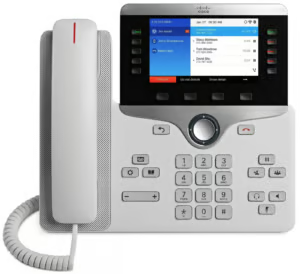
The Cisco 8851 is my recommendation for businesses that need flexible deployment options across various platforms. Whether you’re running Cisco’s on-premises system, Webex Calling, or a third-party VoIP provider, this phone adapts easily to your infrastructure. It’s a great choice if you’re planning to scale or migrate platforms over time without having to replace hardware.
Beyond its deployment flexibility, the Cisco 8851 combines mobility and desk phone features through Cisco Intelligent Proximity. This lets you move an active mobile call to the desk phone for better audio quality or shared listening, something I find useful in collaborative office settings. It also includes five programmable line keys, a USB charging port, and intuitive navigation that boosts daily productivity.
Despite its enterprise-grade capabilities, the Cisco 8851 doesn’t include built-in Wi-Fi, which is now standard in many modern multi-line phone systems. For businesses that prefer wireless networks or want a simpler setup, this can be limiting. I suggest the Nextiva X-885, which offers built-in Wi-Fi support and easier installation.
Pricing & specifications
The Cisco 8851 is listed by Cisco as a supported IP phone model, but the current price and availability varies by reseller and VoIP provider.
Specifications:
- 5 programmable line keys
- 56 additional line/feature keys
- Busy Lamp Field (BLF)
- Extension mobility
- Silent monitoring and recording
- Full-duplex speakerphone
- Two-port Cisco Ethernet
- Analog headset jack
- EnergyWise™ technology
- Flexible deployment options
Standout features
- Multi-call per line: Allows users to manage multiple simultaneous calls on a single directory number for seamless call handling, toggling, and queueing.
- Fixed function keys: Provides one-touch access to essential tools like applications, messaging, and contacts, along with frequently used call functions such as hold, resume, transfer, and conference calling.
- Cisco EnergyWise: Certified by the Energy Star program, Cisco offers an energy-efficient design that helps reduce power consumption and supports environmentally responsible business operations.
Avaya J179: Best for power users
My expert opinion
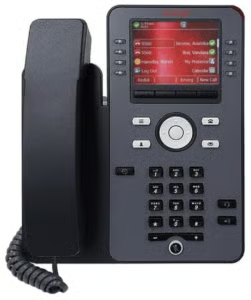
The Avaya J179 is my top-recommended multi-line phone system for power users who need fast, efficient access to call management features throughout the day. With four softkeys, support for multiple line appearances, and an intuitive display, it helps you handle transfers, conferences, and call forwarding without missing a beat. I’ve seen it perform especially well in fast-paced roles like reception, customer support, and executive assistance, where every second counts.
In addition to its call handling strengths, the J179 brings advanced functionality to the desk. It features a color display, HD audio, integrated Gigabit Ethernet, and headset support, plus optional Wi-Fi and Bluetooth for more flexible setups. You can also connect up to three 24-button expansion modules, making it a scalable solution for users managing high call volumes or multiple departments.
While I like the J179 for its advanced features and flexibility, it may be more than smaller teams or casual users really need. If you’re looking for a simpler alternative that focuses on the essentials, the Nextiva X-885 offers strong core functionality with a cleaner setup. It’s a smart pick for teams that want ease of use without sacrificing performance.
Pricing & specifications
| Vendors | Amazon | VoIP Supply |
|---|---|---|
| Unit cost | Starts at $137.99 | $429.95 |
Specifications:
- LEDs for speaker, mute, headset, message, history
- 8 buttons with dual LEDs (red, green); 4 softkeys
- Full duplex speakerphone
- Rich, classic, alternate, and downloadable ringtones
- Gigabit Ethernet
- Zero-touch deployment
- Optional Wireless Deployment
- Bluetooth connectivity
- User interface personalization
- Ergonomic hearing aid compatible
- Multi-language support
Standout features
- Ergonomic hearing aid compatible: Ensures comfortable use and clear audio for users with hearing impairments and provides high-quality multi-party calls through the wideband audio codec.
- Gigabit Ethernet port: Allows the phone to transmit data at faster speeds for reliable network connectivity for both the phone and connected devices.
- Unified communications: Uses Session Initiation Protocol (SIP) for seamless integration with VoIP platforms and enhanced call control features.
Grandstream GXV3370: Best integrated video
My expert opinion
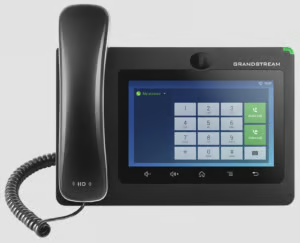
The Grandstream GXV3370 offers a feature-rich experience for teams that rely on face-to-face collaboration. It creates a complete desktop video hub with its seven-inch touchscreen, tiltable megapixel camera, and 720p HD video conferencing capabilities. This phone thrives in hybrid meeting spaces where video clarity and multi-party interaction are essential.
On top of video support, the GXV3370 brings impressive specs for power users. It runs on Android 7.0, includes dual-band Wi-Fi, Bluetooth, and PoE+, and offers support for up to 16 SIP lines. Plus, the built-in security protocols like transport layer security (TLS) protect your calls and user accounts.
Like the Avaya J179, its robust feature set can feel overwhelming for users who only need a desk phone for traditional voice communication. If you prefer a simpler, voice-focused experience, I recommend the Mitel 5320e, which combines rich telephony features with a large backlit graphics display for streamlined call handling. It’s a better fit for teams who prioritize ease of use over advanced video tools.
Pricing & specifications
Standout features
- Built-in megapixel camera: Delivers high-definition video conferencing, providing crisp, clear visuals for professional face-to-face communication over IP networks.
- Built-in PoE/PoE+: Allows the phone to receive both power and network connectivity through a single Ethernet cable, simplifying installation and reducing cable clutter.
- Double-talk performance: Supports two-way conversations where both parties can speak and be heard simultaneously without audio clipping or delay, ensuring smoother and more efficient communication.
Poly Edge E220: Best for hybrid working
My expert opinion
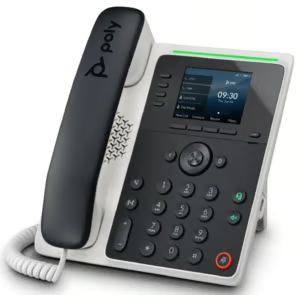
The Poly Edge E220 is best for hybrid working, thanks to its built-in Bluetooth 5.0 for mobile pairing and headset support, making it easy to switch between desk and mobile communications. It’s designed for hot-desking, where users can log in quickly and stay productive no matter where they sit. I’ve found its adaptive design especially useful for shared workspaces that prioritize flexibility.
Beyond its hybrid-ready setup, the E220 delivers impressive audio performance with Poly HD Voice, NoiseBlockAI, and Acoustic Fence technologies. These features help block out background noise, whether you’re using the speakerphone, handset, or headset, ensuring clear calls even in open office environments. It also includes a bright 2.8” color LCD display, intuitive navigation keys, and text-to-speech features for improved accessibility.
While I like the Poly Edge E220 for its smart design and hybrid-friendly tools, some user reviews point out that firmware updates can be overly complex to install. If long-term manageability is high on your list, Cisco, a close competitor, offers firmware updates that are generally easier to manage, especially for businesses deploying devices at scale.
Pricing & specifications
| Vendors | RingCentral |
|---|---|
| One-time payment | $189 |
| Monthly rental | $9 |
Specifications:
- Four-line keys with up to 16 SIP lines
- Poly Acoustic Clarity
- Integrated Bluetooth
- Hearing aid compatibility
- Text-to-speech accessibility support
- Two-port Gigabit Ethernet
- Shared line appearance
- NoiseBlockAI technology
- Distinct incoming call treatment
- 2.8-inch color display
Standout features
- Poly NoiseBlockAI: Filters out most background noise during speakerphone use, allowing for clearer conversations in open or noisy environments.
- Hands-free speakerphone modes: Make and receive calls without lifting the handset, promoting multitasking and convenience during meetings or desk work.
- WebKit-based browser: Provides built-in access to web content directly from the phone’s interface, enabling integration with web apps, portals, or internal tools.
Mitel 5320e: Best for entry-level users
My expert opinion
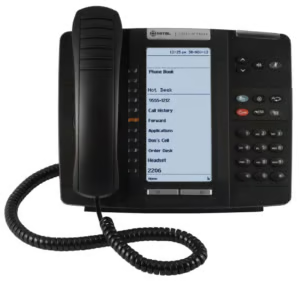
The Mitel 5320e is best for entry-level users because it combines essential telephony tools with an easy-to-understand structure. With a large backlit display, three contextual softkeys, and 12 fixed-function keys, users can quickly navigate to features such as voicemail, transfer, and speaker mode. I’ve found the self-labeling keys especially helpful because users can see assigned functions without paper labels or constant admin updates.
Beyond its accessibility, the Mitel 5320e still delivers solid enterprise functionality. It supports wideband audio, hot desking, unified communications integrations, and embedded apps for businesses that want to connect it to other tools. Admins will appreciate features like centralized remote programming, which streamlines setup and reduces ongoing maintenance costs.
Due to its straightforward functionality, you’ll find that the Mitel 5320e lacks modern features like wireless headset pairing or built-in Wi-Fi, and it requires a wired Ethernet connection. This can be limiting for hybrid teams who need more flexibility in their desk setups. If you’re looking for a modern desk phone with hands-free mobility and advanced app support, the Yealink SIP T58W includes a Bluetooth handset and Android OS, making it ideal for remote-friendly workflows.
Pricing & specifications
Standout features
- Call line indication: Displays incoming and active calls for each line, making it easy to manage multiple conversations.
- Self-labeling keys: Automatically update labels on the display screen, allowing flexible customization without the need for paper inserts.
- Unified Communicator® Express: Integrates desktop call control and presence features, enabling users to manage calls directly from their computer for improved efficiency.
Methodology: How I evaluated the best multi-line phone systems
To evaluate the best multi-line telephone systems, I began by researching industry-leading brands and selecting their top-rated multi-line phone models designed for small-business use. From there, I developed a scoring rubric grounded in my years of experience, factoring in pricing, scalability, and real-world performance, as informed by hands-on reviews and provider documentation.
- Pricing (20%): I looked at the phone’s upfront cost, whether it’s sold on Amazon for easy access, and if refurbished options are available for budget-conscious buyers. Models also earned points for offering a manufacturer’s warranty, which adds long-term value and lowers the total cost of ownership.
- General features (25%): Systems were scored on basic call management tools such as hold, transfer, conference, and call park. I also checked how many lines each unit supports and gave more points to phones with more than five lines.
- Niche features (20%): I gave extra credit for built-in voicemail indicators, speed-dial buttons, expansion-module support, and compatibility with video calling and mobile apps. These features may not be essential for every small business, but they’re vital for teams that need flexibility and efficiency.
- Ease of use (15%): Multi-line business phone systems were rated on whether they support PoE or Wi-Fi, have color or touchscreens, and include user-friendly features such as one-touch keys and intuitive interfaces. I also considered whether power adapters were included, a small detail, but a helpful one for plug-and-play installation.
- Expert score (20%): Lastly, I factored in my own hands-on impressions from testing and reviewing each device. Phones that struck the right balance between performance, design, and business readiness scored highest in this final category.
How to choose the right multi-line phone systems
When you’re shopping for a business multi-line phone system, it’s easy to get overwhelmed by specs and feature lists. To narrow your options, here are the most important factors I always recommend focusing on, especially if you’re aiming for long-term value and ease of use.
- Number of line appearances: Start with the number of simultaneous calls your team needs to manage. If you’re a receptionist or in a customer-facing role, look for phones that support 6 to 16 lines. For general office use, a 2- to 4-line phone might be enough.
- Call handling features: Think about what your team does every day. Features like call hold, transfer, conferencing, call park, and speed dial are essential for maintaining a smooth workflow.
- Compatibility with your VoIP provider: Not all desk phones work with every VoIP system. Always check whether the phone is pre-configured or fully compatible with your provider’s platform.
- Display and navigation: Color displays and touchscreen navigation can significantly improve usability. Phones with clear visual indicators and intuitive menus reduce the learning curve and keep teams moving efficiently.
- Wired vs. wireless accessories: If your team prefers headsets or needs to stay mobile around the office, look for phones with Bluetooth, USB, or RJ9 headset ports. Wireless handsets, like the one in Yealink’s T58W Pro, are essential if you’re constantly on the move.
- Power and connectivity options: Make sure the phone supports PoE if you want to reduce cords and avoid buying extra power adapters. Dual gigabit ports are also useful if you’re connecting the phone to a computer over the same Ethernet line.
- Expandability: If you’re handling high call volumes, check whether the phone supports expansion modules or sidecar displays. These are ideal for receptionists, sales teams, or support agents managing multiple contacts and departments.
- Price and warranty: Prices can vary widely, from under $100 for basic models to over $500 for advanced units with video and Android OS. I always recommend balancing cost with warranty coverage to ensure you’re not overspending for features you don’t need.
Frequently asked questions (FAQs)
Which phone system is best for small business?
It depends on your team size, call volume, feature preferences, and budget. But if you’re looking for a well-rounded option, RingCentral stands out. It offers excellent scalability, robust VoIP features, and built-in tools like call routing, SMS, and video conferencing.
What is the best softphone for a small business?
The best softphone will vary based on how your team works, but I’ve found that providers like Nextiva, RingCentral, and Ooma deliver some of the most complete softphone experiences. Their mobile and desktop apps mirror the capabilities of desk phones, including voicemail, call flip, and team messaging.
Is VoIP worth it for small businesses?
Yes, VoIP is worth it for small businesses. It gives you lower monthly costs, advanced call management, and the flexibility to run your business phone system from anywhere with an internet connection.
Bottom line
Choosing the best multi-line telephone system comes down to what your business needs most. Think about whether you prioritize advanced call handling, ease of use, or compatibility with your VoIP provider. With the right phone, you can streamline communication, reduce missed calls, and improve team productivity.
My top pick for the best multi-line phone system for small businesses is the Yealink SIP-T58W Pro because it offers modern features that are ideal for collaborating with remote and hybrid teams. It also includes advanced audio and video capabilities for high-quality virtual meetings, plus built-in security features that give you peace of mind.
