







The best team chat apps feature unlimited channels and message history, provide ample file storage, and enable efficient task management. They have additional collaboration tools, such as audio and video conferencing, and seamlessly connect with several third-party business platforms. Most providers offer forever-free plans, making the software highly accessible to solopreneurs and small businesses.
After comparing several team chat software solutions, we identified our top picks to help you decide which one to use for your specific business requirements:
- Slack: Best overall for chat app integrations
- Microsoft Teams: Best for chat and virtual meeting collaboration
- RingCentral: Ideal for chat and phone call communication
- Rocket.Chat: Great for chat functionality customizations
- Skype: Top choice for software affordability and simplicity
- Google Chat: Best for improved Google Workspace productivity
- Mattermost: Solid pick for better data control and security
- Best Team Chat Apps at a Glance
- Slack: Best for Chat App Integrations
- Microsoft Teams: Best for Chat & Meeting Collaborations
- RingCentral: Best for Chat & Phone Communication
- Rocket.Chat: Best for Chat Functionality Customizations
- Skype: Best for Software Affordability & Simplicity
- Google Chat: Best for Improved Google Workspace Productivity
- Mattermost: Best for Better Data Control & Security
- Frequently Asked Questions (FAQs)
- Bottom Line
Best Team Chat Apps at a Glance
| Best Team Chat Apps | Monthly Starting Price per User | Key Features | Free Plan /Free Trial | FSB Rating |
|---|---|---|---|---|
 | $7.25 |
| ✓ / 90 days | 4.64 out of 5 |
| Visit Slack | ||||
 | $4 |
| ✓ / 30 days | 4.59 out of 5 |
| Visit Microsoft Teams | ||||
 | $30 |
| ✕ / 14 days | 4.57 out of 5 |
| Visit RingCentral | ||||
 | $7 |
| ✓ / 30 days | 4.39 out of 5 |
| Visit Rocket.Chat | ||||
 | Free |
| ✓ / No trial | 3.88 out of 5 |
| Visit Skype | ||||
 | $7.20(Google Workspace) |
| ✓ / 14 days | 3.87 out of 5 |
| Visit Google Chat | ||||
 | $10 |
| ✓ / 30 days | 3.79 out of 5 |
| Visit Mattermost | ||||
Slack: Best for Chat App Integrations
Slack Monthly Pricing
- Free: 90-day access to message and file history, integrations with 10 apps, one-on-one external communications, and one workspace
- Pro: $7.25 per user for unlimited message and file history, unlimited integrations, workflow builder, and customizable sections
- Business+: $12.50 per user for single sign-on (SSO), data exports for all messages, and user management
- Enterprise: Custom quote for integration with enterprise mobility management (EMM), support for Health Insurance Portability and Accountability Act (HIPAA) compliance, and unlimited workspaces
- Free trial: 90 days
Slack is the overall best team chat app with robust third-party integrations, extending the software’s functionalities. It connects with over 2,600 apps, covering a wide range of categories: marketing, customer support, office management, project management, security and compliance, and analytics. These tools include the most popular, namely Google Drive, Zoom, Trello, HubSpot, and monday.com.
Aside from the rich third-party integration list, Slack appeals to businesses because of its intuitive platform. Organize conversations easily through private and public channels and find specific files and messages using the search bar at the top of the tool’s interface. The message bar has all the necessary tools, from text formatting and emojis to audio and video clip recordings. Slack works on Windows, Mac, Android, and iOS.
While Slack is an excellent team chat software, it lacks native task management features like those offered in RingCentral and Mattermost. This means you’ll have to create an account in Asana or Wrike and connect these platforms to Slack to organize to-dos efficiently. If you want to avoid that hassle, RingCentral and Mattermost have built-in task management tools that won’t require setting up.
Slack Features
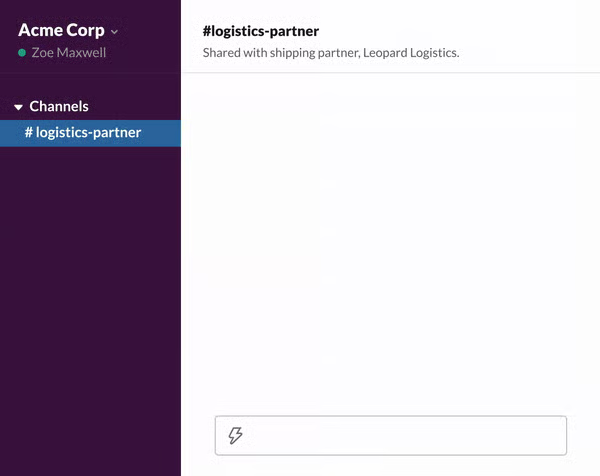
- Thread: Reply to a specific message in a chat to start a discussion around that subject. This feature keeps conversations organized, allowing users to easily go back and take note of details.
- Workflow builder: Automate routine tasks, such as welcoming a new team member, sending information quickly, and sharing updates. As Slack handles menial to-dos, you’re able to focus on more complex assignments.
- Slack Atlas: Help team members know more about each other by letting them create rich user profiles. Aside from name and job title, some information users can add to the profiles are their pronouns, manager’s name, current location, start date, and work hours.
Microsoft Teams: Best for Chat & Meeting Collaborations
Microsoft Teams Monthly Pricing
- Microsoft Teams (Free): A maximum of 100 users, unlimited chat messages and search, 2GB of file attachments, and 5GB of file storage across all teams
- Microsoft Teams Essentials: $4 per user for a maximum of 300 users, 10GB of file storage, and 24/7 phone and web support
- Microsoft 365 Business Basic: $6 per user for guest access, 1TB of file attachments, 1TB of file storage within the team, and integrations with over 250 apps
- Microsoft 365 Business Standard: $12.50 per user for webinar hosting and desktop versions of Outlook, Word, Excel, PowerPoint, Access, and Publisher
- Free trial: 30 days
Microsoft Teams is the best team chat app for businesses that need video conferencing features on top of instant messaging. It accommodates up to 300 participants and 30 hours of meeting duration. Within actual meetings, team members are able to use screen sharing, annotations, and together mode for better, more interactive collaboration.
For brainstorming sessions, you have the option to divide a big group into smaller teams and assign them to breakout rooms. The maximum number of breakout rooms is 50. To make meetings more efficient, use the recording and transcription features. Microsoft Teams is compatible with Windows, Mac, Linux, Android, and iOS.
Although the provider is great for chats and video meetings, it doesn’t offer unlimited channels like Slack. The maximum number of Microsoft Teams channels is 200, which includes groups you create and later delete. For private channels, you’re only allowed to create up to 30. If you don’t want limits on the number of channels in your chat software, choose Slack over Microsoft Teams.
Microsoft Teams Features
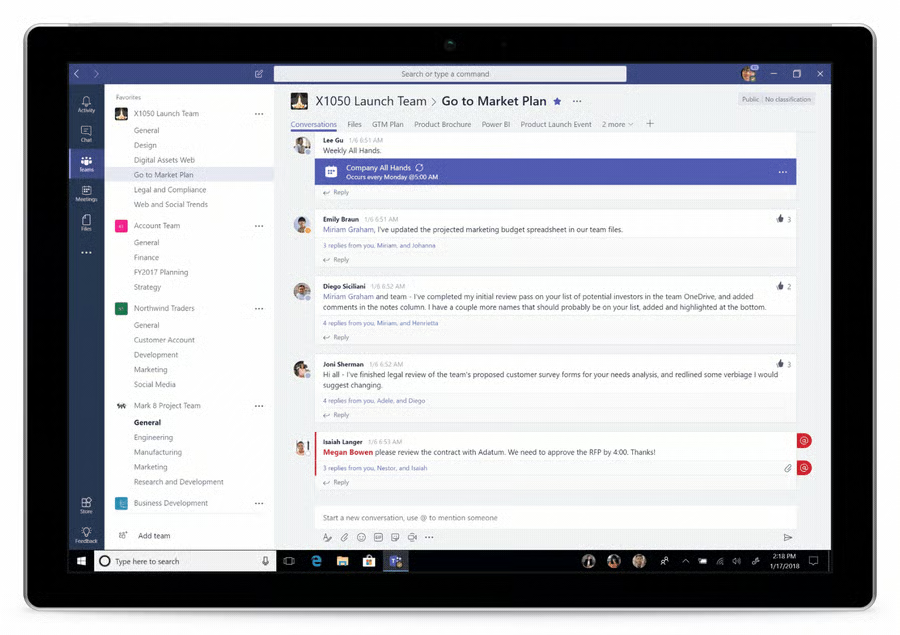
- Slash commands: Be more efficient in performing specific tasks on Teams by using slash commands. Use “/chat” and “/call” to initiate a conversation with colleagues quickly. Type “/unread” and “/saved” to find posts. To learn more about these shortcuts, refer to our guide on Microsoft Teams slash commands.
- Pop-out chat: Launch a one-on-one or group chat in a separate window. Use this feature when you’re in the middle of a phone call or a meeting to get better visibility of your chat messages.
- Translate: Hover a message written in a foreign language, click the three-dot icon, and choose Translate. Microsoft Teams automatically translates the message into the language you set. Some of the languages the platform supports are Arabic, Chinese, French, Hebrew, Italian, Japanese, and Swedish.
RingCentral: Best for Chat & Phone Communication
RingCentral Monthly Pricing*
- Core: $30 per user for limited storage for team chat and file sharing, end-to-end encryption, and 99.999% SLA
- Advanced: $35 per user for integration with customer relationship management (CRM) and industry-specific platforms, Business Analytics Essentials, multi-site admin and management, and custom rules and permissions
- Ultra: $45 per user for unlimited storage for files, messaging, and recordings, Business Analytics Pro, and device analytics and alerts
- Free trial: 14 days
*Save up to 33% by paying annually; volume discounts for more than 50 users are available.
Among the best team chat apps listed here, RingCentral is our top pick for businesses with remote, on-the-go employees who also collaborate through voice calls. Since the provider is a voice-over-internet-protocol (VoIP) and unified communications (UC) solution, it has robust telephony features on top of its instant messaging capabilities. Its call management system has a multi-level auto-attendant, shared lines, call recording, ring groups, and hot desking.
These tools improve customer service by enabling team members to work together in accommodating incoming calls. RingCentral integrates with over 300 business tools, making it easier for employees to pull critical information from the company’s existing tech stack. The app is available for Windows, Mac, Linux, Android, and iOS devices.
However, the disadvantage of using RingCentral as your team chat app is that its unlimited storage for files, messaging, and recordings is only available at the highest-tier plan, which costs $45 per user. Slack provides this feature in its base-level subscription plan, priced at only $7.25 per user.
RingCentral Features
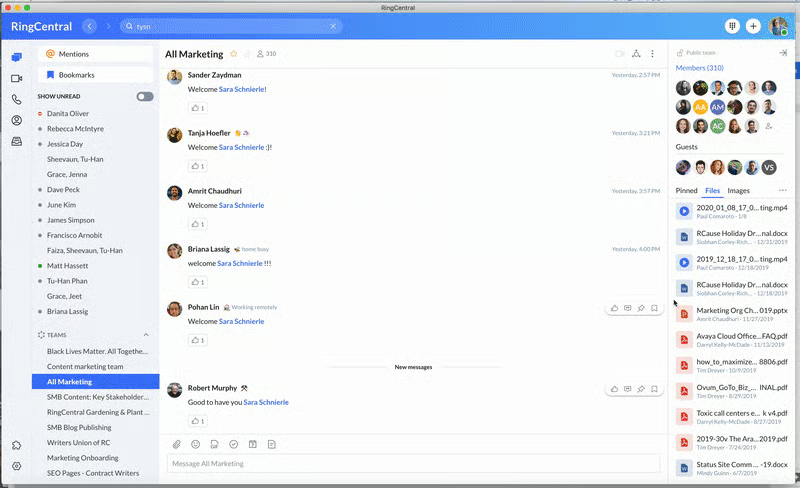
- Task management: View different kinds of to-dos (e.g., open, assigned to you, past due, and completed). When creating a new task, fill out the important fields in the form, such as the names of assignees and due dates and times.
- Bookmark: Hover over a particular message you want to save for future reference, find the three-dot icon, and click the ribbon icon. All your bookmarked messages appear in the Bookmarks tab under the Message option.
- Annotation: Open a file, click anywhere on the document you want to make notes on, and type your comment in the text box provided. With this annotation feature, it’s easier to collaborate on revisions.
Rocket.Chat: Best for Chat Functionality Customizations
Rocket.Chat Monthly Pricing
- Community: Free for unlimited one-on-one and group messaging, full messaging history, two-factor authentication, and end-to-end encryption
- Enterprise $7 per user for a minimum of 25 users or $35 per agent for a minimum of five agents for unlimited and secure push notifications, guest users, custom roles and permissions, and white-label branding
- Free trial: 30 days
Rocket.Chat is the best team chat software for companies that want a customizable solution for their unique instant messaging requirements. This open-source platform gives users access to the codebase, letting them build their own chat app or expand Rocket.Chat’s functionalities. Aside from the actual features, you’re able to customize the platform’s interface. The provider’s white labeling options let you change the colors and layout.
Moreover, Rocket.Chat works on Windows, Mac, Linux, Android, and iOS devices. Before subscribing to this provider, note that the only customer support services available in its subscription plans are community assistance and web portal. You must pay the separate support packages to get phone and email support. In contrast, Microsoft Teams’ paid plans have 24/7 phone and web support.
Rocket.Chat Features
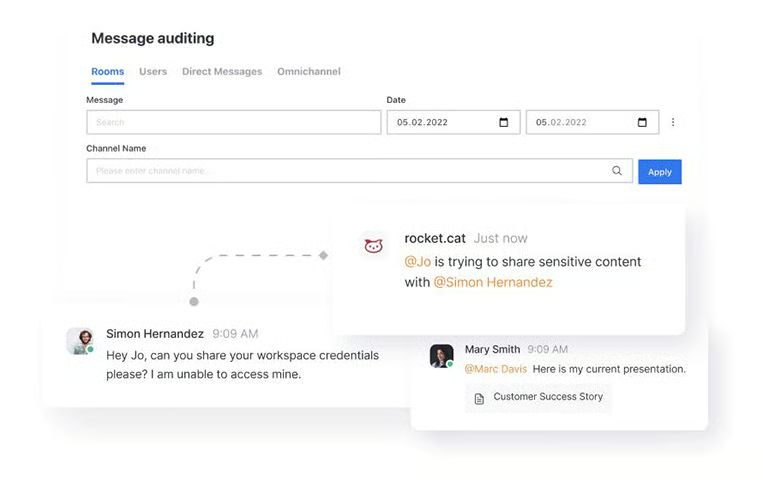
- Message audit: Go over conversations to ensure that confidential information remains private. Rocket.Chat allows authorized users to search and review messages by channel, direct messages, and users at any given time.
- Engagement dashboard: Gain valuable insights about your team’s unique collaboration patterns. Under the Messages tab, you’ll see the engagement matrix for the channels with the most messages at a given time period.
- Guest users: Let external stakeholders join your workspace by adding them as guest users. A guest user is able to message another user or a group of users, create discussions, and join channels they are invited to.
Skype: Best for Software Affordability & Simplicity
Skype Monthly Pricing
- Free: Team chat and video conferencing for up to 100 participants
If you’re a solopreneur or a small business looking for the best team chat app, free of charge, Skype is the ideal solution. It lets users send and receive instant messages without cost, only charging for calls to landline numbers. Its tools are enough for sharing regular updates with colleagues, as the provider supports file sharing and group chats. Aside from chat, the provider allows users to hold video meetings for up to 100 participants.
The best thing about Skype is its intuitive interface. Since it’s easily navigable, it’s ideal for less tech-savvy users. It’s also accessible via Windows, Mac, Linux, Android, and iOS devices.
The downside of it is that it isn’t a scalable solution that can handle large meetings and task management requirements. If you have growing operations, it’s best to use Mattermost, which offers unlimited teams, users, channels, and file storage, or Rocket.Chat, which is a customizable platform.
Skype Features
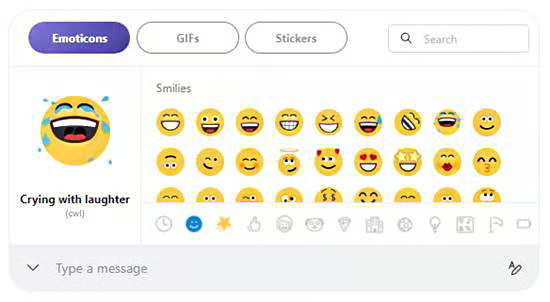
- Emojis, GIFs, and stickers: Make messages more interactive with animated images. These help lighten the conversation and foster rapport among team members.
- Quote message: Repost a previous message to help colleagues get a better context of what you’re saying. Use this when getting updates on projects and tasks.
- File sharing: Send documents, photos, and videos of up to 300MB. Drag and drop the files into the chat window.
Google Chat: Best for Improved Google Workspace Productivity
Google Chat Monthly Pricing*
- Free: One-on-one and group chats, access to Rooms, and message and file search
- Business Starter: $7.20 per user for turning history on or off, auto-accept invitations, one-to-one external chat, 30GB Google Drive storage
- Business Standard: $14.40 per user for threaded rooms, guest access, and 2TB Google Drive storage
- Business Plus: $21.60 per user for 5TB Google Drive storage and video conferencing for up to 500 participants
- Enterprise: Custom quote for 5TB Google Drive storage with the option to have more, data loss prevention, and S/MIME (Secure/Multipurpose Internet Mail Extensions) encryption
- Free trial: 14 days
*The entry-level plan’s fee is reduced from $7.20 to $6 when you pay annually.
Google Chat is the best group messaging app for work when your business uses Google Workspace to improve productivity. It’s built into the Gmail environment, allowing you to quickly switch from emails to chats without leaving the platform. When you send Google Docs, Sheets, and Slides, an “Open” button appears in the conversation window, letting you launch the document seamlessly.
Since the chat app is connected to Google Drive, the system automatically sends a notification when a document on the cloud storage is shared or commented on. This helps in keeping track of files you need to revisit. Google Chat also features private channels called “Spaces,” where team members share interests or discuss specific topics or projects.
Download the app on various devices: Windows, Mac, Linux, Android, and iOS. However, one disadvantage of choosing this provider is that its integrations are limited to Google Workspace products. If you’re using third-party customer relationship management (CRM) platforms, you won’t be able to connect to Google Chat. If robust integrations are your priority, Slack is the better alternative.
Google Chat Features
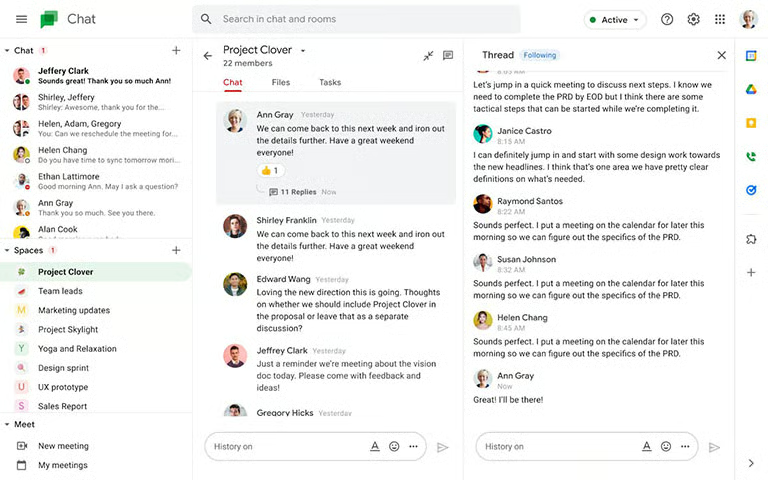
- In-line threading: Reply to a specific message to make a side discussion within a group channel. This helps in keeping conversations organized, causing less disruption in the main thread and allowing users to easily refer to previous discussions.
- Smart Compose: Craft messages faster by using Google Chat’s text suggestions powered by machine learning. This feature supports different languages, namely English, Spanish, French, Italian, and Portuguese.
- Message search: Find certain messages quickly using Google Chat’s filters. The “From” filter shows messages from specific team members. The “Said in” filter displays messages delivered in a particular conversation or space. The “Date” filter comes up with messages sent at a specific time period.
Mattermost: Best for Better Data Control & Security
Mattermost Monthly Pricing
Self-hosted solutions:
- Free: Unlimited teams, unlimited users, unlimited channels, playbooks, and boards, and unlimited file storage
- Professional: $10 per user for single sign-on, guest accounts, custom user groups, and advanced team permissions
- Enterprise: Custom quote for custom EMM, custom admin roles, granular data retention policies, and performance monitoring
Cloud-based solutions:
- Professional: $10 per user for unlimited workspace teams, unlimited file storage, single sign-on, and guest accounts
- Enterprise: Custom quote for unlimited file storage, custom EMM, custom admin roles, and granular data retention policies
Free trial: 30 days
Mattermost is the best work chat app if you want to ensure the security and privacy of your data because it provides a self-hosted option. With the servers and data physically located in the company’s premises, your information technology (IT) team is able to deploy backup and disaster recovery solutions to maintain the integrity of crucial information. Healthcare and other businesses governed by data security standards benefit from these self-hosted solutions.
The Mattermost app is downloadable on Windows, Mac, Linux, Android, and iOS devices. While it’s excellent for strengthening data security, it doesn’t have native video calling features like other providers. If you regularly switch from chats to virtual meetings for collaboration, Microsoft Teams makes for a better software choice. The provider has a built-in video conferencing tool, accommodating up to 300 participants.
Mattermost Features

- Forward message: Pass on a previous message to a specific person or channel quickly and add a comment on the forwarded message. Once it’s delivered, a message preview appears on the recipient’s end.
- Message priority: Label specific messages as important or urgent to increase visibility on critical tasks and action steps. When you toggle on the “Request Acknowledgment” button, the people you tagged in the message are compelled to click the Acknowledge button, signifying that they’ve seen the message.
- Message reminders: Set a reminder for important messages that must be sent at a specific time. You won’t get another notification once you’ve been reminded about the message.
How We Evaluated the Best Team Chat Apps
Frequently Asked Questions (FAQs)
What is the difference between Slack & Teams?
The main difference between Slack and Teams is their priority function. Slack focuses on team messaging, while Teams integrates chat, video conferencing, and office productivity.
Can I use Slack for free forever?
Yes, you can use Slack for free as long as you want. However, note that the free version of the platform has usage limitations. For instance, you’ll only access messages and files from the last 90 days. These include documents, images, videos, and audio files. What’s more, you’ll only be able to install a maximum of 10 third-party apps.
Bottom Line
Chat apps simplify workflows, engage employees better, and increase accountability among team members. Ultimately, they make collaboration easier for remote, hybrid, and highly mobile teams. However, business chat software isn’t created equal, as some provide more robust features.
Among the solutions we reviewed, Slack emerged as the best overall, as it allows easy channel creation, quick huddles, and extensive storage while providing a wide range of integrations. Sign up for the provider’s 90-day free trial to determine if it suits your team collaboration goals.
