







Microsoft Teams is a collaboration app that allows video conferencing, team chat, and file sharing. While the business plans start at $4 per user (billed annually), there is also a free version with similar features. Microsoft Teams works best for remote and hybrid work, allowing teams to stay connected, access shared content, and keep up with workflows.
In this Microsoft Teams review, the platform scored high in pricing and general features. However, it lost points for ease of use and customer support because of its interface issues and limited assistance for free plan users.
Why You Can Trust Us
Microsoft Teams Review: At a Glance
Deciding Factors
| Best For | Microsoft 365 users and small businesses looking for an affordable virtual workspace with built-in video conferencing features |
|---|---|
| Standout Features |
|
| Pricing Plans |
|
| Annual or Volume Discounts Available |
|
| Integrations |
|
| Customer Service |
|
When to Use Microsoft Teams
- Free or low-cost unified communications: Microsoft Teams offers a feature-rich free version and a cost-effective monthly plan starting at only $4 per user, billed annually.
- Team communication app: Microsoft Teams offers an all-in-one collaboration solution for remote and hybrid teams, with unlimited team chats and message searches.
- Video conferencing software: Microsoft Teams is a team collaboration software with video conferencing capabilities, including screen sharing and live captions.
- Microsoft 365 users: Microsoft Teams is one of our best team chat apps for Office 365 users because of its seamless integrations with Microsoft productivity apps, such as Word, Excel, PowerPoint, and Outlook.
When to Use an Alternative
- Free, feature-rich video conferencing software: Zoom’s free version offers more video meeting tools, such as breakout rooms, whiteboarding, and co-annotation. Discover more about these two providers in our Microsoft Teams and Zoom Meetings comparison.
- User-friendly collaboration: Between Google Meet and Microsoft Teams, Google Meet is more favorable to new users because of its streamlined interface.
- Workflow automation with bots: Although Slack and Microsoft Teams provide access to automated bots, Slack includes a no-code workflow builder for simplified development.
Microsoft Teams Alternatives
While Microsoft Teams provides a centralized workspace for distributed teams, it doesn’t mean it caters to all collaboration requirements. Its downsides include a complex interface, the lack of monthly payment plans, and free plan restrictions. If these are your priorities, here are the best Microsoft Teams alternatives to consider:
| Alternatives to Microsoft Teams |  |  |  |
|---|---|---|---|
| Best For | Distributed teams looking for workflow integrations and collaborative tools | Large teams looking for unified communication features | Small teams that are interested in cost-effective communication tools |
| Monthly Starting Price (per User) | $8.75 | $15.99 | $7.20 |
| Learn More | Visit Slack |
Microsoft Teams Pricing & Plans
4.00 / 5
Microsoft Teams scored 4 out of 5 for pricing because all plans require an annual prepayment, and no discounts are offered for yearly billing. At the same time, Microsoft Teams is available on two plan types: Business and Home, each providing affordable access to collaborative tools.
The free Microsoft Teams plan is included in the series of Home Plans and does not offer access to Microsoft 365, while the paid plans are included under the heading of Business Plans. Therefore, the free plan has limited features for small business owners compared with the paid plans.
| Pricing and Plans | Microsoft Teams Free | Microsoft Teams Essentials | Microsoft 365 Business Basic | Microsoft 365 Business Standard |
|---|---|---|---|---|
| Best For | Small teams looking for a free virtual workspace | Businesses wanting to host longer online meetings | Teams that rely heavily on Microsoft productivity apps | Microsoft 365 users that regularly host webinars |
| Annual Pricing (per User/Month) | Free | $4 | $6 | $12.50 |
| Participant Limit | 100 | 300 | 300 | 300 |
| Group Meeting Length | 60 minutes | 30 hours | 30 hours | 30 hours |
| Live Captions | English | English | 30-plus languages | 30-plus languages |
| Unlimited Chat | ✓ | ✓ | ✓ | ✓ |
| Meeting Recording | ✕ | ✕ | ✓ | ✓ |
| File Storage | 5GB | 10GB | 1TB | 1TB |
| Third-party Integrations | ✕ | ✓ | ✓ | ✓ |
| Webinar Tools | ✕ | ✕ | ✕ | ✓ |
For businesses with advanced security needs, consider upgrading to the Microsoft 365 Business Premium, which costs $22 per user monthly (billed annually). It includes everything in Microsoft 365 Business Standard and comprehensive security capabilities, such as cyber threat protection and access control.
Additional Plans & Features
In addition to the Business Teams Plans, Microsoft offers additional plans and features that could benefit small businesses. For example, Microsoft provides a Teams Phone plan for businesses requiring VoIP phones. You can add the phone features to your Microsoft Teams plans for a more robust cloud-based system.
| Plans & Pricing | Microsoft Teams Phone Standard | Teams Phone With Pay-as-You-Go Calling | Teams Phone With Calling Plan |
|---|---|---|---|
| Monthly Pricing (per User/Month) | $8 | $11 | $15 |
| Domestic Calling | Add-on | Metered | 3,000 minutes included |
| International Calling | Add-on | Add-on | Add-on |
| 99.999% SLA Uptime | ✓ | ✓ | ✓ |
You can also enhance your Microsoft Teams plans by adding artificial intelligence features. Specifically, Microsoft 365 Copilot can be used with Microsoft Teams to offer sentiment analyses, generate summaries, and search through meeting transcriptions for important information and themes. You can also ask Copilot for insights regarding the tone of meeting participants and identify any issues or questions that need to be addressed during team collaboration.
| Microsoft Copilot Pricing | Personal | Business | Enterprise |
|---|---|---|---|
| Pricing(per User/Month) | $20 | $30 | $30 |
| Billed Monthly | ✓ | ✕ | ✕ |
| Billed Annually | ✕ | ✓ | ✓ |
Microsoft Teams Features
Microsoft Teams is an online workspace that allows users to chat, meet with coworkers, and share files. In addition to these standard features, it includes many advanced communication tools that make it stand out in the market. For businesses seeking a unified communications solution, Microsoft Teams is an effective platform for web meetings, audio conferences, webinars, and large-scale events. Additionally, the team collaboration features facilitate the creation of a shared workspace.
General Features
4.00 / 5
Microsoft Teams scored 4.75 out of 5 for general features, as it offers various features to support remote and hybrid work, such as chat conversations among coworkers and video meetings. All plans include file sharing, cloud storage, instant messaging, and unlimited search history. Although the free plan offers most of these features, upgrading to Microsoft 365 Business plans provides access to a larger cloud storage capacity (up to 1TB) and hundreds of app integrations.
Instant Messaging
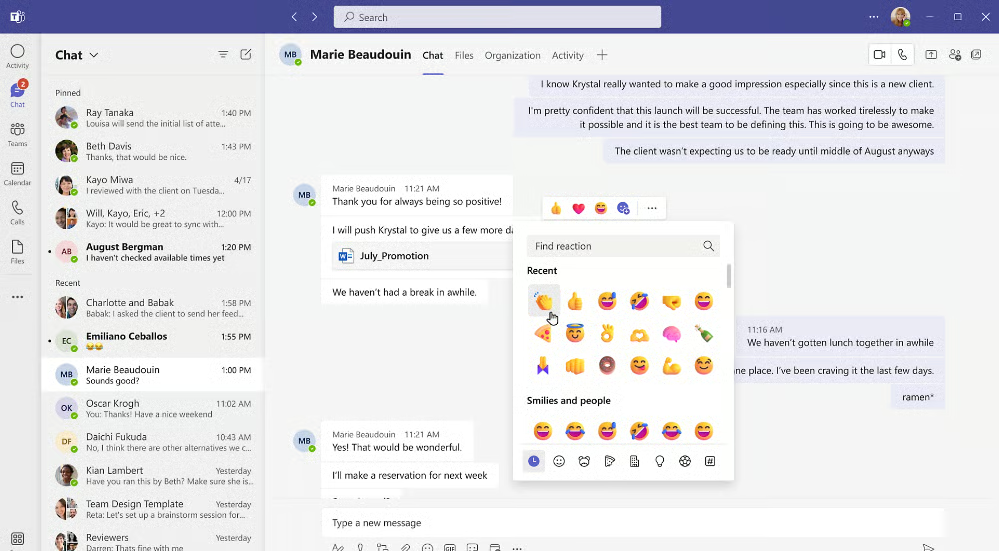
Unlimited chat is among Microsoft Teams’ best team collaboration and communication tools. Chats can be sent as one-on-one or group messages to stay in direct contact with your employees or collaborators. Additionally, you can use chat to message reminders and contact information to yourself or transfer files from one device to another.
Collaboration Planning
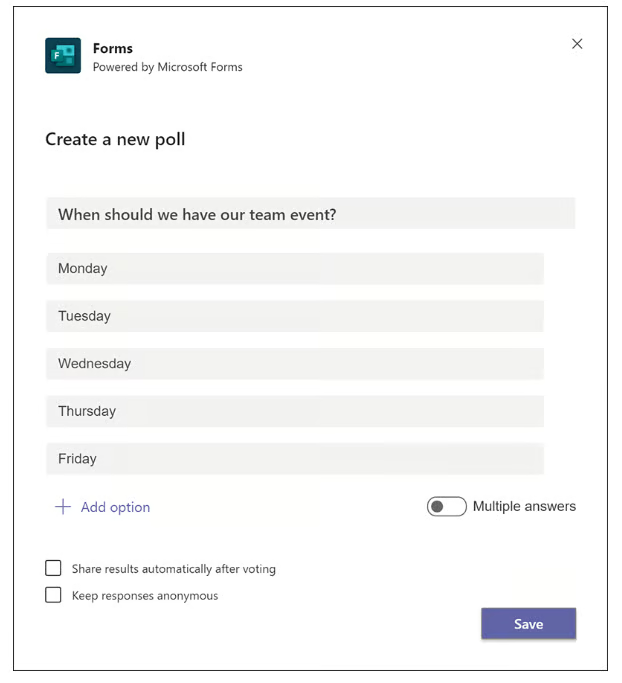
Microsoft Teams offers multiple tools that make collaboration more manageable, such as file sharing, tasks, and polling. Microsoft OneDrive storage is used for file sharing in chat because it provides secure cloud storage and communication flows. You can also create polls in the chat to assign tasks or decide on projects and scheduling.
Video Conferencing
Microsoft Teams offers video conferencing across plans. The free plan includes 60-minute meetings with up to 100 participants. In comparison, the paid Business plans hold up to 300 meeting participants for 30 hours. Video conferencing tools include breakout rooms, in-meeting chat, recording, hand raising, custom backgrounds, and whiteboards. While all plans include live English captions and subtitles, the highest-tier plans support over 30 languages.

Niche Features
4.25 / 5
Microsoft Teams scored 4.25 out of 5 for niche features because it has most of the features expected from a team collaboration solution. Public and private channels enable users to create groups for specific team members, while task management tools are designed for managing individual and team tasks. Users can also edit and collaborate on Microsoft 365 apps within Teams using the real-time coauthoring feature.
Click on each item below to learn more about the best features of Microsoft Teams:
Channels
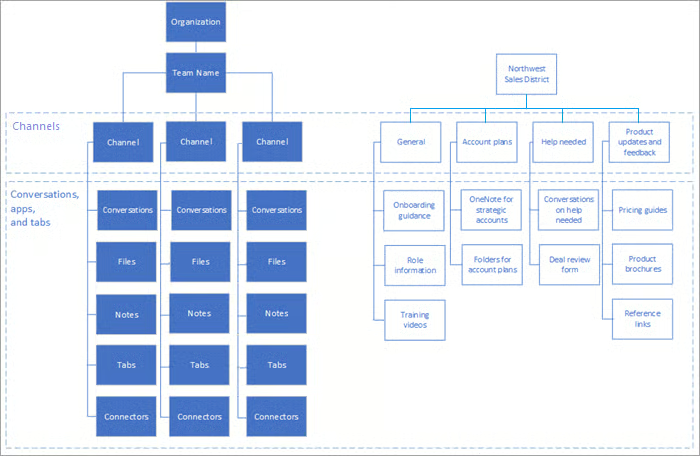
Channels are focus spaces where people gather to work on the same project or topic. These team collaboration spaces are divided into two types: standard and private. Standard channels are accessible to all users within a workspace, while private channels are for confidential conversations. Each channel also includes tabs that link to shared files, apps, and services.
Integrations & Workflow Automation
You can customize your Microsoft Teams experience with applications that integrate with your workspace, such as popular CRMs and project management tools. For example, Microsoft Teams integrates with Salesforce, Trello, and Zendesk. With the Microsoft Teams toolkit and Developer, you can also create custom apps and bots to automate workflows and replicate tasks for improved productivity.
Microsoft Places
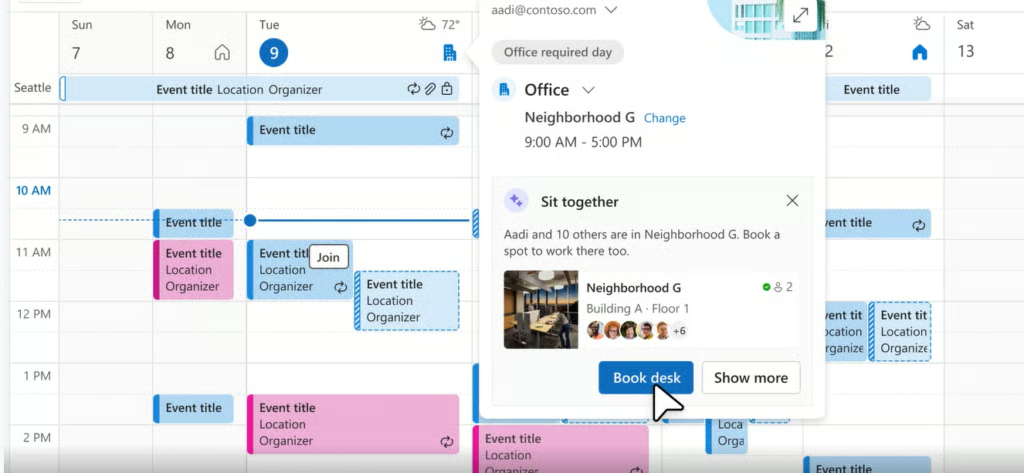
Microsoft Places is an AI feature included in the Microsoft Teams Premium plan. It enables you to schedule workplace events and make reservations using the Teams and Outlook calendars. Additionally, you can make data-driven decisions about daily workflows and connect with nearby colleagues through location-based chats and collaborative tools.
Artificial Intelligence
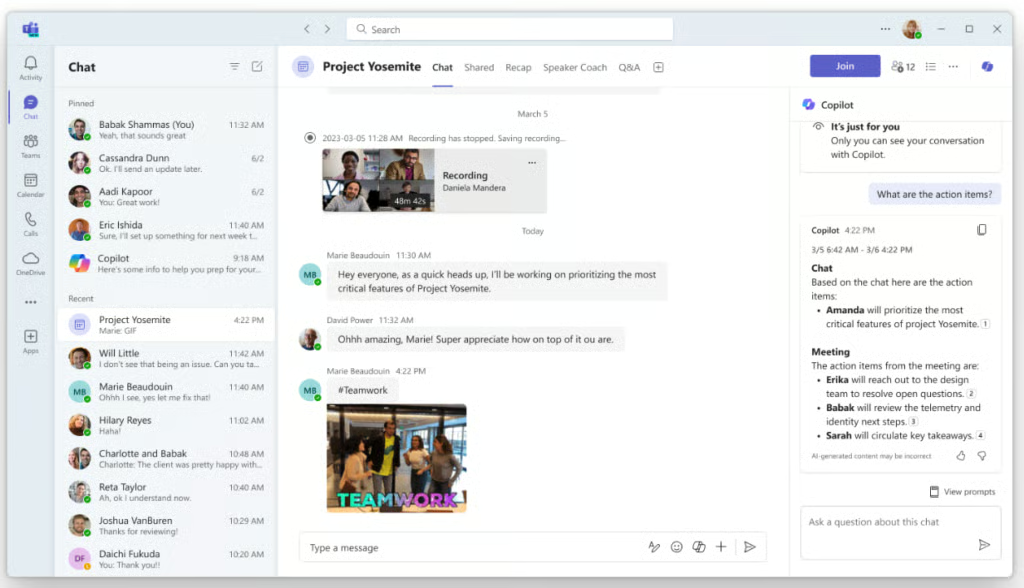
Over the years, Microsoft Teams has continually expanded its AI features to improve communication at work. For example, during meetings, you can turn on the Speaker Coach, an AI feature that offers real-time insights on your speaking pace, pitch, grammar, and use of sensitive phrases. Teams Premium includes intelligent recaps and AI-generated chapters to organize meeting notes.
Additionally, you can add Microsoft Copilot for more comprehensive insights from meeting transcriptions, such as detailed summaries and action items.
Customer Service
3.75 / 5
Microsoft Teams scored 3.75 out of 5 for customer service. While it provides a 24/7 hotline for technical support, access to additional support channels requires a paid plan or Microsoft 365 subscription. In contrast, free plan users can only access self-service resources such as a help desk, community forums, and YouTube tutorials.

Ease of Use
3.25 / 5
Microsoft Teams received an average score for ease of use because of its user interface, which could be more intuitive for those unfamiliar with the Microsoft 365 environment. While the platform appears polished and professional, many users struggle with setup and navigation because of its compartmentalized layout.
The interface can become cluttered for users collaborating in multiple teams and channels, making it challenging to access previous conversations. Additionally, users have complained about the overwhelming number of notifications, the difficulties creating a Microsoft account, and the learning curve associated with migrating to Teams after using more intuitive communication tools like Slack.
Expert Score
3.75 / 5
Microsoft Teams scored 3.75 out of 5 for our expert assessment because it is less feature-rich and user-friendly than other collaboration tools like Google Meet and Zoom. Additionally, its free plan and first paid tier lack essential features, such as integrations and admin tools, which force users to upgrade to Microsoft 365 Business plans.
Many users note that Microsoft 365 and Teams tend to have communication quality and reliability issues, such as service outages or delays, slow performance, and inconsistent updates. Therefore, businesses using Teams should invest in a strong internet connection and updated devices with sufficient local and cloud storage to mitigate these concerns.
What Users Say About Microsoft Teams
In assessing user reviews, many people like Microsoft Teams as a collaborative tool for remote workspaces. Specifically, users like the ease of communication with messaging features, such as unlimited and private chats. Microsoft Teams is also well-received in workspaces that use other Microsoft 365 tools for project management and team collaboration.
Although users value the breadth of collaborative features provided by Microsoft Teams, these features can be resource-intensive. As a result, users often report that Microsoft Teams has performance issues, like glitches and lag when working with other platforms or loading files. These concerns also impact video meetings, leading to problems with audio and video quality.
Despite these issues, Microsoft Teams earned the following scores on popular user review sites:
- TrustRadius: 8 out of 10 based on 6,482 reviews
- GetApp: 4.5 out of 5 based on approximately 9.600 reviews
- G2: 4.3 out of 5 based on 15,565 reviews
How We Evaluated Microsoft Teams
To evaluate Microsoft Teams, I reviewed some of its features and functions after consulting user feedback from third-party websites and community forums. From there, I used a six-part scoring system divided into the following criteria: pricing, general features, niche features, customer service, ease of use, and expert score. Learn more about how I evaluated Microsoft Teams by clicking on the tabs below:
Since cost is a significant concern for small businesses, I looked for the availability of a free forever plan, a free trial, and discounts for annual billing. I gave additional points to Microsoft Teams, which offers competitive per-user pricing for its subscription plans.
Since Microsoft Teams is a unified communications solution, I delved deeper into which features will benefit remote and distributed teams. These include unlimited chat, cloud storage, file sharing, user presence, and searchable message history.
The best team collaboration software includes tools that enhance team productivity. I checked if Microsoft Teams offers public and private channels, task management, and workflow automation. I also considered its artificial intelligence features and compared the number of integrations against other leading competitors.
I consulted several customer reviews and product demos to evaluate Microsoft Team’s usability. I also compared it with my experiences with other team collaboration solutions, like Zoom, Slack, and Google Meet. Additionally, I checked whether users encountered learning curves when setting up and operating the platform.
I examined the provider’s support channels, including phone, email, chat, and a ticketing system. If all support channels are available 24/7, additional points are awarded.
The expert score reflects my experience evaluating various unified communications solutions. I compared Microsoft Teams’ offerings against other team collaboration tools and weighed the provider’s user popularity. I also assessed how its service meets small business needs, including its ease of use and overall value for money.
Frequently Asked Questions (FAQs)
Is Microsoft Teams free?
Yes, Microsoft offers a free version of its Teams tool for those who don’t require access to the entire Microsoft 365 suite. The free Microsoft Teams plan provides 5GB of cloud storage, unlimited chat, and 60-minute conference calls for up to 100 meeting participants. Therefore, the free plan is best for solopreneurs or small teams with occasional virtual meetings.
Why do people use Teams instead of email?
Like email, Microsoft Teams is a communication tool that allows team members to collaborate and stay connected. Many people prefer using Teams because it encourages faster responses and helps reduce the number of emails sent when engaging in back-and-forth dialogue.
What are the pros & cons of Microsoft Teams?
There are advantages and disadvantages to using Microsoft Teams. One of the main pros is that the platform enables efficient workspace collaboration through its chat and video conferencing features, allowing multiple users to work together virtually. However, some drawbacks are that users must commit to annual billing, and integrations are only available on the paid business plans.
Bottom Line
Microsoft Teams is an excellent option for businesses using Microsoft 365 products or those seeking a cost-effective collaborative workspace. It facilitates teamwork by providing a centralized platform for hosting meetings, managing projects, and sharing virtual presentations. You can sign up for the free version or register for a free trial to see if it’s the right collaboration tool for your team.
