


Every small business owner should have a good business card. But you don’t always need to spend a fortune on it. Fortunately, there are ways to get free business cards from online platforms, whether through free trials or free sample kits. Some even offer 100% free custom business cards with no strings attached. Below, I’ve compiled the best places to get business cards for free, their pros and cons, and how you can get your cards.
- VistaPrint: Best free business card samples for designers or agencies
- MOO: Best free sample brand kit
- Adobe Express: Best for free digital business cards
- InoPrints: Best way to get custom-printed business cards for free
- Design.com: Best free business card designs for self-printing
- Wix: Best free business cards with a website purchase
- Where to Get Free Business Cards at a Glance
- VistaPrint: Best Free Business Card Samples for Designers or Agencies
- MOO: Best Free Sample Brand Kit
- Adobe Express: Best Free Digital Business Cards
- InoPrints: Best Way to Get Custom Printed Business Cards for Free
- Design.com: Best Free Business Card Designs for Self-printing
- Wix: Best Free Business Cards With a Website Purchase
- 4 Things to Consider When Getting Free Business Cards
- Frequently Asked Questions (FAQs)
- Bottom Line
Where to Get Free Business Cards at a Glance
| What You’ll Get | How to Get Them | Starting Cost for Paid Business Cards | Our Score out of 5 | |
|---|---|---|---|---|
 | A business card sample pack in 11 different paper stocks and VistaPrint branding | Order the sample pack from VistaPrint’s website | $11.99 for 50 cards | 4.93 |
| Visit VistaPrint | ||||
 | A sample brand kit with business cards, posters, postcards, and flyers in MOO branding | Order the brand kit sample pack from MOO’s website | $21 for 50 cards | 4.77 |
| Visit MOO | ||||
 | Free digital business cards made with Adobe Express’s design tools | Choose your template, design your business card, and download your files | $9.99/month | 3.93 |
| Visit Adobe Express | ||||
 | 100 printed business cards with your design on one side and InoPrints’ on the other | Order InoPrints’ free business cards, upload your design, and pay for shipping | $60 for 100 cards | 3.84 |
| Visit InoPrint | ||||
 | Business card designs you can customize and download for self-printing | Customize a template, create an account, and download your design | $3/month | 3.74 |
| Visit Design.com | ||||
 | 250 business cards as a freebie with the Logo + Online Presence plan | Design a logo in Wix’s logo maker, choose the Logo + Online Presence plan | $9.59/month | 3.52 |
| Visit Wix | ||||
VistaPrint: Best Free Business Card Samples for Designers or Agencies
Overall Score: 4.93 / 5
| RATING CRITERIA | Pricing | 2.75 out of 5 | |
|---|---|---|---|
| Free Features | 3.63 out of 5 | ||
| Other Features | 3.75 out of 5 | ||
| Customer Support | 5.00 out of 5 | ||
| Expert Score | 4.69 out of 5 |
Pros
- You can get a sample business card pack 100% free (including free shipping) with various paper stocks and finishes.
- The free business card pack works great as design samples if you’re a designer or design agency.
- Overall, the VistaPrint design platform is very easy to use and reliable, and has hundreds of templates in different shapes and sizes.
Cons
- The free business cards can’t be customized with your own design—it’s only a generic predesigned sample pack.
- There’s no option to download your business card design and print it yourself.
- The free sample pack doesn’t include the bamboo or linen card stocks.
Order the free business card sample kit, enter your shipping details, and your free sample kit will be delivered to your door in around 10 business days.
Standard Uncoated Business Cards
| Quantity | Cost |
|---|---|
| 50 | $11.99 |
| 100 | $14.99 |
| 500 | $24.99 |
| 1,000 | $39.99 |
| 2,000 | $72.99 |
If you’re looking for an overall reliable, high-quality service to print your business cards, my number one recommendation is always VistaPrint. It’s simple to use, has dozens of business card templates and paper types, and even special finishes, including raised foil and gloss, and it’s reasonably priced. It’s our overall best business card printing service.
It also has a free business card sample pack that you can have delivered to your door so you can get a feel before committing to a purchase. The sample pack is 100% free, including its shipping, and it’ll include samples of all of VistaPrint’s 11 paper types and stocks, finishes, and shapes.
However, I also find VistaPrint’s sample pack useful as samples, say if you were a designer or a design agency and you want to give your clients samples of the branding work you can offer. Business cards are a fundamental part of small business branding, and a free sample like what VistaPrint offers is a good visual representation of what they can do. You can use VistaPrint’s sample pack to give clients an idea of how they can brand their business.
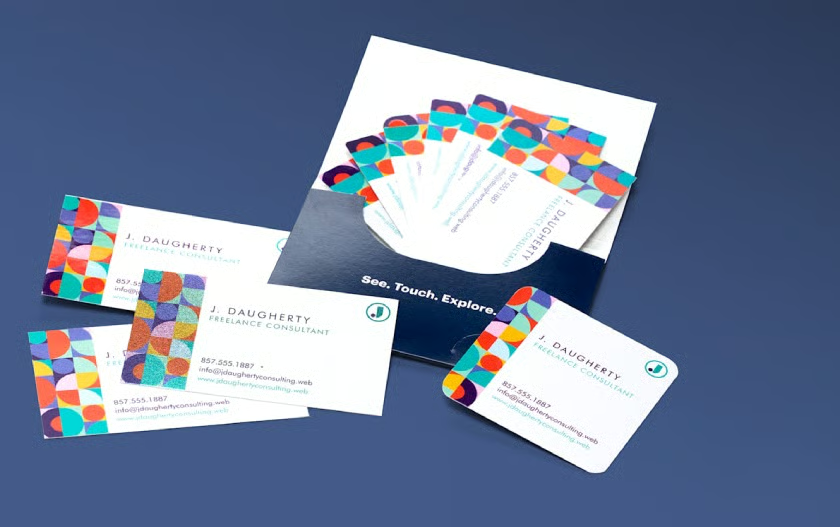
VistaPrint offers a free business card sample pack with 11 different card stocks. (Source: VistaPrint)
The obvious downside with VistaPrint is that its free business cards can’t be customized with your own design—they’ll come predesigned with a generic VistaPrint placeholder. This means they won’t be of much value if you need them for your personal use. However, if you are satisfied with VistaPrint’s printing quality and want some with your own brand, custom cards start at just $11.99 for 50 cards.
That’s another reason VistaPrint is one of our top business card providers. Minimum orders start at just 50 cards, so you don’t need to order in bulk. Its online design platform is also among the best in the industry, along with its hundreds of templates for just about any industry and aesthetic.
Our Expert Opinion
VistaPrint has always been our go-to for marketing materials, whether for business cards, posters, or even outdoor signage. Even if it doesn’t exactly provide free custom business cards, its features are still some of the best you’ll find online and are worth including in this list. Whether you use the free business cards as samples for clients or just to test their print quality, they’re a good way to get a feel of the service.
MOO: Best Free Sample Brand Kit
Overall Score: 4.77 / 5
| RATING CRITERIA | Pricing | 2.75 out of 5 | |
|---|---|---|---|
| Free Features: | 3.63 out of 5 | ||
| Other Features | 4.00 out of 5 | ||
| Customer Support | 4.58 out of 5 | ||
| Expert Score | 3.44 out of 5 |
Pros
- MOO offers a full free sample brand kit with business cards, postcards, flyers, and posters.
- It specializes in premium-quality prints like Pearlescent and Premium Gloss, which are included in your brand kit sample.
- Shipping for the sample brand kit is also 100% free.
Cons
- Your sample brand kit won’t be customized with your branding, so it’s not helpful for personal use.
- The sample kit doesn’t provide the full range of MOO’s business cards—it doesn’t include the Minicards or the Square business cards.
On MOO’s website, order the free sample pack, then input your shipping details. Your sample pack will automatically be delivered to you.
| Quantity | Cost |
|---|---|
| 50 | $21 |
| 100 | $42 |
| 400 | $128 |
| 1,000 | $250 |
| 2,000 | $500 |
In a similar vein, MOO is also another printing service that offers a free sample pack. However, instead of just business cards, MOO offers a full brand kit for free, which includes flyers, postcards, stickers, and business cards in varying card stocks and sizes. And because MOO specializes in premium-quality prints, your samples won’t just be any run-of-the-mill paper stock, but premium ones like Pearlescent and Matte Vinyl and Premium Gloss.
There aren’t many other business card services with the same dedication to premium printing quality—or that offer a full brand kit sample. The primary drawback, as with VistaPrint, is that it won’t be of much use for sharing with your network as it won’t be customized with your own brand. It’s just a sample brand kit with generic designs.
More than anything, the kit’s a good stepping stone for the kind of brand kit you can build for your own business. This is especially true if you host or attend plenty of events like trade shows and small business expos where you might exchange flyers or business cards frequently.
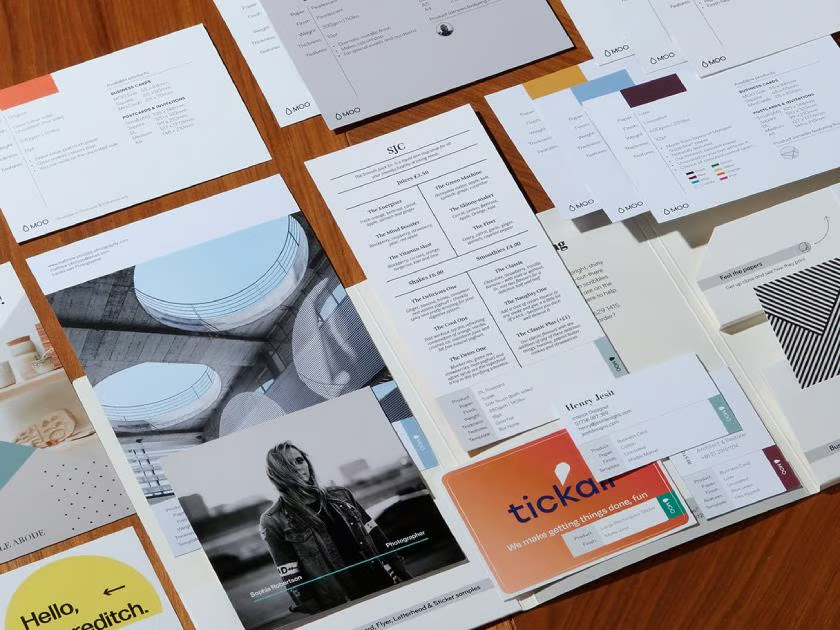
MOO’s free sample kit includes business cards, postcards, stickers, and flyers—all with premium-quality paper stocks. (Source: MOO)
Our Expert Opinion
While MOO doesn’t give fully custom brand kits for free, what it does provide can be a good example of what you can create for your own business in the future. Quality-wise, MOO is also one of the best in the industry, so I find its brand kits a good source of inspiration if you want your business to stand out a little extra at your next event.
Adobe Express: Best Free Digital Business Cards
Overall Score: 3.93 / 5
| RATING CRITERIA | Pricing | 1.00 out of 5 | |
|---|---|---|---|
| Free Features | 4.00 out of 5 | ||
| Other Features | 3.25 out of 5 | ||
| Customer Support | 2.50 out of 5 | ||
| Expert Score | 4.38 out of 5 |
Pros
- Adobe Express lets you design and download digital business cards, completely free of charge, with no limits.
- All the business card templates are modern and well-designed (Adobe standards).
- The business card design editor is very easy to navigate and use, being a drag-and-drop platform.
Cons
- Adobe Express doesn’t offer any printing services—it’s just for digital business cards.
- Your free business card designs will have a small Adobe Express logo on the bottom-right corner.
On the Adobe Express website, open the Create tab, then choose Business Cards and click on the “Create Now” button. Sign up for an Adobe Express account, then start designing your business card. After designing your card, download your files or upload them to your cloud storage or social media.
Adobe Express’ digital business card design platform is 100% free. However, you can upgrade to a premium plan for more templates and storage.
| Free | Premium | Teams | |
|---|---|---|---|
| Monthly Cost Per User | $0 | $9.99/month | $4.99 |
| Users | 1 | 1 | 2 Minimum |
| Storage | 5GB | 100GB | 1TB |
| Business Card Templates | Limited | Full | Full |
| Design Elements | 1 million+ | 200 million+ | 200 million+ |
| Image & Video Editing Tools | Standard | Advanced | Advanced |
| Social Media Scheduling | 1 Account | 3 Accounts | 3 Accounts |
| Generative AI Credits | None | 250/month | 250/month |
| Brand & Asset Management | ✕ | ✕ | ✓ |
It’s no secret we live in the digital age, and that also sometimes means opting for a digital business card instead of a physical one—especially if you have an online-first business. Building your online presence should always be part of your marketing plan. Fortunately, there are many platforms that allow you to make digital business cards for free, and the best one I have tried so far is Adobe Express.
If you’ve heard of Adobe before, you’ll probably know it’s the industry leader for all things design, being the company behind Adobe Photoshop, After Effects, and the rest of the Adobe Creative Suite. But it also has a host of free design tools, one of which is the free digital business card maker, which lets you design and download digital business cards, all completely free.
And because this is Adobe, the business card designs are all professional and modern, with designs to match any brand and taste. The only problem is not all its templates are free to use—some require an upgrade to a paid plan. But that’s not much of a problem either, as there are already hundreds of professionally designed free templates, and its online design platform makes them easy to edit. It’s all a matter of dragging and dropping elements.
Then, when you’re done designing your business card, you can simply download it or share it with your cloud storage or social media. No payments are necessary; you’ll only need to create an Adobe Express account, which is also free.
[gallery: images unavailable]
Unfortunately, Adobe Express doesn’t offer any free printing services (or any printing services at all), so it’s not an option if you need physical business cards. Another drawback is that its free templates have a small Adobe Express logo on the bottom-right corner of your card, which you can’t edit out. But otherwise, it still produces a good business card design.
Our Expert Opinion
Adobe has always been well-known among professional design circles, but not many people know of its free design tools, which are very helpful for any small business or brand. I’ve used many of them before, and its business card design platform is one of its best. It’s easy to use, produces good results, and is completely free.
You don’t even need the premium templates to make eye-catching business cards. It’s a good bet for any freelancer or small business owner looking to grow their brand online on a small budget, and it’s the overall best place to get free business cards for digital use.
InoPrints: Best Way to Get Custom Printed Business Cards for Free
Overall Score: 3.84 / 5
| RATING CRITERIA | Pricing | 4.25 out of 5 | |
|---|---|---|---|
| Free Features | 2.13 out of 5 | ||
| Other Features | 2.00 out of 5 | ||
| Customer Support | 3.75 out of 5 | ||
| Expert Score | 4.06 out of 5 |
Pros
- InoPrints provides printed business cards customized to your design—at completely no cost.
- You can also choose between a matte or glossy finish for your free business cards.
- You can also order as many free business cards as you want (in batches of 100).
Cons
- All your free cards will have an InoPrints logo on the back side, so you can only have your design on one side.
- Only the printing is free with InoPrint. You’ll still need to pay for shipping.
- InoPrints doesn’t have an in-house design platform (although it has an integration with Canva), so you’ll need to have your design prepared.
On the InoPrints website, choose the free business cards option. Choose your card finish (gloss or matte) and how you’ll add your card design (upload your own, design via Canva, or hire a designer at an additional $50). Then, input your shipping details and pay for your shipping to complete your checkout. You’ll have your 100 free business cards delivered within two to three business days.
Standard Single-sided Matte Business Cards
| Quantity | Cost |
|---|---|
| 100 | $60 |
| 250 | $70 |
| 500 | $90 |
| 1,000 | $100 |
| 2,500 | $135 |
If you’re looking to get 100% free, printed, customized business cards, the best platform by far is InoPrint, which offers exactly that: up to 100 free business cards with your own design, printed and delivered to your door. No payments or signups are necessary except for shipping. The only catch is that your free business cards will have a small InoPrints logo on the back side, so only the front side can have your design.
But still, there’s no other platform (so far) that gives you completely free printed business cards with your design, and you can even choose between a gloss or matte finish. However, InoPrints doesn’t have its own business card design platform, so you’ll have to prepare your design. It does, however, have an integration with Canva, so you can design from there. InoPrints also offers professional design services, although they come at a price.
However, I found that the easiest route by far is to just upload your own design (hint: you can even use the design platforms here, like Adobe Express or Design.com, to help). Once you have your design, it’s a simple matter of uploading it during the checkout process. However, a caveat here is you won’t be able to proof or preview your designs before printing. You can only wait for your final cards to be delivered.
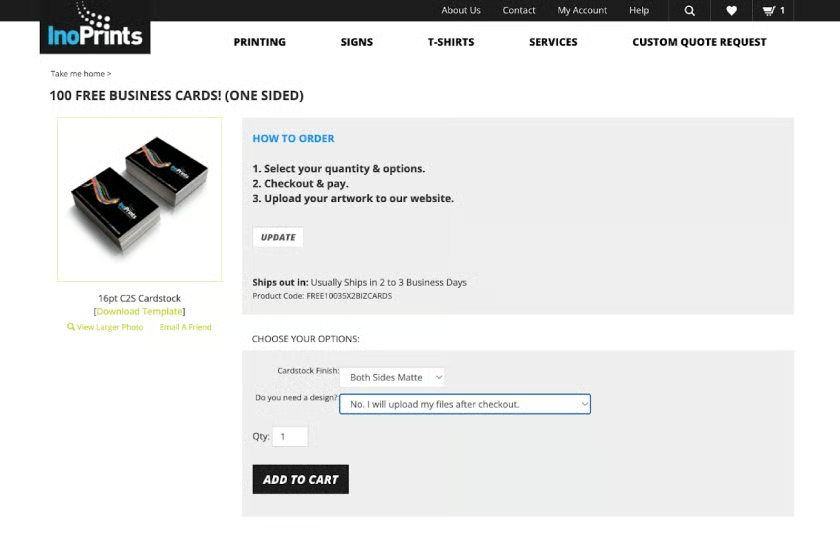
InoPrints offers up to 100 free business cards customized with your design (on one side).
Our Expert Opinion
If you absolutely need free custom-printed business cards, InoPrints is one of the few platforms that do just that. It’s not as design-forward as some of the others on this list, but it’s the only one that can give you 100 business cards at absolutely no cost (except shipping). If you don’t mind sharing your business card with a small Inoprint logo on the back, there’s a lot of value you can get with Inoprint.
Design.com: Best Free Business Card Designs for Self-printing
Overall Score: 3.74 / 5
| RATING CRITERIA | Pricing | 1.00 out of 5 | |
|---|---|---|---|
| Free Features | 4.00 out of 5 | ||
| Other Features | 2.75 out of 5 | ||
| Customer Support | 2.50 out of 5 | ||
| Expert Score | 4.13 out of 5 |
Pros
- Design.com has several free business card templates you can easily customize and save to print yourself.
- The drag-and-drop platform is free to use, and you can customize your business card’s colors, fonts, and designs as much as you like.
- There’s also an AI-powered business card generator that produces designs based on your business names (although not all templates will be free).
Cons
- Not all the business card templates are free, and it’s not always clear which ones are—you’ll only find out during checkout.
- While Design.com has printing services, they’re not free. Costs start at around $35 for 250 cards.
- While you can download high-res files for free, you can only download them in JPG or PNG formats (not PDF or SVG).
Visit the Design.com website, then browse through the free business card templates. Select a template, sign up for an account, then customize your card design. After finalizing your design, click “Download” and it’ll be sent to your email.
Premium Plans
| Business Card Pack | Premium Plan | |
|---|---|---|
| Monthly Cost (Annual Billing) | $0 | $3 |
| Business Card Templates | Free | Premium |
| Business Card Design Platform | ✓ | ✓ |
| High-Resolution Files (PNG and JPG) | ✓ | ✓ |
| Logo Editor | ✕ | ✓ |
| Social Media Posts, Letterheads, and Email Signatures | ✕ | ✓ |
Business Card Printing (Standard Matte, Single-sided)
| Quantity | Cost |
|---|---|
| 250 | $44 |
| 500 | $51 |
| 1,000 | $77 |
| 2,000 | $125 |
| 2,500 | $141 |
One of the best ways to save on your business cards is by printing them yourself, especially if you already have a printer and paper at home. You’ll only need to ensure your designs are professional and eye-catching. A good platform that can help you there is Design.com. As its name suggests, “design” is Design.com’s game, and it has dozens of business card designs you can easily customize and download.
The design platform is also very easy to use. There are two ways you can create your business cards: through the AI design generator, where you only need to type in your business’ name, and it’ll generate design templates, or by browsing through its hundreds of design templates.
Both methods are easy and produce good templates, but if you’re a complete beginner, I recommend trying the AI design generator because it already generates templates based on your business name. For example, I typed in a cafe business name, and it generated coffee-inspired templates. If you have a logo, you can even upload it, and it’ll also take that into consideration.
[gallery: images unavailable]
Going the other route is also a decent option, as you can also filter your search through specific keywords. You’ll also get a wider template variety (my primary drawback with the AI designer is that its layouts look almost identical). However, keep in mind you’ll only be limited to the free templates. The premium templates will require a subscription to a paid plan.
However, once you’ve chosen a template to start with, the rest of the process is super simple. You’ll only need to create your account and then customize your template in the editor, which is a drag-and-drop. You can customize your design’s colors, elements, and fonts as much as you like, even for free, which is why I don’t feel it necessary to subscribe to a paid plan. Then, when you’re done, click “Download,” and your design will be sent to your email.
Our Expert Opinion
Design.com has some of the best business card templates you’ll find online. If you don’t need your cards printed or already have printing materials at home, it’s worth checking out for good business card designs—especially if you only need small batches and are working with a small budget. It’s a quick and easy way to get business cards made for free.
Wix: Best Free Business Cards With a Website Purchase
Overall Score: 3.52 / 5
| RATING CRITERIA | Pricing | 0.50 out of 5 | |
|---|---|---|---|
| Free Features | 2.63 out of 5 | ||
| Other Features | 3.25 out of 5 | ||
| Customer Support | 4.17 out of 5 | ||
| Expert Score | 3.81 out of 5 |
Pros
- Wix offers an all-in-one platform for creating logos, websites, and business cards in one plan.
- Your plan will also come with 250 custom business cards printed and delivered to your door, anywhere in the world.
- Wix is also very easy to use, ideal for any beginner building an online presence from scratch.
Cons
- It’s not technically free as you’ll need to subscribe to a paid Logo + Online Presence plan costing $9.59/month, where the business cards are a freebie.
- You can only get up to 250 business cards on every plan, and they can only be printed on a standard 300gsm card.
- Wix also doesn’t offer any other business card shapes or sizes beyond the standard rectangle.
Create your logo via Wix’s Logo Maker, then subscribe to the Logo + Online Presence plan on Wix and choose either the Unlimited or Business tier, which includes free business cards. Your logo design will be applied to your business cards.
Logo + Online Presence
| Unlimited | Business | |
|---|---|---|
| Monthly Cost (Billed Annually) | $9.59/month | $14.40/month |
| Logo Maker | ✓ | ✓ |
| Full Commercial Rights of Your Logo | ✓ | ✓ |
| Brand Kit with Social Media Posts & Cover Images | ✓ | ✓ |
| Wix Website with 2GB Storage | ✓ | ✓ |
| Free Website Domain for 1 Year | ✓ | ✓ |
| 250 Business Cards with Your Logo | ✓ | ✓ |
| Online Payments on Your Website | ✕ | ✓ |
Finally, another good way to get business cards for free is by getting them as part of an overall digital brand kit. This is especially true if you’re only starting to build your online presence and you also need a website and logo. The good news is that many website platforms now offer all-inclusive plans with all of these, and one of the best is Wix.
You might know Wix best as a website builder (in fact, it’s one of our best website builders for small businesses), but it’s also an all-in-one online branding platform, particularly through its Logo and Online Presence plans. These plans offer a Wix website and a brand-new logo you can use to design social media posts and covers—and business cards.
Wix also has a separate business card design platform, although it isn’t free. You’ll get far more value by subscribing to one of its all-inclusive online presence plans.
Of course, the main drawback of Wix is that it’s not technically free. You’ll still need to pay some upfront cost for its plans, although for the products you get, it’s still a lot of value, especially if you’re building your online presence from scratch. From just $9.59/month, you get a brand-new logo, website, and 250 business cards, all with the same branding.
You can even get social media files and a free domain for one year. You’ll also be able to customize your logo and business card designs any time you want. As a platform, Wix is also very beginner-friendly, and that holds true for its logo and business card editor.
[gallery: images unavailable]
Our Expert Opinion
If you’re building your online presence from scratch, you won’t just need a business card. You’ll also need a website and social media presence, among other things, all of which will require an upfront investment. So, while Wix isn’t technically free, consider if what it offers might benefit your business in the long run. If you also need a website and social media collateral, it’ll be far more convenient to have them all from one platform.
How We Evaluated the Best Places to Get Free Business Cards
There are a number of avenues to get free business cards from online platforms, but you might have noticed that it’s not an apples-to-apples comparison. Some platforms are 100% free, while others only include business cards as freebies with paid plans. To get a clearer, more accurate comparison, I compared the platforms in this guide on a set of criteria, which you’ll find below.
Of course, pricing is the first part of our evaluation. I gave higher marks to platforms that provided 100% free printed business cards, especially those with free shipping. However, because not all provide free cards, I also considered the value included in each plan, like the number of business cards included and whether they offered custom card designs.
Aside from pricing, the platforms above were also graded on the free features they offered. This includes things like an online business card design platform and templates, free high-resolution downloads of your design, multiple card sizes, and whether or not your cards would have ads. While all these features are essential to any business card platform, I gave a higher grade to the ones that offered them for free.
Aside from the essentials, the best platforms can also offer more features to improve your business card, like multiple paper types and finishes, different shapes and sizes, a QR code generator, and even professional business card design services. These features make up 25% of our score.
Business card platforms shouldn’t be complicated to navigate, but I gave extra credit to platforms with above-average customer support. This includes longer customer support hours and more support avenues (phone call, live chat, email ticketing, and a help center).
Finally, the Fit Small Business team has several years of combined experience in branding and marketing, which we also took into consideration in our scoring. All the platforms above were tested and graded based on their features, ease of use, and value for money.
4 Things to Consider When Getting Free Business Cards
Getting business cards for free isn’t always a straightforward process, as you might have noticed from the platforms above. Some have certain restrictions or a “catch” you have to take note of before getting your business cards. So, before deciding on a platform, here are some things to take into consideration.
- Your overall budget: While you may be looking for free cards, consider if you’re willing to spend a little extra for a lot more, like customized designs and your own branding. A business card with a logo other than your own isn’t ideal for your branding, so if you have the budget, paying for the extra might be worth it in the long run, especially if you use business cards often (say for networking events).
- Your main purpose: The main objective of your business card will guide your overall design, print quality, and even the quantity of your order, which in turn will guide your platform choice. For instance, if you need business cards for a large networking event, you might need a bulk business card provider. Meanwhile, if you work in design and need to make an impression, you might need a more premium business card.
- Your target audience: Business cards are meant to be distributed, which means you also have to consider your target audience. A standard one-sided business card might be good enough for handing out to your local community fair, but it might not be for a small business expo.
- Your design vision and capabilities: No two business card platforms are the same. Some have beginner-friendly design platforms with many templates, while others don’t have one at all. Evaluate if you already have a design on hand or still need to create one—or if you need to outsource one from a designer.
Frequently Asked Questions (FAQs)
Unfortunately, VistaPrint doesn’t print custom business cards for free. However, it does provide a free business card sample pack, so you can get a feel of its print and design quality. The free sample pack includes 11 business card paper stocks, finishes, and shapes printed with a generic VistaPrint design, which will also be shipped for free to your location. Prices for VistaPrint’s custom-printed business cards start at $11.99 for 50 standard uncoated cards.
The best provider for low-cost, high-quality business cards is VistaPrint. VistaPrint has long provided printing services for small businesses, including business cards, and its prices start at $11.99 for 50 standard business cards. Another reason I recommend VistaPrint is that its minimum quantity orders start at just 50, instead of others that are much higher. VistaPrint also offers multiple paper stocks and finishes, including matte and raised foil.
You can create your business card yourself if you already have a printer and card stock at home. First, decide on your business card’s content and design. You can use platforms like Adobe Express and Design.com to lay out your card design, which also have free templates you can use. After finalizing your design, download your file as a PNG or PDF, lay it out on a document file, and print and cut your cards.
Bottom Line
Good branding doesn’t require an outlandish budget, and the platforms above are proof. There are several ways you can get free business cards that don’t require sacrificing their quality or design. And even if not all the platforms above are 100% free, they all still give good value with well-designed, premium-quality business cards that are worth the investment for building your brand.
