








Our Zoom vs Zoho Meeting comparison found both video conferencing solutions offer essential meeting and collaboration features, such as in-meeting chat, screen sharing, and virtual background. However, Zoom won over Zoho Meeting because of its rich integrations and more robust meeting features, especially recording and storage. On the other hand, Zoho Meeting is an excellent solution for small teams and professionals, thanks to its low cost and simplicity.
Based on our comparison, the best use cases for Zoom vs Zoho Meeting are as follows:
- Zoom: Better for growing teams needing dedicated video conferencing software
- Zoho Meeting: Better for companies looking for a simple, affordable virtual meeting solution
Zoom and Zoho Meeting are primarily online meeting platforms and webinar solutions. If Zoom and Zoho Meeting don’t fit the bill, consider an all-around unified communications (UC) provider like RingCentral. In addition to powerful video conferencing, RingCentral has business features for call management, conferencing, and messaging.
- RingCentral: Best for companies looking for an all-in voice-over-internet-protocol (VoIP) solution with native conferencing tools
Zoom vs Zoho Meeting Compared
 |  | |
|---|---|---|
| Monthly Starting Price | $15.99 per user | $2 per user |
| Annual Billing Starting Price | $149.90 per user, per year | $1 per host, per month |
| Free Trial | 30 days | 14 days |
| Free Plan | ✓ | ✓ |
| Storage |
|
|
| Maximum Number of Participants | Up to 1,000 participants |
|
| Session Duration | Up to 30 hours | Up to 24 hours |
| Key Features |
|
|
| Desktop & Mobile Apps |
|
|
| Ease of Use | Very easy to use | Very easy to use |
| Customer Service | Ticket, live chat, phone, and knowledge base | Website form, phone, and email |
| For More Information |
Best Alternatives
While Zoho Meeting and Zoom are established video conferencing platforms offering free plans, there are better options if you need advanced artificial intelligence (AI), in-depth analysis, superior audio, or seamless Office 365 suite integration. Companies with these needs are better off with an alternative service provider.
A few Zoho Meeting and Zoom alternatives include:
- Microsoft Teams: This is the ultimate business communications platform for existing Microsoft Suite users. It’s excellent for budget-conscious businesses since its base-level package is less than $5 monthly. A paid plan allows you to create up to 50 breakout groups for small group discussions.
- Dialpad: Dialpad offers some of the most advanced AI features, such as post-meeting summaries and sentiment analysis. The real-time call transcriptions let agents focus on the conversation instead of writing notes during the call.
- BlueJeans: BlueJeans uses Dolby Voice in video meetings, giving users high-quality audio. Its top features include noise suppression and spatial audio profiling. It also has a centralized command center for real-time alerts and offers in-depth system analysis for better problem troubleshooting.
Best for Pricing: Zoho Meeting
| |
|---|---|
Zoho Meeting Monthly Pricing*
| Zoom Monthly Pricing**
|
| *Save more than 15% by paying annually. Volume discounts are likewise available.**Pricing is based on monthly billing. Save up to 21% by opting for annual billing. | |
When comparing Zoom vs Zoho Meeting for pricing, Zoho Meeting takes this round thanks to its low-cost monthly paid plans that start at just $2 per user. Its zero-payment plan lets you host unlimited meetings and webinars for 100 participants for up to one hour. It includes engagement tools like screen and file sharing, chat, basic reports and analytics, and virtual backgrounds. Different add-ons are available for paid plans, like more recording storage and toll-free numbers.
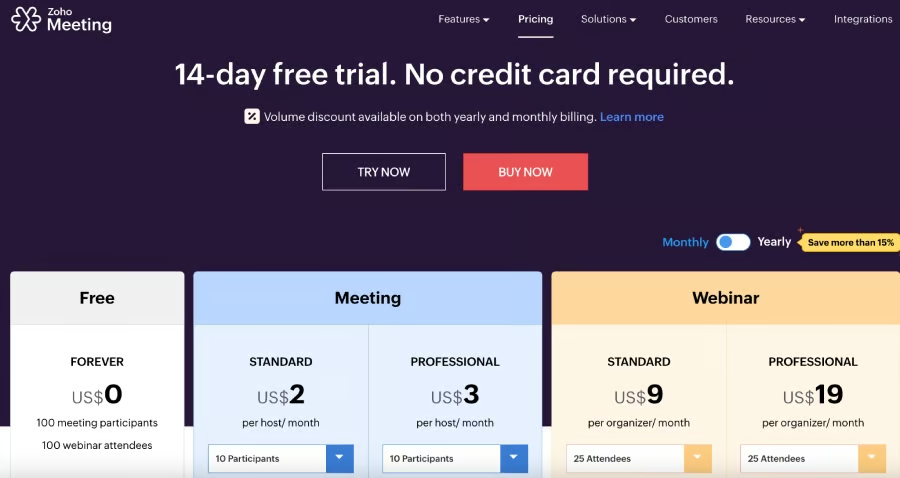
Zoho Meeting’s plans and pricing (Source: Zoho Meeting) 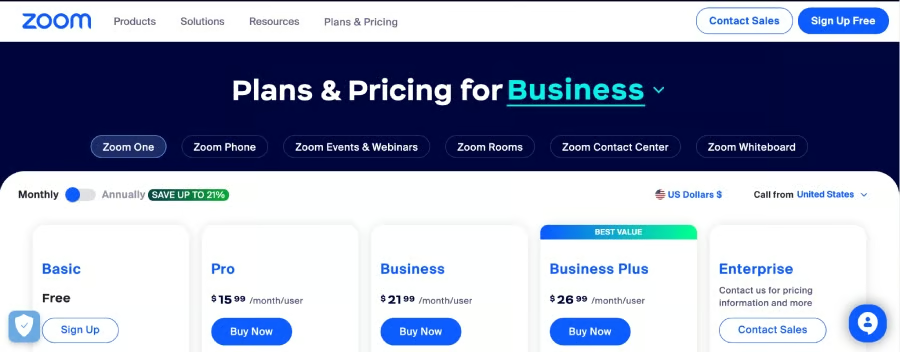
Zoom’s plans and pricing for business (Source: Zoom)


Zoho Meeting also offers yearly billing discounts where users can save over 15%. Pay only $1 per user, monthly, for up to 10 participants. If you want to accommodate more attendees or need longer meeting durations, try paid plans by signing up for Zoho Meeting’s 14-day trial. Zoom’s paid plans are higher at $15.99 per user, monthly. It also offers an annual billing discount and has no credit card requirement for its forever-free plan.
Best for Video Conferencing Features: Zoom
| |
|---|---|
|
|
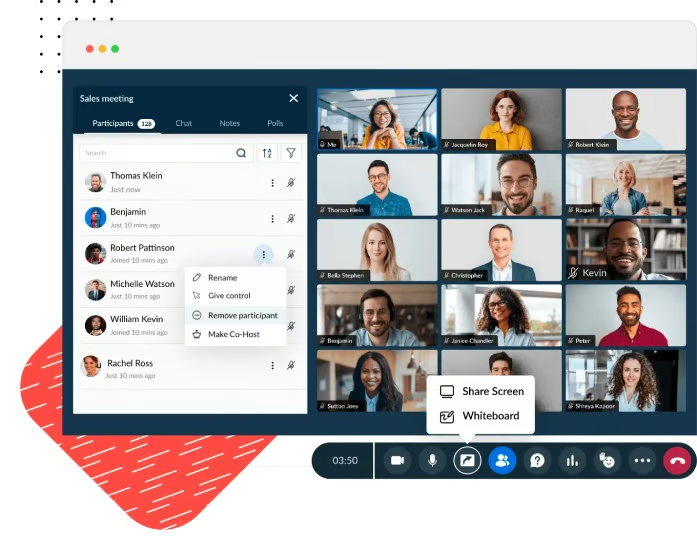
Comparing Zoom vs Zoho Meetings for video conferencing shows that Zoom has the advantage because it offers more robust recording, storage, and meeting participants. While Zoho Meeting offers up to 10 meeting recordings and 25 webinar recordings per host, Zoom has local and unlimited cloud storage. Zoho Meeting allows up to 250 meeting participants, while Zoom accommodates 1,000 attendees. However, Zoho Meeting can host up to 5,000 for webinars.
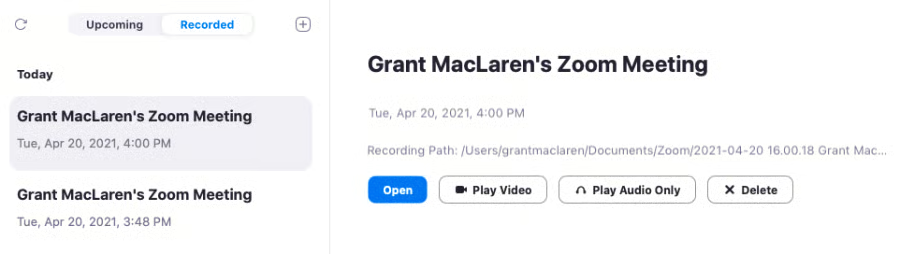
When comparing engagement and interactive tools, both Zoom and Zoho Meeting’s free plans offer essential features, such as screen sharing, virtual backgrounds, emoji reactions, instant chat, and whiteboards. However, Zoho Meeting’s free plan has a longer meeting duration than Zoom’s zero-pay package. Zoho Meetings’ free plan has a generous 60-minute maximum. On the other hand, Zoom users using the free plan only have 40 minutes to host meetings.
Best for Ease of Use: Zoom
| |
|---|---|
|
|
Even though both providers offer easy and intuitive solutions, Zoom wins this round because of its popularity and user-friendly layout. As one of the leading video conferencing solutions that skyrocketed during the pandemic, chances are most people you’re meeting with have already used Zoom. Meeting participants can join Zoom virtual discussions with one click. Sounds and video prompts are also automatic, and chat is integrated into the home screen.
In addition, Zoom is simple to install—just download the software for desktop, Windows, and mobile devices and sign up using a mobile number or email. Launch or attend a meeting immediately after signing up.

Zoho Meeting’s user interface and design are pretty straightforward—they are great for small teams with little tech know-how who want to hold video meetings for free or at a very affordable price. Best of all, Zoho Meeting works well with Zoho CRM, allowing you to meet with CRM leads and contacts straight from your customer relationship manager (CRM). However, we noted that the audio and video quality of Zoho Meetings during discussions can be a bit more unreliable than Zoom.
Best for Third-party Integrations: Zoom
| |
|---|---|
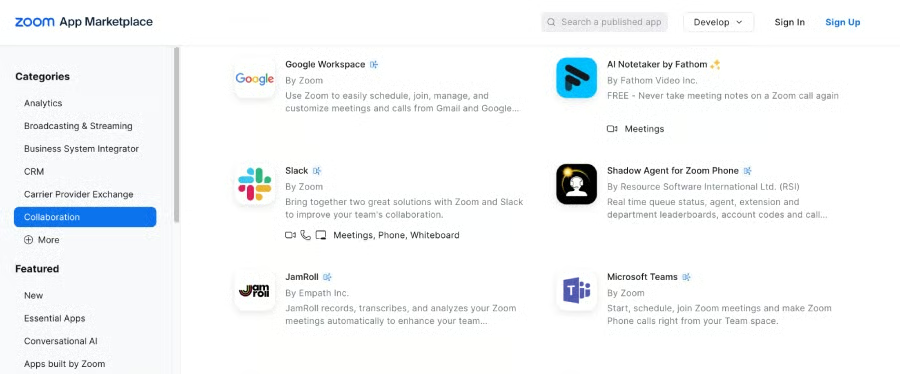
| Zoom’s app marketplace features over 2,400 third-party app integrations | Integrations are mainly within the Zoho Suite (Zoho CRM, Zoho Projects, etc.) with Slack, Gmail add-on, Zia, and Rev AI |
Zoom easily wins the Zoom vs Zoho Meeting match-up for integrations. With over 2,400 third-party apps, Zoom has one of the most integrated video conferencing solutions. The Zoom Marketplace contains extensive business solutions for simplifying your workflow. For example, Zoom has downloadable plugins for Microsoft Outlook and Google Chrome for Google Calendar.
Zoho Suite users will benefit from Zoho Meeting because it offers a seamless experience between the different Zoho applications and tools. For example, link your Zoho Meeting with Zoho Bookings so that when customers book an appointment, they receive meeting details and can simply click to join the appointment.
Best for Security: Tie
| |
|---|---|
|
|
Both Zoom and Zoho Meeting use enterprise-grade security to protect users’ data and conversations. Both platforms offer standard security protocols, such as encryption, TLS, and 2FA. Moreover, they have additional security features like lock meetings and entry and exit notifications, so hosts have more control and awareness of their participants.
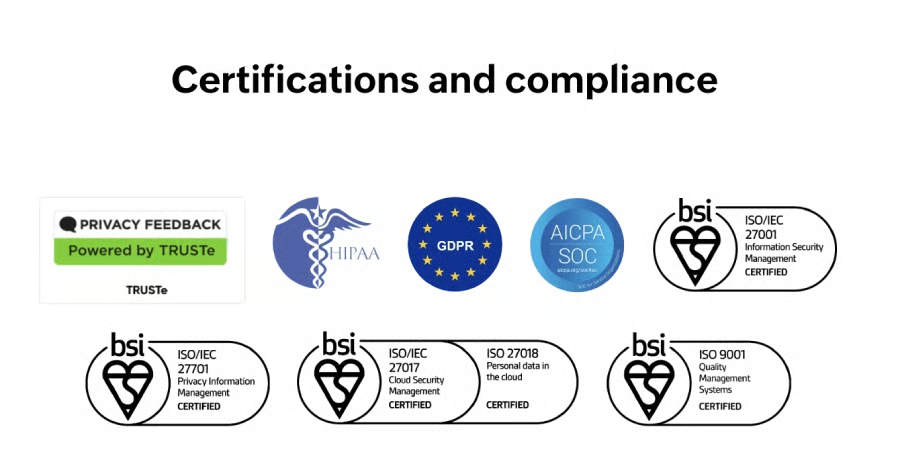
Based on our Zoho Meeting vs Zoom evaluation, both comply with various regulations and security standards, such as the International Organization for Standardization (ISO) 27001, Service Organization Control (SOC) 2 Type II, and CSA Star certification level 2 for Zoom and level 1 for Zoho Meeting.
How We Evaluated Zoom vs Zoho Meeting
We compared Zoom vs Zoho Meeting as video conferencing solutions to see how they differ. Our evaluation focused on the different areas critical to small businesses and essential to virtual communications. Our categories included pricing, video conferencing functionalities, security, ease of use, and third-party integrations.
Here’s a complete breakdown of these factors:
- Pricing: When doing this Zoom vs Zoho Meeting comparison, we evaluated the price points of both platforms. We reviewed the inclusions of paid and free plans. Our team checked whether there were free trials and annual and volume discounts for greater savings.
- General features: This comparison focused on essential conferencing and collaboration features, such as in-meeting chat, participant capacity, and screen and file sharing. Our review also considered each solution’s maximum meeting duration and the availability of mobile and desktop applications.
- Security: Recognizing that virtual meetings must be secure if used for business and professional services, we looked at the level of security offered by Zoho Meeting and Zoom. Key service inclusions we focused on are 2FA, encryption, and guest management and control.
- Expert score: For this comparison, our expert score refers to our evaluation of the providers’ standout features, popularity, and ease of use. We also considered their value for money.
Frequently Asked Questions (FAQs)
Who is Zoom’s biggest competitor?
Zoom’s biggest competitors are Google Meet, Cisco Webex, Microsoft Teams, and RingCentral Video. These are primarily built-in video conferencing solutions of leading UC platforms. To learn more about top providers, check out our list of the best video conferencing solutions for small businesses.
Zoom vs Zoho Meeting: Which is more reliable?
Zoom is more reliable than Zoho Meeting because it offers a better uptime guarantee. Zoom has a service level agreement (SLA) that guarantees 99.999% uptime, while Zoho Meeting provides a 99.99% guaranteed uptime.
Which platform is better for webinars?
Zoho Meeting has dedicated plans for webinars and is cheaper than Zoom’s. It can host up to 5,000 webinar attendees, while Zoom is limited to 1,000 on its Enterprise Plus plan. When comparing Zoho Meeting vs Zoom, the former’s storage is based on a set number of meetings, not file size, which is advantageous for lengthy webinars. Lastly, Zoho Meeting offers unlimited co-organizers so you can have as much help as you need when managing your webinars.
Bottom Line
Video conferencing providers offer helpful and efficient solutions for business communications. Robust platforms save small businesses money by lowering travel costs, improving coordination, and minimizing logistical expenses and preparations. Solutions like Zoho Meeting and Zoom save team members’ time and increase team productivity.
While Zoho Meeting was the cheaper option, Zoom came out on top of this Zoom vs Zoho Meeting battle because of its powerful meeting features and extensive third-party integration. Sign up for Zoom’s free plan and begin hosting meetings instantly; you can upgrade to a paid plan as your business grows and your needs increase.
