







Zoom and Google Meet are popular video conferencing platforms with free workspace plans and collaborative features like screen sharing, meeting recording, and whiteboarding. In this Zoom vs Google Meet comparison, Zoom is ideal for businesses looking for extensive video meeting tools and integrations. On the other hand, Google Meet is a more practical choice, especially for small business owners working within the Google Workspace ecosystem.
After comparing Google Meet vs Zoom, the best use cases for both are as follows:
- Zoom: Best for teams looking for standalone video conferencing software with robust collaboration features, event hosting capabilities, and integrations.
- Google Meet: Best for businesses that use Google Workspace in their daily workflows and prioritize meeting security.
Why You Can Trust Fit Small Business
Zoom vs Google Meet at a Glance
| Zoom vs Google Meet |  |  |
|---|---|---|
| Our Score out of 5 | 4.25 | 4.33 |
| Monthly Starting Price (per User) | $15.99 | $8.40 |
| Free Trial | ✓ | ✓ |
| Free Plan | ✓ | ✓ |
| Video Meeting Tools |
|
|
| Collaboration Tools |
|
|
| Integrations | 2,900+ third-party apps |
|
| Security Features |
|
|
| For More Information | Visit Zoom | Visit Google Meet |
Best Alternatives
While Zoom and Google Meet are popular video meeting platforms, they have limitations that may not meet specific business needs. Whether you need a complete unified communications solution, mobile meeting support, or artificial intelligence (AI) features, check out these Google Meet vs Zoom alternatives:
RingCentral is best known as the leading cloud-based phone system with unified communication features. It supports video meetings, instant messaging, SMS, and fax capabilities, making it an all-in-one app for business communications. RingCentral Video also has a free and upgraded version, which includes content sharing and virtual whiteboards.
GoTo Meeting is a video conferencing software with enterprise-grade security and collaborative features. Unlike providers restricting meeting duration, GoTo Meeting allows unlimited meetings without time limits. Additionally, the commuter mode feature makes it easier to attend virtual meetings on the go or from a mobile device.
Dialpad is a unified communications solution with artificial intelligence (AI) capabilities. Its free version lets you host small-scale meetings, while the upgraded version comes with automated post-meeting summaries and transcriptions.
Best for Pricing: Google Meet
| Google vs Zoom Meet Pricing | | |
|---|---|---|
| Pricing Score | 5 out of 5 | 3.13 out of 5 |
| Free Trial | 14-day free trial for Google Workspace | 7-day free trial for monthly Pro plans; 14-day free trial for annual Pro plans |
| Free Plan | ✓ | ✓ |
| Monthly Price (per user) |
|
|
| Annual Pricing (per user) |
|
|
| Enterprise | Contact sales for 1,000 participant video meetings, attendance tracking, and live-streaming | Contact sales for access to 1,000 participant meetings, live captioning, and visitor management |
| User Limits | More than 300 users require an Enterprise license | 99 users maximum for Pro plans; 10-250 users on Business plans; More than 250 users require an Enterprise plan |
Google Meet wins out in pricing because it comes with a lower starting price, almost half the cost of Zoom’s monthly subscription. Google Meet’s free plan also has a longer meeting length of 60 minutes (20 minutes longer than Zoom). Upgrade to a Google Workspace subscription for longer meetings with more extensive features, including essential features like noise cancellation and meeting recording.
At the same time, Zoom’s Workspace plans stand out because they prioritize video conferencing tools, even with a free subscription. For example, Zoom’s Basic plan offers meeting recordings and breakout rooms, while Google Meet doesn’t offer these features until its second-tier subscription plan.
Additionally, because Google Meet is included as part of Google’s larger ecosystem, it offers a suite of unified communication tools that are more beneficial for Google users. So, while Google Meet is more affordable, consider whether you want a straightforward video conferencing platform or a suite of workspace tools.
Best for General Features: Zoom
| Zoom vs Google Meet | | |
|---|---|---|
| General Features Score | 5 out of 5 | 4 out of 5 |
| Meeting Participants |
|
|
| Meeting Length | Free plan: Up to 40 minutes Paid plans: Up to 30 hours | Free plan: Up to 60 minutes Paid plans: Up to 24 hours |
| Meeting Recording | ✓ | ✓ |
| Breakout Rooms | ✓ | ✓ |
| Team Chat | ✓ | ✓ |
| Whiteboarding | Zoom Whiteboards | Integrations with Figma, Lucidspark, and Miro |
| Artificial Intelligence | Meeting summaries and note-taking with Zoom AI Companion | Live transcriptions and post-meeting summaries with Google Gemini |
| Live Transcription | ✓ | ✓ |
| Screen-sharing | ✓ | ✓ |
| SLA Uptime | 99.999% | 99.9% |
Zoom has the edge over Google Meet for virtual meetings because it is a full-featured video conferencing software with enhanced team collaboration. While users must purchase a higher-tier plan to access many of Google Meet’s features, Zoom provides collaborative tools like breakout rooms, multi-screen sharing, co-annotation, and remote keyboard and mouse control on the free and paid plans.
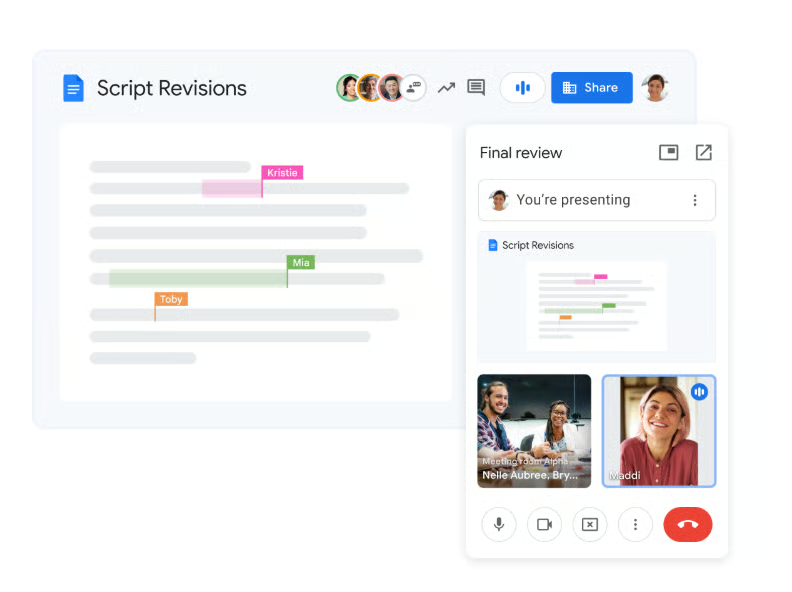
In comparison, you must use Google Meet with Google Workspace apps to access its collaborative features. With picture-in-picture mode, you can access a Google Meet call while working with team members on another Google app in a different window. Additionally, while Zoom includes a whiteboard feature, Google Meet requires integrations with Figma or Miro to collaborate with virtual boards.

Although both providers support live-streaming large-scale events, Zoom offers Webinar plans for virtual meetings and events with over 10,000 participants. However, both providers stand out when it comes to integrating AI. Zoom’s AI Companion and Google Gemini can provide high-quality live transcriptions of meetings with notes and summaries, so you never miss an important detail.
Best for Ease of Use: Tie
| Zoom vs Google Meet | | |
|---|---|---|
| Usability Score | 5 out of 5 | |
| Mobile Application | ✓ | ✓ |
| Desktop Application | ✓ | ✓ |
| Web Browser Compatibility |
|
|
| Accessibility Features |
|
|
Zoom and Google Meet are tied for ease of use because they are well-known for being simple to set up and use, especially for those new to remote collaboration. Both platforms offer video-conferencing features on mobile and desktop applications, which are compatible with most major web browsers and mobile phones. This ensures that you can log into your meeting from any device.

Additionally, Zoom and Google Meet offer features that make their platforms more accessible to all users. For example, Zoom provides manual and automated closed captions to help users follow along with meeting dialogue. Google Meet also offers captions and transcriptions for live meetings and recordings so you can review a conversation after the meeting ends or translate a speaker’s presentation into dozens of languages, like English, Spanish, or Mandarin.
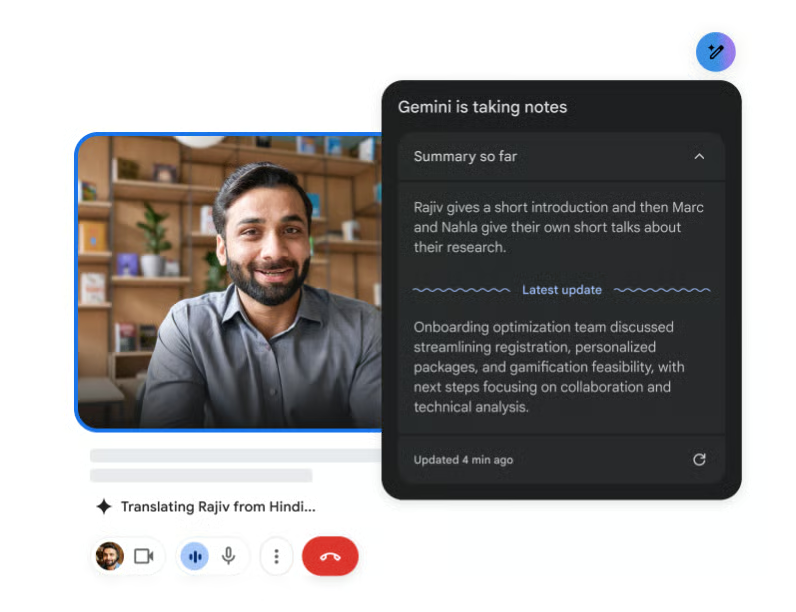
The interface of both platforms allows you to customize your screen and settings to create the best experience for your needs, such as pinning speakers on a call or using gallery view to see all meeting participants. From changing virtual backgrounds to joining a meeting, users can easily understand how to navigate these apps with little to no learning curve.
Best for Integrations: Zoom
| Zoom vs Google Meet | | |
|---|---|---|
| Key Integrations Score | 4.5 out of 5 | 3.5 out of 5 |
| Third-Party Integrations | 2,900+ third-party apps |
|
| Application Programming Interface (API) | ✓ | ✓ |
| Software Development Kit (SDK) | ✓ | ✓ |
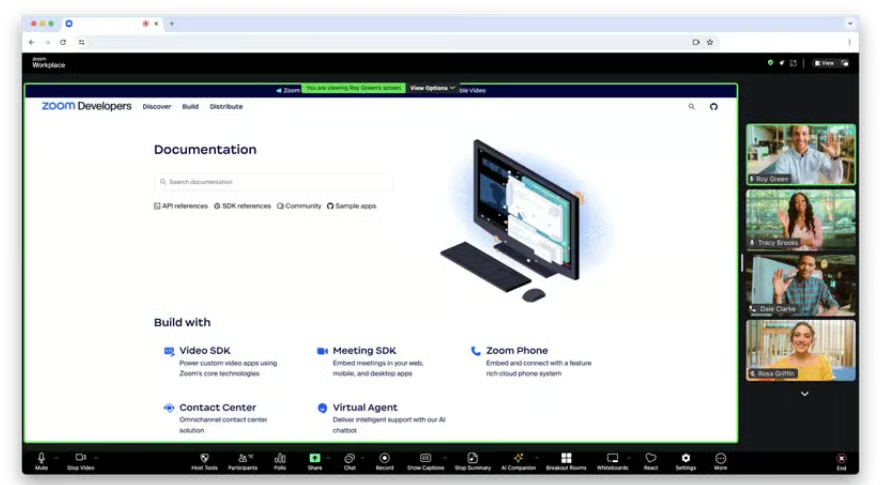
With over 2,900 partner apps, Zoom is the clear winner in the integrations category. Whether you’re using software for customer service, project management, or productivity, there’s a good chance you’ll find all of them in the Zoom App Marketplace. You can also develop integrations with software development kits (SDKs) and application programming interfaces (APIs). For example, Zoom Meeting SDK provides the necessary tools to embed Zoom meetings or webinars into your business website.
In comparison, most of Google Meet’s integrations are limited to Google Workspace products like Gmail, Drive, Docs, Sheets, and Google Calendar. Google has also partnered with some providers to offer additional collaborative tools in the Google Meet platform. For example, you can integrate third-party apps like Confluence to collaborate on projects. Like Zoom, you can embed an app into Google Meet using Google Developer to configure SDK add-ons.
Best for Security: Google Meet
| Google Meet vs Zoom | | |
|---|---|---|
| Security Score | 4.5 out of 5 | 3.75 out of 5 |
| End-to-end encryption (E2EE) | ✓ | ✓ |
| Two-step verification (2FA) | ✓ | ✓ |
| Single sign-on (SSO) | ✓ | ✓ |
| Meeting passcodes | ✓ | ✓ |
| Meeting recordings | Up to 5TB of secure cloud storage | Local & 5GB of cloud storage across plans |
Although Zoom and Google Meet share some of the same security features, Google Meet stands out for its meeting security. All security controls are enabled by default, including counter-abuse protections like anti-hijacking measures for web meetings. Users with high-risk accounts can enroll in the advanced protection program to shield against phishing and account hijacking.
Zoom and Google Meet also provide end-to-end encryption of video meetings, but enabling encryption with Zoom does not give you the same access to video conferencing tools. For example, enabling encryption removes most collaboration and accessibility features, such as live transcription, polling, whiteboards, and access to the AI companion.
Google Meet is also better if you simply need more cloud storage. While Zoom provides 5GB of secure cloud storage, Google Meet offers up to 5TB of pooled storage across users, which benefits businesses that need to store or archive meeting recordings and transcriptions.
Expert Choice: Google Meet
| Google Meet vs Zoom | | |
|---|---|---|
| Expert Score | 4.5 out of 5 | 4 out of 5 |
| Customer support | Standard, Enhanced, and Premium Support packages for Google Workspace | 24/7 global support for all plans with Premier support options |
| User reviews | 4.13 average | 3.5 average |
| Learn more | Read our Google Meet Review | Read our Zoom Review |
For the expert score, I compared Zoom and Google Meet by assessing customer support, user reviews, and the value for small business owners. While Zoom offers robust customer support features and 24/7 access to its global support center, Google Meet offers more affordable pricing and a better user experience and reviews.
Click the tabs to learn which video conferencing solution you should choose based on customer support, user reviews, and key features.
Customer Support
When comparing customer support, Zoom and Google Meet offer multiple support packages depending on your business needs. For Zoom users, the level of support available corresponds to the subscription plan, with higher-tier plans receiving more support. While users on the Basic plan have access to the Zoom community knowledge base and a chatbot, Business users can submit web tickets and receive live chat support.
Premier support packages offer dedicated account managers, technicians, and priority response for businesses that want more hands-on customer service. In contrast, accessing support for Google Meet is handled by Google Workspace and requires administrative permissions. Workspace accounts offer Standard support for all users and Enhanced or Premium support as an add-on service for those who want 24/7 care for high-priority cases.
User Reviews
Although both Zoom and Google Meet are popular and user-friendly platforms among small business owners, Google Meet has more favorable customer reviews than Zoom. Some small business owners note that Zoom can be more resource-heavy than other platforms because of its overabundance of features. While these features are excellent for large collaborative teams, they are not always necessary for individual business owners or small teams.
While some users critique Google Meet for having fewer features than other popular video-sharing platforms, they appreciate its simplicity and ease of use. Especially if you already have a Gmail account, upgrading to Google Workspace provides all the features you need to communicate with clients and coworkers.
Therefore, solopreneurs and small business owners who want to upgrade from a free Google Meet account or access more premium meeting features should choose one of the Google Workspace Business plans.
Factors to Consider When Choosing Zoom vs Google Meet
Reviewing your business needs and background is an essential first step in the decision-making process when choosing between Zoom and Google Meet. Specifically, you should consider what type of meetings you want to host, on what platforms, and how accessible your meetings will be for guests and team members.
Although free plans can be an attractive option, the primary difference between Zoom and Google Meet exists in the features available with a paid subscription, so I have included a list of key features below that you should consider before making your final decision:
- Meeting capacity: Every virtual meeting platform differs in the length and number of people that can participate in a conference call. Generally, free plans have a smaller meeting capacity and are sufficient for occasional one-on-one meetings. However, choose a paid subscription if your business regularly hosts large team meetings or if you need to take long calls with clients.
- Data security: Depending on your industry, there are different security standards for making video calls. For example, healthcare providers require a HIPAA-compliant video-conferencing platform. However, most free plans do not have these permissions, so consider a paid plan to access these features. Additionally, you should select a provider and plan that offers security features like two-factor authentication (2FA), end-to-end encryption (E2EE), and other certifications that correspond to your business and protect the privacy of your virtual meetings and data.
- Cloud storage: For businesses that save meeting recordings or notes for future reference, consider a provider and plan with scalable cloud storage. In contrast to local storage, which is constrained by the storage capacity of your device, cloud storage can grow with your business and provide a more secure method of accessing and sharing files.
- Event planning: If you plan to host events with guests from outside your organization, consider a provider or plan with webinar features. For example, Zoom offers webinar and single event plans for hosting large-scale meetings with features like live streaming and guest management.
- Workspace integrations: Although Zoom and Google Meet provide video conferencing software, they offer very different integrations. Zoom has thousands of additional integrations and tools. At the same time, Google Meet provides access to Google products and a small number of third-party apps. So, choose a video conferencing platform that provides access to the types of workspace tools you need to get the most out of your plan.
Methodology: How I Evaluated Zoom vs Google Meet
I compared Zoom’s free and paid plans to Google Meet’s packages. I also tested each software and checked user feedback on popular review websites. Then, I evaluated each app using six criteria: pricing, features, ease of use, integrations, security, and expert score. Here’s a complete breakdown of these factors:
I compared the monthly per-user costs for Google Meet and Zoom and the features accessible at different tiers. I also checked for the availability of a free plan, free trial, and discounts for annual billing.
I looked at capabilities essential to a video conferencing service, such as screen sharing, meeting recordings, and breakout rooms. I also checked which provider has a larger participant capacity and longer meeting duration.
I explored how each platform supports third-party integrations, including the number and types of supported software. I also checked if the provider enables users to develop integrations through SDK and API.
I assessed the quality of each platform’s mobile and desktop applications by determining how easy or complicated it was to perform various tasks, such as scheduling a meeting or starting a video call. I also evaluated each system’s ease of setup and installation.
I compared each provider’s security features by focusing on their data privacy standards for accounts, video meetings, and recording storage. Specifically, I looked for the availability of two-step verification, end-to-end encryption, or single sign-on (SSO). I also reviewed the options for meeting locks and passwords and access to secure cloud storage for meetings and recordings.
I compared each platform by examining its total costs and features, Then, I analyzed user reviews to evaluate both platforms’ overall popularity. Finally, I assessed the quality and capacity of user support, such as customer service features, community forums, and knowledge base accessibility.
Frequently Asked Questions (FAQs)
Which is better: Google Meet or Zoom?
Whether Google Meet or Zoom is better depends on your business needs. Consider Google Meet if you want a suite of workspace tools that includes video conferencing features. However, if you want a straightforward video conferencing platform with integrated team collaboration features, then choose Zoom.
Why do companies use Zoom instead of Google Meet?
Companies that choose Zoom instead of Google Meet often have specific requirements for meeting size, team collaboration, and event planning. One primary difference between Zoom and Google Meet is access to webinar hosting and visitor management. Therefore, Zoom is better for companies that need to host large-scale meetings or events.
Does Google Meet free have a time limit?
Yes, Google Meet has a time limit of 60 minutes per virtual meeting with up to three participants on a call. If you need to host longer meetings, consider upgrading to a Google Workspace plan, which provides 24-hour meetings on each plan.
Bottom Line
In this Google Meet vs Zoom article, I found that both are reliable video conferencing solutions. They offer all the essential features for hosting video meetings and collaborating with team members. Each also provides varying levels of storage and security that cater to specific business communication needs.
While Zoom outshines Google Meet in terms of pricing, general features, and integrations, Google Meet stands out for its affordable pricing and meeting security. So, while I would recommend Google Meet for small business owners, you should consider Zoom if you need to create customized and immersive meeting experiences.
