







This Zoom vs Skype comparison found that both popular video conferencing platforms offer reliable virtual meetings and collaboration features, such as background animation and screen sharing. However, Zoom beats Skype because it provides more productivity features and a higher participant capacity, which is essential to business operations. Skype, on the other hand, is an excellent solution for solopreneurs and small teams looking for a straightforward solution.
Based on our comparison, the best use cases for Zoom vs Skype are as follows:
- Zoom: Better for growing businesses needing a powerful video conferencing solution
- Skype: Better for a simple-to-use and free virtual meeting platform
For businesses looking for a service with robust call management and advanced analytics, all-in voice-over-internet-protocol (VoIP) options are available. We found a great cloud-based service provider that offers message, video, phone, and contact center services. It has niche features like team messaging, automatic call recording, automatic call recording, and number porting.
- RingCentral: Best for companies in need of robust integrations with third-party applications
- Zoom vs Skype at a Glance
- Best for Pricing: Zoom
- Best for Video Conferencing: Zoom
- Best for Participant Capacity: Zoom
- Best for Security: Skype
- Best for Business & Productivity Features: Zoom
- Best for Customer Support: Skype
- Best for Ease of Use: Skype
- Frequently Asked Questions (FAQs)
- How We Evaluated Zoom vs Skype
- Bottom Line
Zoom vs Skype at a Glance
 |  | |
|---|---|---|
| Monthly Price(per User) | $14.99 for paid plans | Free |
| Free Trial | 30-day Zoom Rooms trial | ✕ |
| Free Plan | ✓ | ✓ |
| Maximum Meeting Duration | 40 minutes on the free plan and 30 hours for paid plans | 24 hours |
| Video Participant Capacity | 1,000 | 100 |
| Team Messaging & Chat | ✓ | ✓ |
| Scalability | ✓ | Limited |
| International Calling | ✓ | ✓ |
| Mobile & Desktop Apps | ✓ | ✓ |
| For More Information | Visit Zoom | Visit Skype |
While Zoom and Skype are two leading video conferencing solutions, there are better options if you need advanced call management solutions and team collaboration capabilities. Companies looking for robust unified communications (UC) solutions with rich integrations, extensive productivity tools, and unlimited domestic messaging and calls are better off with an alternative service provider.
A few Skype and Zoom alternatives include:
- RingCentral: Add advanced call management capabilities with RingCentral’s VoIP platform. It offers video and audio conferencing, team messaging, file sharing, and real-time analytics. Learn more about this provider in our expert RingCentral review.
- Nextiva: Consider this provider if you want business collaboration software that keeps all communications and conversations in a single workspace. Our Nextiva review details key features, such as unlimited domestic calls, toll-free minutes, and unmetered internet fax.
- Vonage: Teams looking for a customizable business phone system with collaboration services are better off with Vonage. This cloud-based solution offers over 50 phone features, making it a feature-rich solution. Check out our detailed Vonage review for more information.
Best for Pricing: Zoom
| |
|---|---|
Monthly Plans (per User)*
|
|
*Choose annual billing to save up to 16%.
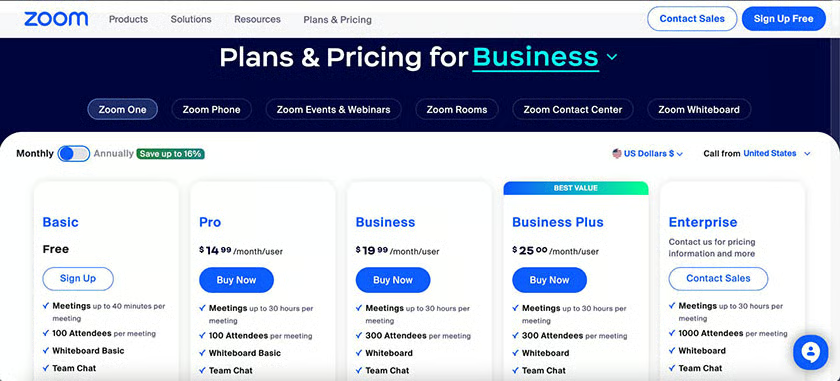
Zoom and Skype offer free plans, but Zoom wins for pricing because its free version has more robust video conferencing and collaboration tools. Zoom lets users pay monthly or annually, allowing small businesses the flexibility to use the service as needed. On the other hand, Skype’s business version comes with Microsoft Teams as part of its business plans. Microsoft 365 business plans only offer annual billing, making the price too steep for some small teams.
Zoom’s free plan already includes features like a whiteboard, team chat, mail, calendar, and 40 minutes per meeting for 100 attendees. If you need more time, simply click the same link after a minute and resume the meeting for another 40 minutes. Choose its higher plans to add more business features, including larger participant capacities, webinars with up to 1,000 participants, and unlimited cloud recordings.
Skype is a free-to-use platform primarily for Skype-to-Skype communications and includes smart messaging, screen sharing, audio, and HD video calls. Premium features like voicemail, short message service (SMS), texts, and calls outside of Skype are available with additional charges. Skype for Business is replaced by Microsoft Teams, a feature-rich solution with monthly plans ranging from $6 to $22 per user.
In addition to meeting and messaging capabilities, Zoom’s business plus plan includes phone features, allowing you to make unlimited monthly internal and outbound calls for $25 per user. With Skype, you’ll need to pay for Skype credits to cover international calls using a monthly subscription or pay-as-you-go. While Skype’s minute rates are relatively cheap, opting for Zoom’s paid plan gives you more value for money.
Zoom’s extensive features and add-ons make the price a worthy investment. Still, if you’re looking for a forever-free plan for internal coordination and occasional long-distance calling, Skype is enough for your needs. On a separate note, Skype for Business was discontinued in July 2021 and became a part of Microsoft 365. However, Skype for consumers is still free and available for download.
Best for Video Conferencing: Zoom
| |
|---|---|
| Up to 30 hours of meeting duration, local and unlimited cloud recording, streaming, branding, multi-language captions, waiting and breakout rooms, multi-share, team chat, and virtual backgrounds | Up to 24 hours of meeting duration, smart messaging, call recording, background effects, real-time translation, file sharing, raise a hand, and custom reactions |
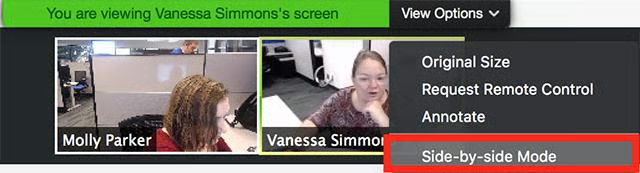
Zoom is one of our recommended best video conferencing software. It outperforms Skype because it’s easy to schedule and join meetings, offers multiple meeting room displays, and has more advanced features than Skype. Although Slack offers basic conferencing features like background blur, screen sharing, and chat, it lacks breakout sessions, whiteboard, and streaming. Zoom provides these features and lets you hold sizable conferences and webinars.
You need a reliable and consistent internet connection for clear call and video meetings. When it comes to video quality, both platforms support 1080p resolution for video conferencing. Skype recommends at least a 1.2Mbps connection up and down for HD video calling, while Zoom recommends 3.8Mbps up and 3Mbps down for 1080p HD video.
Skype uses 1080p, and while 1080p is available on Zoom, this setting is not automatic. Zoom videos are automatically set at 720p, and you have to toggle on the 1080p option on the settings page if you need this feature. Our research indicates that users report Skype suffers from call quality issues like choppiness and lag more often than Zoom.
Best for Participant Capacity: Zoom
| |
|---|---|
| Zoom’s free plan starts with video calls of up to 100 participants, and upgrades get that number up to 1,000 | The free version limits users to 100 participants but increases to 300 with a Microsoft Teams plan |
When it comes to meeting participants, Zoom is hands-down the best for teams looking for large meeting capacities, as it can host up to 1,000 participants. Zoom’s free plan accommodates video calls with up to 100 participants for a maximum of 40 minutes. Its enterprise plan lets you host unlimited meetings and webinars for up to 500 or 1,000 attendees.

Skype’s standard video conferencing tool only accommodates a maximum of 100 participants. You must buy a paid Microsoft Teams subscription to host larger meetings. This will allow you to host up to 300 attendees. Skype’s participant limits pale in comparison to Zoom. However, when comparing their free plans, Zoom and Skype accommodate the same number of participants, but Skype is better for longer meetings.
Best for Security: Skype
| |
|---|---|
| Security features include end-to-end encryption (E2EE), 256-bit encryption, TLS (transport-level security) encryption for messages, and AES (Advanced Encryption Standard) between Skype clients | Security features include meeting TLS encryption, attendees waiting rooms, participant activities suspension, participant removal, recording controls, audio signature, meeting passcode, join by domain, and meeting lock |
Both Zoom and Skype use enterprise-grade security to protect users’ data and conversations, but Skype wins this battle because of its E2EE. Skype supports E2EE for all video meetings, but Zoom only offers TLS encryption security and AES 256 encryption. Further, all Zoom meetings are encrypted by default, but unlike Skype, E2EE is optional.
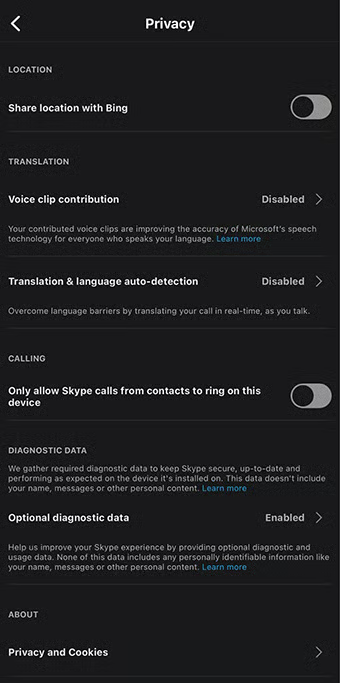
Skype’s server includes various security features, from server-to-server authentication and role-based access control to centralized configuration data storage. As a Microsoft solution, it was designed and developed following the Microsoft Trustworthy Computing Security Development Lifecycle (SDL). Skype uses E2EE to protect voice and video calls, uses a private profile ID needing user permission, and a proprietary encryption algorithm.
Skype’s been in the market much longer than Zoom and has had fewer security issues than the newer platform. However, while Zoom had many security issues, the platform has taken steps to fix many of its most significant security flaws. If you’re seeking secure virtual meeting solutions, check out our list of the best Health Insurance Portability and Accountability Act of 1996 (HIPAA)-compliant video conferencing solutions.
Best for Business & Productivity Features: Zoom
| |
|---|---|
| Offers unlimited meetings for up to 1,000 attendees for 30 hours in the Enterprise plan, robust video conferencing, team chat, mail and calendar sync, company branding, Zoom phone, and webinars | Accommodate up to 100 participants and comes with audio and HD video calling, smart messaging, screen sharing, call recording with subtitles, international calling, and private conversations |
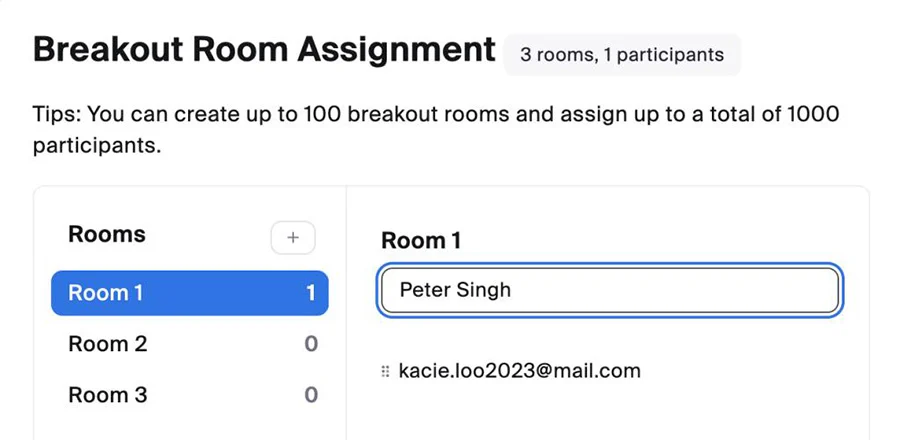
Skype and Zoom have similarities like screen share, but the latter wins by a mile thanks to integrated tools like breakout rooms and admin controls. Its free plan comes with preloaded backgrounds, company branding, and social media streaming, making it a better business tool than Skype. Further, large meeting and webinar add-ons indicate Zoom is designed for both small teams and larger organizations, offering the scalability that Skype lacks.
Zoom integrates with popular customer relationship management (CRM) systems, analytics, and project management apps like Asana, Slack, and Google. If your business wants to create custom connections with applications, Zoom has an open application programming interface (API) system. Zoom’s App Marketplace has virtually unlimited integrations that help small businesses expand their communication stack’s feature set.
Skype has robust third-party integrations, but its claim to fame is its compatibility with other Microsoft products. Since Microsoft owns Skype, the communications platform works seamlessly with other Microsoft 365 productivity tools like Outlook email.
Best for Customer Support: Skype
| |
|---|---|
| Offers unlimited meetings for up to 1,000 attendees for 30 hours in the Enterprise plan, robust video conferencing, team chat, mail and calendar sync, company branding, Zoom phone, and webinars | Accommodate up to 100 participants and comes with audio and HD video calling, smart messaging, screen sharing, call recording with subtitles, international calling, and private conversations |
Zoom has extensive customer support services, but enterprise-grade support options and elite technicians aren’t a daily requirement for small business communications. For Skype, the help center is the main mode of support. It has user guides, FAQs, and community threads, which are helpful for small teams looking for information on basic settings and configurations. You can use Microsoft’s virtual agents or contact the support team for more advanced inquiries.
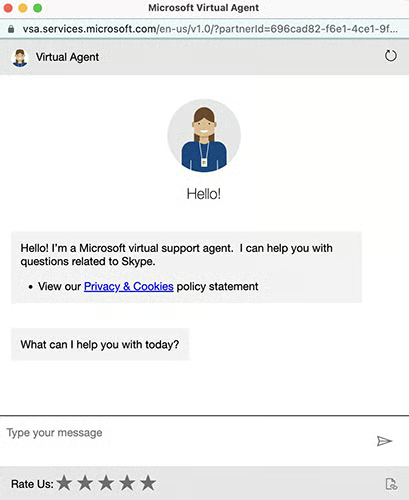
Zoom’s customer service options offer everything—from community resources and chatbots to priority response and global technical account teams. All Zoom users have access to the knowledge base, community resources, and chatbot services, but options vary depending on whether you’re a user, account owner, or administrator. Pro and business plan owners and administrators can access live chat, live phone support, and agent video meetings.
There is a minimum monthly plan subscription to access these advanced support services that start at $50 per month. Zoom also offers two premiere support plans, Premier and Premier Plus. Both plans have 24/7 global access, chat, web ticket, and phone support. The Premier Plus plan has technical account managers, service level agreements, and assigned elite technicians. There is an additional fee for the services, but prices are not published on the website.
Best for Ease of Use: Skype
| |
|---|---|
|
|
Both apps are straightforward, but Skype wins by a narrow margin because it usually takes one click to launch a feature or join a call. Upon signing into the app, Skype displays your message inbox, and you can click on the contact you want to connect with. You can launch a meeting or send an instant message. On the other hand, Zoom’s main page displays all information and settings, but it focuses on your meeting schedule.
Skype also has a long history as a consumer app, making it a more widely known and recognized software. While Zoom has skyrocketed to the top as one of the leading video conferencing platforms, Skype has a solid user base thanks to its free-to-use software and ease of use. This platform is familiar to many, significantly reducing the learning curve should you adopt this software.
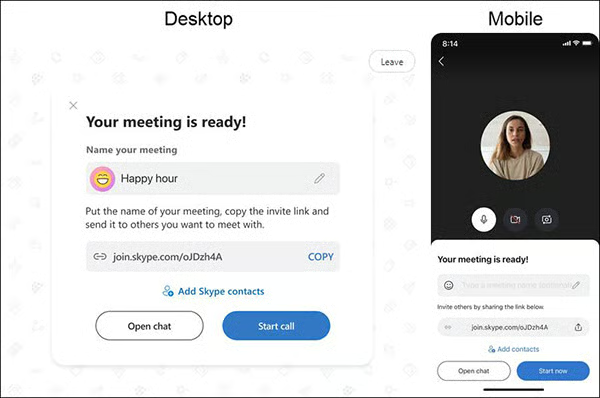
Both apps make starting and joining meetings simple. The clean and intuitive designs are easy to navigate, even for beginners. All of Zoom’s essential controls are at the bottom of the screen in the meeting room. It also has a customizable control panel that can be removed or minimized when you don’t need it.
When setting up a meeting, both Skype and Zoom hosts generate a unique link with meeting details that can be shared with invited participants. Best of all, neither platform requires software downloads to participate in meetings.
Frequently Asked Questions (FAQs)
What are the limitations of video conferencing?
There are two main drawbacks to video conferencing. First, it lacks the personal connection and body language cues of a face-to-face conversation. Secondly, virtual meetings depend on technology, particularly internet connection and meeting equipment like headphones and high-quality cameras.
To mitigate these concerns, use conferencing software with robust interaction features like annotation and HD video. Also, using compatible equipment in good working condition is best to minimize connectivity and audio-visual issues.
What is a video conferencing bridge?
A conference call bridge creates a shared virtual space for participants to communicate via phone. Participants can enter the meeting room via mobile, landline, or desktop phone. They can also join via the meeting link on their smartphone or computer.
How does video conferencing help in communication?
Video conferencing offers an alternative to face-to-face meetings, which has helped strengthen relationships, streamline collaboration, and save valuable time and resources. It removes physical barriers to meetings by allowing participants to convene regardless of location. Participants can still see each other’s facial expressions and body language using cameras and HD video.
How We Evaluated Zoom vs Skype
In comparing Zoom vs Skype, we considered the most common features small business owners look for when choosing a communications solution. We looked at pricing, general features, video conferencing, and expert score. Here’s a complete breakdown of the factors we considered in this Skype vs Zoom comparison:
- Pricing: We compared monthly per-user costs for Skype vs Zoom and the features across different plans. We also looked at the availability of a free plan, free trial, and discounts for annual billing and volume purchases.
- General features: In our Zoom versus Skype comparison, we focused on the features that matter to small businesses, such as meeting duration, productivity tools, and customer support. Since online platforms are used for internal and external communications, we also evaluated how easy each platform is to use.
- Video conferencing: When discussing Skype or Zoom, its main purpose is often video conferencing, so we focused on each platform’s virtual meeting capabilities. We looked at each provider’s range of interactive features and video quality.
- Expert score: The expert score is based on our analysis of each product’s value. We considered its feature set, quality of customer support, and usability. We also reviewed verified user feedback to determine the overall popularity of both platforms while considering our own experiences.
Bottom Line
When comparing Zoom vs Skype, both offer similar features small businesses and professionals require for daily business communications. Zoom is a more robust business solution ideal for small to large companies needing a scalable solution with basic and advanced collaboration features. Skype is better for solopreneurs and small teams looking for a free platform for internal communications. Sign up for Zoom’s basic plan and see if it suits your business.
