





.jpg?w=288)

Shoppers are moving from short keywords to full questions. Last year, someone might type “best laptop backpack” and click a few links. Today, many people use an AI tool and ask, “I ride the train daily and need a water-resistant 20L backpack that fits a 16-inch laptop under 100 dollars. What should I buy?” That shift is why AI search for ecommerce matters: same buyer intent, different input, and new rules for how results are created.
The scale of this change is already measurable. A National Bureau of Economic Research (NBER) study revealed ChatGPT activity estimated that about 2% of the chatbot’s 2.5 billion daily conversations — roughly 50 million every day — involve shopping-related queries. That means millions of purchase decisions are now influenced by AI tools before shoppers ever reach a store’s website.
If you run a small store, this shift can feel overwhelming. I get it. I learned search engine optimization (SEO) to make my site show up, so adding something new sounded frustrating. The good news is that the SEO basics still help. I’ll walk you through a simple plan you can follow without deep technical skills: what to check, what to add to product pages, and how to measure progress so your store appears in AI answers and increases visibility.
What is AI search optimization?
Before the steps, I want to align on terms. When I say, “AI search optimization,” I mean making your products and pages easy for large language models (LLMs) to understand, cite, and recommend. Traditional SEO still matters for fast pages, helpful content, and solid links. AI adds a second goal: being used as a trusted source inside the answer.
Traditional SEO vs AI search optimization
Traditional SEO still matters for speed, content quality, and links. AI search adds a second goal: being used as a source inside answers. Here is a quick side-by-side that shows where they differ so you can keep your SEO basics while adding what AI need
| Aspect | Traditional SEO | AI Search Optimization |
|---|---|---|
| Goal | Rank higher on SERPs | Be cited in AI answers |
| Target | Ranking algorithms | LLMs that parse and summarize content |
| Matching | Keywords | Intent and semantic meaning |
| Structure | Page-level tweaks | Schema, answer boxes, FAQs, product feeds |
| Visibility metric | CTR and organic traffic | AI citations and implied mentions |
| Scope of proof | On-site content | On-site plus reviews, comparisons, forums, and feeds |
Read also: SEO for Ecommerce Websites: The Ultimate Beginner’s Guide
How online businesses appear in AI search
Think of AI as a research helper for shopping. It scans public pages, forums, review sites, and buying guides, then compiles what it finds into one answer. To be considered, I make sure my public pages are open to reputable crawlers in robots.txt
Instead of a plain list of links, AI blends context and recommendations. It may reflect the shopper’s conversation, summarize third-party reviews, and sometimes hand off to checkout inside the assistant.
Here are the common ways a store can appear:
- Product card: An image and title that links to your product page, often with a short reason it was recommended.
- Curated list: A concise roundup with quick explanations and simple tags such as “budget pick” or “good for travel.”
- Local pack: For nearby intent, a map or list with a short blurb, hours, contact info, and a link to your site.
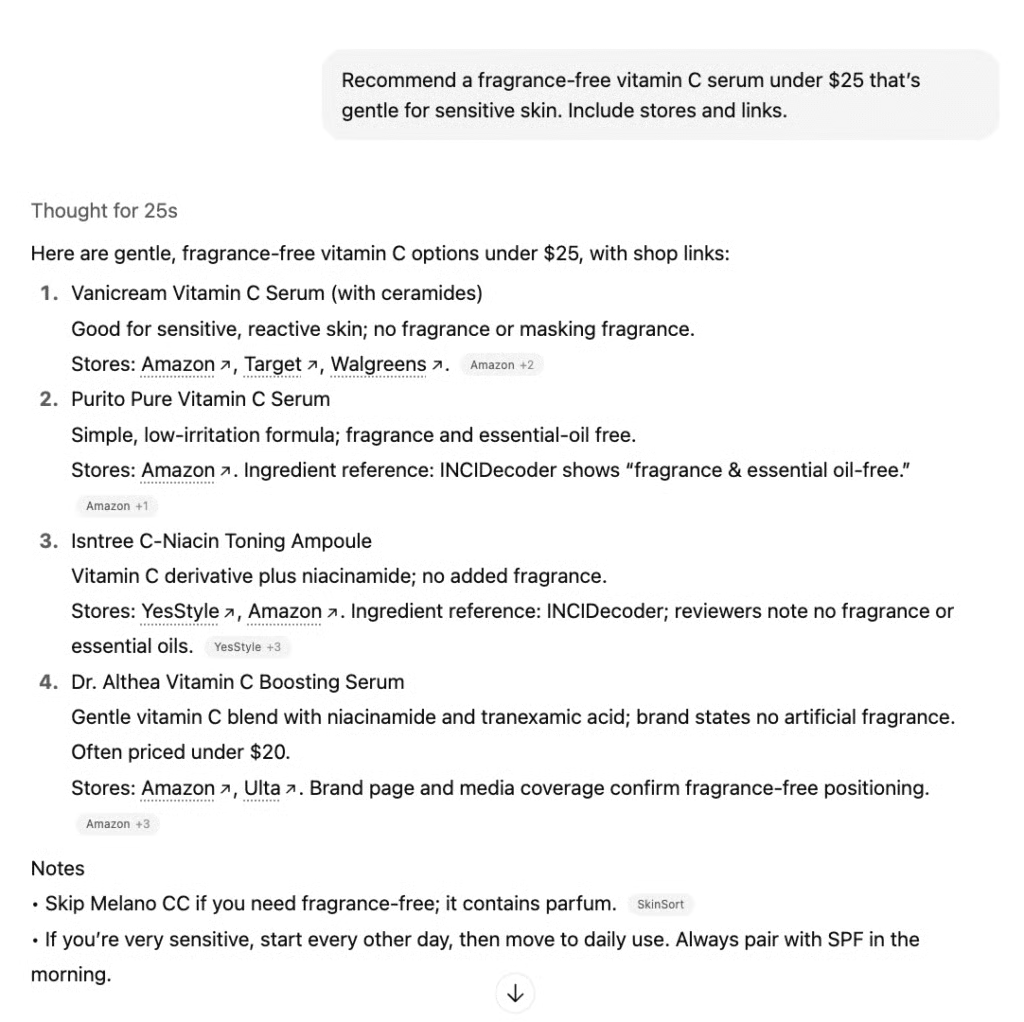
I asked for a fragrance-free vitamin C serum under $25 for sensitive skin. The AI returned a short list with one-line reasons and store links for each pick.
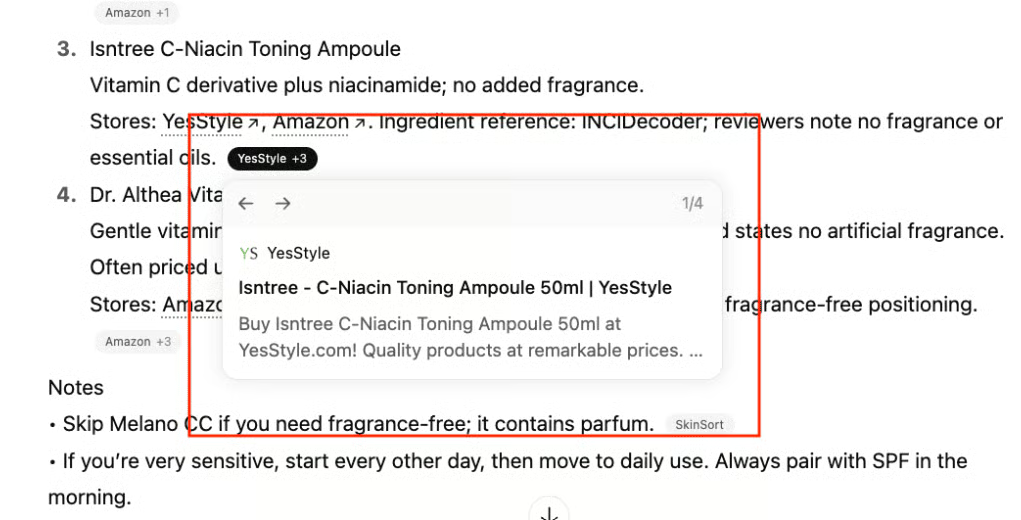
I clicked the “YesStyle +3” badge to preview the source. The card confirms the product and merchant before I leave the page.
How to optimize your ecommerce site for AI search
Now that we know how stores appear in AI search, here is a simple plan to make your products easy to feature.
I ordered the steps for quick wins: confirm structured data, check crawl settings, answer common questions, keep details current, build off-site proof, set up merchant feeds, strengthen visuals, and measure results. Most of this is available in Shopify, WooCommerce, and BigCommerce with basic settings and light edits. Start with your top products and work down the list.
Step 1: Confirm structured data on product pages
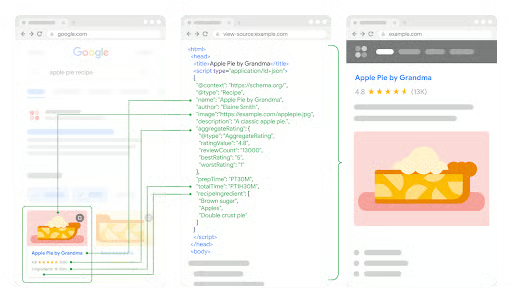
AI and search engines read two things on a page: the words a shopper sees and the “labels” machines read. Those labels are called structured data or schema. They sit in a small code block and tell machines “this is the product name,” “this is the price,” and “this item is in stock.” You do not need to write code. You just need to check that the labels are there and match what is on the page.
Take a look at the image below: The image shows three views of the same page: the search result on the left, the structured data in the middle, and the normal page on the right. When labels are complete and accurate, AI can show the right title, image, rating, price, and availability. For products, the key labels are Product and Offer.
Each of your product pages should include the following information:
- Product name and a short description
- Price and currency
- In-stock or out-of-stock status
- Customer reviews or star rating if available
- Size or dimensions
- Color or variant
- Return or exchange policy
Do this quick check: Open a top product page. View source and search for application/ld+json. Look for “@type”: “Product” and “Offer”. Make sure the values match the page title, image URL, price, and availability. Run the page in Google’s Rich Results Test to catch errors. Fix missing fields in your product editor or theme. Recheck.
Step 2: Review AI crawlability settings and add llms.txt if available
Crawlers decide whether your products appear in AI results. Make sure public pages are allowed, private areas are blocked, and key URLs are easy to find. Some AI crawlers don’t run JavaScript reliably, so keep core product details in the initial HTML.
- Check robots.txt. Allow public pages; disallow private paths like /admin/ and /cart/. List your sitemap URL.
- Avoid blanket blocks of reputable crawlers (Googlebot, Bingbot, OAI-SearchBot, ChatGPT-User, PerplexityBot, Perplexity-User).
- Optionally add llms.txt at your site root with links to top categories, best sellers, FAQs, returns, shipping, and your about page.
- Load a product page with JavaScript disabled. If title, price, availability, images, or schema vanish, ask your developer about server-side rendering or prerendering.
Here’s how you can do it in the most popular ecommerce platforms:
- Shopify: Adjust robots.txt.liquid if needed; sitemap is automatic; confirm schema in your theme/app.
- WooCommerce: Manage robots and sitemap via an SEO plugin; WooCommerce outputs product schema.
- BigCommerce: Robots and sitemap are generated; extend schema as needed.
Step 3: Optimize for conversational, long-tail queries
Shoppers ask specific questions about budget, size, material, or use case. Answer them on the page so AI can match your products to those needs.
- Add a short FAQ to key product pages or a central FAQ page.
- Place a two-sentence answer under major headings.
- Use real questions from support or reviews.
- Call out constraints like budget, size, allergy-safe, or travel-friendly.
Here’s an example:
Question: “Backpack for weekend trips under 150 dollars?”
Answer: “This 35L pack fits weekend trips and weighs under 2.5 lb. It includes a hip belt and rain cover and is usually under 150 dollars.”
Step 4: Keep your website updated
Fresh, accurate pages build trust and help AI include your products. You do not need to rewrite often. I set a simple monthly check so details stay true to what I actually sell. Here’s what the schedule looks like:
- Week 1: Check top sellers for price, stock, specs, and photos.
- Week 2: Review new arrivals; fix missing images, size charts, or variant data.
- Week 3: Update FAQs and policies (shipping, returns, warranties). Add or refresh the “updated” date on key pages.
- Week 4: Spot-check categories with lots of returns or questions. Redirect discontinued SKUs to the best alternative.
Here are some quick checks that save me from headaches:
- Compare the price and availability on the page with your product feed (Google/Microsoft). They should match.
- If an item is out of stock, make sure the page suggests similar products.
- After big changes, re-validate schema in Google’s Rich Results Test so labels still match the page.
I keep a tiny change log (date + what changed). It makes it easy to troubleshoot if AI shows an old price or image.
Step 5: Strengthen off-site visibility, reviews, and comparisons
AI summarizes what others say about you across the web. The more recent, consistent, and positive those mentions are, the more likely your products show up.
- Ask for reviews on trusted third-party sites and on your product pages. Add a simple request in order confirmation and delivery emails.
- Pitch honest roundups or comparisons to niche blogs or creators. Offer samples and clear product facts.
- Join useful threads on Reddit or Quora. Be helpful first; link only when it truly answers the question.
- Keep your details consistent in Google Business Profile and Yelp (name, address, hours, URL).
- Watch sentiment. If the same complaint appears, fix the issue and politely ask the reviewer to re-evaluate.
What good looks like: A steady flow of new reviews, at least one comparison or roundup mention each quarter, and consistent business details across directories.
Read also: Ecommerce Product Recommendations: Ultimate Guide to Increasing Sales
Step 6: Join merchant feeds and product programs
Feeds place complete product data where AI shopping systems can find it. Start with Google and Microsoft. Add Perplexity and monitor ChatGPT feeds as they expand.
- Google Merchant Center: Title, description, price, currency, availability, image, and GTIN or MPN when available. Schedule regular fetch or use the Content API.
- Microsoft Merchant Center: Submit your catalog via the UI, FTP, or Content API. Use incremental updates for price and stock.
- Perplexity Merchant Program: US-focused. Product cards and in-chat checkout options in some cases. Keep titles, images, and availability current.
- ChatGPT shopping via Shopify: Monitor rollout. Ensure catalog details and pricing are synced.
Here are some tips:
- Keep titles and attributes consistent across platforms.
- Meet image size and quality rules.
- Automate updates if price or stock changes daily.
Step 7: Enrich pages with images and short videos
Clear visuals help shoppers and AI understand products quickly. Cover angles, scale, and real-world use, plus a short demo clip.
- Multiple images per item: front/back, close-ups, a scale shot, and one in-use photo.
- Descriptive alt text that names the product and variant.
- Compress images before upload.
- A 30- to 60-second demo video with captions; encourage customer photos/clips in reviews.
- Plain-English file names (e.g., ceramic-travel-mug-black-12oz-side.jpg).
Don’ forget to measure your AIO efforts
You can track the progress of your AI search optimization (AIO) with simple checks and your existing analytics. Look for two signals: more appearances in AI, and better performance from site search users.
- Run five to 10 realistic shopping prompts in AI tools; note if your brand appears and screenshot results.
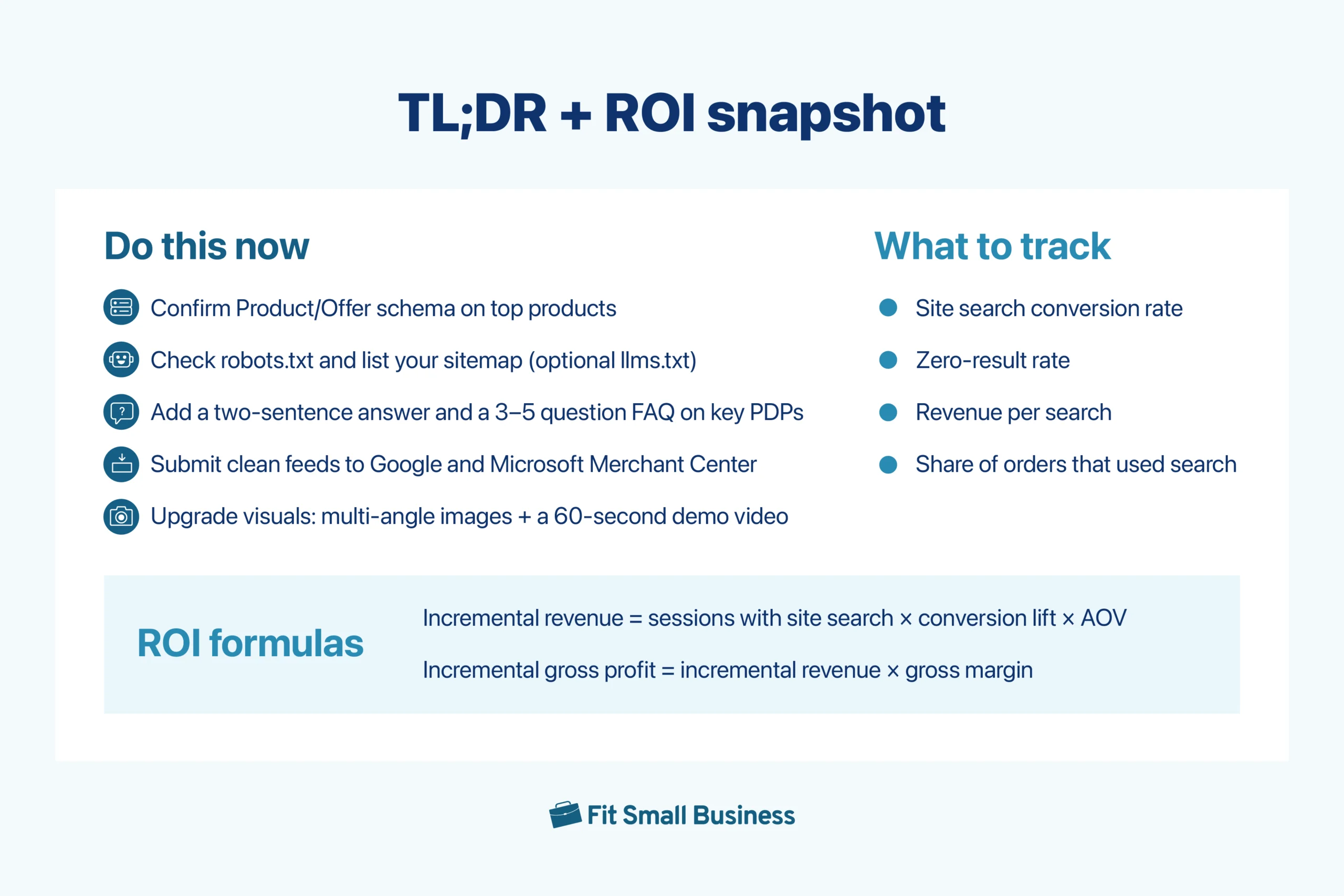
- Track these monthly — site search conversion rate, zero-result rate, revenue per search, and the share of orders that used search.
- Spot-check price and availability on top SKUs; re-validate schema after major changes.
- Log new third-party reviews or mentions and note sentiment trends.
Frequently asked questions (FAQs)
What is AI search for ecommerce?
AI search helps shoppers find the right products using natural questions instead of exact keywords. AI reads your pages and structured data, then recommends items that match a person’s needs, budget, and preferences.
How is AI search different from traditional SEO?
You still need fast pages and clear content, but AI also relies on machine-readable labels like Product and Offer schema and short, direct answers it can quote. The goal is to be included in AI answers, not only ranked as a blue link.
Do I need a developer to optimize my site for AI search?
Not always. On Shopify, WooCommerce, and BigCommerce you can check schema fields, add a short FAQ to key product pages, and confirm robots.txt and your sitemap. A developer helps if your theme hides core details behind JavaScript or you need custom schema.
Is AI search worth it for small catalogs?
Yes. A tight set of steps on your top products can lift findability: confirm Product and Offer schema, add a two-sentence “who this is for” summary, include a brief FAQ, and keep images and prices current.
Do I need an llms.txt file to optimize my site for AI search?
It is optional. Some teams add it to point AI systems to priority pages like categories, FAQs, returns, and shipping. It is low effort and safe to try, but if you skip it, focus on schema, clean HTML, and an updated sitemap.
Bottom line
AI search is changing how shoppers find products, and small stores can benefit by making their product information easily read by bots and easily trusted by customers.
Start with your top 10 products: confirm Product and Offer schema, check robots.txt and your sitemap, add a two-sentence answer and a short FAQ, and upgrade images with a 60-second demo video. Submit clean feeds to Google Merchant Center and Microsoft Merchant Center.
Track four metrics each month: site search conversion rate, zero-result rate, revenue per search, and the share of orders that used search. Keep what works, fix what does not, and repeat. This steady cycle turns AI search for ecommerce into measurable revenue.
