







The best workflow automation software allows users to schedule tasks and generate actions with little to no technical expertise or reliance on a development team. Workflow automation tools support third-party integrations, facilitating smooth automation with popular project management and productivity apps. You can also use these tools to assign administrative roles, notify users of each successful automation, and suggest ways to address process loopholes.
We evaluated a diverse list of workflow management software solutions to develop our top recommendations.
- ClickUp: Best overall automated workflow software
- monday.com: Best for intuitive workflow automation
- Pipedrive: Best for sales management
- Zapier: Best for third-party integrations
- HubSpot CRM: Best for marketing automation
- Zoho Creator: Best for software development
Why You Can Trust Fit Small Business
- Comparing the Best Workflow Automation Software
- ClickUp: Best Overall Automated Workflow Software
- monday.com: Best for Intuitive Workflow Automation
- Pipedrive: Best for Sales Management
- Zapier: Best for Third-party Integrations
- HubSpot CRM: Best for Marketing Automation
- Zoho Creator: Best for Software Development
- How Workflow Automation Works
- Frequently Asked Questions (FAQs)
- Bottom Line
Comparing the Best Workflow Automation Software
| Workflow Automation Software | Monthly Starting Price (per User) | Key Features | Our Score out of 5 |
|---|---|---|---|
 | $10 |
| 4.60 |
| Visit ClickUp | |||
 | $12 |
| 4.52 |
| Visit monday.com | |||
 | $24 |
| 4.40 |
| Visit Pipedrive | |||
 | $29.99 |
| 4.39 |
| Visit Zapier | |||
 | $20 |
| 4.34 |
| Visit HubSpot CRM | |||
 | $12 |
| 4.29 |
| Visit Zoho Creator | |||
ClickUp: Best Overall Automated Workflow Software
Our Expert Opinion
ClickUp is our best overall workflow automation software because of the advanced features available even on its forever-free plans. As one of our best project management software tools for small businesses, ClickUp is one of the best platforms for managing tasks across teams using customizable dashboards and dynamic views.
If you’re a small team interested in adopting workflow automation software, ClickUp provides a generous suite of tools at no cost. Unlike other providers that only offer automation features in paid plans, ClickUp’s free version already includes such capabilities, letting users create up to 100 automation workflows a month.
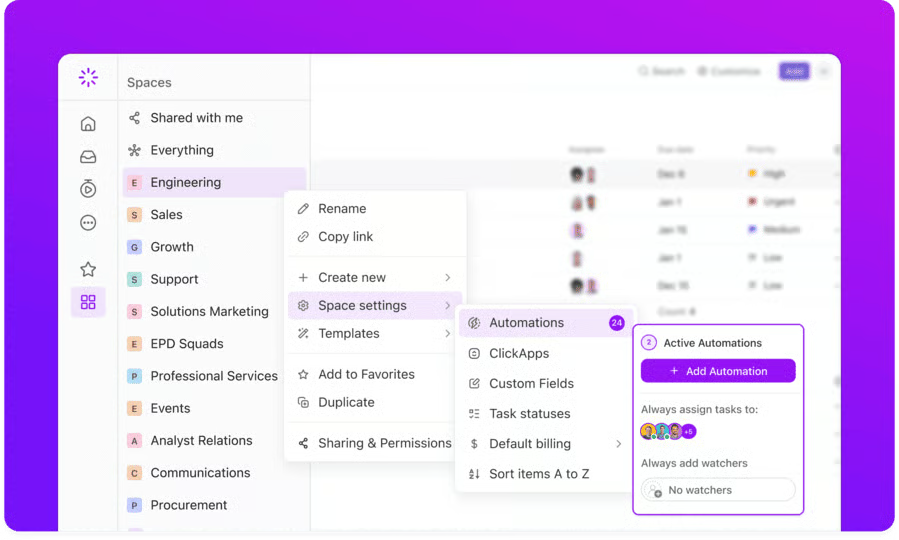
For larger teams, ClickUp offers a breadth of automation tools, including artificial intelligence, to maximize workforce management. ClickUp Brain provides an AI automation builder that you can use to describe your workflow while the software builds it. Regardless of skill level, these automation tools are accessible to any business owner wanting to integrate automation and artificial intelligence into their workspace.
The best part about ClickUp’s plans is that they enable custom integrations through its API, and you can maximize up to 100 API requests per minute per token. However, this workflow automation software solution has limited native third-party integrations. If you want to connect the platform to more apps, Zapier is the best choice, as it connects with over 7,000 apps.
Pricing
| Plans & Pricing (per User) | Free | Unlimited | Business |
|---|---|---|---|
| Monthly | $0 | $10 | $19 |
| Annually | $0 | $7 | $12 |
ClickUp stands out for its breadth of workflow automation tools available across four plans. For small teams that can use limited monthly actions, the free plan includes 100 automation and custom task statuses, 100 application programming interface (API) requests per minute, and 100 uses of reporting dashboards. These automations make it easier to manage simple tasks and collaborative projects.
After the free plan, businesses with more advanced automation needs can upgrade to Unlimited. This plan provides up to 1,000 automations with access to future recurring tasks on the calendar, column calculations, and cloud storage. Therefore, this plan is best for businesses that want to collect and analyze data on their project management goals.
The Business plan provides more access to customizable features and up to 10,000 automations with multiple actions and conditions. For example, this plan includes unlimited activity and timeline views, branding, and form customization. This ensures you can personalize and automate documents like email templates to reflect your business.
While smaller teams might not benefit from all of the features included in the Enterprise plan, it is the only plan that offers single sign-on and white labeling. With up to 250,000 automations a month plus multiple actions and conditions, conditional logic on forms, and 10,000 API requests per minute, this plan is best for businesses with a high volume of tasks and team members. Contact the sales team for more information on custom pricing.
Standout Features
- Custom statuses: Label the progress status of your tasks according to the terms your team uses. Save the new statuses as templates to keep them handy for other projects.
- Mind maps: Detail the steps in your workflow visually and outline specific tasks under each step. It’s easier to keep track of accomplished steps with the mind map.
- Dynamic assignees: Create more accountability in your workspace by adding watchers and assignees to tasks.
monday.com: Best for Intuitive Workflow Automation
Our Expert Opinion
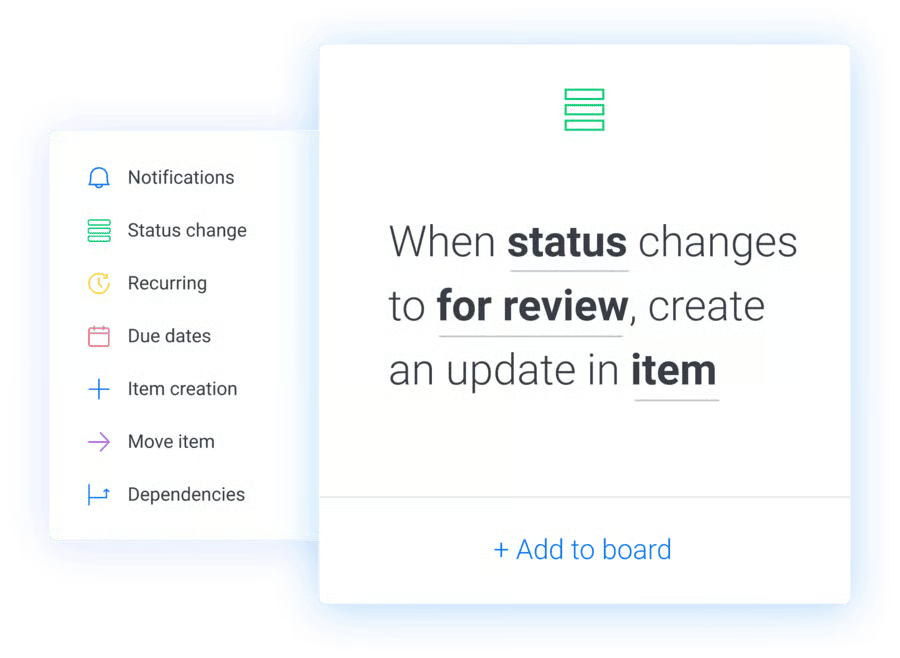
monday.com is the best software for intuitive workflow automation because it includes a vast catalog of over 200 prebuilt automation recipes. These templates apply to different industries, including marketing, sales, and customer service. With its code-free automation, creating an action is as easy as selecting a template and filling out the underlined fields with the options provided in drop-down menus.
Similarly, scaling automation with this reliable workflow management tool is straightforward. Simply customize your automation by filling out the trigger (“When this happens”), condition, and action (“Then do this”) fields. You can also add several actions to a single workflow automation template to generate more complex workflows.
monday.com also features automation notifications that send alerts when an independent action is completed. This makes monitoring different activities within the workspace easier.
Unfortunately, the platform requires a minimum team size of at least two users for the free plan and three seats for the paid plans.
Additionally, automation features are unavailable on the free or Basic plan, making it unsuitable for solopreneurs and freelancers. For smaller teams, we recommend workflow automation software solutions like ClickUp and Pipedrive, which don’t require a minimum number of users for their subscriptions.
Pricing
| Plans & Pricing(per Seat) | Free(up to 2 seats) | Basic | Standard | Pro |
|---|---|---|---|---|
| Monthly | $0 | $12 | $14 | $24 |
| Annually | $0 | $9 | $12 | $19 |
Although monday.com offers several work management plans, the two base plans do not provide workflow automation tools. Instead, the free and Basic plans are best for project management tasks, like organizing assignments and collaborating on documents using manual actions in a dashboard.
The Standard or Pro plans are the best options for small businesses interested in workflow automation. The Standard plan offers 250 integrations and automation actions, a six-month activity log, and 20GB of file storage. This plan also includes timelines and calendar views for more effective task management. The Pro plan expands on these collaborative features with time tracking, one year of activity logging, and up to 100GB of file storage.
Additionally, the Pro plan includes the dependency column to view the relationship between up to 25,000 integration and automation actions. This column is also featured in the Enterprise plan, providing up to 250,000 complex integration and automation actions. The Enterprise plan is also the only plan with a 99.9% uptime guarantee and compliance with Health Insurance Portability and Accountability Act (HIPAA) standards.
Contact a sales associate to learn more about the Enterprise plan’s pricing. You can also sign up for monday.com’s 14-day free trial today to see if one of the essential plans fits your automation needs.
Standout Features
- Customizable boards: monday.com’s workflow boards can be configured to reflect your specific project needs. In the columns, you may add people (responsible parties for specific tasks), due dates, timelines, and priority levels to help you better oversee project progress.
- Guest access: Allow external stakeholders, like partners, vendors, and clients, to see your project roadmap. An “Invite” button at the top of the board lets users enter external contacts’ email addresses and offer guest access.
- Dependency column: Manage task dependencies to reduce the risks of project delays. The dependency column makes it easy to identify which assignments must be finished in order. You can also review status changes in your monday.com dashboard.
Pipedrive: Best for Sales Management
Our Expert Opinion
Pipedrive should be your top choice for automated workflow software if you’re focused on nurturing leads and increasing sales. Its automation features are geared toward improving the sales process with actions that reflect each funnel stage. For example, its AI-powered Sales Assistant analyzes previous actions to recommend ways to streamline the workflow.
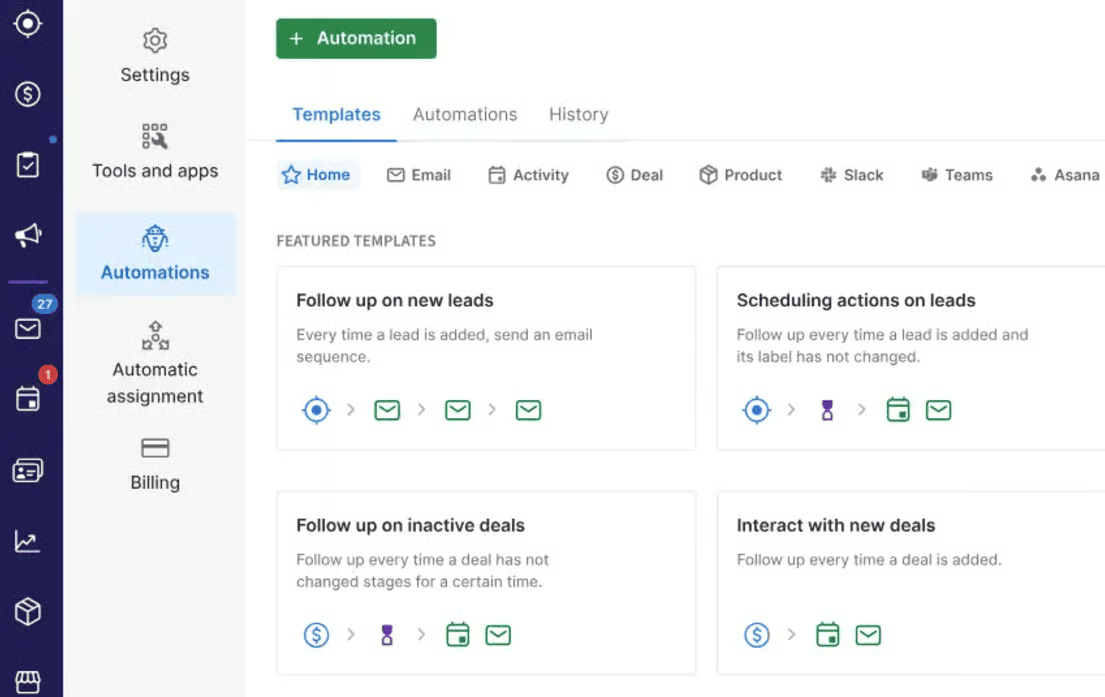
Its automation templates feature sales-focused tasks, including adding products to new deals, reengaging with inactive deals, reaching out to new customers, and sending a campaign to lost deals. You can also prequalify leads with smart contact data that gathers information about a potential customer, such as their likelihood of signing a contract.
Before choosing Pipedrive, note that it doesn’t have a free version, and workflow automation isn’t available on the base plan. This means you must upgrade to one of the higher-tier plans to use all the workflow automation tools. For small businesses that want to try out automation software on a free plan, we recommend ClickUp, which has robust tools in its free plan.
Pricing
| Plans & Pricing(per User) | Essential | Advanced | Professional | Power | Enterprise |
|---|---|---|---|---|---|
| Monthly | $24 | $49 | $69 | $79 | $129 |
| Annually | $14 | $39 | $49 | $64 | $99 |
Pipedrive offers five plans, from essential to enterprise-grade, each including access to artificial intelligence features. While the Essential plan does not include customizable workflow automation tools, it does provide an AI-powered sales assistant that can suggest ways to improve sales performance.
After the base plan, the advanced plan includes 30 active automations per user, three credits for using automation delay features, and access to Smart contact data and team sales reports. The Professional plan expands on these features with 60 active automations per user and 10 credits for automation delay with automatic assignments and customizable fields.
For businesses that require more hands-on support features, the Power plan includes 90 active automations per user, with phone support and custom onboarding. Although the Enterprise plan includes 180 active automations per user, this is significantly less than the automation capabilities available on enterprise plans from other providers.
However, the highest-tier plan includes unlimited reports and security alerts for businesses that require highly protected customer data acquisition and more detailed sales insights. To access these workflow automation solutions, try any of Pipedrive’s plans for 14 days free.
Standout Features
- Automation delay: If you want to schedule automation for later or delay automation for approval, the delay feature can create specific conditions for performing an action. You can also create multiple stages of conditions and delays for complex tasks.
- Smart contact data: A deal card provides all the information about a particular sales opportunity, including the linked contact person and organization, deal value, and deal owner. Pipedrive also uses customer data to qualify leads by automatically generating insights about how “hot” a lead is and whether they will lead to more sales.
- Automatic assignment: Let the platform assign deals to team members. Set up the rules to launch this automation: assign new deals to specific people or an existing deal to a person after it moves through the pipeline.
Zapier: Best for Third-party Integrations
Our Expert Opinion
Zapier is the best workflow automation solution if you’re looking for robust integrations because it connects with more than 7,000 apps, including Trello, Asana, Jira, Wrike, and other project management solutions. With excellent connectivity, overseeing and automating tasks for optimal efficiency is much easier when combining applications for more efficient workspace management.
In addition to integrations, Zapier boasts an intuitive no-code editor, helping users launch automation faster. Instead of describing automation as actions, Zapier describes automated workflows as “Zaps,” with a specific amount allocated for each plan. These Zaps make creating automated workflows more convenient for teams with tools like version history. Despite its intuitive interface, custom coding and automation require more technical skills.
The platform offers Zapier Experts as a customer support resource for businesses that need additional assistance or software development specialists to meet these needs. However, most customer support resources and security features are only available on the enterprise plan, which does not offer transparent pricing.
Although Zapier offers a free base plan, it has the most expensive entry-level subscription fee among the solutions listed here. While most providers offer a series of plans that incrementally scale up in price, Zapier has a jump in pricing and features from its $29.99 per month base plan to its highest-tier plan at $103.50 monthly. Therefore, we recommend monday.com and ClickUp for more intuitive and cost-effective workforce automation software.
Pricing
| Plans & Pricing | Free | Professional | Team |
|---|---|---|---|
| Monthly | $0 | $29.99 | $103.50 |
| Annually | $0 | $19.99 | $69 |
Like many other providers, Zapier offers a free forever plan with unlimited zaps, automation workflows, copy-and-paste automation steps, and two-step automation flows. In contrast, the Professional plan provides multistep workflow automation for more complex workflows, expanded access to premium apps, version rollback, custom logic with paths, and duplicate and reorder paths.
Zapier Team is the highest tier of the essential plans, offering a shared workspace, export features for all Zaps, and a six-month audit log useful for collaborative workspace management. After the essential plans, the Enterprise plan provides more advanced administrative features, like observability and permissions to supervise tasks.
You can contact a sales representative to learn more about the features and pricing for the enterprise plans. Consider a 14-day free trial of Zapier’s workflow automation solutions to learn more about the essential plans.
Standout Features
- Drafts: Edit existing workflows without disabling them in the platform, letting them run while you adjust. Zapier automatically saves drafts, ensuring work is recovered and used.
- Copy and paste steps: If you want to put the same triggers, action steps, or paths in other automated workflows, copy and paste those elements to save time. These functions are available in the Zap editor.
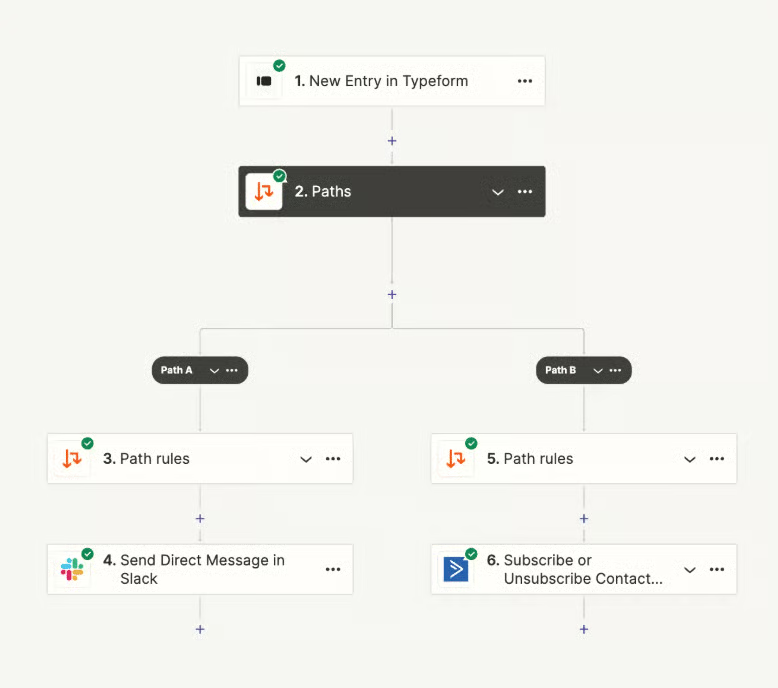
- Zapier paths: Use conditional logic to automate workflows along custom pathways. This feature makes it easier to customize automation for different situations and outcomes.
HubSpot CRM: Best for Marketing Automation
Our Expert Opinion
HubSpot CRM is ideal if your team focuses on automating marketing tasks, such as sending emails and creating campaigns. Since it integrates with marketing tools, you can track customer activities and use that data to beef up marketing automations. Set up triggers, conditions, and actions to send personalized emails to prospective customers according to where they are in the sales process and how they engage with advertising.
In addition to standard tools like email automation, HubSpot CRM’s higher-tier plans include advanced reporting features that use automation to offer feedback on the effectiveness of sales strategy and marketing campaigns. These plans also include advanced segmentation and directly include contacts in workflows to build your audience and provide valuable insights on customer engagement.
At the same time, the disadvantage of using HubSpot CRM is upgrading to a paid plan to access professional tools. For example, the free plan includes HubSpot branding on the templates, which looks less professional than personalized branding on forms.
Even after upgrading to a paid subscription, the Starter plan only allows up to ten automated monthly actions and standard marketing automation tools, which aren’t very useful for a business that runs marketing campaigns. Therefore, upgrading to the Professional plan is the only way to unlock a generous amount of automation credits and advanced features. However, this plan costs $800 monthly and includes a $3,000 onboarding fee.
For a more cost-effective marketing automation plan, we recommend the Pipedrive Professional plan, which provides a sales assistant and email automation tools.
Pricing
| Plans & Pricing(per Seat) | Free | Marketing Hub Starter/Starter Customer Platform | Marketing Hub Professional | Marketing Hub Enterprise |
|---|---|---|---|---|
| Monthly | $0 | $20 | $890 | N/A |
| Annually | $0 | $15 | $800 | $3,600 |
HubSpot CRM provides free, essential, and enterprise plans to meet various business needs. The free plan includes standard marketing automation tools, such as one automated email per form, one email automation action, and up to three reporting dashboards with ten reports each. However, the templates include HubSpot branding, which makes them less personalized to your business.
After the free plan, HubSpot CRM offers two starter plans: Marketing Hub Starter and Starter Customer Platform. These plans remove the HubSpot branding and include additional tools unavailable on the free plan. Each plan has slight differences because Marketing Hub Starter only includes simple marketing automation tools. In contrast, the Starter Customer Platform includes additional sales tools and operation software for seamless content creation and improved customer experience.
The next tier is the Professional plan, which includes three seats and provides workflow automations for up to ten teams. This plan also offers omnichannel marketing automation and unlimited actions and workflows. However, while the Starter plans have monthly and annual pricing, the Professional plan requires a $3,000 onboarding fee and a $45 monthly charge for additional seats.
Like the Professional plan, the Enterprise plan includes tools for large-scale marketing campaigns and teams, such as predictive lead scoring and workflow health monitoring. However, the startup and subscription fees would be prohibitive to most small business owners.
Standout Features
- Live chat: Respond to website visitors instantly through real-time chat. You’re more likely to turn curious visitors into customers by answering questions and providing relevant information.
- Channel switching: Chat representatives can move from one communication channel to another without losing the context of the conversation. Channel switching also offers visibility on messages from other communication platforms.
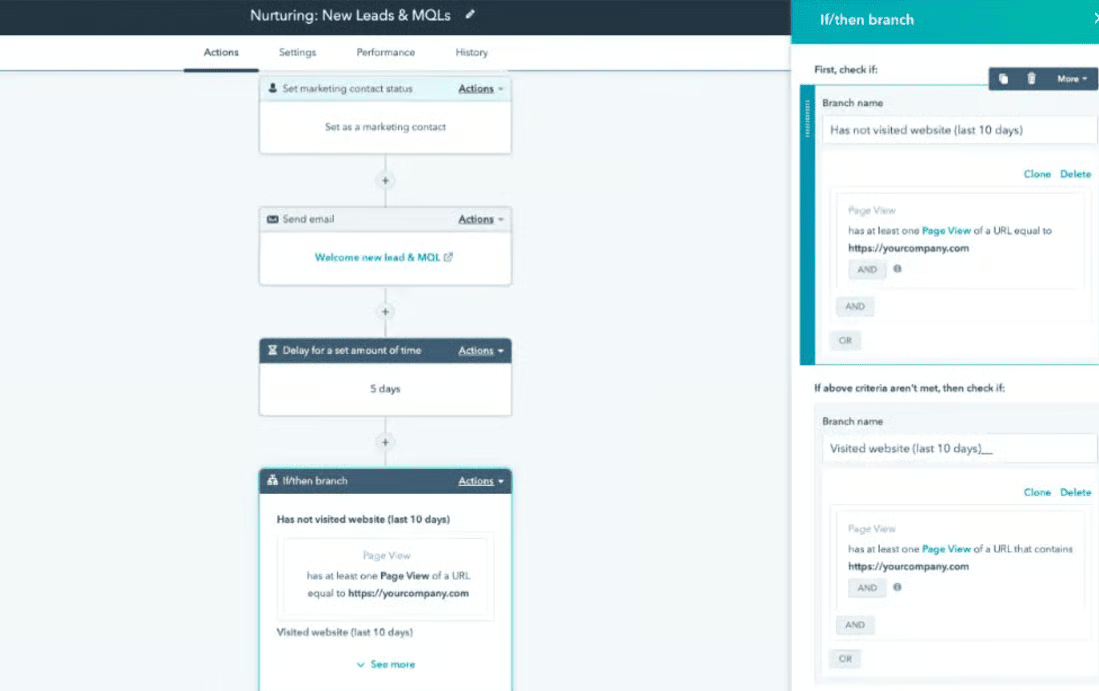
- Visual editor: Create workflows in the visual editor to visualize all the necessary steps for various projects more clearly. This feature has an if-then branch that makes it easy to determine triggers and corresponding actions.
Zoho Creator: Best for Software Development
Our Expert Opinion
Zoho Creator is one of the best workflow automation tools for handling software development projects, like developing mobile applications, because it includes a low-code app builder and ready-to-use AI models. Specifically, it features different workflows that automate an app’s routine actions, such as how the application collects user data and sends information.
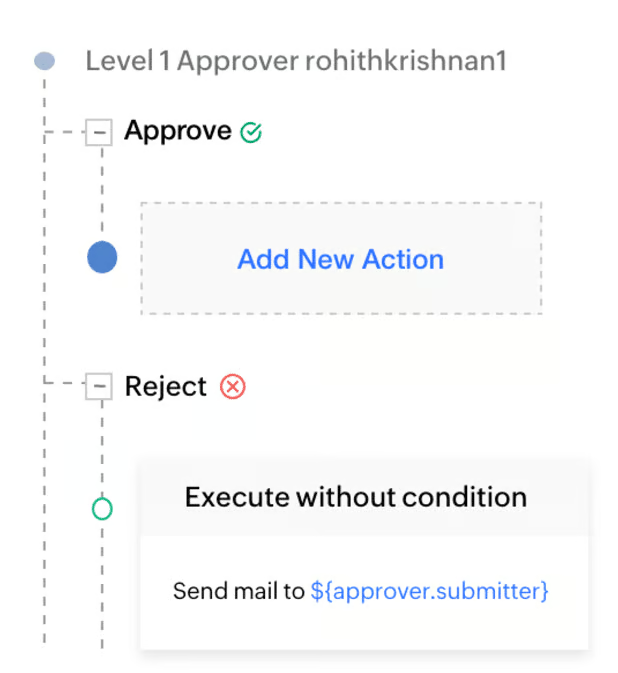
For example, as an admin, you can create form workflows, which automate tasks based on form activities. This includes updating inventory records when the order form is submitted through the app. There’s also the approval workflow, which automates the entire approval process, for example, in a reimbursement or leave management platform.
Although Zoho Creator offers seamless integrations with other Zoho apps, the entry-level subscription package excludes third-party integrations. To connect the solution to external platforms, you must upgrade to its highest-tier plan, which costs $37 per user. If you don’t want to pay more for integrations, consider the top workflow automation software, ClickUp. Its entry-level plan provides unlimited integrations for $10 per user only.
Pricing
| Plans & Pricing(per User) | Free | Standard | Professional | Enterprise |
|---|---|---|---|---|
| Monthly | $0 | $12 | $30 | $37 |
| Annually | $0 | $8 | $20 | $25 |
Zoho Creator includes four plans with scalable growth from one tier to the other. Small businesses with simple automation needs can benefit from the built-in approvals, custom schedules, and workflow actions for creating and managing tasks.
Specifically, the Standard plan includes 1GB of file storage per user, 90 custom schedules per user, and Blueprint stages, transition, and analytics. Blueprints are visual representations of a particular business process that can be replicated to automate workflows.
Access to the Blueprints feature is also available on the Professional and Enterprise plans. The Professional plan stands out for its 100 custom AI models and 250 ready-to-use AI models, which can be deployed without extensive software development skills. The Enterprise plan also offers business intelligence and analytics tools for more in-depth reporting.
In addition to the essential and enterprise plans, Zoho Creator offers a Flex plan with unlimited scalability and custom pricing for businesses that need a tailored plan. However, you must contact a sales associate to create a customized plan.
Standout Features
- Form workflows: With Zoho Creator, you can create a workflow for an event using forms. Simply choose a form and select which actions you want, such as editing, creating, or deleting records.
- Schedules and notifications: Set a specific date and time for running workflows. Or launch them when a variable in any of your forms is satisfied, for example, by notifying users about a meeting a few minutes before it begins.
- Approval process automation: The platform’s criteria-based approval triggers and automated alerts make approving key documents more efficient. Zoho Creator allows decision-makers to respond easily to approval notifications on their mobile devices.
How We Evaluated the Best Workflow Automation Software
To assess the best workflow automation tools, I identified different criteria points, including affordability, robustness of features, usability, and customer assistance. I also calculated an expert score, which focuses on the provider’s value for money and usefulness to small business owners, among other considerations. Learn more about the evaluation criteria for the best workflow automation solutions.
To assess each provider’s affordability, I considered whether it offers a free plan and the monthly pricing compared with other software on the market. I awarded more points to providers offering annual discounts and more than three subscription packages.
The general features included the availability of automations, task management, and single sign-on within base plans. Because many businesses need accessible solutions, I also included mobile apps and prebuilt workflow templates in the assessment.
Analytics and reporting tools were the primary features in evaluating niche capabilities. I also considered automation supported by artificial intelligence and gave more points to platforms with milestone tracking and robust integrations.
Software solutions with intuitive interfaces earned more points in the rubric. I also used product demos, user reviews, and documentation to determine if technical skill is required to set up and operate the system.
I evaluated the most common communication channels businesses use to contact providers: live chat, phone, and email. I then checked each vendor’s customer service hours and gave more points to those with 24/7 operations.
Based on user reviews on third-party sites, my expert score included standout features, value for money, and ease of use for small business owners.
How Workflow Automation Works
Workflow automation uses digital tools or software to systematically program everyday or repetitive tasks, streamline processes, and manage staff. Most workflow automation works by selecting specific tasks that would benefit from automation and setting up rules and conditions that trigger the completion of a sequence of actions. These actions could be anything from assigning tasks to organizing content and sending information from one place to another.
This is because workflow automation software uses conditional logic to program automations based on preestablished rules and requirements. If one condition is fulfilled, the workflow can create a pathway of distinct automations. Therefore, the system selects actions based on a flow of decision-making that branches from one condition to another.
For example, if you receive a high volume of emails but don’t have the time to reply immediately, you can use workflow automation software to send follow-up emails. This software can be programmed to trigger a reply every time your business receives an email using custom email templates. These tools can also incorporate artificial intelligence to provide more personalized automated responses.
Explore the following tabs to learn about the benefits and best practices for working with workflow automation software.
Benefits of Using Workflow Automation Software
By automating tasks, a software solution offers these benefits to businesses:
- Increased productivity: Since team members won’t have to perform tasks manually, they can focus on more complex and high-yield tasks like developing marketing strategies or building customer relationships.
- Fewer errors: When team members process forms and approvals, they will undoubtedly make a few mistakes. Automation decreases human error and ensures accuracy in workflows.
- Better team accountability: It’s challenging to keep track of manual work, but with automation, you can see every task’s progress and check team members’ contributions.
How to Choose the Best Workflow Automation Software
Consider the following criteria when choosing workflow automation software for your small business.
- Pricing and scalability: One of the primary concerns for small businesses is the cost of adopting new tools. While many workflow automation tools are available for free, these forever-free plans often have less robust features than paid plans. Therefore, you should look for providers offering multiple workflow automation tiers with incremental pricing that provides just enough monthly actions and automations without exceeding your goals.
- Usability and customer support: Next, you need to consider your technical skills and knowledge of setting up workflow automation. While some software providers offer visual editors and a drag-and-drop interface that makes it easy to design custom workflows, others are less intuitive. Consider whether the provider offers onboarding support or software developers who can help you create a system that suits your business needs. Additionally, note if customer support or technical assistance incurs additional fees or is only provided on specific plans.
- Analytics and AI: Automation goes hand in hand with artificial intelligence, so many small businesses could benefit from workflow automation software that includes these advanced features. Specifically, AI is beneficial for providing business insights and feedback on your automations and allows you to design workflows using prompts.
- Industry standards and integrations: Besides the advanced features, workflow automation software is often tailored to specific industries. For example, sales and marketing automation usually includes lead generation and email campaign tools, while human resources can benefit from customizable form templates. Therefore, you should choose software that caters to your industry and your most commonly used business integrations and standard tools.
- Reporting and compliance: While workflow automation software can include security features like single sign-on and approvals, many are only available on specific plans. So, if your industry has regulations around security compliance and reporting, you should choose a software and plan that reflects these standards.
Best Practices for Using Workflow Automation Software
Automating workflows can save your business time and money by streamlining repetitive tasks, efficiently managing staff, and improving customer engagement. However, workflow automation can also become overly complex. Therefore, the following list includes some best practices for using workflow automation tools to benefit your small business.
- Consider your goals and intentions: Before choosing your workflow automation software, consider why you want to use it. For example, what goals do you hope to achieve by automating processes in your business? Do you have more tasks than staff, or do you want to create a more efficient workflow? These questions will help you understand if you need to pair your workflow automation with more workforce management tools or artificial intelligence features.
- Talk to your team: Before and after developing a workflow, you should include your team members. This means delegating administrative roles to team members, deciding how to assign tasks, and identifying ways to manage their workload. Communicating throughout this process will ensure your team understands the workflow and can benefit from adopting automation.
- Create a workflow diagram: Most workflow automation software visually represents automated workflows in the dashboard. However, you should create workflow diagrams before using the software to automate tasks. This will make it easier to design the automations within the platform because you have already organized your tasks and developed the conditions for each action.
- Document and share automation rules: Record these diagrams to share with your team after creating your workflows. This will benefit your business by demonstrating how automation works and what actions are triggered when completing specific tasks. It will also ensure that team members understand each step in the workflow and how their activities fit into the process.
- Review and revise automated processes: After implementing a process, you should routinely assess which automations benefit your business and which overcomplicate tasks or lead to bottlenecks. Then, revise these processes to ensure your workflow automation aligns with your initial goals.
Frequently Asked Questions (FAQs)
What is workflow automation software?
Workflow automation software allows users to set up rule-based logic within a system. This enables the system to perform tasks independently without human assistance. Project management platforms often use this software to assign tasks, update statuses, or send notifications about to-dos.
Which type of automation is the most advanced?
The most advanced type of automation on the market is intelligent automation. This type of automation uses artificial intelligence and process management to streamline workflows and improve processes. For example, workflow automation tools can use speech recognition technology and robotic process automation (RPA) to create recurring tasks that save time on manual task assignment and management.
How do I start workflow automation?
How to start a workflow automation depends on your goals, processes, and tools. Before automating a workflow, you should identify what you want it to do, how it fits into your business goals, and whether it benefits that task.
Then, you should find a tool that can accomplish your goals efficiently and within the scope of your technical skills. For example, do you need automation for task management (e.g., assigning tasks), or do you want to automate a repetitive process, like sending emails?
Once you know your automation tasks, goals, and tools, you should design a process that facilitates automation, such as a timeline for your tasks or criteria for task completion. This is also a good time to assign roles and permissions to ensure tasks are completed with accountability and in a reasonable timeframe. Then, you can use your workflow automation software to create an automated task or action.
Bottom Line
The best workflow automation tools help businesses efficiently complete work, saving time and reducing errors. It connects with various third-party platforms to holistically support users’ project management and communication needs. Many platforms also incorporate artificial intelligence and intuitive automation builders to make adopting these workflow automation tools easier.
Of the platforms we evaluated, ClickUp is the best workflow automation software because of its breadth of automation features and affordable subscription rates. The scalable platform allows small teams to access it at minimal cost and larger teams to find a plan that suits their needs. Get started with ClickUp for free, or try a plan and take advantage of the 100% money-back guarantee.
