







eSmart Paycheck is an online payroll software optimal for small businesses with very basic payroll needs. It provides tools for calculating employee pay and payroll taxes, creating paychecks and paystubs, and printing federal forms (such as Form W-2). eSmart Paycheck also offers a free payroll calculator you can use for simple payroll tax and deduction computations.
For this eSmart Paycheck review article, I compared it with the best free payroll software, where it earned an overall rating of 3.03 out of 5. It has a free plan for creating and printing a single paycheck and paystub at a time. For its paid services, eSmart Paychex pricing starts from $75 annually for up to four employees.
Deciding Factors
| Supported Business Types | Very small businesses (10 or fewer employees) with simple payroll needs |
|---|---|
| Pricing |
|
| Standout Features |
|
| Ease of Use | Online calculator and payroll software are relatively easy to use, provided you have in-house HR staff or basic knowledge of how to run payroll |
| Customer Support |
|
When to Use eSmart Paycheck
- You are a budget-conscious small business owner: eSmart Paycheck offers a relatively simple to learn and use solution that’s affordably priced. Its annual fees cost anywhere from $75 to $450, depending on the number of employees you have. Plus, it doesn’t charge a setup fee for new clients.
- You only pay a handful of employees: If you have a very small team and need an easy way to calculate employee salaries, then eSmart Paycheck’s free online payroll calculator will be easy for you to use. It also comes with paycheck and pay slip printing capabilities.
- If you are a bookkeeper handling basic payroll for a few small business clients: With eSmart Paycheck’s online payroll management solution, you can handle employee pay processing for multiple companies under one account. Its tools are basic, though, and there’s no guarantee it offers e-filing for your state, so it’s important the clients are small, few in total, and have a simple structure.
When to Choose Something Else
- Your business is in a heavily regulated industry: If you don’t have in-house HR expertise and must meet more regulatory requirements than the average business, eSmart Paycheck won’t work well for you. Benefits are unavailable—and neither are dedicated representatives and HR experts. Live phone support is even limited. Check out our guide to the best HR payroll software for more robust options.
- Your company is located in areas that charge local taxes, like New York: eSmart Paycheck doesn’t automate local tax calculations—only state and federal. This means you’ll have to research and stay abreast of any local taxes your employees owe. For payroll solutions that will do this for you, read our payroll services buyer’s guide.
- You need to pay employees in different states: If your workforce is spread throughout the US, you should consider other payroll solutions like Gusto, as eSmart Paycheck doesn’t support multistate pay processing. To learn more about Gusto, visit the website or read our Gusto review.
Why You Can Trust Fit Small Business
Top eSmart Paycheck Alternatives
| Best For | Free Plan | Starter Pricing of Paid Plans | Learn More | |
|---|---|---|---|---|
 | Single or infrequent paycheck creation | ✓ | $75 annually | |
| Visit eSmart Paycheck | ||||
 | Free basic payroll and time tracking | ✓ | $50 monthly for up to 10 employees | Read our TimeTrex Review |
| Visit TimeTrex | ||||
 | Free payroll services for very small teams | Free for up to 10 employees | $10 per payroll posting for 11 to 25 employees | Read our Payroll4Free Review |
| Visit Payroll4Free | ||||
 | Full-service payroll and solid HR support | ✕ | $49 per month + $6 per person per month | Read our Gusto Review |
| Visit Gusto | ||||
Looking for something different? Read our guide to the best payroll services and top payroll software for small businesses to find a service or software that’s right for your business.
eSmart Paycheck Pricing
5 / 5
In my evaluation of eSmart Paycheck as a free payroll tool, I gave this software perfect marks for pricing. It offers a free forever option that lets you handle simple payroll and tax calculations.
While eSmart Paycheck’s online payroll calculator is free to use, you have to re-input your salary information each time you use it. If you want the system to retain your details, you have to upgrade to a paid plan.
| Free Online Payroll Calculator | eSmart Paycheck Online Payroll Software | |
|---|---|---|
| Annual Pricing | $0 | Ranges from $75 to $450(for up to 40 employees) |
| Automatic Payroll and Payroll Tax Calculations | ✔ | ✔ |
| Multiple Earnings and Deductions Types | ✔ | Customizable |
| Paycheck and Payslip Printing Tools | ✔ | ✔ |
| Saves Payroll Data | N/A | ✔ |
| Federal Forms Printing and e-Filing (W-2/940/941) | N/A | ✔ |
Paid Plans
The eSmart Paycheck pricing matrix is based on the number of employees you have. It offers six subscription options, wherein fees start at $75 and can go as high as $450 per year.
- Up to 5 employees: $75 per year
- 6 to 10 employees: $150 per year
- 11 to 15 employees: $225 per year
- 16 to 20 employees: $300 per year
- 21 to 30 employees: $375 per year
- 31 to 40 employees: $450 per year
It doesn’t charge setup fees, plus new clients can use its paid package at no cost for the first three months. And unlike the free online payroll calculator, it saves all of your company and payroll data. It also lets you set up the earnings and deductions types you need, like commissions and 401(k) plan deductions. Plus, it can generate and print federal forms 940, 941, and W-2.
Note that if you exceed your selected plan’s employee limit, eSmart Paycheck will charge you the next level’s pricing on a pro-rated basis based on the number of months remaining in your annual subscription. You will be billed the additional fees by the end of the calendar year.
For example: Your employee count increased from 10 to 15 workers in October, so the additional prorated amount at the end of December will be $18.75*.*Computed as: ((New plan pricing ($225) − old plan pricing ($150)) × 3 remaining months) / 12 months in a year = $18.75
Add-ons
Payroll tax filing services
With eSmart Paycheck’s paid version, you are granted access to payroll tax services, and the provider will deposit tax payments and electronically file federal forms to the IRS. Note that for state tax deposits and filings, it can only do this for 12 US states (California, Connecticut, Florida, Georgia, Illinois, New Jersey, New York, Pennsylvania, Texas, Virginia, Washington, and Wisconsin) as of this writing.
| Payroll Tax Services | Pricing |
|---|---|
| Federal Tax Deposits | $35 per year annually |
| State Tax Deposits | $30 per year annually |
| State Payroll Forms Printing and e-Filing | $20 annually, per form type |
| W-2 e-Filings to States | $20 plus $2 per employee |
| Print and Mail Year-End W-2s | $2 per form |
Blank check stocks and envelopes
While you’re free to use your preferred check stock to print employee paychecks on, you can purchase blank check stocks and envelopes through eSmart Paycheck. For $15, eSmart Paycheck will even send your ordered items via mail (for continental US addresses only).
| Quantity | Standard Checks | Multi-color Premium Checks | Non-self-sealing Envelopes | Self-sealing Envelopes |
|---|---|---|---|---|
| 100 | $12 | $15 | $12 | $20 |
| 200 | $20 | $25 | $20 | $35 |
| 300 | $28 | $35 | $28 | $40 |
| More than 300 | Call for quote | Call for quote | Call for quote | Call for quote |
eSmart Paycheck Payroll Features
2.5 / 5
While you get two online payroll options to calculate salaries and withhold deductions, its pay processing tools are only ideal for simple payroll calculations. It doesn’t handle multi-state pay runs and wage garnishment payments like most small business payroll systems do. It also lacks direct deposit and pay card options—only offering a printing tool for generating paychecks and pay stubs. These limitations are some of the reasons why I gave eSmart Paycheck a low score in this criterion.
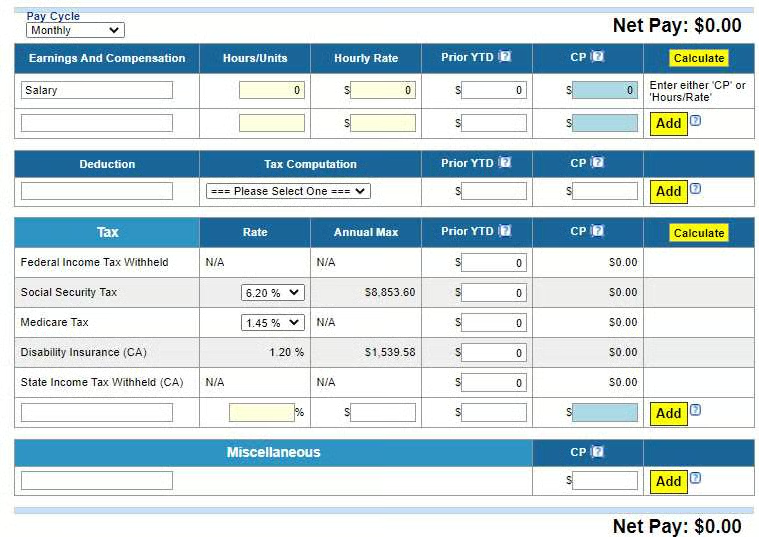
However, it supports several pay cycles (such as daily, weekly, biweekly, monthly, semimonthly, quarterly, and annually) and can handle pay processing of hourly and salaried employees. You can also customize earning types for payroll, from overtime and fringe benefits to bonuses and commissions. Similarly, it lets you add custom non-tax, pre-tax, and after-tax deductions, like a premium-only plan (POP), 401(k), garnishment, and local tax items.
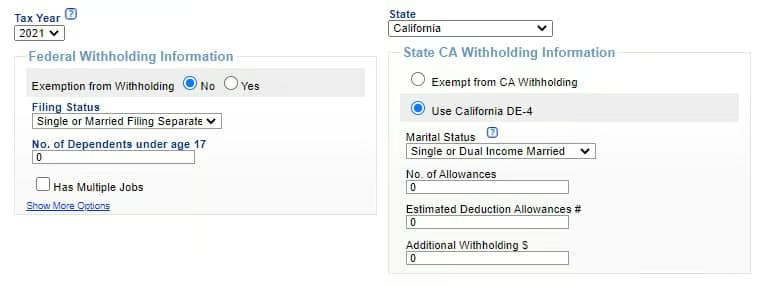
Payroll Tax Calculations
With eSmart Paycheck, you don’t have to separately manage tax tables. Its system tracks and calculates federal and state payroll taxes automatically. eSmart Paycheck’s calculator now reflects the 2025 federal and state tax tables, including the increased Social Security taxable maximum of $176,100 (OASDI 6.2% each side). If you rely on the calculator, be sure it’s applying the 2025 OASDI wage base along with your state’s latest rates before processing payroll. It also generates and electronically files federal tax forms (such as Forms W-2, 940, and 941)—provided you subscribe to an annual plan.
Paycheck & Pay Stub Printing
You can create paychecks and pay stubs at any time. eSmart Paycheck generates PDF versions that you can print. You can either use blank check stocks or pre-printed company checks. Note, though, that you need a laser printer to print paychecks.
eSmart Paycheck Reporting
2.5 / 5
eSmart Paycheck didn’t fare well in this criterion because of its limited reporting capabilities. You get the basic reports you need for payroll, such as a payroll summary and payroll tax forms, but it lacks customization options. Plus, you have to pay extra to print PDF copies of state payroll forms, such as California’s quarterly contribution return and report of wages (or DE 9) and the quarterly contribution return and report of wages (continuation) (or DE 9C) reports.
eSmart Paycheck Ease of Use: What Users Think
3.63 / 5
- User-friendly interface
- Automatic payroll tax computations
- Free online payroll calculator
- Phone and email support
- FAQs and how-to guide videos
eSmart Paycheck may have a user-friendly interface but I didn’t give it top marks for ease of use. Its tools are simple to learn, but you need to have a good grasp of payroll and payroll tax requirements. It also doesn’t help that its platform looks dated, lacking the intuitive controls that most payroll systems offer.
It also doesn’t have integration options. So, you can’t connect your time tracking system to eSmart Paycheck to make data transfers of employee attendance details easy during pay runs. If you require assistance or have questions about some of its functionalities, the provider offers support via fax, email, and phone. However, it can be hard to reach a rep by phone. I tried to contact the provider several times but had difficulties getting through. This comes as no surprise though, since its website does indicate that phone support is “very limited.”
Alternatively, you can visit eSmart Paycheck’s website to access its video guides and FAQ section. While there are only a handful of tutorial videos, the ones available contain sufficient information to help you navigate its system and run payroll.
eSmart Paycheck Reviews
I gave this software zero marks in this criterion because, as of this publication, there are no eSmart Paycheck reviews available on popular review sites.
Methodology: How I Evaluated eSmart Paycheck
For this eSmart Paycheck review, I used our rubric for the best free payroll software and compared the software to six providers that offer free payroll services for small businesses. I looked at the reporting tools and features, focusing on paycheck processing and tax preparation. I also considered ease of use, user feedback, and customer support options.
To view the full evaluation criteria, click through the tabs in the box below.
I specifically chose payroll services with free payroll functions. However, I favored those that don’t have limits (like a specific number of employees) for its forever-free plan.
Having access to payroll tax calculation, payment, and filing services are preferred as these can simplify pay processes. I also considered other tax and payroll functions, such as year-end reporting, multiple employee payment options (via direct deposit or printable checks), and the capability to add deductions and garnishments
I gave points based on the reports available and whether you could customize them.
Free is no good if you have to fight the program. I looked for software with an intuitive interface, checked how easy it was to learn, and compared support options. I also considered whether it integrates with other programs or at least allows CSV file downloads.
I considered online user reviews from third-party sites (like G2 and Capterra) based on a 5-star scale, wherein any option with an average of 4+ stars is ideal. I also looked at the features and services that reviewers liked, including factors that prevented users from leaving a higher score on these review sites.
Frequently Asked Questions (FAQs) About eSmart Paycheck
Is eSmart Paycheck legit?
Yes, it is. eSmart Paycheck has been offering its free online payroll calculator, check printing tool, and electronic filing of tax forms since 2011. Further, C&S Technologies Inc., the company that developed it, has been in business since 1996 and is an IRS-authorized e-file tax filing services provider and payroll software developer.
What is the best software for payroll calculation?
The best software for payroll calculations can help you pay employees accurately, manage tax withholdings correctly, and ensure that all non-tax deductions (like retirement and benefits premiums) are properly withheld. It should also meet your software budget and offer tools that are easy to use.
Is eSmart Paycheck right for you?
eSmart Paycheck may be the right one for you if you only have simple payroll needs and don’t have a large team.
