






QuickBooks Workforce, formerly QuickBooks Payroll, is best for small businesses that want payroll closely connected with QuickBooks accounting. The platform includes recruiting, onboarding, employee records, HR workflows, performance management, and other workforce tools alongside its payroll functions.
For this QuickBooks Workforce review, I looked at its current pricing, payroll and HR capabilities, ease of use, support, and where another provider may offer a better fit. In my evaluation of the best payroll software for small businesses, QuickBooks Workforce earned an overall score of 3.45 out of 5.
Why you can trust Fit Small Business
The Fit Small Business editorial process follows strict standards to ensure that our best answers are founded on the basis of accuracy, clarity, authority, objectivity, and accessibility.
For this review, I checked Intuit’s pricing, product disclosures, feature documentation, support resources, and help articles. I also reviewed recent customer feedback and compared its payroll and HR capabilities with other systems built for small businesses.
I also drew on more than eight years of experience evaluating HR and payroll software and 10 years of HR experience working with payroll, employee administration, HR systems, and benefits. That background helps me look beyond a provider’s feature list and consider how the software fits into everyday payroll and HR work.


Who is QuickBooks Workforce best for?
QuickBooks Workforce makes the most sense when payroll and accounting need to work closely together. Its broader HR tools also make it more practical for growing businesses that want to reduce the number of separate systems they use to hire, manage, and pay employees.
QuickBooks Workforce is a strong fit for:
- Small businesses that want payroll with room to add HR tools: QuickBooks Workforce covers full-service payroll across all plans, with automated federal and state tax payments and filings. As your HR workload grows, higher tiers add time tracking, recruiting, onboarding, time-off management, HR workflows, and access to HR resources. That gives a small business room to add employee management tools without immediately moving payroll to an entirely different system.
- Companies with hourly employees: Workforce Premium and Elite combine payroll with time tracking, so approved employee hours can move into payroll without another export or separate timekeeping integration. Managers can also create schedules and track employee hours, while Elite adds tools such as geofencing, mileage tracking, and project activity. I see the biggest value here for businesses where payroll accuracy depends heavily on collecting clean hourly data every pay period.
- Contractor-only businesses: QuickBooks also offers a separate Contractor Payments plan if you do not have W-2 employees. It costs $25 per month for up to 20 contractors, plus $2 for each additional contractor, and includes unlimited contractor payments, next-day direct deposit, contractor self-setup, and unlimited 1099 e-filing. That can be a simpler and less expensive route than paying for a full employee payroll subscription when your workforce consists entirely of independent contractors.
- QuickBooks users: If you are already comfortable using the QuickBooks Online accounting software to manage your books, Workforce gives you the clearest reason to keep payroll in the same ecosystem. Pay-related transactions flow into your accounting records without relying on a separate integration or repeated manual entry, which makes reporting and payroll reconciliation easier. The shared ecosystem also gives you a better view of how payroll affects overall labor costs and business finances.
If you are still learning the accounting side, our guide to what QuickBooks is explains how its core bookkeeping tools work.
Consider an alternative if you:
- Want lower-cost payroll without needing QuickBooks accounting: QuickBooks Workforce becomes more expensive as headcount grows because every plan combines a base subscription with a monthly per-employee fee. As of this writing, Workforce Payroll pricing starts at $50 plus $7 per employee, while Premium and Elite raise both parts of that equation. If you have a small team and simple payroll needs, check out our list of the top free payroll software.
- Need advanced HR or IT management: Workforce now handles recruiting, onboarding, employee records, HR workflows, time off, and other common HR processes, but it is still not as deep as platforms built around highly configurable HR and IT administration. A business that needs app provisioning, device management, complex workflow automation, or broader global workforce tools may get more value from a system such as Rippling. Read our Rippling review to see if its features fit your requirements.
- Require sophisticated employee scheduling: QuickBooks can create schedules and connect employee time with payroll, which should cover the needs of many straightforward hourly teams. However, businesses that rely on demand forecasting, automatic schedule generation, complex staffing rules, or detailed labor planning may be better served by dedicated employee scheduling software.
- Need broader international payroll capabilities: QuickBooks Workforce is primarily designed around US payroll and tax administration. If you regularly hire or pay employees in multiple countries, a global payroll platform or employer of record (EOR) services will usually provide stronger support for country-specific payroll, employment requirements, and international payments.
Are you looking for something different? Read our guide to the best payroll services for small businesses to find a service or software that’s right for you.
Which QuickBooks Workforce plan is right for you?
QuickBooks Workforce pricing increases as you add more time tracking, HR, and workforce management capabilities to payroll. The right plan largely depends on how much employee administration you want to handle in the same system.
| Feature | Workforce Payroll | Workforce Premium | Workforce Elite |
|---|---|---|---|
| Monthly price | $7 per employee + $50 base fee | $13 per employee + $88 base fee | $17 per employee + $134 base fee |
| Full service and automatic payroll | ✓ | ✓ | ✓ |
| Tax payments and filings | Federal and state | Federal, state, and local | Federal, state, and local |
| Direct deposit | Next-day | Same-day | Same-day |
| Health and 401(k) plans | ✓ | ✓ | ✓ |
| Benefits administration | ✕ | Call for a quote | Call for a quote |
| Automated HR workflows | ✕ | Five | Unlimited |
| Hiring and onboarding | ✕ | ✓ | ✓ |
| Scheduling | ✕ | ✓ | ✓ |
| Time and time off tracking | ✕ | ✓ | ✓ |
| Geofencing | ✕ | ✕ | ✓ |
| Performance reviews | ✕ | ✕ | ✓ |
| Personal HR adviser | ✕ | ✕ | ✓ |
| Tax accuracy guarantee | ✓ | ✓ | With tax penalty protection up to $25,000 |
| Setup assistance | Guided setup | Expert review | Expert setup |
Here’s where I see the clearest dividing line between the plans:
- Workforce Payroll makes the most sense when processing payroll is the main job you need the system to do. You get automated federal and state payroll taxes, Auto Payroll for eligible employees, payroll reports, employee self-service, and next-day direct deposit. If your business already tracks hours elsewhere and does not need broader HR administration, this is a good starting point.
- Workforce Premium is the practical step up for employers managing hourly workers or a growing team. Time tracking, same-day deposit, recruiting, onboarding, time-off management, HR workflows, and the HR resource center make it much more than a payroll upgrade.
- Workforce Elite is easier to justify once you want deeper HR support and workforce management controls. Its advantages include geofencing, mileage tracking, unlimited HR workflows, performance management, personal HR advice, expert setup, and tax penalty protection.
QuickBooks also offers a separate Contractor Payment plan, which costs $25 monthly for up to 20 contractors (plus $2 per additional worker). This package is ideal for those who only need to pay contractors and includes next-day direct deposits, 1099 electronic filings, and contractor self-setup tools.
What QuickBooks Workforce could cost as your team grows
Looking at the base price alone understates the cost because every plan also charges per employee.
| Employee count | Workforce Payroll | Workforce Premium | Workforce Elite |
|---|---|---|---|
| 5 employees | $85 monthly | $153 monthly | $219 monthly |
| 10 employees | $120 monthly | $218 monthly | $304 monthly |
| 25 employees | $225 monthly | $413 monthly | $559 monthly |
| The above totals use regular monthly list pricing and exclude promotional discounts and other optional services or tools. | |||
Workforce Premium adds considerably more HR functionality, but the cost difference becomes harder to ignore as headcount grows. For a 25-employee business, it costs $188 more per month than Workforce Payroll, or $2,256 more per year. I’d weigh that added cost against how useful its time tracking, recruiting, onboarding, time-off management, and HR workflows would be for your day-to-day operations.
Unsure which QuickBooks Workforce plan to get? Read our QuickBooks Workforce Payroll vs Premium vs Elite guide to help you find the right payroll package for your business.
What are QuickBooks Workforce's features?
QuickBooks Workforce covers more than payroll, but its value comes less from the number of features it offers and more from how those tools connect. Employee information collected during hiring can carry into payroll, approved hours can feed into pay runs, and payroll costs can flow back into QuickBooks accounting without as much manual movement between systems.
For a small business, that connected workflow is the main reason to consider Workforce over piecing together separate payroll, time tracking, and basic HR tools.
Payroll and tax management
The payroll workflow covers employees and contractors, deductions, wage garnishments, direct deposits, year-end forms, and federal and state payroll taxes. Eligible businesses can also use Auto Payroll when employee pay is predictable enough to run without rebuilding the payroll each period.
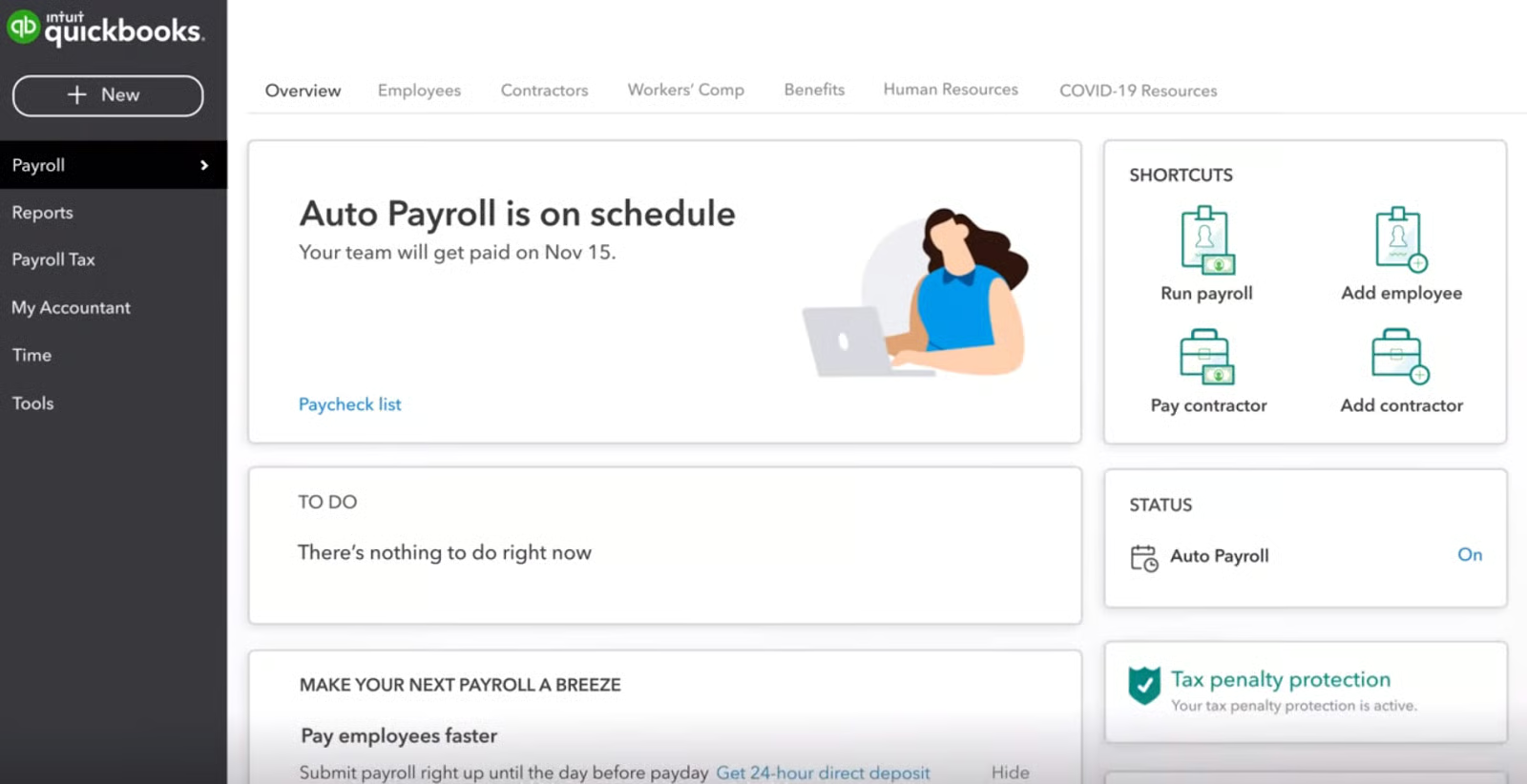
New users who need help navigating the pay features can follow our guide to setting up and running QuickBooks Workforce. It also includes a video tutorial if you prefer a visual walk-through.
Paper checks are still an option if that is how you pay some employees. You can print them yourself after purchasing compatible check stock and configuring the printer correctly. Our guide to printing QuickBooks Workforce checks walks through the process.
Also read: How to Set Up QuickBooks Workforce Direct Deposit
What stands out to me is what happens around the payroll run rather than the pay calculation itself. Businesses already using QuickBooks can keep payroll expenses within the same accounting environment, removing one of the common handoffs between the person processing payroll and whoever maintains the books.
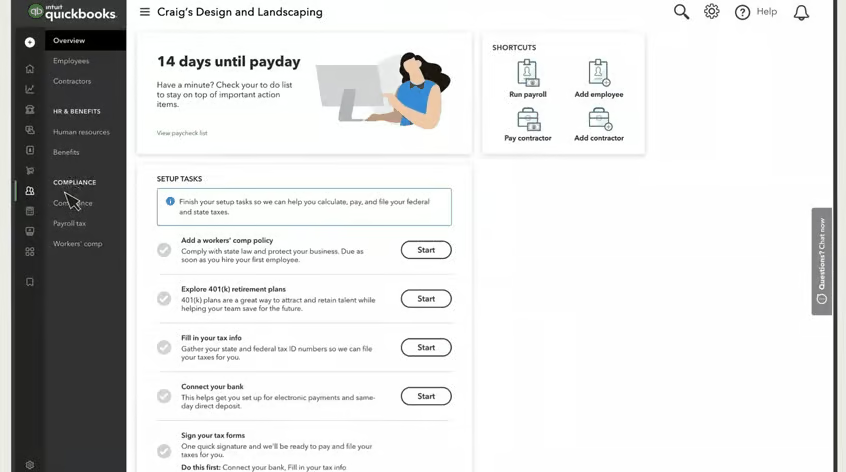
There are still some boundaries to watch. Local payroll taxes are one area to look at more closely. The entry-level subscription calculates and tracks them, but employers generally remain responsible for making the payments and filing the forms themselves. Automated support for eligible local taxes is available with higher tiers.
Direct deposit speed and tax penalty protection also vary depending on the level of service selected. Those differences matter, but I would put more weight on whether the core payroll and accounting workflow fits your business. If you use another accounting platform and only need inexpensive full-service payroll, one of QuickBooks Workforce's biggest advantages becomes less relevant.
Payroll software can automate much of the calculation and filing work, but employers still own decisions around classifications, pay practices, and required records. Our payroll compliance guide explains the federal, state, and local responsibilities that still sit with the employer.
Time tracking, scheduling, and employee access
For employees, the process is fairly straightforward. They can clock in and out through the Workforce app, submit timesheets, record time off, and switch between jobs or customers as their day changes. Managers can see who is working, review submitted time, approve several timesheets at once, and build schedules around employee availability.
Where this becomes more useful is at payroll time. Instead of collecting hours from another system, exporting totals, and then checking that everything transferred correctly, managers can review the original time entries before approved hours move forward for payment. That is especially helpful when overtime, missed punches, or job changes usually create a last-minute scramble.
Field teams get a few extra advantages. The mobile app can record where employees are when they clock in, while more advanced tools add geofencing, mileage tracking, and project activity. Those controls are more relevant for construction crews, technicians, or other mobile workers than for employees who report to the same workplace every day.
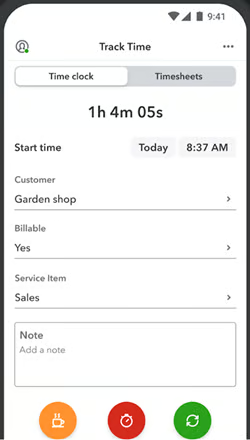
The app also doubles as an employee self-service hub. Workers can pull up pay stubs, W-2s, earnings, deductions, withholdings, taxes, time-off information, and year-to-date pay without asking payroll to retrieve those records for them.
That sounds minor, but it removes a lot of small interruptions over time. A question like “Can you resend my pay stub?” no longer has to turn into another task for HR or whoever runs payroll.
Time tracking is included with Workforce Premium and Elite, so I would not move up a tier just to get a digital clock unless the payroll connection and other added tools are useful too. If you already use one of QuickBooks’ supported time tracking partners, you can bring employee hours into Workforce for payroll processing instead. Manual time entry is also available, so businesses are not locked into QuickBooks’ own time tools.
.png)
If capturing hours, projects, or field work is your bigger priority, compare our best time tracking software for products built more specifically around those workflows.
Hiring and HR administration
The difference is easiest to see with a new hire. Instead of collecting candidate information in one place, onboarding documents somewhere else, and then entering the same employee details again in payroll, Workforce can carry more of that information through the process. Recruiting tools cover candidate tracking and offers, while onboarding supports employee information, documents, and I-9 tasks.
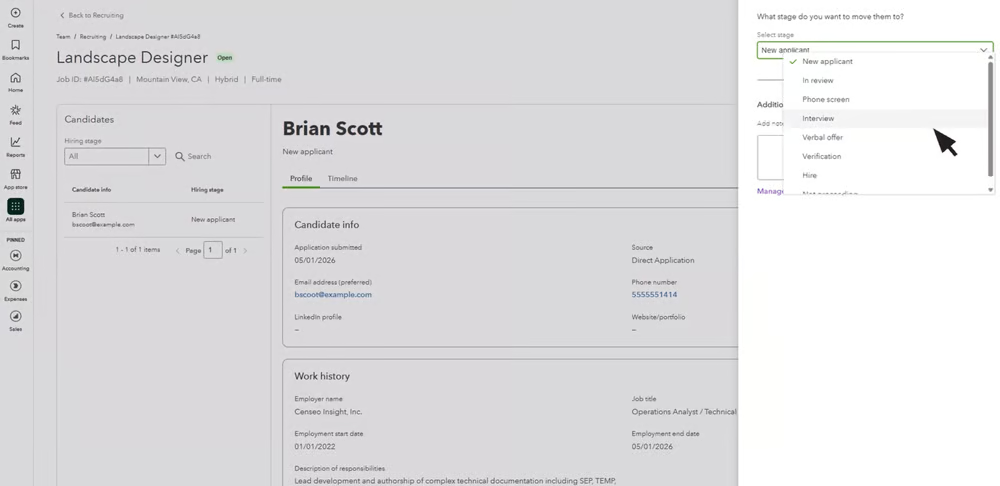
For a small HR team, that can eliminate a surprisingly annoying amount of duplicate work. Names, addresses, tax information, banking details, and employment records are less likely to end up scattered across spreadsheets, inboxes, and separate systems that all need to be kept in sync.
You can also put some structure around recurring HR tasks. A promotion, employee change, or offboarding process can trigger a set of steps and approvals instead of relying on someone to remember what comes next. Scheduled workflows can handle recurring events as well, including performance-review cycles tied to dates or work anniversaries.
Performance tools extend that employee record into goals, feedback, and reviews. While QuickBooks Workforce offers a straightforward performance review process, companies running complex review cycles, compensation planning, learning programs, or succession management will probably need a more specialized HR platform.
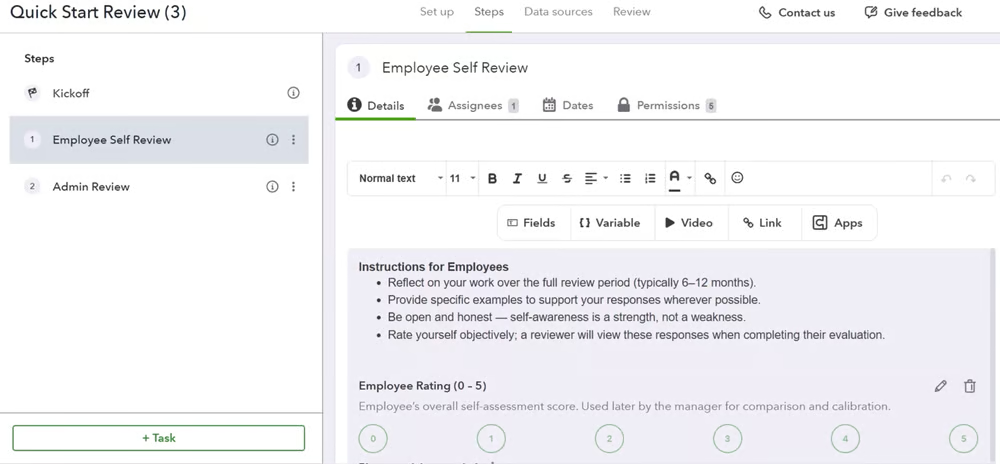
Benefits can stay connected to payroll, too. QuickBooks provides access to health insurance, retirement, and workers' compensation options through its partner carriers, with supported deductions flowing into payroll automatically. However, full benefits administration is a separate paid service for eligible businesses with at least 20 employees who are on either the Premium or Elite plans.
Smaller businesses without an in-house HR specialist can also access HR resources and, depending on the service level, more direct expert support. This is a useful backup for everyday HR questions, especially when an employee issue has compliance or employment law implications.
Once employee administration starts taking up as much time as payroll, it may be worth comparing a broader system. Our best HRIS for small businesses guide covers products designed for deeper employee records, HR workflows, and workforce management.
Payroll AI, reporting, and business insights
For many hourly businesses, the calculation itself is not the hardest part of payroll. The mess usually shows up earlier, when someone forgot to submit hours, overtime looks unusual, tips are missing, or a manager spots a correction right before the deadline.
Payroll AI is meant to catch more of that before the payroll run gets underway. It can reach out to employees through SMS or the Workforce app for hours, overtime, and tips, follow up on discrepancies, and prepare a draft for the payroll administrator to review. You can also see estimated gross pay and payroll expenses before approving the run.
After payday, the value shifts from preparation to visibility. Workforce reports can cover payroll taxes, deductions and contributions, PTO balances, time activity, workers' compensation, multiple worksites, and performance reviews. You can customize, export, print, or share them with an accountant.
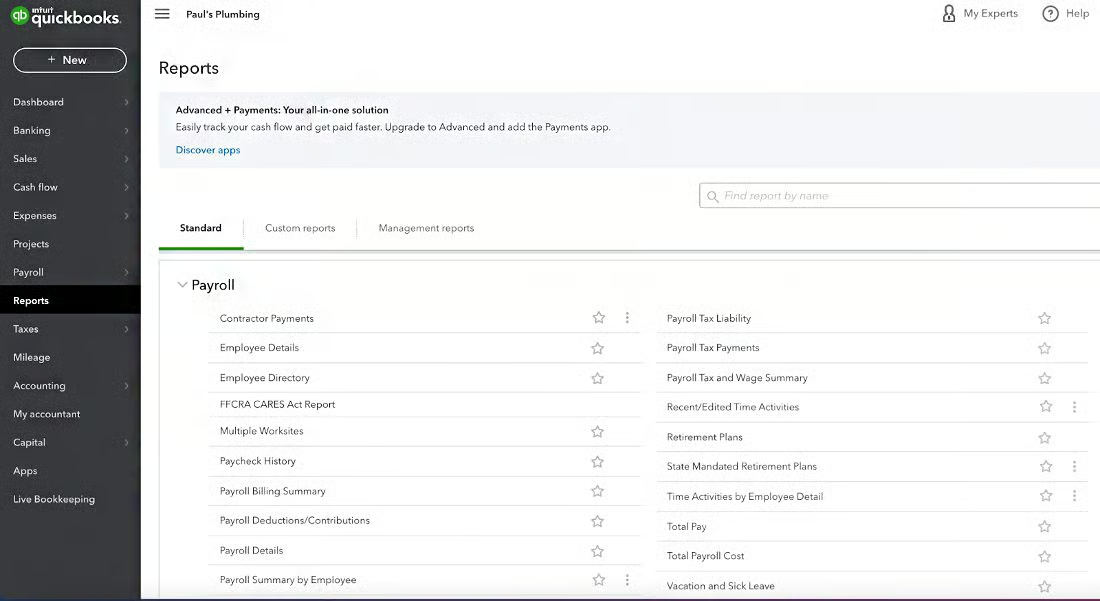
For businesses already using QuickBooks accounting, those reports can tell a bigger story. Payroll costs can sit alongside budgets, projects, and other financial data, which makes it easier to answer questions such as how much labor actually cost this month or whether a job was as profitable as expected.
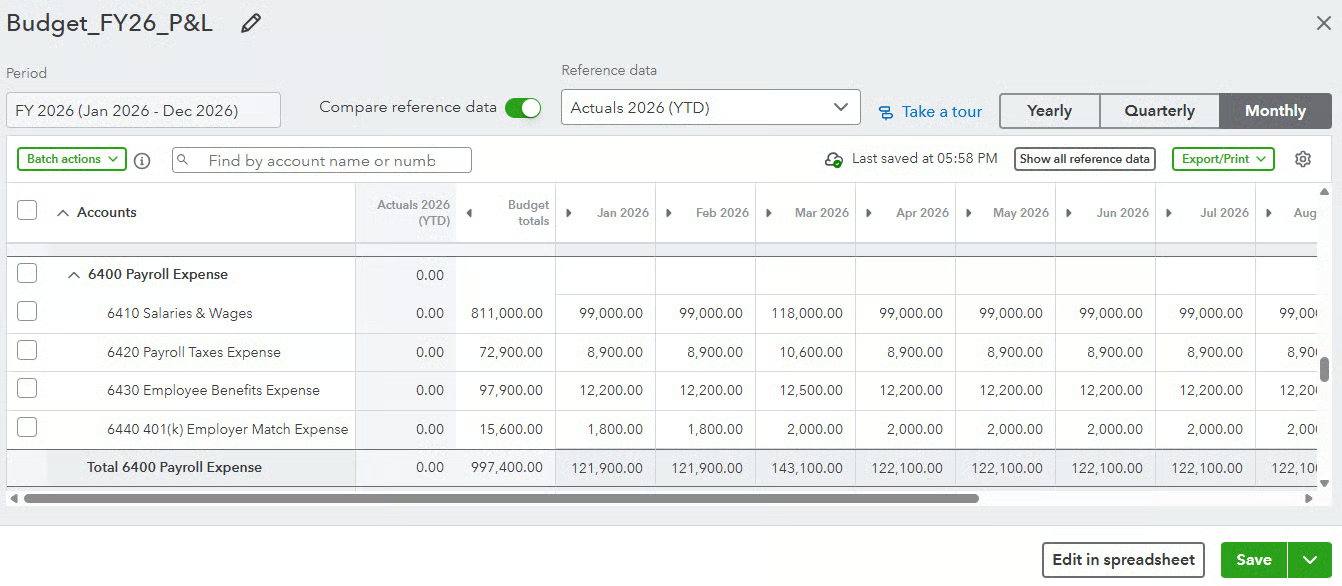
That is more useful to me than simply having a long report library. A restaurant owner may care about overall labor spend, while a project-based business may want to see how employee time affects job profitability. The real value is getting to those answers without piecing them together from several separate systems.
Want to see where automation can genuinely reduce payroll work? Our payroll automation guide explains which tasks are good candidates for automation and where human review still matters.
How easy is QuickBooks Workforce to use?
QuickBooks Workforce is fairly easy to get around once the basics are set up. If you already use QuickBooks for accounting, the layout and workflows will feel familiar, which helps flatten the learning curve.
Most of the extra effort comes when you start using more than payroll. Setting up employee time, HR workflows, time-off policies, recruiting, or benefits takes more work upfront because there are simply more moving parts to configure.
Intuit does provide setup help. Eligible new customers can get a guided setup session, while higher-tier plans add more hands-on payroll setup support.
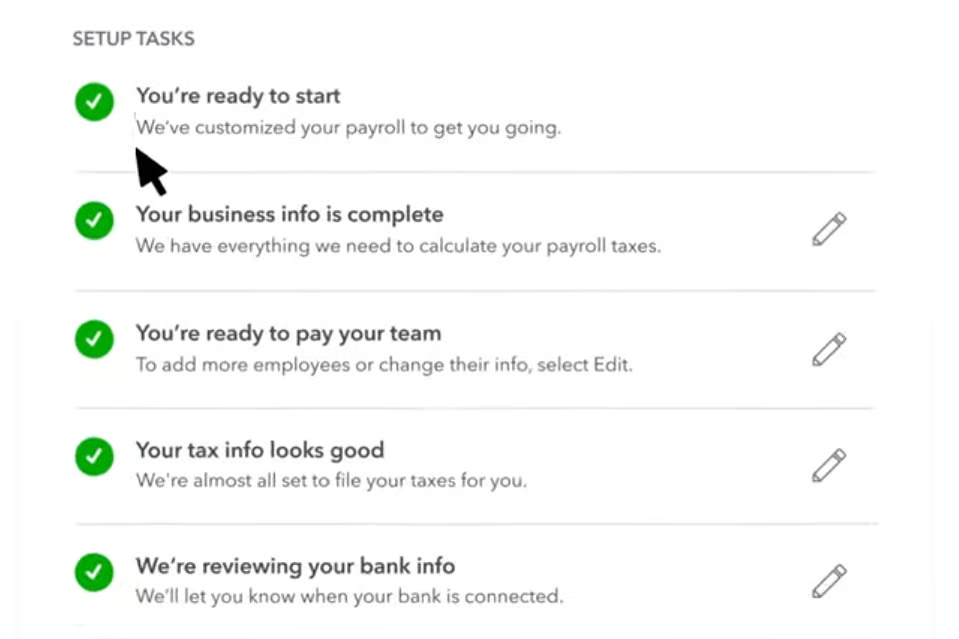
I’d still make sure whoever runs payroll in your team understands the rules behind the system, though. QuickBooks can automate a lot, but it cannot tell you that a work location, tax setting, or employee classification was wrong unless something triggers a review or during a payroll audit. A clean setup matters more than having every automation switched on.
QuickBooks Workforce customer support
QuickBooks offers phone and chat support, but service hours vary by plan. Workforce Payroll support is available Monday through Friday from 6 a.m. to 6 p.m. Pacific Time (PT). Premium and Elite extend weekday support from 5 a.m. to 7 p.m. PT and add weekend availability from 6 a.m. to 3 p.m. PT.
For simpler questions, the Help area includes searchable support articles and QuickBooks Assistant, so you may not need to contact support every time you get stuck on a setting or workflow.
The more hands-on help comes with the higher tiers. Premium includes an expert review of your payroll setup, while Elite adds expert setup and access to an HR adviser. That can be useful if you would rather have someone double-check your configuration than figure everything out on your own.
One thing to keep in mind is that QuickBooks support is not available around the clock, and weekend access depends on the plan. If you often process payroll outside regular business hours, factor those support windows into your purchasing decision.
What do users think about QuickBooks Workforce?
QuickBooks Workforce gets generally positive customer feedback. As of this writing, Capterra rates it 4.5 out of 5 from more than 990 reviews, while G2 shows a 4.4 out of 5 rating from over 500 reviews.
Users praise the connection between its HR and accounting modules, along with the ease of running payroll and keeping employee pay information in one place. Some also said that the system becomes easier to use once the initial setup is complete.
However, reviewers point to rising costs as teams grow, and with mixed experiences with customer support. Others mention limitations with reporting, customization, or more advanced workflows.
QuickBooks Workforce alternatives
QuickBooks Workforce is convenient for businesses already running their books in QuickBooks, but that accounting connection may not be everyone's top priority. Consider these alternatives:
| Software | Best if you need | Starter monthly pricing |
|---|---|---|
| Gusto | Straightforward SMB payroll with benefits and basic HR | $6 per employee + $49 base fee |
| Square Payroll | Payroll connected with Square POS | $6 per employee + $35 base fee |
| OnPay | Simple pricing with federal, state, and local tax filing | $6 per employee + $49 base fee |
| Rippling | Broader HR, IT, and workflow automation | Call for a quote |
QuickBooks Workforce frequently asked questions (FAQs)
Is QuickBooks Workforce the same as QuickBooks Payroll?
Yes. QuickBooks Workforce is Intuit’s payroll and workforce management product, with payroll still at the center. If you previously used or searched for QuickBooks Payroll, you’ll now see its payroll plans offered under the QuickBooks Workforce name.
Do I need QuickBooks Online to use QuickBooks Workforce?
No. You can purchase QuickBooks Workforce without adding a QuickBooks Online accounting subscription. Existing QuickBooks users can also add Workforce to their account, which is where the product gains one of its biggest advantages: keeping payroll and accounting data within the same ecosystem.
Does QuickBooks Workforce handle local payroll taxes?
It depends on the plan. Workforce Payroll calculates and tracks local tax liabilities, but you must pay and file those taxes outside QuickBooks. Workforce Premium and Elite automate supported local tax payments and forms after the required tax setup is complete.
Does QuickBooks Workforce include time tracking?
QuickBooks Workforce Premium and Elite include time tracking, while Workforce Payroll does not. Employees can track their hours using the Workforce app, and managers can use tools for time approval and scheduling. Elite adds more advanced options such as geofencing, mileage tracking, and project-related time tools.