







OpenPhone is a business phone system known for offering unlimited calls and texts to the US and Canada. It also provides a built-in artificial intelligence–powered platform for managing call histories, team conversations, and call transcripts.
Our review found that OpenPhone stands out for its pricing and ease of use, earning it a perfect expert score and a 5-out-of-5 overall rating. However, it received a fair rating for general features, as it only offers basic call management functionalities and some of those (e.g., call forwarding and transfer) are locked in higher plans.
Continue reading to determine if OpenPhone is the best fit for your communication needs. I’ve also identified top alternatives, in case you find OpenPhone not the best match for your business.
OpenPhone review: Overview
Deciding factors
| Best for | Small businesses and distributed teams that need a unified inbox to manage calls and messages |
|---|---|
| Standout features |
|
| Pricing plans |
Annual billing options are available. |
| Free trial | 7 days |
| Customer support |
|
When to use OpenPhone
- Distributed teams that need quick access to call and text histories: With OpenPhone, users get access to a shared AI-powered dashboard that contains notes and conversations. In this shared inbox, multiple team members can manage calls, texts, and contacts, enhancing collaboration.
- Small businesses on a tight budget that need to make unlimited domestic calls and texts: Starting at $19 per user, per month, OpenPhone users can facilitate unlimited calling and messaging within the US and Canada.
- Teams that want to centralize business communications by sharing phone numbers: OpenPhone allows you to share phone numbers and prevent missed calls by ringing multiple people simultaneously. Your team can also use a single number for calling and texting, serving as the primary contact number for the entire company. A shared number makes cross-team collaboration easier, as anyone in your team can jump in to assist customers.
When to use an alternative
- Business operations requiring a high volume of international calls: While there’s an option to add international calling to your plan, note that it’s charged per minute. For teams that need to make regular calls outside the US and Canada, this can be a costly choice. Voice over Internet Protocol (VoIP) providers like RingCentral and 8×8 offer more competitive rates and packages. For additional options, refer to our guide to the best VoIP services for international calls.
- Organizations handling sensitive data: Businesses and institutions that handle patient information (e.g., the healthcare industry) require HIPAA compliance, but OpenPhone doesn’t adhere to this. If you need a business phone system that does, like Phone.com and Dialpad, check our guide to the top HIPAA-compliant VoIP providers.
- Call center operations that require advanced call handling functionalities: OpenPhone offers basic call management features; however, advanced calling capabilities essential in call center operations are lacking. For instance, it doesn’t support call whisper, barge, queue management, and advanced IVR and analytics. For this, consider alternatives like Nextiva Contact Center.
OpenPhone alternatives
While OpenPhone offers unlimited domestic calls and texts, along with an AI-powered platform to manage all your contacts, it may not be the best fit for all small businesses. For instance, teams that require team chat and voice messaging capabilities should consider these top alternatives:
 |  |  | |
|---|---|---|---|
| Best for | Unified communications platform for calls, chat, and meetings | Basic calling and texting | Multichannel customer service platform |
| Starting monthly price (per user, per month) | $30 | $18 | $23 |
| Learn more | Visit RingCentralorRead our RingCentral review | Visit GrasshopperorRead our Grasshopper review | Visit NextivaorRead our Nextiva review |
OpenPhone pricing
5 / 5
OpenPhone pricing earned a perfect score, as it offers scalability for individuals, small teams, and growing businesses. To start, there are three pricing tiers that you can choose from, with the option to choose between month-to-month or annual contracts (with discounts). Starting at just $19, you get access to unlimited calling to the US and Canada — recommended for businesses with high call volume needs.
What I particularly like about OpenPhone’s pricing scheme is the access to add-on features such as additional numbers or international calling. Since they’re purchased separately and only as needed, I don’t have to worry about overspending. Note that, although this is a pay-as-you-go service, if you need to make frequent international calls, your bill may increase significantly. Therefore, it is essential to keep track of your calling patterns.
Speaking of add-ons, for $49 per month, you have the option to get Sona, OpenPhone’s AI agent, to assist you with answering calls.
| Inclusions | Starter | Business | Scale |
|---|---|---|---|
| Best for | Standard calling and texting | Teams that need collaboration and CRM integrations | Large organizations with complex routing requirements and priority support |
| Monthly pricing (per user per month) | $19 | $33 | $47 |
| Annual pricing | $15 | $23 | $35 |
| Phone numbers per user | 1 | 1 | 1 |
| Shared phone number | Up to 10 users | Unlimited | Unlimited |
| Unlimited calling and messaging to US and Canada | ✅ | ✅ | ✅ |
| Advanced call forwarding | ❌ | ✅ | ✅ |
| Call transfer | ❌ | ✅ | ✅ |
| Analytics and reporting | ❌ | ✅ | ✅ |
| AI call tags | ❌ | ❌ | ✅ |
| Priority support | ❌ | ❌ | ✅ |
Sign up for a seven-day free trial to get started.
Add-ons
- Additional phone numbers: If the phone number allocation on your plan isn’t enough, you can add more for only $5 per number per month.
- International calling and messaging: For calls and messages outside the US and Canada, an additional payment is required for the service. Costs vary depending on location. For example, calls to Sweden can range from $0.03 to $0.12 per minute, while calls to the Philippines start at $0.32 per minute.
- Automated messages: Build automation on message sending for $0.01 per segment.
- Sona: An AI agent that works as a 24/7 answering service, which costs $49 per month for 50 calls.
OpenPhone features
OpenPhone offers a simple and easy-to-use unified business communication platform. It combines voice, messaging, and collaboration features in a cloud-based platform. Find out what its core features are, along with the advanced functionalities that you can take advantage of to stay on top of your business.
General features
3.63 / 5
OpenPhone received a fair rating for its general features because, while it offers basic calling features, they’re not as extensive as those of its top competitors. OpenPhone is popular for offering unlimited texts and calls to the US and Canada. It also allows you to port phone numbers from other carriers, and you get one phone number per user.
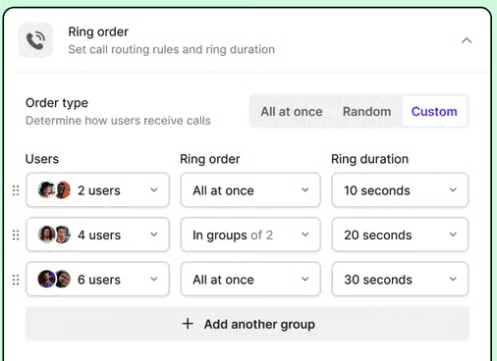
Other basic call management and collaboration features in OpenPhone include:
- Toll-free numbers
- Voicemail transcripts
- Call recording
- Auto-replies
- Scheduled messaged
- Basic and advanced call forwarding
- Phone menus
- Call hold and transfer
- Ring order
- Group calling
- Contact notes
- Shared contact
Advanced features
4.13 / 5
OpenPhone earned a high score of 4.13 out of 5 for its advanced features, which help it stand out from the competition. The platform is powered by AI, which automatically generates call summaries and next steps, keeping the entire team informed about previous conversations. Users also get time-stamped transcripts, simplifying the process of finding specific information.
Here are some of OpenPhone’s niche features.
Sona AI agent
Available as an add-on, the Sona AI agent functions as a 24/7 answering service, greeting callers, answering questions, and capturing messages. One thing I like about Sona is that it’s highly customizable. You can even change its default name and add key details, such as your business name, operating hours, products and services, and pricing.
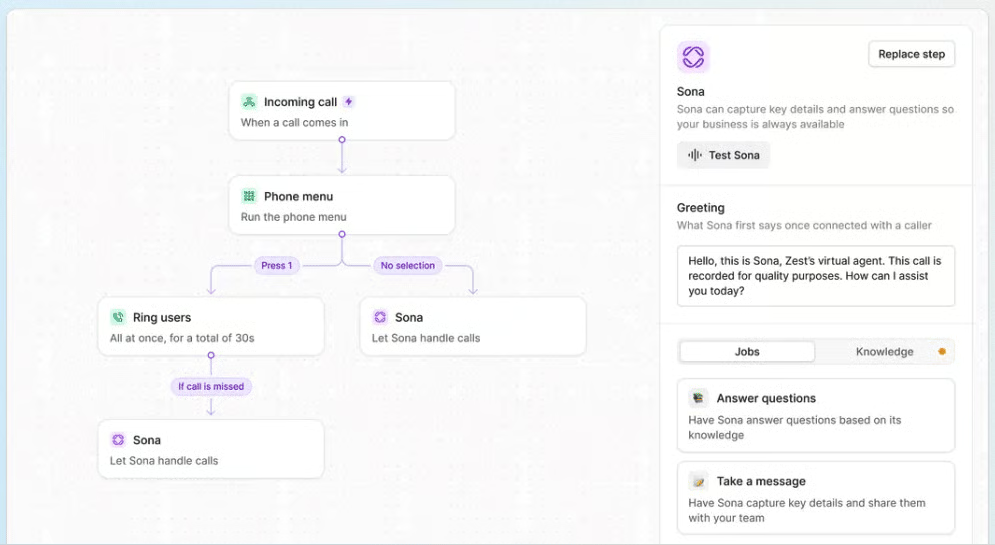
With the Sona AI agent, you can capture leads even when you’re not available to chat or take the call. Customize the questions to gather information, such as the caller’s name, the service they’re looking for, and any details you need to return their call.
On the other hand, there are tasks that you cannot pass on to Sona. For instance, it is not capable of making outbound calls. It also doesn’t support other languages aside from English.
Call analytics and reporting
In OpenPhone’s shared workspace, you can access data that you can use to make business decisions and assess your employees’ performance. For example, you can determine through a visual graph which days and time slots are the busiest in terms of incoming and outgoing calls. It also allows you to track each user’s performance by summarizing the total number of calls, time spent on each, and sent messages.
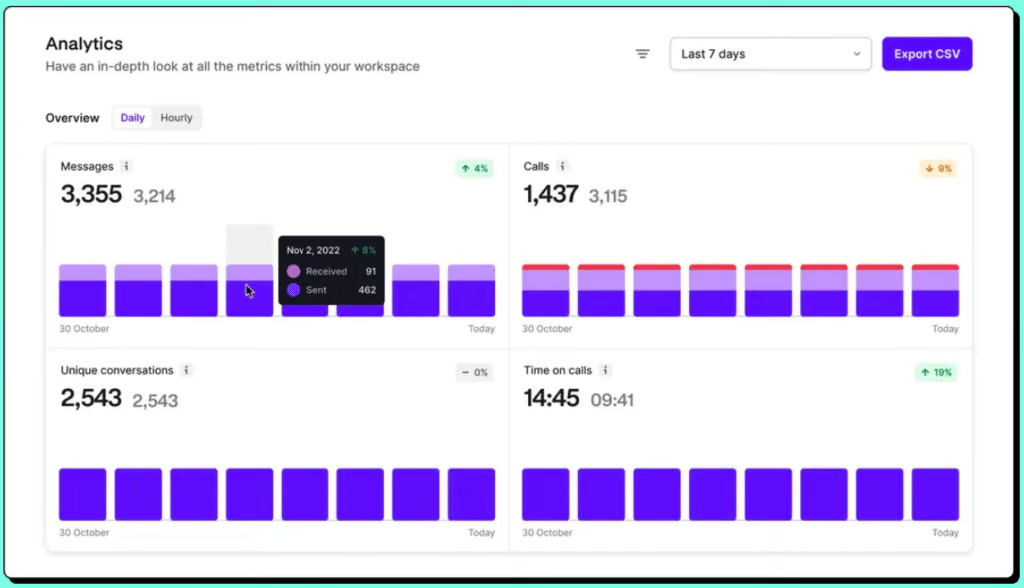
While this data is helpful in analyzing your call volume and capacity, there are key metrics that are missing. For example, with other VoIP providers, you have access to live dashboards that show call queues and wait times. It’s also lacking trend analysis that you can potentially utilize in call center operations to determine team benchmarks.
Shared inbox
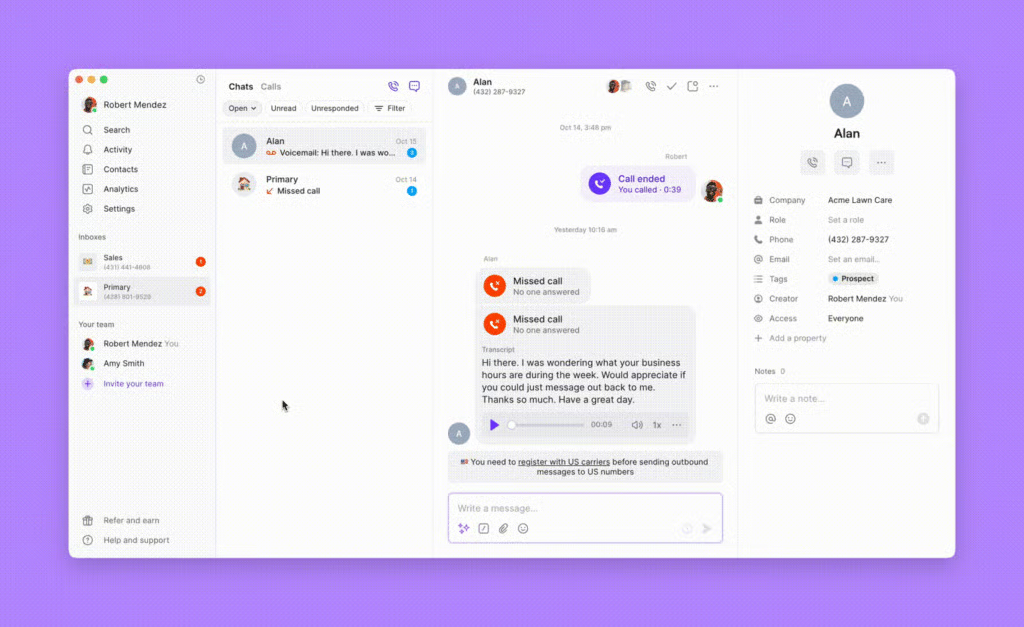
OpenPhone features a shared inbox that team members can access online. This shared inbox allows them to view interactions with contacts and collaborate by sending private notes and transferring calls, all within the same workspace. Users can personalize saved replies to expedite communication.
Organize your leads by creating and assigning custom tags. You can also configure your menu so that callers can choose from the self-service list of information, connecting them to the right representative.
OpenPhone’s customer support
4.5 / 5
There are multiple ways to reach OpenPhone’s customer service team, which is why I gave it a high score in this category. However, you have to understand that the level of support also depends on the plan you are subscribed to. For instance, priority support is only available to subscribers of the Scale plan, its priciest tier.
Overall, you get access to live chat, email ticket, and a Reddit community of OpenPhone users. On its website, you can also find an extensive library of resources, including product demos, tutorials, blogs, and on-demand videos.

OpenPhone’s ease of use
5 / 5
OpenPhone is one of the most user-friendly phone systems on the market. One of its strengths is its simplicity, making it ideal for teams that prefer to get onboarded quickly. While it lacks some advanced analytics and customizations for more complex configurations, it shines with its clean and modern interface that’s easy to navigate.
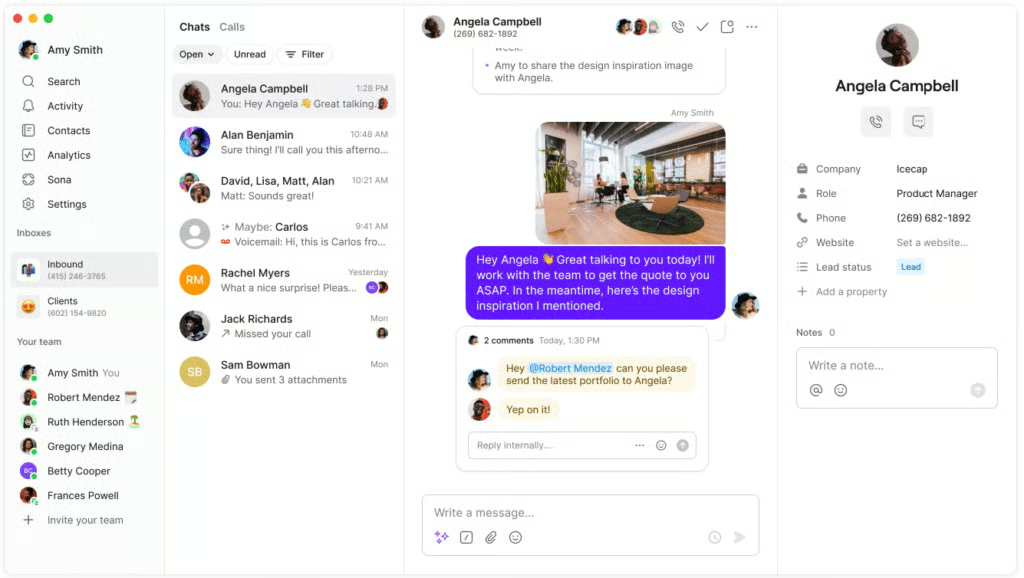
I highly recommend giving OpenPhone a try if you or most of your team members are non-tech-savvy users and you want a quick setup process. While it doesn’t offer a free plan, you can get started with a seven-day free trial.
Expert score
5 / 5
Upon reading through recent user reviews, it’s apparent that OpenPhone’s clean and intuitive interface takes the cake, resulting in a perfect expert score. Being a cloud-based solution, OpenPhone is also very easy to deploy and set up. It has all the basic calling features you need to run your business, plus some AI features that can take care of what would’ve been time-consuming tasks.
On the other hand, I’d also like to highlight that it currently doesn’t connect to many software solutions. OpenPhone integrates with a few apps, including HubSpot, Salesforce, Jobber, Make, Slack, Gong, and Google Contacts. To extend its functionalities and automate your workflow, you can connect it with Zapier.
These are the user ratings for OpenPhone on different review sites:
- G2: 4.7 out of 5 based on 2,769 reviews
- GetApp: 4.2 out of 5 based on 60 reviews
- Trustpilot: 4 out of 5 based on 605 reviews
- TrustRadius: 7.5 out of 10 based on 26 reviews
Overall, OpenPhone users love its minimalistic UX. It received a lot of praise for being easy to navigate. Many users also appreciate the message threads that allow them to comment privately on any messages, calls, and voicemails. These are useful for tracking progress and identifying next steps.
I used this service for a few years and am really satisfied by the simplicity, quality, and functionality of this SaaS. I have subscribed and deployed this app in less than 5 minutes.
While there are many positive reviews, some users also left negative reviews, citing technical difficulties such as lagging and dropped calls. While I agree that call quality is a critical issue that OpenPhone needs to address, it is a problem that can also be attributed to the user’s internet connection. I also noticed some reviewers commenting on OpenPhone’s customer service being unresponsive and delayed.
Absolute horrible customer service. It takes days to get answers to questions. No one follows up.
Methodology: How I evaluated OpenPhone
In evaluating OpenPhone, I considered the top priorities that small businesses look for in a VoIP platform. I identified pricing, features, customer service, and ease of use as my main criteria when comparing the provider to other business phone systems.
Learn how I evaluated OpenPhone by clicking on the tabs below:
To determine if the provider has an accessible price point, I examined its base and second-tier subscription plans. I awarded it additional points for pricing their plans lower than its counterparts. I considered the availability of a free trial and annual billing discounts.
General features we considered included unlimited calling to the US and Canada, call management, an IVR system, security and compliance, and app integrations. I also reviewed its uptime service level agreement (SLA).
The specialized capabilities I evaluated included international calling, business phone numbers, video conferencing, collaboration tools, and AI functionalities. Additionally, I looked for features such as call analytics and reporting.
I assessed if the platform requires technical skills to set up and operate and checked how intuitive the desktop and mobile apps are.
The variety and types of customer support channels were a key factor in my assessment. I examined the availability of live chat, phone, and email support, as well as the customer service operations schedule and the extensive resources available.
The expert score includes my evaluation of standout features, value for money, popularity, and ease of use. I also considered what verified users are saying on credible review sites, in addition to my personal assessment of OpenPhone’s performance.
Final verdict
OpenPhone is a solid VoIP choice for small businesses on a tight budget. It’s cloud-based and highly intuitive to use, making it great for teams with remote employees. The platform combines calls, SMS, voicemail, and collaboration in a single workspace. However, access to additional call management features, analytics, and integrations is only available with higher-priced plans. To start exploring and get a glimpse of what OpenPhone can offer, you can sign up for a free trial.
Frequently asked questions (FAQs)
Is OpenPhone secure?
Yes, OpenPhone has security features to protect user information and privacy. For instance, it performs daily backups of all its databases and supports General Data Protection Regulation (GDPR) and the California Consumer Privacy Act (CCPA). It also complies with SOC 2 to ensure precaution for potential cyber attacks.
However, note that OpenPhone is not HIPAA-compliant. If this is a major consideration, consider alternatives such as RingCentral or Nextiva.
Can I use OpenPhone for international calls?
Yes. OpenPhone offers international calling as a pay-as-you-go add-on service, charged per minute. However, doesn’t provide international phone numbers. If you need this service, choose Vonage or 8×8.
Can I use my existing number with OpenPhone?
Yes, OpenPhone supports number porting for free. The whole process won’t interrupt your operations and you can continue using your phone number as usual.
