







OpenPhone is a collaborative phone system that centralizes customer communication in a shared inbox, making it easier for teams to respond quickly. While it’s user-friendly, some users report issues with call connectivity, reliability, and the lack of features like team chat and voice messaging. The best OpenPhone alternatives offer more flexible calling options and stronger collaboration tools to help teams manage customer conversations across multiple channels.
Based on my research, here are the top OpenPhone competitors I recommend:
- RingCentral: Best unified platform for calls, chat, and meetings
- Zoom Phone: Best for customizable per-user calling plans
- Nextiva: Best for customer journey management
- CallHippo: Best for low to moderate call needs
- Ooma: Best for office and home setups
- Phone.com: Best business phone app without Wi-Fi
- Grasshopper: Best for basic calling and texting
Why you can trust Fit Small Business
- Best OpenPhone alternatives compared
- RingCentral: Best unified platform for calls, chat, and meetings
- Zoom Phone: Best for customizable per-user calling plans
- Nextiva: Best for customer journey management
- CallHippo: Best for low to moderate call needs
- Ooma: Best for office & home setups
- Phone.com: Best business phone app without Wi-Fi
- Grasshopper: Best for basic calling & texting
- How to choose the right OpenPhone alternative
- Frequently asked questions (FAQs)
- Bottom line
Best OpenPhone alternatives compared
| Best OpenPhone alternatives | Monthly starting price(per user) | Key features | Our rating |
|---|---|---|---|
 | $30 |
| 4.91 out of 5 |
| Visit RingCentral | |||
 | $10 |
| 4.82 out of 5 |
| Visit Zoom Phone | |||
 | $23 |
| 4.75 out of 5 |
| Visit Nextiva | |||
 | $25 |
| 4.46 out of 5 |
| Visit CallHippo | |||
 | $19.95 |
| 4.44 out of 5 |
| Visit Ooma | |||
 | $18 |
| 4.37 out of 5 |
| Visit Phone.com | |||
 | $18 |
| 3.84 out of 5 |
| Visit Grasshopper | |||
Take the quiz to find out which OpenPhone alternative suits your business needs.
Question 1 of 3
What’s your top priority in a phone system?
RingCentral: Best unified platform for calls, chat, and meetings
How it compares to OpenPhone
- RingCentral has stronger AI capabilities than OpenPhone, as it can help you write professional-sounding messages.
- RingCentral connects with a wide range of apps, but OpenPhone only offers a handful of integration options.
- RingCentral comes with a higher price tag, but you’re getting a lot more tools in the base plan, such as video meetings, team chat, and advanced call management.
- RingCentral packs in a lot of features, which might be overkill for smaller teams, while OpenPhone sticks to the basics and is easier to manage.
My expert opinion
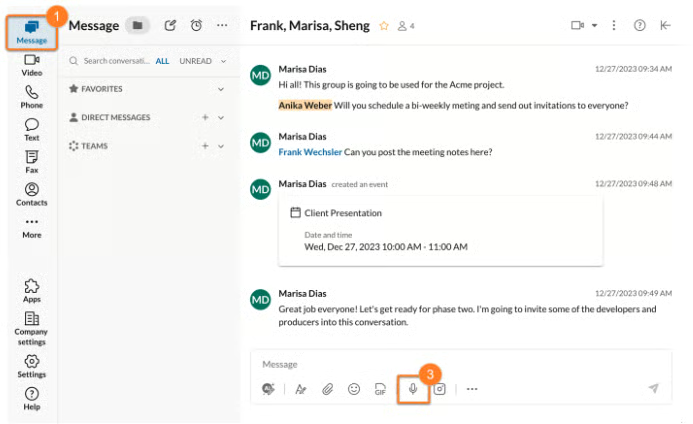
RingCentral stands out from OpenPhone by offering a unified communications platform that goes beyond voice calls to include messaging, video meetings, and team collaboration. Unlike OpenPhone, which focuses mainly on calling, RingCentral supports the broader communication needs of growing businesses. Manage calls with advanced routing tools, run AI-powered video meetings, and streamline teamwork with built-in messaging and task management features.
While OpenPhone primarily relies on Zapier for third-party app integration, RingCentral provides support for over 500 apps across various platforms, including productivity, customer relationship management (CRM), and retail. This allows you to automate workflows between your phone system and the tools your team already uses. I also appreciate that it’s backed by robust privacy controls and top-tier security certifications to protect both company and customer data.
With its extensive feature set, it’s no surprise that RingCentral comes with a higher price point. If you’re looking for budget-friendly alternatives to OpenPhone, Zoom Phone is worth considering as it offers similar functionality, including video meetings, starting at just $10 per user.
RingCentral pricing
| Plans (per user) | Core | Advanced | Ultra |
|---|---|---|---|
| Monthly | $30 | $35 | $45 |
| Annually | $20 | $25 | $35 |
| A 14-day free trial is available. |
- Core: Includes unlimited domestic calling, SMS/MMS, interactive voice response (IVR), HD video meetings (100 participants), complete call management, single sign-on, shared voicemail, and real-time transcription and AI summary.
- Advanced: Adds auto call recording, advanced call monitoring, multi-site support, unlimited internet fax, CRM integrations, analytics with six-month storage, cloud backup, custom roles, and AI-powered real-time note-taking and action item capture.
- Ultra: Builds on Advanced with customizable analytics, 12-month reporting history, 200-participant video meetings, device analytics, unlimited file and recording storage, plus AI tools for drafting and translating SMS and team chats.
Standout features
- Shared voicemail: Give multiple team members access to the same voicemail inbox, so anyone on the list can listen, save, or delete messages, so no call ever gets overlooked.
- Voicemail transcription: Instead of listening to every voicemail, you’ll get transcriptions delivered to your inbox or mobile device so you can quickly scan messages and prioritize your response.
- Reply with a voice message: If you’re tied up or on the move, you can instantly respond to calls using automated voice messages that play your custom reply through text-to-speech.
Zoom Phone: Best for customizable per-user calling plans
How it compares to OpenPhone
- Unlike OpenPhone’s fixed prepaid setup, Zoom Phone gives you the flexibility to assign different plan types across your team.
- Zoom Phone focuses on standard phone features, while OpenPhone complements it with customer-centric tools.
- When committing to a monthly plan, Zoom Phone comes in cheaper than OpenPhone.
- Both providers utilize AI for efficient management of calls.
My expert opinion
Teams with diverse calling needs that don’t want to be locked into OpenPhone’s unlimited calling plans may find Zoom Phone a better fit. It offers flexible options, including both metered and unlimited plans for local and international calls. This allows businesses to scale call volumes according to team usage and avoid overspending on unused minutes.
One thing I really like about Zoom Phone is how seamlessly it integrates with Zoom’s video conferencing platform. It’s a great fit for businesses that already rely on Zoom for meetings, giving them a unified solution for calls and team collaboration. If a team member is on a call with a customer and needs to switch to video, they can do it instantly in just a few clicks.
Zoom Phone falls short in advanced reporting, making it less ideal for teams that rely on in-depth performance insights. If call analytics is a priority, I highly recommend RingCentral. It includes business intelligence tools with customizable dashboards, allowing you to monitor key metrics and uncover opportunities to improve customer communication and team performance.
Zoom Phone pricing
| Plans (per user) | Metered | Regional Unlimited | Global Select |
|---|---|---|---|
| Monthly | $10 | $15 | $20 |
- Metered: A budget-friendly option with pay-as-you-go domestic calling, ideal for businesses with light to moderate phone usage.
- Regional Unlimited: Includes unlimited domestic calling within a designated country and provides each user with a direct dial number, making it a solid choice for locally based teams.
- Global Select: Delivers unlimited domestic calling in over 40 countries and territories, with each user assigned a local direct dial number.
All plans include essential call management features such as call routing, unlimited auto-attendants, recording, and Zoom Meetings integration.
Standout features
- Caller ID: Adjust your outgoing caller ID to display a different number or business identity, giving you flexibility for personal, departmental, or outbound sales calls.
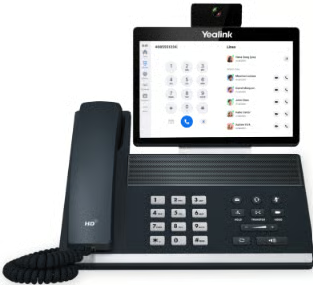
- Desk phone support: If you prefer a traditional desk phone setup, Zoom Phone works with leading desk phone devices like Polycom and Yealink, so you won’t have to give up familiar hardware.
- Salesforce integration: With native Salesforce integration, you can click to dial, view customer info on screen pops, and automatically log call activity to save time and improve follow-ups.
Nextiva: Best for customer journey management
How it compares to OpenPhone
- Nextiva functions more as a customer engagement platform, while OpenPhone is a collaborative phone system.
- Nextiva offers multi-channel support across social media, email, reviews, and live chat, while OpenPhone focuses primarily on voice and text messaging.
- OpenPhone makes it easy for teams to manage and reply to customer SMS, whereas Nextiva enables team collaboration across a broader range of communication channels.
- Both platforms are intuitive to use and set up.
My expert opinion
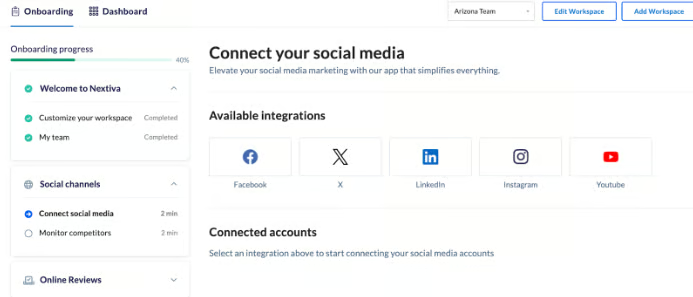
If OpenPhone’s collaborative phone system doesn’t meet the demands of your customer service strategy, you might prefer Nextiva’s multi-channel approach. Beyond phone and chat, Nextiva lets you connect with customers through social media, video, email, and even review platforms, all from a single interface.
Nextiva unifies customer data across channels, giving you a complete view of each interaction. With built-in AI tools like intelligent call routing and automated workflows, Nextiva helps teams respond faster and more efficiently. You can also monitor sentiment and analyze interactions in real time to better understand customer perceptions.
While Nextiva’s robust omnichannel features are ideal for sales and support teams, they may feel overwhelming for startups or businesses with simpler needs. In that case, Grasshopper is a closer alternative to OpenPhone, focusing strictly on phone and text communication.
Nextiva pricing
| Plans (per user) | Core | Engage | Power Suite |
|---|---|---|---|
| Monthly | $23 | $50 | $75 |
| Annually | $15 | $25 | $50 |
- Core: Built for small teams, it includes everything in Digital plus inbound and outbound voice, SMS, video meetings, screen sharing, and call routing across desktop, mobile, and browser apps.
- Engage: Geared toward growing teams, this plan adds customer-to-team SMS, toll-free numbers and minutes, Microsoft Teams integration, live and bot web chat, and advanced reporting for a full omnichannel experience.
- Power Suite: Ideal for sales and service teams, this top-tier plan layers on call transcription and summarization, advanced IVR, skills-based routing, a unified team interface, a supervisor dashboard, and callback.
Standout features
- Customer video & screenshare: Host real-time video calls with customers, share your screen to walk them through solutions, and even chat privately with teammates during a call to keep everything aligned.
- Social and review management: Monitor and respond to customer reviews and comments on sites like Facebook, Google, and Yelp, so you can protect your brand’s reputation without jumping across platforms.
- Digital fax: Send and receive faxes from your email or the vFAX portal, and even use a physical fax machine with the optional Fax Bridge if your business still relies on traditional workflows.
CallHippo: Best for low to moderate call needs
How it compares to OpenPhone
- CallHippo offers unlimited international calling, while OpenPhone charges per-minute rates.
- CallHippo supports a much broader range of integrations compared to OpenPhone.
- CallHippo seamlessly scales into a full-featured call center solution, while OpenPhone functions as a business phone system.
- OpenPhone offers unlimited SMS, while CallHippo limits outbound SMS to a set number of credits.
My expert opinion
CallHippo is a great fit for businesses with low call volumes, thanks to its dedicated plan, which is built specifically for light usage. It includes unlimited landline and mobile minutes, with free minutes shared across all account users, perfect for small teams that don’t make frequent calls. If your needs grow and your usage starts to resemble bulk calling, you can easily upgrade to the Pro Suite plan, which offers advanced features to help manage high call traffic efficiently.
For outbound campaigns, CallHippo features a parallel dialer, an AI-powered tool built to boost sales team productivity. Instead of dialing leads one by one, the system dials multiple numbers simultaneously and connects only the answered calls to available sales reps. This smart dialing approach helps reps focus on live conversations, accelerate outreach efforts, and close more deals in less time.
Similar to RingCentral, CallHippo uses AI tools to deliver fast responses and 24/7 support. But if AI isn’t essential to your workflow, you may want to explore simpler phone systems that don’t charge extra for those features. Ooma is a strong OpenPhone alternative due to its robust set of call handling features without the added cost of AI.
CallHippo pricing
| Plans (per user) | Starter | Professional | Ultimate | Enterprise |
|---|---|---|---|---|
| Monthly | $25 | $40 | $55 | Custom |
| Annually | $18 | $30 | $42 | Custom |
| A 10-day free trial is available for all plans. | ||||
- Starter: Offers unlimited US/Canada calling, 100 SMS, one phone number, and essential features like call logs, voicemail, and basic analytics.
- Professional: Adds 500 SMS, call recording, AI-powered reports, and more productivity tools such as audit logs, voicemail transcription, and user-based settings for growing teams.
- Ultimate: Enhances the Professional plan with 1,000 SMS, custom integrations, a dedicated account manager, and extended automation tools like call cascading and holiday routing for advanced operational control.
- Enterprise: Built for large-scale operations with global calling to 48 countries, custom onboarding, speech analytics or CallHippo AI, developer support, and full-service compliance and reporting tools.
Standout features
- Call monitoring: Supervisors can listen to live or recorded calls to coach agents, maintain quality, and improve service, especially useful for sales or support teams handling large call volumes.
- Auto rotate: To reduce the chance of your number being flagged as spam, CallHippo dynamically rotates the phone number displayed to each customer, keeping your outbound calls deliverable.
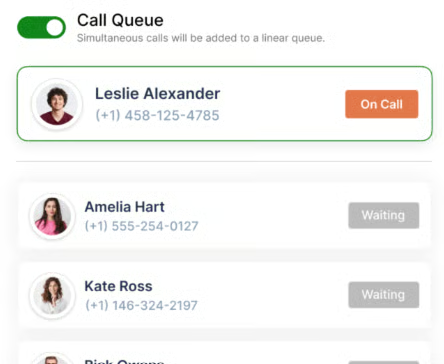
- Call queuing: When lines are busy, callers are placed in a queue with wait time announcements, which helps reduce hang-ups during peak hours.
Ooma: Best for office & home setups
How it compares to OpenPhone
- Ooma supports phone, video, and messaging channels, while OpenPhone solely focuses on phone communication.
- Ooma includes 500 toll-free minutes if you get a toll-free number.
- Ooma offers unlimited calls to the US, Canada, Mexico, and Puerto Rico, whereas OpenPhone only includes the US and Canada.
- OpenPhone offers a more up-to-date experience than Ooma, thanks to its AI capabilities and modern interface.
My expert opinion
Ooma is an excellent choice for both home and office setups, offering tailored plans to suit each use case. Residential users benefit from its free home phone plan, which includes free US calling, while Ooma Office offers over 50 business phone features for small teams. Both options are known for their simple setup and user-friendly experience, making them ideal for beginners or anyone looking for a hassle-free solution.
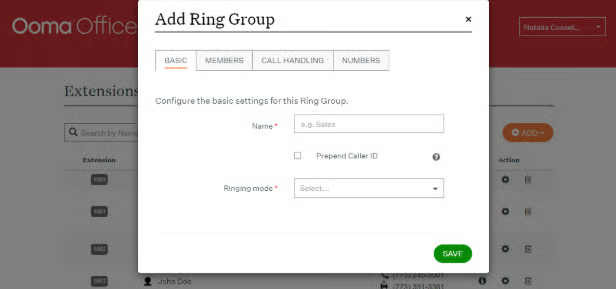
As a business phone, users report that Ooma offers great value for money, as it strikes a balance between affordability and the number of features. The base plan includes over 50 standard phone features, such as virtual receptionists, call park, and ring groups, which most providers typically unlock in more expensive tiers.
While Ooma includes team chat and video meeting capabilities, it doesn’t quite match the depth of more robust unified communications platforms. For a more advanced and modern communication experience, RingCentral offers an AI-powered solution with a wider range of integrated features designed for dynamic team collaboration.
Ooma pricing
| Plans (per user) | Essentials | Pro | Pro Plus |
|---|---|---|---|
| Monthly | $19.95 | $24.95 | $29.95 |
- Essentials: A basic business phone plan offering over 50 core features like a virtual receptionist, ring groups, digital fax, and mobile app support.
- Pro: Expands on Essentials with additional tools such as desktop and video conferencing apps, text messaging, call recording, voicemail transcriptions, and dynamic caller ID.
- Pro Plus: Delivers the most advanced experience with CRM integration, call analytics, call queuing, hot desking, “Find Me, Follow Me,” and Ooma Meetings recording for larger or remote teams.
Standout features
- Caller info match: Before answering a call, you’ll see rich contact details pulled from sources like CRM records, social media, or search engines, helping you respond with more context and confidence.
- Expanded extension monitoring: View the real-time availability of up to 60 extensions at once, so you can easily route calls or see which colleagues are free to take the next call.
- Advanced ring groups: Set up flexible rules for how long each phone should ring and what happens next, like forwarding to voicemail or another user, so calls are always answered or rerouted efficiently.
Phone.com: Best business phone app without Wi-Fi
How it compares to OpenPhone
- Phone.com allows entry-level users to create multi-level phone menus. OpenPhone requires a higher-priced subscription for the same feature.
- Phone.com includes essential call handling features in its base plan, while OpenPhone locks many of those behind higher-tier upgrades.
- Like OpenPhone, Phone.com offers unlimited calling and messaging.
- Both providers utilize AI for efficient call handling.
My expert opinion
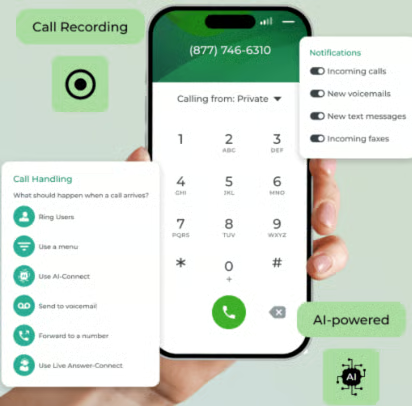
Among the OpenPhone alternatives featured in this guide, Phone.com stands out as the only provider that leverages eSIM technology to turn your mobile device into a full-featured business line. With its ProSim feature, you receive a dedicated business number that integrates directly with Phone.com’s platform, allowing you to manage calls without relying on mobile data or Wi-Fi.
Once your eSIM is activated, you can make and receive native business calls straight from your mobile phone, no apps required. This gives you access to over 50 phone features, such as IVR, call recording, and call analytics.
However, because Phone.com is built with small businesses in mind, it offers limited international coverage. If your business is expanding globally, CallHippo may be a better fit due to its unlimited calling to 48 countries and support for international numbers.
Phone.com pricing
| Plans (per user) | Basic | Plus | Pro |
|---|---|---|---|
| Monthly | $18 | $27 | $40 |
| Annually | $15 | $22.50 | $33.33 |
- Basic: Offers unlimited calling, one shared phone number, mobile/web apps, 50+ voice features including IVR, and video conferencing with up to 100 participants.
- Plus: Includes all Basic features plus AI-powered call routing, voicemail transcription, enterprise texting, IP desk phone compatibility, and outbound text messaging.
- Pro: Built for larger teams, the Pro plan adds call recording, call analytics, CRM integration, and 10-year data retention for full-scale communication management.
Standout features
- Call analytics: With the Pro plan, you’ll get detailed insights into call trends by time, direction, user, and more, along with graphs that help you visualize patterns and make smarter staffing or marketing decisions.
- Call logs: You can access a detailed history of every call, including missed, answered, inbound, outbound, and even faxes.
- Dial-by-name directory: Callers can reach the right person just by typing a name on their keypad, and you can customize name recordings for a more polished, brand-friendly experience.
Grasshopper: Best for basic calling & texting
How it compares to OpenPhone
- Grasshopper’s higher-tier plans support unlimited users at a flat rate, while CallHippo charges per user.
- Grasshopper offers phone menus and call forwarding at the base plan, while OpenPhone unlocks them at the second tier.
- Both providers focus on phone and SMS capabilities.
- While few, OpenPhone readily integrates with popular productivity apps, whereas Grasshopper lacks integration support entirely.
My expert opinion
If you want a simple alternative to OpenPhone without the overload of advanced features, Grasshopper is your best bet. This virtual phone system strips away the extras, delivering a streamlined solution ideal for small businesses that mainly rely on calls and texts. Its limited feature set keeps setup and usage incredibly user-friendly.
One thing I appreciate about Grasshopper is that higher-tier plans support unlimited users without charging per person, unlike many providers with per-user monthly fees. You also get bundled phone numbers and extensions, which is handy if you need dedicated lines for different teams.
That said, Grasshopper’s simplicity may be a drawback for businesses with expanding communication needs. If you’re planning to scale, I recommend Nextiva, which offers a more robust platform with multi-channel capabilities, helping you connect with customers across voice, video, and email.
Grasshopper pricing
| Plans | True Solo | Solo Plus | Small Business |
|---|---|---|---|
| Monthly | $18 | $70 | $70 |
| Annually | $14 | $25 | $55 |
- True Solo: Best for solo entrepreneurs, this plan includes one phone number, one extension, and essentials like business texting, call forwarding, voicemail, and app-based calling.
- Solo Plus: Adds support for unlimited users and three extensions on a single phone number, plus additional features like call transfers, reporting, and simultaneous call handling.
- Small Business: Offers maximum flexibility with four phone numbers, unlimited extensions and users, and the full feature set, including call recording, reporting, and advanced call control tools.
Standout features
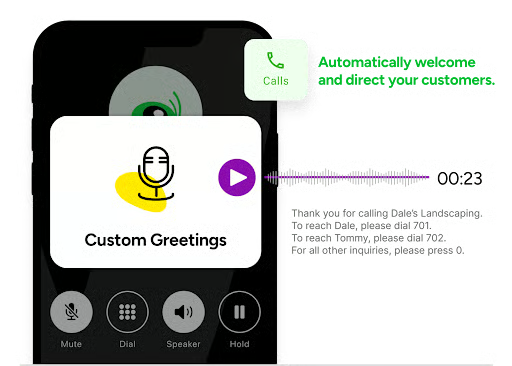
- Pre-recorded greetings: You can set up custom audio greetings that play automatically when someone calls. Use this for professional introductions, voicemail messages, or to let callers know when you’re unavailable.
- Instant response: If you miss a call, Grasshopper can instantly text the caller with a message letting them know you’re unavailable and invite them to reply with the best time to reach them.
- VoIP + Wi-Fi calling: When cell reception is weak, you can make and receive business calls over your Wi-Fi connection, saving mobile data and ensuring you’re always reachable from any device.
How I evaluated the best OpenPhone alternatives
Choosing the right OpenPhone alternative means looking beyond basic calling features. I focused on key factors that matter most for growing teams and small businesses, such as pricing, feature inclusions, usability, and support quality.
I gave top marks to providers with free trials, competitive per-user rates, and volume discounts. Services that offer strong value at under $30 per user stood out the most in this category.
Core VoIP features like call management, unlimited US/CA calling, and SMS were weighted heavily. Platforms that included these essentials in their base plans scored highest.
I looked for standout tools like voicemail transcription, integrations, call analytics, and video conferencing. Providers that packaged these into mid-tier or base plans earned more points for flexibility and depth.
Setup time, user interface, and app experience influenced this score. Services that customers described as simple, intuitive, and quick to deploy earned full points.
Strong 24/7 access, multi-channel availability, and implementation assistance were big differentiators. I prioritized platforms with responsive, always-on support for small business users.
This includes my hands-on experience with the platform’s reliability, innovation, and overall value. I also factored in customer reviews and whether the service could scale as your business grows.
How to choose the right OpenPhone alternative
If OpenPhone isn’t meeting your needs, finding the right alternative depends on what matters most to your business — whether it’s pricing, performance, or productivity tools. Here’s what to consider when comparing other VoIP options:
Frequently asked questions (FAQs)
What is the alternative to OpenPhone?
Top alternatives to OpenPhone include RingCentral, Nextiva, CallHippo, Zoom Phone, and Grasshopper. These platforms offer more flexible plans, advanced features, and better scalability, depending on your business needs.
Is Grasshopper or OpenPhone better?
OpenPhone is better for teams that want shared inboxes and professional calling features. Grasshopper is a simpler solution ideal for solopreneurs who just need basic calling and texting.
Which is better, OpenPhone or RingCentral?
The answer depends on your team’s size, feature needs, and how you plan to scale. RingCentral offers a comprehensive unified communications platform that combines voice, video, messaging, and AI capabilities. OpenPhone is more affordable and easier to use, but lacks the depth and flexibility of RingCentral.
Bottom line
The best OpenPhone competitors offer more flexibility, better reliability, and advanced features to support growing business needs. Whether you need stronger integrations, multi-channel communication, or customizable call plans, there’s a platform built to match your goals.
I picked RingCentral as the overall best because it combines calling, messaging, and video in one AI-powered platform. It’s the most comprehensive solution for businesses that want to scale without having to switch tools down the line.
