







If you’re running a business that handles multiple projects or client deliverables, a project management schedule template offers a prebuilt framework to organize timelines. This feature is commonly offered by project management software, which often integrates with task and resource management tools and includes AI capabilities for automating scheduling and tracking progress. In this guide, you’ll learn how to build your own schedule template and apply best practices to plan your activities effectively.
- What is a project management schedule template?
- Benefits of using a project management schedule template
- Types of project management schedule templates
- Key elements of a project management schedule template
- How to create a project management schedule template
- Tools for managing project management schedules
- Project management schedule template best practices
- FAQs
What is a project management schedule template?
A project management schedule template is a ready-made document typically presented as a table or timeline, that lists project tasks in order of completion along with key milestones and assigned roles. It is often used at a project’s planning stage, but it can also be used as a guide during execution for adjusting workloads and keeping everyone informed about the order of activities.
In small businesses, project schedule templates save time and improve coordination when managing multiple initiatives. In fact, 68% of project practitioners mostly or always use a project schedule, according to Wellingtone’s 2025 survey, showing how essential these templates have become for keeping projects on track.
Benefits of using a project management schedule template
A project management schedule template is one of the most practical tools you can use to guide a project from start to finish. It lets you repeat proven processes, allowing you to keep everything under control when you’re coordinating work with contractors or external contributors.
Here are the main benefits you can expect when using one in your projects.
- Improved time management
By laying out tasks with start and finish dates, a schedule template makes it easier to see how long the project realistically takes. Instead of guessing deadlines, you can plan with confidence and adjust timelines before problems affect delivery. - Better resource allocation
Some templates allow you to track task dependencies and how workloads are spread across the team, which gives a clearer view of where resources should be allocated. This avoids overburdening team members and ensures limited resources are directed toward the highest-priority tasks. - Greater accountability
A template documents who is responsible for each activity and when it must be completed, which removes the ambiguity that often slows projects down. With expectations visible to the whole team, it becomes easier to follow through and hold contributors accountable. - Easier progress tracking
Instead of relying on memory or scattered notes, you have a single reference that shows how actual progress compares with the original plan. This visibility makes it straightforward to communicate status updates and keep stakeholders informed at every stage.
Types of project management schedule templates
Project management schedule templates come in different formats, each suited to the way you prefer to plan and oversee work. Here are sample project management schedule templates you can use to match your project’s complexity and your team’s needs.
Gantt chart template
A Gantt chart template visually displays tasks along a timeline to show how activities overlap and how delays in one area can impact the rest of the project. This format works well for projects with multiple tasks and requires close coordination.
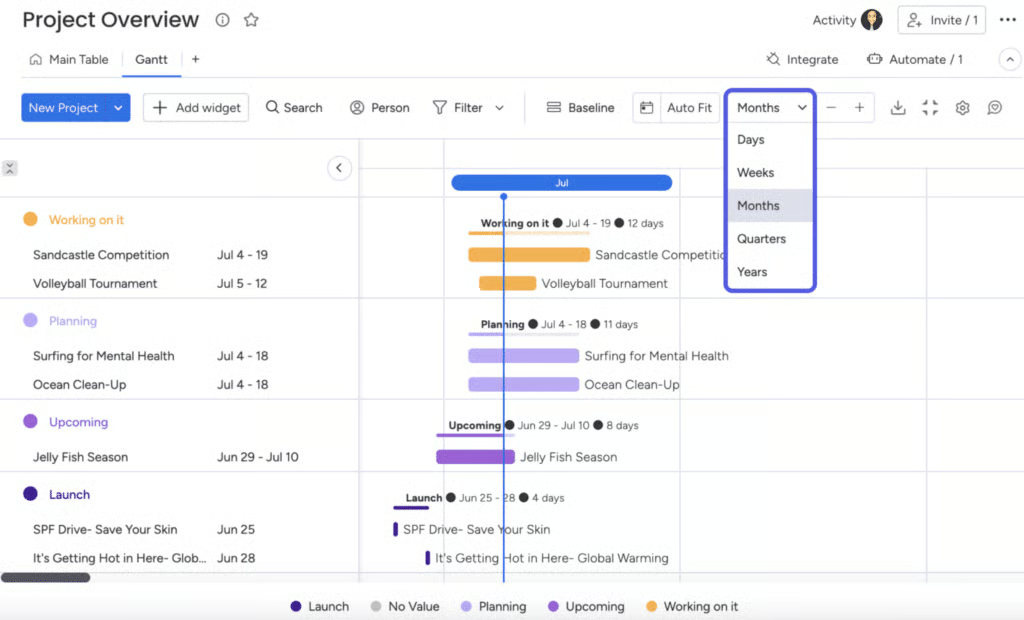
monday work management’s Gantt chart template offers a timeline view that lets you manage both immediate priorities and long-term planning. You can adjust the view to match your preferred time period, while also seeing how task dependencies connect across the schedule.
Calendar template
A calendar template organizes project deadlines along with meetings and appointments. It’s especially useful for teams managing overlapping schedules and time-sensitive milestones. You can customize it with daily, weekly, or monthly views, and use color coding to easily identify milestones, meetings, and decision dates.
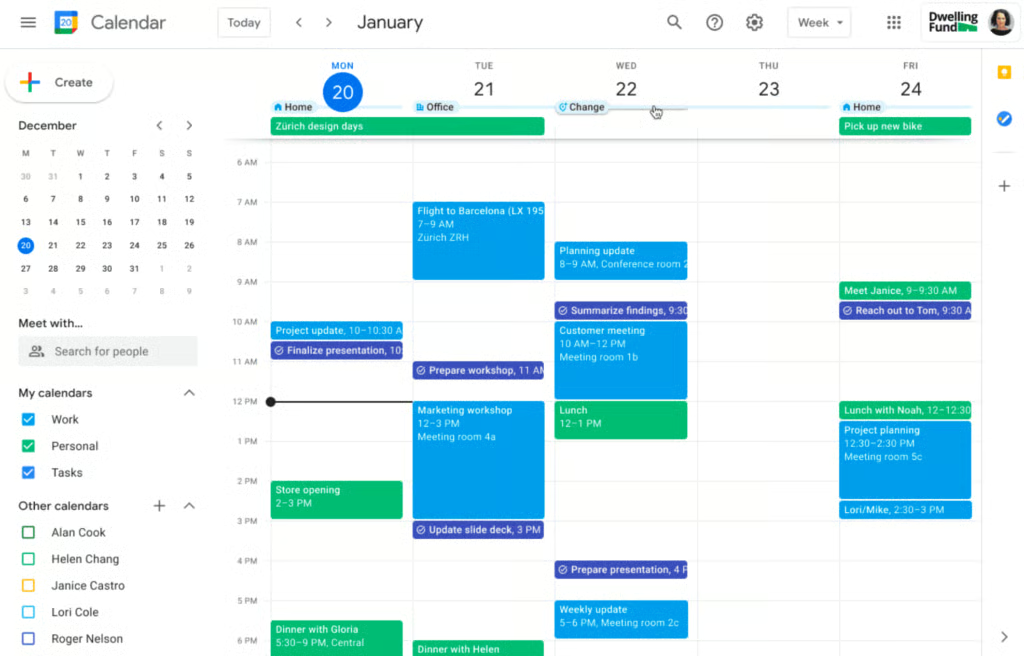
If you’re managing projects within Google Workspace, its built-in Calendar app lets you add tasks or events from your email with just a few clicks. Features like color coding and shared access help you stay informed of upcoming deadlines and find out who’s available for a given time slot. The platform now also includes Gemini’s AI features, which assist with scheduling by detecting calendar details in emails and suggesting helpful follow-up actions.
Kanban board template
A Kanban board is a visual management tool that displays tasks according to workflow stages such as “To Do,” “In Progress,” and “Completed.” As tasks move through each stage, they shift across columns, which makes it easier to spot bottlenecks and control work in progress (WIP).
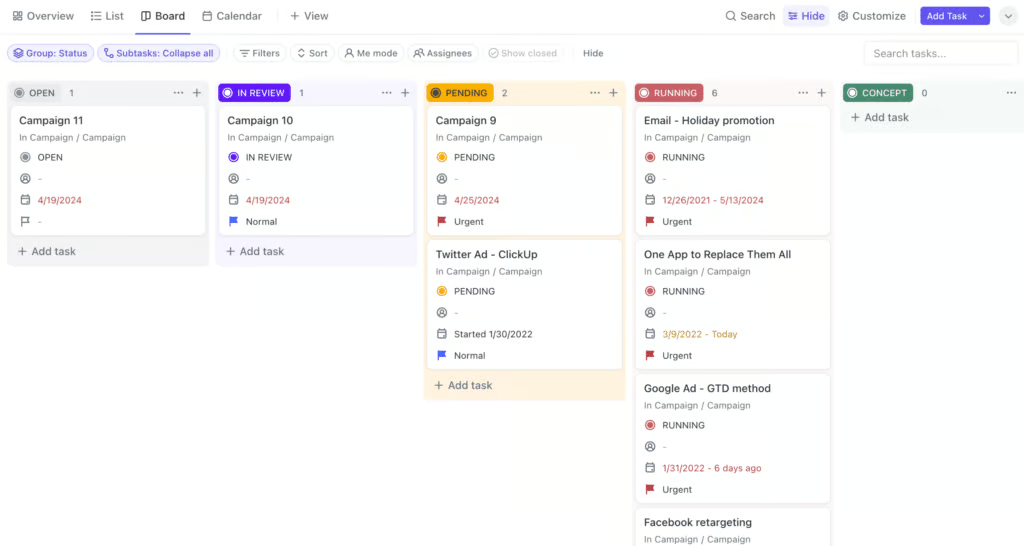
ClickUp’s Kanban board fits well into the scheduling process by letting you map out tasks as they move through different stages of completion. You can set up tasks with custom statuses like Open, In Progress, Review, Blocked, or Closed to monitor the progress of each step in your workflow.
Milestone chart template
Unlike most project schedule templates, a milestone chart highlights only the major checkpoints in a project rather than every task. It is ideal for communicating progress to stakeholders who need a high-level overview of the project’s status without diving into all completed tasks. This approach keeps attention on critical achievements that show whether the project is advancing as planned.
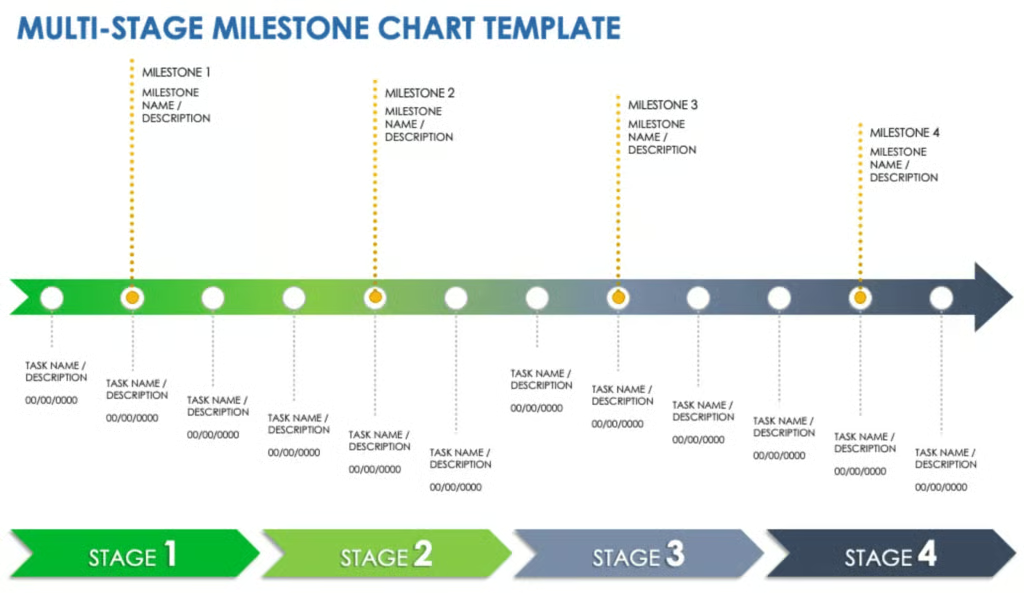
Smartsheet’s milestone chart template gives you a way to track project phases by entering checkpoints and short descriptions under each milestone. You can also attach deliverables and dates to the supporting tasks, which makes it easier to monitor overall progress.
Key elements of a project management schedule template
Below are the main components commonly found in a project schedule template, such as task name, status, and dependencies. Each serves a specific purpose for project tracking and schedule adherence.
| Element | Description |
|---|---|
| Task name | Identifies the specific work that needs to be completed. |
| Start date | Marks when a task is scheduled to begin. |
| End date | Defines the deadline for finishing a task. |
| Duration | Shows how long the task is expected to take from start to finish, with options to calculate duration based on working days or total days, including or excluding weekends and holidays. |
| Dependencies | Indicates which tasks must be completed before another task can begin. |
| Assigned owner | Points to the person or team responsible for completing the task. |
| Milestones | Highlights major checkpoints that signal progress in the project. |
| Status | Provides the current state of a task, such as pending, active, or complete. |
| Resources | Lists the people, budget, or tools required to complete the task. |
How to create a project management schedule template
Teams may approach a project management schedule template in different ways but the steps below can give you an idea of how to shape a schedule that fits your work style and project needs.
1. Define the scope and break down tasks
Start by clarifying the scope of the project, including your target outcomes and what falls within and outside the project’s boundaries. From there, you can break the work into smaller tasks and start assigning them. This level of detail ensures the schedule captures the full workload while reducing overwhelm to team members.
2. Establish timelines and dependencies
Once tasks are identified, decide when each one should start and end, while taking into account the effort required and the order in which activities must occur. Dependencies are critical here, since some tasks cannot begin until others are finished.
You can also account for lead and lag times to manage overlaps or intentional delays between tasks, which helps create a more realistic and flexible schedule.
3. Assign responsibility
Each task in the schedule requires an assignee who is the “do-er” — the individual responsible for completing the work. Assigning responsibility also empowers team members by giving them ownership over their portion of the project, which strengthens accountability and communication.
4. Add milestones
Milestones serve as checkpoints that signal when important phases of the project have been achieved. Unlike regular tasks, they highlight major accomplishments that confirm the project is advancing as planned.
5. Allocate resources
No schedule is complete without considering the people, tools, time and budget required to complete each task. Planning resources alongside activities gives you a realistic view of what is needed to finish a project. This prevents last-minute shortages and allows you to balance resources across the team more effectively.
6. Select a format and review
Select the template format that best suits your project, such as a Gantt chart for sequential tasks, a calendar for schedule-focused work, or a Kanban board for visual workflow tracking. After mapping out the details in your chosen template, review everything to ensure the schedule aligns with your priorities and project goals. As conditions shift, you can adjust the schedule to implement corrective actions, such as reducing task durations or shifting dependencies.
Tools for managing project management schedules
Building a schedule template from scratch lets you fully customize it to match your project’s specific needs, but it can also take time and involve some trial and error. Using dedicated project management software simplifies this process by offering templates equipped with task and resource management tools. If you’re ready to invest in a platform that manages all aspects of project scheduling, here are a few options to consider:
| Project management scheduling tool | Free plan | Monthly starting price | Key features for project scheduling |
|---|---|---|---|
 | ✓ | $12/user |
|
 | ✓ | $7/user |
|
 | ✓ | $7/user |
|
 | 14-day trial | $9/user |
|
Project management schedule template best practices
Now that you’ve learned how to create your own project schedule template, the next step is putting it into action across your team. The following best practices will help you implement your schedule effectively so it becomes a reliable guide for managing work and meeting deadlines.
- Define ownership for every task
Each task should have one clearly identified owner who is both responsible for completing the work and accountable for its outcome. Clarifying these roles prevents confusion over who does the work versus who ensures it gets done, helping teams avoid the “someone else will handle it” problem and track progress more effectively.
- Set timeframes based on actual capacity
Time estimates should always reflect the workload of your team. Instead of setting dates based on ideal timelines or stakeholder pressure, use past project data or direct input from team members to establish deadlines that can actually be met without overworking anyone.
- Include dependencies to visualize how each task connects
A well-built schedule shows how one task influences another, which gives you a clear view of your project’s critical path. By identifying dependencies early, you can anticipate where delays will have the biggest impact and plan around lead or lag times to fine-tune sequencing. This helps you manage overlaps or gaps between tasks, sequence work more efficiently, and make informed decisions when priorities shift.
- Use project management software to streamline collaboration
Using project management software gives you access to a suite of features to manage and access the schedule from anywhere, which is especially helpful for hybrid or remote teams. In a survey by monday, smaller businesses (84%) are more likely to use work management software than large enterprise companies (71%), showing that even small teams benefit significantly from these tools.
- Update the schedule regularly to reflect real progress
A schedule only becomes effective if it reflects what’s happening in the project. Build a habit of reviewing and revising it after each milestone or deliverable to record completed work and adjust for delays or new priorities. When using a scheduling template with dependencies and lead or lag times, updates to one task can automatically shift related activities. This ensures the schedule reflects actual performance data instead of static projections.
FAQs
How do I create a project management schedule?
Start by defining the project scope and breaking it into smaller, actionable tasks. Assign responsibilities, set deadlines, and identify dependencies between activities. Then, organize these tasks in a timeline or template, such as a Gantt chart or calendar, and update it regularly to reflect real progress and resource changes.
Which tool is used for project scheduling?
Project management software like monday, ClickUp, or Smartsheet offer a comprehensive set of features to help teams build and organize project schedules in real time. These tools have ready-made templates to cut down time spent on building timelines and finding the right project view that fits your workflow.
What is a master project schedule?
An integrated master schedule is the central timeline that consolidates all project tasks, milestones, and dependencies. It provides a high-level view of progress, so managers can coordinate resources and ensure every part of the project moves toward the same objectives.
