


The best hybrid meeting software creates equal opportunities for all participants to contribute, whether they’re attending virtually or in person. It enables users to brainstorm on a digital whiteboard, annotate on a shared screen, and access meeting tools like breakout rooms, polling, Q&A, and meeting summaries. Often, these providers support video conferencing equipment and room systems to build the right setup for your next hybrid meeting.
Here are our top-rated picks for the best hybrid meeting solutions:
- Zoom One: Best for keeping meeting media on premises
- BlueJeans: Best for customizable meeting features
- RingCentral: Best for all-in-one business communications
- Webex: Best for immersive, hybrid collaboration systems
- Microsoft Teams: Best for asynchronous work communication
- Google Meet: Best for secure and compliant hybrid meetings
- Best Hybrid Meeting Solutions at a Glance
- Zoom One: Best Overall for On-premise Hybrid Meeting Solution
- BlueJeans: Best for Customizable Meeting Tools
- RingCentral: Best for Centralized Business Communications
- Webex: Best for Immersive Collaboration Systems
- Microsoft Teams: Best for Asynchronous Collaboration
- Google Meet: Best for Secure & Compliant Meetings
- Frequently Asked Questions (FAQs)
- Bottom Line
Best Hybrid Meeting Solutions at a Glance
| Hybrid Meeting Solutions | Monthly Starting Price (per User) | Key Features | Free Plan/Trial | FSB Rating |
|---|---|---|---|---|
 | $14.99 |
| ✓ | 4.85 out of 5 |
| Visit Zoom One | ||||
 | $12.49 |
| ✓ | 4.63 out of 5 |
| Visit BlueJeans | ||||
 | $30 |
| ✓ | 4.53 out of 5 |
| Visit RingCentral | ||||
 | $14.50 |
| ✓ | 4.52 out of 5 |
| Visit Webex | ||||
 | $4 |
| ✓ | 4.48 out of 5 |
| Visit Microsoft Teams | ||||
 | $7.20 |
| ✓ | 4.44 out of 5 |
| Visit Google Meet | ||||
Zoom One: Best Overall for On-premise Hybrid Meeting Solution
Zoom One Monthly Pricing (per User)
- Basic: Free for 100 attendees, 40-minute meetings, breakout rooms, co-annotation, remote control, multi-share, whiteboard, local recording, team chat, and multi-language captions
- Pro: $14.99 for 100 attendees, 30-hour meeting length, 5GB cloud storage, polling, co-host, streaming, and reporting
- Business: $19.99 for 300 attendees, unlimited whiteboards, recording transcripts, and branding
- Business Plus: Custom pricing for 10GB cloud, translated captions, and phone system features
- Enterprise: Custom pricing for 1,000 attendees and unlimited cloud storage
Zoom’s Hybrid Meeting service model leverages its conferencing platform to enable organizations to host hybrid meetings easily. It allows users to deploy Zoom’s meeting components into their company network and keep their meeting media on-premise. In this mode, internal users can connect to a local hybrid server while external users join via the Zoom Cloud. It enables a variety of hybrid workspaces like centralized room management and digital signage.
While Zoom has worked furiously to fix its security holes over the years, many users have become skeptical of its reputation. If security is a huge concern, consider Google Meet, which employs various counter-abuse protections to keep meetings safe, including anti-hijacking measures and multiple two-step verification options.
Zoom One Features
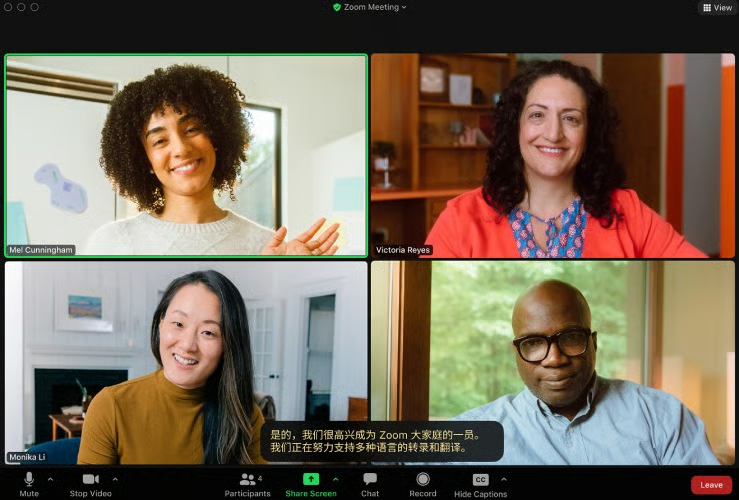
- Multi-screen share: Allows an unlimited number of meeting participants to share their screens simultaneously. This can only be used in the Zoom desktop app, and screen sharing in webinars is restricted to four simultaneous participants.
- Translated captions: Zoom enables free and paid users to have the speech in a meeting automatically translated into another language. Real-time translation currently supports up to 21 languages, including Arabic, Chinese, French, Italian, and Spanish.
- Remote control: Toggle on this feature to allow another meeting participant to take control of your screen. Once given permission, the participant can control the mouse and keyboard and copy text from your shared screen.
BlueJeans: Best for Customizable Meeting Tools
BlueJeans Monthly Pricing (per User)
- Basic: Free for 25 attendees and unlimited meeting duration
- Pro: $12.49 for 150 attendees, 25 hours of recording, remote desktop control, and collaboration board
- Enterprise: $17.49 for 300 attendees, unlimited recording, closed captioning, live transcription, and brand customization
- Free trial: 14 days
All plans include file sharing, virtual backgrounds, hand raising, polling, screen sharing, breakout rooms, in-meeting chat, and calendar integrations.
BlueJeans, one of our top video conferencing software, features a wealth of customizable meeting features to make hybrid working more personalized, efficient, and productive. Gallery view customization lets you organize video layout organized by name, meeting participation, and raised hand status, while weatherperson mode immerses participants by overlaying your camera feed into your presentation.
If you’re conducting corporate training through video conferences, combine all learning tools into a single screen, including Q&A, polling, collaboration board, and breakout rooms. You can also enable on-screen alerts to get one-click access to your next meeting.
If you’re new to hybrid conferences, we suggest a more user-friendly option like Zoom One. BlueJeans tends to clutter its interface with many features, potentially leading to a steep learning curve. Zoom has earned its popularity mainly for its ease of use, allowing users to become quickly familiarized with its video meeting platform.
BlueJeans Features
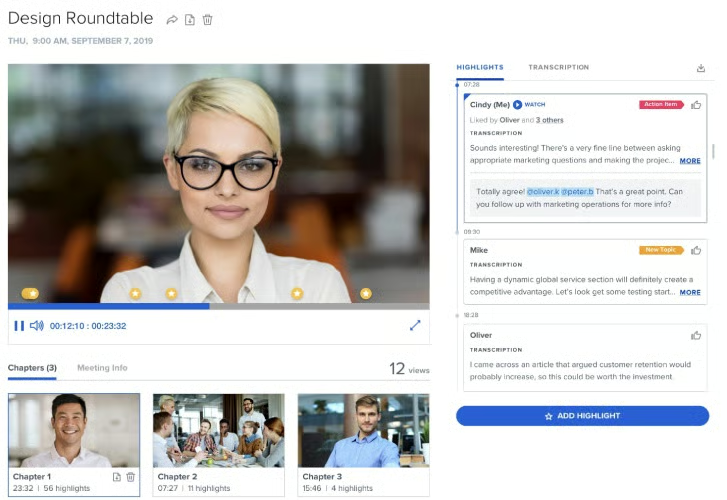
- Smart meetings: Capture meeting highlights and automatically assign action items to meeting participants. Action tags and email notifications help track project status.
- Collab board: Works similarly to a digital whiteboard in which participants brainstorm together by adding images, sticky notes, arrows, and screenshots.
- Command center: Provides admins with complete visibility of all meetings, rooms, and events. Interactive dashboards present critical metrics for usage and deployment.
RingCentral: Best for Centralized Business Communications
RingCentral Monthly Pricing (per User)
- Core: $30 for one phone number, 100 toll-free minutes, unlimited calls in the U.S. and Canada, 25 SMS segments, visual voicemail, multi-level auto-attendant, call management, team chat, and 100 video attendees
- Advanced: $35 for 1,000 toll-free minutes, 100 SMS segments, advanced routing, auto-call recording, hot desking, advanced call monitoring, and business analytics
- Ultra: $45 for 10,000 toll-free minutes, 200 SMS segments, device analytics, and unlimited cloud storage
- Free trial: 14 days
If you’re looking for a one-stop shop for all your hybrid communication needs, RingCentral is your best choice. RingCentral, the market leader in unified communications, combines calling, meeting, and messaging in one streamlined platform. The entry-level plan features a core phone system along with business SMS, team chat, and smart video conferencing features. Upgrading to higher tiers includes unlimited internet fax and cloud storage.
On the downside, RingCentral can be difficult to set up due to its complex configurations and feature-rich nature. If you’re looking for a more straightforward solution for your hybrid meetings, check out Google Meet. It employs a no-frills approach to video meetings, making it more straightforward to use.
RingCentral Features
- Call-to-video: Switch an ongoing voice call to a video call without hanging up or scheduling a meeting. Use the RingCentral app to use this feature on your computer or smartphone.
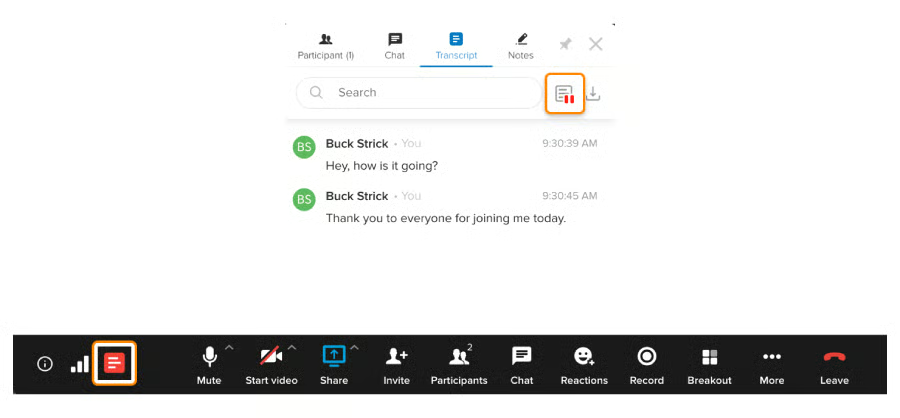
- Live transcription: Enables hosts and moderators to start, pause, and resume real-time transcription and choose whether the transcript should be visible to participants and can be downloaded.
- Auto-follow: Uses artificial intelligence (AI) to automatically track where you are while keeping you at the center of your camera feed. This puts your video in the frame and keeps meetings distraction-free.
Webex: Best for Immersive Collaboration Systems
Webex Monthly Pricing (per User)
- Free: Free for 100 attendees, 40-minute meeting length, whiteboard, noise removal, local recording, virtual screen sharing, calendar integration, and team chat
- Meet: $14.50 for 200 attendees, 24-hour meeting length, 10GB cloud storage, closed captions, polling, Q&A, post-meeting transcript, and file sharing during meeting
- Suite (Meet + Call): $25 for 200 attendees, six-way conference call, auto-attendant, call forwarding, unlimited local calls, and advanced calling features
- Enterprise: Custom pricing for 1,000 attendees, unlimited cloud storage, call monitoring, and call recording
- Free trial: 90 days
Webex has dramatically expanded its cloud services by creating purpose-built devices to enable hybrid meeting room solutions with an emphasis on engaging and inclusive experiences. Its device lineup ranges from smart boards, room systems, table microphones, and headsets. Each device has key features optimized for hybrid meetings—voice optimization, background noise removal, virtual assistant, gesture recognition, and whiteboard capabilities.
The Webex meeting plans may be restrictive for growing businesses due to its lack of scalability options. Users can only choose between the free and paid versions of Webex Meet, and upgrading to higher tiers would mean paying extra for cloud calling features. If you’re after a scalable hybrid meeting solution, consider Zoom One, which provides up to five subscription options for its meeting platform.
Webex Features
- Co-host privileges: A meeting host can assign an alternate host who will assume the host role in case they run late or can’t attend. Co-hosts are able to mute participants, manage breakout sessions, record meetings, and share multimedia.
- Overlapping meetings: Enables the same host to schedule two or more meetings at the same date and time. The host can leave an ongoing meeting to start another meeting without causing interruptions in both sessions.
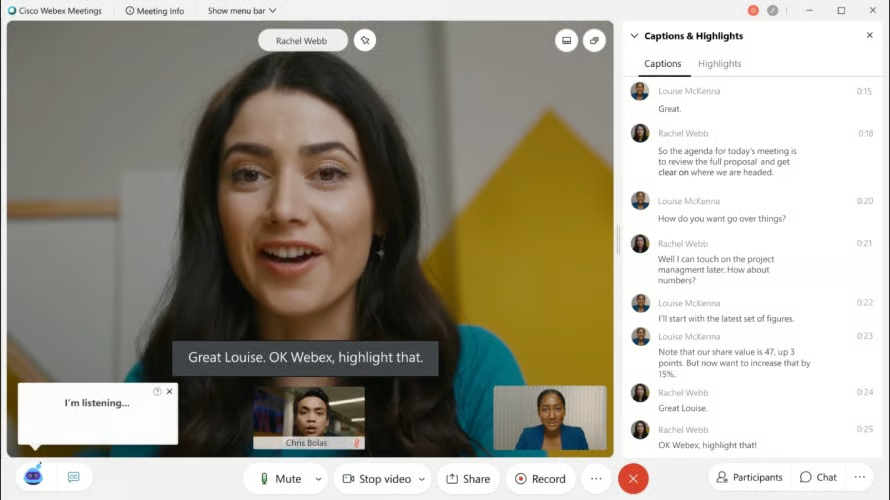
- Webex Assistant: Use voice commands to enable the Webex virtual assistant to take notes, set reminders, and capture meeting highlights. It integrates with Webex devices for a hands-free collaboration experience.
Microsoft Teams: Best for Asynchronous Collaboration
Microsoft Teams Monthly Pricing (per User)
- Free: Free for 100 attendees, one-hour meeting length, screen sharing, noise suppression, 5GB cloud storage, unlimited chat, and tasks.
- Essentials: $4 for 300 attendees, 30-hour meeting length, whiteboard, breakout rooms, and 10GB cloud storage
- Microsoft 365 Business Basic: $6 for 30 languages for live captions, co-annotations, meeting transcripts, breakout rooms, 1TB cloud storage, and app integrations
- Microsoft 365 Business Standard: $12.50 for webinar hosting and desktop version of Microsoft apps
- Microsoft 365 Business Premium: $22 for advanced security, access and data control, and cyberthreat protection
Microsoft Teams supports hybrid working by allowing meeting participants to sync meeting schedules, record sessions, and ideate on a digital whiteboard. Besides these meeting basics, it has asynchronous features that enable file sharing, task assignment, and project discussions even if employees can’t meet at the same time. Chats and channels are great for team check-ins, while the Sharepoint team site serves as a landing place to share project news.
Unfortunately, Microsoft Teams is a little resource-intensive, potentially affecting desktop performance. If you’re looking for a lightweight hybrid meeting solution, try Google Meet, a video conferencing platform that runs entirely on a web browser. It delivers the right number of meeting tools that won’t overwhelm your small team.
Microsoft Teams Features
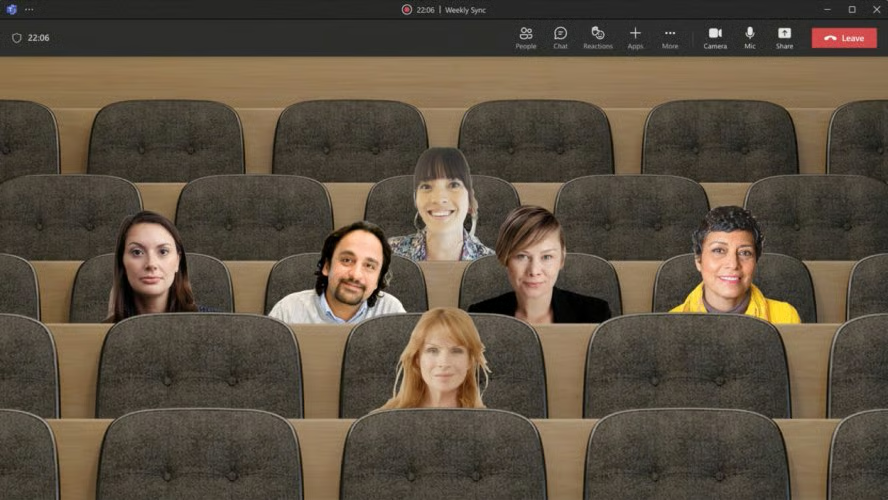
- Activity feed: A summary of all activities in the channels you follow. Set the filter to show specific types of notifications, such as replies, likes, and @mentions.
- Together mode: Make meetings more engaging by placing participants in a shared virtual background. It uses an AI tool to automatically crop people’s faces and shoulders to slot their images and place them in a single environment.
- Slash commands: Similar to keyboard shortcuts, slash commands are words preceded by a slash (/) that you can type in the command box to quickly perform common tasks in Teams. For example, typing the command “/busy” will automatically set your status to busy.
Google Meet: Best for Secure & Compliant Meetings
Google Meet Monthly Pricing (per User)
- Free: 100 attendees, one-hour meeting limit, and whiteboard
- Business Starter: $7.20 for 100 participants, 24-hour meeting length, 30GB cloud storage, and international dial-in numbers
- Business Standard: $14.40 for 150 attendees, noise cancellation, polling, Q&A, hand raising, breakout rooms, and 2TB cloud storage
- Business Plus: $21.60 for 500 participants, attendance tracking, and 5TB cloud storage
- Enterprise: Contact sales for 1,000 participants and live streaming
- Free trial: 14 days
When it comes to security standards, Google Meet takes several steps to protect the data and privacy of its users. It runs on an advanced security infrastructure and keeps all data encrypted in-transit, whether meeting on a browser or mobile app. Anti-abuse measures include meeting codes, host management, two-step verification, and access transparency. In addition, it supports compliance requirements for heavily regulated industries like healthcare and education.
Unfortunately, Google Meet’s features are rather basic and don’t compare to Zoom One or RingCentral. It doesn’t support meeting summaries, multi-screen sharing, or remote control. If you need a feature-rich platform for large-scale meetings, we recommend RingCentral or Zoom One. Both providers deliver powerful unified communications capabilities that unify phone, video meetings, and team collaboration.
Google Meet Features
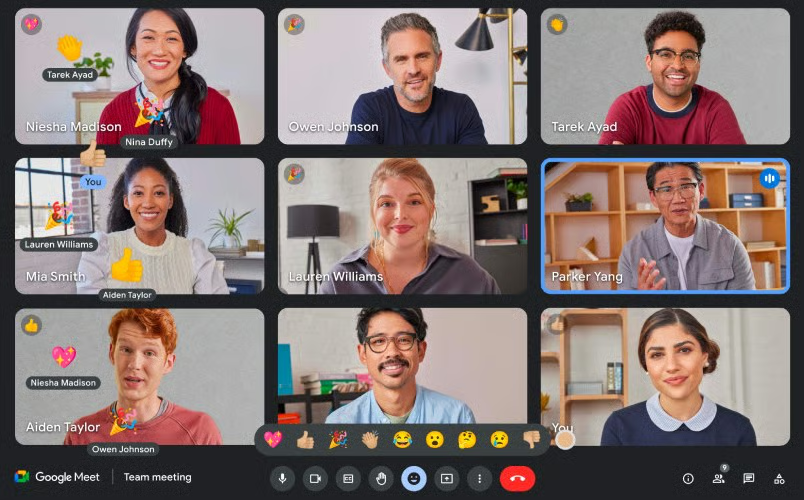
- Background edits: To make meetings more fun and reduce distractions, you can choose various visual effects, such as blur, custom image, color filters, and stylized backgrounds (static, immersive, and seasonal).
- Meeting reactions: Interact with the host and other meeting participants through emojis. This allows the host to identify what participants feel and which moments the audience likes best.
- Active noise control: Filters out background noise to limit distractions during meetings. It removes noises like room echo, a closing door, or typing.
How We Evaluated the Best Hybrid Meeting Solutions
Frequently Asked Questions (FAQs)
What are the requirements for a hybrid meeting?
The requirements to host a successful hybrid meeting involve high-quality conference devices (e.g., webcams, headsets, and microphones) with voice optimization and noise-canceling capabilities. This ensures smooth communication between both remote and in-person attendees regardless of location. To fully engage participants, you need video conferencing software capabilities like whiteboarding, co-annotation, polling, and breakout rooms.
What is the difference between hybrid & virtual meetings?
Hybrid meetings feature an in-person audience gathered in a physical venue (e.g., a conference room) while others join the meeting virtually through an online conferencing platform. Virtual meetings, on the other hand, occur completely online, where attendees participate from different locations. Note that hybrid meetings involve extra work since you must make arrangements for remote attendees with different collaboration needs than those attending on-site.
What are the challenges of hosting a hybrid meeting?
Technical issues and isolation are some of the biggest hybrid meeting challenges. Attendees are bound to experience technical problems ranging from poor internet connection, audio/visual issues, or incompatible devices. Exclusion, biases, and power imbalance may also occur due to the different levels of interaction among on-site and remote participants. Learn more about hybrid meeting best practices to ensure smooth and engaging meeting experiences.
Bottom Line
As more companies embrace the hybrid work model, it’s important to invest in technologies that are flexible and adaptable for different roles, locations, and working styles. You need a hybrid meeting solution that creates a collaborative and engaging meeting experience for remote and on-site employees.
We chose Zoom One as our top hybrid meeting software due to its ease of use, robust integrations, and rich meeting tools. Its hybrid meeting service gives companies more control over their security, privacy, and meeting spaces. Take advantage of its free plan to unlock the Zoom meeting experience.
