







Keyword research is a critical component of achieving high rankings in the search engine results pages (SERPs) on Google and Bing. The best keyword research tools help you identify which keywords to use in your content to rank higher without breaking the bank. We compared dozens of apps to find the best options for gaining insights and data to guide your research, improve search volume, and make you competitive in online search results.
Click the links below to visit provider sites for the nine best tools for keyword research:
- Best keyword research tools for small businesses overall: Semrush
- Cheapest keyword research tools: SE Ranking
- Easiest keyword research tool to use: Serpstat
- Exact Google rankings for your site’s keywords: Search Console
- Best for insights on multiple search engines: Ahrefs
- Free AI (artificial intelligence) content keyword planner: Surfer
- Best free tool for long tail and related keywords: Keyword Tool
- Great for trending keywords and location-based research: Google Trends
- Best for pay-per-click (PPC) ad keyword research: Google Ads
- Semrush: Best Keyword Research Tool for Small Business Overall
- SE Ranking: Cheapest Keyword Research Tools
- Serpstat: Top Keyword Research Tool for Ease of Use
- Search Console: Best for Researching Your Website’s Keywords
- Ahrefs: Best Tool for Multiple Search Engine Insights
- Surfer: Best Free AI Tool for Keyword Content Planning
- Keyword Tool: Best for Identifying Long-tail & LSI Keywords
- Google Trends: Best Free Tools for Locale-based Keyword Trends
- Google Ads: Best for PPC Keyword Research
- How We Evaluated the Best Keyword Research Tools
- Frequently Asked Questions (FAQs)
- Bottom Line
Semrush: Best Keyword Research Tool for Small Business Overall
- Domain overview: Get a top-level view of how your domain is performing.
- Domain vs domain: Compare your site’s keywords vs competitors and identify low-hanging fruit, keyword and content gaps, and more.
- Keyword Magic Tool: Generate alternative and tertiary keyword ideas for your content.
- Keyword manager: Track keywords and your site’s performance.
- Writing assistant: Evaluate copy to identify keywords needed to round out your article.
- Position tracking: See how your site ranks on Google for each of your keywords.
- Traffic analytics: Find out how your competitors are performing on your keywords.
| Free | Pro | Guru | Business | |
|---|---|---|---|---|
| Monthly Pricing* | $0 | $119.95 | $229.95 | $449.95 |
| Monthly Cost With Annual Billing | $0 | $99.95 | $191.62 | $374.95 |
| # of Users | 1 | 1 | 1 | 1 |
| Cost for Additional Users | N/A | $45 | $80 | $100 |
| Keywords to Track | 10 | 500 | 1,500 | 5,000 |
| Daily Keyword Analytics | 10 | 3,000 | 5,000 | 10,000 |
| Results per Keyword Analytics Report | 10 | 10,000 | 30,000 | 50,000 |
| Historical Data | ✕ | ✓ | ✓ | ✓ |
*Monthly billing rate shown; annual billing is available at a reduced cost.
It’s best to think of Semrush as a toolbox chock-full of search engine optimization (SEO) tools to help you succeed on Google. Because of the exhaustive nature of Semrush’s tools, they’re the best overall keyword research tool for small business, providing tools for in-depth reporting on competitors, search volume trends, keyword gaps, and more.
Although more expensive than SE Ranking, Semrush updates rankings more frequently and has a more extensive link index (for analyzing backlinks). It also includes much higher account limits and offers a local SEO listing feature for an additional fee. Consequently, Semrush is ideal for marketing teams and digital marketing agencies that want an all-in-one platform.
Along with an extensive keyword database, Semrush provides technical SEO tools and keyword research features for Google ads. It supports competitor and market research activities, allowing you to compare your site to five rivals in a single report. The breadth and depth of Semrush’s data and functions make it the best-paid keyword research tool. It even includes tools to assist with voice search optimization so you can capture traffic from personal assistants like Alexa and Siri.
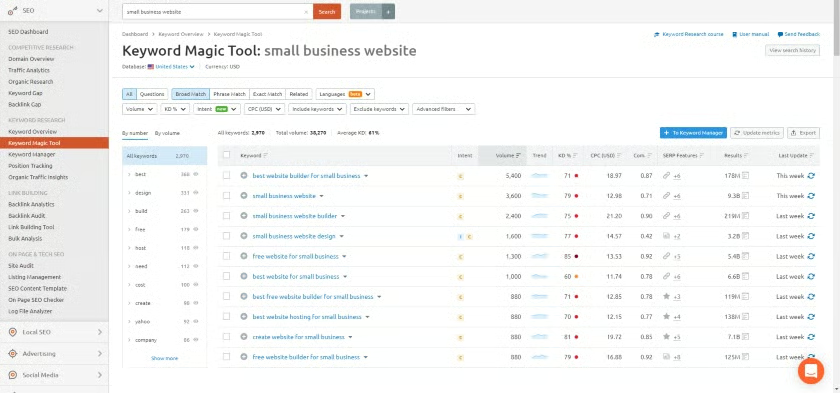
With Semrush, you can understand your ranking, view individual search term data, and find new keyword opportunities. The Keyword Magic Tool helps identify words and phrases your site ranks for, including organic search positions, position changes, competitors, pages, and subdomains. Once you’ve identified your strengths and weaknesses, you can use this tool and others, such as the Keyword Gap Tool, to improve your website’s SEO performance.
Other tools include position tracking, pay-per-click advertising recommendations, and one of the best content guides available. Simply feed in a keyword, and the content guide identifies the top SERPs, analyzes them, and tells you which backlinks you should pursue to rocket your content to the top of the search results.
Semrush is hands down the best keyword research software for businesses of any size. Rich features make optimizing your website simple with competitive research, site audits to identify potential issues, and content strategies to set yourself up for success. Semrush offers an exclusive, 14-day free trial to Fit Small Business readers. See how it can grow your traffic risk-free.
SE Ranking: Cheapest Keyword Research Tools
- Backlink checker: Identify and discover backlinks for any website.
- Backlink tracker: Monitor and track backlinks to your site so you know what’s gaining and what’s losing.
- Competitor analysis: Find out what your competitors are ranking for so you can target the right keywords.
- Keyword rank tracker: See how your site stacks up against the competition for your keywords.
| Free | Essential | Pro | Business | |
|---|---|---|---|---|
| Monthly Cost With Annual Billing* | $0 | $39.20 | $87.20 | $191.20 |
| Tracked Keywords* | 0 | 250 | 1,000 | 2,500 |
| Keyword Grouper | ✕ | ✓ | ✓ | ✓ |
| Competitive Keyword Research | ✕ | 100 reports/day 1,000 results per report | 5,000 reports/day 50,000 results per report | 10,000 reports/day 100,000 results per report |
| Historical Keyword Data | ✕ | ✕ | ✓ | ✓ |
| Organic SERP History | ✕ | ✕ | ✓ | ✓ |
| SERP Analyzer | ✕ | 10 keywords | 100 keywords | 1,000 keywords |
| Users | 1 | 1 | 3 | 10 |
*Higher keyword limits and/or month-to-month billing for an additional cost.
If you’re just starting out with SEO, consider a less-expensive alternative to Semrush. SE Ranking lets you find keyword suggestions, track changes, and analyze SERPs easily through its intuitive interface—and it does so for an affordable price. In fact, it’s the cheapest all-in-one SEO platform available for light use. SE Ranking costs less and provides reports and tools similar to Semrush, making it a good choice for small businesses on a budget.
SE Ranking lets you quickly find keyword suggestions, track page changes, and analyze SERPs. It also provides tutorials and reports written with beginners in mind, making it easy to learn how to improve your site’s SEO. It has add-on content marketing tools similar to those offered by Surfer, so you can easily add new SEO content to your site.
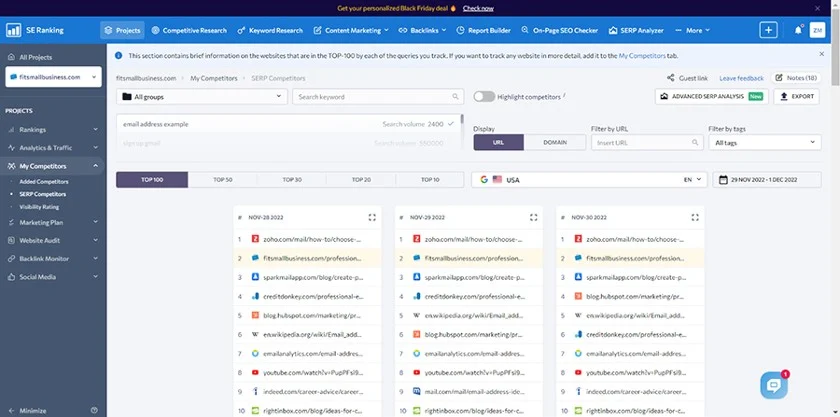
A database of over 4.2 billion search terms powers (688 million in the U.S.) powers SE Ranking’s keyword research tools. You’ll be able to find keyword ideas and view metrics for each, like search volume, difficulty, and cost-per-click for PPC ads. Simply enter a search term in the box, choose a country and search engine, and then click search. SE Ranking delivers the results in seconds.
SE Ranking offers content marketing tools as an add-on to its paid plans. These tools let you perform keyword research, specify brief parameters, and score your text for quality.
SE Ranking is a more affordable alternative to Semrush, and it offers similar functionality, including competitive analysis, rank tracker, and PPC search features. SE Ranking offers a 14-day free trial, no credit card required, so you can try it before you commit.
Serpstat: Top Keyword Research Tool for Ease of Use
- Keyword research tool: Identify and analyze multiple keywords in just a few clicks.
- Keyword niche finder: Carve out your niche online with keywords tailored specifically to help your business gain traffic.
- SEO audit tool: Web-based tools scan your site and produce an SEO and technical audit to help you know how to perform better.
| Lite | Standard | Advanced | Enterprise | |
|---|---|---|---|---|
| Cost per Month* | $55 | $119 | $239 | $399 |
| Searches per Day | 4,000 | 5,000 | 8,000 | 12,000 |
| API Credits per Month | 100,000 | 500,000 | 1,000,000 | 2,000,000 |
| Backlink Analysis | ✓ | ✓ | ✓ | ✓ |
| Site Audit API | ✓ | ✓ | ✓ | ✓ |
| Rank Tracker Reports | ✕ | ✓ | ✓ | ✓ |
| Position Checks | 15,000 | 60,000 | 150,000 | 300,000 |
| Team Members | 1 | 3 | 5 | 7 |
*On annual billing cycle; monthly rate is 20% higher.
Serpstat provides users with a suite of tools to conduct keyword research, undertake an SEO audit, and even conduct a technical SEO audit to ensure the best from your website’s SEO performance. The tools are relatively intuitive and easy to use, making Serpstat a great resource for those who are just getting started in the SEO process.
With Serpstat, you get a keyword research tool, keyword clustering, competitor analysis, and more. Site audits are almost point-and-click simple, while an artificial intelligence (AI) content generator will assist you in creating SEO copy for your site to beat the competition.
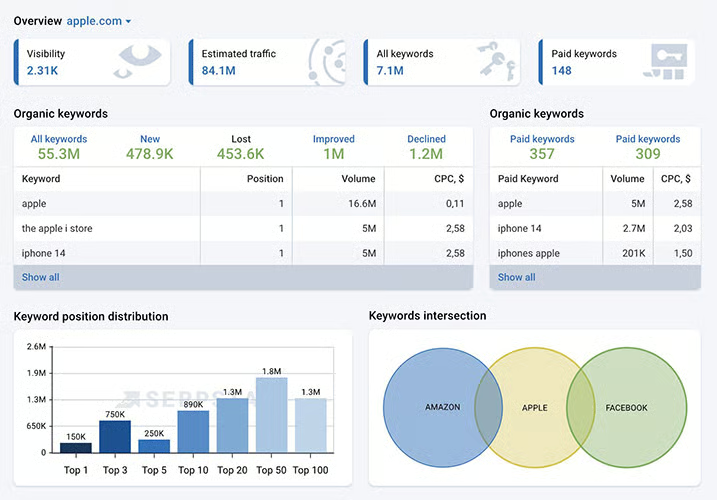
Drawing from a database of more than 8 billion keywords, Serpstat’s keyword research tool helps you identify potential keywords, and the AI content generator will show you how to incorporate them into your website. A keyword niche finder is particularly useful for helping you find holes in the SERPs—holes that you can exploit to drive traffic to your site and rank higher in the search engines.
Serpstat tools are remarkably simple. This makes it easy for beginners to do a bang-up job with their SEO. However, that simplicity is a double-edged sword, because Serpstat lacks some of the advanced functionality and depth of more robust keyword research tools like Semrush or SE Ranking.
But, if you’re just starting out, Serpstat is a great place to get your feet wet. The Lite plan starts at just $55 a month, and a seven-day free trial lets you experiment with the Lite version without having to commit. Go to Serpstat to learn more.
Search Console: Best for Researching Your Website’s Keywords
- Index Coverage report: Identify errors that cause your pages to perform poorly.
- Performance report: Summarize page performance to identify pages with lower click-through rates (CTR).
Google Search Console is a free service from Google to help you undertake a technical SEO audit and optimize your site. It’s free to use for website owners, developers, and SEO professionals. Google Search Console provides a pair of reports that help you identify action areas where you can improve your website’s SEO performance.
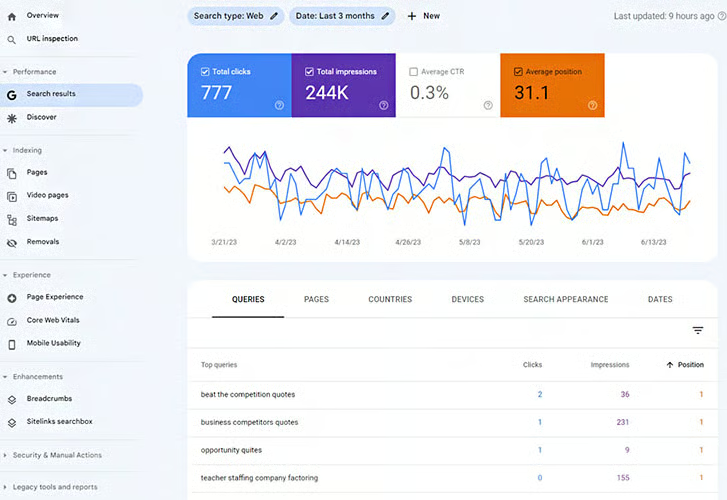
The Performance report is a tool included with Google Search Console. It tracks metrics such as visitors, impressions, and click-through rates. It also reports each page’s average ranking, or where a given page is placed in the Google SERPs based on specific keywords. This information is critical in understanding how your website is performing, and with some thought and planning, it can help shape how your website evolves over time.
It’s important to note that Search Console is not an all-in-one solution like SE Ranking or Semrush. It’s a tool with particular uses that provides you with information you can use to improve performance. It does not include keyword research tools like competitor analysis, which means you’ll still need tools to help you find out how your competitors are performing.
Google Search Console is a great tool to see exactly how your website is performing in Google at any given time. It is free to use, but because of limitations like lacking competitor analysis, it’s best to use it alongside another tool like Serpstat or Semrush. Search Console is free to use.
Ahrefs: Best Tool for Multiple Search Engine Insights
- Research dashboard: Get a top-level view of your website’s SEO performance, tracked keywords, and more.
- WordPress integration: A WordPress plugin helps you analyze content and track backlinks.
- Rank tracker: Monitor the competition and track your progress in the SERPs.
| Free | Lite | Standard | Advanced | |
|---|---|---|---|---|
| Monthly Cost With Annual Billing | 0 | $83 | $166 | $333 |
| # of Credits | 0 | 500 | 500 | 500 |
| Site Explore | ✓ | ✓ | ✓ | ✓ |
| Site Audit | ✓ | ✓ | ✓ | ✓ |
| # of Keyword Explorer Lists | 0 | 5 | 50 | 100 |
| Historical Data | ✕ | ✕ | ✓ | ✓ |
| Users | 1 | 1 | 1 | 1 |
*Monthly billing is available at a higher cost.
Ahrefs is a suite of SEO tools with a free-forever version that provides some basic functionality. Its paid plans are where the rubber meets the road, though, as it offers a comprehensive suite of tools that span multiple search engines, including Google, Bing, Yahoo!, and Amazon. In fact, Ahrefs tools query more search engines than any other keyword research platform we examined.
Its Site Explorer allows you to review the top pages on your site, including content, PPC reports, and backlinks. This information helps you understand your ranking—and to find content gaps that show terms your competitors rank for, but your site doesn’t. Identifying content gaps is one of the keys to how Ahrefs performs.
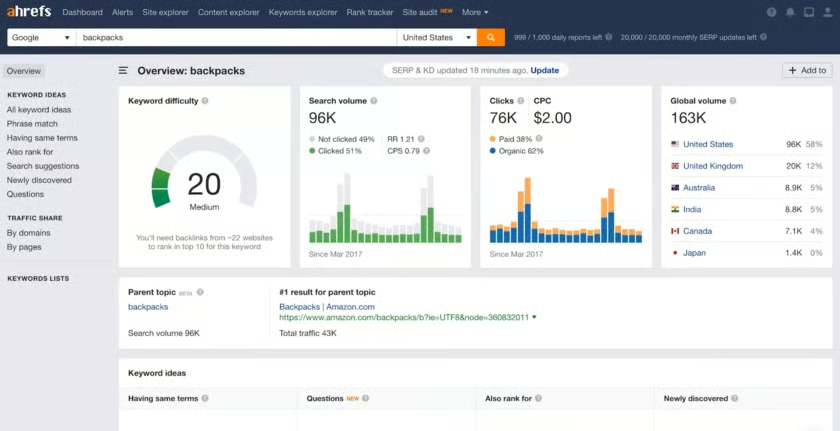
Additional tools include Rank Tracker, which helps you learn about keyword-based organic traffic to your site through interactive graphs. Rank Tracker also reports average position as well as 13 additional SERP features. One key feature of Rank Tracker is its tracking over time, which allows you to track progress against your handpicked competitors.
Among the metrics Ahref reports provide are keyword ranking difficulty, search volume, and clicks. You can find these metrics with a simple search. A comprehensive Keywords Explorer provides data for 10 different search engines, including Google, Amazon, Yahoo!, YouTube, and Bing.
Ahrefs can also help you generate content ideas to optimize your small business website with its Content Explorer feature. Content Explorer identifies low-competition topics, subjects that generate links, and popular content. You’ll have to subscribe to the Standard tier to access Content Explorer.
Ahrefs is a powerful suite of tools for SEO research. With Ahrefs, you get keyword research, content analysis and ideas, rank tracking, and more. Reporting leans heavily on visuals, which makes Ahrefs easy to use and the data easy to interpret. Try it for free before you sign up.
Surfer: Best Free AI Tool for Keyword Content Planning
- AI content generator: Get content ideas for your target keywords.
- Plagiarism checker: Checks content for plagiarism before you publish it, which prevents you from getting dinged by Google.
- Multi-language: Check your SEO performance in multiple languages.
| Lite | Essential | Advanced | Max | |
|---|---|---|---|---|
| Monthly Cost* | $19 | $69 | $149 | $249 |
| Content Editor Limits per Year | 36 articles | 84 articles | 300 articles | 600 articles |
| Keyword Research | 120 per year | 100 per day | 100 per day | 100 per day |
| Plagiarism Checker | ✕ | ✓ | ✓ | ✓ |
| AI Keyword Assistant | ✕ | ✓ | ✓ | ✓ |
| Google Docs Integration | ✕ | ✓ | ✓ | ✓ |
| WordPress Integration | ✕ | ✓ | ✓ | ✓ |
*Billed annually; monthly billing available at a higher rate.
While not as robust as all-in-one solutions such as SE Ranking, Surfer is a lower-cost keyword research tool with a lot of powerful, AI-driven tools to help you build content and rank higher. An AI outline generator will create article ideas for you to write, while a content generator will create ready-to-publish articles on the subjects you choose. An AI plagiarism checker will examine your content and make sure it will pass Google muster for plagiarism-free copy.
One of the most powerful tools in Surfer’s arsenal is the SERP Analyzer, which offers a broad overview of search results for keywords as well as an in-depth analysis of content structure, keyword density and frequency, and even how many words appear above the page’s fold. This information will help you create engaging content that performs well on Google. A handy Chrome extension puts much of this information right at your fingertips.
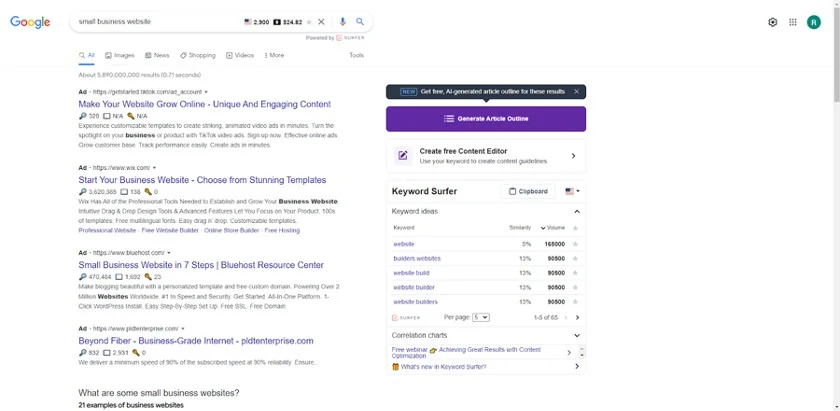
While the base plans of Surfer are affordable, starting at just $19 a month, much of the functionality you need is locked behind the higher-tiered Essential and Advanced plans. Moreover, the SERP analysis tool used to be included in Surfer plans, but now it is a $29 monthly add-on, which begins to push Surfer into the price range of more powerful options like Semrush and SE Ranking.
Still, if you’re looking for a lot of assistance, the AI-powering Surfer offers tremendous insights and guidance. The research tools included are adequate to help you build an effective content strategy on a limited budget. You can get a feel for Surfer starting with the Lite plan at $19 a month.
Keyword Tool: Best for Identifying Long-tail & LSI Keywords
- Keyword research tool: Find long-tail keywords and LSI keywords on up to 10 search engines.
- Volume search tool: Discover how many people are searching for your keywords.
- Keyword Tool Pro: Find search volume, average trends, competition, and more.
| Free | Pro Basic | Pro Plus | Pro Business | |
|---|---|---|---|---|
| Monthly Price | 0 | $89 | $99 | $199 |
| Monthly Cost With Annual Billing | 0 | $69 | $79 | $159 |
| Longtail Keyword Suggestions | ✓ | ✓ | ✓ | ✓ |
| Bulk Search Volume Analysis | ✕ | 7,000 keywords/day | 35,000 keywords/day | 70,000 keywords/day |
| Competitor Keyword Analysis | ✕ | ✓ | ✓ | ✓ |
| Cost-per-Click (CPC) Data | ✕ | ✕ | ✓ | ✓ |
| Users | 1 | 1 | 5 | 10 |
Keyword Tool is a suite of web-based SEO tools that taps into Google autofill data to help you generate keywords. As such, it’s a brilliant tool for generating long-tail keywords and LSI keywords. Using Keyword Tool in conjunction with an all-in-one provider like Semrush provides you with the most information and clearest strategies to rank.
Keyword Tool is the best free keyword research tool for eBay, Amazon, Apple App Store, and Google Play Store sellers who want to optimize listings. YouTube video content producers can use it to identify popular search terms to infuse into descriptions and titles. This can drive traffic to your content and help improve conversions or monetization.
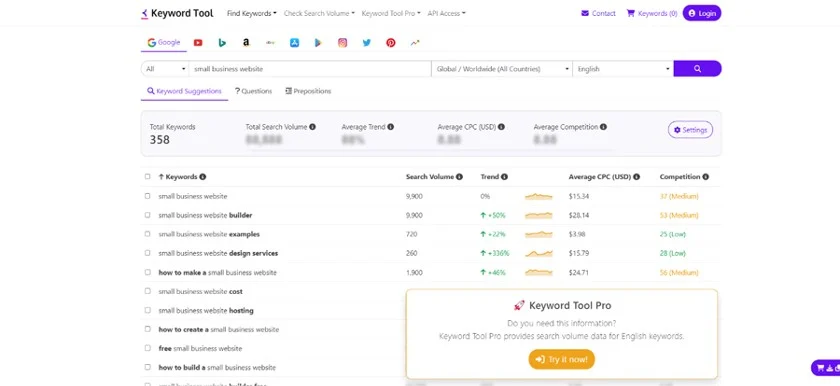
Whether you go pro or use the free tools, Keyword Tool is incredibly easy to use. Simply choose the platform, input your term, and hit enter. From there, the Keyword Tool provides hundreds of long-tail keywords, related keywords, and questions visitors are asking. However, the free service only offers metrics for the first five terms. Paid plans show the search volume, trend data, average cost-per-click (CPC), and ad competition data for all keywords.
Understand that Keyword Tool is a basic system focusing solely on research. It lacks any technical SEO, reporting, or content-generation tools. As such, you’ll want to use Keyword Tool in concert with Semrush or SE Ranking. However, because Keyword Tool sources data from 10 search engines instead of just Google and Bing, you’ll definitely want to use at least the free version.
Google Trends: Best Free Tools for Locale-based Keyword Trends
- Data filters: You can view keyword data for search terms, images, videos, or specific content areas such as news or shopping.
- Interest by location: Find out how people are searching in your neck of the woods with location-based data.
Local businesses that sell goods or services in a specific geographic area need local SEO, or optimization for location-based searches. Google Trends provides the first level of local search data for keywords, and it does so for free.
Google Trends is a free keyword research tool that looks at the popularity of your term in the selected geographic region and time frame. It supports your local SEO strategy and helps you build brand presence with trending topics and seasonal search habits. Since it’s free and easy to use, Google Trends is an excellent option for small business owners and content marketing planners focusing on local search engine optimization.
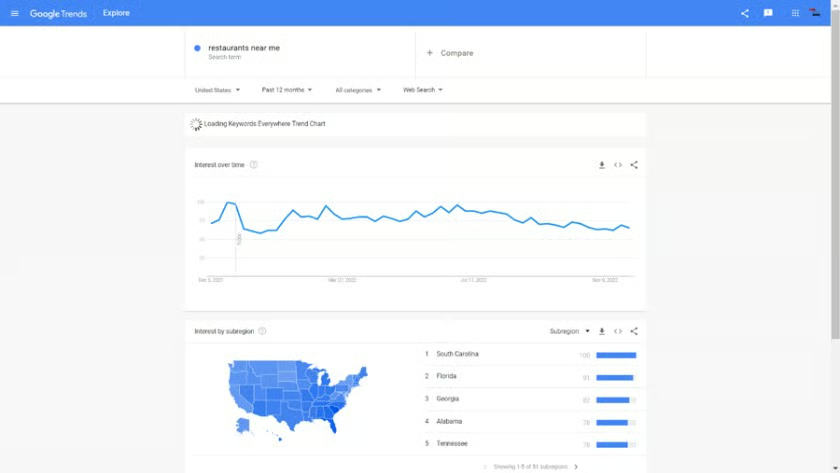
Search your target keywords to spot trends by country, metro region, or city (Source: Google Trends) 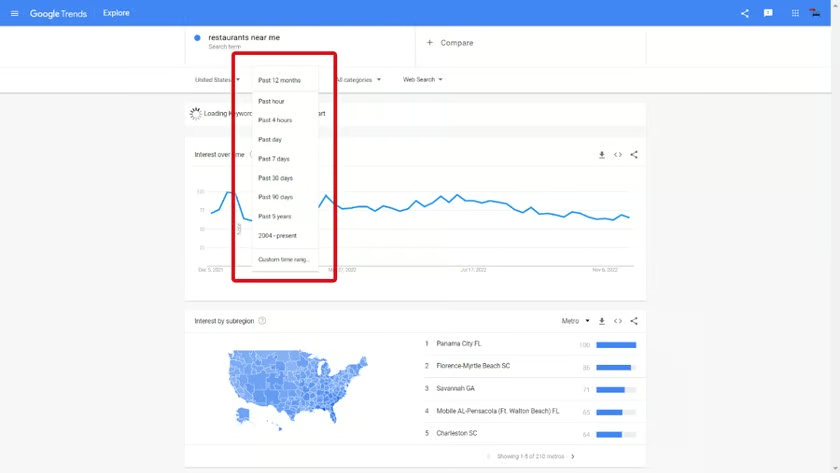
Filter Google Trends results by time period 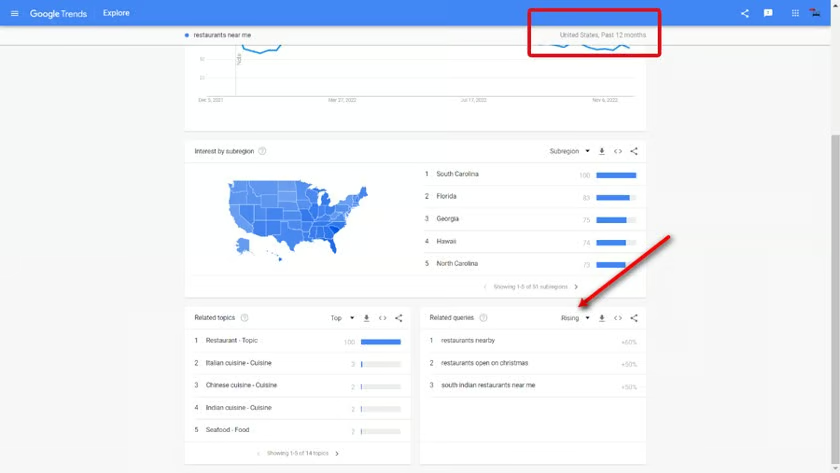
See “Related queries” and “Related topics” for additional keyword ideas 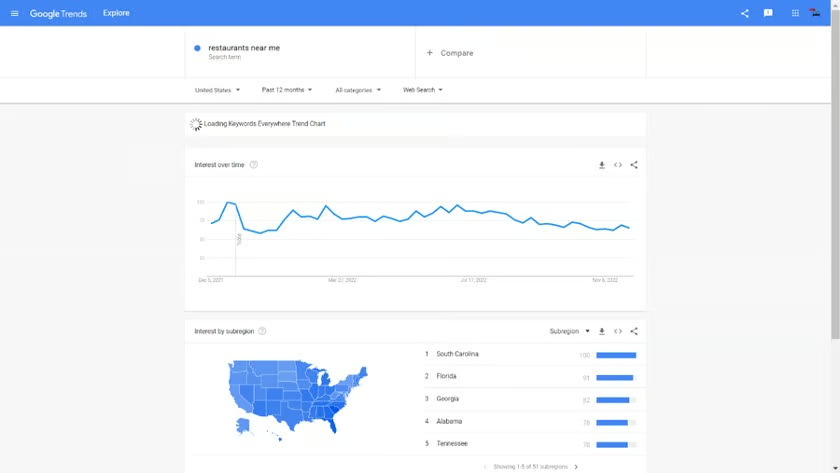
Example of changes to Google Trends “Related queries” by filtering for the past 30 days


Simplicity is at the core of the Google Trends tool. Just input your term in the search bar and click enter to almost instantly view keyword data. You can apply filters to view results for images, web searches, news, shopping, or YouTube. You can also compare two topics to see how popular each is.
Results are broken down by location. First, click on the region of the map you’re interested in learning more about. Then, click on the municipality. For example, if you’re interested in local search performance for “lawn maintenance” in Nashville, Tennessee, you’d first click on Tennessee, then the Nashville area. Local search data at this level is a key part of any SEO content marketing plan.
Like Surfer, Keyword Tool is not a standalone suite of tools. It lacks advanced keyword research tools, data on your site, and competitor site data. Therefore, it’s a tool you’ll want to use alongside Semrush or Serpstat. But Google Trends definitely belongs in your SEO toolkit.
Google Ads: Best for PPC Keyword Research
- Google Keyword Planner: Generate keywords and view search volume forecasts.
- Multi-language search: Explore search results in any language Google utilizes.
The Google Ads platform has a tool called Keyword Planner intended to help advertisers find the best keywords for Google Ads campaigns. Although this feature is free to use, you must create an Ads account to access it, including setting up a basic campaign and adding (and verifying) a form of payment.
However, you can immediately pause your campaign, and then continue to access the Keyword Planner to research keywords on Google. Best of all, it provides 100% accurate data relative to Google keyword search volumes, advertiser ranking difficulty, and more. To try it out, follow our instructions for how to advertise on Google, starting with creating an account.
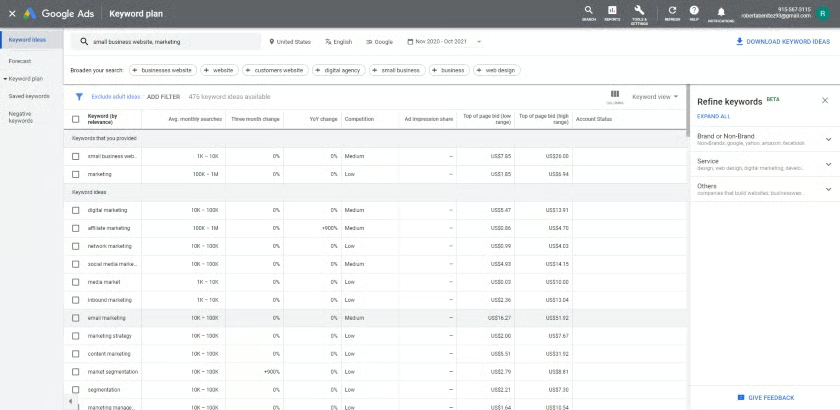
Google Keyword Planner is basic and provides two essential functions. Generate new keyword ideas by entering one or more words or phrases related to your business. Alternatively, view the search volume and forecasts for your existing target keywords. Like Google Trends, you have unlimited searches. The results estimate the number of impressions, clicks, CTR, cost, and average CPC.
You can filter the results page by average monthly search volume or competition with both features. In addition, you can choose different locations, languages, time frames, and Google partners or properties, such as YouTube. You can narrow your search by only showing results with specific words or excluding content types, like adult ideas.
The Keyword Planner is an excellent place to double-check data gathered from other tools to ensure you are targeting the best keywords to get your site ranking higher on Google. However, it’s not a full-featured platform for keyword research as it lacks information about your site and those of competitors and doesn’t provide SERP-related information.
How We Evaluated the Best Keyword Research Tools
We looked at dozens of popular tools for keyword research and narrowed the list down to our top choices based on unique use cases. The best platforms allow anyone to find relevant keywords to rank higher for both paid advertising and organic content marketing strategies. In addition, we looked at cost, ease of use, and our experience using each of these tools.
Here’s a breakdown of the criteria we considered when ranking the best tools for keyword research:
- Cost: Fortunately, many keyword tools are free or at least affordable for startups and small operations. We judged paid versions based on whether or not a typical small business could afford them.
- Features: Features analysis includes whether they work and how accurate they are. We also considered other SEO features offered in all-in-one solutions or as a value-add, and whether paid plans add tools for scaling businesses.
- Ease of use: We judged the tools by how simple they are to use. We also considered its interface and whether or not an absolute SEO beginner would be able to successfully navigate and analyze the data presented.
- Expert score: Our final criteria weighed each tool against our firsthand experience, platform popularity, and customer reviews to narrow the list to the tools most worth investing time and money in.
Frequently Asked Questions (FAQs)
What is the best tool for keyword research?
Semrush is the best tool for keyword research overall due to its data accuracy and comprehensive tools for researching keywords to help your website rank higher on Google. SE Ranking is the best alternative, especially for small businesses on a budget.
Which free tool is best for keyword research?
Semrush is the best free tool for researching top keywords, seeing which keywords your site ranks for, and benchmarking competitors’ keyword rankings. Google Search Console is the best free tool for seeing the exact Google rankings for your site’s keywords and tracking position changes over time. Google Ads Keyword Planner can also be used for free to get precise data on keyword search volume and ranking difficulty on Google.
What are some Google tools for keyword research?
Google provides free data in Data Studio (soon to replace Analytics), Search Console, and its Ads Keyword Planner. Google Trends is a free research platform showing current and historical search data relative to a given keyword. Think With Google is another option for gaining insights into what Google wants in your overall search engine marketing (SEM) strategy and trending topics.
Bottom Line
Keyword research is essential since keywords let both humans and search engines know the content on your site, improving online visibility. The first step to any well-grounded search engine marketing strategy is finding the right keywords to rank for, and the platforms above make it easy to do just that.
You’ll find the most robust tools for keyword research in Semrush. Try it risk-free at no cost, or take advantage of the 14-day free trial offered exclusively to Fit Small Business readers by clicking the button below.
