







Pizza restaurants need a POS system that can handle high-order volume, custom toppings and modifiers, delivery management, online ordering, and fast checkout workflows. The best pizza POS systems also help pizzerias manage drivers, track inventory, streamline kitchen operations, and build customer loyalty through rewards and repeat ordering tools.
To find the best pizza POS systems for small businesses, I evaluated leading restaurant POS platforms based on pricing, delivery features, online ordering, ease of use, kitchen management tools, and customer retention capabilities. After comparing the top options, I narrowed the list down to the best pizza POS systems for dine-in, takeout, and delivery-focused pizzerias.
The best pizza POS systems for small businesses are:
| Best for | Minimum monthly software price | |
|---|---|---|
| Toast | Pizzerias with in-house or third-party drivers (best overall) | $0 |
| SpeedLine | Complex orders and combos | Custom-quoted |
| Revel Systems | Multilocation pizzerias wanting a cloud POS | $99 |
| HungerRush | Pizza technology | Custom-quoted |
| Slice Register | Quick setup and small shops | $69 |
| Square for Restaurants | Free POS for slice shops | $0 |
- Top Pizza POS Systems Compared
- Quiz: Get a personalized recommendation
- How I evaluated the best pizza POS systems
- Toast: Best overall pizza POS system
- SpeedLine: Best for complex orders and combos
- Revel Systems: Best cloud POS for multilocation pizzerias
- HungerRush: Best for pizza tech
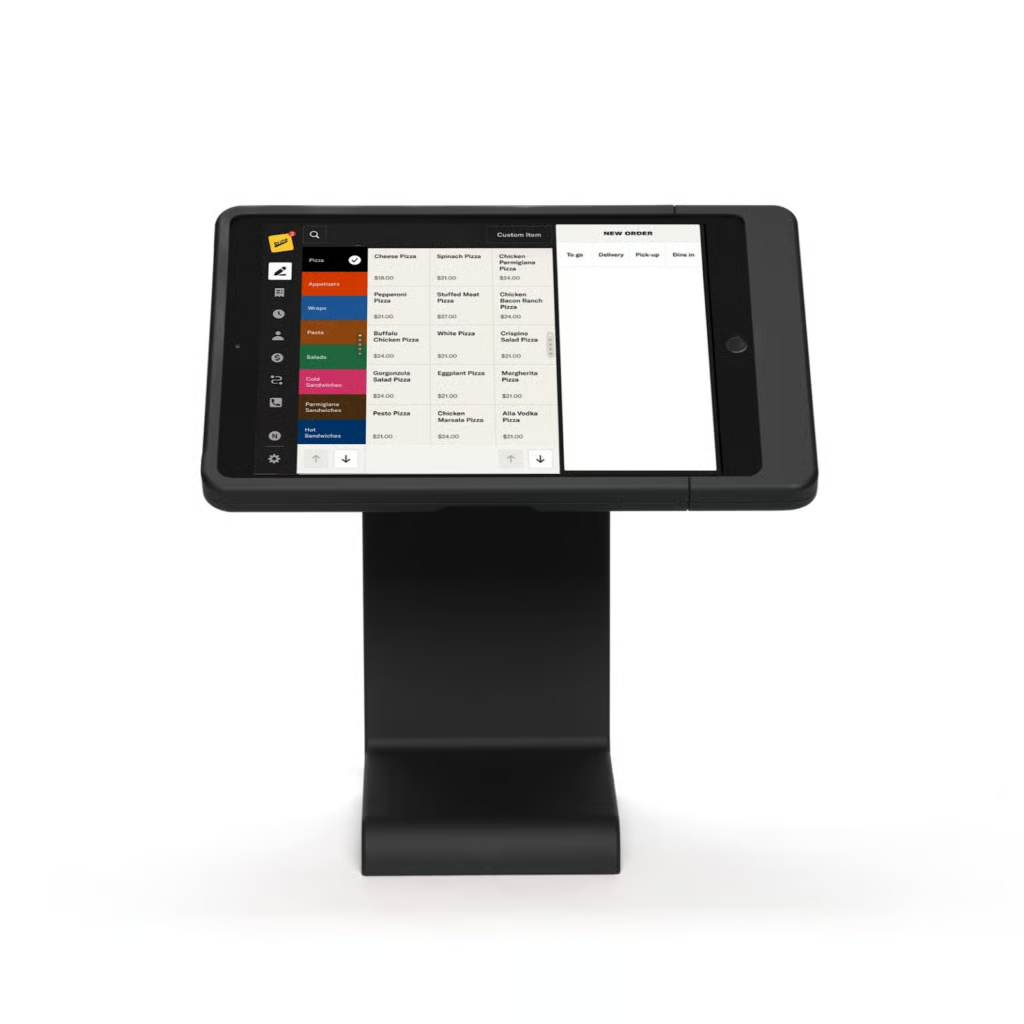
- Slice Register: Best for quick setup and small shops
- Square for Restaurants: Best free POS for slice shops
- How to choose a pizza shop POS system
- Methodology: How I evaluated the best pizza POS systems
- Frequently asked questions (FAQs)
- Bottom Line
Top Pizza POS Systems Compared
| My expert score out of 5 | Self-managed delivery tools | Pay at Door card readers | Built-in online ordering | KDS support | |
|---|---|---|---|---|---|
| Toast | 4.49 | Good | No | Native | Native |
| SpeedLine | 4.25 | Advanced | Yes | Native | Native |
| Revel Systems | 4.15 | Advanced | No | Native | Native |
| HungerRush | 4.09 | Advanced | Yes | Native | Native |
| Slice Register | 3.94 | Good | No | Native | Supported |
| Square for Restaurants | 3.58 | Good | No | Native | Native |
Quiz: Get a personalized recommendation
Answer a few questions about your business, and we'll give you a personalized product match.
Question 1 of 4
What type of Pizzeria do you have?
How I evaluated the best pizza POS systems
I evaluated pizza POS systems using a weighted rubric that compares pricing, general POS features, pizza-specific tools, ease of use, and overall value, with a focus on delivery management, pizza customization, driver tracking, and online ordering. I also validated results through user feedback and real-world restaurant POS experience. Learn more about my full methodology below.
Toast: Best overall pizza POS system
Why I chose Toast
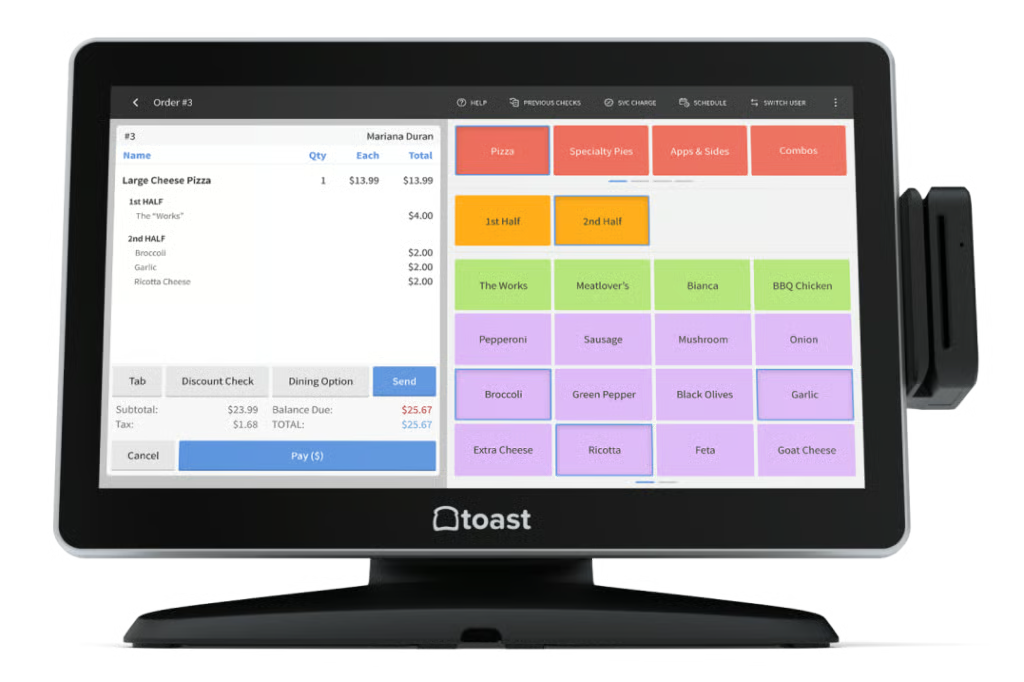
Toast is considered an industry-leading restaurant POS system, and it shows in its pizzeria functionality. Industry-grade hardware, robust driver management, accessible price points, and user support make Toast the ideal POS system for a pizzeria. Its Starter Kit POS option provides two terminals, great for starter pizza shops. Robust driver management and online ordering features allow you to reach your maximum customer base.
Who should use Toast:
Pizzerias with in-house or third-party drivers; businesses that don’t mind being locked into a longer contract. Toast’s offerings may be a little too much for smaller slice shops.
Toast pricing
Plan Tier Levels & Monthly Software Fees:
- Starter Kit: $0 (Pay-as-You-Go)
- Point of Sale: $69
- Build Your Own: Custom quote needed
Installation Fee: You can typically self-install a simple Toast POS system following Toast’s excellent online tutorials and guides. For more complex installations, you’ll need on-site assistance, which requires a custom quote.
Processing Fees:
- Standard: 2.49% + 15 cents per in-person transaction
- Pay-as-You-Go: 2.99% + 15 cents per in-person transaction
- Pay-as-You-Go with Marketing Tools: 3.39% + 15 cents per in-person transaction
Standout features
- Complex modifier and combo building screens: Toast supports a pizza-building screen for ringing in custom pizzas and combo discount options for building complex order combos.
- Training and support: Toast’s customer hub, Toast Central, contains a wealth of resources to train your managers and staff—in both English and Spanish. The searchable knowledge database can answer any question, and Toast offers 24/7 live support.
- Driver management: You can set a delivery area, assign delivery fees, and assign orders to drivers directly in Toast. Drivers can operate with a tracked cash bank to receive cash payments upon delivery, and you can print shift summaries for drivers just like you do for servers.
- Third-party driver integration: Toast Delivery Services allows pizza shops to dispatch third-party drivers on-demand through a partnership with DoorDash. Toast also integrates with Grubhub to send orders directly to your pizzeria’s POS. Other third-party apps are supported via aggregators ItsaCheckmate and Chowly.
- Digital storefront: AI-powered marketing tools such as one-click marketing campaigns, a personalized recommendation-based marketing suite, and targeted promotional offers are all offered in this new feature. This storefront aims to use AI and enticing marketing to build customer loyalty.
SpeedLine: Best for complex orders and combos
Why I chose SpeedLine
SpeedLine is a POS system focused on delivering software that is able to deal with the complexities in ordering that only a pizzeria will encounter. Pizza orders can vary greatly from customer to customer, and SpeedLine’s focus on accommodating this makes it so valuable. With the ability to break individual pizza pie orders into quarters, offer complex coupons, and manage drivers effectively, SpeedLine is an excellent choice for pizzeria owners.
Who should use SpeedLine
Mid- to large-size pizza shops or shops with multiple locations; shops with their own fleet of drivers or those who often deliver on complex pizza order combinations.
Speedline pricing
- Plan tier levels and monthly software fees: Custom-quoted, all-in-one software and hardware price
- Installation fee: Custom-quoted
- Processing fees: Custom-quoted from compatible payment gateways (WorldPay, Monetra)
Standout features
- Pay-at-the-door functionality: The SpeedLine Pay app lets your drivers accept card payments at your customers’ doorsteps. This helps your pizza shop avoid higher card-not-present transaction fees and chargebacks. HungerRush is the only other system on this list that supports pay-at-the-door.
- Tattle Integration: Tattle is a customer feedback tool that lets a restaurant create customizable surveys for their guests. Pizza shops can create customer satisfaction scores, track customer sentiment, and allow for niche feedback to your specific business needs.
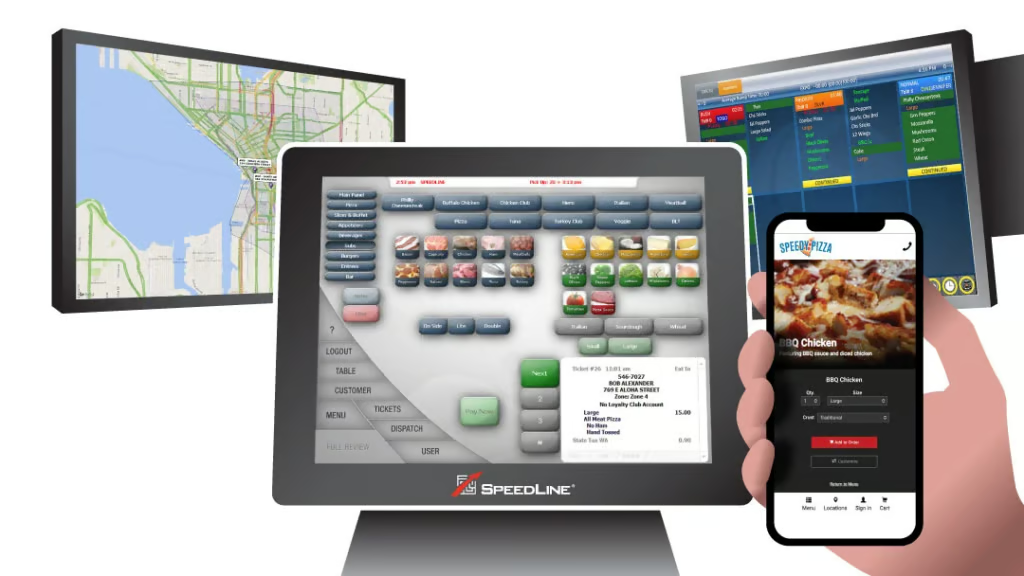
- Pizza-focused order screens: SpeedLine’s order screens show nutritional information, allergens, and recipes at the touch of a button. You can add pop-up screens for item-specific upsells and coupons, so anyone ringing in order has all the information at their fingertips.
- Heatmap reporting: One of SpeedLine’s most impressive functions is combining navigational tools with sales tools. For example, you can pull sales reports that show what specific items are selling (or not) in specific areas of your city. This shows you immediately where a game day promotion or discounted delivery offer will have the most impact.
- Highly customizable coupons: Utilizing coupons to drive business is a key way to win customers in the pizza space. SpeedLine offers the option of 2-for-1, 3-for-2, or even 5-for-4 coupons for key deals on pizza and other menu items.
- Branded App: SpeedLine allows you to build out a dedicated app tailored to your specific brand. This makes driving customer loyalty a breeze; customers get a direct channel to order through downloaded to their phone’s home screen.
Revel Systems: Best cloud POS for multilocation pizzerias
Why I chose Revel Systems
Revel Systems is a multi-functional iPad POS system, perfect for businesses with multiple locations. Revel allows you to shop around for the best payment processing rates while also delivering in-depth combo-building features, robust driver management, and some unique CRM management tools to grow your customer base. This POS often ranks among our best restaurant POS due to its extremely intuitive functionality and control over third-party drivers that other systems do not have.
Who should use Revel Systems
Pizzerias with a large geographic footprint or with 5+ units; system may be too much for a smaller pizzeria to utilize fully.
Revel Systems pricing
- Plan tier levels and monthly software fees: $99 per terminal (2-terminal minimum)
- Installation fee: From $674
- Processing fees: Varies by processor
Standout features
- Comprehensive inventory: Revels’ inventory is semi-automated, allowing you to create purchase orders (POs) in the POS and email the orders directly to vendors. Inventory updates in real time and alerts you to low stock. Other systems—like Toast—charge extra for inventory, but Revel includes it in the baseline POS.
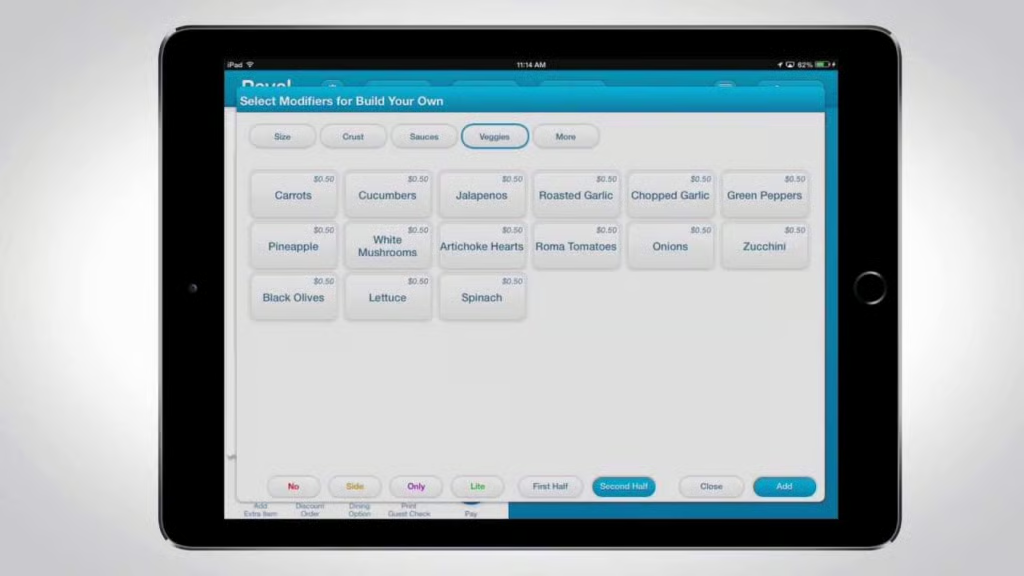
- Streamlined combo and modifier screens: Revel supports multiple modifier screens, and combo options are housed on a single screen (reducing button presses and speeding service). You can set prices for different dish sizes—as in a small, medium, or large pizza—and create prices for individual toppings.
- Online ordering: Revel’s online ordering module creates a custom URL that syncs with your POS and management console. The online ordering login allows customers to connect via Facebook, so they don’t need to create a new username and password.
- Delivery XT Driver management: Revel’s delivery management tools allow you to assign multiple orders to a single driver and generate the speediest route. The system estimates prep and delivery times and tracks drivers’ delivery histories, giving you massive data to create reports. It also provides SMS updates to customers.
- Easy-to-use Format: It is safe to assume many of your staff members have used an iPad at some point. This makes training them on Revel’s systems easier, as it is native within the iOS format.
- CRM and marketing: You can prompt customers to enroll in your loyalty program at checkout or via email and SMS. Create unique customer groups like “Local Soccer Parents” to create targeted deals, like a post-practice pizza pick-up package.
HungerRush: Best for pizza tech
Why I chose HungerRush
HungerRush is a cloud POS built from a former POS software known as Revention, which was a niche pizza-focused software. A lot of the bones for pizza shop owners are there, like build-your-own pizza functionality. Offering ordering in multiple channels, this POS system uses technology to reach more customers and complete orders successfully.
Who should use HungerRush
Large pizzerias with a large customer base can find a lot of success with HungerRush’s different tech tools. Companies like Sbarro, Jet’s Pizza, and Hungry Howie’s all use HungerRush. It may be too much for a smaller pizzeria.
HungerRush pricing
HungerRush does not publicly list fixed monthly POS pricing on its pricing page. Instead, the company uses custom quote-based pricing tailored to restaurant size, number of locations, and operational needs. The pricing page emphasizes enterprise restaurant groups and promotes “customize your solution to fit your technology and pricing needs.”
Standout features
- Hardware replacement: All HungerRush hardware is covered by a service agreement. If your hardware breaks down or needs repairs, HungerRush will service or replace it.
- Pay-at-the-door payments: Like SpeedLine, HungerRush allows your drivers to accept card and mobile wallet payments when a delivery is completed, giving you card-present transaction rates rather than the higher card-not-present transaction rates for online payments.
- Text ordering: HungerRush’s TextAI allows users to accept orders via text message. The text ordering functions sync with HungerRush’s marketing and loyalty features, enabling you to alert loyal customers to special offers and promotions.
- OrderAI: HungerRush offers a voice AI assistant that can answer the phone, take orders, and answer basic questions. This can be very useful, as pizzerias often take many calls for orders and other niche questions.
- Driver management: HungerRush’s driver management integrates with Google Maps, which provides real-time mapping updates. The system will also alert you if a driver is late returning from a delivery round so you can get a head start on accidents or handling a disappointed customer.
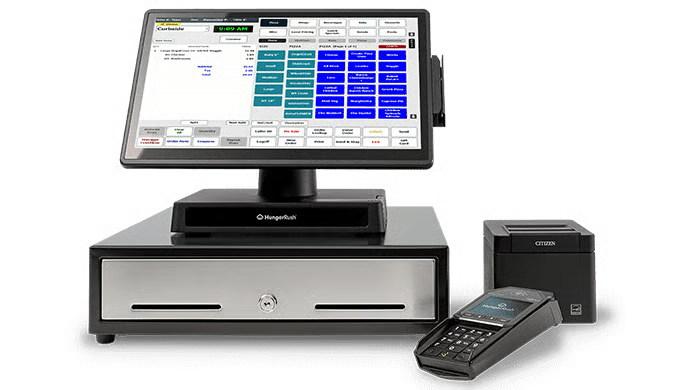
- Pizza-style order screens: HungerRush’s order screen highlights each pizza’s ingredients with red and green lights, so it is easy to make modifications at a glance.
Slice Register: Best for quick setup and small shops
Why I chose Slice Register
Slice Register is built off of the back of a popular online marketplace, where more than 18,000 independent pizza shops are members. Its software and hardware are the simplest and easiest to set up among those in our guide. Smaller pizza shops are quick businesses, without much time to focus on anything other than creating their product to make a profit. Slice Register is a true plug-and-play POS, it is very easy to set up and get accustomed to.
Who should use Slice Register
Slice Register is excellent for users new to POS systems, smaller pizza shops, and those who want more of a long-term commitment to their POS software.
Slice Register pricing
Slice Register charges a $69 monthly software subscription, with hardware available through monthly equipment plans. Hardware bundles range from $5 to $99 per month depending on the setup, while payment processing starts at 2.5% for most restaurants.
Standout Features
- Built-in Slice platform integration: Naturally, Slice Register comes with the Slice platform integration built-in—so you can showcase your independent pizza shop to customers nearby.
- Driver management with driver app: Like Revel and SpeedLine, Slice Register includes driver dispatch tools with a connected driver app. So, you can dispatch your drivers with Uber-like efficiency and assign deliveries with a few swipes and clicks.
- Marketing support: The Slice Register team supports your marketing efforts by sending email and SMS messages to customers on your behalf. The system is designed to encourage customers to return to your pizzeria for their future orders.
- Rewards platform: The Slice platform includes a built-in customer rewards program. Customers earn reward points for purchases from any participating Slice restaurant. Pizza lovers using the Slice app will be more likely to see your shop on the platform, driving new customers to your business.
- Community feel: One key aspect I like about Slice Register is the user community. It has a ton of niche pizza content on its site, emphasizing the idea of independent restaurant ownership pride amongst pizza shop management.
Square for Restaurants: Best free POS for slice shops
Why I chose Square for Restaurants
Square for Restaurants is the food and beverage POS built by the popular payment brand Square. This cloud-based POS operates on iPads and Square-designed hardware. The baseline software subscription is free to use on unlimited terminals. You can use the hardware you already own, and there are no long-term contracts. Slice shops, which don’t need complex order modifiers, will be well-supported by this user-friendly system. Your Square POS comes with a free online ordering site, so you can easily accept online orders.
Who should use Square for Restaurants:
Pizzerias looking for a free, baseline POS software to get started; pizzerias with their own hardware.
Square for Restaurants pricing
- Monthly software fees: $0-$149, depending on the POS version and plan tier
- Installation fee: None. Setup is do-it-yourself with guided onboarding resources
- Contract length: Month to month; no long-term commitment required
- Payment processing fees:
- In-person: 2.6% + 15 cents
- Online: 2.9% + 30 cents
- Keyed-in: 3.5% + 15 cents
- Custom rates available for businesses processing over $250,000 annually.
Standout features
- Month-to-month plans: Square for Restaurants users are not locked into long-term contracts, making the system an excellent fit for seasonal pizza shops in vacation destinations.
- Free online ordering: As a Square for Restaurants customer, you can build an online ordering website that ties directly to your pizzeria’s POS, and your online ordering site will sync with Facebook and Instagram. Online orders can be picked up only, or online orders to develop an in-house delivery team.
- Integrations: Square for Restaurants POS users can customize their systems by adding integrated apps. Pizza shops that want to add maps-based driver dispatch can do so via the Shipday integration, which—like Square—includes a free baseline subscription.
- Pay-as-you-go marketing: Square for Restaurants POS plugs directly into high-functioning Square tools like Square’s marketing software. Real-time reporting lets you measure the success of each promotion so that you can drive more sales.
- Social media selling integrations: A great feature for Square is that you can integrate your POS system through your Facebook and Instagram channels. This means that if you have a large online following, you can monetize and capitalize on this following using this tool.
How to choose a pizza shop POS system
When it comes to picking the best POS system for your business, it will come down to a few key factors that you should be aware of. Below are the steps we suggest you should take when picking a pizza POS software.
Step 1: Assess How Many Locations You Have
The first step you need to take is determining what kind of system you need regarding how many locations you have. For example, if you have 12 locations in your greater business area, then Revel Systems will be your best bet. But if you have two or three locations that need a top-of-the-line system, then Toast may be a better choice.
Step 2: Understand How Quick You Need to Get Set Up
Some pizza shop owners do not want a lot of setup and just want to plug in and get going. This is where a system like Slice Register comes into play. On the other hand, a system like Revel Systems takes some time and may be a bit more complicated to get going with.
Step 3: Know How In-depth You Need Your Tech to Be
After determining the size of your business and what kind of POS system will fit the size of your pizzeria, you then need to decide how in-depth the tech needs to be for your business. As you can see in our guide, each system has its own niche features to further your business. Understanding how technical each system is and how it will apply to your business goals is crucial.
Essential pizza POS features you should consider
Here are the most common features you can expect to find in a pizza POS system:
- Online ordering functionality: As more customers seek contactless transactions, having an efficient online ordering feature is crucial. Your POS should enable customers to place orders from the comfort of their homes, either through your website or a convenient mobile app.
- Integrated order management: The best pizza POS systems should seamlessly merge various types of orders—dine-in, online, or phone-in—into one easy-to-manage platform. This kind of order management integration ensures operational efficiency and order accuracy.
- Custom pizza builder: A pizza builder tool that accommodates custom orders is key for many pizza restaurants. Most of these features allow for the creation of half-and-half pizzas, specific topping combinations, and other customizations.
- Loyalty program integration: Implementing a loyalty program helps stimulate repeat business, so it’s important that your POS supports it. Loyalty programs typically act as a POS add-on that rewards customers with points leading to perks (like a free pizza).
- Ingredient-level inventory management: The ability to automatically track ingredients used per order and update your inventory in real time is another essential feature. Some advanced systems may also allow for ingredient reordering directly from the app.
- Delivery management capabilities: If your restaurant offers in-house delivery, choose a POS system equipped with robust delivery features, including tools like delivery mapping and at-the-door payment processing.
- Third-party delivery integration: Pizza POS systems that integrate with third-party delivery services (like Grubhub, DoorDash, and Uber Eats) can help broaden your delivery range and efficiency while outsourcing the logistics.
- Comprehensive customer management: A POS with a robust customer management system is essential. It should store key information like customer contact details and preferences. Some advanced systems even have the ability to record dislikes and other notes for personalized service.
- Payment processing: Your pizza POS should offer diverse and efficient payment options, from chip cards to mobile and contactless methods, all at affordable rates. Some providers only support their own proprietary payment processors, while others integrate with multiple processors (offering you the flexibility to seek better rates).
- Reporting and analytics: A successful pizza POS system should provide comprehensive reporting and analytics. This feature allows you to monitor key performance indicators (KPIs), informing strategic planning based on sales data, inventory levels, and customer behavior insights.
- Manageable pricing and terms: One of the most important pizza POS system features is a price that fits into your budget. Many systems also require 1- to 3-year contracts, so be sure to seek a provider with terms that fit your future plans.
- Tailored features: Additional features may be required depending on your unique business needs. For instance, an intuitive POS system that requires minimal training could be vital in a high staff turnover environment. Or, If your pizzeria also serves alcoholic beverages, consider a POS that caters to specific liquor service needs. A sit-down restaurant will likely benefit from table management, pre-auth for bar tabs, and tableside ordering capabilities.
By considering these attributes in your search for a pizza POS system, you can find a solution that is reliable, easy to use, and tailored to the specific operational needs of your pizzeria.
Step 4: Understand your budget and time commitment
Every business has a different budget, which they can dedicate monthly to a POS system. Additionally, not every business may want to be locked into a years-long contract. Trying free trials, taking costs and contract lengths into account, and verifying you can afford the system you are looking at will help you finalize the system that is right for you.
Methodology: How I evaluated the best pizza POS systems
To build this list of the best pizza POS systems, I focused on platforms that support high-volume pizza operations, including delivery management, order customization, and online ordering. I prioritized systems designed for pizzerias as well as restaurant POS platforms with strong pizza-specific functionality.
I evaluated each system using a weighted rubric based on the factors pizza shop owners consider most when choosing POS software:
- Pricing (10%): I compared monthly software costs, contract requirements, payment processing fees, and free trial availability to evaluate overall affordability and long-term value.
- General POS features (25%): I assessed essential restaurant POS capabilities, including inventory management, online ordering, reporting tools, and mobile access for managing operations on the go.
- Pizza-specific features (30%): I placed the most weight on pizzeria-focused tools such as pizza modifiers, delivery and driver management, marketing promotions, and pay-at-the-door payment capabilities.
- Ease of use (15%): I considered setup, training resources, cloud accessibility, and customer support availability to determine how easy each system is to implement and manage daily.
- Expert score (20%): I incorporated my own evaluation of overall value, feature depth, and usability, along with customer feedback from trusted third-party review platforms and real-world restaurant POS experience.
When possible, I validated findings through demos, free trials, product walkthroughs, and user reviews to assess how each system performs in real pizza shop environments.
Frequently asked questions (FAQs)
These are some questions people commonly ask about pizza POS systems.
What features matter most in a pizza POS system?
A pizza POS should support fast order customization, delivery dispatching, driver management, online ordering, and loyalty tools. In my experience, pizzerias benefit most from systems that can handle high order volume without slowing down kitchen workflows.
What is the best POS system for a pizzeria?
Toast is the best overall pizza POS for most businesses because it combines strong restaurant tools with delivery and online ordering features. However, smaller slice shops may prefer Square for affordability, while high-volume delivery operations may benefit more from Revel or SpeedLine.
How much does a pizza POS system cost?
Most pizza POS systems range from free starter plans to several hundred dollars per month, depending on hardware, number of terminals, locations, and delivery management features. Costs also increase if you add online ordering, loyalty programs, or advanced reporting tools.
Bottom Line
Pizza POS systems should be easy to use, enable customizable orders, and integrate seamlessly with delivery apps. In short, it should create an efficient experience for your customers and employees.
With this in mind, we found that Toast is the best overall pizza POS system for small, independent pizza shops. With user-friendly, industry-grade hardware, a pizza-building module, and built-in options for driver management and third-party delivery, Toast can expand to fit any operation. Pay-as-you-go hardware options also make it easy for new pizzerias and slice shops to get started for no upfront cost. See if Toast is right for you by getting a full demo.
