







A virtual phone system gives your business a dedicated phone presence without tying you to a landline, desk phone, or office location. You can answer calls from a mobile phone, route inquiries to the right person, and keep customer communication separate from your personal number.
For small businesses, the best option depends on how you work. A solo consultant may only need a business number, voicemail, and texting. A growing team may need shared extensions, an auto-attendant, call routing, and collaboration tools. While I chose Grasshopper as my top choice, I compared virtual phone systems based on pricing, ease of use, number options, call handling, mobile access, and overall value for small business users.
Consider the virtual phone system providers below to learn more:
| Virtual phone systems | Best for | Monthly starting price |
|---|---|---|
| Grasshopper | Small business virtual phone systems | $18 |
| MightyCall | Call management | $25 |
| RingCentral | Team collaboration | $30 |
| Phone.com | Customizable phone numbers | $18 |
| Nextiva | Customer experience | $23 |
| Google Voice | Solopreneurs | $10 |
- Comparing the best virtual phone systems on the market
- Grasshopper: Best overall virtual phone system for small business
- MightyCall: Best for call management
- RingCentral: Best for team collaboration
- Phone.com: Best for customizable phone numbers
- Nextiva: Best for customer experience
- Google Voice: Best for solopreneurs
- What you should consider when selecting the best virtual phone systems
- How to set up a virtual business phone system
- My method for evaluating the best virtual phone systems
- Frequently asked questions (FAQs)
- Bottom line
Comparing the best virtual phone systems on the market
| Virtual phone systems | Ideal setup | Key features | My rating (out of 5) |
|---|---|---|---|
| Grasshopper | Shared business number for solo users or small teams |
| 4.57 |
| MightyCall | Cloud phone system with desk phone support |
| 4.46 |
| RingCentral | Full business communications workspace |
| 4.41 |
| Phone.com | Flexible calling plan with mobile access |
| 4.36 |
| Nextiva | Customer-facing team inbox |
| 4.28 |
| Google Voice | Google Workspace users |
| 4.21 |
Grasshopper: Best overall virtual phone system for small business
My expert opinion
Grasshopper is my top choice for virtual phone systems for small teams, allowing unlimited users to share a single company phone number at no extra cost. This fosters team collaboration and offers generous savings for businesses managing calls and texts collectively. And, unlike many VoIP solutions that limit virtual phone numbers per plan and charge for additional users, Grasshopper offers flexibility with no user cap on its plans.
At the same time, Grasshopper lacks features like artificial intelligence agents, call queues, and video conferencing. For a more feature-rich option, consider MightyCall, which offers advanced capabilities, such as call analytics and monitoring, ideal for businesses wanting to enhance their communication strategy.
Pricing
| Plans and pricing | True Solo | Solo Plus | Small Business |
|---|---|---|---|
| Monthly | $18 | $32 | $70 |
| Annual | $14 | $25 | $55 |
Standout features
- Call recording: Include automatic recordings for every extension to keep track of inbound and outbound calls.
- Simultaneous call handling: When your line is busy or unavailable, Grasshopper redirects callers to the next forwarding number you set up. Instead of hearing a busy signal, callers will hear a standard ringtone until someone answers.
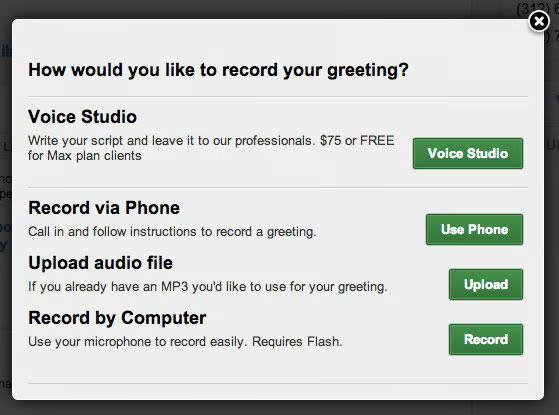
- Custom greetings: Personalize your main greeting, voicemail, or away message with pre-recordings, or use Grasshopper’s Voice Studio to have a professional voice actor record your greeting.
MightyCall: Best for call management
My expert opinion
MightyCall is one of my favorite VoIP phone systems because it offers a variety of call management features starting at $20 per user monthly (billed annually), including unlimited call minutes and text messaging. The entry-level plan features advanced telephony options like multilevel IVR, predictive dialers, ring groups, and call queues, providing a comprehensive call handling experience.
However, one major drawback of MightyCall is its minimum subscription requirement of three users, which can be a disadvantage for small teams. For those seeking a virtual phone system without user minimums or restrictions, Google Voice offers low-cost monthly plans tailored to individuals.
Pricing
| Plans and pricing(per user)* | Core | Pro | Power | Enterprise |
|---|---|---|---|---|
| Monthly | $25 | $45 | $65 | $75 |
| Annual | $20 | $38 | $54 | $65 |
| *The base plans require signing up a minimum of three users; Enterprise plans require a minimum of five users. | ||||
Standout features
- Multilevel IVR: This feature offers an advanced automated phone system with submenus for directing calls across multiple levels. It is useful for providing multilingual voice menus or linking multiple offices.
- Call intercept: It disconnects the agent handling the call and lets the supervisor take over. This allows the supervisor to address the customer’s concern and manage the situation.
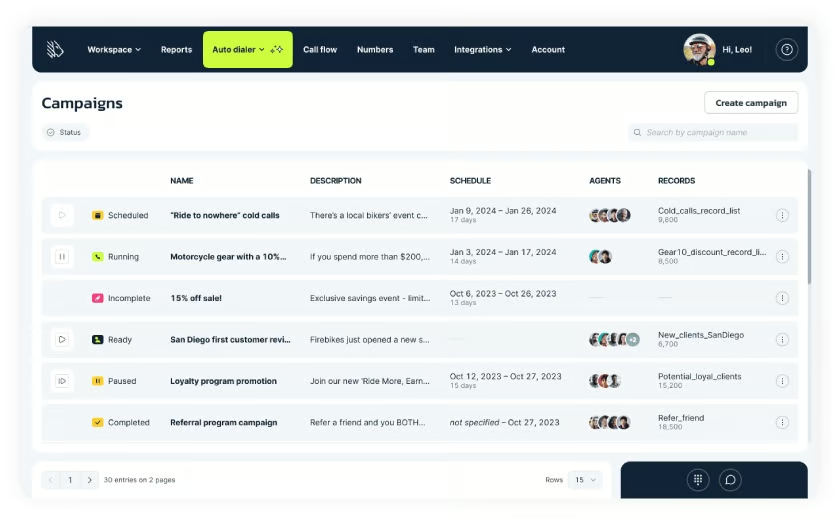
- Auto dialer: MightyCall uses artificial intelligence to instantly connect agents with customers, reducing call time and making the best matches for handling queries.
RingCentral: Best for team collaboration
My expert opinion
While I frequently highlight RingCentral as one of the top business phone systems for its third-party app integrations, it’s also an excellent option for large teams seeking a unified communication solution. With both mobile and desktop apps, you can send messages to team members, host video meetings, share files, and access other workspace tools, all from one platform.
But, while RingCentral provides various team messaging and collaboration features, its SMS messaging is limited to 200 messages per user per month, even on the highest tier plan. If your business relies on messaging for marketing campaigns, consider using Grasshopper, which offers unlimited text messaging for small teams.
Pricing
| Plans and pricing (per user) | Core | Advanced | Ultra | Customer engagement bundle |
|---|---|---|---|---|
| Monthly | $30 | $35 | $45 | Contact sales for pricing |
| Annual | $20 | $25 | $35 |
Standout features
- Call log reports: Uncover patterns in your clients’ call behavior and get a full overview of your call history with customizable dashboards with detailed analytics.
- AI assistant: Across plans, RingCentral offers several artificial intelligence features for phone, messaging, and video meetings, including real-time transcriptions, content generation, and summaries.
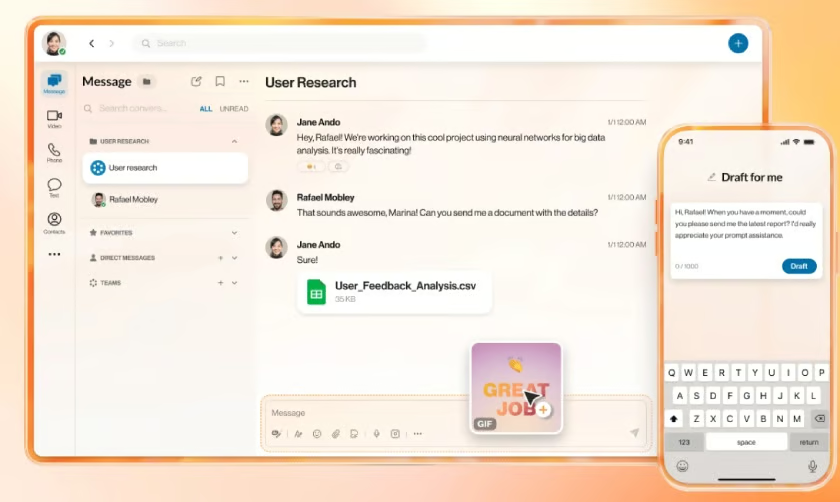
- Team messaging: Shares files, images, and messages through the RingCentral app to collaborate with team members on projects or customer feedback.
Phone.com: Best for customizable phone numbers
My expert opinion
Phone.com is recognized as one of our best hosted PBX providers, offering unique custom numbers that help business owners create a memorable first impression for potential clients and customers. Specifically, each plan includes a personalized local or toll-free number, unlimited domestic calling, and 24/7 support.
Add-ons like live receptionist and ProSIM accounts also allow you to create an advanced call routing system. However, Phone.com has limited app integrations, which connect mainly through Zapier. If you need an integrated solution, consider RingCentral, which offers over 120 business apps.
Pricing
| Plans and pricing (per user) | Basic | Plus | Pro |
|---|---|---|---|
| Monthly | $18 | $27 | $40 |
| Annual | $15 | $22.50 | $33.33 |
Standout features
- Text-to-greeting: This feature converts written text into a voice message using over 40 automated voice talents. Just type your script, choose a voice, and add it to your automated menu.
- AI Connect: Direct incoming calls to the appropriate destinations using various call handling options and appointment scheduling powered by artificial intelligence.
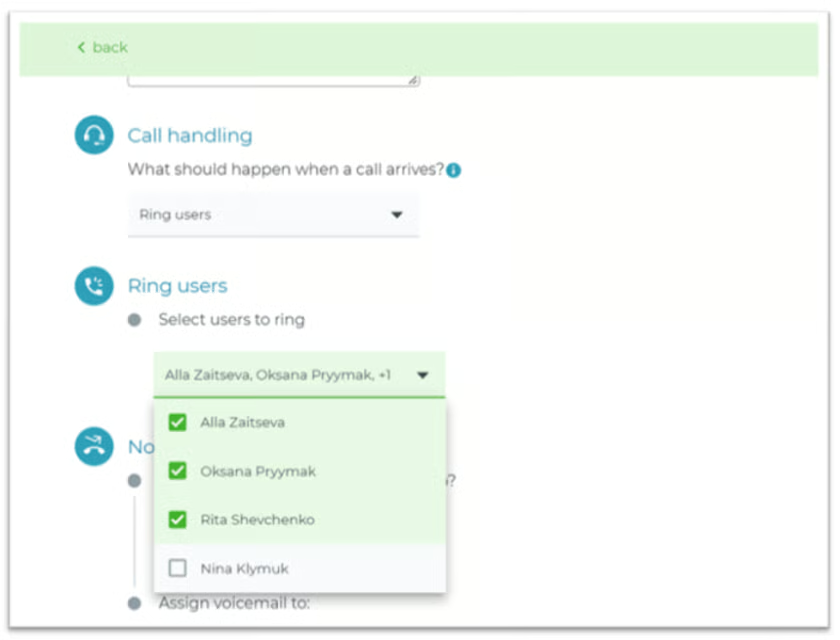
- Call handling: Set up your account with call handling rules that define how to route calls and where to direct agents.
Nextiva: Best for customer experience
My expert opinion
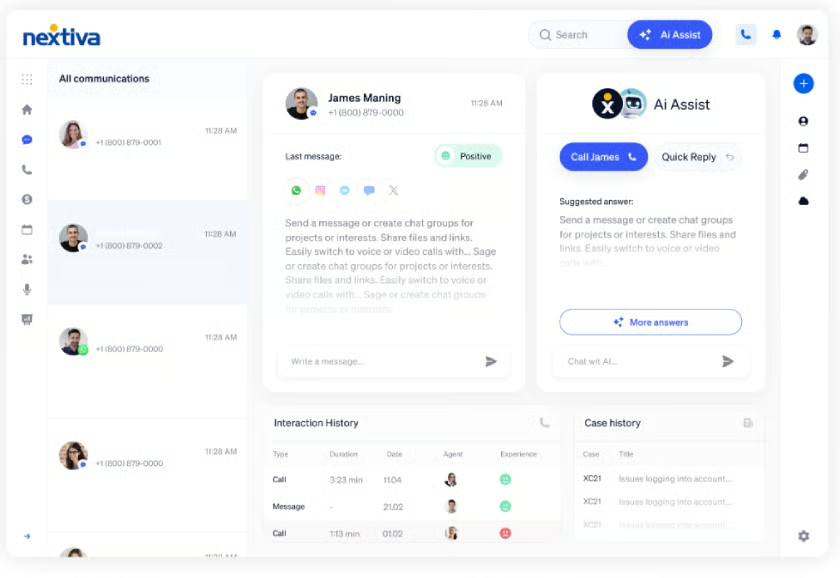
As an innovator in customer experience, I consistently rank Nextiva highly for its AI features and accessible VoIP apps. It also stands out on this list, due to its customer experience tools, such as a unified customer inbox to track interactions, AI chatbots to interact with customers, and smart routing tools to create customizable call flows that improve customer engagement.
Overall, Nextiva is an excellent choice for businesses that require advanced customer support. However, many of Nextiva’s top features are only available with its call center plans, while the core plan does not include toll-free minutes and has limited integration options. If you’re looking for a more comprehensive virtual phone system, consider RingCentral.
Pricing
| Plans and pricing (per user) | Core | Engage | Scale |
|---|---|---|---|
| Monthly | $23 | $50 | $75 |
| Annual | $15 | $25 |
Standout features
- Conversation threads: You can view past calls, voicemails, chats, and texts all in one place, removing the need to switch between menu tabs to find messages.
- Intelligent routing: Nextiva’s interactive voice response (IVR) uses automation and AI to gather caller data and guide customers through the call journey.
- Shared inbox: This provides full visibility into all call activities, including voicemail, call logs, and customer feedback. You can also review interaction history and use AI support.
Google Voice: Best for solopreneurs
My expert opinion
Google Voice is my go-to option for solopreneurs wanting to separate work and personal calls with a virtual phone number. It offers basic features for calls and texts without overwhelming users with advanced functionality. As a Google service, it also integrates well with Google Meet, Calendar, and Drive, enabling easy scheduling and call management across these apps.
However, Google Voice does not offer the same range of call-handling features as other providers on this list. For enterprise-level needs that require more flexibility and customization, MightyCall is a better option, as it provides a comprehensive set of phone features even on its base plan.
Pricing
| Plans and pricing (per user)* | Starter | Standard | Premier |
|---|---|---|---|
| Monthly | $10 | $20 | $30 |
*Google Voice is available as a standalone plan or as an add-on to a Google Workspace subscription.
Standout features
- Do not disturb: Enabling this feature will redirect all incoming calls to voicemail. If your work hours are set on Google Calendar, this feature will automatically activate outside of those hours and when you are out of the office.
- Multilevel auto-attendant: Create a multilayered phone menu to direct callers to the right person or department. This will play greetings or announcements and let callers select options.
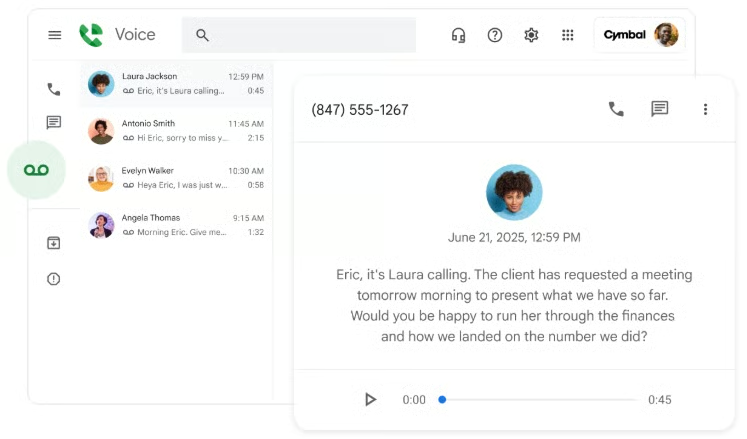
- Voicemail transcription: Convert audio messages into text to make it easier to read voicemails on the go and stay updated on important calls and data.
What you should consider when selecting the best virtual phone systems
Now that you have an overview of the top providers in the market, it’s time to start thinking about which one to choose. While I used a detailed evaluation criterion to compare these virtual phone systems, you can use the following factors to select the best provider for your needs.
Pricing and budget
One of the key factors to consider when selecting a provider is the cost of each subscription plan. Virtual phone systems vary in price, with the most affordable plans designed for small teams and the more expensive plans typically offering contact center or customer experience features.
Before choosing a provider, review your monthly budget, and keep in mind that most providers charge by user or license, and some also impose user minimums that can raise costs for smaller teams.
Setup and onboarding
VoIP phone systems are generally easier to set up than traditional phone systems, as they typically require less hardware and software. However, businesses with more complex call handling needs may require more detailed onboarding. To simplify the setup and maintenance of your phone system, choose a virtual phone system provider that offers implementation services, training videos, and 24/7 support.
Call management features
Each virtual phone system and subscription is designed for different business needs, with some providing call management tools for contact centers and customer support. In contrast, other virtual phone systems are ideal for separating your personal and business accounts with voicemail boxes to receive messages. Therefore, consider which features are relevant to how you handle your calls.
Unified communication tools
One advantage of virtual phone systems is that they often provide more than just inbound and outbound voice calls. VoIP providers usually include unified communication tools that create a centralized space for calling, text messaging, and team collaboration. So, if you’re engaged in remote work or want a single platform for all your business communications, consider virtual phone systems that offer unified communication.
Third-party integrations
While some virtual phone system providers offer hundreds of native integrations, others offer fewer than a dozen or require connectors to access third-party apps. Whether you need business integrations to access customer information or to connect with other workspace tools, it is important to choose a virtual phone system provider that lets you use the platforms that work best for your business.
Artificial intelligence
Currently, virtual phone systems are expanding to include more artificial intelligence features that enhance call routing, customer experience, and team collaboration. However, these features don’t always identify themselves as AI tools. If you’re interested in adopting AI, look for features such as virtual agents, sentiment analysis, real-time transcription, or intelligent routing.
Security
When using a virtual business phone system, it’s crucial to ensure that information shared online remains secure. To meet these needs, many providers offer extra security features such as end-to-end encryption (E2EE), user passwords, and call monitoring with analytics. Especially for business owners handling sensitive information, such as financial data or protected health information (PHI), choose a virtual phone system that complies with regulatory standards.
How to set up a virtual business phone system
After reviewing the key factors and providers above, you can select a virtual phone system and watch the video below. It provides valuable guidance on setting up a VoIP phone system effectively, saving you time and resources during implementation.
My method for evaluating the best virtual phone systems
I compiled my list of the top six virtual phone systems by selecting a dozen service providers and comparing their key features. I then used a six-part evaluation criteria to rate each provider. Learn how I determined the best virtual phone system for small business use by clicking on the tabs below.
- Pricing (10%): I assessed the value for money of each provider by checking for the availability of a free trial, free-forever version, solopreneur plan, and discounts. Higher points were awarded for monthly per-user plans costing less than $20.
- General features (30%): I checked whether the provider offers core virtual phone capabilities, such as unlimited domestic calling, call management, voicemail transcription, and a mobile app. I also confirmed whether the platform integrates with popular third-party apps, including CRM and productivity tools.
- Advanced features (20%): I looked for providers offering additional value through niche capabilities, such as low-cost international calling, call recording, and virtual numbers. I also gave more weight to providers with comprehensive analytics tools and ring groups.
- Ease of use (10%): I assessed each platform’s user-friendliness by exploring each platform myself and reviewing user reviews on reliable websites. I also considered whether there were learning curves during the setup and configuration phases.
- Customer support (15%): I checked each provider’s customer support channels, including phone, live chat, email, helpdesk, and community forums. Additional points were given if all support channels were available 24/7.
- Expert score (15%): I assessed each provider’s overall quality and performance by looking at its standout qualities and value for money. I also considered their level of popularity and the quality of user experience.
Frequently asked questions (FAQs)
Can I get a virtual phone number for my business?
Yes, virtual phone systems typically include a free phone number with all their monthly plans. Depending on the provider, you can choose from local area codes or set up a customizable toll-free number.
What is the best softphone for a small business?
The best softphone for a small business depends on your budget and specific communication needs. However, if you’re looking for a versatile solution that ensures scalability, cost savings, and essential functionality, Grasshopper is an excellent choice. With its flat-rate pricing model and all-inclusive phone features, Grasshopper provides a reliable and user-friendly softphone experience without overwhelming a small team.
Is VoIP worth it for small businesses?
Of course! VoIP provides a cost-effective and flexible communication solution for small businesses seeking a range of phone features without the need for traditional landline equipment. It can be set up on any device, allowing you to stay connected with your customers wherever you are.
Bottom line
The best virtual phone systems provide a modern twist on traditional telephony, offering numerous benefits directly from the cloud. If you’re a small business aiming to improve your communication, look no further than Grasshopper, my top choice for virtual phone systems.
With its simple fixed monthly pricing, unlimited user seats, and a wide range of features, Grasshopper makes managing your calls straightforward. Plus, you can try it out yourself with a free seven-day trial.
