







MightyCall is a cloud-based phone system that helps you manage business communications. Its basic plan starts at $15 per user, offering basic voice-over-internet-protocol (VoIP) features, including call forwarding, call recording, and interactive voice response (IVR). In this MightyCall review, the provider got an overall rating of 3.81 out of 5, receiving high scores on general features and ease of use. However, it earned a low score on pricing as it lacks volume and annual discounts.
MightyCall Review: At a Glance
When to Use MightyCall
- Solopreneurs looking for a simple virtual phone system: MightyCall’s entry-level plan allows a maximum of two users, which is more than enough for solopreneurs. For this reason, the provider earned a spot in our list of the best VoIP services for home offices.
- Need toll-free numbers: As one of the best virtual phone number providers in the market, MightyCall offers up to two toll-free numbers in all three plans. Most competitors, like Ooma and Nextiva, only include one number or charge an additional cost, as in the case of Dialpad.
- Prefer vanity phone numbers: MightyCall allows businesses to quickly get a custom, memorable number through its number search tool, making it one of our top picks for vanity phone number providers.
- Need an efficient call routing system: The provider features an auto-attendant system, guiding callers to specific departments or teams they want to talk to. It also has a multi-level IVR available in its Business and Enterprise plans.
When to Use an Alternative
- When your business frequently sends virtual faxes: MightyCall doesn’t offer this feature, while other phone systems, like Grasshopper, have this across all plans.
- Transfer international phone numbers to the provider: The provider doesn’t support international number porting. However, it does offer international phone numbers if you’re open to getting new numbers for your business. For a provider who has this feature, consider Dialpad.
- Need international toll-free numbers (ITFNs): The provider only has international local numbers. If you need ITFN, consider AVOXI, another cloud-based phone system that provides a toll-free service that works in 170-plus countries.
MightyCall Deciding Factors
MightyCall is a reliable virtual phone system equipped with basic call management features. It’s an excellent choice for solopreneurs and small businesses needing a no-frills communication platform. Its core offerings include virtual phone numbers, voicemail transcription, business messaging, call reporting, and call flow.
| Best For | Solopreneurs and small businesses that require a virtual phone system with essential call management capabilities |
|---|---|
| Standout Features |
|
| Pricing Plans |
|
| Annual or Volume Discounts Available | Not available |
| Key Integrations |
|
| Customer Service |
|
MightyCall Alternatives
While MightyCall has plenty of valuable phone system features, businesses will benefit more from alternative platforms in specific situations. For instance, 800.com offers several options for phone numbers as it features a wide variety of 800 prefixes. If you need virtual fax and unlimited calling minutes at an affordable flat rate, Grasshopper is a great alternative to MightyCall.
Meanwhile, RingCentral is your best choice if you need both audio and video conferencing in your phone system. The provider allows unlimited meetings and hosts up to 1,000 audio and 200 video conferencing participants. RingCentral is the top platform in our list of the best business phone systems and best small business VoIP services.
 |  |  | |
|---|---|---|---|
| Best For | Businesses in need of multiple phone numbers, wanting to pick from an extensive catalog of 800 prefixes (800, 833, 844, 855, 866, 877, or 888) | Businesses that prefer plans with a flat rate and need virtual fax and unlimited calling minutes | Companies that want to host audio and video conferences for a large number of participants |
| Monthly Starting Price | $29 | $31 | $30 per user |
| Learn More | 800.com Review | Grasshopper Review | RingCentral Review |
MightyCall Pricing
2.00 / 5
MightyCall pricing earned a low score of 2 out of 5 primarily because it doesn’t offer a free plan like competitor Google Voice and annual discounts like Grasshopper. However, the provider gets a slight boost as it features three subscription packages, giving businesses options as they manage their budget.
| MightyCall Plans | Small Team | Business | Enterprise |
|---|---|---|---|
| Best For | Small teams accommodating low call volumes and needing basic call management features | Small businesses that require advanced call management tools | Companies with several team members needing access to a business phone system |
| Number of Users | 2 | 3 | Unlimited |
| Monthly Pricing | $15 per user | $20 per user | $150 (flat rate) |
| Toll-free or Local Number | 2 | 2 | 2 |
| Voice-to-Text | ✕ | ✓ | ✓ |
| Call Recordings | ✕ | ✓ | ✓ |
| Multi-level IVR | ✕ | ✓ | ✓ |
| Presence Status | ✕ | ✓ | ✓ |
| Softphone & Desk Phone Support | ✕ | ✓ | ✓ |
| API | ✕ | ✓ | ✓ |
| CRM Integration Through Zapier | ✕ | ✓ | ✓ |
An additional $10 on top of the monthly plan is charged if you need extra phone numbers and international numbers. Learn more about the features included in each of the MightyCall pricing packages here:
Small Team
This plan features 500 calling minutes and 100 texts. It charges $5 per 100 MMS. Its call management capabilities include call flow, call waiting, caller ID and caller name (CNAM), custom greetings, and business hours. It allows storing up to 10 contacts in the business book. The plan supports remote work, providing access to the mobile app and webphone. In terms of integrations, subscribers are able to use web widgets.
Business
All the features included in the Small Team plan are in the Business package. However, it has expanded call management capabilities: multi-level IVR, voicemail transcription, call recording, and presence status. It allows sending unlimited MMS and storing unlimited contacts in the business book. The plan comes with softphone and desk phone support, APIs, and integrations with HubSpot, Salesforce, and other CRM tools.
Enterprise
The Enterprise plan is somewhat similar to the Business package. The only difference is that it offers unlimited users at a monthly flat rate. The Business package, which allows three users, charges $20 per additional user.
MightyCall Features
MightyCall ticks all the right boxes in terms of features, as it has a wide range of VoIP capabilities, enabling streamlined business communications. These include talk minutes, texts, and virtual phone numbers (local, toll-free, vanity, and international numbers).
Here’s an overview of MightyCall features:
General Features
4.38 / 5
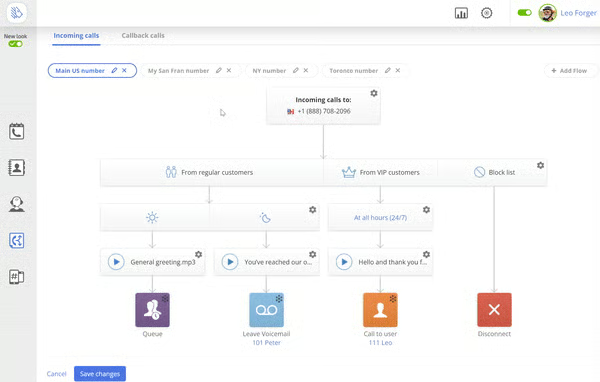
MightyCall got a high score of 4.38 out of 5 for general features since it comes with several tools for routing and monitoring calls. For instance, it has an easily customizable call flow letting you decide how callers will be directed through your system. It also comes with an auto-receptionist, guiding callers to appropriate teams depending on their concerns.
Below are some call management tools in MightyCall:
- Business contact book
- Caller ID
- User extensions
- Call queues
- Custom greeting
- Music on hold
- Call waiting
- Call screening
- Dial-by-name directory
- Call forwarding
- Call transfer
- Conference calls
- SMS and MMS
- Business hours call routing
- Voicemail-to-text
- Presence indicator
Niche Features
3.13 / 5
In this MightyCall review, the provider’s niche features earned a score of 3.13 out of 5. While the provider checks all the boxes in general features, we didn’t find as many standout capabilities as other business phone systems have. Nonetheless, MightyCall gets a slight boost in rating as it features a multi-level IVR system.
Learn more about MightyCall’s niche features below:
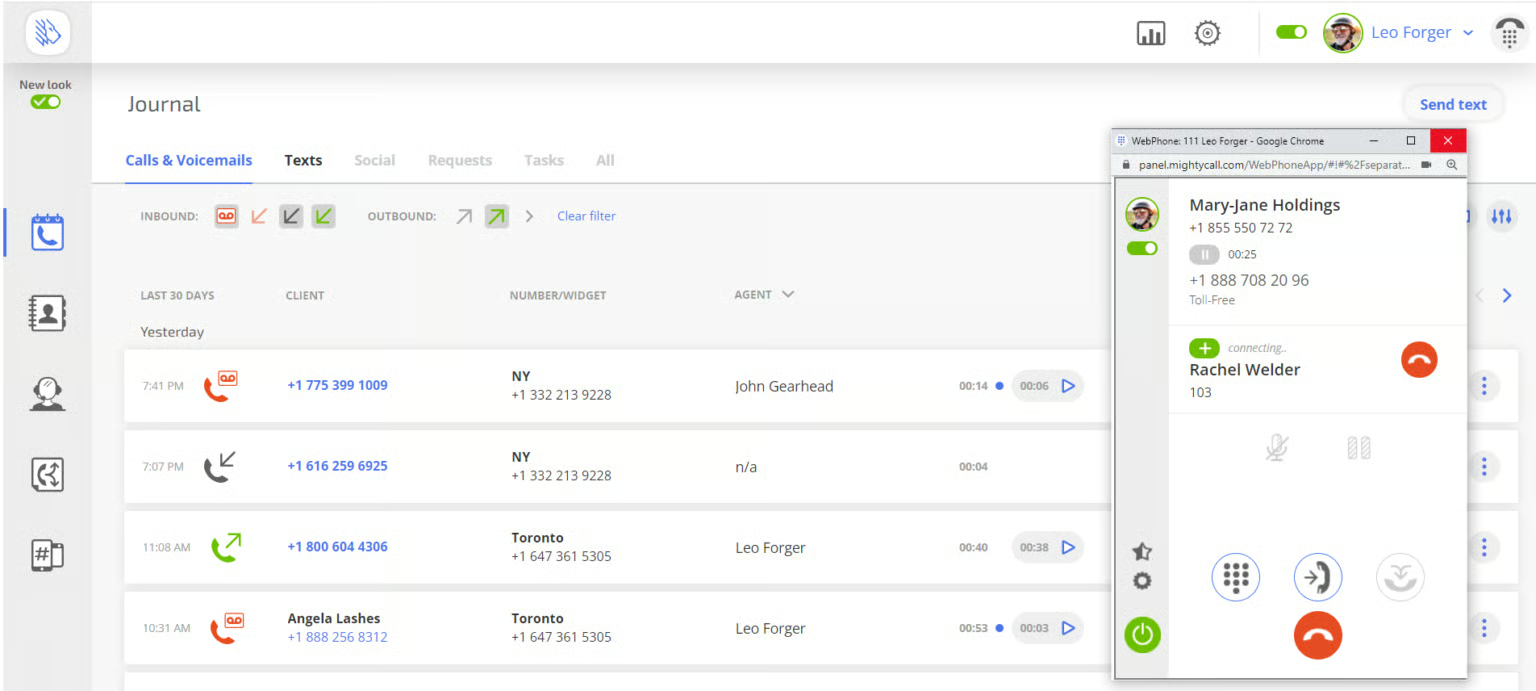
Consultative Calls
This feature places the caller on hold while a company representative calls another colleague or manager to ask for guidance. This is especially beneficial when confirming specific information or the next appropriate steps. After the consultative call ends, the line with the customer automatically reconnects, allowing the agent to relay information to the caller.
Voicemail-to-Email
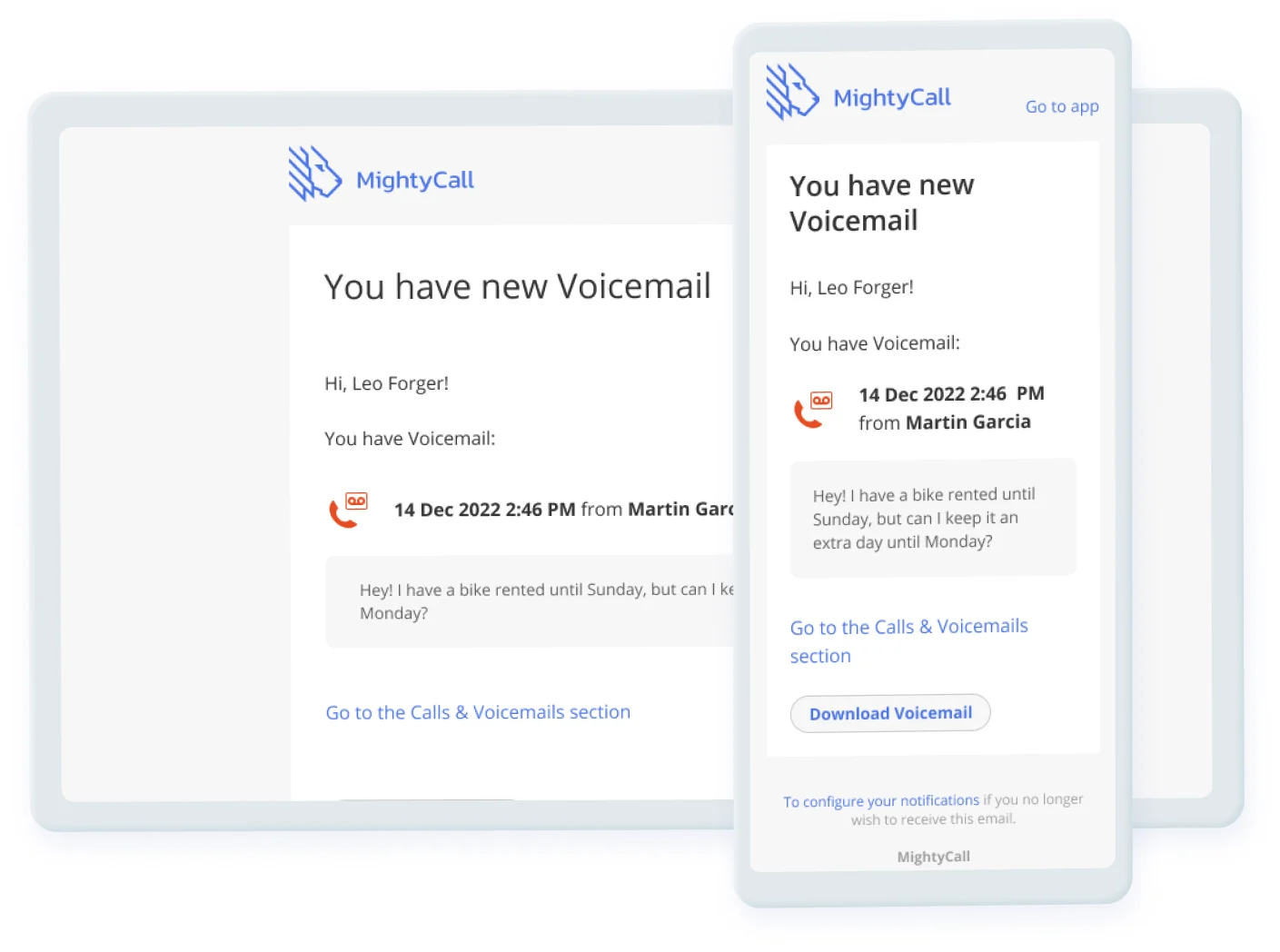
This feature sends voicemails to your email address in the form of audio or text files. With a transcribed version of the voicemail, it’s easier to revisit messages and learn the exact details of the call. As a result, you’re able to respond faster and provide better customer service.
Another benefit of using the voicemail-to-email feature is improved documentation. Since you readily see what the voicemail is about, it’s more convenient to organize messages into email folders and use them for future reference.
VIP & Block List Call Routing
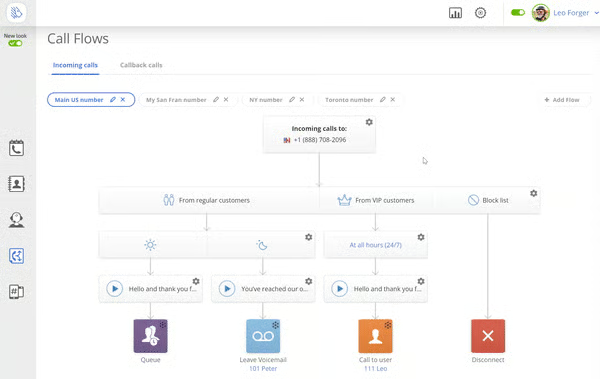
VIP and block list call routing allows you to create a list of very important people (VIP) and spam callers. This informs the phone system which contacts need to be prioritized and disregarded. When an important customer comes through your phone system past business hours, instead of receiving the recorded after-hours message, they’ll be directed to a phone number you set. Meanwhile, when a blocked caller calls, the call will automatically drop.
Communication History
Communication history lets you replay conversations of past calls. This is beneficial when you want to understand your customers’ needs to upsell products and services. In instances where you miss calls, the communication history ensures that the team has accommodated all incoming calls during the time you weren’t taking calls.
Customer Service
4.69 / 5
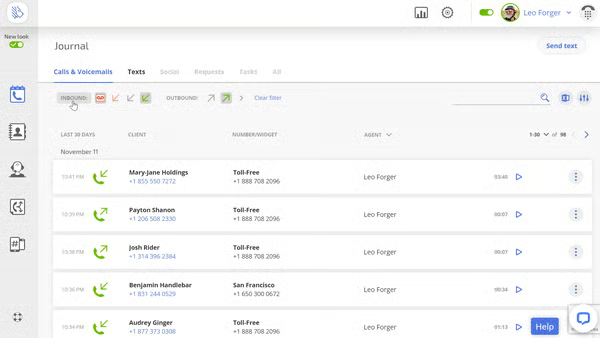
For offering different customer support channels, MightyCall earned a high score of 4.69 out of 5 for customer service. Users are able to connect to the provider via live chat, phone, and email. The customer service hours are from 8 a.m. to 8 p.m. Eastern Time on weekdays and 12 p.m. to 8 p.m. Eastern Time on weekends.
In addition, MightyCall has an online help center where you find comprehensive guides for using the different phone system features. If you want to know how other businesses use the platform, refer to the case studies section. The help center also hosts MightyCall’s status page, which provides updates about system performance and issues.
Ease of Use
5.00 / 5
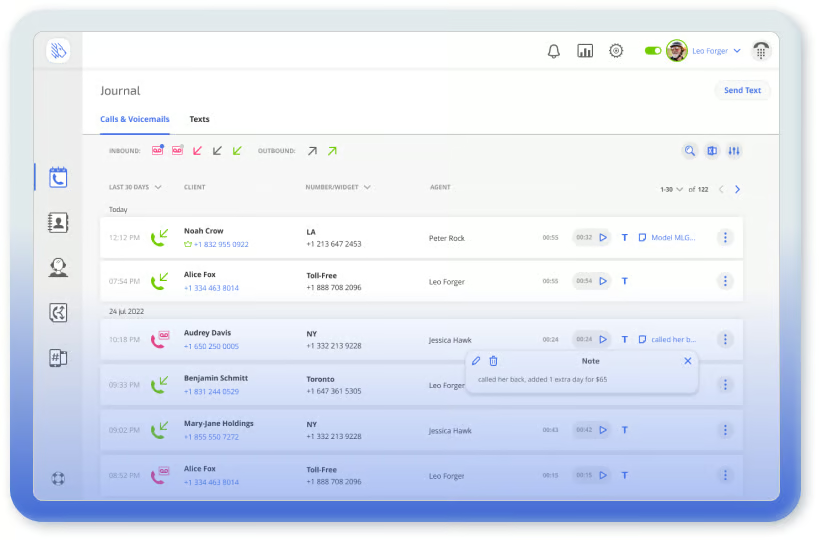
For ease of use, MightyCall received a perfect score because navigation is effortless with easily recognizable icons. Find all the tools for managing inbound and outbound calls on the left side of the interface. From top to bottom, you’ll see the icons for calls, contacts, teams, call flows, numbers, and widgets. The last one provides a convenient tool for adding and porting virtual phone numbers.
Expert Score
4.00 / 5
We gave MightyCall an expert score of 4 out of 5, given that many reviews on third-party platforms praised its features. Some liked the easy-to-use call flow builder and the convenience of adding virtual numbers. Others appreciated the call recording and voicemail-to-email feature, as it allows them to go back to conversations and pick up details of the message.
Here are the user ratings in MightyCall reviews from third-party sites:
- GetApp: 3.8 out of 5 based on 94 reviews
- G2: 4.5 out of 5 based on 113 reviews
- Capterra: 3.8 out of 5 based on 94 reviews
How We Evaluated MightyCall
Bottom Line
MightyCall is a virtual phone system equipped with a range of features that help businesses route inbound calls more efficiently. It’s ideal for teams that only need essential VoIP capabilities as it doesn’t have as many advanced capabilities as other platforms, like virtual fax, team chat, and video conferencing.
With its intuitive interface and various customer support channels, you’ll find it easy to navigate the system and maximize its features. Sign up for MightyCall’s seven-day free trial today.
