







GoDaddy POS is the payments arm of GoDaddy Commerce, built to unify in-person and online sales in a single platform. It combines dual-screen smart terminals, Tap to Pay on mobile, and tools for catalog management, ecommerce, and invoicing. I was able to demo the system with the GoDaddy team and later test it myself through a demo account, which gave me a firsthand look at how intuitive it is to set up and navigate.
In my evaluation, GoDaddy POS scored 4.11 out of 5. It earned top marks for ease of use and register features, thanks to its plug-and-play setup, 24/7 support, and fast checkout tools. It lost points in management tools and expert score, mainly due to limited multilocation support and few integrations. GoDaddy POS is a cost-effective way to manage sales across channels in one system for small businesses, especially those already using GoDaddy for their online presence.
GoDaddy POS overview
Deciding Factors
| Supported business types | Small retailers, service providers, pop-up/event sellers, ecommerce merchants using GoDaddy |
|---|---|
| Standout features | AI assistant (Airo) for catalog setup, offline + online sync, surcharge program, omnichannel inventory. |
| Monthly software fees | Free Standard plan; $34.99/month Plus plan |
| Setup and installation fees | None — plug-and-play; free two-day shipping for hardware |
| Free trial | No free trial, but 30-day money-back guarantee |
| Contract length | Month-to-month |
| Payment processing options | GoDaddy Payments only; surcharge program available |
| Payment processing fees | Standard at 2.5% flat rate; Plus at 2.3%; 0% with surcharge program for in-person credit. |
| Customer support | 24/7 phone, chat, and email; personalized onboarding for merchants over $100K annual volume. |
Is GoDaddy POS right for you?
I recommend GoDaddy POS to the following:
- Small retailers and service providers already using GoDaddy: If you have a GoDaddy domain, website, or online store, the POS integrates seamlessly so you can manage sales, inventory, and payments in one dashboard.
- Event and pop-up sellers needing offline mode: GoDaddy POS allows you to take payments even without internet access. Transactions sync automatically once the device reconnects, making it a reliable choice for markets, festivals, and high-traffic events.
- Businesses wanting simple, flat-rate pricing: With free and $34.99/month plans, flat transaction fees, and an optional surcharge program, GoDaddy POS provides cost transparency that works well for budget-conscious merchants.
When to use an alternative:
- If you need a budget-friendly POS with robust features: Square POS is the best alternative if you want a free, all-in-one POS that includes inventory, online store, and appointment booking at no monthly cost. It’s especially useful for new or seasonal businesses that want to minimize upfront fees. In fact, it’s the top pick for best free POS systems in our evaluation.
- If you are aiming for multichannel ecommerce growth: Shopify POS is a better fit if your business is primarily online or expanding into omnichannel retail. Shopify’s POS integrates directly with its ecommerce platform, giving you advanced inventory syncing, marketplace integrations, and powerful marketing tools.
- If you just need a simple mobile POS: PayPal Zettle is ideal for solopreneurs, pop-ups, and vendors who only need a low-cost way to accept payments on the go. Zettle has no monthly fees, works with affordable hardware, and deposits funds directly into your PayPal account for easy access.
GoDaddy POS alternatives
| Best For | Monthly Fee From | |
|---|---|---|
 | Brick-and-mortar retailers | $0 |
| Visit Square | ||
 | Multichannel retailers | $5 |
| Visit Shopify | ||
 | Businesses needing a simple online and international mobile payment app | $0 |
| Visit Paypal | ||
GoDaddy POS user reviews
| Users like | Users dislike |
|---|---|
| Easy setup and onboarding | Limited integrations and vendor tools |
| Flat, transparent pricing | Hardware restrictions and ecosystem lock-in |
| Offline + cloud sync for mobile usage | Occasional bugs, support delays, performance lags |
User feedback highlights GoDaddy POS’s simplicity, transparent pricing, and accessibility for small businesses. Many reviewers note how easy it is to set up and start selling, especially for food trucks, pop-ups, and retailers already using GoDaddy’s ecosystem. Flat-rate processing and offline mode also earn consistent praise.
- “It’s very easy to add and set up items, taxes and menus. In 2 years of usage I only had one issue that was fixed very quickly.” — Reddit (r/foodtrucks)
- “They charge very little and that’s what I was going for.” — Reddit (r/foodtrucks)
- “My online store and physical sales sync instantly — saved me tons of headache.” — App Store review
On the other hand, common frustrations and complaints surface around integrations, hardware limitations, and performance.
- Limited integrations: Users point out that GoDaddy POS only works with GoDaddy Payments and has fewer third-party plugins compared to Square or Shopify. “No built-in integrations unless you stay inside GoDaddy’s ecosystem.” — Reddit (r/POS)
- Hardware restrictions: Merchants dislike being locked into GoDaddy terminals and not being able to bring their own processor. “You can’t use your own processor; hardware is restricted.” — Reddit (r/POS)
- Performance and support issues: Some Android users report app lag or sync delays, while customer support receives mixed reviews. “Sometimes the POS lags or fails to sync instantly.” — Google Play review
Overall, GoDaddy POS is praised for being affordable, easy to use, and reliable in offline scenarios, but it lags behind competitors in scalability, integrations, and advanced tools.
App ratings snapshot:
- Apple App Store: 4.7 out of 5 (nearly 16,000 ratings) — users praise reliability, ease of setup, and seamless online/offline syncing.
- Google Play Store: 3.6 out of 5 (more than 3,900 ratings) — feedback is more mixed, with Android users citing lag, bugs, and stability issues.
GoDaddy POS earns strong reviews from iOS users and food truck operators who value simplicity and offline reliability. However, Android users and multi-location businesses often highlight its limitations in performance, integrations, and scalability.
GoDaddy POS pricing
GoDaddy POS keeps pricing simple with two software plans and flat-rate processing fees. In my evaluation, it scored 3.88 out of 5 for pricing. It earned points for offering a free entry-level plan, affordable monthly upgrades, and no contracts or installation fees. However, I deducted points because merchants are locked into GoDaddy Payments, hardware isn’t free, and more advanced features, such as employee management, are only available with the Plus plan.
Software fees
| Plan | Monthly fee | Features |
|---|---|---|
| Standard | Free (with GoDaddy hardware) | Core POS features, catalog setup, basic inventory tracking, GoDaddy Payments at 2.5% flat rate |
| Plus | $34.99/month | Lower 2.3% processing fee, stock alerts, online ordering with in-store pickup, employee management, custom digital receipts |
GoDaddy also offers a compliant surcharge program, which allows merchants to pass credit card fees to customers. This can reduce in-person credit transaction costs to as low as 0%. I like this option because it gives sellers flexibility to protect their margins without inflating sticker prices across the board.
There are no setup or installation fees, and all software plans are offered on a month-to-month basis with a 30-day money-back guarantee.
Hardware fees
GoDaddy offers three main hardware options plus Tap to Pay on mobile. In my evaluation, I found the hardware affordable compared to competitors, but less flexible because you’re limited to GoDaddy’s own devices. That said, the dual-screen Smart Terminal stands out for its built-in printer and barcode scanner, while the smaller Flex version works well for mobile sellers.
All devices come with free two-day shipping, a one-year warranty, and a 30-day money-back guarantee. Setup is truly plug-and-play, which I find especially valuable for small businesses that don’t want to hire IT support.
| GoDaddy Card Reader | Smart Terminal | Smart Terminal Flex |
|---|---|---|
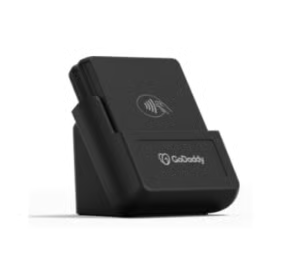 | 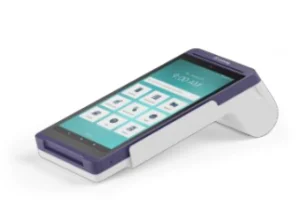 | 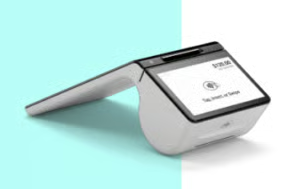 |
| $99 | $299 | $499 |
| Take mobile payments via app | Single (6 in.) touchscreen and compact design | All-in-one dual-screen device (8” merchant screen and 5” customer screen) |
GoDaddy also supports Tap to Pay on iPhone and Android, so you can accept contactless payments directly on a smartphone without buying hardware. This option works best for very small businesses or those just starting out.
GoDaddy POS features
Flexible checkout and register tools
The checkout process is fast and customizable, with barcode scanning, product modifiers, discounts, and multiple payment types. The dual-screen terminal enhances the customer experience, while features such as invoicing, virtual terminal, and Tap to Pay expand sales beyond the counter.
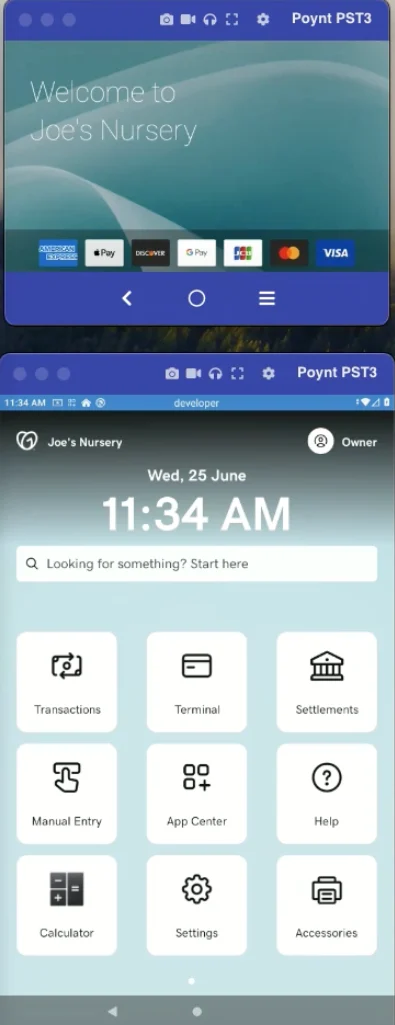
Under Payment Tools, the Smart Terminal and Smart Terminal Flex show how merchants can choose hardware that fits their setup, whether countertop or mobile.
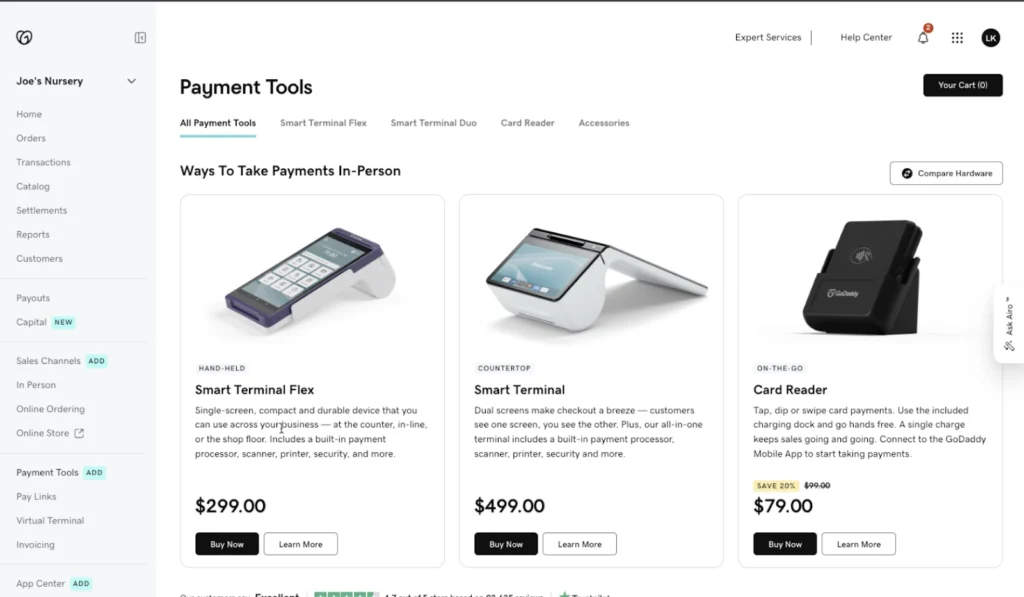
On the terminal itself, the interface is clean and easy to navigate, with big icons for Transactions, Settlements, and App Center. During my demo, I noticed how quickly I could ring up a sale — the dual-screen design keeps customers engaged, while merchants can add discounts, scan barcodes, or enter items manually without friction.
Unified dashboard with ecommerce integration
GoDaddy POS connects in-person, online, and mobile sales in a single dashboard. Customers can order online for pickup, and inventory updates automatically across all channels. This seamless integration saves time compared to systems that require third-party connectors.
The Sales Channels dashboard clearly illustrates how GoDaddy POS ties together in-person sales with ecommerce platforms like WooCommerce, Amazon, eBay, Etsy, and even Facebook/Instagram. This means you can sell across multiple channels without juggling different systems.
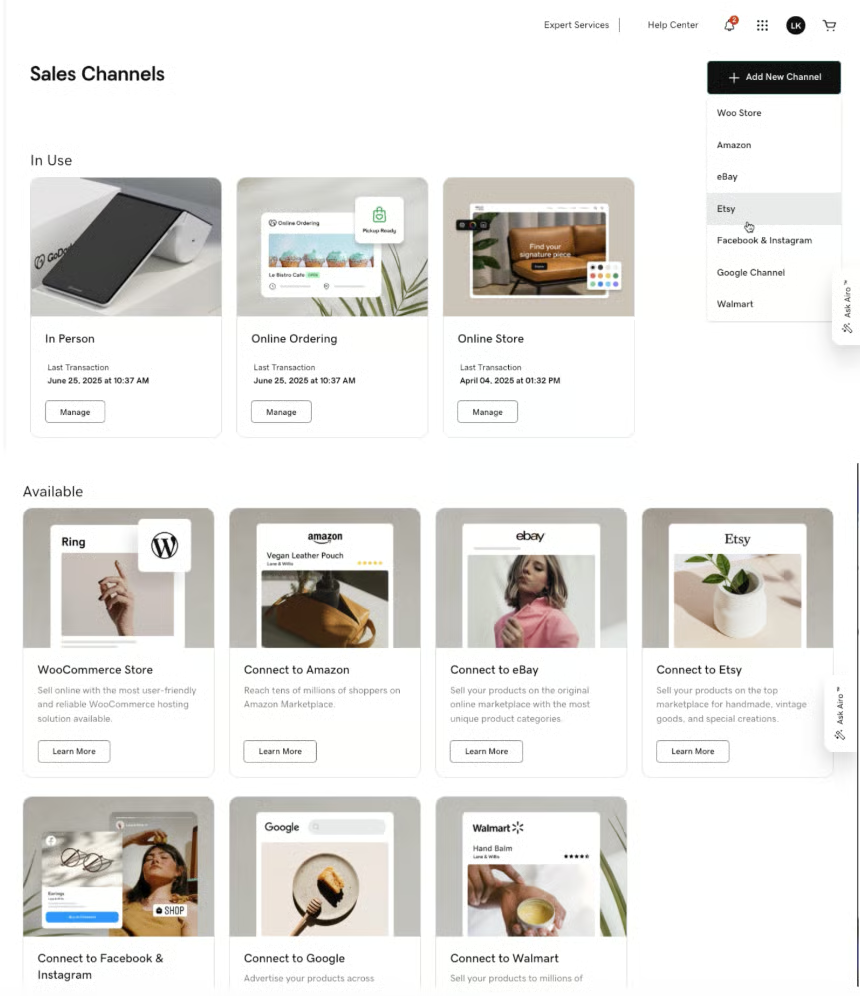
When I tested the demo account, I saw how orders placed online instantly appeared in the dashboard, and stock levels updated automatically — a real time-saver compared to manual reconciliation.
AI assistant (GoDaddy Airo)
With GoDaddy Airo, merchants can create a product catalog by snapping a photo of a menu or importing files. It auto-generates items with pricing and descriptions, dramatically cutting setup time.
On the catalog page, GoDaddy Airo appears as a side panel that lets you upload a file, snap a photo, or type product details. In our demo, we uploaded a menu image, and within seconds, Airo generated product names, pricing, and even descriptions. This feature turns one of the most tedious onboarding tasks — catalog setup — into a near-instant process, which is something I don’t usually see from competitors like PayPal Zettle.
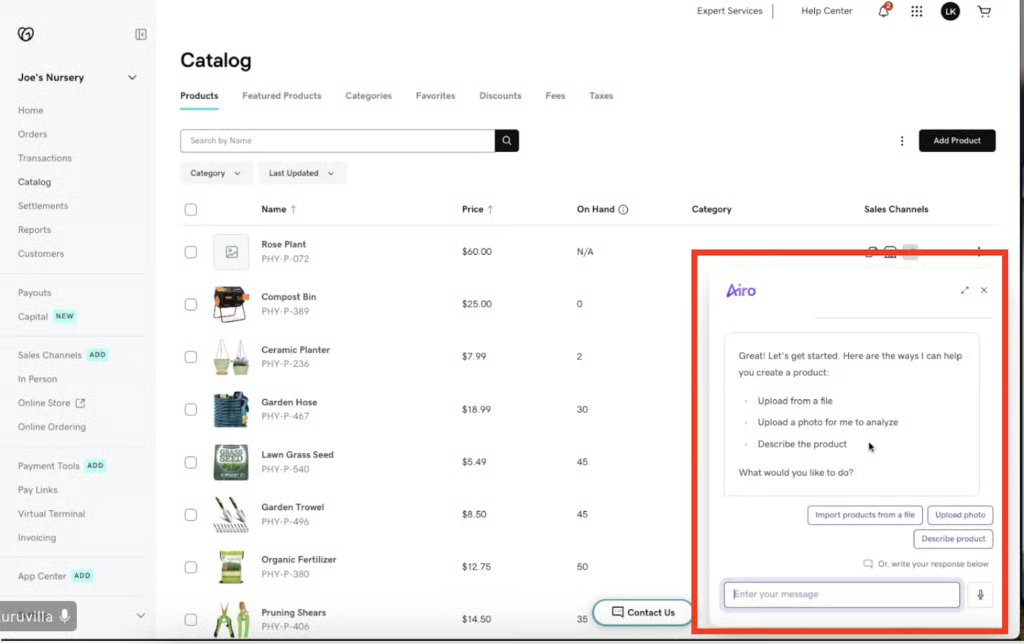
GoDaddy Airo isn’t just for setting up product listings; it can also create an initial setup for your online store. This is why GoDaddy’s Online Store made it to my picks for best ecommerce platforms.
Inventory and order management
GoDaddy supports real-time inventory tracking with stock alerts, synced across channels. Orders can be managed directly from the terminal or dashboard, reducing friction for small teams.
In the images, you will see how the catalog synced with live inventory and the reporting dashboard breaking down sales by channel, method, and product. I found this helpful for small teams — orders placed online, in-store, or through a pay link all flow into the same system.
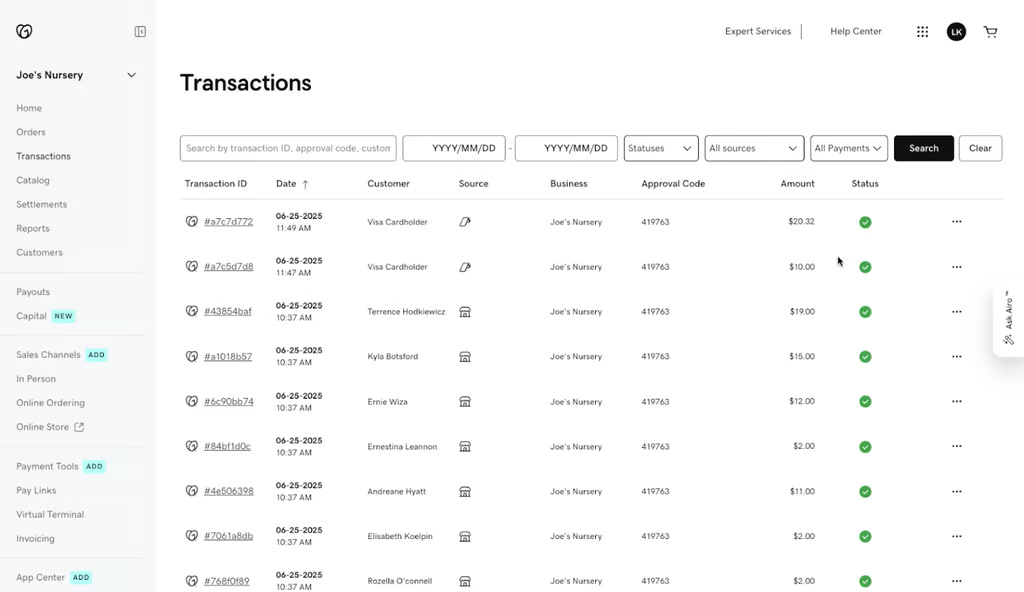
The transaction view on the GoDaddy POS dashboard. Note that you can see the source of the sale. 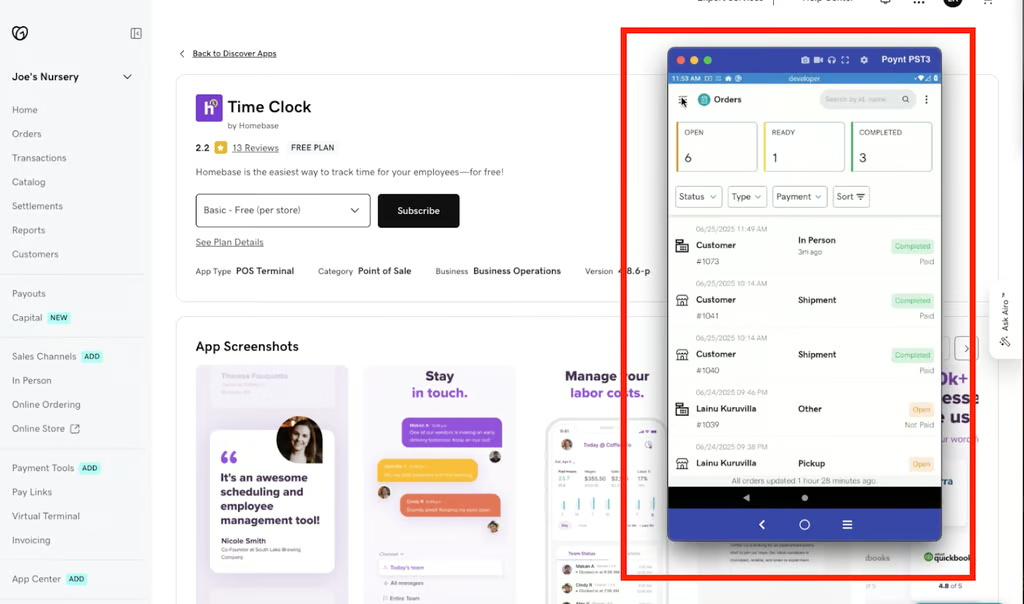
In the GoDaddy mobile POS app, transactions are shown like in the image displayed.


While GoDaddy’s analytics aren’t as advanced as Square’s, you still get the essentials: top-selling products, sales by channel, and payment method breakdowns.
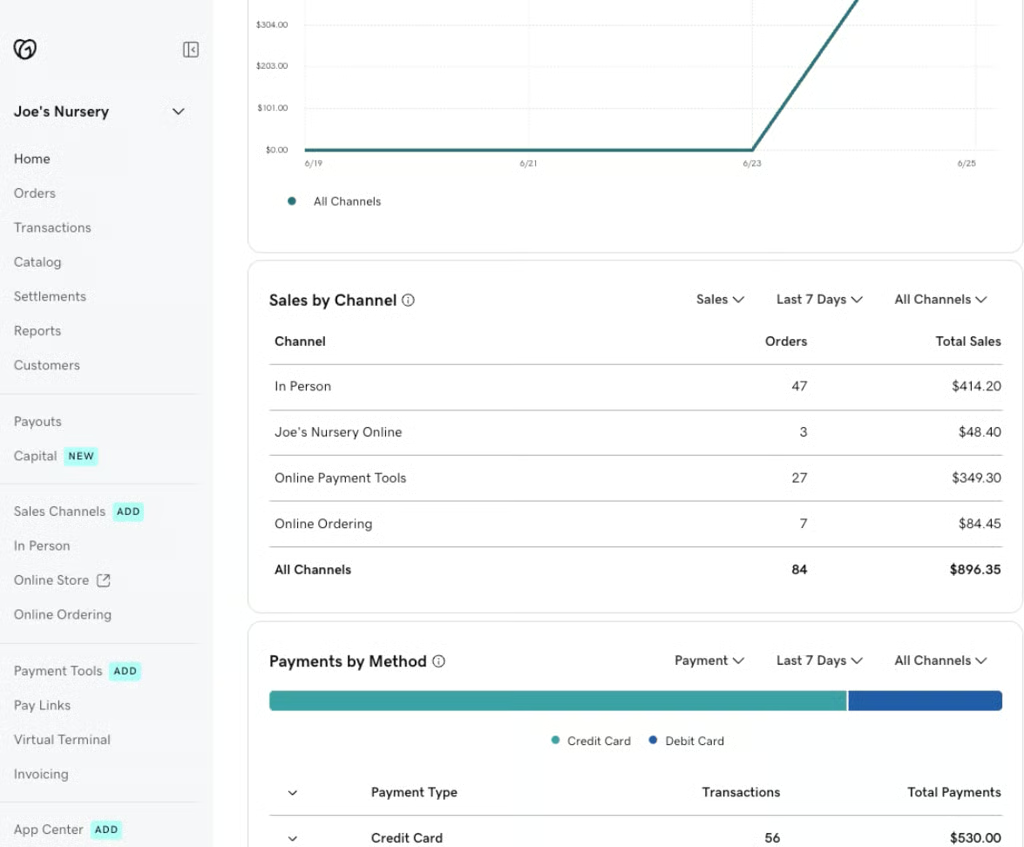
Sales reports break down transactions by channel, payment method, and time period, helping small businesses monitor performance. 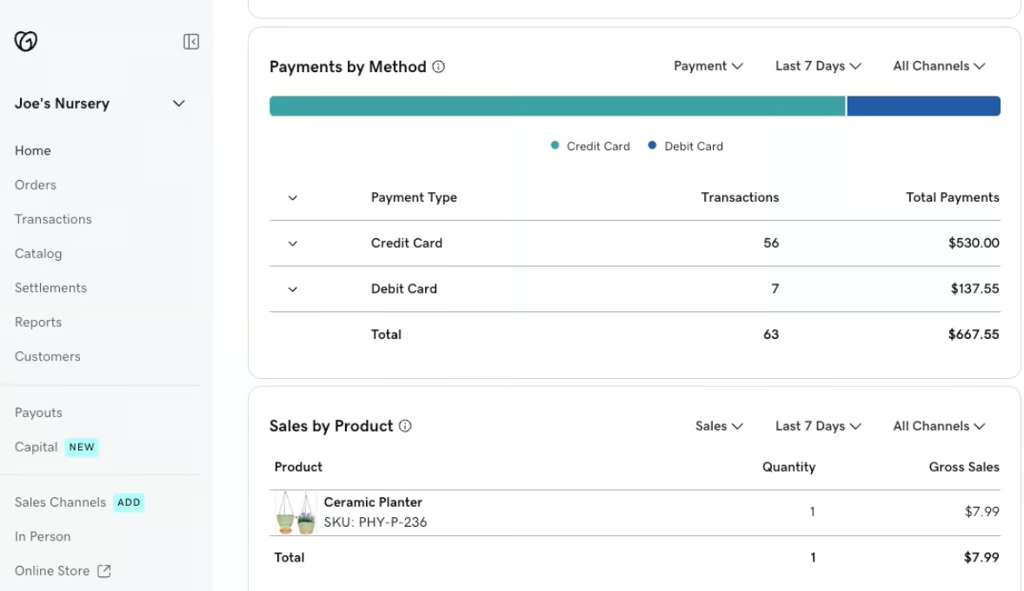


Lightweight core with app integrations
GoDaddy POS doesn’t overload the base system with features. Instead, it keeps the software lean (part of why the Standard plan is free) and offers add-ons for loyalty, marketing, and employee scheduling. Merchants who want advanced features will need third-party apps, but this model works well for small operators that prefer to keep costs low.
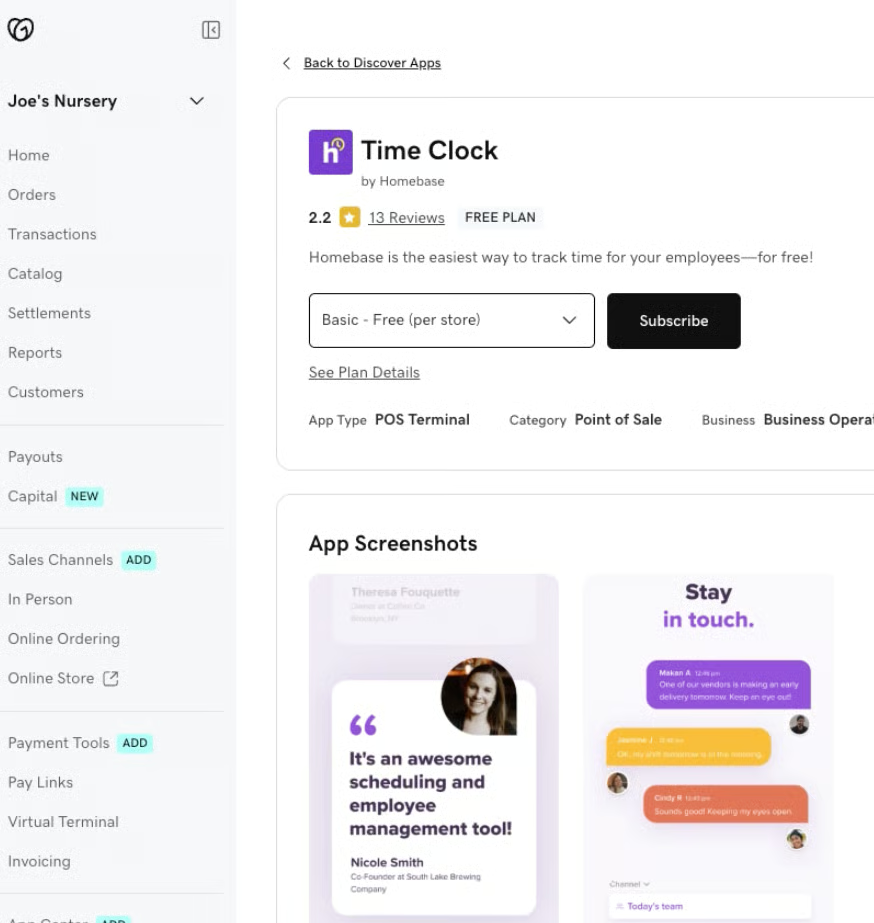
The demo account and screenshots highlight GoDaddy POS’s biggest strengths — simplicity, integration, and speed. From the dual-screen checkout to AI-powered catalog setup and seamless channel syncing, the system feels approachable for small business owners who don’t want to wrestle with complex POS setups.
GoDaddy POS ease of use and customer support
Ease of use and setup
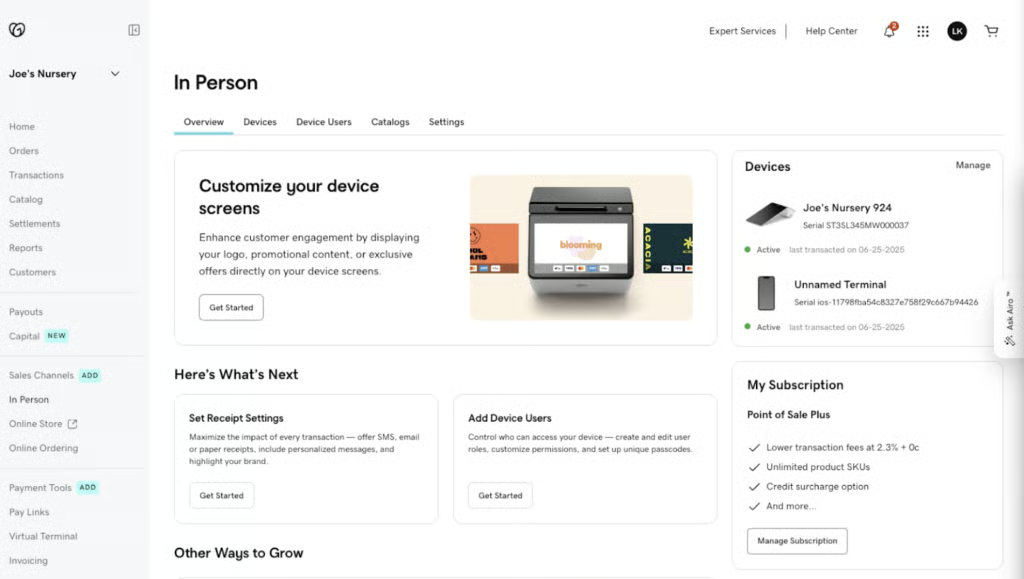
When I demoed GoDaddy POS, I was delighted at how intuitive it was to use. The system feels plug-and-play, with a clean, central dashboard that makes it easy to manage sales, inventory, and orders all in one place. We also received a demo account to test, which confirmed how straightforward the workflows are — even without training, it’s simple to navigate the menus and complete daily functions. I especially liked how the unified dashboard ties together all parts of the business in one view.
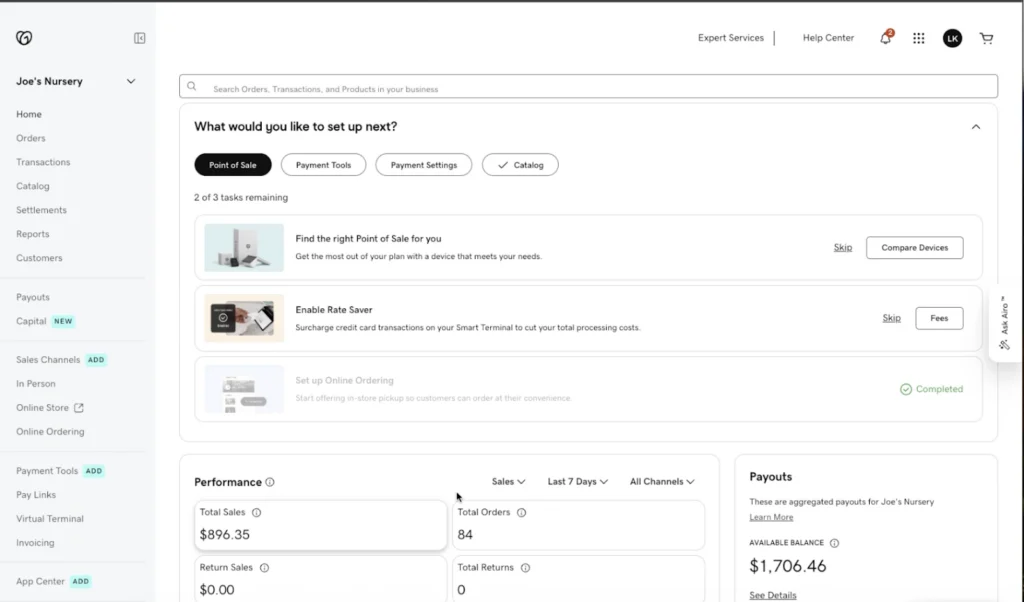
Another advantage is how well GoDaddy POS integrates with the company’s ecommerce suite. If you already host a store with GoDaddy, the POS syncs seamlessly, linking your online and in-person inventory. For example, when a customer places an order online for pickup, the sale automatically shows up in your POS, and stock updates in both systems without any manual work. That level of integration reduces friction and helps small merchants save time.
Support
GoDaddy POS provides 24/7 support through live chat, phone, and email. Merchants can start a chat session from the Contact Us page, call region-specific numbers, or email support and expect a reply within a day. In my evaluation, having round-the-clock access is valuable for small businesses that don’t always operate on a 9-to-5 schedule.
Beyond direct support, GoDaddy offers a self-service Help Center with searchable articles covering setup, troubleshooting, and feature use. The company also maintains YouTube tutorial videos that walk through catalog creation, device setup, and ecommerce integration, which I found useful for quick training. I also appreciated that GoDaddy gave us a demo account to test features ourselves — something many competitors don’t always provide.
Methodology
In reviewing GoDaddy POS, I considered how well the system meets the needs of small businesses that want an affordable, easy-to-use solution with essential POS functions. I focused on its ability to process multiple payment types, apply discounts, and manage inventory. I also tested its omnichannel capabilities since GoDaddy serves both in-person and ecommerce merchants.
I evaluated GoDaddy POS in these categories:
I reviewed whether GoDaddy POS offers affordable subscription tiers, integrated payment processing, and flexible hardware options. I also noted whether it imposes user or transaction limits, requires long-term contracts, or carries hidden fees.
I tested the speed and flexibility of checkout, including customer management, discounting, and order tracking. I also looked at contactless payments, integrated online ordering, and how well GoDaddy supports sales across multiple channels.
examined GoDaddy’s inventory tracking, reporting dashboard, and available marketing and employee management tools. I also considered how inventory syncs across POS, online stores, and marketplaces.
I evaluated installation and setup, the clarity of workflows, and the intuitiveness of the interface. I also tested whether GoDaddy POS supports offline transactions and assessed its training resources and support availability.
I weighed the overall quality and stability of GoDaddy POS features, security measures, and value for the price. I factored in my own hands-on demo experience, user reviews, and how GoDaddy’s product team supports merchants.
Frequently asked questions (FAQs)
Is GoDaddy POS good for small businesses?
GoDaddy POS is designed for small retailers and service providers that want both in-person and online selling tools in one platform. Its catalog management, ecommerce integration, and AI-powered product setup make it appealing to growing businesses. However, the value depends on your transaction volume and whether you already use GoDaddy for your website or domain.
Does GoDaddy POS work offline?
Yes, GoDaddy POS supports offline payments with configurable risk limits. Merchants can process transactions without internet access, and once the device reconnects, sales automatically sync to the cloud. This feature is especially useful for events, pop-ups, or areas with spotty Wi-Fi.
What payment methods does GoDaddy POS accept?
GoDaddy POS supports credit cards, debit cards, contactless payments, and manual card entry. Merchants can also create pay links, invoices, and use the virtual terminal for phone orders. Payment processing is handled through GoDaddy Payments, which integrates directly into the POS system.
Can GoDaddy POS integrate with ecommerce and marketplaces?
Yes, GoDaddy POS connects with GoDaddy’s online store, online ordering, and third-party marketplaces like Amazon. The system keeps inventory synced across all channels so you don’t have to manually update stock. Marketplace integrations may require live accounts and are not fully supported in demo environments.
How much does GoDaddy POS cost?
Pricing for GoDaddy POS varies by plan and hardware bundle. While GoDaddy offers competitive rates and flexible hardware, access to certain features, such as the Airo AI assistant, may depend on your subscription tier. It’s important to review whether your plan includes everything you need before committing.
Bottom line
GoDaddy POS is a lightweight yet capable system that makes selling in person and online simple. Its biggest strengths are ease of use, quick setup, and seamless integration with GoDaddy’s ecommerce tools. Features such as AI-powered catalog setup, offline payments, and flat-rate processing make it especially appealing to small retailers, food trucks, and service providers who seek affordable, transparent pricing without long-term contracts.
While it lacks some built-in features and advanced scalability, it’s an excellent fit for entrepreneurs already in the GoDaddy ecosystem or those looking for a no-fuss POS solution. Get started with GoDaddy POS today and see how simple selling can be.
