







Learning how to sell on Faire starts with one simple step: applying as a vendor. Once approved, you’ll have access to one of the largest wholesale marketplaces, where independent brands connect with retailers across the US and worldwide.
Faire simplifies wholesale by giving you a digital storefront, built-in tools for promotions, and integrations with platforms like Shopify. Along the way, you’ll need to factor in commissions, payment processing, and even new tariff policies that can impact international sales.
In this guide, I’ll show you the full process, explain the costs, and share practical tips for building long-term success on the platform.
- What is Faire.com?
- How to get started selling on Faire
- Faire fees and commissions explained
- How tariffs affect selling on Faire
- Faire seller tools to grow your wholesale business
- Tips for long-term success on Faire
- Who should sell on Faire?
- Pros and cons of selling on Faire
- Frequently asked questions about selling on Faire (FAQs)
- Bottom line
What is Faire.com?
Faire is a wholesale marketplace that connects independent retailers with brands, artisans, and makers. Instead of relying on trade shows or cold outreach, you can set up a digital storefront and reach thousands of retailers worldwide. What makes Faire attractive to retailers are its Net 60 payment terms, free shipping on first orders, and a wide catalog of products. Faire also integrates with Shopify and other ecommerce platforms, making it easy to sync products and manage orders.
In short, Faire helps small businesses scale their wholesale operations quickly while simplifying the buying process for retailers.
How to get started selling on Faire
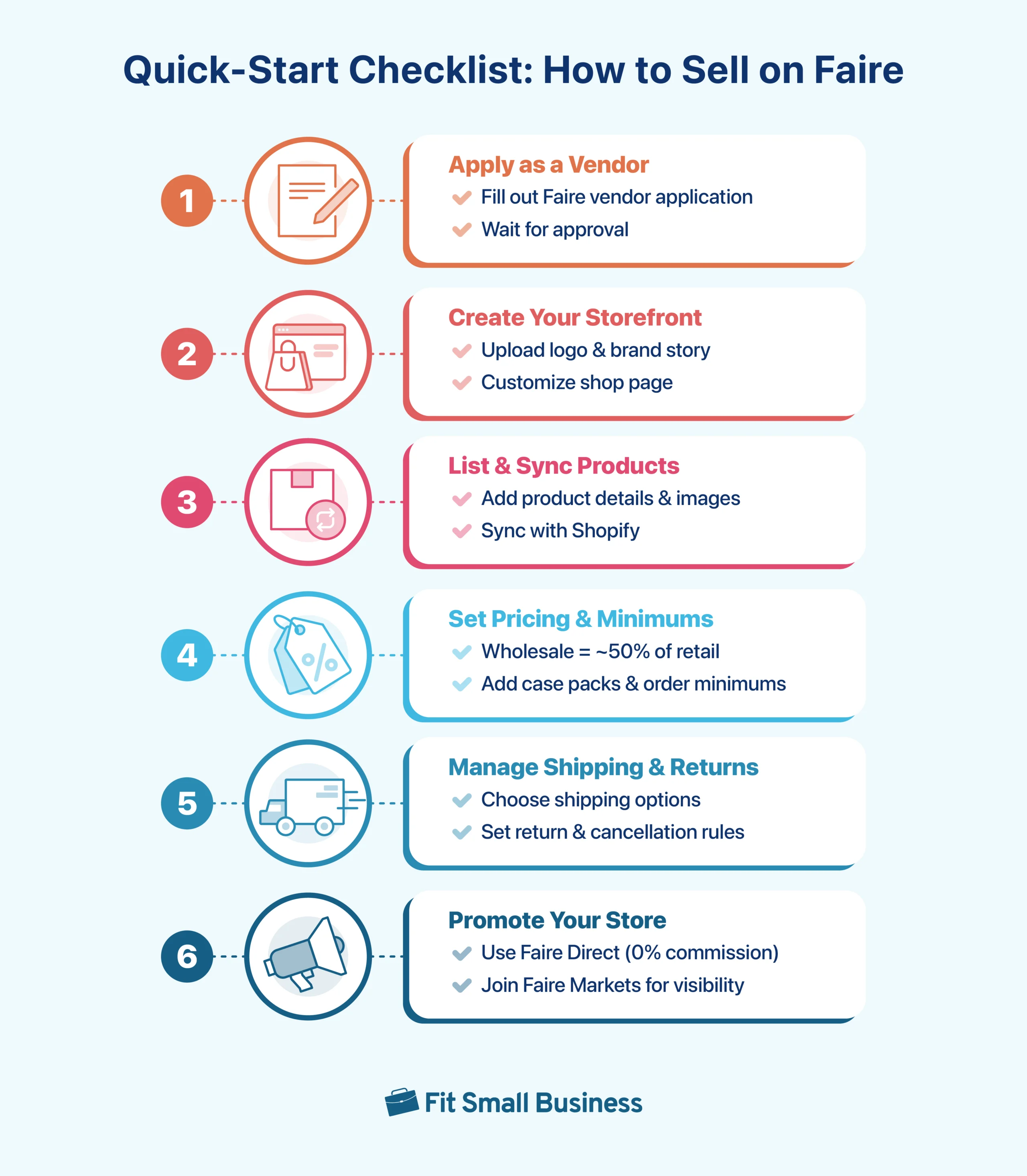
Learning how to sell on Faire is pretty straightforward once you know the key steps. Think of it like opening a wholesale storefront: you’ll create your account, upload your products, set up shipping and pricing rules, and make sure your orders and returns run smoothly. If you plan to ship internationally, you’ll also want to understand how new US tariff policies may affect your sales.
In this section, I’ll walk you through everything you need to get started with selling on Faire — from setting up your shop and syncing products with Shopify (if you have one), to managing shipping, pricing, orders, returns, and tariffs. By the end, you’ll have a clear roadmap for how to sell wholesale on Faire and avoid common pitfalls.
Setting up your Faire account and storefront
Getting started begins with your brand profile. This is the first impression retailers see, so you’ll want to set up your account, upload your logo, and write a clear brand story. Think of it like your digital booth at a trade show; it’s where buyers decide whether to explore your products further.
Apply for a Faire brand account
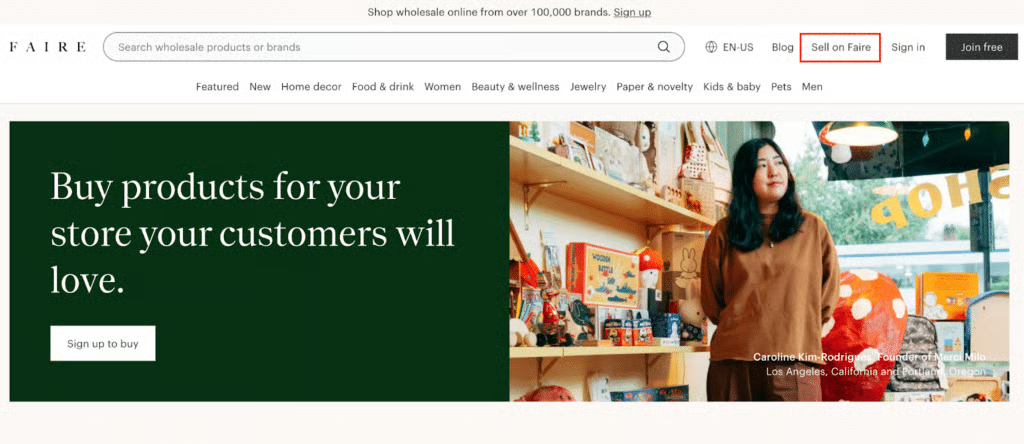
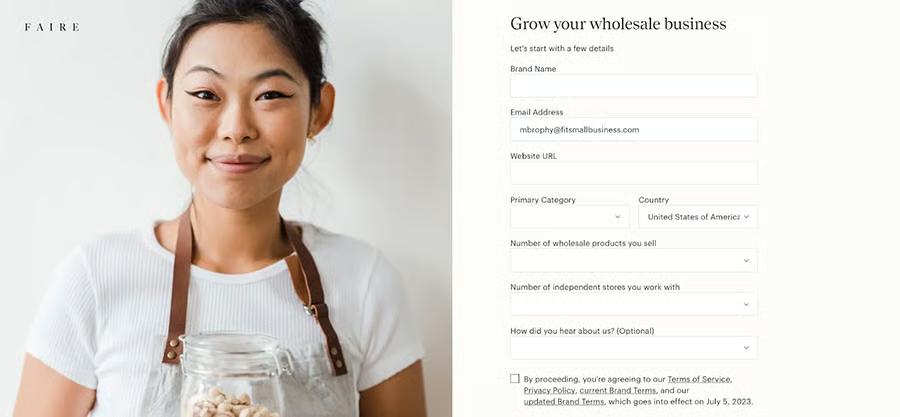
First, apply for a brand account. When you visit the Faire website, the homepage shown by default is for buyers. To apply as a seller, go to Sell on Faire on the navigation bar and provide the following information:
- Brand name
- Email address
- Website URL
- Retail category
- Country
- The number of wholesale products you sell
- How many retailers you currently sell to
It will then go to Faire’s brand verification team, which will determine the legitimacy of your brand and the accuracy of the information provided.
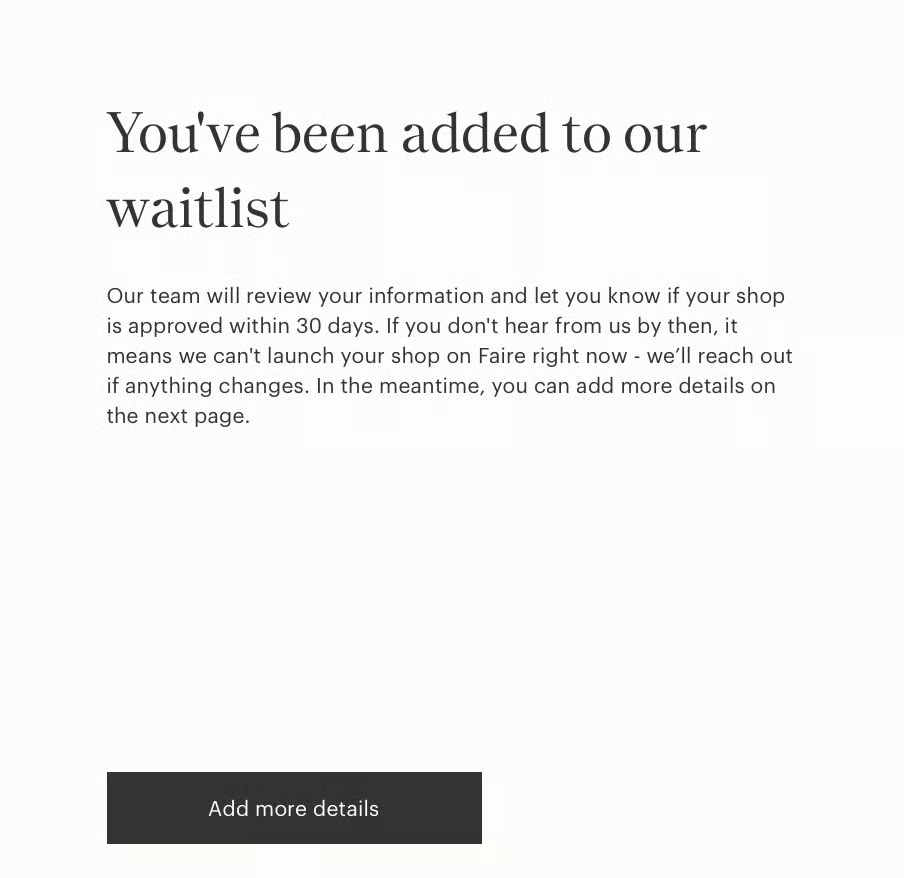
On the next page, you’ll have the option to provide:
- Your Instagram handle
- Year your brand was established
- Which of the core Faire values your brand aligns with
- Anything else you think will help your account in the approval process

Set up your account settings
Once your application is approved, you will then need to officially create your account, setting your email, password, and phone number for two-factor authentication. Once you are in, you need to set up your store with the following settings:
- Business details: Brand contact info, social media pages, name, product overview, shipping location details, and a list of the retail stores carrying your products.
- Contact information: Email address, phone number, and your billing and shipping addresses.
- Payment terms: Decide if you want to offer next-, 30-, or 60-day payout terms.
- Lead times: Add the amount of time you expect it will take you to ship orders. Brands with faster fulfillment times typically perform better with customers.
- Banking and tax information: Add your bank account information where Faire can deposit your payouts.
- Tax information: Input your tax classification and number to receive a 1099-K form come tax season.
- Order minimums: Set your order minimums to show customers the smallest quantities they are allowed to order from your store.
- Fulfillment times: Set your estimated shipping times once the order has left your warehouse.
- Fulfillment methods: You have two different fulfillment options with Faire, and you can choose the one that makes sense for your business. These are:
- Ship with Faire: With this method, you enter your order information, and then you can find and print shipping labels straight from your Faire account. Faire offers low carrier rates, and you’ll pay zero shipping fees upfront. Not only that, the order’s shipping cost and tracking number will be recorded straight to the order page on your Faire account, so you can keep tabs on its progress and manage all your order details from your Faire account.
- Ship on your own: If you would rather ship with your own carrier or get shipping labels from another provider, you have the option to ship outside of Faire’s shipping tools. Faire will also reimburse the shipping cost up to a certain amount on your payout if you enter the shipping cost and tracking number on the order page once it’s available.
Customize your Faire Shop page
Faire gives you a few customization options for your store appearance, allowing you to showcase your brand and stand out from other stores on the site. Here are the areas that you can customize within your storefront, as well as some sample store images to get you inspired:
- Shop images: You can upload custom images, including a feature image that will be your store banner, marketplace cover image, and marketing email photo. The best size for your shop image is 1080 x 1080 pixels. Your shop image should also avoid logos or text, photo collages, inappropriate language, and nudity.
- Brand story: Add a short description or introduction to your brand to give customers a glimpse of who you are, what you stand for, and how you got started. Your brand story will appear on the “Read Their Story” page of your storefront. It will include your:
- Location
- The year you started
- Social media information
- Brand values
- A personal story of your brand
- The message you’d like to share with retailers
- Publications you’ve been featured in (optional)
- Some images that represent how your products are made (optional)
- An embedded YouTube or Vimeo video (optional)
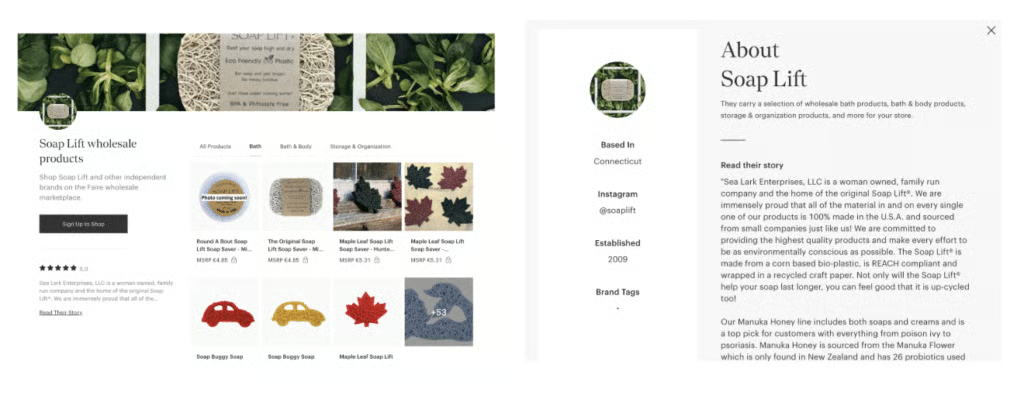
An example of a Faire Shop page with good product images and brand story is Soap Llift. Soap Lift customized its storefront by evoking a natural vibe that matches its eco-friendly products. They also shared their inspiring brand story.
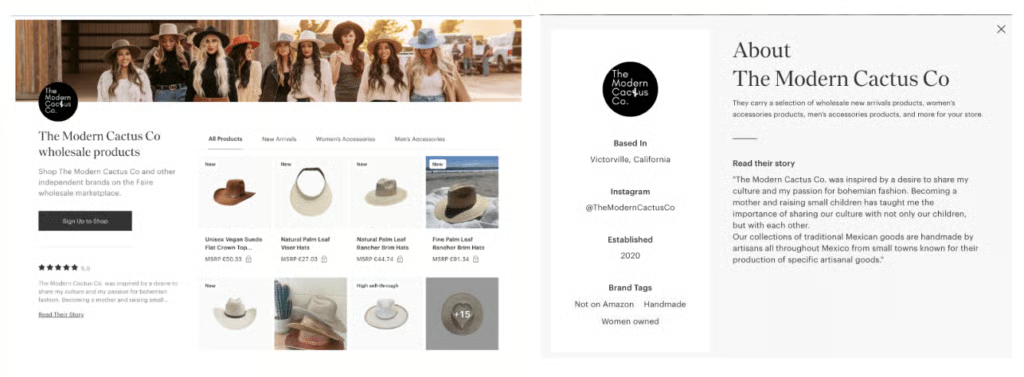
The Modern Cactus is also a good brand example. It showcases its stylish hat products with its shop cover image and tells us about the inspiration for the brand and what it means to the owners.
Add your team
Once you have your shop page up and running, you will then want to add your team to your Faire account. Your team can have their own login with set access roles and permissions, allowing you to collaborate more efficiently and streamline communication across your orders. Only the account owner can create new team members.
To begin adding new team members to your account:
- Head over to your Account Settings tab on the left-hand menu of your dashboard
- Select “My Team” from the Account Settings page
- Click the “Add Team Member” button to get a new team member form
- Fill out the team member’s form with their name and contact information
- Select “Next”
- Designate the member’s role: Admin or Contributor.
- Admin: This member can add, remove, and edit roles and permissions for all team members except for the account owner
- Contributor role: This member can’t manage roles or permissions
- Select “Invite Member”
- The team member will receive an email invitation immediately with a link to join the team
You will want to create accounts for each of your team members and also remove members as they leave your team. To deactivate Faire team member accounts:
- Navigate to Account Settings, then select “My Team”
- Select the team member you want to remove to view their profile
- Select “Deactivate Member” to end their account
Once removed, the user will lose access to their account, and the account owner’s payment method will be charged for any outstanding invoices.
Listing your products
With your account nearly set up, it’s time to add your product listings so that your shop has items for people to buy. For this process, you have the following options — you can either upload in bulk via a CSV file, add products individually by filling out product forms for each item, or sync your products from an ecommerce platform like Shopify. If you sell in person and use a POS, there are providers that allow you to sync products from your storefront, too.
Add products via CSV bulk download
To upload in bulk, you will either fill out Faire’s CSV file with all the relevant information, or you can export and upload your product catalog directly from Shopify, Etsy, WooCommerce, or Wix. To start:
- Select “Products” from the left-hand menu of your account dashboard
- Click “Add Products” on the top right
- Select the “Upload Spreadsheet or Export” option from the dropdown
- Upload
- For users that exported their product catalogs from Shopify, Etsy, WooCommerce, Wix, or PrestaShop, all you need to do is select “Upload a Catalog File” and then add the file for upload.
- For users that will use Faire’s CSV file to add products, you will need to download the file, fill it out, and then upload it.
To download and fill out Faire’s catalog template:
- There will be an option to “Download Template” under the “Upload a Catalog File” option. Select that.
- Fill out the file with at least the following information (there are additional fields if necessary):
- Product name
- Product description
- Wholesale price
- Retail price
- Case quantity and minimum order quantity
- Images (links or JPG or PNG files if you are planning to share an image folder)
- Product option details (if applicable)
- Then you can upload the file by returning to your products page and selecting “Add Products” > “Upload a Catalog File”
Add products individually
If you would rather upload items individually, you can fill out Faire’s product forms and add products this way.
- Select “Products” from the left-hand menu of your account dashboard
- Click “Add Products” on the top right
- Select “Add Single Product”
- Fill out the product form with the following details:
- Product name
- Product type
- Customer (customer group for whom the product is intended)
- Product description
- Image and videos
- Variants/Options
- Product tags
- Price
- Selling method and settings
- Weight and size
Sync products with your Shopify store
If you use Shopify, you can connect it directly to Faire through the Faire: Sell Wholesale app. This integration makes selling on Faire much easier by keeping your catalog, inventory, and orders in sync between both platforms. Key sync features include:
- Catalog import (Shopify → Faire): Automatically pull new products from Shopify to your Faire storefront.
- Inventory syncing (Shopify → Faire): Keep stock levels up to date in real time.
- Order syncing (Faire → Shopify): Send Faire orders straight to Shopify for fulfillment and reporting.
- Price syncing (Shopify → Faire): Ensure wholesale prices match across both platforms.
Once the app is installed, you can adjust syncing preferences from your Shopify settings. This includes whether to auto-create new listings, link products by SKU, or publish items directly to your storefront. You can also configure inventory updates and currency conversions, or disconnect the integration at any time.
For many sellers, Shopify integration is the easiest way to streamline cross-channel sales and reduce errors when managing wholesale orders on Faire. Visit Shopify to get a free trial.
Sync products with your POS
Faire integrates with Shopify, Square, and Clover POS systems. Once integrated, turn on “Automatically create new item listings,” so that products are automatically added to the POS system when you purchase through Faire. Don’t worry, they won’t be available for customers to shop until they are marked as delivered to you on Faire.
Managing shipping, pricing, and order settings
Once your storefront and products are live, the next step in selling on Faire is making sure your shipping, pricing, and order settings are dialed in. These details affect your margins, how retailers see your brand, and whether they’ll reorder.
Faire pricing
Wholesale pricing on Faire is typically set at 50% of your retail price, but you’ll need to factor in Faire’s commission to make sure your margins stay healthy. To keep orders profitable, many sellers establish order minimums or require retailers to purchase in case packs. You also have control over who buys from you. For example, you can restrict online-only shops if your goal is to work exclusively with brick-and-mortar retailers.
Managing Faire orders
When you get a new order on Faire, you’ll also get an email with the buyer’s name and order number. You can accept it directly from the email or through your Orders page in the Faire portal. Once accepted, the retailer is notified that their order is being processed. Some things to remember about accepting orders:
- You have 30 days to accept; otherwise, the order is automatically canceled.
- You can accept orders by email or through your portal.
- Retailers are notified as soon as you accept.
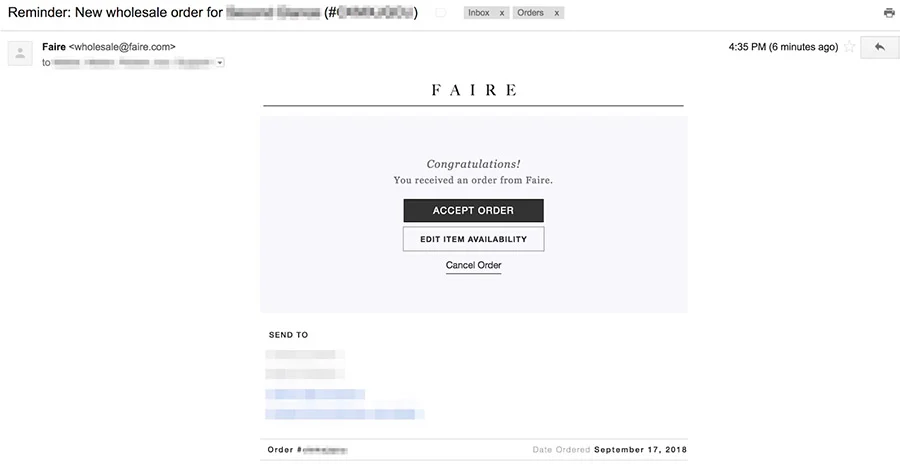
Once you have accepted the order, you will then want to click “View Order” to see the order’s fulfillment page and then select your expected ship date for the package. This will automatically notify the retailer that their order is being processed.

If you’d rather streamline things, Faire offers an auto-accept feature. You can choose to automatically accept all new orders or just reorders from existing retailers. This helps speed up fulfillment and ensures buyers get quick confirmation. Just make sure your lead times are set correctly, since those dates become your expected ship dates.
You also have the flexibility to edit orders before shipping. This includes updating the retailer’s shipping address, changing ship dates, adjusting quantities, or adding and removing products. You can even apply promotions or free shipping before the order is fulfilled. Once tracking information is added, edits are locked in — so double-check everything first.
From there, you simply acquire a shipping label and ship the order via your preferred fulfillment method. You will receive funds once the order is delivered to the customer.
Faire shipping options
Faire lets you ship on your own or have them handle the shipping for your orders.
- Ship with Faire: Faire gives you discounted carrier rates, prints labels, and adds the cost to the retailer’s invoice. Insurance (usually up to $100 per package) is included, and international orders come with auto-generated customs paperwork. This is the easiest option for most sellers.
- Ship on Your Own: Use your own carrier and enter the cost and tracking info in Faire. You’ll be reimbursed up to an approved amount. This option works better if you already have shipping contracts or need to handle special products.
You can also customize the following shipping settings:
- Set flat-rate shipping or offer free shipping minimums to encourage larger orders.
- Add a small packing and handling fee (up to $15) if you need to cover materials or 3PL costs.
- Save shipping origins and box dimensions to get accurate rates and speed up fulfillment.
Creating Faire shipping labels
When you input your shipping estimate, Faire will take you to the fulfillment page where you can create a shipping label. Here, you will:
- Confirm or enter your Ship From Address.
- Choose Ship with Faire or Ship on your own.
- Fill out the appropriate form
- Select Confirm
- Print out the shipping label and packing slip to include in the box
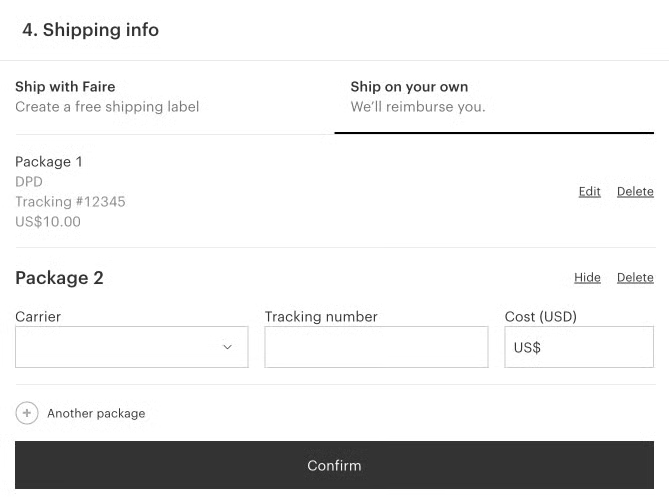
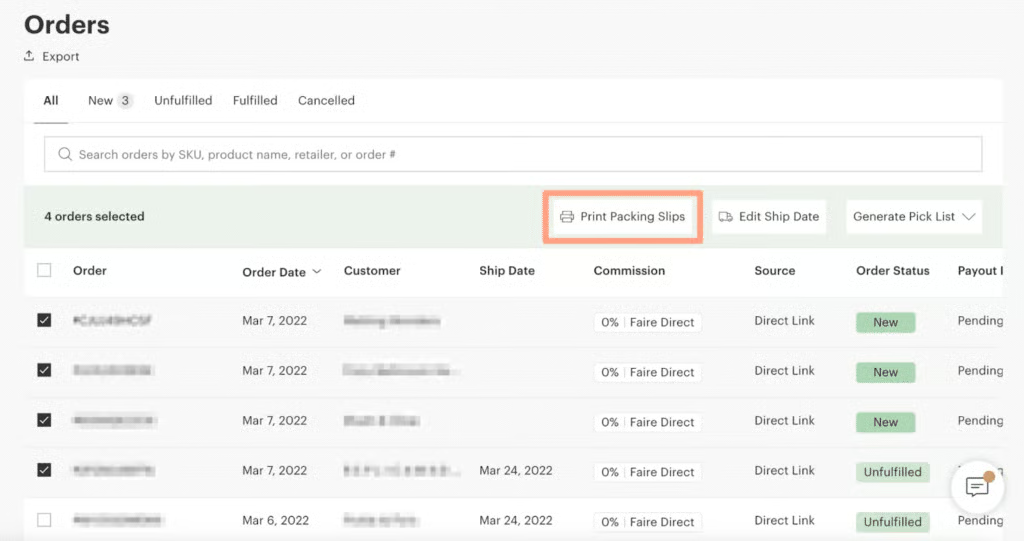
You can also print multiple packing slips and the process is simple:
- Go to your Orders page and select the orders you want.
- Click Print Packing Slips — they’ll open in a new tab.
- Choose Print or Save as PDF.
If you save them as a PDF, all the slips will be combined into one file, with each packing slip on its own page.
Managing returns and cancellations
Managing cancellations and returns is part of selling on Faire, and knowing the rules upfront helps protect your business and make your customers happy.
Canceling an order as a seller
- Go to your Orders tab, select the order, and hit Cancel.
- Choose the reason, add a short note (at least 30 characters), and confirm.
- You can also restock items back into your inventory when canceling.
- Both you and the retailer will get an automated cancellation email.
- Important: cancellations are permanent and can’t be undone.
Remember that frequent cancellations can affect your shop metrics, so only cancel when necessary. If you cancel by mistake, you may need to rewrite the order using Faire’s invoicing tool.
Retailer (buyer) cancellations
Retailers can cancel within the first 24 hours of placing an order. After that, they must submit a request, which you can accept or decline. If you don’t respond within 2 days, the request is automatically declined.
Returns on Faire
Retailers get free returns on their first order with your brand. Returns must be submitted within 60 days and can cover full or partial cases. Retailers also can’t return products directly to you; they must go through Faire. Faire manages the return process, and your payout isn’t impacted. Approved items may be sent to Faire’s warehouse, inspected, and resold at a discount to other retailers. However, these orders can’t be returned:
- Reorders, seasonal or custom items, testers, face masks, merchandising displays, or products over $500 are not eligible.
- Damaged or incorrect items also can’t be returned through Faire’s process. Retailers must ensure returned goods are in resalable condition.
Faire fees and commissions explained
One of the first things to understand when learning how to sell on Faire is how the fees work. It is completely free to create an account to start selling on Faire. Every user is allotted the same tools and opportunities. While your account is free, Faire charges both commission and payment processing fees that are higher than those you might find with larger B2B sites.
Marketplace commissions and fees
- 15% commission + $10 first-time fee: When a retailer discovers you through the Faire marketplace and places their first order, Faire takes 15% plus a $10 flat fee.
- 15% on reorders: If that same retailer comes back, you’ll only pay the 15% commission — no $10 fee.
- What commissions cover: These fees help cover marketplace tools like order management, retailer verification, free returns on first orders, and marketing programs that bring new retailers to your shop.
Faire Direct (0% commission)
Faire Direct is your personalized link to your Faire storefront. When you share it with retailers — whether through email, your website, or social media — any orders they place through that link are commission-free. That means you keep 100% of your wholesale payout.
The big advantage is that you can invite existing wholesale customers to order on Faire without losing margin to commissions. Retailers still get Faire’s benefits like Net 60 terms, free returns on first orders, and consolidated ordering, while you avoid the fees.
Example payout calculation
Let’s say your product retails for $100:
- Wholesale price on Faire: $50
- First-time order: ($50 – 15% commission of $7.50 – $10 fee) = $32.50 payout
- Reorder: ($50 – 15% commission of $7.50) = $42.50 payout
- Faire Direct: full $50 (minus payment processing fees only)
Payment processing fees and payout options
On top of commission, you’ll pay a small processing fee that depends on how quickly you want to get paid:
- Next day payout: 3.5% + $0.30 (Payout occurs the day after an order ships)
- 30-day payout: 2.4% + $0.30 (Payout occurs 30 days after an order ships)
- 60-day payout: 1.9% + $0.30 (Payout occurs 60 days after an order ships)
You choose your payout speed inside your account settings, and you can change it at any time.
How payouts are calculated
Faire uses the formula below:
You can see a full breakdown for every order inside your account under “Payout Summary.”
How tariffs affect selling on Faire
If you sell internationally on Faire, recent US tariff changes could impact how your products are received by retailers. A tariff is simply a duty or tax charged when goods cross borders, usually calculated as a percentage of the shipment’s value. Importers — your retailers — are the ones responsible for paying these fees, not you. Still, higher tariffs can influence how often US buyers place orders with brands outside the country.
In 2025, the US introduced a 10% baseline tariff on imports, with new reciprocal tariffs replacing it for certain countries as of August 7. Canada now faces a 35% tariff on most goods unless they qualify under USMCA rules. Even more important: starting August 29, 2025, the de minimis exemption will be removed. That means retailers can no longer import shipments under $800 duty-free — all international orders will be subject to duties and formal customs processing.
During the transition, shipments through the international postal system may be charged a flat-rate duty ($80-$200 per package), but after six months, all orders will default to percentage-based tariffs.
For you as a seller, this means:
- Retailers may place fewer US orders if tariffs raise their costs.
- If you source materials or manufacture outside the US, your own costs may rise.
- Keeping your Made in and shipping origin info accurate on Faire is crucial, since duties are calculated based on that data.
Tariffs don’t change how you list or sell products on Faire, but they do affect buyer behavior. Some sellers are choosing to adjust pricing, negotiate with suppliers, or source locally to offset the impact. If your products ship internationally, it’s smart to stay flexible and keep your brand page updated so retailers always know what to expect. I encourage you to monitor updates through Faire’s page.
Faire seller tools to grow your wholesale business
Faire offers a variety of seller tools that come with every Faire account. These include:
- Faire Direct link: A personalized link to your Faire storefront that you can share with customers. If they buy directly through your direct link, you also will have 0% commission fees.
- Performance analytics: See how your store is performing on the analytics page of your Faire account with metrics for overall store performance, total sales, shop traffic, customer service, and sell-through & returns.
- Integrations: You can integrate your Faire account with a variety of partners in eCommerce, enterprise resource planning (ERP), inventory management, point of sale (POS), and accounting solutions.
- Faire Protection: This is an optional feature that Faire brands can offer retailers if they want to create exclusivity around their products, marking them as a Faire Protected brand. With Faire Protection, the first retailer to place an order with the brand will have 90 days of exclusivity within their zip code, excluding other stores in the area from buying the same products they purchased. Note, however, that only brick-and-mortar retailers can get Faire protection, not online or pop-up brands.
- Preordering: This tool allows you to set products that are still in production or have yet to arrive as “pre-order” items, indicating that retailers can buy the products now, but they will not ship until a later date.
- Custom promo codes: You can create custom shop promo codes that you can share with your customers to use on orders from your Faire store. Note that promo codes can only be in a percent-off format and they only last for up to 14 days.
- Faire Markets: Faire Markets are Faire’s bi-annual online trade shows where brands can offer market discounts and get featured. The best part is that Faire will match your discount up to 5% to help you reach and convert more customers.
- Marketing tools: Create email marketing campaigns, customize your storefront to fit your brand image, get Faire marketplace SEO guidance, get featured on the marketplace homepage with a simple application, Embed the Faire Direct widget into your website, and Add your Faire Direct link to your email signature.
- Product tags: Add product tags to your products for their key features and categorical attributes to make them easier to find and to give them a better chance of being suggested and featured by Faire.
- Top shops: Faire awards its top brands a “Top Shop” badge. Every brand is eligible for the award, you simply have to meet the criteria. See where you stand directly on your account on the Top Shop page.
Tips for long-term success on Faire
Selling on Faire isn’t just about setting up your storefront, it’s about building momentum that lasts. Once you’ve launched, the right habits will keep retailers coming back and help you scale profitably.
Build strong retailer relationships
Your biggest wins on Faire come from repeat buyers. Stay in touch with retailers by using Faire Messenger, respond quickly to questions, and keep communication professional but approachable. A retailer who trusts you will reorder and those reorders are where margins improve since there’s no extra $10 first-time fee.
Watch your profit margins
It’s easy to underestimate fees and shipping costs if you’re new to wholesale. Always calculate how Faire’s 15% commission, payment processing fees, and wholesale discounts impact your bottom line. Set minimum order amounts or case pack rules so every order is worth fulfilling.
Avoid common mistakes
Many new sellers hurt their performance by rushing setup or ignoring policy details. Common pitfalls include:
- Forgetting to update ship dates or leaving orders unaccepted (leading to cancellations).
- Listing incomplete product details or weak images.
- Ignoring tariff and country-of-origin requirements, which can cause customs delays.
Double-check your store setup, policies, and shipping info before going live to prevent unnecessary issues.
Market and promote your shop
Marketing is what separates passive sellers from top performers on Faire. Use every promotion tool Faire offers to keep your brand visible:
- Faire Markets: Join the bi-annual online trade shows where Faire matches your discounts up to 5%. These events drive massive traffic.
- Seasonal promos & codes: Offer custom discount codes or free shipping promos to keep retailers engaged during slower periods.
- Faire Direct promotion: Share your personalized link on your website, social media, and email signature to drive commission-free orders.
- SEO and product tags: Add descriptive tags to your listings to increase your chances of showing up in retailer searches.
Expand beyond Faire
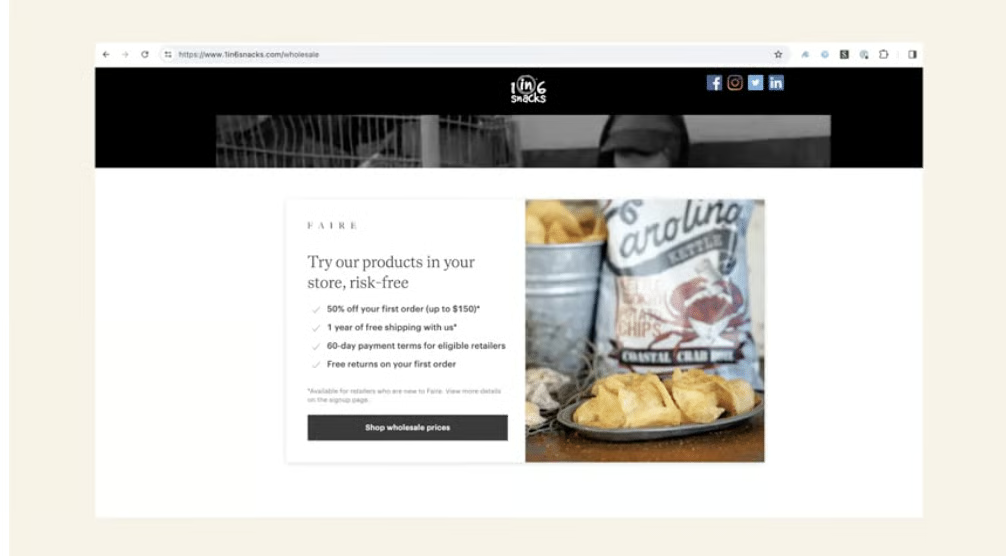
Faire is powerful, but it shouldn’t be your only sales channel. Add your Faire Direct widget to your website, share your link on social media, and attend trade shows when possible. The stronger your brand presence is outside Faire, the more retailers you’ll funnel back into Faire Direct where you keep 100% of the margin. Faire reports that adding the Faire Direct widget on your website results in a 49% average sales boost.
Who should sell on Faire?
Not every business is the right fit for Faire, but it can be a great opportunity if you’re:
- An independent brand looking to reach a wide network of retailers without the expense of trade shows.
- A maker or artisan who wants to scale beyond local boutiques and access international wholesale buyers.
- A growing ecommerce brand with wholesale-ready products (case packs, order minimums, consistent supply).
- A US or Canadian brand interested in leveraging Faire’s free returns, Net 60 terms, and shipping support to reduce friction for new retailers.
If you sell highly seasonal, custom, or perishable items, Faire may be more challenging since those products often fall outside of its return policies or retailer buying habits.
Pros and cons of selling on Faire
Selling on Faire can be a smart move for wholesalers, but it isn’t without trade-offs. Here’s a quick breakdown of what to expect:
| Pros | Cons |
|---|---|
| Large buyer network: Faire connects you with thousands of independent retailers you might never reach on your own. | Commission fees eat into margins: Between wholesale discounts and Faire’s 15% commission (plus $10 on first orders), your profit per unit is slimmer than direct wholesale. |
| Built-in perks for retailers: Things like 60-day payment terms and free returns on first orders make it easier for stores to take a chance on your products. | Competitive marketplace: You’re listed alongside many other brands, which means standing out requires effort with pricing, promotions, and presentation. |
| Seller tools included: From analytics to integrations to Faire Direct, you get access to tools that can streamline operations and boost visibility. | Control trade-offs: Retailer perks like free returns are funded by Faire, but you don’t have a say in how those policies apply to your products. |
| Low barrier to entry: No monthly subscription fee, just commission and processing fees when you make a sale. | Limited customization: Some things, like shipping origin display or editing orders after fulfillment, are set by Faire’s system. |
Frequently asked questions about selling on Faire (FAQs)
How do I apply to become a Faire vendor?
To sell on Faire, you’ll need to complete Faire’s vendor application with details about your brand, products, and business. Faire reviews each application to ensure your business fits their wholesale marketplace.
What are the vendor requirements on Faire?
Faire looks for independent brands with high-quality products, strong wholesale readiness (such as case packs and order minimums), and the ability to fulfill orders reliably.
How much does it cost to sell on Faire?
It’s free to create an account, but Faire charges a 15% commission on marketplace orders, plus a one-time $10 fee for new customers. Payment processing fees range from 1.9% to 3.5% depending on your payout speed. Orders placed through Faire Direct have 0% commission.
Can I integrate Faire with Shopify?
Yes, Faire integrates directly with Shopify through the Faire: Sell Wholesale app. This allows you to sync products, inventory, and orders between both platforms.
Who pays for shipping on Faire?
Brands are generally responsible for fulfilling and covering shipping, unless you’re participating in programs like Insider where Faire may cover shipping for some retailers.
Do retailers get free returns?
Yes, Faire offers free returns on retailers’ first orders, which helps reduce their risk and can boost your chances of landing repeat buyers.
Bottom line
Selling on Faire gives you instant access to thousands of retailers without the cost of trade shows or cold outreach. The platform handles payments, returns, and customer verification, letting you focus on growing your brand. Keep in mind the commission fees, payment processing, and new tariff rules if you ship internationally — your margins depend on managing these costs wisely.
For many independent brands, the exposure, tools, and streamlined wholesale process make Faire one of the best ways to scale quickly. It’s easily my top pick in our list of best wholesale suppliers.
If you’re ready to expand into wholesale and connect with retailers worldwide, start your application today and begin selling on Faire.
