








Multiplier is a global employment solution that makes it easy for businesses to manage a global workforce. It offers employer of record (EOR) services for hiring and paying employees and contractors in over 150 countries as well as global payroll tools for those that only need to pay international employees. Compliance support and access to competitive benefits plans are also available. In our evaluation of the best international payroll services, Multiplier earned an overall rating of 4.29 out of 5.
Monthly fees for its EOR services start at $400 per employee. If you only need global payroll tools, Multiplier will charge you $20 per employee monthly.
Multiplier Overview
| Supported Business Types | Businesses needing global hiring, onboarding, payroll, and contractor management solutions |
|---|---|
| Free Trial | None, but you can request a free demo |
| Pricing |
|
| Setup Fees | None |
| Standout Features |
|
| Ease of Use | Its platform is generally easy to learn and use, but having basic knowledge of paying international employees and global contractors will be helpful. |
| Customer Support |
|
Multiplier Is Best For
- Businesses looking for affordable EOR services: Multiplier’s EOR rates are less expensive than popular providers, such as OysterHR, Deel, Rippling, and Remote. The starter monthly fees of these companies’ EOR solutions range from $599 to $650 per employee, whereas Multiplier is only $400 per employee.
- Flexible international hiring and payroll services: Multiplier can help you handle the day-to-day tasks of managing a global workforce. It has legal entities in 150+ countries, so you don’t have to set up your own in order to hire and pay employees. If you already have a local business entity, you can still use Multiplier’s platform to streamline employee onboarding and payroll processes.
- Companies that need solid global compliance support: With Multiplier, you get 24/5 support from local HR and legal experts. It even offers visa and employee relocation assistance to help your staff move to a different country on a short- or long-term work assignment.
Multiplier Is Not Ideal For
- Businesses that want flexible options to pay international workers: Multiplier requires that you follow a set deadline (every 10th of the month) for running payroll. Providers, like Deel, have more flexible options. And, while Multiplier may offer multicurrency payments and can pay freelancers via cryptocurrency, its payout options aren’t as robust as Deel’s. Aside from bank transfers and cryptocurrency payouts, Deel can pay workers via digital payment processors and a Deel contractor card. To know more, read our Deel review.
- Companies needing robust IT tools to manage company devices: While Multiplier handles the logistics of sending company-assigned laptops to your global team, it lacks the software access tool that Rippling offers. Aside from helping deliver the computer units you selected, Rippling allows you to remotely activate and deactivate a worker’s access to business apps. Check out our Rippling review to see if it fits your company’s HR and IT requirements.
- Global companies that only hire and pay contractors: Multiplier only charges a monthly fee of $40 per worker to companies that onboard and pay contractors or freelancers.
Need more info on EORs? Check out our guide on what an EOR is and how it works.
How Multiplier Compares With Top Alternatives
| Best For | Free Plan | Starter Monthly Fees | Our Reviews | |
|---|---|---|---|---|
 | Businesses looking for budget-friendly EOR services | None, but offers a free demo | $400 per employee for EOR$40 per worker for contractor payroll | |
| Visit Multiplier | ||||
 | Companies needing low-cost international contractor payroll services | Call for a quote | Call for a quote | Read our Papaya Global Review |
| Visit Papaya Global | ||||
 | Tech-heavy businesses that want global HR, payroll, and IT solutions | None, but new users get the first month free* | $599 per employee for EOR**$20 per worker for contractor payroll** | Read our Rippling Review |
| Visit Rippling | ||||
 | Businesses that need flexible payment options | Free HR platform (for up to 200 workers) | $599 per employee for EOR$49 per worker for contractor payroll | Read our Deel Review |
| Visit Deel | ||||
| *This may end at any time. Visit the provider’s website for the latest promo on offer.**Pricing is from a quote we received. | ||||
Looking for something different? If you only want online tools to pay US-based employees, check out our list of the best payroll services and top payroll software. If you need help deciding which provider to get, read our guide to finding the right payroll solution.
Multiplier Pricing
5.00 / 5
Multiplier offers multiple plans that cover various hiring and payroll services, including a separate package for contractors. These features, along with its transparent pricing and zero setup fees, contributed to its perfect marks in this criterion.
Multiplier pricing plans consist of two base tiers (Hire Employees and Pay Freelancers) and two add-on packages (Run Global Payroll and Provide Employee Insurance). The two base plans cover its EOR services for employees and contract workers, while the add-on options are for those that need standalone pay processing and benefits administration services.
Fees are charged on a month-to-month basis, so you don’t have to worry about signing up for an annual subscription. All Multiplier pricing packages also come with reporting tools and access to professionals who can provide expert HR and legal advice. To know more about each plan’s features and pricing details, click the tabs below:
- Hire Employees: Starts at $400 per worker monthly
- Multicountry and multicurrency payroll
- Onboarding tools with locally compliant work contracts
- ESOP, benefits, and insurance administration
- Expense reimbursement, time sheet, and leave management
- Intellectual property (IP) protection
- Compliance support with visa and work permit assistance
- Computer equipment deployment services
- Pay Freelancers: $40 per worker monthly
- Multicountry and multicurrency payroll + crypto payouts
- Onboarding tools with locally compliant work contracts
- Benefits and insurance administration (if applicable)
- Compliance support
- Run Global Payroll: Starts at $20 per worker monthly; ideal for those with local business entities that only need pay processing and benefits solutions
- Multicountry and multicurrency payroll
- ESOP and benefits administration
- Expense reimbursement management
- Compliance support
- Provide Employee Insurance: Starts at $20 per worker monthly; ideal for those with local business entities that only want benefits administration services
- Competitive benefits plans and coverages
- Uniform localized benefits across countries
- Benefits administration
- Zero co-payments for in-patient procedures*
- Cashless health insurance claims (if treatment is done at a network hospital)*
- Dependent coverage**
*Note that coverage, features, and pricing may vary depending on the location.
**Dependent coverage costs extra. The scope of eligibility also varies from country to country.
Multiplier Payroll Features
4.00 / 5
Payroll is one of the criteria where Multiplier received a high rating. It supports multicountry and multicurrency payroll and lets you send payments via international wire transfer. Wages, deductions, and taxes are automatically calculated, and in-country payroll experts are available to help ensure you remain compliant with local regulations.
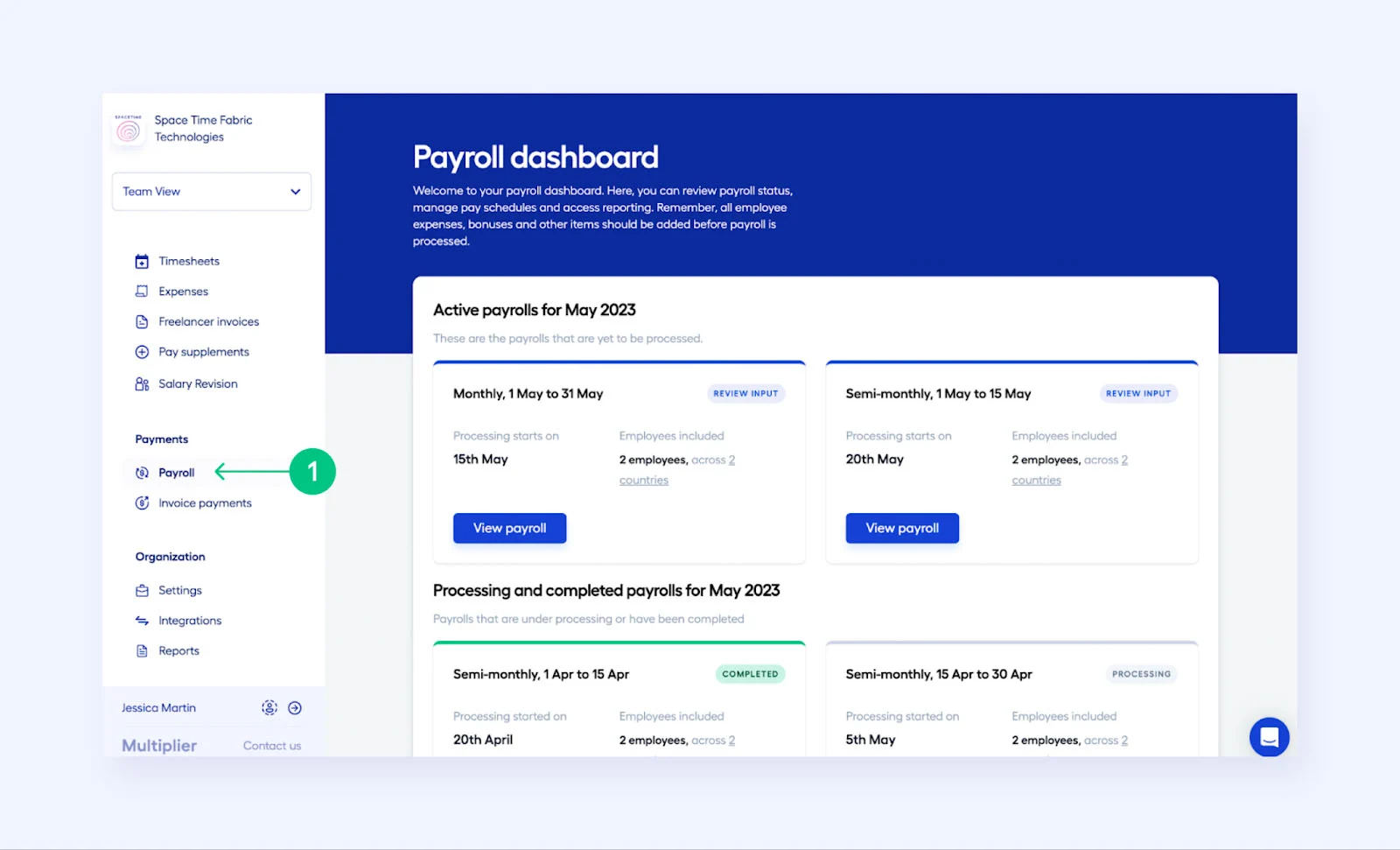
This category is also where we rate an international payroll service provider’s time tracking functionalities, giving additional scores to those with built-in clock-in/out tools that digitally send the actual hours worked to the payroll module for pay processing. While Multiplier may grant access to online timesheets, employees have to complete these manually. This cost the provider a few points since the time tracking process isn’t seamless and can be prone to errors.
Despite the limitations of its time sheets, it has a robust set of pay processing solutions. Here are some of the Multiplier features for paying workers accurately and compliantly.
Full-service Payroll
Multiplier can handle pay runs for international employees and contractors or freelancers. It pays workers in more than 120 currencies, processes expense reimbursements, and supports multiple payroll schedules, such as monthly, semimonthly, and biweekly. With legal entities in countries where its EOR service is available, you’re assured that its team of local payroll professionals can expertly manage pay processing, in-country payroll compliance, and tax filings for you.
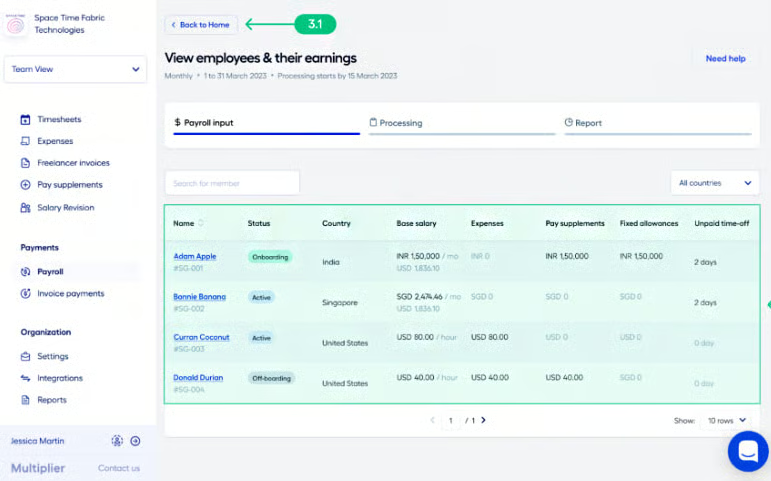
However, its payroll cut-off date is fixed at every 10th of each month. This means that all salary changes and additional payments (e.g., bonuses, allowances, and expense reimbursements) inputted into its system before the cut-off date will be processed for payroll in the same month. Pay-related revisions added to its system after the 10th of the month will be processed in the subsequent month.
Note that the same payroll cut-off date applies to employees onboarded into Multiplier. New hires added into the system before the 10th of the month will receive their first pay in the same month, while those who didn’t make the cut-off date will get their salaries in the next month.
Cryptocurrency Payments
Salary payouts are made through international bank transfers, but if you prefer to pay via cryptocurrency, Multiplier supports payments through Bitcoin and Litecoin. However, this is only for freelancers or contract workers hired through its platform.
Contractor Invoices
Multiplier makes paying contractors and sending invoices easy for you and your workers. Its invoicing solution lets users create, edit, send, approve, and revoke invoices. The process starts with your workers creating invoices for projects they completed and then submitting the form directly through the Multiplier platform. You can approve the form or reject the request if you find discrepancies in the invoice.
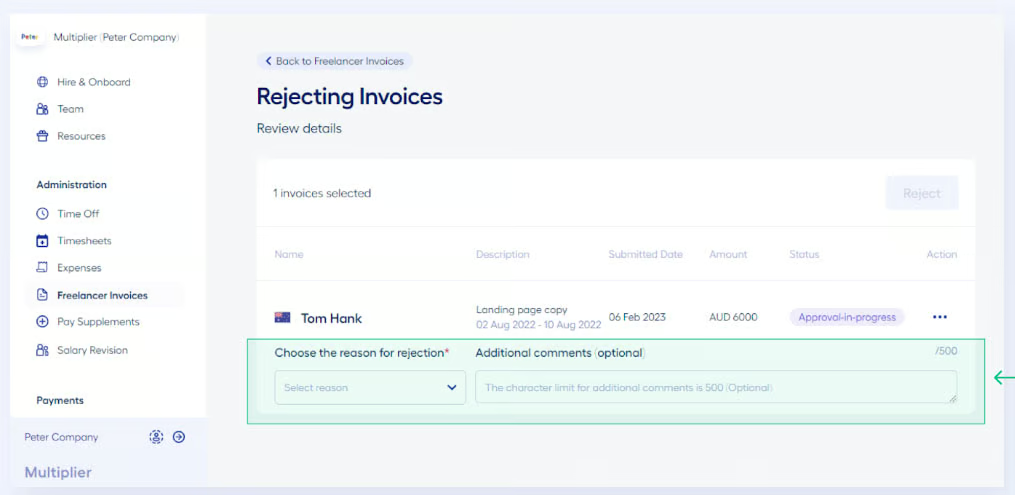
Approved invoices will appear in your Invoice Payments dashboard. You can select all the invoices or use a filter to choose specific transactions for payment processing. Multiplier accepts client invoice payments via bank transfer, cryptocurrency, and credit card. Note that Multiplier will only pay your contractors after it has confirmed receipt of your payment.
Attendance Tracking
Multiplier can help you track leave entitlements and paid/unpaid time off. It also has a time sheet tool that your employees can use to capture their actual work hours. These online time sheets can be accessed through the “Administration” section on Multiplier’s left sidebar.
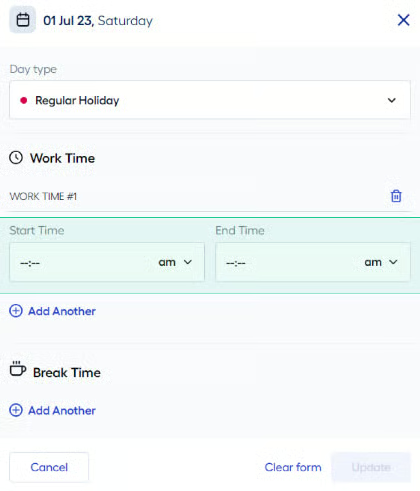
Employees can submit their completed time sheets for a pay period directly through the platform. Managers, on the other hand, can approve the transactions or request the employee to make some adjustments, such as adding missing regular hours or removing invalid overtime hours.
The system automatically calculates all overtime and night shift differential hours based on the inputted start and end times. Multiplier also auto-inputs the regular hours of employees with monthly pay rates—they only need to submit time sheets for overtime claims. This isn’t the case for hourly-paid workers. They have to accomplish time sheets and send the forms for approval in order to receive pay for each pay period.
Multiplier HR Features
5.00 / 5
Multiplier’s HR functionalities are robust enough to handle global hiring, onboarding, and benefits management, which is one of the reasons it received perfect marks in this criterion. Plus, it provides solid compliance support and EOR services in over 150 countries.

Let’s look at some of its HR features to help you gauge whether its services fit your business’ global hiring and onboarding needs.
Recruiting
As an EOR, Multiplier will take responsibility for hiring international workers for your business. It can recruit employees in over 150 countries. Plus, you can use its platform to generate and send locally compliant employment contracts. Online templates are available, and you can request to add company-specific clauses to the contract. Multiplier’s legal team will review your proposed changes within three to five business days, and you’ll receive a notification when the new contract has been uploaded into the system.
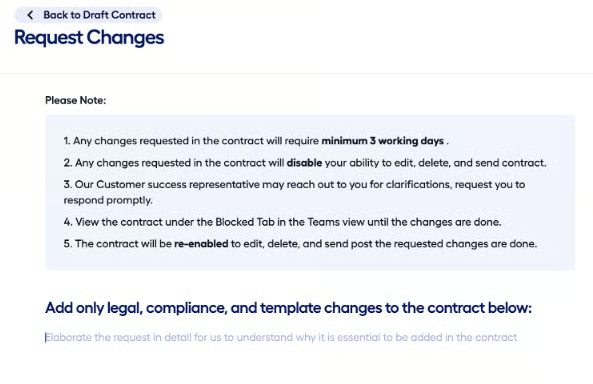
You can also upload your own employment contracts into the system. However, Multiplier only allows it for employees hired under your own business entity but paid through its platform.
If you have existing workers in any of the 150+ countries where its EOR services are available, you can opt to transfer them to Multiplier. The provider will only need to gather your employees’ basic information and prepare their contracts. After your workers have signed the agreement, Multiplier can start managing their payroll and other compliance items (like taxes) for you.
Onboarding & Offboarding
Multiplier’s onboarding process is straightforward and only has a few steps. After you input the worker’s basic onboarding details (such as full name, position, pay rate, and benefits), you can invite the new hire to complete their onboarding requirements in its system.
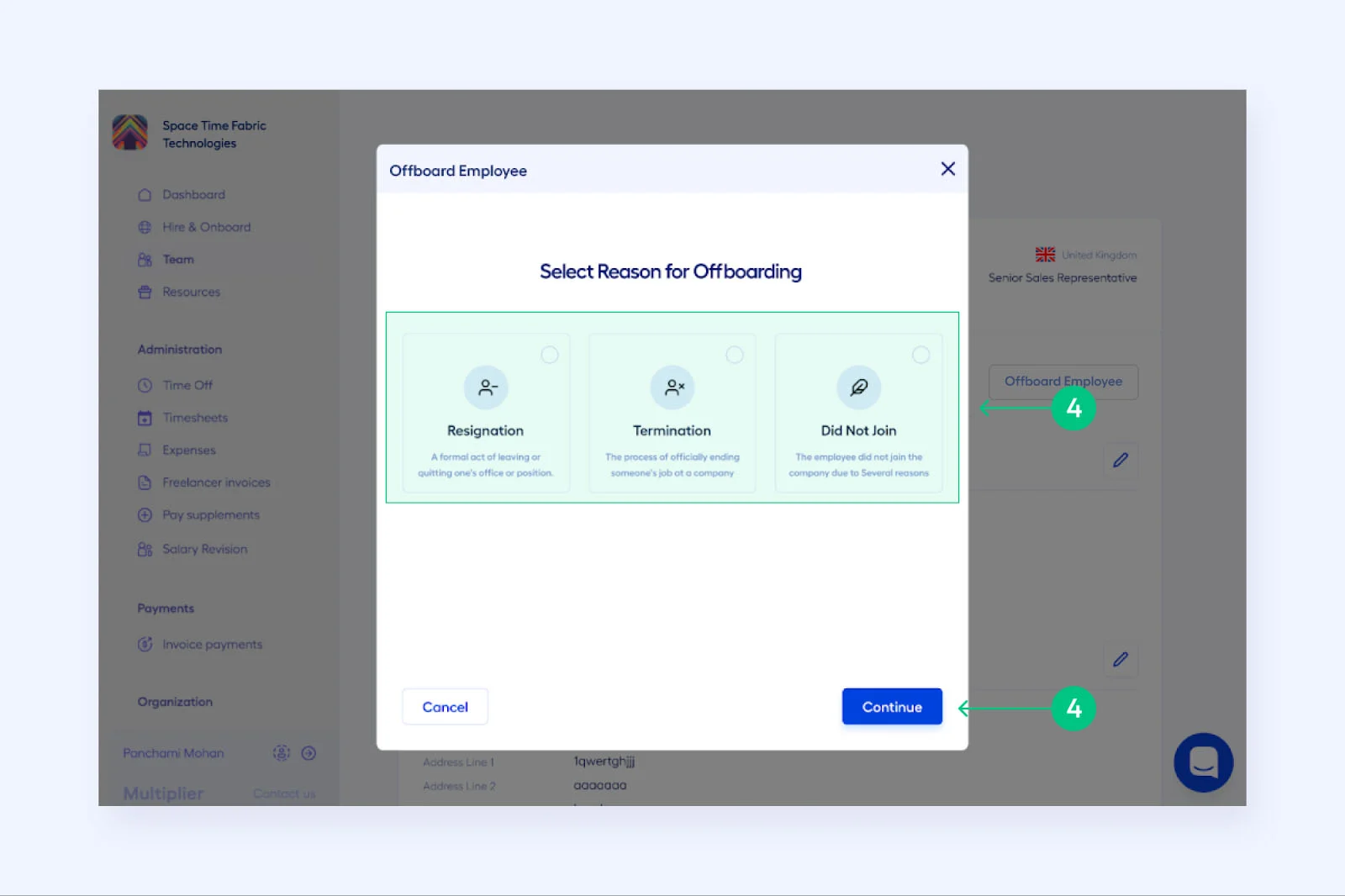
You can also offboard employees and freelancers/contractors directly through the platform. To offboard a worker, select the “Team” option on the left sidebar, navigate to the “Active” tab, select the employee to be offboarded, and click the “Offboard Employee” button.
The system has three pre-built offboarding reasons: resignation, termination, and did not join (if an employee has signed the contract and has been activated on Multiplier but did not join the company). Note that Multiplier will need seven days to initiate the resignation, termination, or contract cancellation process, but this can change depending on the offboarding reason, pay cycle, and the employee’s offboarding date.
Employee Benefits
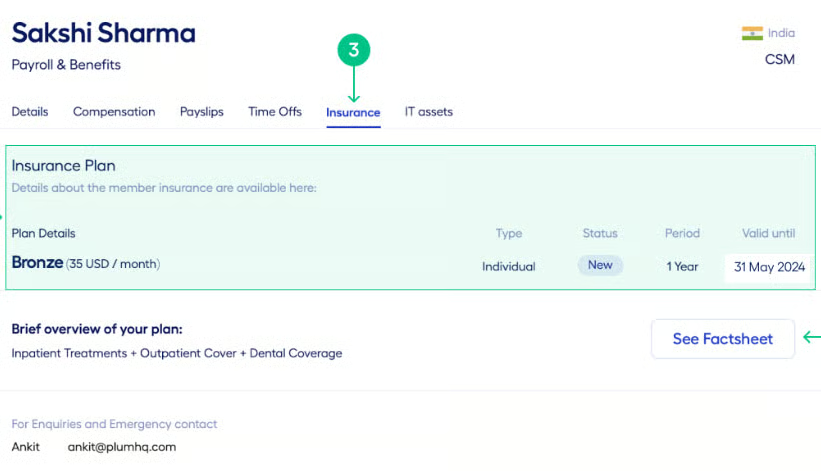
With Multiplier, you can give workers access to competitive benefits plans and employee stock options (if applicable). It even lets you compare, select, and customize insurance options so that your distributed teams receive uniform benefits across the globe. You also don’t have to worry about compliance. It will ensure that the benefits you offer comply with local regulations and tax laws.
Laptop Issuance
Included in Multiplier’s Hire Employees plan is the option for you to select laptop units and other IT-related accessories (such as headphones) for employees. The provider also offers a logistics service to ensure your company-assigned devices reach your distributed teams. However, this solution is only available in 50+ countries.
Self-service Tools
Multiplier provides access to an employee platform where your workers can view payslips, access forms, track benefits and time off, and manage expense reimbursement requests. Employees with manager access can also view and approve requests online.
Multiplier Reporting
3.75 / 5
Multiplier provides access to a wide range of payroll, benefits, and employee-related reports. However, the customization options are a bit limited—which is why it didn’t get a perfect score in this criterion.
While you can ask for changes to its contract templates, it isn’t a quick process since it has to go through Multiplier’s legal team for review. This may be great for compliance, but you have to wait up to five business days before you can get a response from Multiplier about the contract changes you want.
Multiplier Ease of Use
4.00 / 5
- User-friendly interface
- Online onboarding
- Efficient automation tools
- 24/5 HR and legal support
- 24/7 product support (via chat)
- Help center and knowledgebase
- Job descriptions with salary details
- Work permit and hiring guides
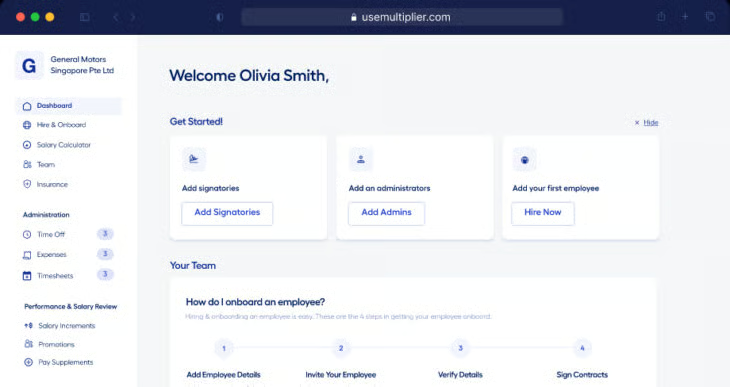
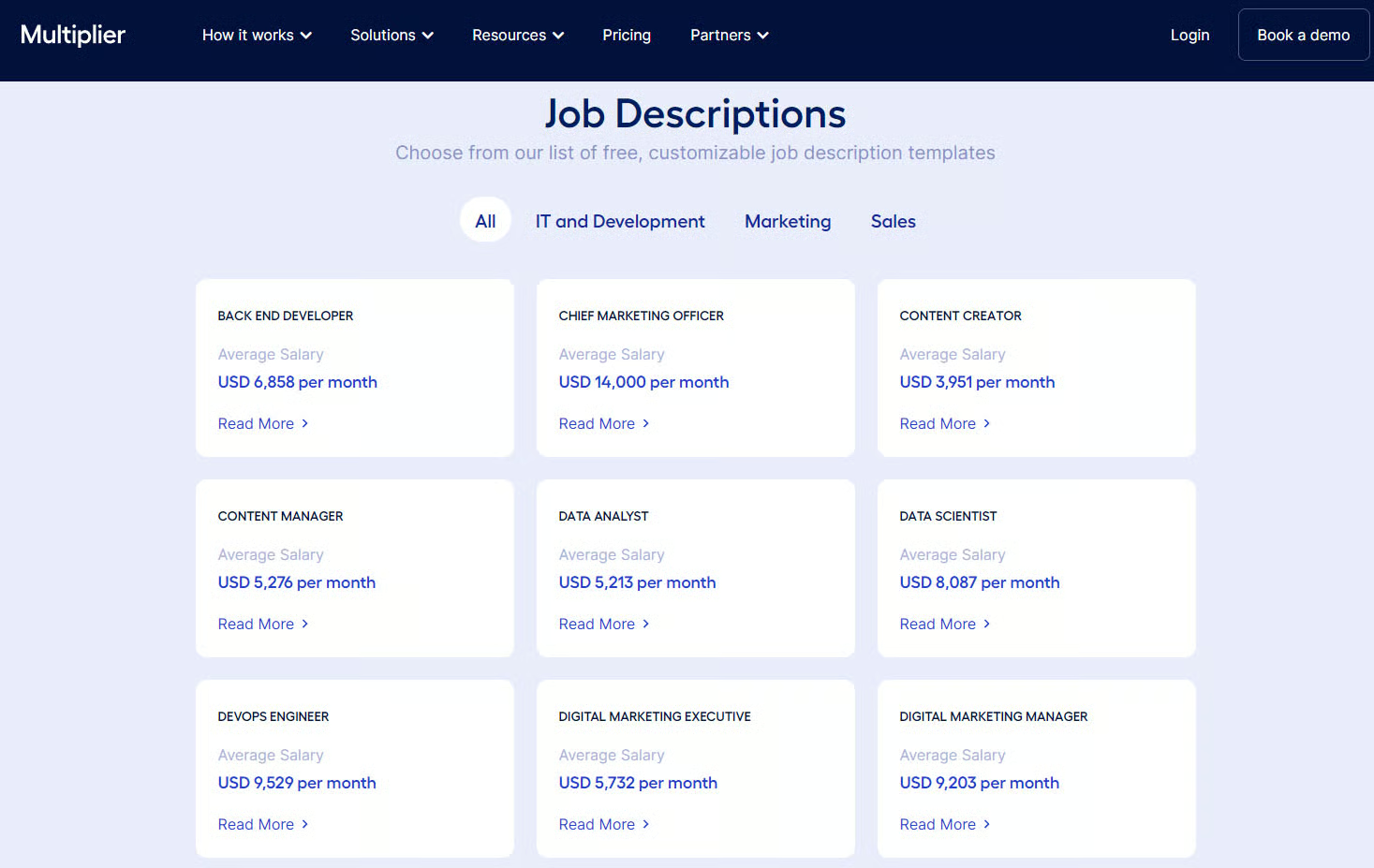
This provider earned a high score here because its interface is generally simple to set up, learn, and use. Multiplier features are easily accessible through the left sidebar, and its help center has a good selection of FAQs, how-to articles, and video tutorials. Hiring and work permit guides are available online, including job description templates you can download and customize. It even contains information about the average salary per position.
It automates most of the processes in managing a global workforce and payroll, but some tasks (like time tracking) require manual data inputs. While it offers 24/7 product assistance, you can only contact its support team via chat or email. Plus, it doesn’t assign dedicated customer success managers to its clients. These factors prevented Multiplier from getting full marks in this criterion.
Multiplier Expert Score
4.38 / 5
For an EOR and global payroll platform, Multiplier is user-friendly and has the basic functionalities businesses need to hire and pay international workers. Its pricing packages are also reasonably priced, with an EOR service that’s slightly cheaper than similar providers (like Deel, Rippling, and OysterHR).
However, it lost several points mainly because of its time tracking solution. It isn’t as full-featured as Rippling’s employee attendance solution, which captures clock-in and outs for pay processing—no manual data inputs needed.
Popularity: What Users Think About Multiplier
2.50 / 5
Multiplier’s low score in this criterion is due to its limited number of reviews on third-party review sites, such as G2 and Capterra. While the average Multiplier rating on these sites is 4.65 out of 5, its average number of reviews didn’t reach 1,000 (as of this writing).
However, many users left positive feedback about its user-friendly platform, efficient onboarding processes, and solid hiring tools. Several reviewers also commended its support team, adding that its representatives are generally responsive and helpful.
On the other hand, some users are unhappy with its invoicing and payment processing solutions. They explained that its invoicing feature can be confusing to navigate through, and its payment service sometimes takes several days to process salary payouts. A few reviewers even wished for Multiplier to add direct deposits to its payment options.
At the time of publication, Multiplier reviews earned the following scores on popular user review sites:
- G2: 4.5 out of 5 based on nearly 400 reviews
- Capterra: 4.7 out of 5 based on more than 40 reviews
How We Evaluated Multiplier
For this Multiplier review, we looked into the key features that can add value to a business looking for international payroll services. We considered pricing, ease of use, and customer support. We also assessed its pros and cons and searched for providers that can be good Multiplier alternatives. We even checked the feedback that actual users posted on popular user review sites.
Click through the tabs below for our full evaluation criteria:
We looked for convenience features like local tax filing and the ability to pay contractors and employees via direct deposits and international wire transfers. Providers rank better if their services are available in more than 100 countries with a team of in-country payroll and HR compliance experts. We also checked whether the providers have locally owned entities in the countries where their services are available.
We highly favored providers that showed straightforward pricing with multiple plan options. In addition to each software’s per-employee pricing, we checked if there were any required setup fees. We also gave more points to providers that offer a separate plan for contractor payments.
The best global payroll service includes essential HR features, such as onboarding, self-service portals, and benefits. We favored companies that offered tools to help with legal compliance issues. We also considered PEO services and benefit and deduction assistance.
We considered providers that offer setup assistance and a dedicated account manager to their clients. We gave more points to those with online platforms that are intuitive and easy to use. We also looked for live phone support, how-to guides, and data export options.
In addition to the number of payroll reports, we considered whether they were customizable or if you could create special reports for your specific needs.
Sometimes, a service can check all the boxes but not be the best fit for a small business. The expert review is our opinion on how well a service meets SMB needs for payroll and HR, including its general value for the dollar.
We took the average review ratings from third-party sites like G2 and Capterra, which are also based on a 5-star scale. Any option with an average of 4-plus stars is ideal. We also favored software with at least 1,000 reviews on any third-party site.
Bottom Line
Finding a reliable partner to handle international payroll and global hiring is vital for companies that are expanding operations in other countries. With Multiplier and its legal entities in more than 150 countries, you get EOR services with solid hiring, payroll, and compliance support. This ensures that you remain compliant with in-country labor laws and tax regulations.
Benefits administration is also one area where Multiplier shines, as it enables you to access competitive and locally compliant benefits. It can even help you grant and manage employee stock options for global employees. Plus, it has fully transparent pricing—you know exactly how much you need to pay for the Multiplier features you want.
Sign up for a Multiplier plan today.
