







Rippling is an all-in-one HR platform that streamlines and automates employee management processes. Its robust features allow you to hire, manage, pay, and train employees. In addition to HR tools, Rippling offers IT solutions for setting up and monitoring computer devices and app access. It’s ideal for small to midsize companies—especially those with plans to expand internationally.
Rippling earned the top spot in our best HRIS software for small businesses with a total score of 4.63 out of 5. Rippling got perfect scores in several categories, including HRIS functionality, popularity, and reporting, and earned scores above 4.5 in every other category, except ease of use. It lost points for ease of use because of its lack of phone support (without the HR Help Desk add-on).
Rippling Overview
Deciding Factors
- Pricing: Starts at $8 per employee monthly and includes Rippling’s core workforce management platform, employee onboarding and offboarding, full-service payroll, time tracking, and software integrations.
- Global reach: Rippling now offers EOR and ASO services for global capabilities.
- Ease of use: Its clean interface makes it quick to navigate through its many features. Plus, you can customize the workflows to help you automate HR, payroll, and IT processes.
- Customer support: Offers live chat and email support, including an online help center with how-to guides. Its HR Help Desk service also lets you call HR professionals to get expert advice, but this is a paid add-on.
When to Use Rippling
Rippling’s core product is HR, but its full-service payroll and tax processing tools are also popular. It offers unlimited pay runs and pays employees through direct deposits or checks. You can also use Rippling to manage candidate sourcing activities, onboarding and offboarding processes, app security and access, and staff information.
It even offers professional employer organization (PEO) services that you can easily turn on and off. These functionalities make Rippling convenient to use for small to midsize businesses, as it provides robust HR and IT features in a single platform without sacrificing efficiency.
Overall, Rippling is best for:
- Small businesses without HR or IT professionals: Rippling provides a suite of HR and IT management features that help businesses onboard and offboard employees, track time off, process payroll, and offer employee benefits.
- Businesses with remote workers or a global workforce: Rippling is on our lists of leading online payroll services and best international payroll software because it can help you track employee work hours and control employee app access from anywhere—provided an internet connection is available.
- Growing businesses that need a flexible system: You can sign up for essential modules (such as payroll, benefits, and time tracking) and then add more (like applicant tracking, learning management, and app management) as you grow your business.
- Employers looking for PEO services they can easily turn on and off: Rippling’s flexible PEO service is one of the reasons why it’s one of our top-recommended PEO companies. Unlike similar providers, in which you have to go through a service cancellation process, Rippling allows you to easily switch off its PEO service directly from your account and start using its HR platform again.
When to Consider Something Else
- Mom-and-pop businesses with limited budgets: While its website indicates that pricing starts at $8 per employee monthly, you have to pay for each module in addition to the Rippling platform. In case you only have a handful of employees and plan to keep it that way, you can probably find more affordable software. Check out our guide on free payroll software for more options.
- Businesses that require live phone support: If you need phone support to get fast answers to questions related to payroll, benefits, and HR, Rippling may not be right for you—unless you’re willing to pay extra for it. We recommend Paychex, ADP, or Gusto, which all offer free live phone support.
Looking for something different? Read our guide to the best payroll software if payroll is your primary need.
Why You Can Trust Fit Small Business
How Rippling Compares with Alternatives
| Best For | Free Plan | Starting Monthly Fees | Our Review | |
|---|---|---|---|---|
 | Small businesses without HR or IT professionals | ✕ | $8 per month | |
| Visit Rippling | ||||
 | Small businesses needing affordable payroll and basic onboarding support | ✕ | $49 per month + $6 per person per month | Gusto Review |
| Visit Gusto | ||||
 | Small businesses needing dedicated support | ✕ | Custom priced | Paychex Flex Review |
| Visit Paychex | ||||
 | Small businesses who need an all-in-one HRIS system | ✕ | Custom priced | Paycor Review |
| Visit Paycor | ||||
Rippling Pricing
4.63 / 5
Rippling’s monthly fees start at $8 per employee. You can purchase Rippling’s HR and IT modules separately, but you have to get its workforce management platform (Rippling Platform) first before you can buy these solutions. For custom pricing and additional add-ons, you must contact Rippling to discuss your business’s HR requirements.
See below to discover what is included in each Rippling plan:
Rippling Platform
Rippling has four subscription levels (Core, Pro, Unlimited, and Enterprise) that offer the following:
- Unified workforce directory
- Global workforce analytics & dashboard
- Onboarding/offboarding automation
- Advanced admin & field privileges
- Compensation bands
- Rippling mobile app
- Workflow studio
- Advanced policy management
- Dynamic permissions & approval management
- Advanced document management
- Compliance 360
- Vacation and leave management
Rippling HCM
- US and global payroll
- Time and attendance
- Benefits administration
- Flex benefits: FSA, HSA, commuter
- ACA & COBRA administration
- Recruiting
- Learning management
- Headcount planning
- Performance management
- Surveys
- HR help desk: HR support
- PEO services
- Administrative services organization (ASO)
- Global employer of record (EoR) services
Rippling IT
- Identity and access management
- Device management
- Inventory management
Rippling Spend
- Corporate cards
- Expense management
- Bill pay
Rippling HR Features
4.75 / 5
Rippling has a suite of HR and IT solutions that small businesses would benefit from. With its online tools streamlining and automating employee management and IT processes, company owners can focus more on growing their business and less on handling day-to-day administrative tasks.
Rippling Platform allows you to manage workflows, policies, analytics, and system permissions. It also unifies your employee information into a single database so you only have one source of data across all of its modules. Learn more about these and other Rippling HR features below.
Workflows & Permissions
Designing workflows, policies, and permissions to automate HR, IT, and payroll processes is easy with its “workflow automator” tool—no coding skills required. Similar to MS Excel formulas, it utilizes IF/THEN and other conditional logic commands, but is structured in a way that makes it straightforward to use.
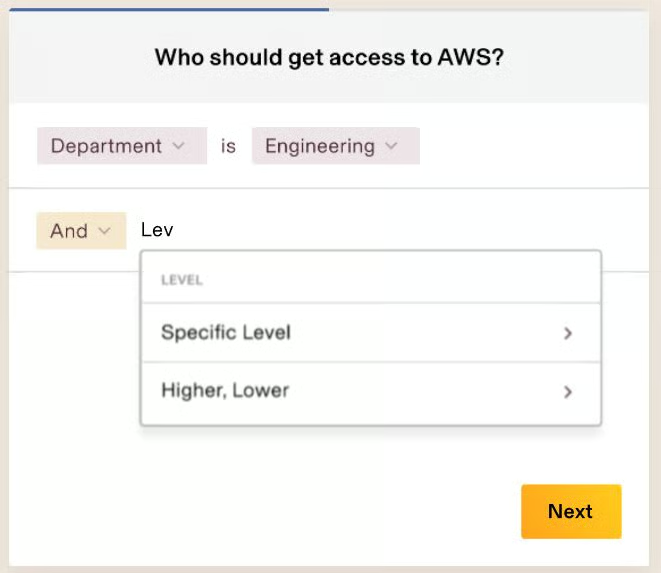
You don’t have to worry about updating your employees’ permission and approval settings whenever their roles change—Rippling will handle this for you. Its system automatically inherits the permissions associated with specific roles and positions, so you don’t have to manually update this every time there are employee movements in your organization.
Custom Triggers & Tasks
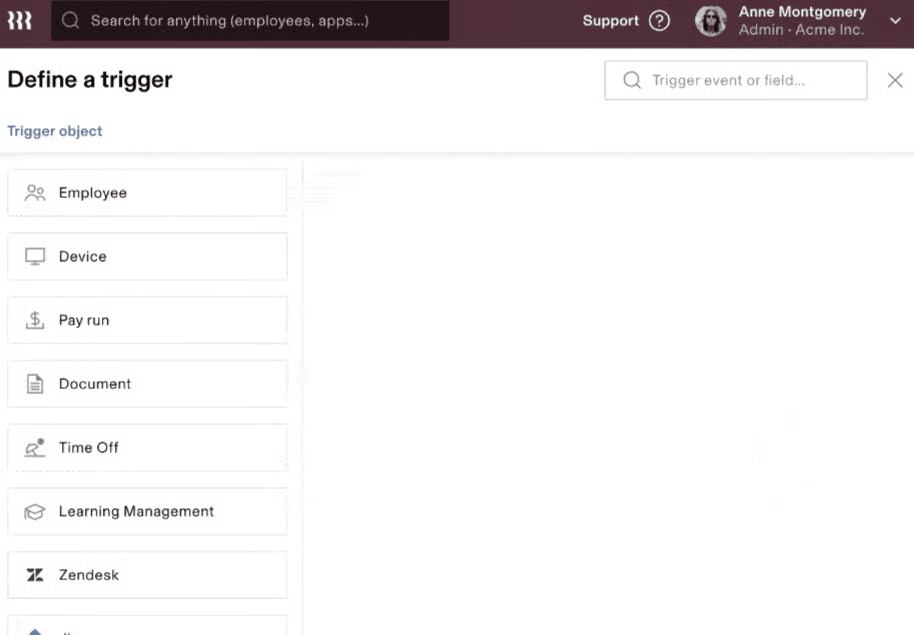
Apart from policies and workflows, Rippling lets you build custom triggers and tasks. You can set up conditional formulas to trigger specific actions, such as sending SMS and email alerts, assigning tasks, and complying with approval requirements. What’s great about this is that it also works across Rippling’s partner networks.
For example, you can create a workflow to detect potential pay inequity when hiring a new employee and have Rippling notify you through Slack (one of the collaboration tools it integrates with). Or, you can set up an alert to inform specific employees via Slack, email, and/or SMS of a high-priority ticket raised on Jira when the person in charge is out on PTO.
‘Recipe’ Templates
If you’re unsure whether or not you can create workflows on your own, Rippling has a library of “recipe” templates you can use. Some of these customizable “recipes” include workflow automations to create Google Calendar events for employee benefits enrollments and mandatory learning sessions. It even has a “recipe” to automate the task of informing your payroll team when a hiring referral bonus is scheduled for pay processing and who it should go to.
Apart from workflows, Rippling’s “recipe” library contains report templates—from payroll registers to hiring pipeline reports and employee attrition summaries. Ready-to-use formula options are also available, such as a formula to compute the percentage of employees who completed learning courses.
Payroll Processing
With Rippling payroll, you don’t need to manually enter data (such as hours worked and benefits deductions) since all of its modules connect seamlessly with each other. You can run unlimited payroll each month and pay employees (including contractors) through direct deposit, paper checks, and even via international wire (for employees based outside of the US).
Plus, with Rippling’s EOR and ASO services, and even through your own local entities in the Rippling platform, companies can hire and pay global employees. Rippling currently supports over 180 countries.
In addition, Rippling’s integration with AP Intego grants you access to pay-as-you-go workers’ compensation insurance. It also supports all types of wage garnishments and can even send the funds to applicable agencies.
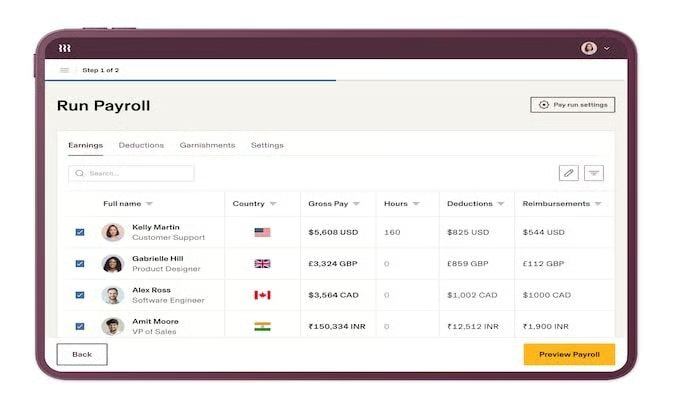
Rippling automatically calculates, files, and pays your federal, state, and local taxes. And at year-end, your employee tax forms (1099s and W-2s) will automatically be generated and electronically distributed. If its reps make a mistake during the tax filing process, Rippling will pay the penalties.
Employee Benefits
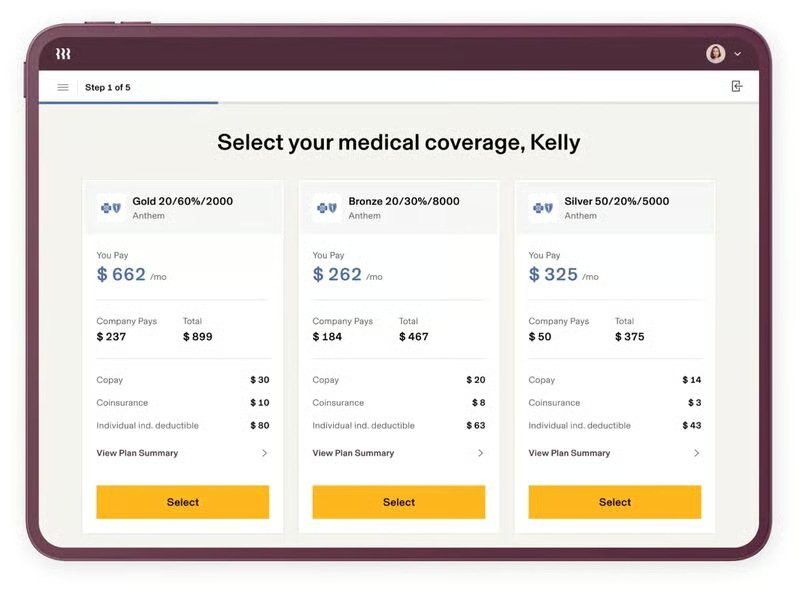
Rippling has an extensive range of employee benefits options, including health insurance (medical, dental, and vision) that covers all 50 states. It also offers commuter benefits, flexible spending accounts (FSA), health savings accounts (HSA), and 401(k) plans.
If you’re looking for new benefits options, you can use Rippling to get quotes, compare packages, and enroll in over 4,000 benefits plans from leading carriers. If you have pre-existing plans, you can opt to retain those—you can even connect your current coverage with Rippling.
Time & Attendance Tracking
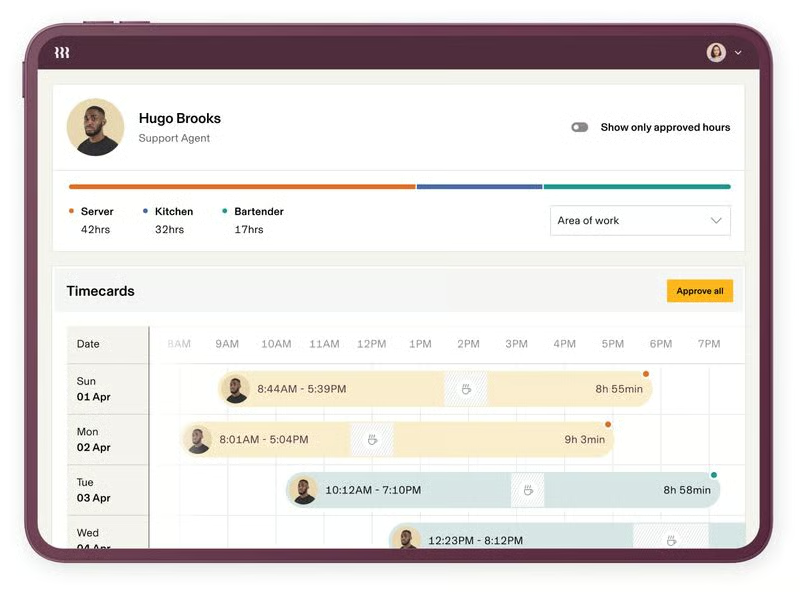
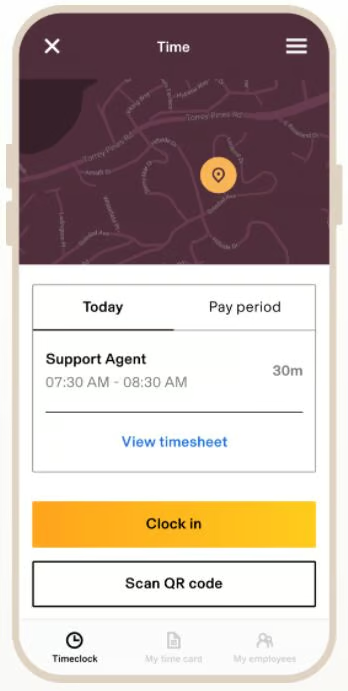
With Rippling, your employees can clock in/out via the computer, a tablet kiosk, and its mobile app for time tracking. All approved hours sync automatically for pay processing, and you can even review your staff’s time cards directly from its payroll solution.
Setting up time tracking rules is made easy with Rippling’s automated workflows. Its system also has built-in compliance that automatically follows federal, state, and local labor laws based on your employee’s work location. Once the rules have been set up, it sends alerts for missed breaks, overtime requests, and unapproved hours.
Apart from monitoring time, Rippling can help you manage and track PTO. Employees can request PTO through its system, which will automatically go to their identified managers for approval.
Hiring Tools
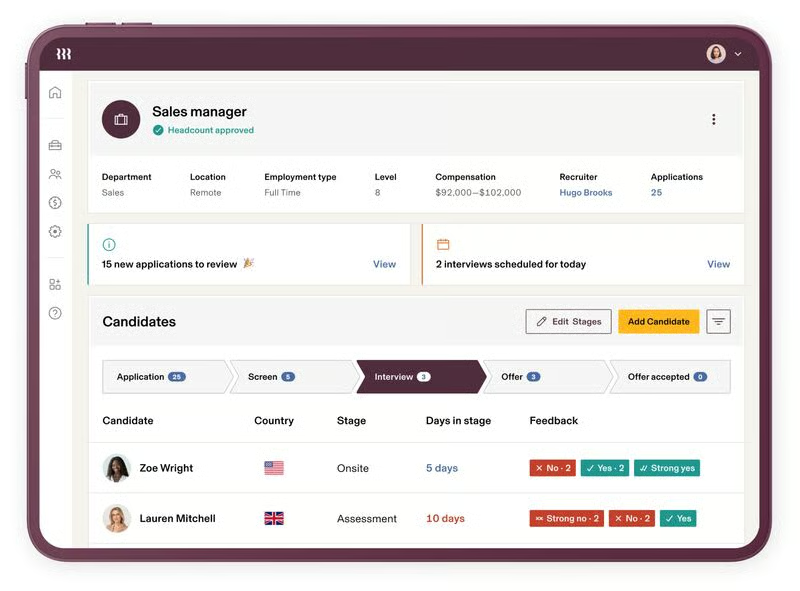
Rippling’s hiring tools include applicant tracking, one-click job postings to multiple job boards and sites (such as Indeed and LinkedIn), and robust reporting to help you check your pipeline and candidate feedback.
It also handles new hire state reporting, plus its onboarding solution can help you send offer letters and other new hire documents to incoming employees. Its partnership with E-Verify even allows you to run background checks on new hires.
Learning Management
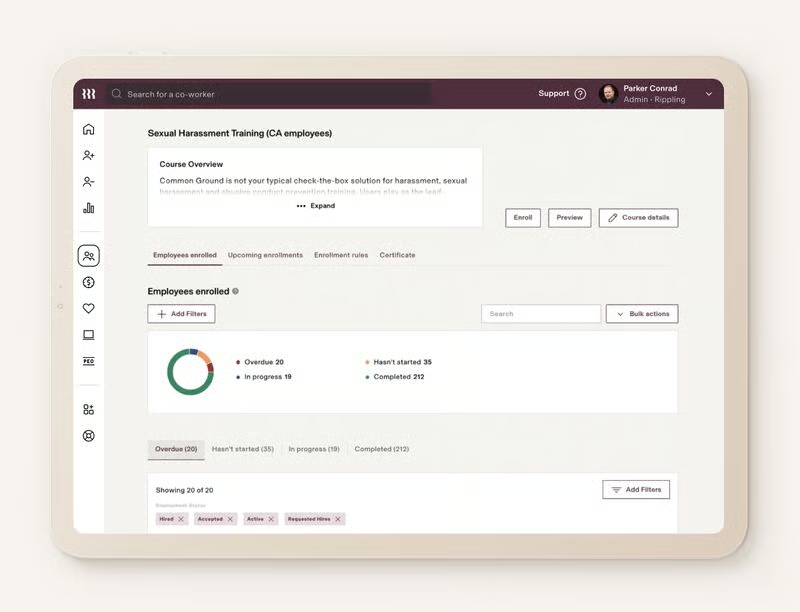
In addition to letting you upload your own courses into its system, Rippling’s learning management solution has a database of 24 prebuilt training programs for the US—from Health Insurance Portability and Accountability Act (HIPAA) training to harassment training in all 50 states.
Additionally, it has 150 international courses, available in more than 10 languages, that cover everything from cybersecurity to country-specific anti-harassment training.
It sends alerts to training participants to ensure that courses are completed on time. Rippling then records and sends the certifications to employees who completed the online training. In case you want to prevent staff from clocking in for a job if they’ve yet to complete the required courses, you can use the certifications to create time tracking rules that restrict clock-ins.
If you can’t find the learning courses you need in Rippling’s training library, its partnership with Go1 provides you access to over 70,000 courses you can purchase.
PEO Service
If your business grows to a point where you need PEO services, Rippling can help you manage HR, payroll, benefits, and IT (specifically app and device provisioning and deprovisioning). And when the time comes that you don’t require its PEO anymore, you can easily turn the services off from your account settings and seamlessly transition to using its all-in-one HR platform again.
Employee Portal
Employees can access payslips, check benefits, request PTO (managers can approve it), search for their coworkers’ contact details, and log in to all of their company-approved apps via Rippling’s self-service portal. This can be accessed online and via its mobile apps for Android and iOS devices.
Rippling’s mobile apps also have time and geolocation tracking capabilities so you know when your employees are clocking in and out and where they are. You can even set location limits to prevent workers from clocking in if they are outside the GPS radius you identified.
IT Solutions
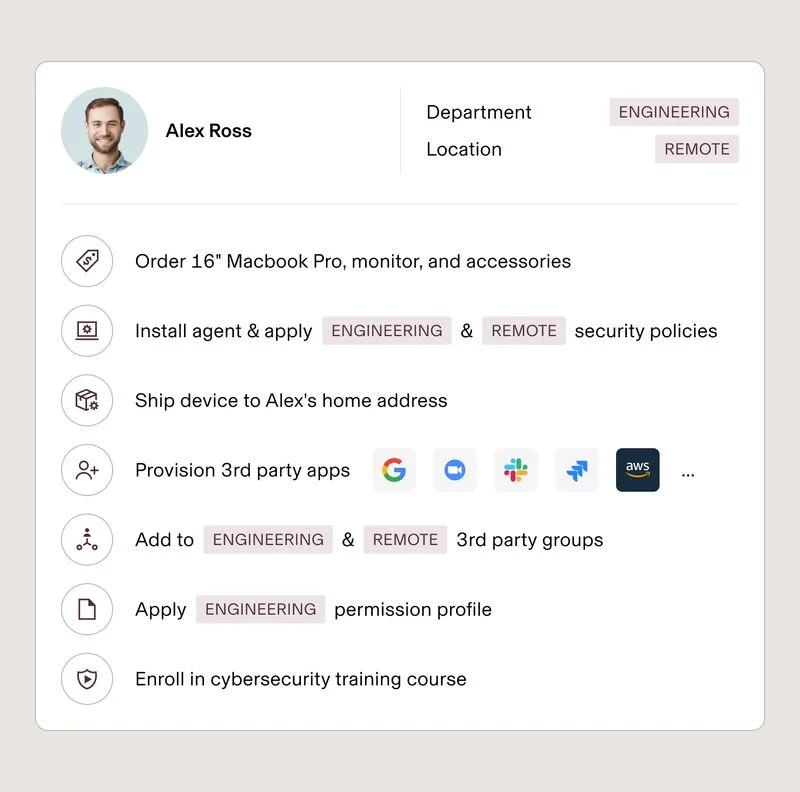
Rippling’s suite of IT solutions is designed to streamline the management of computer devices and business software access when onboarding and offboarding employees. This makes it easy for a small business without in-house IT teams to assign and collect computer devices issued to its workforce.
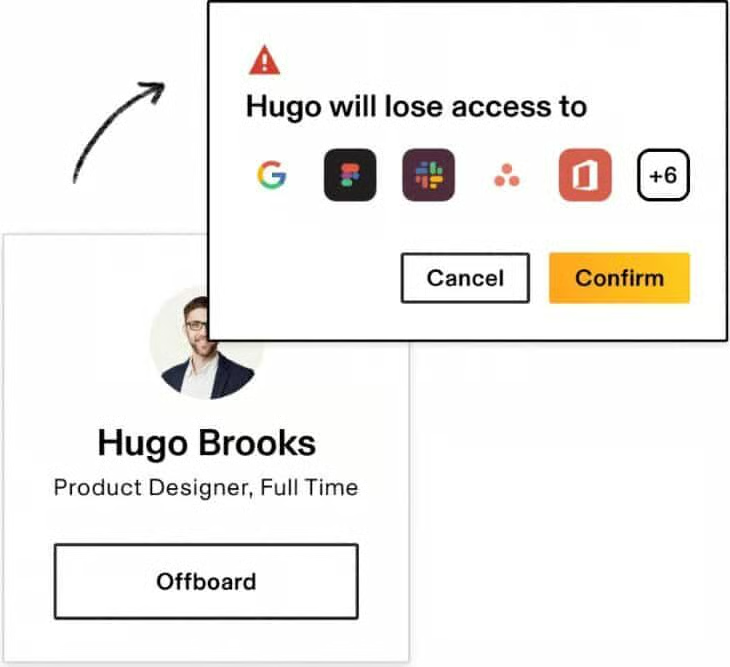
You also don’t have to worry about removing system access of resigning employees on their last day because Rippling allows you to do this remotely. It can even help manage your computer inventory for you.
Device Management
This solution is designed to help you efficiently manage the entire employee device lifecycle. With Rippling, you can easily set up or reassign computers and laptops for employees.
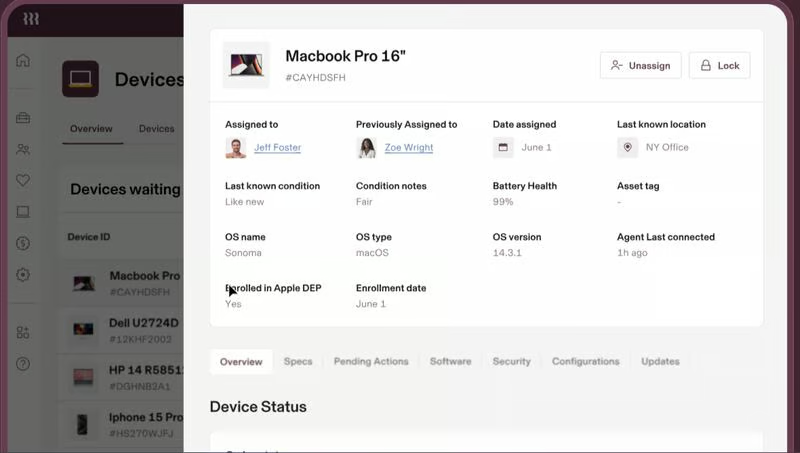
It also automatically installs an app on all your devices, enabling you to make system changes to company-issued computers. This is great for deploying system updates to all devices, including managing settings for Wi-Fi, VPN, and printers.
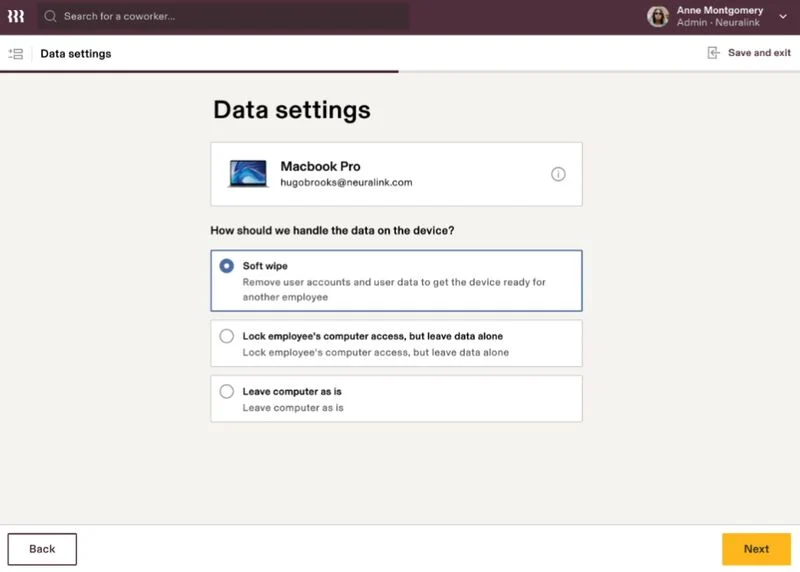
When offboarding resigning employees, you can use Rippling to schedule the date and time to disable the computer device access. It also lets you wipe the data and employee accounts from devices to get them ready for the next users.
Inventory Management
If you need to buy new computer devices and have these shipped to your staff, you can place the order, identify the software to be installed, and track the shipment directly in Rippling. The provider also keeps an inventory of your unused computers and stores these in their warehouse for safekeeping until you’re ready to reassign the devices.
It even assesses the condition of each unit and records the findings online, allowing you to easily check and monitor your inventory from your dashboard. For resigning workers, most employees hand in their laptops personally to HR or IT on their last day. However, if you have remote staff, you can either retrieve it yourself or have Rippling do it for you.
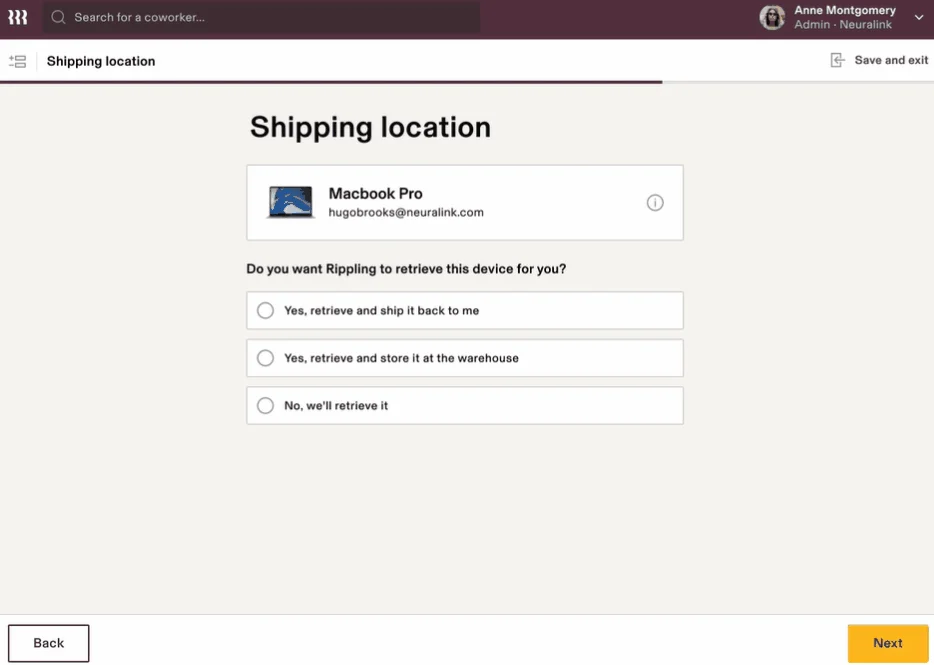
Rippling will also send resigning employees return boxes with prepaid shipping labels so they can have the company-issued devices shipped back to you or Rippling’s warehouse, depending on your choice.
App Management
Rippling automatically sets up new employees with the apps they will need—like Slack, Gmail, and Dropbox—based on their roles and departments. And with Rippling’s single sign-on (SSO), employees can securely access company-approved apps directly from their dashboard.
Its built-in team password manager, RPass, even helps your staff generate strong system passwords and securely share login credentials and 2FA codes for any app or website.
For resigning employees, Rippling simplifies the account deprovisioning process, so you don’t have to manually disable their profiles from various apps. Rippling will instantly revoke their access during the offboarding process.
Third-party Software Integrations
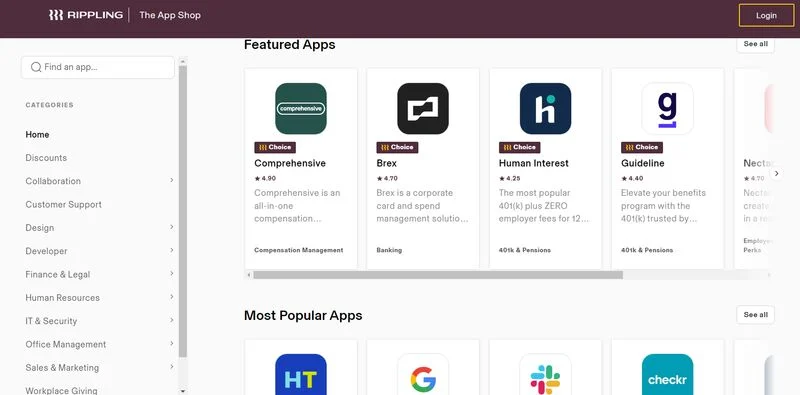
With over 500 third-party integrations, Rippling connects with a variety of software types, including accounting, banking, collaboration tools, learning management, time and attendance, IT, project management, and more.
Rippling HRIS Functionality
5 / 5
Rippling ticked all the boxes in this criterion. It offered full-service payroll, a self-service portal, and time and attendance tools. Rippling also makes it quick for businesses to hire new employees with its user-friendly applicant tracking system and it’s also easy to onboard new hires.
Whatever part of the HR management process, Rippling has a tool for it. At its simplest, Rippling helps you manage hiring, time and attendance, and payroll. But, one of the things that makes Rippling stand above the competition is its IT management offering, which helps employers monitor their computer devices—from assigning laptops or computers to employees to removing access to users who have retired or left the company.
Rippling Reporting
5 / 5
Rippling got 5 out of 5 for reporting because you can create your own reports by selecting the data you need and the type of chart you want. You can then download the generated report and share it with other team members.
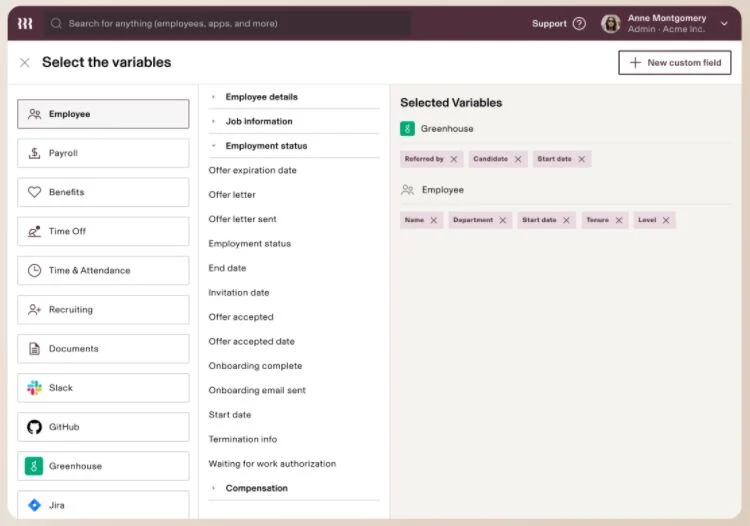
Included in the Rippling platform is an analytics suite to help you view, edit, and report on employee-related data. While it has report “recipe” templates you can use, Rippling also lets you create reports that show data from multiple datasets and even from its partner business systems.
For example, if you want a list of employees eligible to receive a bonus for candidates they referred who were hired, you simply generate a report, and the system will extract the information from partner recruiting tools to display all the data you need. This tool helps small businesses save money and time, and eliminates the need to purchase additional software to perform these analyses.
Rippling Expert Review
4.5 / 5
In our expert review, we find Rippling to be a good option for most small businesses. It allows users to choose from the offered modules, so they can only get the tools they need. There’s no need to pay for things you won’t use. The breadth and depth of HR features that Rippling offers are also suitable for managing the daily HR tasks among small businesses.
Rippling Ease of Use
3.88 / 5
- Setup wizard and how-to guides
- Self-service portal
- Robust third-party integration options
- HR support help desk
- Phone, In-app chat, and email support
- Workflow automations
While we praise Rippling for its robust HR tools, it lacks phone support if you don’t get its paid HR Help Desk add-on. It also doesn’t have a customizable interface. However, Rippling is very easy to use and seamlessly integrates with third-party providers.
With its setup wizard and how-to guides, you can quickly navigate through it and effortlessly add your employees’ profiles, including their salary and benefits information. Its workflows and customizable “recipe” templates make it easy to automate HR, IT, and payroll processes.
When you have questions, it’s easy to access its in-app chatbot that provides links to its help articles. However, if you need to speak to a certified HR representative via phone or email, you have to sign up for its HR help desk add-on.
Rippling User Reviews: What They Think
5 / 5
| Users Like | Users Don’t Like |
|---|---|
| Intuitive and user-friendly | Mobile apps have limited features compared to its web version |
| Automated and customizable features for payroll, HR, IT, and tax compliance | Lacks free phone support; customer support isn’t always helpful or responsive |
| Feature-rich platform | Minor software glitches and software lags with occasional integration issues |
Most users left positive Rippling reviews on third-party sites like Capterra and G2. Many complimented Rippling’s intuitive interface and the seamless integration with a lot of third-party providers. Others expressed that they like its robust HR features.
Some, however, complained about having experienced occasional glitches, such as software lags, login issues, and mobile app crashes. A few users also wished for more customization options and a way to contact its support team via the phone.
At the time of publication, Rippling earned the following scores on popular user review sites:
- Capterra: 4.9 out of 5 based on over 3,000 reviews
- G2: 4.8 out of 5 based on about over 2,600 reviews
Methodology: How We Evaluated Rippling
For our Rippling review, we evaluated the software against other HRIS software. In the evaluation of HRIS software, we looked at the pricing (affordability for small businesses), HR features, functionality of HRIS features, our expert review, ease of use, reporting, and popularity among users.
Click through the box below to learn more about how we evaluated each criterion.
Software that was considered affordable (under $5,000 per year for up to 15 employees) was rated favorably.
For this category, we looked at each software in terms of its capability to handle online onboarding, a robust employee database, and availability of benefits.
This review went deeper into the HR features offered by each software, and explored payroll functions, HR tools, and even learning management.
For our expert review, we looked at both the provider’s website and our user experience to determine if the software is the best fit for small businesses.
Software should be easy to navigate and offer customer support in various forms (i.e., live phone assistance, chat, email, etc.)
We considered both standard and customizable reporting capabilities within the software. Since HR runs on reporting, in order to score favorably, the software should offer a variety.
Although we thoroughly research each software and score it accordingly, what users think about the software is important to understand user experience and how robust the features are.
Rippling Review Frequently Asked Questions (FAQs)
What is Rippling used for?
Rippling is used by many small businesses for time tracking, payroll processing, administering employee benefits, and basically all HR tasks. It also functions as a professional employer organization (PEO), employer of record (EOR), and administrative services only (ASO).
Is Rippling secure?
Rippling offers IT management services with the utmost security. It helps maintain any business’ security by encrypting devices and ensuring they’re updated with the latest antivirus program. It has natively-built IAM, MDM, SSO, and inventory management solutions, as well as security measures (ISO 27001 and SOC 2 Type II) that secure your data.
Is Rippling’s platform enough for my business?
If you’re mainly looking for a solution to help you manage your small business workforce with payroll, time tracking, onboarding, and offboarding, then the Rippling platform is an excellent choice. But, if you have a large number of employees and would need an applicant tracking system and benefits administration, then you should consider its other modular options.
Bottom Line
Rippling is an all-in-one HR platform that offers full-service payroll and tax compliance. Its fully automated and customizable solutions make it an ideal software for small businesses looking to streamline HR and IT processes. And if you need to offload some of your HR duties—be it processing payroll or administering employee benefits—Rippling’s PEO services can help you, plus you can easily switch it on and off.
To see Rippling’s HR and IT tools in action, sign up for its free demo today.
