








Square Appointments and Vagaro are two of the best appointment management and point-of-sale (POS) software on the market, especially for beauty businesses. In fact, both options made our list of the best salon POS system for 2023.
Both include tools for managing schedules, taking appointments online and in person, customer management, point of sale, and more. This guide will walk through the key differences between Square vs Vagaro so you decide which is best for you.
Before we get into the weeds, here is our big-picture Square vs Vagaro judgment.
- Square Appointments: Best for solopreneurs or small businesses looking for a free option
- Vagaro: Best for health and fitness businesses or those needing specialized healthcare tools
- Vagaro vs Square Appointments Overview Comparison
- Vagaro vs Square Appointments Pricing
- Vagaro vs Square Appointment & CRM Tools
- Vagaro vs Square Appointments Checkout & Sales Tools
- Vagaro vs Square Appointments Back-office Tools
- Vagaro vs Square Appointments Expert Score
- Vagaro vs Square Appointments FAQs
- Bottom Line
Vagaro vs Square Appointments Overview Comparison
While Square Appointments and Vagaro share a lot of the same features, there are some major differences between the two. Click through the tabs below to see our overview comparison of Vagaro vs Square.
 |  | |
|---|---|---|
| Overall Score | 4.49 out of 5 | 4.74 out of 5 |
| Full Review | Vagaro Review | Square Appointments Review |
| Best for | Health and fitness businesses or those needing specialized healthcare tools | Solopreneurs or small businesses looking for a free option |
| Monthly Fees |
|
|
| Standout Features |
|
|
| User Reviews | 4.6 out of 5 | 4.7 out of 5 |
| Visit Vagaro | Visit Square |
| PROS | CONS |
|---|---|
| Free plan for a single user and location | Class bookings only available on paid plans |
| All plans include Square POS and ecommerce platform | Only syncs with Google Calendar and calendar syncing is a paid feature |
| No-show protection | No video appointment integration |
| Booking page integrations on website, Google, Facebook, and Instagram | No intake forms |
| Square Assistant tool | |
Square Appointments is Best for:
- Solopreneurs: As one of our top choices for the best free appointment scheduling software, Square offers a fully featured free plan for single users at a single location.
- Businesses selling merchandise: Every Square account comes with a fully integrated POS and inventory management system so you can sell physical products along with your services.
- Those needing an affordable plan: Square’s paid plans range from $29–$69 per month per location, so even the most advanced features—like custom contracts and shift management—are under $100 per month.
When to Use an Alternative:
- If you need to host virtual appointments: Square lacks a native video appointment feature or integration. Vagaro does have an app for virtual appointments, though.
- If you have lots of locations: While Square is affordable, every location costs an additional monthly fee, so if you operate in lots of locations, your monthly payment will stack up quickly. Fresha, another appointment software, supports unlimited locations in all of its plans.
| PROS | CONS |
|---|---|
| Vagaro livestream app for video appointments | Many tools (including intake forms and website platform) cost extra |
| Robust booking, HR, payroll, and marketing tools | No free plan |
| Easy set-up and intuitive interface | Plans only support single location, must get a custom quote for multilocation businesses |
| Intake forms and SOAP forms for healthcare | Expensive hardware |
| Rental and resource management | No unlimited calendars—every calendar is an additional $25/month |
| List your business on the Vagaro Marketplace app | |
| Booking widget that you can add to your website | |
Vagaro is Best for:
- Healthcare and fitness businesses: Vagaro supports SOAP (subjective, objective, assessment, and plan) notes and other intake forms so you can keep track of your client’s progress and take care of liability concerns.
- Businesses looking for marketing tools: Vagaro members will automatically get their business listed on the Vagaro Marketplace app and receive free promotions from there. Additionally, there are email and SMS marketing tools.
- Businesses that host virtual events: With Vagaro’s Livestream app, you can host online classes and events and then save the recordings for future use.
When to Use an Alternative:
- Businesses that want to sell merchandise: While you can sell products and track inventory with Vagaro, the system is not intended to be for retail operations and lacks some of the more advanced industry-specific tools that you find with the best retail POS systems.
- Restaurants: Vagaro does not have tools to support restaurant reservations. You will want to look for a restaurant-specific POS for that.
- Businesses looking for a free option: Vagaro starts at $25 per month per calendar. If you need a free option, Square Appointments is a better bet.
Vagaro vs Square Appointments Pricing
| | |
|---|---|---|
| Pricing Score | 3.75 out of 5 | 5 out of 5 |
| Monthly Fees |
|
|
| Add-on Fees (Monthly Pricing) |
|
|
| Free Trial | Yes | Yes |
| Processing Fees | Vagaro Payments
Volume discounts available | Square Payments
Volume discounts available |
| Hardware |
|
|
| Contract Length | Month to month | Month to month |
| Review | Vagaro Review | Square Appointments Review |
Square Appointments Pricing
Square Appointments walked away from the pricing category of our assessment with a perfect 5 out of 5. With a free plan for a single user, affordable advanced plans, competitive payment processing rates, and great hardware options that start as low as just $59, Square knocks it out of the park when it comes to pricing. Plus, there are no long-term contracts, so you will never be roped into something you don’t want or need.
The only thing you will want to be wary of with Square is that its pricing might not be advantageous if you operate a multilocation or high-volume business. Every additional location costs an additional monthly fee, so if you have lots of locations, your prices will grow rapidly.
Additionally, with Square Appointments, you are locked into Square’s flat-rate payments. For businesses that have lots of transactions, you might be able to find better rates from another merchant and save lots of money over Square’s flat-rate structure.
Vagaro Pricing
Vagaro earned a 3.75 out of 5 for its pricing. While the base monthly fees and payment processing rates are relatively low, Vagaro locks a lot of its most important features behind an add-on fee, and every calendar is an additional $10 fee. Additionally, Vagaro lacks a free plan, and its hardware options are expensive, especially if you aren’t eligible for the free reader.
While those are the reasons Vagaro lost points in the pricing category, the software does offer a free trial, and the monthly fee is capped at $85/month for unlimited calendars.
Vagaro vs Square Appointment & CRM Tools
| | |
|---|---|---|
| Appointment & CRM Score | 4.5 out of 5 | 4.63 out of 5 |
| Number of Calendars | 1 calendar per account | Unlimited calendars |
| Calendar Syncing | Yes (iCal, Outlook, and Google) | Yes (paid feature, Google only) |
| Online Booking Page/Widget |
|
|
| Online Customer Portal | Yes | Yes |
| Intake Forms | Yes ($10/month) | No |
| Resource Booking | Yes | Yes (Premium only) |
| Marketplace App | Yes | No |
| No-Show Protection | Yes | Yes |
| Automated Appointment Reminders | Yes | Yes |
| Review | Vagaro Review | Square Appointments Review |
Square Appointments Appointment & CRM Tools
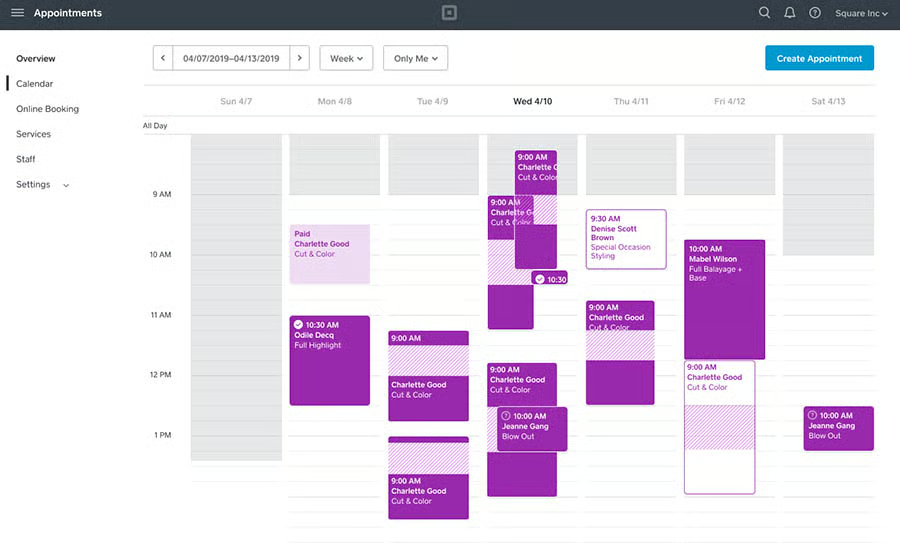
Square earned an impressive 4.63 out of 5 for its appointment and CRM tools. To start, every Square account includes tools for building a booking website or adding a booking widget to your existing site so that customers can book, pay for, and manage appointments online. From there, Square will send out automated messages to remind customers of their upcoming bookings. Should they still miss an appointment, you have the ability to charge a no-show fee, so you are always protected.
Additional appointment and booking tools from Square include:
- Square mobile app for accessing and managing your calendar
- Calendar customizations
- Square Assistant AI messaging
- Time zone syncing
- Customer profiles
- Pre-appointment contract
- Class bookings (paid)
- Waitlists (paid)
- Processing time booking (paid)
- Cancellation policy and fees (paid)
- Resource management (paid)
- Custom contracts (paid)
Vagaro Appointment & CRM Tools
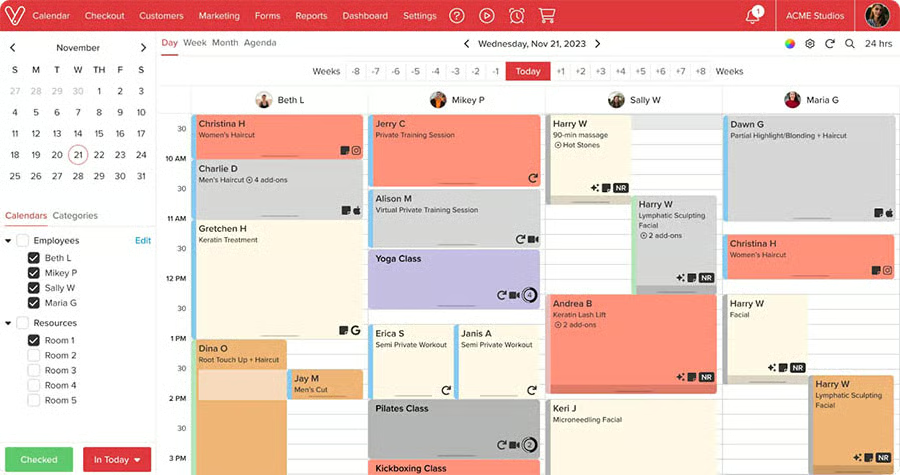
Just behind Square, Vagaro earned a 4.5 out of 5 in the appointments and CRM category. As with Square, you are able to build a new booking website ($10/month) or add a booking widget to your existing site so that customers can book online. Additionally, customers can also discover and book with your business via the Vagaro Marketplace app, where all Vagaro member companies are listed and promoted.
However, unlike Square, you only get a website builder for an additional $10/month, and there is only one calendar included in each plan, additional calendars are $10 per month each. With Square, you have unlimited calendars in all plans.
From there, Vagaro offers automated appointment reminders and no-show protection. There is also a loyalty program that you can use to reward customers and boost repeat visits.
Additional appointment and CRM tools include:
- Invoices
- 1,000 free email marketing messages to send each month
- Text marketing ($20/month)
- Intake and SOAP forms ($20/month)
- Get featured on the marketplace ($10/month)
- Waitlist
- Resource management
- Customer loyalty program
- Livestream appointments ($10/month)
- Check-in app ($10/month)
- Branded app ($200/month)
Vagaro vs Square Appointments Checkout & Sales Tools
| | |
|---|---|---|
| Checkout & Sales Score | 4.75 out of 5 | 4.25 out of 5 |
| Membership/Package Sales | Yes | Yes |
| Retail Product Sales | Yes | Yes |
| Mobile POS app | Yes (Vagaro Pro) | Yes (Square POS) |
| Inventory Tracking | Yes | Yes |
| Gift Cards | Yes | Yes |
| Marketing Tools |
|
|
| BNPL Integrations | Yes (Vagaro Pay Later) | Yes (Affirm) |
| Pre-pay online | Yes | Yes |
| Loyalty Program | Yes | Yes (add-on) |
| Employee Commission Tracking | Yes (via Vagaro Payroll - add-on) | Yes (via Teams Plus - add-on) |
| Review | Vagaro Review | Square Appointments Review |
Square Appointments Checkout & Sales Tools
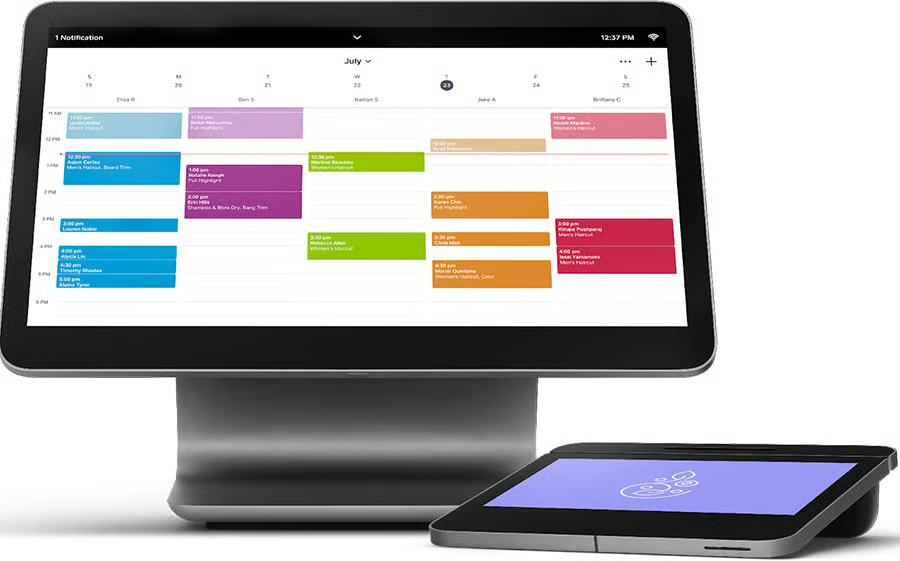
As we looked at Square’s checkout and sales tools, we gave the software a 4.25 out of 5 in our evaluation. Square has a top-of-the-line POS, with an easy-to-use checkout that you can customize to your needs, offers marketing tools and a website builder to promote your business, and can manage product sales as well as schedules and inventory. Really, Square has everything you need.
The software lost points, however, because many of its key tools, like SMS and email marketing, commission tracking, and the loyalty program, are either add-ons that you have to pay for on top of your monthly fee or they are only available in higher-tier plans. The cost of Square is low, however, so even with these add-on fees, you may still have a lower rate than with other providers.
Vagaro Checkout & Sales Tools
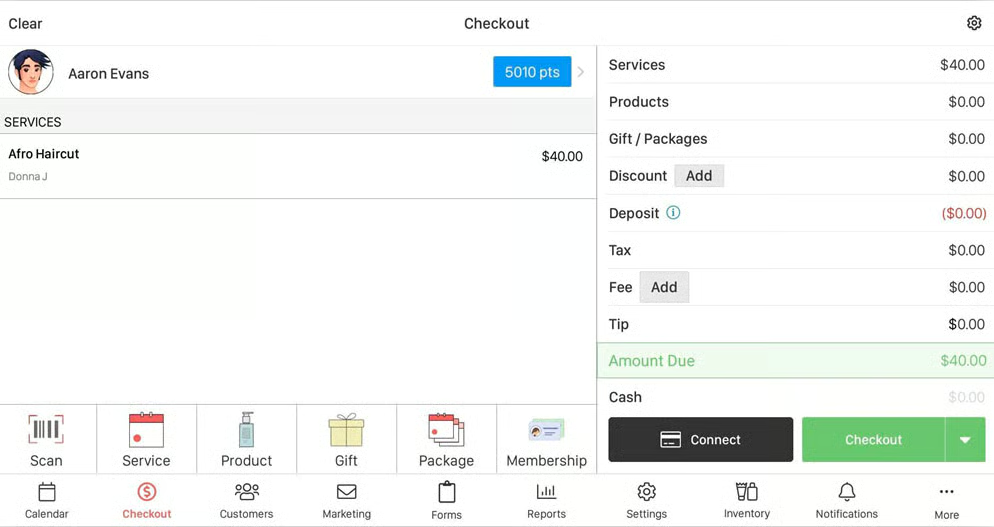
Vagaro earned a nearly perfect score in the checkout and sales category with a 4.75 out of 5. As a solution designed specifically for appointment-based businesses, Vagaro has everything you need to drive sales and manage your inventory and staff. With a loyalty program, automated email marketing, the Vagaro Marketplace, and a great POS with the ability to sell products and memberships all included in the base plan, Vagaro leaves almost nothing behind a paywall.
The only points that Vagaro lost were for its lack of commission tracking in the base plan—you’ll have to add Vagaro Payroll to manage any sort of bonus or comm structure.
Vagaro vs Square Appointments Back-office Tools
| | |
|---|---|---|
| Back Office Tools Score | 4.38 out of 5 | 5 out of 5 |
| Employee Scheduling | Yes | Yes (via Premium Plan or Shifts Plus add-on) |
| Inventory Management | Yes | Yes |
| Payroll Tools | Yes (via Vagaro Payroll add-on) | Yes (via Square Payroll add-on) |
| Invoicing | Yes | Yes |
| Reporting |
|
|
| Review | Vagaro Review | Square Appointments Review |
Square Appointments Back-office Tools
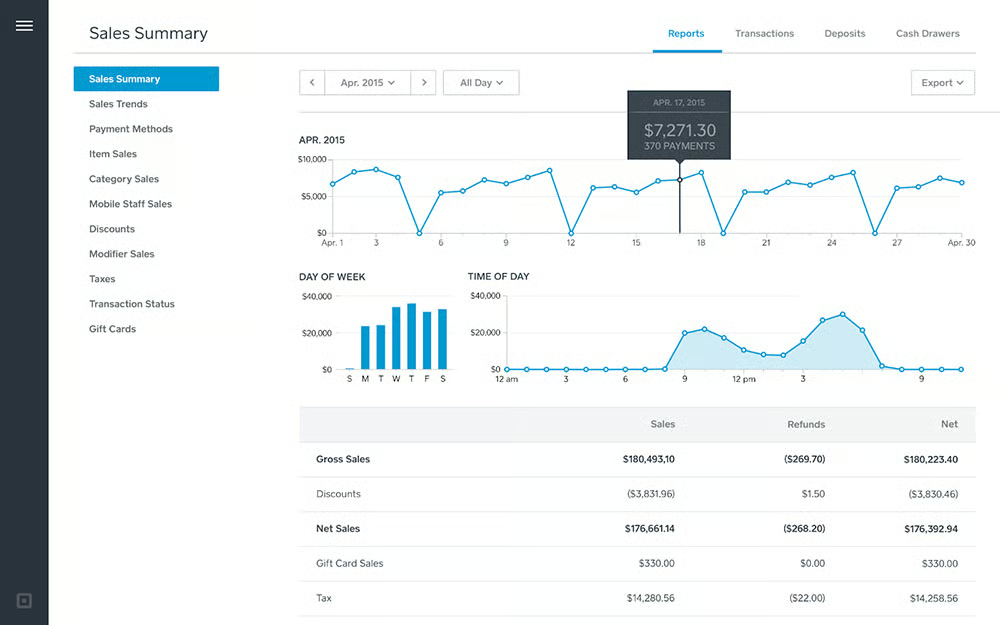
Square earned a perfect score in the back-office tools category, and for good reason. With tools managing staff—like staff permission settings, shift scheduling, and performance monitoring—as well as great reporting, inventory management, and invoicing abilities.
The only thing to be wary of is that Square’s staff management tools, Teams Plus (performance and permissions) and Shifts Plus (scheduling and payroll), are only included in the Premium plan. For other plans, you can add those tools as add-ons for a low monthly rate.
Vagaro Back-office Tools
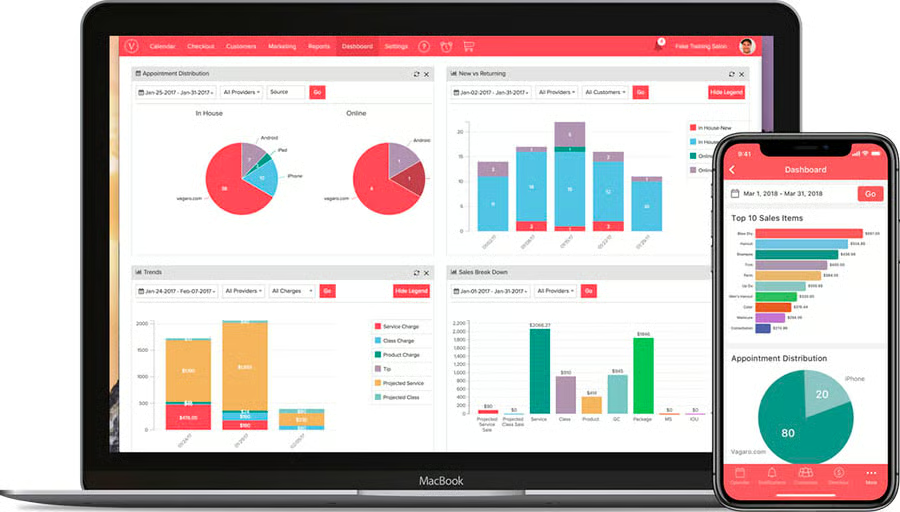
As with Square Appointments, Vagaro also has great back-office tools, earning it a 4.38 out of 5 in this category. While Vagaro technically has everything that Square does—reporting, inventory management, staff controls—the tools are generally more basic than Square’s, and there are no advanced options.
Vagaro vs Square Appointments Expert Score
| | |
|---|---|---|
| Expert Score | 4.69 out of 5 | 5 out of 5 |
| Features | Excellent | Excellent |
| Value for Money | Good | Excellent |
| Popularity | Excellent | Excellent |
| Cloud-based | Yes | Yes |
| Ease of Use | Excellent | Excellent |
| User Review | 4.6 out of 5 | 4.7 out of 5 |
| Review | Vagaro Review | Square Appointments Review |
As we looked at Vagaro vs Square Appointments and evaluated them based on our expert use experience as well as the reviews of real-life users, we found that they both offer great value and are popular among their members, but Square eked out just ahead of Vagaro with a 5 out of 5.
This was primarily due to the value you get from Square. With a free, fully-featured plan for a single user, affordable plans that offer unlimited calendars, and a free Square POS and website builder with all accounts—you get a lot out of Square at a very low price. While Vagaro is certainly not expensive compared to the market for appointment POS systems, the price is per calendar, and you don’t get quite as advanced tools as you get with Square.
Methodology: How We Evaluated Vagaro vs Square Appointments
As we looked at POS systems for salons, spas, and other appointment-based businesses, we considered features to help you manage customers, scheduling, marketing initiatives, intake forms, resource management, and no-shows. We also looked for staff management tools, including tipping, commissions, break management, and booking notifications.
Based on these criteria, Square Appointments scored at the top of the list, just above Vagaro. Square not only offers a free, best-in-class POS system, but it also offers all the tools you need to run your appointment business.
Click through to see more about our scoring criteria:
Salons have enough overhead without adding expensive POS subscriptions. We looked for plans under $100 a month with integrated payment processing and no limits on appointments. Square earned a perfect score in the category.
The backbone of any salon or spa is appointments and scheduling. We looked for online and in-person tools that made it easy for customers to make and keep appointments. Both Vagaro and Square scored high marks here.
To make this list, all the products needed to offer an easy-to-use POS with tools for handling commissions, memberships, retail product sales, gift cards, and contactless payments. Vagaro was the top scorer over Square here.
Like any business, service businesses need to handle inventory, employees, payroll, and more, plus have access to reports for evaluating the present and planning for the future. Square offers everything we looked for in this category.
This score considers our judgment on feature quality and input from real-world users on ease of use and value for the money. Square stood out with a perfect score in this area.
Vagaro vs Square Appointments FAQs
Expand the questions below to get answers to some of your most frequently asked Vagaro vs Square questions.
Is Square compatible with Vagaro?
Square and Vagaro are separate POS systems with appointment management tools. They can not integrate with each other as they offer the same suite of tools.
Is Square or Vagaro cheaper?
Square is cheaper than Vagaro. Square offers a free plan, and its paid options are cheaper than Vagaro’s. Additionally, Square’s hardware is less expensive than Vagaro’s.
Is Vagaro or Square easier to use?
Both Square and Vagaro are intuitive and easy to use, but Square has higher customer ratings overall, so it might have a slightly more intuitive interface.
Bottom Line
Vagaro and Square offer great POS solutions for managing appointments and keeping your service business running smoothly and efficiently. Square is going to be the best option for small businesses on a tight budget, while Vagaro is best for those with slightly more to spend and in need of specialized tools, like SOAP forms, and a larger staff. You can’t go wrong with either option, and with this guide comparing Vagaro vs Square, you have the tools to choose the software that makes sense for you.
