







When it comes to small business payroll processing, two of the popular payroll solutions available on the market are Gusto and Square Payroll. While both can help streamline the way you pay employees, Gusto offers more HR payroll solutions, such as international contractor payments, applicant tracking, and performance management. Square Payroll may not have advanced HR features but it provides better value for your money if you only need to process employee payments.
To help you gauge whether Gusto vs Square Payroll is right for your business, here are our recommendations.
- Gusto: Best for small businesses looking for full-service payroll with solid HR support
- Square Payroll: Best for restaurants and Square POS users needing low-cost pay runs
Square Payroll and Gusto appear in several of our buyer’s guides for small businesses given the HR and payroll tools that each offer. Both are on our lists of best small business payroll software, top payroll services, and best HR payroll systems.
Gusto vs Square Payroll Compared
 |  | |
|---|---|---|
| Starter Pricing($/Month) | $49 per month + $6 per person per month | $35 base fee + $6 per employee |
| Contractor-only Payroll Plan($/Month) | US contractors: $35 base fee + $6 per worker
Global contractors: Call for a quote | US contractors only: $6 per worker |
| Add-on Solutions($/Month) | Health insurance: Pay only for premiums
Benefits plans: Pricing varies, depending on benefit | Health insurance and retirement plans: Call for a quote |
| Standout Payroll Features |
|
|
| Standout HR Features |
|
|
| Customer Support |
|
|
| For More Information | Read our Gusto review | Read our Square Payroll review |
Consider using Gusto if:
- You’re a small to midsize business (SMB) looking for an HR payroll software: While Gusto’s core platform is payroll, its wide suite of HR solutions make managing employee-related processes easy for employers and HR professionals. It can help you recruit and pay workers, track staff attendance, manage performance reviews, and run surveys to measure employee engagement.
- You want multiple payment options: With Gusto, you can pay workers via pay card and direct deposit (with four-, two-, and next-day options). If you prefer check payments, you can use Gusto to print the paychecks yourself and manually distribute these to employees.
- You need to pay both US and global workers: Gusto payroll is designed to pay workers across all US states, but it also has an international contractor payment service that covers more than 120 countries. If you have global workers, Gusto’s partnership with Remote grants you access to employer of record (EOR) services to help you hire and pay international workers in 75+ countries.
.cls-1,.cls-2{fill:#155E85;}.cls-1{fill-rule:evenodd;}
Want to know more about EOR services? Read our EOR guide to understand how it works.
Check out the box below to learn more about the advantages and drawbacks of using Gusto’s payroll solutions and services.
Consider using Square Payroll if:
- You use Square POS for your small restaurant or retail shop: Square Payroll connects seamlessly with Square POS to capture the employee tip data for payroll processing. You can also use Square POS to track staff clock-ins/outs and Square Payroll will collect the attendance information it needs to pay employees—no manual data entry required.
- You’re looking for an affordable payroll solution: In comparing Square Payroll vs Gusto in terms of pricing, the former is slightly less expensive than the latter. To pay one employee, Square Payroll will only charge you $35 + $6 per worker monthly; whereas Gusto will bill you $40 + $6 per worker monthly.
- You only pay contract workers: Businesses that only hire and pay contract workers will save a lot of money with Square Payroll. Its contractor payroll plan only costs $6 per worker monthly. Gusto may have a similar plan, but it’s priced at $35 + $6 per worker monthly.
- You require fast employee payments: Similar to Gusto, Square Payroll supports payments via pay card, manual check, and direct deposit (with four-, two-, and next-day options). However, if you and your employees use Square’s Cash App (for iOS and Android devices), you can pay workers instantly.
To know more about Square Payroll pros and cons, check out the box below.
Top Alternatives
There may be times when neither Square Payroll nor Gusto’s HR and payroll functionalities fit your requirements. We recommend the following options:
 |  |  | |
|---|---|---|---|
| Visit Rippling | Visit ADP | Visit Paychex | |
| Best For | Companies looking for an all-in-one HR, payroll, and IT solution | Fast growing businesses that want flexible payroll tools | Startups and SMBs that need customizable HRIS and payroll tools |
| US & Global Payroll Tools | ✓ | ✓ | ✓(Global payroll via partner solution) |
| Starter Pricing($/Month) | US payroll*: $35 base fee + $8 per employee | Call for a quote | Custom-priced |
| Contractor Payments Plan($/Month) | US contractors: included in US payroll plan | Included in payroll plan | Included in payroll plan |
| For More Information | Read our Rippling review | Read our ADP Run review | Read our Paychex Flex review |
| *Pricing is based on a quote we received | |||
Best for Value: Square Payroll
| | |
|---|---|---|
| Free Trial | One month*
| None |
| Pricing Plans($/Month) |
|
|
| Contractor-Only Payroll($/Month) |
| $6 per worker(US contractor payroll only) |
| Add-ons |
|
|
| Visit Gusto | Visit Square Payroll |
*Get one month free when you run your first payroll. Offer will be applied to your Gusto invoice(s) while all applicable terms and conditions are met or fulfilled.
In comparing Gusto vs Square Payroll in terms of pricing transparency, both providers are relatively straightforward with their monthly payroll plans and add-on costs of additional services. However, if you only need payroll software to pay employees and don’t need all the bells and whistles of an HR payroll software like Gusto, then Square Payroll is for you.
Pricing Calculator: Compare Monthly & Annual Fees
For a quick cost comparison, use our online calculator to compute the estimated fees for Gusto vs Square Payroll.
Gusto vs Square Payroll Calculator
| Provider | Estimated Monthly Fees | Estimated Total Cost for One Year |
|---|
It should be noted that Gusto occasionally offers special promotions, such as discounts. At the time of writing this, new clients get a discounted base price for the first six months. They only need to pay the per-worker monthly fee of $6 during the said period. However, they will be billed both the base price and per-worker monthly rates once the promo ends.
Best for Payroll: Gusto
| | |
|---|---|---|
| Handles Payroll & Payroll Taxes | ✓ | ✓ |
| Global Payroll | ✓ | ✕ |
| Multiple Pay Schedules | ✓ | ✓ |
| Unlimited and Automated Pay Runs | ✓ | ✓ |
| Payment Methods | Pay card, direct deposits, and manual checks you print yourself | Pay card, direct deposits, manual checks, and via Square’s Cash App |
| Direct Deposit Options | Four-, two-, and next-day options | Four-, two-, and next-day options;instant payments via the Cash App |
| Wage Garnishment Services | South Carolina excluded | ✕ |
| Expenses and Reimbursements | ✓ | Via manual data entry of approved reimbursements |
| Tip Processing | ✓(includes built-in compliance for tipped minimum wage workers) | ✓(with direct tip imports from Square POS) |
| Visit Gusto | Visit Square Payroll |
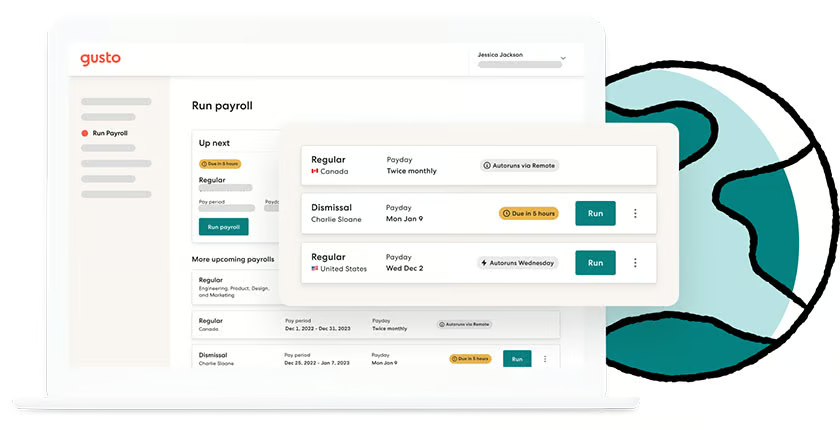
Square Payroll and Gusto payroll functionalities are very similar to each other. Their platforms support flexible pay schedules, multiple payment options, and unlimited pay runs. Aside from calculating payroll taxes, they will also handle tax payments and filings for you.
However, in comparing Square Payroll vs Gusto for payroll processing, Gusto has robust solutions and services. It offers wage garnishment payment services (except in South Carolina) and can process reimbursements for business expenses that employees file (and approve) through its system. An international payroll service is also available if you need to pay global contract workers. And if you plan to expand your business outside of the US, Gusto’s partnership with Remote will allow you to compliantly hire and pay international employees.
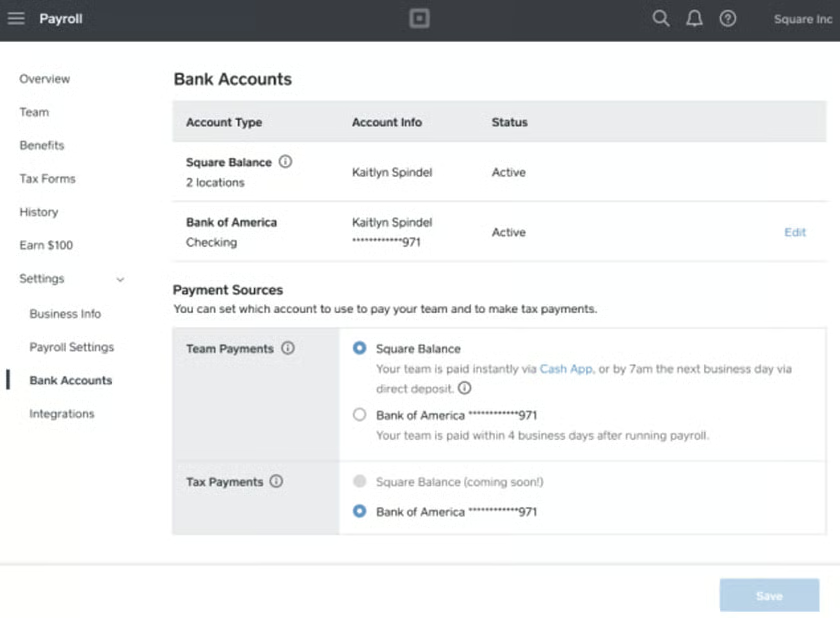
Square Payroll may not have global payroll capabilities, but it can help you pay US workers faster than Gusto. If you use Square to accept client credit card payments, you can store and use the funds in your Square Balance to instantly pay employees via Square’s Cash App. With Gusto, the fastest payment option you get is a next-day payout.
Further, Square Payroll automatically syncs with Square POS to get the tip information needed for payroll. While Gusto also connects with point-of-sale solutions, it doesn’t integrate with Square POS.
Best for HR Features: Gusto
| | |
|---|---|---|
| Online Employee Profiles | ✓ | Basic profiles only |
| Onboarding and Offboarding Tools | ✓ | Simple onboarding only |
| Health Insurance and Retirement Benefits | ✓ | ✓ |
| Health Insurance Coverage in All US States | ✓ | Unavailable in six states |
| Job Postings and Applicant Tracking | ✓ | ✕ |
| Time Off Requests & Approvals | ✓ | ✓ |
| Time Tracking & Scheduling | Time tracking only | ✓ |
| Performance Reviews | ✓ | ✕ |
| Employee Surveys | ✓ | ✕ |
| Self-Service Portal for Managers & Employees | ✓ | ✓ |
| Business Software & Email Account Management | Includes provisioning and deprovisioning tools | ✕ |
| Visit Gusto | Visit Square Payroll |
Gusto wins in this category given its wider suite of HR solutions. Unlike Square Payroll, its platform is equipped with job posting and applicant tracking tools to recruit employees. Online offer letters, self-onboarding features, and electronic signature capabilities make new hire onboarding easy for HR teams. It can even help you manage the business software and email account access of both new hires and leavers.
You also get advanced HR features for managing performance reviews and staff surveys. Gusto-administered benefits plans are available and you can manage employee benefits directly through its platform.
On the other hand, if you don’t need all the bells and whistles included in an HR payroll platform like Gusto, then Square Payroll’s basic HR solutions are right for you. It only has the essential HR functionalities for onboarding new hires, tracking employee attendance, creating staff schedules, and storing worker information.
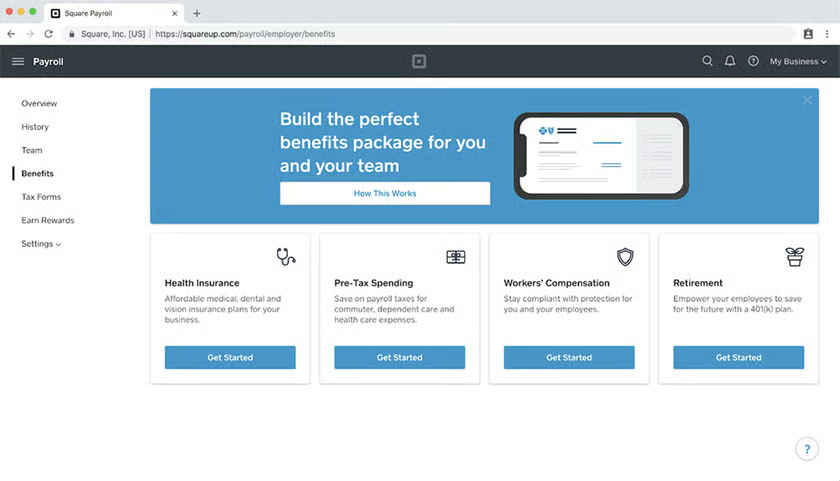
It also provides access to employee benefits plans but through partner brokers. As of this writing, Square Payroll offers health insurance via SimplyInsured and retirement plans via Guideline.
Best for Ease of Use & Customer Support: Gusto
| | |
|---|---|---|
| Learning Curve | Relatively easy | Relatively easy |
| Ease of Use | Good | Good |
| Setup Help | ✓ | ✓ |
| Dedicated Customer Success Manager | Included in the Premium plan | ✕ |
| Customer Support | Via chat, email, and phone | Via chat and phone |
| Access to HR Advisers | Included in Premium plan(costs extra for the Plus tier) | Paid add-on |
| Third-Party Software Integrations |
|
|
| Online Guides & Tools |
|
|
| Visit Gusto | Visit Square Payroll |
Gusto and Square Payroll both have platforms that are relatively easy to learn and use, but what sets Gusto apart from Square is the customer support that it offers. You can contact its support team via email, chat, and phone; whereas Square only provides chat and phone assistance. And if you upgrade to Gusto’s Premium tier, you even get HR advisory services and a dedicated customer success manager (costs extra for Plus plan subscribers).
With Square Payroll, you don’t get a dedicated support manager and you have to pay extra for HR advisory services. It also charges additional fees if you need help creating an employee handbook (this service is included in Gusto’s HR advisory services).
However, if you want to connect with other Square users, the provider has a “Seller Community” forum where you can ask other business owners questions about using Square. The forum also provides updates about its various products and services.
Best for Popularity Among Users: Gusto
| | |
|---|---|---|
| User Feedback | Mostly positive | Mostly positive |
| Average User Ratings* | 4.55 out of 5 | 4.4 out of 5 |
| Average Number of Reviews* | Nearly 3,000 | More than 300 |
| Visit Gusto | Visit Square Payroll | |
| *Data from third-party review sites (such as G2 and Capterra) as of this writing | ||
To assess Square Payroll vs Gusto for user popularity, we looked at each provider’s average number of user reviews and average overall ratings on third-party review sites. Gusto wins in this category as it has more user reviews and a higher average rating.
What Users Think
Users who left Gusto reviews on G2 and Capterra commended its user-friendly and intuitive interface, adding that it helps simplify pay processes. Others like that it has a wide range of HR features for managing the employee lifecycle—from hiring to retiring.
However, some reviewers said that the software runs a bit slow from time to time. Several users also complained about having experienced long wait times when contacting support.
The Square Payroll reviews on G2 and Capterra are mostly positive. Users said that its ease of use, affordability, and efficient payroll tools are its standout features. Many also appreciate its seamless integration with Square POS and other Square products.
Similar to Gusto, reviewers also complained about Square’s customer support. Several users said that its customer reps are unresponsive and difficult to reach at times.
How We Evaluated Gusto vs Square Payroll
To evaluate the differences between Square Payroll and Gusto, we compared the HR and payroll features of both providers, including the global payment options that they offer. We also checked both platforms’ popularity among users, ease of use, third-party software integrations, and customer support options. Lastly, we considered pricing transparency and monthly costs.
Bottom Line
In deciding whether to use Gusto vs Square Payroll, take a look at the payroll and HR features that your business needs. If you have simple payroll and HR requirements and are using or planning to use Square products (like Square POS), we recommend Square Payroll. For those who want integrated HR and payroll tools to handle a wide range of employee management processes, Gusto is a better option.
