







Statement descriptors are text used to provide customers with transaction information on their credit card bills. A standard statement descriptor includes the business name, phone number or location, and the transaction amount. However, some payment processors
Customers use statement descriptors on their credit card statements to confirm that they actually made the transaction. Default statement descriptors can sometimes be ambiguous, leaving customers unable to recognize the charge. Unrecognized charges, even if they are valid, can cause customers to file a claim with their issuing bank. A well-made statement descriptor, therefore, reduces the risk of chargebacks and miscommunication.
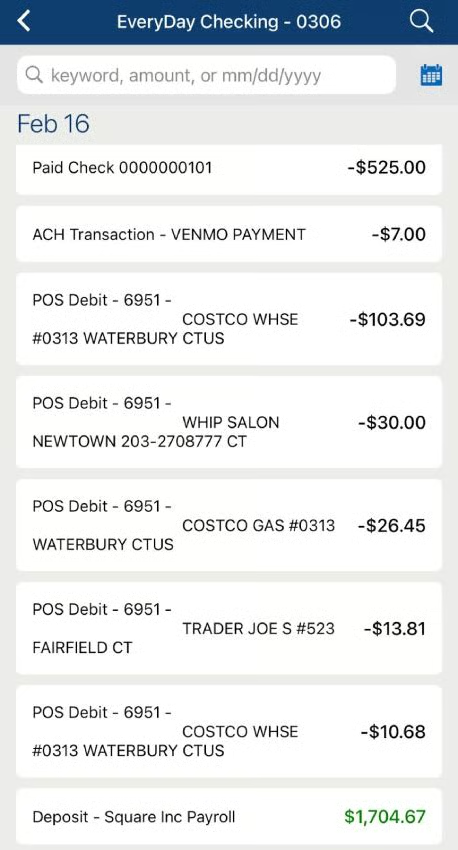
Types of Statement Descriptors
Statement descriptors range from five to 25 characters in length (not including the transaction amount) and can be customized with a combination of descriptor types.
Default Statement Descriptors
Banks and card issuers use a unique mapping system to determine what customers see as statement descriptors in their credit card billing statements. By default, it would include the merchant’s business name and sometimes a logo or image.
Hint: Recall the business name you provided your payment processor and what you see when you were prompted to design your business receipt. The business name found on the receipt you issue customers should match your business name in the customer’s credit card billing statement.
Considering the length or space available, the business contact number or location may also be included. The default statement descriptor follows a simple pattern:
<Business-name><Contact><Amount>
For example, you have a shoe store that operates under the name, Lucky Joe Store, and charged $35 on a customer’s credit card for a pair of sneakers. The default statement descriptor may look like:
LUCKY JOE 885-649-9570 $35.00 or LUCKY JOE SPRINGFIELD, IL $35.00
Some banks may prefer to add a code for your payment processor as well as a merchant category code (MCC) in the statement descriptor.
Given the first example, if your payment processor is Square, the default statement descriptor would look something like: SQ*LUCKY JOE*5699 $35.00
For PayPal, it would be: PAYPAL*LUCKY JOE*5699 $35.00
Soft Statement Descriptors
The banks’ and card issuers’ mapping system can also temporarily override payment descriptors that it deems “unreadable” with its default descriptor. This is done to avoid instances of chargeback claims resulting from vague descriptors that customers will find difficult to recognize.
Again, following the first example,LJS*RBRCON $35.00 may be replaced with one of the statement descriptor examples mentioned above.
While default soft statement descriptors are easy to read, it doesn’t always make transactions recognizable.
Static Statement Descriptor
As the name suggests, a static descriptor shows up in all credit card statements where a payment is charged. It is used to display the merchant’s business name. On its own, a static descriptor works best for businesses with only one product or service.
For example, customers will easily understand when they see “NETFLIX $22.99
” on their credit card bill.
However, some customers may find this vague if your business name does not really provide an idea of your product or service or if you have more than one product or service.
Dynamic Statement Descriptor
A dynamic statement descriptor can be customized to change based on the specifics of a transaction. This works best for businesses that sell more than one type of product or service. It is composed of a shortened descriptor as a prefix and a dynamic descriptor as a suffix.
Shortened Descriptor
A shortened descriptor is a static descriptor that functions as a prefix. So instead of using the limited space to spell out the business name (as is done with a static statement descriptor), a “readable” abbreviation takes its place.
Going back to our earlier example, instead of “LUCKY JOE STORE
” a shortened descriptor can be used to display “LJS
” followed by a dynamic descriptor to provide more details of the transaction.
Dynamic Descriptor
The dynamic descriptor functions as a suffix and changes based on the transaction details such as product or service names and nearest store location. This provides customers with a clearer picture and helps them recognize the charge on their credit card.
With the same example business, if the transaction is for a pair of Converse shoes, the complete dynamic statement descriptor would look something like:
LJS*CONVERSE 885-649-9570 $35.00
Hard Statement Descriptor
Once a transaction has been settled (balance adjusted and funds transferred), hard descriptors replace soft descriptors in the cardholder’s credit card statement after a few days. This essentially looks the same but will include the final amount for the transaction.
How to Write a Statement Descriptors
Unfortunately, not all payment processors have the functionality that allows merchants to customize their statement descriptors. Some may let you add an “identifier” such as invoice numbers via code.
For payment processors that do, there is no single process. However, this guide should help you locate settings and proceed with customization, if available:
- Step 1: Log in to your merchant services dashboard and navigate to your payment settings
- Step 2: Next, locate the section for customer bank statements where you will find a prompt to enter your preferred statement descriptor (note that this is a static descriptor that will show up on all card statements)
- Step 3: Follow the rules for adding statement descriptors:
- Limit to 5–25 characters
- Contains at least 1 letter
- Not contain the following special characters: < > \ ‘ “ *.
- Must display your business’s DBA name.
- Contains more than a single common term or common website URL (URL only acceptable if providing a clear and accurate description of a transaction on a customer’s statement)
- Step 4: If prompted to add a shortened descriptor (prefix):
- Limit to 2–10 characters
- Contains at least 1 letter (the dynamic descriptor suffix should also content at least 1 letter)
- Not contain the following special characters: < > \ ‘ “ *
- Must be in reference to your business’s DBA (doing business as) name
- Step 5: If you have a shortened descriptor, look for prompts that tell you what the payment processor would include as a dynamic descriptor such as the invoice number.
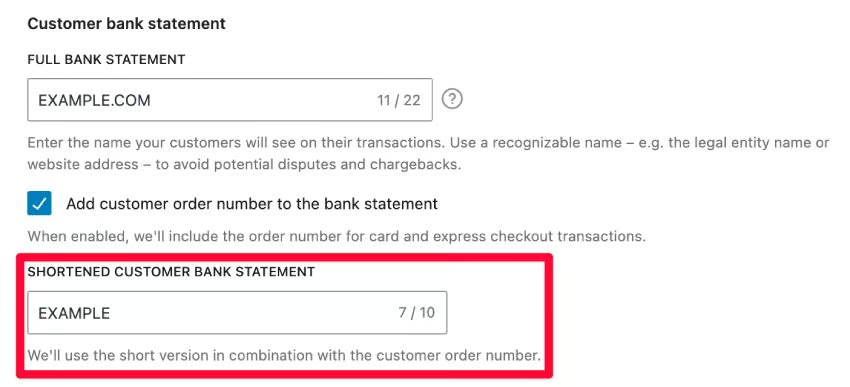
WooCommerce integrates with Stripe and allows you to set dynamic statement descriptors. (Source: WooCommerce) - Step 6: Preview the settings if available and click “save.”
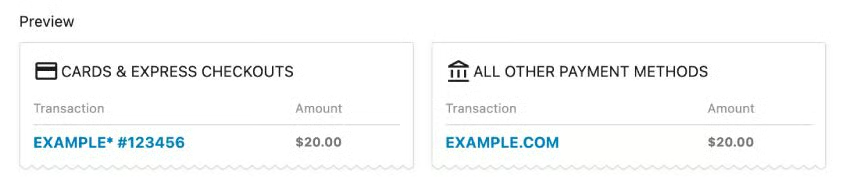
Make sure your statement descriptor is clear and easy to understand. (Source: WooCommerce)
Statement Descriptor Best Practices
The following are guidelines for creating clear and recognizable statement descriptors:
Keep It Short & Clear
Keeping your statement descriptors as simple as possible generally makes it easier to read. Avoid cramming multiple pieces of information within the limited space available. Some ideal statement descriptor formats include:
- Business name + location (or contact number, but not both)
- Business name + product (or service) + location
- Website name + product (or service)
Avoid Generic Business Names
Add an identifier in your statement descriptor if your DBA is too generic. If your business name is simply “ABC Company,” include a description of your product or service such as “ABC Co. – Bakery” to make it more recognizable.
Use URLs Only When Necessary
Only include your company’s website address if it is directly related to the sale. You can replace your business name in the statement descriptor with your business URL if purchases are made directly from your online store.
Add Contact Information
When possible, add contact information on your statement descriptor. Some businesses prefer to have a dedicated customer service phone number included instead of a location (for those with more than one store branch) on their statement descriptor so customers can easily call for any concerns.
Preview Your Statement Descriptors
Payment processors that allow you to create test payments while setting up your system will likely also have sample payment descriptors. This can help you to evaluate how it “looks” (or reads) and make adjustments if needed.
Frequently Asked Questions (FAQs)
These are some of the most common questions we encounter about statement descriptors.
What is a statement descriptor on a credit card?
A statement descriptor explains to customers the reason for the charge on their credit card. It contains the merchant’s business name, the transaction specifics, and the cost.
How do you write a statement descriptor?
When writing a statement descriptor, maximize the limited space available by keeping the details clear and readable. Most importantly, your business name should be recognizable. Note that there are also certain rules as to the type of characters that are allowed in a statement descriptor.
Can I make changes to a statement descriptor?
Generally, you can only make changes to the business name part of the statement descriptor. Some payment processors may provide easy access to this from the payment settings, while most will require you to contact an account representative. The dynamic descriptor that appears on your customer’s credit card statement is often decided by the payment processor, bank, or card issuer.
Bottom Line
The goal of optimizing statement descriptors is to help prevent chargeback claims that can harm your business. However, a well-written statement descriptor can also improve brand recognition and build customer loyalty. Ultimately, banks and card issuers have the final say as to what customers see in their credit card statements. That said, working closely with your payment processor can help you understand how to write a statement descriptor that works best for your business.
