







Device as a service (DaaS) is a subscription-based device management model that allows businesses to outsource the process of buying, deploying, and managing computing devices. These devices include business phones, smartphones, personal computers, laptops, and tablets.
The information technology (IT) support providers offer services such as onboarding team members, monitoring registered devices, and ensuring the devices are secure and the software solutions are up to date. Businesses turn to DaaS to remove the hassle and high costs of device management. In this article, we fully answer the question “What is device as a service?” and explore how DaaS benefits companies from different industries.
How Device as a Service (DaaS) Works
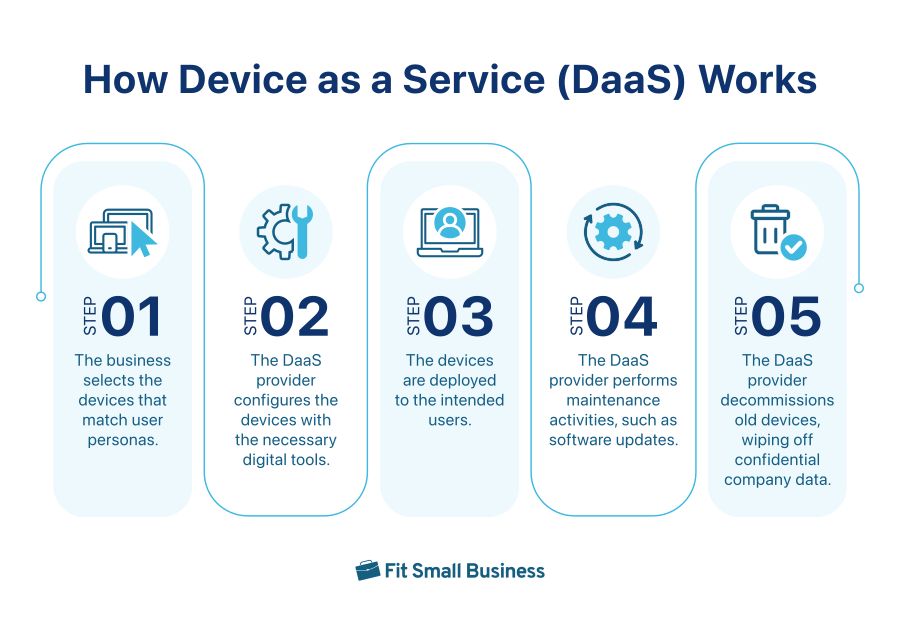
With the DaaS model, a cloud services provider lets businesses find devices that match personas or the different types of users in the company. Employees who often travel for work and on-site workers will have different device needs. The former may require a device with a long battery life and apps that support remote work, while the latter may settle for a simpler device.
After selecting the necessary devices for specific users, the DaaS vendor equips the devices with essential digital tools, including security and collaboration apps. The devices are then deployed to their intended users.
From here on, the DaaS provider handles all maintenance activities, including implementing software updates, repairing or replacing damaged devices, and overseeing device performance. When it’s time to decommission old devices, the DaaS vendor offers trade-in and disposal options.
Your provider handles end-to-end device lifecycle management, namely these key phases:
- Procurement: The provider secures the devices after determining the specifications based on the users’ work styles.
- Implementation: The vendor integrates the devices into the company’s existing apps and necessary networks. Likewise, they provide user training to ensure device security.
- Maintenance: The provider offers support when devices malfunction, handling the company’s concerns and requests.
- Refresh: The vendor updates and replaces the devices regularly, allowing employees to use the latest technologies that accommodate modern work demands.
- Retirement: The provider removes devices from the registry and wipes off data to ensure that unauthorized parties won’t access confidential company information.
Types of Device as a Service (DaaS) Models
The following models may be included in a DaaS contract:
- Hardware as a Service (HaaS): This offers access to hardware devices, such as desktops, laptops, servers, desk phones, and video meeting equipment.
- Desktop as a Service (DaaS): This provides companies with cloud-hosted virtual desktops, enabling users to access their desktops from any device, as long as they have an internet connection.
- Mobile Device Management as a Service (MDMaaS): This allows businesses to secure mobile devices, such as smartphones and tablets, for their employees. The provider handles device configuration, software updates, and security protocols.
Difference Between DaaS & Leasing Model
Those asking “What is device as a service?” often wonder how it’s different from renting hardware equipment. While both models involve providing products to companies for a certain period, DaaS offers an all-around solution for managing devices. These are the specific ways DaaS and leasing differ:
| Key Business Factors | DaaS Model | Leasing Model |
|---|---|---|
| Payment | Subscription fees, which may have annual or monthly billing arrangements | Fixed payments for a specific lease period |
| Maintenance | Vendor-managed | Customer-managed |
| Refresh | Devices and software solutions are updated regularly as an inclusion in the subscription | Upgrades and replacements are discussed with the vendor as a separate agreement |
| Scalability | Highly scalable, with vendors allowing businesses to add and remove devices anytime, as needed | Not scalable, as vendors have a fixed list of devices for a specific lease period |
| Cost | More affordable, given the preset, predictable monthly subscription fee | More expensive, given the additional costs of maintenance and refresh |
Top VoIP Providers Offering Device as a Service (DaaS)
Some voice-over-internet-protocol (VoIP) providers offer DaaS, complementing their business phone system and contact center offerings with hardware options. The products range from desk phones and cordless phones to conference phones. Each product comes with a fixed monthly subscription fee. These are the top VoIP providers offering DaaS:
RingCentral, a popular VoIP phone system provider, offers DaaS, carrying popular phone brands, such as Poly and Yealink. Aside from desk phones, conference phones, and internet protocol phones, it has hardware options for video meetings. These help teams equip conference rooms with the tools needed for hybrid work arrangements and collaboration among geographically dispersed team members.
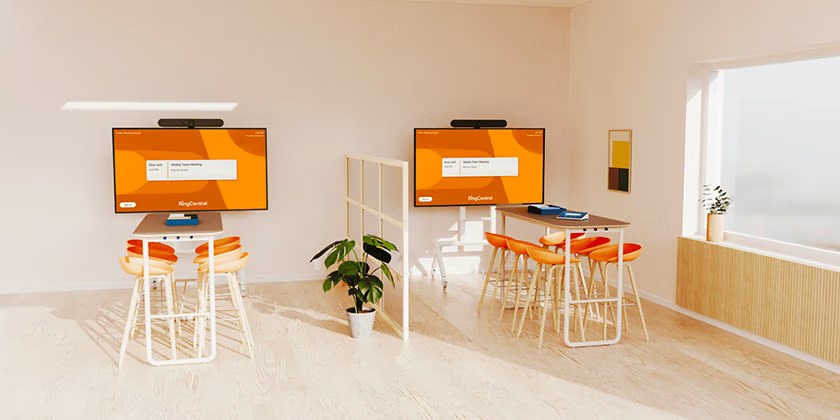
The vendor handles the shipping, service, and warranty of the devices provided. The monthly fee for RingCentral DaaS solution starts at $4 per phone.
8×8 is a business phone system vendor that offers different types of VoIP phones and accessories, including desk and cordless phones, headsets, and analog telephone adapters (ATA) for rent and sale. To make these sets of equipment accessible to companies, the provider presents a range of payment plans, which include DaaS.
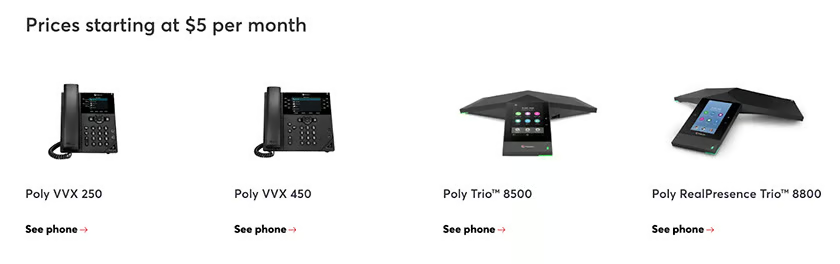
The 8×8 Flex Program comes with low monthly payments without upfront costs. The products have a five-year manufacturer’s warranty. Businesses are able to upgrade to the latest phones and cancel subscriptions anytime. Subscribe to 8×8’s DaaS solution for a monthly starting fee of $5 per phone.
Zoom’s HaaS includes business phone and video meeting equipment. For the phone solution, you’ll find Poly, Yealink, and AudioCodes in its hardware catalog. Some products cost as low as $3.99 a month. For the meeting hardware, the provider carries popular brands like Poly, Yealink, DTEN, Logitech, and Neat.

Although the featured hardware complements Zoom’s software, you need to pay the dedicated fees for the software license, as it’s not part of the HaaS offering. However, Zoom helps businesses manage subscriptions easily by providing a single invoice for both hardware and software subscriptions.
Benefits of Device as a Service (DaaS)
Many businesses adopt DaaS primarily for the reduced, long-term equipment costs. Compared to purchasing equipment, DaaS is more manageable, as it only comes with a monthly fee. In fact, it allows you to turn hardware costs from a large capital expenditure to a bearable operating expense.
Meanwhile, compared to renting devices, DaaS is more affordable, as vendors offer all-around IT support. You won’t have to worry about repair expenses along the way since it’s already included in the subscription plan. Aside from long-term money savings, companies benefit from these DaaS benefits:
Find the Right Tech for Work
As mentioned, DaaS vendors help you find the devices most fitting for different users in your company. This contributes to increased productivity as employees are equipped with the tools they need to accomplish work efficiently. On top of that, since most of the DaaS providers support a wide range of brands, your team will quickly secure the right technologies. There’s less hassle finding the hardware products with the precise specifications users require.
Access to Professional Advice
Aside from securing the right technologies for different work styles, DaaS enables you to keep abreast with the latest technologies in the market. When you’re handling various business tasks, it’s difficult to stay updated, but by partnering with reliable DaaS providers, you receive professional advice on which new devices make for specific use cases.
At the same time, DaaS vendors keep in touch with device manufacturers and could discuss warranties on your behalf. This frees your IT department from a particularly time-consuming task, giving them more time and bandwidth to handle internal concerns.
Hassle-free Device Management
From procurement and deployment to maintenance and disposal of devices, DaaS service providers supervise the entire device lifecycle. Without having to worry about device configuration, software updates, and security measures, you’ll be able to focus on more important, high-yield business tasks.
Since the important aspects of device management are handled professionally from end to end, you have the peace of mind that the devices work well to team members’ advantage.
Streamlined Technology Set
The top DaaS providers mentioned above, RingCentral, 8×8, and Zoom, offer software solutions aside from hardware products. When you avail both solutions, it’s easier to streamline the tech stack. Moreover, you’ll ensure that devices are compatible with the software systems used and are functioning smoothly together.
Optimized Device Use
Part of DaaS providers’ all-around services is device analytics, monitoring the health, productivity, and security of each device on your fleet. With this, it’s easier to spot problems early on and prevent issues that compromise team members’ productivity. DaaS vendors provide remote assistance for bugs and glitches, so even if an employee is out on a business trip, they’ll be able to have issues fixed immediately.
Tips for Choosing the Best DaaS Provider
While DaaS offers plenty of business benefits, not all vendors are created equal. Thus, it’s important to choose the right provider that can handle your company’s requirements. The tips below should help you find the best DaaS partner:
Match Business Needs With the Provider’s Services
Identify the number of devices you need for your teams. If you already have devices deployed, make a list of them and take note of their specifications, such as operating systems. Then, identify the devices you want to add to the list, outlining how the devices will be used and which applications and integrations are necessary to enable the user’s workflow.
From here, research different DaaS providers. Look into their device catalog, software and security capabilities, support solutions, and service level agreements (SLA) and find one that matches your business requirements and preferences.
See if the Subscription Fees Match Your Budget
DaaS vendors like RingCentral, 8×8, and Zoom provide a range of rates for featured devices. On the other hand, some desktop as a service providers follow a pay-as-you-go model, while others are on a per-user basis. Aside from the monthly subscription fee, you must consider any upfront costs or penalties for early termination. Ideally, go for providers with discounts for bulk purchases. Consider those offering incentives for availing both hardware and software systems.
Evaluate Customer Support
Learn how DaaS vendors assist in registering devices and setting up accounts. If you think your team would benefit more from a hands-on approach, look into providers with in-person deployment options.
Consider the technical support, particularly the response times for requests and issues and the channels for submitting tickets. It should be easy for you to access support resources. Ideally, the vendor must have a dedicated knowledge center facilitating self-service.
Check Security Measures
Business phones and other devices are vulnerable to cyberthreats that result in unauthorized access. Your DaaS vendor should have security measures in place to prevent such data breaches. Multiple layers of protection are necessary, including data encryption, multi-factor authentication, threat detection, and regular security updates.
If you’re in a niche industry, ensure that your provider complies with security standards, such as the Health Insurance Portability and Accountability Act (HIPAA) and Payment Card Industry Data Security Standard (PCI-DSS).
Frequently Asked Questions
What is the difference between SaaS & DaaS?
SaaS stands for software as a service, an application hosted on the cloud and accessed by end-users via the internet. Device as a service (DaaS) focuses on providing and managing physical hardware, including business phones, mobile phones, personal computers, laptops, and tablets.
Is device as a service the same as desktop as a service?
Both device as a service and desktop as a service share the DaaS acronym, but they are different. While device as a service involves providing IT equipment and device lifecycle management services, desktop as a service allows users to access virtual desktops over the internet from a third-party cloud services provider.
What is desktop as a service & how is it different from a VPN?
Many people wonder, “What is DaaS in cloud computing?” and to put it simply, desktop as a service allows any device from anywhere to access a cloud-hosted virtual workspace. Meanwhile, a virtual private network (VPN) creates a secure connection between devices from remote locations and a corporate network.
Bottom Line
The device as a service solution simplifies the procurement and management of computing equipment, offering significant money savings to businesses in the long run. It ensures device security and reduces the likelihood of unauthorized access to confidential company information. More importantly, it facilitates increased productivity for team members as they use tools fit for their work tasks. Explore different DaaS providers today as you take stock of your business needs.
