







One of the biggest concerns for business owners is protecting their companies from cyberattacks. However, ensuring your business’ safety involves more than just relying on your computer’s antivirus software. The best antivirus software for small business owners should include essential features such as real-time threat detection, automated scanning, monitoring, and multi-device firewall protection.
Discover the best antivirus software for business security by considering the following options:
- Bitdefender GravityZone: Best overall antivirus software for small business
- Avast Business Antivirus: Best for cloud-based business management
- ESET Protect: Best for enterprise-grade security
- Webroot Business Endpoint Protection: Best for automated antivirus software
- Norton Small Business: Best for social media monitoring
Why you can trust us
- Comparing the best antivirus software for small businesses
- Bitdefender GravityZone: Best overall antivirus software for small business
- Avast Business Antivirus: Best for cloud-based business management
- ESET Protect: Best for enterprise-grade security
- Webroot Business Endpoint Protection: Best for automated antivirus software
- Norton Small Business: Best for social media monitoring
- Key features to look for in antivirus software
- How to choose the right antivirus software for your small business
- Frequently asked questions (FAQs)
- Bottom line
Comparing the best antivirus software for small businesses
| Best antivirus software for business | Starting price(1 year subscription) | Key features | My Score out of 5 |
|---|---|---|---|
 | $115.49 for 5 devices |
| 4.58 |
| Visit Bitdefender | |||
 | $148.36 for 5 devices |
| 4.43 |
| Visit Avast | |||
 | $211 for 5 devices |
| 4.36 |
| Visit ESET | |||
 | $150 for 5 devices |
| 4.34 |
| Visit Webroot | |||
 | $79.99 for up to three employees |
| 4.08 |
| Visit Norton | |||
Bitdefender GravityZone: Best overall antivirus software for small business
My expert opinion
Bitdefender tops the list as the best overall antivirus software for small businesses, offering its GravityZone suite of subscriptions specifically for small business owners. Like many antivirus software providers, Bitdefender GravityZone takes an automated approach to business security, focusing on anticipating potential risk areas and defending against cyberattacks.
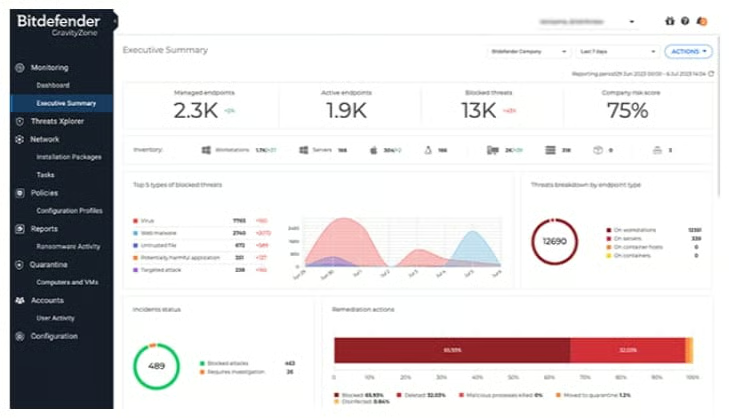
Specifically, the software includes anti-malware and anti-exploit features that scan and analyze your devices for viruses, worms, or other types of malicious software. You can also stay updated on the software’s effectiveness through a digital console and dashboard, which tracks endpoint coverage and allows you to manage your workspace.
At the same time, some of the service plans have recently been discontinued, including GravityZone Business Security, which may concern users seeking long-term service options. Additionally, many features offered by other providers, such as device control and protection for email and mobile devices, are only available as add-ons. If you need access to these solutions, consider ESET Protect, which provides a range of enterprise-grade security features.
Pricing
| Small business antivirus software (for 5 devices) | GravityZone Small Business Security | GravityZone Business Security* | GravityZone Business Security Premium | GravityZone Business Security Enterprise |
|---|---|---|---|---|
| One year | $115.49 | $129.49 | $286.99 | Contact sales for pricing |
| Two years | $181.99 | $220.49 | $482.99 | |
| Three years | $237.99 | $310.79 | $681.09 | |
| *As of December 2024, GravityZone Business Security is discontinued. | ||||
Standout features
- HyperDetect: Even before an attack occurs, advanced threat protection focuses on detecting potential security risks and suspicious activity so that you can worry less about the safety of your data and technology.
- Business assets monitoring: Track the security of your business email, credit cards, and social media accounts to ensure that they aren’t vulnerable to cyberattacks. If your assets have been threatened, Bitdefender provides security recommendations and next steps.
- GravityZone console: Visit the dashboard to receive an overview of endpoints and blocked threats, as well as generated reports and risk assessments.
Avast Business Antivirus: Best for cloud-based business management
My expert opinion
For small business owners who are operating remote businesses, Avast Business Antivirus is the best option for cloud-based business management. While some business owners believe they won’t need antivirus software for all their devices and networks, Avast provides comprehensive security protection that covers multiple devices and endpoints.
IT professionals can greatly benefit from the Avast Business Hub, which allows for the management of multiple devices and networks from a single, central console. This is crucial for overseeing a remote workspace or customer networks. The sandbox feature also allows you to test applications or software in a secure environment, ensuring that your computer or network remains uncompromised while identifying a potential threat.
However, there are a few features that Avast doesn’t offer in its Business Security plans, such as patch management and extended detection and response. So, if you require more advanced protection, I recommend Webroot, which offers patch management and various endpoint solutions that are beneficial for businesses that need full coverage support.
Pricing
| Small business antivirus software (for five devices) | Avast EssentialBusiness Security | Avast PremiumBusiness Security | Avast UltimateBusiness Security |
|---|---|---|---|
| One year | $148.36 | $187 | $227.08 |
| Two years | $244.76 | $308.52 | $374.68 |
| Three years | $342.72 | $431.92 | $524.56 |
Standout features
- Avast Business Hub: Use the cloud console to manage your security features across networks and protect customer data and profiles.
- USB protection: Control access to external devices by ensuring they can’t access any of your end users’ data without permission.
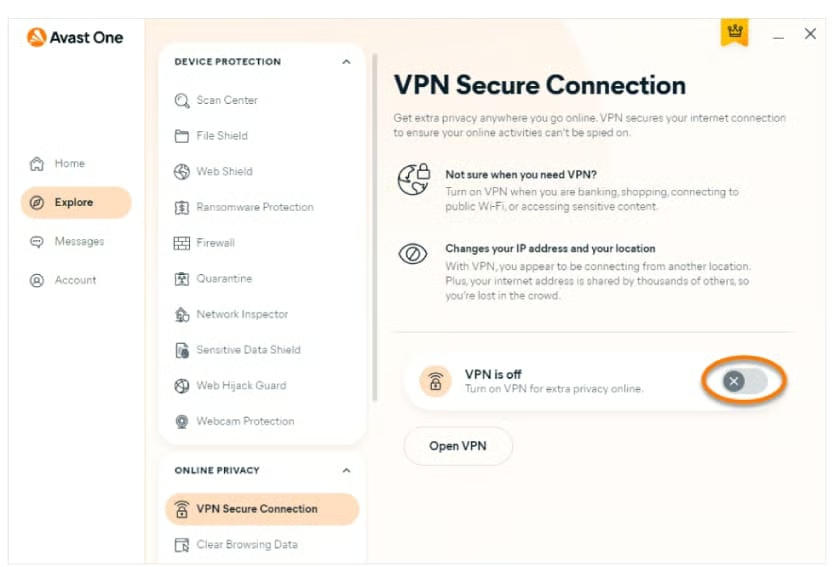
- Personal VPN: Avast offers a virtual private network (VPN) service for secure browsing, wherever you work.
ESET Protect: Best for enterprise-grade security
My expert opinion
Small business owners who need to comply with specific industry standards should consider ESET Protect as the best option for enterprise-grade security. Each subscription plan offers unique regulatory standards with a focus on cybersecurity compliance. In this sense, standard antivirus protection, such as anti-phishing features, is supported by server security and investments in regulatory frameworks.
Whether you are a healthcare provider who needs to comply with the HIPAA or someone who accepts payments from customers and needs to follow the Payment Card Industry Data Security Standard (PCI DSS), ESET has a solution for you.
But the primary issue with ESET Protect is its pricing and subscription structure. Of all the antivirus software providers, ESET has the highest subscription prices. And, while most providers allow you to purchase plans by device, ESET has a minimum subscription requirement of five devices. Therefore, solopreneurs and budget-conscious business owners should consider Norton Small Business, which offers subscription plans starting at $79.99 and charges based on the number of employees instead of devices.
Pricing
| Antivirus software for business (for 5 devices) | ESET Protect Entry | ESET Protect Advanced | ESET Protect Complete | ESET Protect MDR |
|---|---|---|---|---|
| One year | $211 | $275 | $287.72 | Contact sales to request pricing |
| Two years | $380 | $495 | $518.07 | |
| Three years | $569.50 | $742.50 | $776.90 | |
| ESET Protect subscriptions require a minimum of five devices | ||||
Standout features
- Mobile threat defense: Extend your security features to both Android and iOS devices, ensuring the safety of company data and protection against unwanted apps.
- Ransomware remediation: In the event of a ransomware attack, the remediation feature will recover and back up any corrupted files.
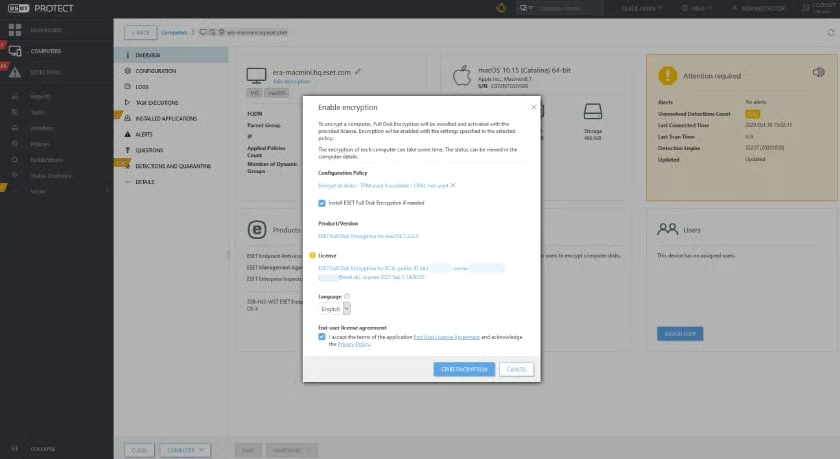
- Full disk encryption (FDE): Encrypt complete system disks, drives, or partitions to ensure that your data is compliant with security and regulations.
Webroot Business Endpoint Protection: Best for automated antivirus software
My expert opinion
Webroot Business Endpoint Protection is one of the best options for automated antivirus software because it incorporates predictive analytics and threat monitoring into a multi-layered approach that prevents malware from infecting your system. It also creates a process log of where and how a threat was able to infiltrate the system. If a change is made, Webroot can also access backup files and restore them to their original state.
In comparison to other providers, Webroot offers antivirus software that prioritizes endpoint protection, which not only covers computers and networks but also servers and virtual machines. Therefore, Webroot’s endpoint protection software is excellent for businesses with cloud computing systems, extensive digital archives, or virtual storage.
Although many of the providers on this list offer a suite of scalable business plans, Webroot’s business plans are focused on providing specific services. This means that features like VPN services require purchasing a separate bundle. If you want more all-inclusive software, choose Avast, which offers personal VPNs on its highest-tier plans.
Pricing
| Antivirus software for business (for five devices) | Webroot Business Endpoint Protection | DNS Protection | Security Awareness Training |
|---|---|---|---|
| One year | $150 | $150 | $150 |
Standout features
- Evasion shield: Turn on this protective feature to safeguard your network and devices from script-based attacks.
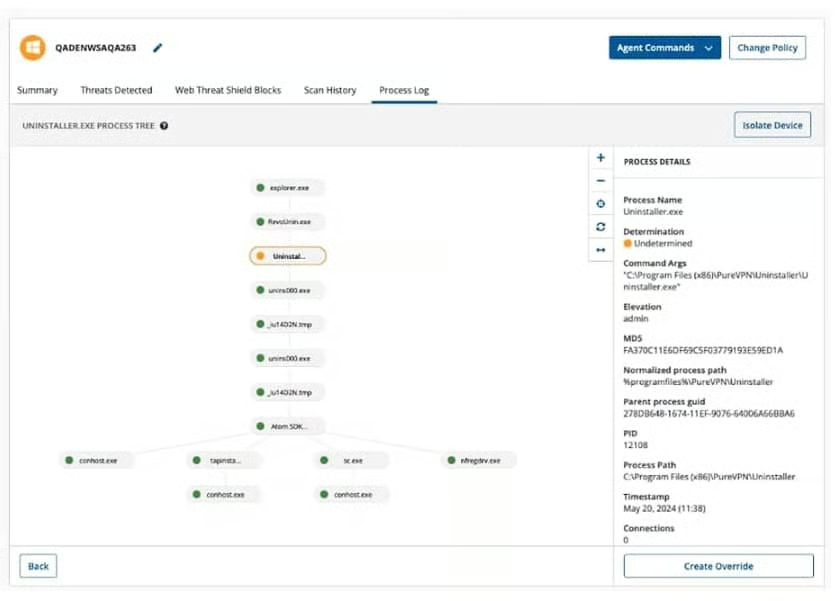
- Device isolation: Using agent commands, Webroot allows you to isolate a device from both internal and external network traffic, ensuring that an infected device does not spread a virus or malware to other devices.
- Process tree: Visualize the initial process and any subsequent activities to understand the sequence of events leading up to a threat or cyberattack. You can then delve deeper into each step of the process to better protect your workspace.
Norton Small Business: Best for social media monitoring
My expert opinion
Although each provider on this list offers antivirus software for smaller teams, Norton Small Business stands out because it also provides social media and employee identity monitoring. Instead of simply focusing on protecting devices or a network, Norton searches for leaked account information and compromised data outside of your workspace, providing an extra layer of protection for your business identity.
With financial monitoring, the software also picks up any suspicious activities in your bank accounts, which is beneficial for safeguarding your business transactions. Norton also creates a secure browsing environment by offering features like an encrypted password vault for generating and saving passwords, and secure VPNs for browsing on the go.
Norton Small Business is designed specifically for small businesses, but it’s worth noting that other providers on this list offer device-based subscriptions, whereas Norton uses an employee-based subscription model. This approach can be suitable for solopreneurs or small teams.
However, the ten-employee limit can be a drawback for larger organizations. If your business has more than 10 employees, consider Bitdefender GravityZone, which offers scalable plans that cater to businesses of all sizes.
Pricing
| Small business antivirus software(introductory rate*) | NortonSmall Business | NortonSmall Business Premium |
|---|---|---|
| Up to 3 employees | $79.99 | N/A |
| Up to 5 employees | $119.99 | $199.99 |
| Up to 10 employees | $169.99 | $249.99 |
| *Pricing reflects the first-year subscription cost; however, the price increases after the first year. | ||
Standout features
- Employee identity monitoring: Add your employee’s information to a contact list so you are alerted if their information is compromised or leaked in a data breach.
- Device cleanup: For Windows PC users, Norton offers a file cleanup and optimization feature that automatically removes any unwanted or unused files.
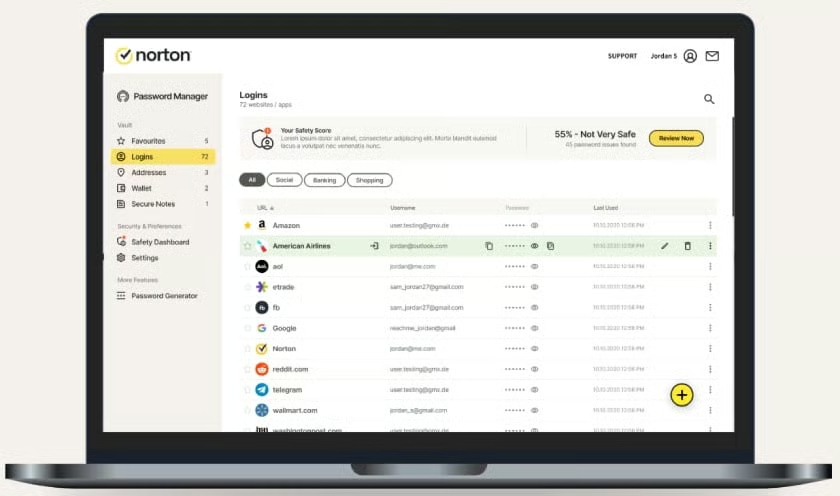
- Password manager: One of the simplest ways to keep your information safe is by protecting your business accounts. Norton’s password vault generates complex passwords, identifies weak passwords, and safely saves previous ones.
Key features to look for in antivirus software
Generally, antivirus software is used to protect networks and devices from cyberattacks, but not all businesses have the same security needs. For example, while some teams would benefit from mobile device coverage, others might require more automated support. Before selecting antivirus software, consider the following key features to determine which are best suited for your business.
- Automated system scans: One of the most essential features in antivirus software is real-time monitoring of your network and devices. Most providers include a combination of automated and manual scans, which ensures that you can employ both defensive and offensive strategies against cyberattacks.
- Threat detection and removal: After a scan, if a threat is detected, you also want a tool that will remove the malicious software or virus and restore your computer or network to its original state.
- VPN access: For business owners or remote team members, having a personal virtual private network (VPN) allows you to work from different locations without worrying about the security of your company data.
- Endpoint Detection and Response (EDR): When monitoring threats, you also want software that can respond directly to external threats, which is the purpose of EDR. Some antivirus software providers offer standalone or add-on EDR, while others integrate it into their subscriptions.
- Email protection: A significant threat to business security is social engineering attacks launched through email campaigns. Therefore, many antivirus companies offer some form of email shield or protection to ensure that incoming emails, attachments, and external links are scanned before being opened.
- Remote device support: The modern workspace includes not only desktop computers and laptops but also a variety of mobile devices, such as cellphones and tablets. It is, therefore, essential to look for antivirus software that offers remote access and supports multiple devices.
- Password manager: Instead of purchasing additional software, many antivirus providers include password management tools to generate and safeguard passwords, which is a crucial method of protecting accounts from unauthorized access.
How to choose the right antivirus software for your small business
In an era where security threats are imminent, incorporating VoIP security tips and antivirus software is crucial for protecting your workspace. When selecting the best antivirus software for your business, there are a few steps you can take to enhance your security and protection.
1. Assess your security needs
The first step in determining what type of antivirus software you need is understanding the kind of security or data protection that would benefit you the most. One of the easiest ways to identify your security needs is by conducting a risk assessment. Risk assessments can help you pinpoint where your business is vulnerable to attack and the specific features you require.
2. Consider your workspace tools
The next thing to consider is the technology you use in your business. Each antivirus software provider is compatible with specific computers, devices, and browsers. Therefore, you should choose a provider that not only meets your security needs but is also software that can be integrated into your tech stack.
3. Create a concrete budget
Plans and pricing are a primary concern for small business owners, so it’s also essential to understand how much you can budget for antivirus software based on the size of your team. Antivirus software is priced per device or employee, meaning that you should factor in how many subscriptions you will need to cover the computers and other devices in your workplace. Set a budget before choosing software, so you can make the best decision.
4. Book a demo or sign up for a free trial
Once you’ve chosen a subscription service, the final step is to try out different products. Many types of antivirus software offer free trials or product demos, which provide a hands-on experience with the product and help you determine how well it works. Once you have some experience with the product, you can feel confident in purchasing that annual subscription.
How I evaluated the best antivirus software for small businesses
Frequently asked questions (FAQs)
Are there free antivirus solutions suitable for businesses?
Many of the antivirus solutions in this guide, such as Avast and Bitdefender, offer free versions of their antivirus software. However, this free software has limited features and may not provide all the security and protection a business needs.
Can antivirus software protect against ransomware attacks?
One of the primary reasons to adopt antivirus software is protection against ransomware attacks. Although using antivirus software does not guarantee you will not experience an attack, you should consider providers that offer this feature.
Is it necessary to have antivirus software if we use cloud services?
Yes, it is still essential to have antivirus software, even with a cloud-based phone system. Many providers specialize in offering protection for businesses that use cloud services, such as automatic scanning of cloud storage systems and multi-device monitoring.
Bottom line
As online data collection continues to grow and new technologies emerge, businesses that operate on online platforms face an increased risk of cyberattacks and security breaches. To better protect your business, investing in antivirus software is a wise decision that safeguards not only your company but also your employees, clients, and customers.
On this list, Bitdefender was chosen as the best antivirus software for small businesses because it offers multiple solutions that are tailored to small and mid-sized companies. Especially for businesses without an in-house IT team, Bitdefender’s Gravity Zone subscriptions offer multi-layered protection, continuous monitoring, and fraud protection that can be easily managed from a single dashboard. Start a free trial today to learn more.
