








If you want to streamline your real estate firm’s sales, marketing, and customer service operations, you’ve come to the right place. We’re here to help you choose the best free customer relationship management (CRM) software for your real estate business.
Many free real estate CRMs provide sales management, reporting, analytics, marketing, and automation features that allow agents to focus on developing deeper client relationships. Its contact storage, client database, lead management, and documentation tools support a real estate agent’s engagement and sales efforts.
In this expert guide, we’ll help you evaluate the best free CRM for real estate agents and brokerage firms based on features, pricing, ease of use, support, and reviews.
- HubSpot CRM: Best for real estate marketing
- Zoho CRM: Best for lead and deal management
- Bitrix24: Best for omnichannel collaboration
- ClickUp: Best for project management
- Agile CRM: Best for appointment scheduling
- Best Free CRMs for Real Estate Compared
- HubSpot CRM: Best Free CRM for Real Estate Marketing
- Zoho CRM: Best for Robust Lead and Deal Management
- Bitrix24: Best Free Real Estate CRM for Omnichannel Collaboration
- ClickUp: Best Free Real Estate CRM for Project Management
- Agile CRM: Best for Appointment Scheduling
- Frequently Asked Questions (FAQs)
- Bottom Line
Best Free CRMs for Real Estate Compared
| Provider | Free Plan | Free Trial | Starting Monthly Price | Our Rating out of 5 |
|---|---|---|---|---|
 | ✔ 2 users | ✕ | $15 per user | 4.77 |
| Visit HubSpot CRM | ||||
 | ✔ 3 users | 15 days | $14 per user | 4.67 |
| Visit Zoho CRM | ||||
 | ✔ Unlimited users | 15 days | $49 for 5 users | 4.61 |
| Visit Bitrix24 | ||||
 | ✔ Unlimited users | 14 days | $7 per user | 4.60 |
| Visit ClickUp | ||||
 | ✔ 10 users | ✕ | $9.99 per user | 4.44 |
| Visit Agile CRM | ||||
HubSpot CRM: Best Free CRM for Real Estate Marketing
When to Use HubSpot CRM
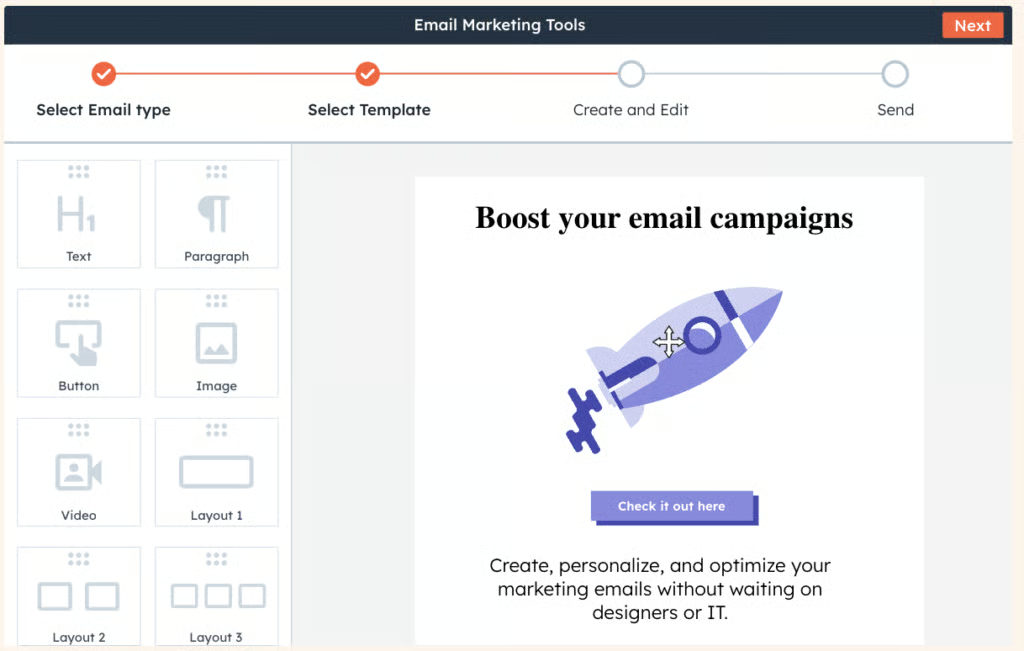
You’re a new agent or new brokerage firm needing free real estate marketing tools: If you’re a new real estate agent or manage a new real estate firm, HubSpot CRM is an excellent choice. This general-use CRM offers a free plan with email, SEO, ad management, and social marketing tools.
Realtors can launch promotional videos using the free beta version of AI Clip Creator. Enter a description of your video, and choose a user-friendly template to effortlessly design property listing videos, educational content, or personalized introduction videos. With these content marketing capabilities, HubSpot is one of our top picks for the best real estate CRM software.
When to Use an Alternative
You need more scalable paid plans on a real estate CRM: HubSpot CRM offers a freemium plan for two users and a low-cost, basic plan (Starter plan for only $15 per user every month). However, its second tier, the Professional plan, costs $1,170 for five users monthly, which is relatively more expensive than other providers on this list.
Alternatives: Zoho CRM, Bitrix24, and Agile CRM offer scalable paid plans. Zoho CRM’s paid plans range from $14 to $52 per user monthly. Bitrix24 provides a starting plan at $49 (for five users per month) and a Professional plan at $199 per organization (includes 100 users). Meanwhile, Agile CRM costs $9.99 to $64.99 per user monthly (billed annually).
Key Freemium Features
- Two users
- Email marketing (up to 2,000 email sends monthly), one email automation, and response tracker
- Basic SEO recommendations for real estate
- Connect HubSpot to your real estate website (send emails and manage content)
- Ad retargeting (two audiences) and ad management (simple website audiences only)
- HubSpot mobile app with email content optimization
- Facebook Messenger integration (send and receive messages and quick replies)
- List segmentation (10 active and 1,000 static lists) for personalized marketing content
- Standard web analytics dashboard with detailed filters, like average time on page
- Users can sign in to HubSpot CRM using the Google or Microsoft social login)
HubSpot CRM Pricing for Paid Plans*
Cost: $15 per user
Key Features:
- Everything in the free plan
- 5,000 mass email sends for marketing
- One simple workflow for each form (with up to 10 actions)
- 50 active and 1,000 static lists for list segmentation
- SEO recommendations (basic recommendations, one page at a time)
- Up to 10 automated email actions
- 1,000 custom properties per object (associate data points with contacts, companies, and deals)
- Up to 10 automated form submissions
- Live chat (remove HubSpot branding)
- 10 dashboards and 10 reports per dashboard
Cost: $1,170 for five users (additional users start at $45 per month)
Key Features:
- Social media tools to publish multimedia posts, monitor conversations, and analyze performance
- Omnichannel marketing automation (up to 300 workflows for 10 teams)
- Video module to upload real estate videos like house tours and staging
- SEO analytics track organic search performance metrics like impressions and click-through rates
- Account-based marketing (ABM) tools like company scoring, properties, templates, and reports
- Up to 50 labels for data associations between each object pair
- Unlimited simple workflows for each form (with unlimited actions)
- Embedded and pop-up calls-to-action (CTAs) to match the look and feel of your real estate website
- Organize real estate agents into teams based on region (up to 10 teams)
- Run A/B tests on landing pages and emails to determine the best variations in copy and design
*Pricing is based on annual billing on a per-user monthly breakdown of HubSpot Customer Platform. Monthly billing and enterprise-level options are also available for a higher cost. We update pricing information regularly but encourage readers to check current pricing.
Our Expert Opinion
HubSpot CRM is the winner for free marketing tools for brokerage firms. Marketing Hub is built on the HubSpot CRM, giving users access to all CRM tools. New real estate agents and brokerage firms can use its free-forever capabilities for email marketing, SEO, ads management, and website management to list properties and attract more clients. HubSpot CRM’s user-friendly mobile app lets users access client data anywhere and close property deals quickly.
Zoho CRM: Best for Robust Lead and Deal Management
When to Use Zoho CRM
You need a CRM with robust lead and pipeline management features: Zoho CRM lets you generate potential clients (buyers and sellers) from chats, websites, and social media at no cost. Set up scoring rules starting with its Standard plan ($14 per user monthly) and lead nurturing to the right real estate agents for a higher conversion rate.
Plus, managers can make more accurate sales forecasts and estimates for multiple periods and agents. They can use the data to inform the next best steps like the best stage to initiate and create new or change pipelines for both buyer and seller transactions.
When to Use an Alternative
You want more affordable AI capabilities in a real estate CRM system: While Zoho CRM is popular for its free and low-cost plans, the Zia tool is locked in the Enterprise plan for $40 per user every month. New real estate professionals needing built-in AI tools may find this plan relatively more expensive than other providers on this list.
Alternatives: Bitrix24’s freemium plan includes AI capabilities for automating repetitive tasks, generating emails, blogs, and survey content, and managing calls. ClickUp’s paid plans (starting at $7 per user every month) include AI capabilities that help real estate agents curate client emails and summarize business documents and conversation threads.
Key Freemium Features
- Three users
- Lead, account, contact, and deal management
- Tasks, meetings, and calls
- Marketing automation for campaigns and email opt-out
- Standard reports for rep performance, deal, lead, sales, and campaign tracking
- 10 custom email templates and document library
- 10 workflow automation rules per module with up to five tasks per automation
- Five email notifications, 50 emails per user license, and 150 email sends per day
- 1GB file storage per organization and 10MB data storage (5,000 records)
- Customized home page components, tabs, list views, and search layout
Zoho CRM Pricing for Paid Plans*
Cost: $14 per user
Key Features:
- Everything in the free plan
- Sales forecasting
- Calendar booking
- 100 custom email templates and 250 daily mass emails per organization
- 30 workflow automation rules per module
- Customizable group tabs, email address duplication check, unique fields, and layout
- 200MB data storage (100,000 records) and two free data backups monthly
- 100 custom reports and 10 custom dashboards
- Google Sites web forms and Google Workspace integration
- 1GB file storage per organization plus 512MB per user license
Cost: $23 per user
Key Features:
- Everything in the Standard plan
- Automation for creating real estate records, assigning record owners, and webhooks
- Macros or a set of actions (like sending emails) for a group of records in a module
- Unlimited custom reports, dashboards, and email templates for pipeline management
- Client support module for capturing customer feedback on your real estate services
- 500 daily mass emails per organization
- 80 workflow automation rules per module
- 10GB data storage (approximately 5 million contact records)
- SalesSignals (real-time activity notifications on lead and customer interactions)
Cost: $40 per user
Key Features:
- Everything in the Professional plan
- Create custom functionalities or kiosks like a real estate sales playbook in the CRM
- Voice of the Customer (VoC) to gain insights into a client’s needs and sentiments
- Best-time-to-contact and record assignment recommendations by Zia
- Data enrichment for up to 500 records per user license
- Task reminders and “ask” options to find CRM data on a command
- AI-powered prediction builder for conversion predictions and revenue forecasts
- Multiple scoring rules on lead scores
- Territory-based forecasting
Cost: $52 per user
Key Features:
- Everything in the Enterprise plan
- Enhanced feature limits (like up to 50 lead scoring criteria per module)
- Extended AI capabilities, such as 20 predictions per real estate organization
- Up to 50 custom links per module to access lead information from any third-party app
- Data preparation to prepare and cleanse data before analysis
- Augmented analytics powered by AI
- Data storytelling provides automated insights through textual narration of reports
- Unify business data across various functions like marketing, sales, and support
- Advanced administration, such as 100MB default data storage per user license
- Unlimited application programming interfaces (APIs)
Zoho CRM Add-ons:
- Additional File Storage: $4.60 for 5GB per organization, monthly
- Additional Data Storage: $2 to $4 for 100MB per month
- Data Backup: $12 per request
*Pricing is based on annual billing and a per-month breakdown of the plans. Monthly billing is available for a higher cost. While we update pricing information regularly, we encourage our readers to check current pricing.
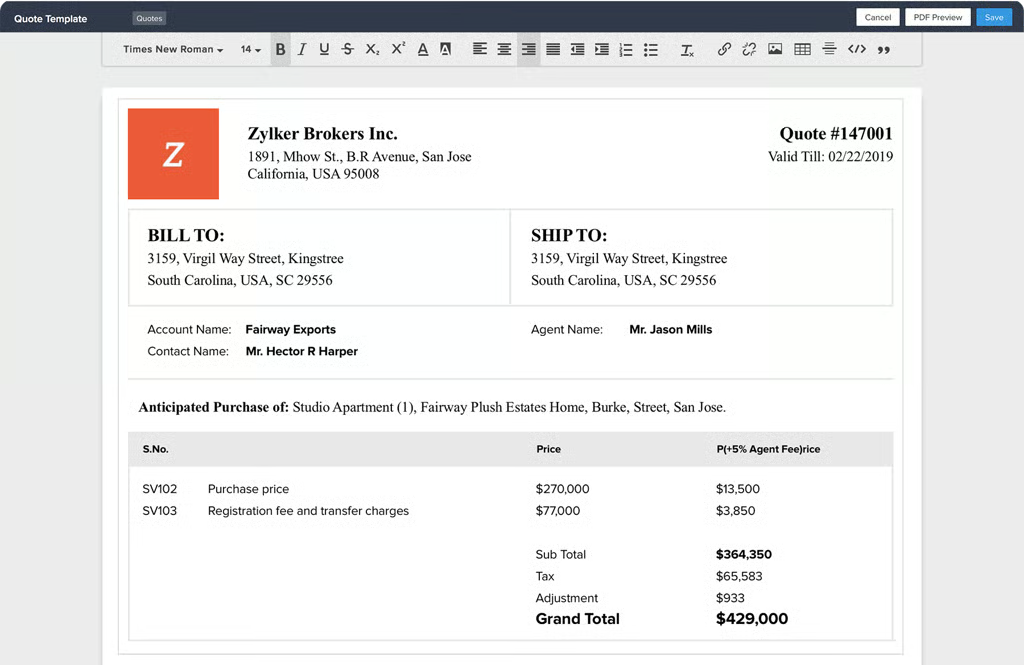
Zoho CRM enables real estate agents to share quotes and invoices via custom email and invoice templates to speed up the closing process. (Source: Zoho CRM) 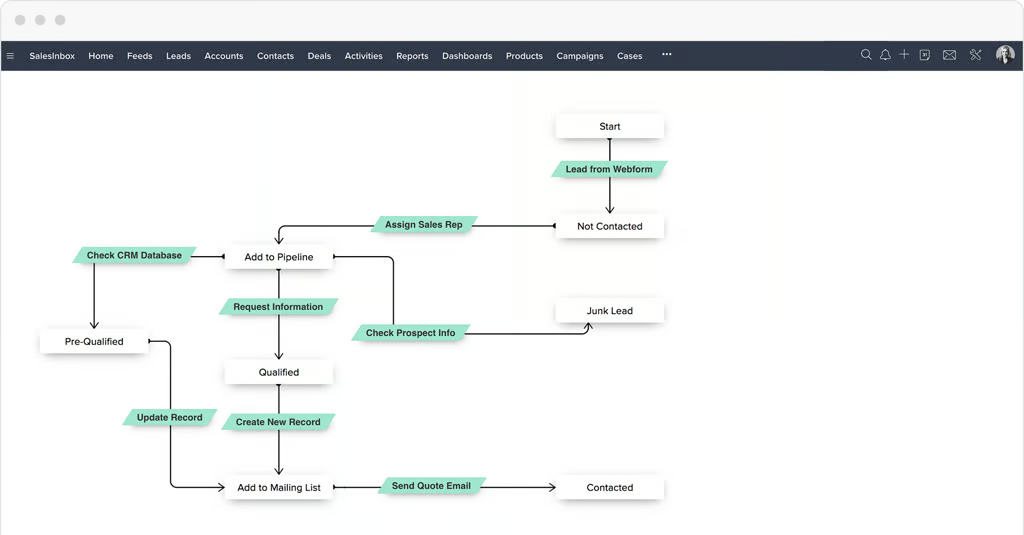
Zoho CRM’s Blueprint process automation helps real estate professionals identify and resolve bottlenecks in their lead management and overall sales process. (Source: Zoho CRM)


Our Expert Opinion
Zoho CRM has notable robust client and activity tracking, lead scoring, sales forecasting, and AI tools for data enrichment. Real estate agents can leverage this CRM to launch real estate marketing through their website and social media and lead nurturing strategies like assessment and follow-up surveys. In addition, real estate agents can manage property listings more efficiently with this CRM’s direct Zoho Developer Console integration.
Bitrix24: Best Free Real Estate CRM for Omnichannel Collaboration
When to Use Bitrix24
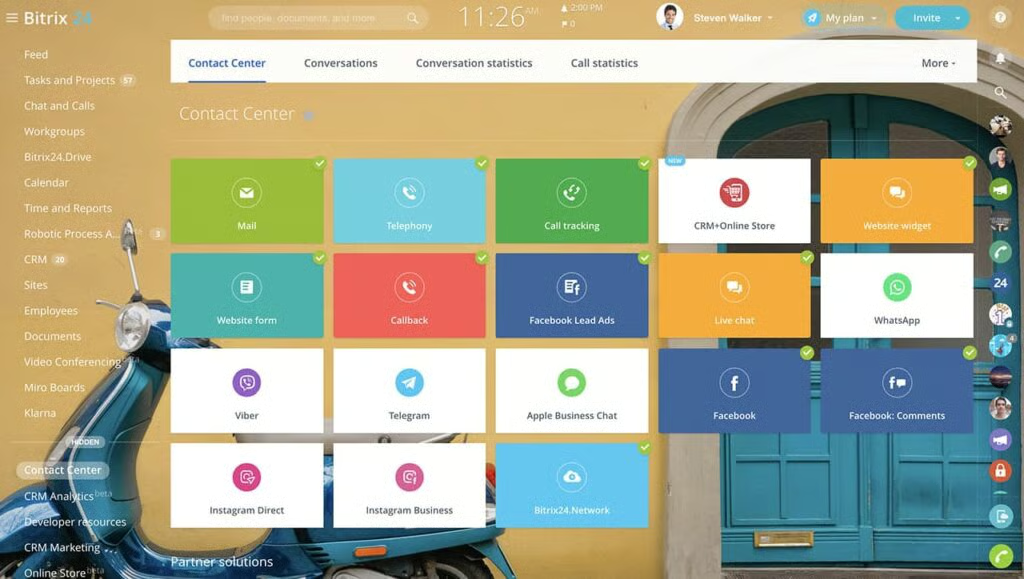
You need robust communication and collaboration tools: Bitrix24 offers chats, emails, and audio and video calls in the contact center module. Managers can use its task management tools to assign clients to real estate agents, set up reminders, and create task descriptions and checklists. Its dedicated feed feature lets teams share news, discuss, engage, and collaborate with coworkers in the brokerage firm.
Bitrix24’s freemium plan (for unlimited users) has client management features for sending and receiving client messages from platforms like Facebook, Instagram, and Telegram into the CRM. Its document management capabilities let realtors easily create real estate documents, like listing agreements and closing disclosures, to formalize all verbal transactions.
When to Use an Alternative
You need affordable real estate project management tools in CRM software: Bitrix24 has a project management module for tracking asset valuations, hosting open houses, advertising property listings, and other real estate project-related tasks. However, it’s locked in the Standard plan ($99 per organization for 50 users).
Alternative: ClickUp offers free and low-cost task and project management tools, such as AI-powered project summaries and milestone tracking, in its Unlimited plan ($7 per user monthly). It helps you implement real estate projects like hosting open houses, managing property listings, and providing valuations
Key Freemium Features
- Unlimited contacts and deals and one pipeline
- Video calls via Zoom or Skype and video conferencing without a time limit
- Task management tools like assignments and timeline features for activity log
- AI in tasks via CoPilot for creating task descriptions and checklists and summarizing tasks
- Communicate with coworkers through comments and engage in discussions (feeds)
- Client management module with deal task setting, activity planning, and automatic telephony dialer
- Instant synchronization with external calendars like Google Calendar and Microsoft Office 365
- Office management tools like task lists, appreciation badges, user profiles, and shared events
- Open real estate documents, presentations, and spreadsheets with automatic duplicate detection
- Connect Facebook, Instagram, and Telegram to send and receive client messages into the CRM
Bitrix24 Pricing for Paid Plans*
Cost: $49 per organization (includes five users)
Key Features:
- Everything in the free plan
- Built-in telephony with call-back widget, email, and CRM forms in the contact center module
- Edit and collaborate on documents like agency agreements inside tasks, calls, chats, and feeds
- Webmail to access all email inboxes in one place and create tasks from emails
- Screen sharing during a video call
- Record important meetings and video calls with meeting briefs to outline discussions
- Invoices or bills for real estate services inside the CRM are saved as PDF files or emailed to clients
- Convert a real estate deal to an invoice
- Create five fully customizable pipelines for different real estate sales processes
- Set automation to move a real estate client from one pipeline to the next per set rules (tunnels)
Cost: $99 per organization (includes 50 users)
Key Features:
- Everything in the Basic plan
- Unlimited leads and real estate estimates are saved as PDF files and can be emailed to clients
- Bulk email (up to 50,000 emails per month) and short messaging service (SMS)
- Robocalling or automatically sending prerecorded messages to buyers and sellers
- Convert lead to contact, company, deal
- Convert property buying and selling deals to estimates
- Convert estimates to deals and invoices for both property sellers and buyers
- Project management module (includes start and end dates, view modes, and focus mode)
- Create 10 fully customizable pipelines for different real estate sales processes
- Business intelligence (BI) builder for creating analytical reports like revenue using CRM data
Cost: $199 per organization (includes 100 users)
Key Features:
- Everything in the Standard plan
- Task automation tools like creating recurring tasks, template sharing, and workflow integration
- Plan time and track actual time spent on a property or client management task
- Delegate a task to another real estate professional individually or in bulk
- Create a new real estate project or workgroup by copying an already existing template
- Advanced HR capabilities like real estate employee reports, work time, and e-signature
- Custom fields and permissions for tasks and projects
- Create 20 fully customizable pipelines for different real estate sales processes
- Real estate sales intelligence reporting engine and business process automation workflows
- Scrum to implement real estate projects in small steps and collaborate and add related documents
*Pricing is based on annual billing and a per-month breakdown. Monthly billing and enterprise-level options are available for a higher cost. While we update pricing information regularly, we encourage our readers to check current pricing.
Our Expert Opinion
Bitrix24 offers free, robust tools for communication, collaboration, task management, and human resource automation—all in one package. Real estate teams can work on various tasks and assist clients through chats, video calls, online meetings, feeds, and workgroups. These capabilities are built into the CRM without requiring third-party software. Plus, managers can oversee their team’s time, tasks, and real estate project expenses in real time.
ClickUp: Best Free Real Estate CRM for Project Management
When to Use ClickUp
You need affordable project management tools: ClickUp’s free plan offers unlimited storage for real estate tasks, whiteboards, and custom data fields. These free tools make ClickUp one of the best free CRM software.
With the Unlimited plan, you can easily track project milestones and automate project summaries for only $7 per user monthly. These features facilitate the quick implementation and completion of real estate tasks such as hosting open houses, managing property listings, launching marketing campaigns, and providing home valuations.
When to Use an Alternative
You consider user-friendliness a critical CRM factor: ClickUp has extensive features and nonintuitive labeling and filtering systems. Hence, new users need more time to learn how to set up and use this CRM than other solutions on this list.
Alternative: HubSpot CRM is one of the best simple CRM systems we recommend. Its interface design layout is simple, and users can quickly navigate the platform because of its intuitive features.
Key Freemium Features
- Unlimited users
- Unlimited records and task storage
- Three whiteboards for collaboration with in-app video recording
- Custom workspaces with custom data fields for task management and collaboration
- Prebuilt templates to create workspaces
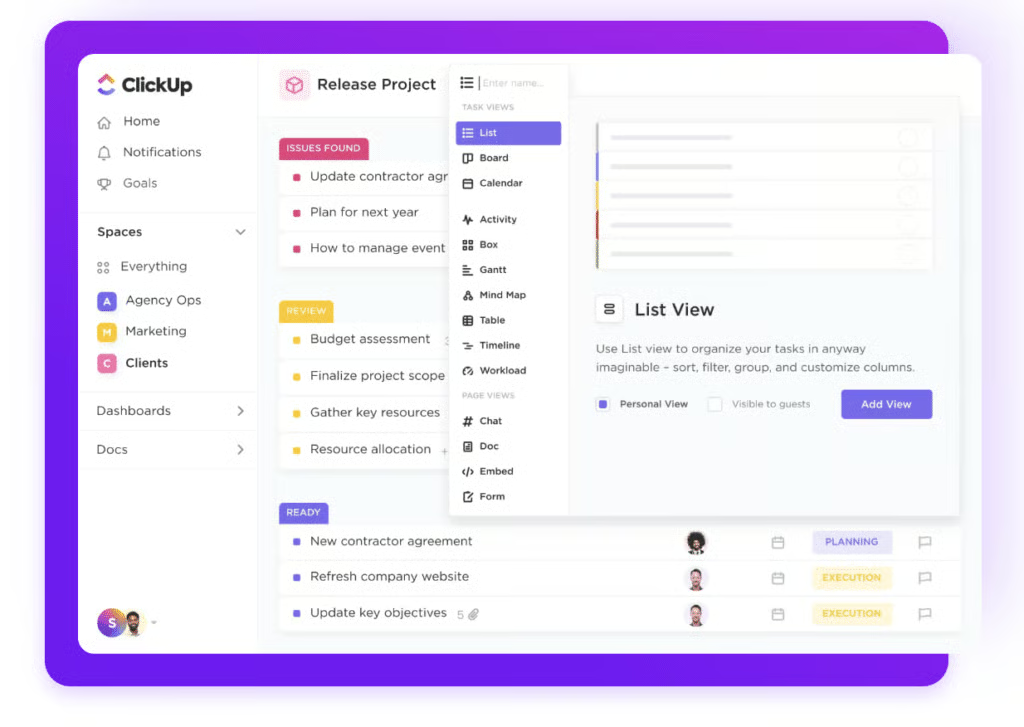
- List, board, table, calendar, Gantt, timeline, workload, and mind map views of workspace
- Workflow automation and goal and dashboard reporting
- User commenting and assignment in data records
- Relationship linking, tags, and priority-setting in data records
- Integration with Zapier, Gmail, and Outlook
ClickUp Pricing for Paid Plans*
Cost: $7 per user
Notable features:
- Everything in the free plan
- Unlimited workspaces and board sessions for Gantt views
- Expanded third-party integrations (Google Drive, Dropbox, and OneDrive)
- Access to ClickUp Brain (AI tools that automate project summaries and updates)
- Up to 1,000 automated workflows per month; allows up to 500 active trigger rules
- Up to 10 built-in whiteboards to collaborate on workspaces
- 100 uses for team, timeline, workload, map, and mind map views
- Built-in web forms for surveying and collecting data
- Recurring task tracking and team management for up to one team
- Unlimited project milestones, goals tracking, and email uses in ClickUp
Cost: $12 per user
Notable features:
- Everything in the Unlimited plan
- Unlimited sessions for team, activity, timeline, workload, and mind-map views
- Unlimited built-in whiteboards to collaborate on workspaces
- Branding and customization on web forms and unlimited whiteboards
- Unique custom ID numbers for tasks and records
- Up to 10,000 automated workflows per month; allows an unlimited number of active triggers
- Advanced automations for email, webhooks, and text message deployments
- Ability to manage an unlimited number of teams and goals management folder
- Time estimates and time-sheet reporting for tasks and processes
- Billable real estate service reports and timesheets for time tracking cards to invoice clients
Cost: Contact for pricing
Key Features:
- Everything in the Business plan
- Universal search for tasks, records, or other data in the system based on keywords
- Unlimited lists, folders, and document tags for each workspace
- Tableau integration to create a snapshot of your CRM data
- Team sharing for spaces
- White labeling
- Up to 250,000 automated workflows per month
- Unlimited custom user roles and advanced permissions
- Security features like single sign-on (SSO)
- Customer success manager and access to managed services
ClickUp Add-on:
- ClickUp AI
*Pricing is based on annual billing on a per-user monthly breakdown, though monthly billing is available for a higher cost. While we update pricing information regularly, we encourage our readers to check current pricing.
Our Expert Opinion
ClickUp is a versatile team and project management platform that streamlines workflows, tracks progress, and facilitates seamless interaction among real estate agents and clients. It boasts robust automated drip campaigns, custom fields, and time tracking for projects like hosting open houses, managing property listings, and providing valuations. Plus, ClickUp offers multiple viewing options, such as Kanban boards, Gantt charts, and lists, setting it apart from competitors.
Agile CRM: Best for Appointment Scheduling
When to Use Agile CRM
You need an excellent appointment scheduling system: Agile CRM lets you put a calendar link on your emails, social media pages, campaigns, and website (from a pop-up). Once integrated, this calendar link syncs with your Agile and Google Calendar.
With an online calendar, interested buyers and sellers can easily book appointments. During the process, the CRM captures lead data and adds a new contact to your database to reduce time spent on tedious administrative tasks and simplify outreach and follow-up.
When to Use an Alternative
You need real estate CRM software with free unlimited contacts: Agile CRM caps the number of contacts teams can store. In its free plan, you can only store up to 1,000 contacts, which some users find limiting. Its paid plans (starting from $9.99 per user every month) offer 10,000 to 50,000 contacts. Only the Enterprise plan offers unlimited contacts for $64.99 per user monthly.
Alternative: Bitrix24 offers unlimited contacts across all plans. Moreover, the free plan includes unlimited users, leads, companies, deals, quotes, invoices, and email marketing.
Key Freemium Features
- 10 users
- Appointment scheduling to share your calendar online for buyers and sellers to book a meeting
- Score and rank your real estate prospects against the scale with custom deal milestones
- Custom data fields and lead data capture for a comprehensive view of up to 50,000 records
- Unlimited deals, tasks, and documents for real estate transaction management and sales efficiency
- Email and form builder with web-to-lead capture and landing page
- Email tracking on email opens and clicks for client nurturing and Chrome extension
- One campaign workflow and automation rule and basic reports
- Customer service module (helpdesk, groups, labels, canned responses, views, activities, reports)
- Email and phone support
Agile CRM Pricing for Paid Plans*
Cost: $9.99 per user
Key Features:
- Everything in the free plan
- Two-way email integration to send client emails and log their responses on the CRM
- Marketing automation and social monitoring
- Five campaign workflows and five automation rules
- Three app integrations
- Basic, email, and team reports
- Customer service module with a knowledge base feature
- 5,000 API calls per day to deliver functionality and data for a seamless user experience
Cost: $39.99 per user
Key Features:
- Everything in the Starter plan
- Two-way telephony to make and receive calls from buyers and sellers
- Create and customize multiple real estate deal milestones and tracks
- Mobile SMS marketing ($2 per thousand text messages via Twilio or Plivo)
- 10 Campaign workflows and 10 automation rules
- Over 50 app integrations
- 10,000 API calls per day to deliver functionality and data for a seamless user experience
Cost: $64.99 per user
Key Features:
- Everything in the Regular plan
- Post-call automation
- Call recording
- Automated voicemails
- Unlimited campaign workflows and automation rules
- Dedicated account rep and onboarding coach
- Access controls
- 25,000 API calls
*Pricing is based on annual billing and a per-month breakdown. Monthly billing is available at higher rates, while a two-year agreement is available at discounted rates. While we update pricing information regularly, we encourage our readers to check current pricing.
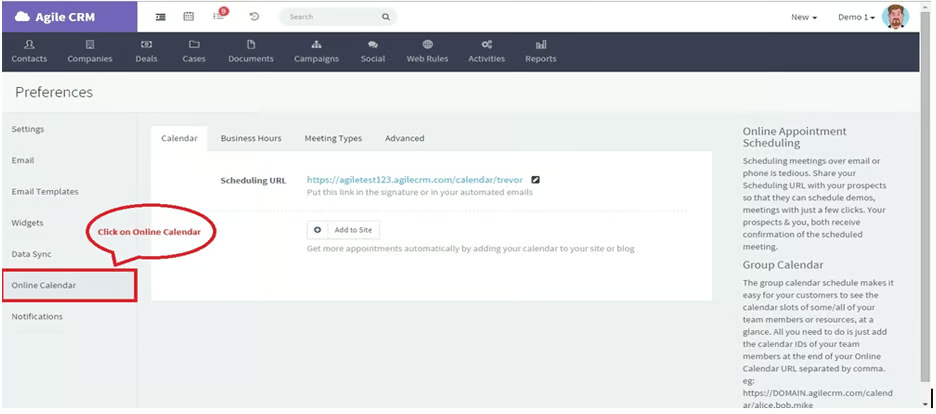
Agile CRM’s online calendar lets you generate a scheduling link embeddable to your website, emails, campaigns, and social media pages for seamless client booking and appointment management. (Source: Agile CRM) 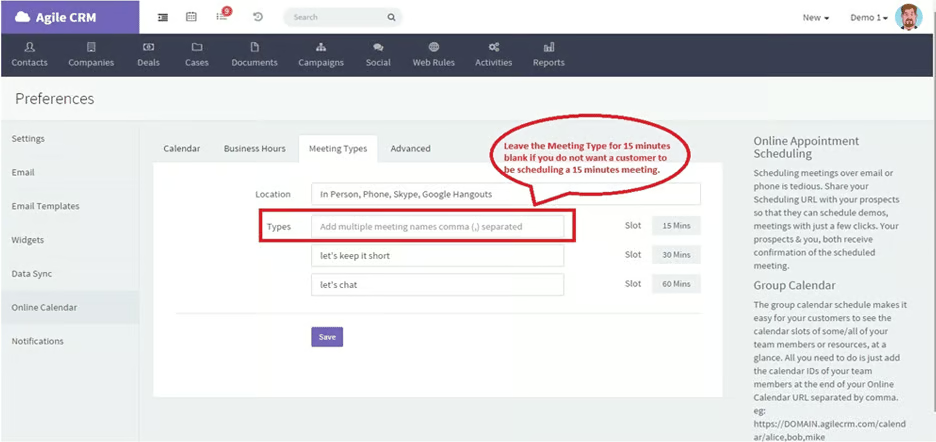
Agile CRM’s online calendar provides online booking configuration options like meeting duration to help real estate professionals manage their appointments seamlessly. (Source: Agile CRM)


Our Expert Opinion
Agile CRM is the winner in free built-in online appointment scheduling, allowing real estate agents to manage buyer and seller bookings seamlessly. Leads can easily book meetings with a real estate agent through this online calendar embedded as a link on the brokerage firm’s website, social media, emails, and campaigns.
Agile CRM also offers free lead scoring, which most CRM providers on this list add to paid plans. Plus, it’s the only free realtor CRM in this guide, offering sales gamification to increase collaboration, lead conversion, and healthy competition among agents.
How We Evaluated the Best Free CRMs for Real Estate
Choosing the right real estate CRM is vital for every stage of business, whether you’ve just become a real estate agent or lead a large team. You must have a CRM for real estate agents that’s intuitive, easy to use, and grows with your business—bonus if it’s free. Test each free tool’s capabilities, extensiveness, and limits to discover which features are most important for your business and team.
The best free real estate CRM is an excellent tool, especially for those working on buying or selling residential properties. If you’re looking for a system to help manage commercial properties and related transactions, check out the best commercial real estate CRMs. Now, let’s check the criteria we considered when determining the best free CRM for real estate.
The free real estate CRMs evaluated provided all the general features to support real estate lead generation and nurturing. We checked the availability of reporting and analytics tools and customizable pipelines. We also considered integrations, contact management, drip campaigns, task assignments, and reminders.
To further evaluate the CRMs, we rated whether the platform provided features to make the experience more robust. We checked the availability of a mobile app, lead rotation automation, and marketing tools like email marketing. Data tracking, a website and landing page creator, team collaboration tools, deal management, and segmented lists are the added benefits of using a free CRM for real estate agents.
All of the CRM providers evaluated offered free plans with the option of paid plans for additional access to platform features. We considered the number of subscription plans offered and whether it allowed monthly billing or if agents had to pay the full annual amount up front.
When agents are focused on converting leads, customer service must be available by phone, email, and live chat support. Hence, we considered these support options for the best free CRM software for real estate.
Expertise in the field and firsthand experience with the software allow us to evaluate each CRM’s standout features, value for the money, and ease of use. We also considered user reviews to inform our expert advice further.
In considering the best free CRM software for real estate, we wanted to understand whether any technical skill is required to set up and operate it. Additionally, having drag-and-drop features and an intuitive interface increased our ratings.
Frequently Asked Questions (FAQs)
Do you need a CRM for real estate?
Yes, a CRM system is essential for real estate professionals. It helps manage client interactions, streamline communication, and improve the efficiency of lead tracking and conversion. A CRM can provide valuable insights into client behavior and market trends, enabling agents to tailor their strategies effectively and maintain long-term relationships with clients.
What is the best CRM for realtors?
HubSpot CRM is the best CRM for realtors because of its free marketing features, such as email, ad management, and social marketing. However, depending on your real estate business needs, alternatives like Zoho CRM and Bitrix24 can also be the best option.
What is the easiest CRM to use?
HubSpot CRM is the easiest CRM software for both desktop and mobile. The menus and features are easy to find on the platform’s homepage and dashboards. Its mobile app has an easy-to-use business card scanner, meeting scheduler, and other features for seamless real estate transaction processing.
Is there a free CRM for realtors?
Yes. HubSpot offers excellent free real estate marketing features, while Zoho CRM boasts lead and deal management tools. Bitrix24 offers omnichannel collaboration tools, and ClickUp offers affordable project management features. Agile CRM provides free online appointment scheduling with a lead capture mechanism.
Bottom Line
Real estate CRM facilitates seamless contact storage, marketing, appointment scheduling, team collaboration, lead generation, and deal and project management. While we rated HubSpot CRM as the best free real estate CRM overall, other options like Zoho CRM and Bitrix24 could be more suitable, depending on your needs and preferences.
