



.jpg?w=288)
.jpg?w=288)

Podcasting is one of the fastest-growing ways for small businesses to build authority, generate leads, and connect with customers. To help you launch or improve your show, I’ve rounded up the 10 best podcast software tools for beginners and SMB teams, from recording and editing to planning, collaboration, and publishing.
Use this guide to quickly find the best podcast platforms for small businesses to streamline production and create professional-quality episodes with minimal effort.
| Podcast software | Best for… | Starting price per month, billed annually |
|---|---|---|
| Descript | An all-in-one podcast production software | Free or $16/user |
| Riverside | Studio-quality remote recording with guest interviews | Free or $24/user |
| Audacity | A free podcast recording and editing software | Free |
| Podcastle | Beginners recording and editing in a browser | Free or $11.99/user |
| Adobe Audition | Advanced podcast editing | $22.99/user |
| StreamYard | Livestreaming podcasts | Free or $20/user |
| ClickUp | Podcast workflow management | Free or $7/user |
| Google Workspace | Collaborative podcast pre-production | $6/user |
| Alitu | Automated podcast production | $38/user |
| Podbean | Podcast distribution | Free or $9/user |
- How do the best podcast software compare?
- What makes Descript the best all-in-one podcast production software?
- Descript
- What makes Riverside best for studio-quality remote recording and interviews?
- Riverside
- What makes Audacity the best free podcast recording and editing software?
- Audacity
- What makes Podcastle the best for beginners recording and editing in a browser?
- Podcastle
- What makes Adobe Audition the best for advanced podcast editing and audio engineering?
- Adobe Audition
- What makes StreamYard the best for livestream podcast production?
- StreamYard
- What makes ClickUp the best for podcast workflow management?
- ClickUp
- What makes Google Workspace the best for collaborative podcast pre-production?
- Google Workspace
- What makes Alitu the best for automating podcast production?
- Alitu
- What makes Podbean the best for podcast distribution and monetization?
- Podbean
- How to choose the right software for podcasting
- Frequently asked questions (FAQs)
- Bottom line
How do the best podcast software compare?
| Free plan | Free trial | Key features | |
|---|---|---|---|
 | ✓ | ✕ |
|
| Visit Descript | |||
 | ✓ | ✓ 7 days |
|
| Visit Riverside | |||
 | ✓ | ✕ open-source |
|
| Visit Audacity | |||
 | ✓ | ✓ 7 days |
|
| Visit Podcastle | |||
 | ✕ | ✓ 7 days |
|
| Visit Adobe Audition | |||
 | ✓ | ✓ 7 days |
|
| Visit StreamYard | |||
 | ✓ | ✓ 14 days |
|
| Visit ClickUp | |||
 | ✕ | ✓ 14 days |
|
| Visit Google Workspace | |||
 | ✕ | ✓ 7 days |
|
| Visit Alitu | |||
 | ✓ | ✕ |
|
| Visit Podbean | |||
The types of podcast software you’ll need
As far as digital marketing strategies go, podcasting takes more time and effort than most. It’s much more than just speaking into a microphone and then uploading. Like videos, podcasts have planning, production, and post-production (aka editing and mixing) stages, each of which requires a different set of tools and software.
Podcasting isn’t a niche channel anymore. It’s a mainstream content format with a massive audience. Approximately 55% of the U.S. population, or about 158 million Americans, listen to podcasts at least once a month, which is why having the right software matters.
To produce consistent, professional episodes that stand out, small businesses need tools that support every stage of the podcasting process. Below are the key types of podcasting software most small businesses and individual creators will need.
The tools featured in this guide represent some of the best options available today. Below, we break down which platforms excel at each stage of podcast production to help you choose the right fit for your needs.
What makes Descript the best all-in-one podcast production software?
My expert opinion on Descript
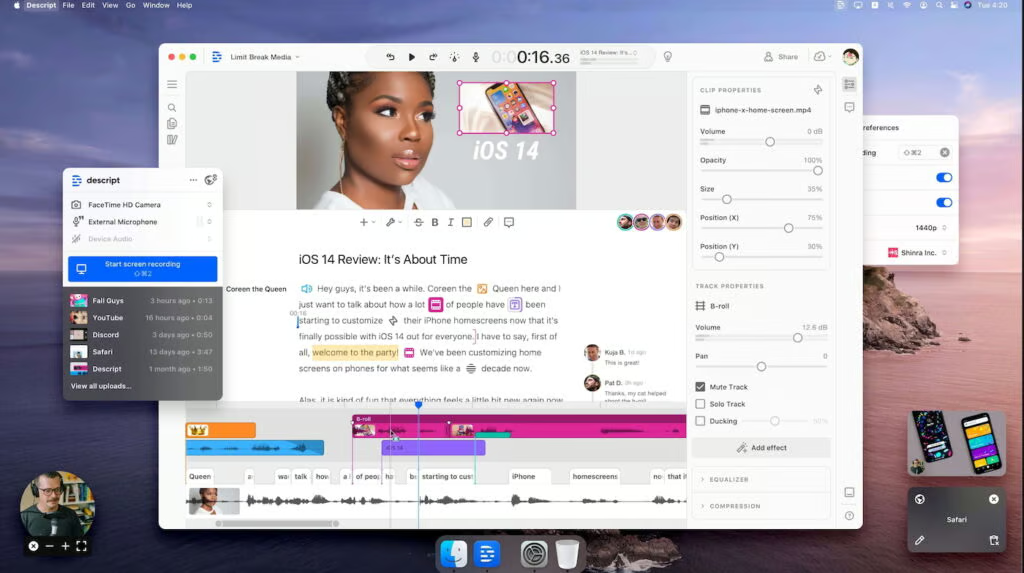
Descript is an all-in-one podcast production platform that gives small businesses everything they need to record, edit, script, and polish episodes in one place. Its signature text-based editor makes audio editing feel as simple as editing a document, allowing even non-technical team members to cut, reorganize, and enhance content quickly.
This makes podcast production far more accessible to marketing teams, founders, and lean SMB operations that don’t have a dedicated audio engineer.
While it doesn’t offer the deep precision of a professional Digital Audio Workstation (DAW), Descript streamlines the entire production workflow from start to finish. It accomplishes this with the help of its built-in recording tools, AI-powered enhancements, screen capture, and collaboration features.
I recommend this for small businesses prioritizing speed, simplicity, and efficiency in an all-in-one toolset.
Descript key features
- Text-based audio editing: Lets you edit your podcast by modifying the transcript, dramatically reducing the time and skill needed for cleanup and restructuring.
- AI overdub voice: Allows you to generate realistic voice lines to fix mistakes or add narration without having to re-record audio.
- Filler-word removal: Automatically detects and removes “um,” “uh,” and other verbal clutter to improve clarity with a single click.
Descript pricing
| Free | Hobbyist | Creator | Business | Enterprise | |
|---|---|---|---|---|---|
| Monthly price, billed annually | $0 per user | $16/user | $24/user | $50/user | Custom |
| Monthly price, billed monthly | $0 per user | $24/user | $35/user | $65/user | Custom |
What makes Riverside best for studio-quality remote recording and interviews?
My expert opinion on Riverside
Riverside is one of the strongest podcast recording platforms available, especially for small businesses relying on remote guests.
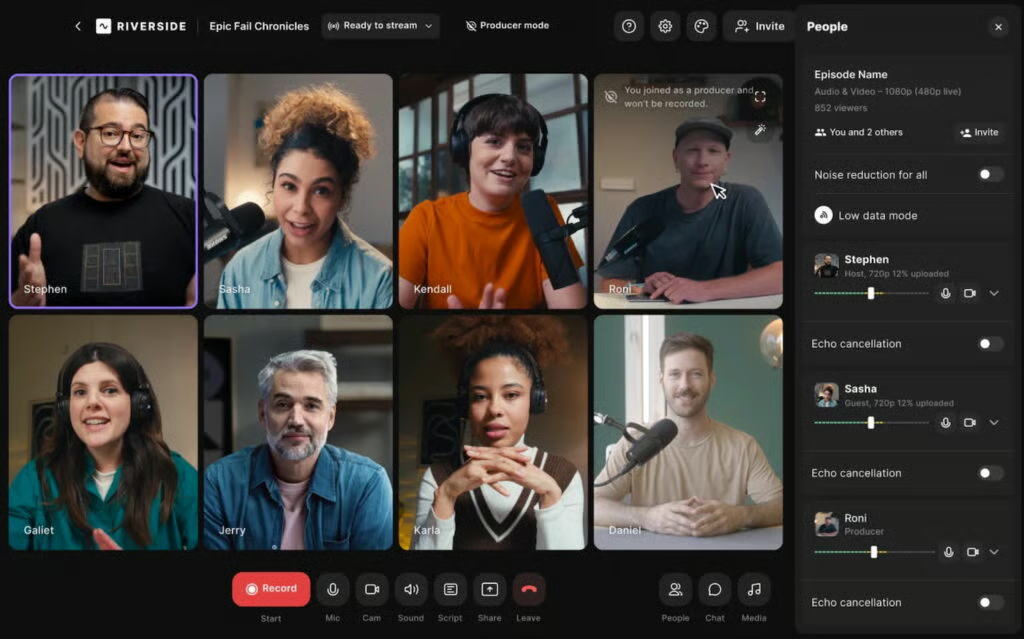
It captures studio-quality audio and video locally on each participant’s device, ensuring consistent quality regardless of internet stability. This dramatically reduces recording failures and reshoots, which is an important advantage for busy SMB teams.
Although Riverside comes at a higher price point than basic tools, the reliability and professionalism it provides make it a worthwhile investment. Its AI editing features help streamline workflows, making it a near-perfect option for small teams that want polished episodes without complicated setups.
Riverside key features
- Async recording: Allows guests to record their audio or video independently on their own time, making scheduling easier and ensuring high-quality files without coordinating live sessions.
- AI-powered editing: Uses automated tools to remove filler words, generate clips, and speed up post-production for busy teams.
- Multitrack recording: Captures separate audio and video tracks for each speaker, giving editors greater control over mix and quality.
Riverside pricing
| Free | Pro | Live | Webinar | Business | |
|---|---|---|---|---|---|
| Monthly price, billed annually | $0/user | $24/user | $34/user | $79/user | Custom |
| Monthly price, billed monthly | $0/user | $29/user | $39/user | $99/user | Custom |
What makes Audacity the best free podcast recording and editing software?
My expert opinion on Audacity
If budget constraints are your main production concern, Audacity has long been one of the best 100% free podcast recording software.
It’s completely free to download and use, supports multiple audio types (including MP3, WAV, and FLAC), and even has advanced sound mixing tools for full control of your audio recordings. In short, it’s reliable, high-quality, and free. You won’t find many other free tools with the same quality of sound mixing.
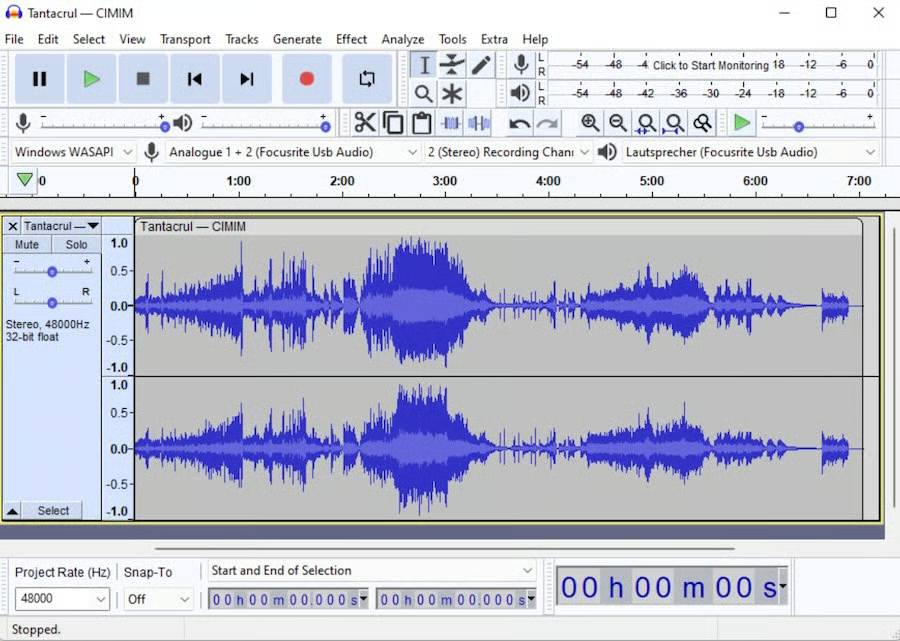
The downside is that Audacity lacks modern conveniences like transcripts, AI cleanup, and cloud collaboration. Also, I’m not a fan of its outdated interface. Still, its cost-efficiency and reliability make it a valuable entry-level tool for budget-conscious podcasters.
Audacity key features
- Waveform editing: Provides full, hands-on control over your audio to manually clean, trim, and polish recordings.
- Noise reduction: Helps remove background hum and unwanted noise from budget or improvised recording environments.
- Plug-in support: Expands the software’s capabilities through community-built tools for effects, cleanup, and restoration.
Audacity pricing
Audacity is 100% free. It’s available on Windows, Mac, and Linux.
What makes Podcastle the best for beginners recording and editing in a browser?
My expert opinion on Podcastle
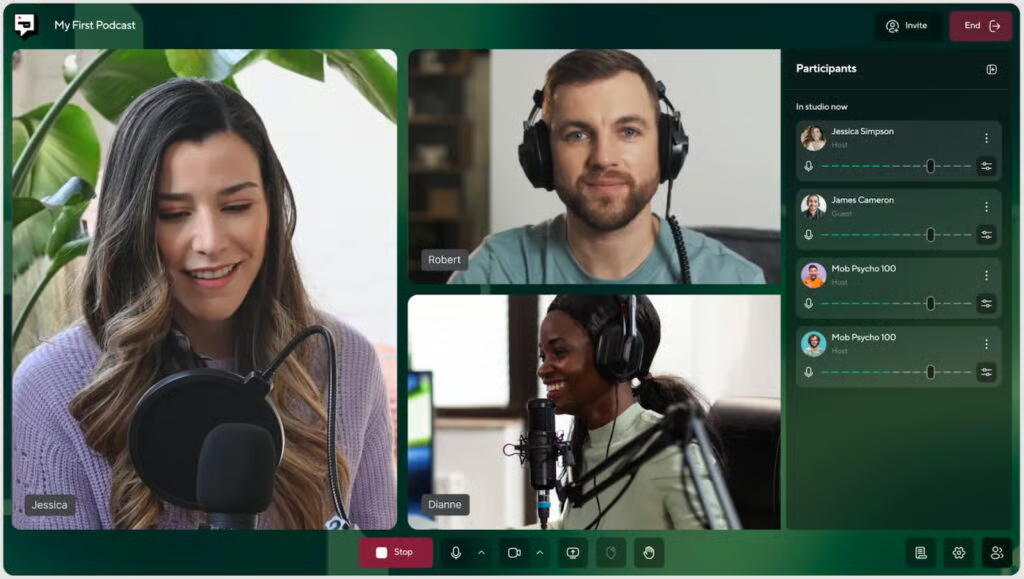
Producing podcasts if you’re a beginner can seem intimidating, but tools like Podcastle make the process so much simpler. Even complete beginners can edit and publish audio in an hour or two.
But it doesn’t skimp on its features either. It also has a video editor, sound mixer, and an audio publisher. And I like that it has a library of royalty-free music and sound effects.
While it doesn’t offer the creative flexibility of advanced editors, Podcastle excels in making podcasting approachable. It’s a perfect fit for teams prioritizing simplicity, speed, and low technical requirements.
Podcastle key features
- AI audio enhancement: Automatically improves vocal quality by reducing noise and balancing levels for a more polished sound.
- Multitrack recording: Records each participant separately in the browser, making editing and cleanup easier.
- Browser-based editing: Works entirely online, enabling easy access and collaboration without software installations.
Podcastle pricing
| Free | Essentials | Pro | Business | Enterprise | |
|---|---|---|---|---|---|
| Monthly price, billed annually | $0/user | $11.99/user | 23.99/user | $39.99/user | Custom |
| Monthly price, billed monthly | $0/user | $19.99/user | $39.99/user | $64.99/user | Custom |
What makes Adobe Audition the best for advanced podcast editing and audio engineering?
My expert opinion on Adobe Audition
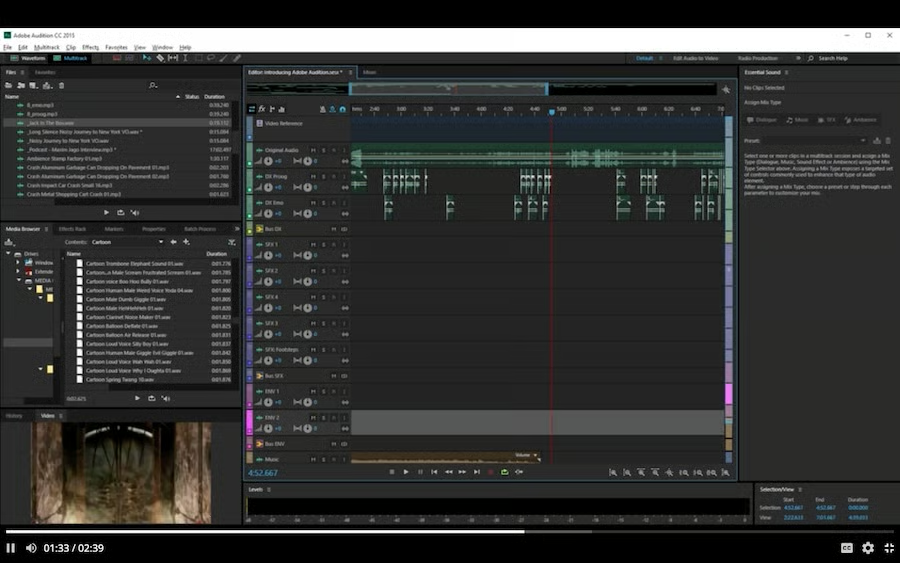
Adobe Audition is built for professionals and teams that demand total control over their audio. Small businesses producing narrative podcasts, brand storytelling, or high-stakes interviews benefit most from its advanced editing and restoration capabilities.
It’s especially useful for correcting noisy or imperfect recordings, creating seamless transitions, and producing highly polished episodes.
However, Audition is not designed for beginners. Its complexity and cost make it better suited for small businesses with a dedicated editor or creators seeking broadcast-level production quality.
Adobe Audition key features
- Advanced noise reduction: Offers powerful restoration tools that clean up imperfect recordings and eliminate background interference.
- Multitrack editing: Supports complex timelines with multiple speakers, music beds, and sound effects for professional results.
- Adobe Creative Cloud integration: Connects seamlessly with other Creative Cloud apps, streamlining workflows for multimedia teams.
Adobe Audition pricing
- Annual subscription (with monthly billing): $22.99 monthly
- Monthly subscription: $34.49 monthly
- Annual subscription (prepaid): $263.88 yearly
All plans come with full access to Adobe Audition and its features.
What makes StreamYard the best for livestream podcast production?
My expert opinion on StreamYard
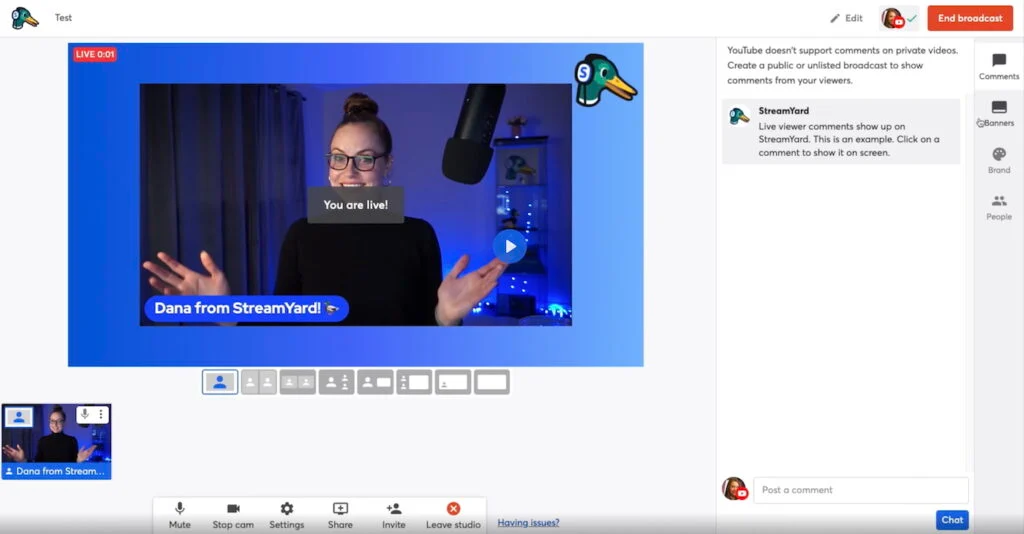
StreamYard is a top choice for businesses producing video podcasts or streaming episodes live to platforms like YouTube, Facebook, and LinkedIn all at once.
You can also host several people in one livestream (even up to six on the free plan). Its browser-based interface makes it easy for non-technical hosts to run professional-looking broadcasts with overlays, banners, and branded elements.
While its recordings aren’t as pristine as Riverside’s, StreamYard wins on simplicity and visual polish. This is an accessible and high-impact tool for businesses prioritizing outreach, live engagement, or thought leadership.
StreamYard key features
- Multistream broadcasting: Lets you go live on several platforms simultaneously to reach more viewers with one session.
- Branded layouts and overlays: Adds professional visuals like lower-thirds, banners, and custom backgrounds to enhance your video podcast.
- Guest-friendly access: Allows guests to join simply through a link with no downloads, reducing friction during interviews.
StreamYard pricing
| Free | Core | Advanced | Business | Enterprise | |
|---|---|---|---|---|---|
| Monthly price, billed annually | $0/user | $20/user | $39/user | $249 for 2 users | Custom (5-user minimum) |
| Monthly price, billed monthly | $0/user | $25/user | $49/user | $299 for 2 users | Custom (5-user minimum) |
What makes ClickUp the best for podcast workflow management?
My expert opinion on ClickUp
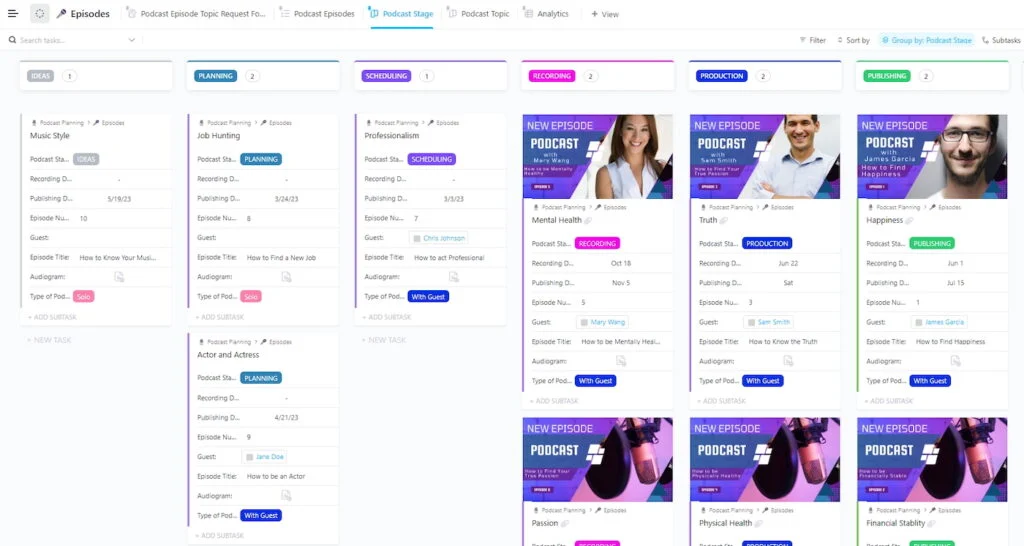
ClickUp is ideal for small businesses managing repeatable podcast processes, including planning, booking guests, drafting scripts, tracking edits, and scheduling releases.
This task and project management tool is particularly handy for podcasts because of its to-do lists, shared calendars, timelines, forms, and docs. This is why ClickUp made it to our list of the best project management tools for small businesses.
It’s not traditional podcast software, but it’s a powerful operational hub that keeps teams consistent and organized across multiple episodes or seasons. Its flexibility can feel overwhelming at first, but once templates are established, ClickUp becomes a reliable command center that accelerates production consistency.
ClickUp key features
- Podcast workflow templates: Provides customizable checklists and workflows to organize every stage from planning to publishing.
- Guest and release calendars: Keep track of interview schedules, deadlines, and episode launches in one centralized place.
- Automations: Automatically move tasks forward and send reminders to reduce manual follow-up for busy teams.
ClickUp pricing
| Free Forever | Unlimited | Business | Enterprise | |
|---|---|---|---|---|
| Monthly price, billed annually | $0 with unlimited users | $7/user | $12/user | Custom |
| Monthly price, billed monthly | $0 with unlimited users | $10/user | $19/user | Custom |
What makes Google Workspace the best for collaborative podcast pre-production?
My expert opinion on Google Workspace
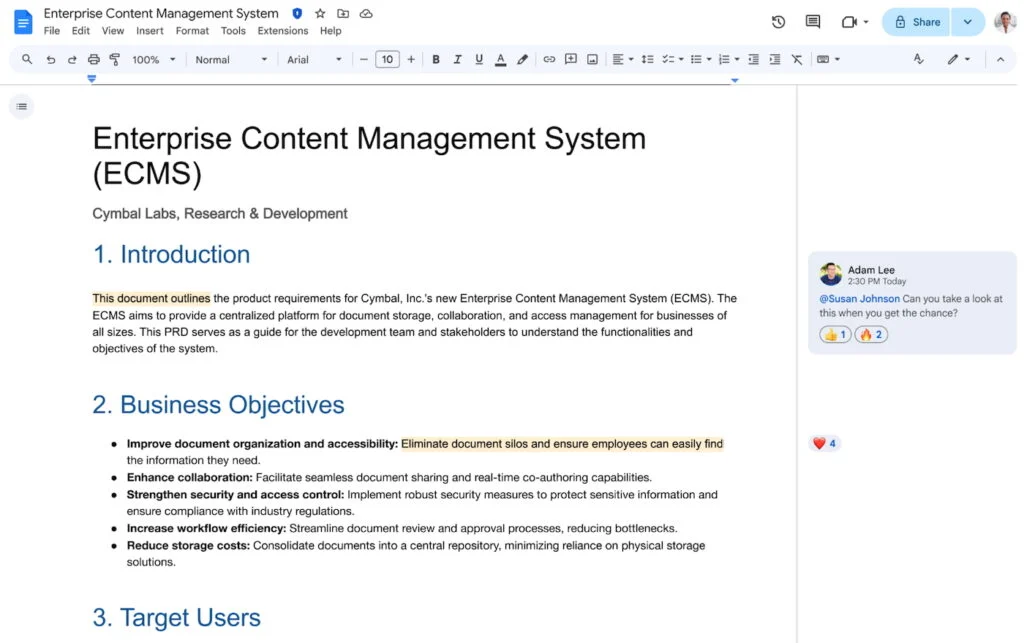
Google Workspace is an ideal pre-production hub for small businesses organizing scripts, outlines, research, and schedules. Docs and Sheets enable real-time collaboration, while Drive keeps all podcast planning materials centralized. Calendar makes it easy to book guest sessions and coordinate across teams.
Though it plays no role in the recording or editing process, this platform remains an essential planning layer for SMB podcasters who need a simple and trusted collaboration environment.
Google Workspace key features
- Docs and Sheets collaboration: Enables real-time co-editing of scripts, outlines, and content plans across distributed teams.
- Shared Drive folders: Stores all podcast materials in an organized, accessible cloud space for consistent team access.
- Calendar scheduling: Makes coordinating guest interviews and internal production timelines simple and efficient.
Google Workspace pricing
| Starter | Standard | Plus | Enterprise | |
|---|---|---|---|---|
| Monthly price, billed annually | $7/user | $14/user | $22/user | Custom |
| Monthly price, billed monthly | $8.40/user | $16.80/user | $26.40/user | Custom |
What makes Alitu the best for automating podcast production?
My expert opinion on Alitu
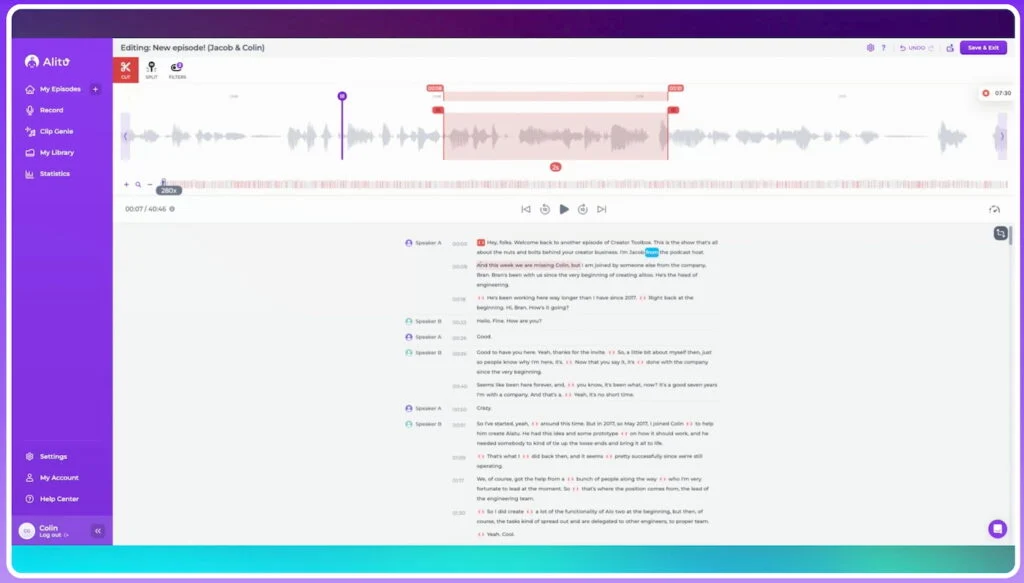
Alitu is designed to make podcasting simple for beginners and busy small business owners. Instead of dealing with complicated editing timelines or audio engineering, users can rely on Alitu’s automated cleanup, leveling, and assembly tools to produce episodes quickly and consistently.
This automation is a major advantage for lean teams that want quality output without investing time in technical skills.
While experienced editors may find Alitu’s controls limited, its real value lies in how much it simplifies production. The platform centralizes recording, editing, branding, and publishing into one straightforward workflow.
This makes it one of the best choices for small businesses that want to launch or maintain a podcast with minimal effort.
Alitu key features
- Automated audio cleanup: Automatically levels, enhances, and cleans recordings so beginners can produce polished sound instantly.
- Episode builder: Lets you assemble intros, interviews, and outros with simple drag-and-drop controls.
- Integrated hosting and publishing: Allows you to publish episodes directly from Alitu, eliminating the need for additional tools.
Alitu pricing
Alitu’s podcast content platform costs $38/user/month or $380/user/year. It comes with access to all its features.
What makes Podbean the best for podcast distribution and monetization?
My expert opinion on Podbean
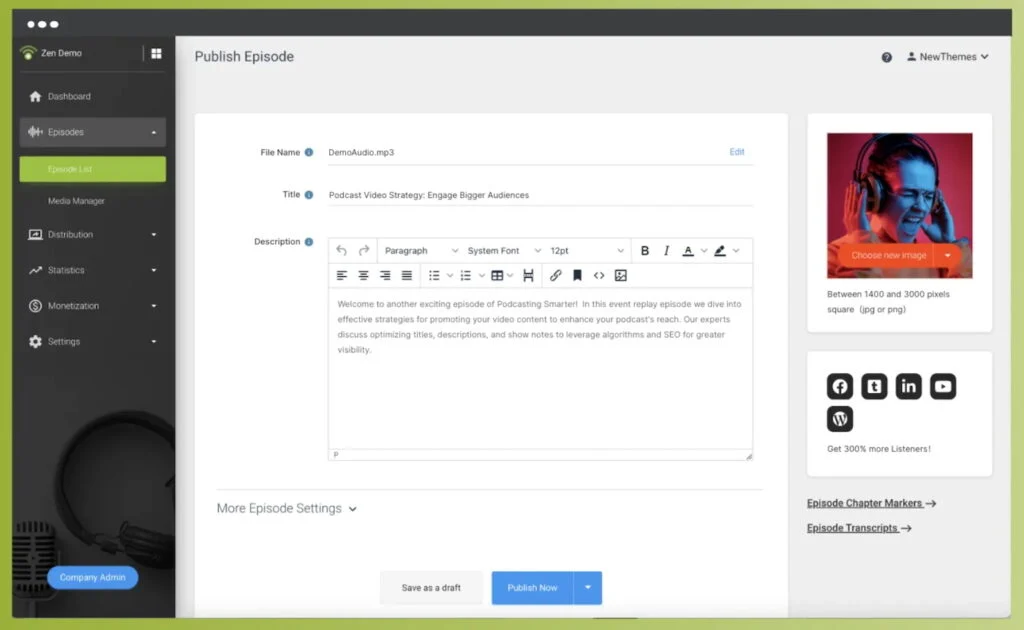
Podbean excels in the distribution and hosting stage of podcasting. Small businesses benefit from its straightforward publishing process, monetization tools, and detailed analytics, which help track show performance and audience behavior. Its mobile-friendly tools make it convenient for teams that work across devices.
While it’s not designed for recording or editing podcasts, Podbean is a dependable headquarters for managing, distributing, and monetizing episodes once production is complete.
Podbean key features
- Hosting and distribution: Publishes your episodes to all major podcast platforms and handles RSS management for you.
- Monetization options: Offers ads, subscriptions, and premium content tools to generate revenue from your show.
- Audience analytics: Tracks listener trends, downloads, and engagement to help you refine your content strategy.
Podbean pricing
| Unlimited Audio | Unlimited Plus | Network | Business | |
|---|---|---|---|---|
| Monthly price, billed annually | $9/user | $29/user | $79/user | $99/user |
| Monthly price, billed monthly | $14/user | $39/user | $99/user | $129/user |
How to choose the right software for podcasting
If you’re completely new to podcasting, you need to have the right tools to help you create podcasts that effectively build your brand presence.
These tools need to suit your business’s specific needs and last you a long while, which can be a lot to juggle. Plus, you also need to consider factors like the format of your podcast episodes and how often you’ll be producing them.
These questions all inform the podcasting tools you’ll choose. Consider the following factors to help you choose the right software for podcasting.
- Your podcast format: This is the biggest factor that will affect the podcast software you choose. If you’re only running a one-person show, a simple recording and editing software will suffice. However, if you plan to interview guests, you’ll need a tool that can accommodate multiple people. Before choosing your podcast software, you’ll need to have a clear idea of what you want your final output to be.
- Cost: Podcasting is one of the costlier forms of content marketing, and you’ll need to consider not only the cost of your podcast software’s plan, but also your other equipment and the overall budget you allocate to your content marketing.
- Features: No two podcast tools are built the same. Some specialize in sound mixing while others are catered specifically for beginners, and still others focus on content management. Also, consider whether the platform you choose suits your specific needs and priorities.
- Ease of use: Each audio recording and editing tool has a different interface, so you’ll also need to consider your comfort level with the production process. Do you need a completely beginner-friendly platform or more advanced mixing tools? Your specific preferences will also affect the software you choose.
- Your equipment: Podcasts will also require some audio recording equipment, which will also affect your podcast software of choice. For instance, if you only have a standard microphone (e.g., the one on your phone or computer), you’ll need a tool with better sound mixing. However, if you have an older computer, it may not be capable of handling advanced editing software, and so on.
Frequently asked questions (FAQs)
What software do I need to start a podcast?
At a minimum, you’ll need podcast recording software, audio editing software, and a podcast hosting platform. Many small businesses also use planning or task management tools to stay organized, especially if they publish episodes regularly.
Is there free podcast software for beginners?
Yes. Audacity is a popular free option for recording and editing audio, while some platforms like Podcastle and StreamYard offer free plans with limited features. These tools are a good starting point for beginners or budget-conscious creators.
What’s the best podcast software for small businesses?
The best podcast software depends on your needs, but all-in-one tools like Descript and Riverside are popular with small businesses because they combine recording, editing, and collaboration features that save time and reduce complexity.
Do I need separate software for recording and editing podcasts?
Not always. Some podcast platforms combine recording and editing into one tool, while others require separate software for each stage. All-in-one platforms are often easier for beginners and small teams with limited technical experience.
What’s the difference between podcast recording software and hosting platforms?
Recording software captures your audio (and sometimes video), while hosting platforms store your podcast files and distribute episodes to listening apps like Spotify and Apple Podcasts. Most podcasters use both.
Can I record a podcast by myself?
Yes. Anyone can record a podcast independently with good recording equipment, editing software, and publishing tools, even for free. You can also use one of the best podcast recording software available, which has most of these tools built in to simplify the production process. To record your podcast, plan your content, record your podcast, mix and edit your audio, and then upload it to a podcast hosting platform.
Bottom line
Podcasting is a proven way for small businesses to grow their brand and connect with audiences, and the right software makes the process far easier.
Descript is the overall best podcast software for most small businesses thanks to its all-in-one production tools and beginner-friendly workflow, while Riverside is the top choice for recording high-quality remote interviews.
With either tool, small teams can produce professional podcasts without complex setups or large budgets.
