


A to-do list app lets users create and track tasks and get automated reminders so nothing slips through the cracks. Because of the simplicity of the software, many of these apps are available for free. The best products will include a range of software integrations, customization options, and task collaboration tools and offer an easy-to-use interface to operate the features.
Based on our evaluation, the six best to-do list apps include:
- Most robust free to-do list app: ClickUp
- Best for Microsoft 365 teams: Microsoft To Do
- Solid set of free project management features: Asana
- Best free to-do list viewing options: Airtable
- Simplest task management tool: Any.do
- Best free team collaboration tools: Todoist
- Best To-do List Apps Compared
- ClickUp: Best for Robust Task Management Capabilities
- Microsoft To Do: Best for Microsoft-using Teams
- Asana: Best for Project Management
- Airtable: Best for Free Task Viewing Options
- Any.do: Best Simple To-do List App
- Todoist: Best for Free Collaboration on Projects
- Frequently Asked Questions (FAQs)
- Bottom Line
Best To-do List Apps Compared
| Provider | Starting Monthly Paid Plan Price per User* | # Users Allowed on Free Plan | Our CRM Rating Out of 5 |
|---|---|---|---|
 | $7 | Unlimited | 4.75 |
| Visit ClickUp | |||
 | N/A** | 1** | 4.52 |
| Visit Microsoft To Do | |||
 | $10.99 | 15 | 4.25 |
| Visit Asana | |||
 | $20 | 5 | 4.24 |
| Visit Airtable | |||
 | $3 | 1 | 4.02 |
| Visit Any.do | |||
 | $4 | Unlimited | 3.93 |
| Visit Todoist | |||
| *Based on annual billing on a per-user, per-month breakdown. Monthly billing is also available for slightly higher rates.**Paid plans only required if you want to purchase the entire Microsoft 365 Business Suite. App only offers one free plan as a standalone product for up to one user. | |||
ClickUp: Best for Robust Task Management Capabilities
When To Use ClickUp
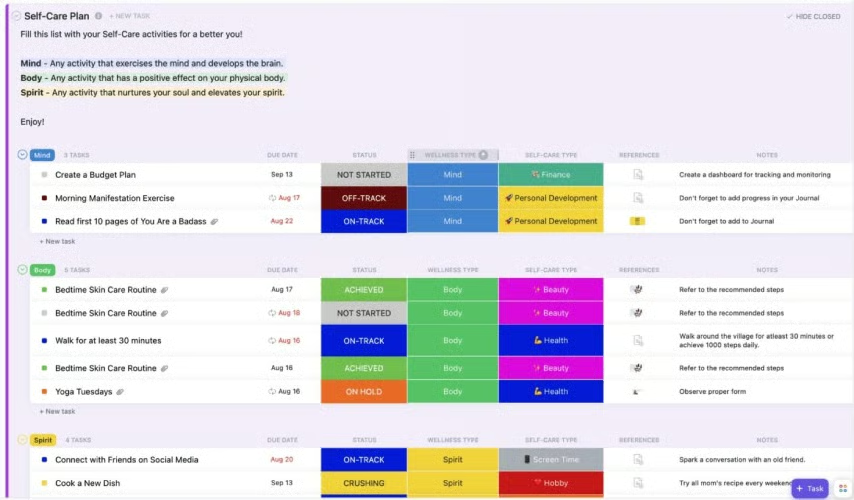
- You want a robust task management system: ClickUp is a free work management tool fully customizable to oversee daily tasks and operations for specific business functions like sales, marketing, or back-office work. It’s on our list as one of the top free customer relationship management (CRM) software products for that reason. This free to-do list comes with excellent functionality and capacity, including an unlimited number of tasks or data items, record tagging, linking, and automations for task activity triggers.
- You need free collaborative tools with your to-do list app: ClickUp is a particular solid to-do list platform for its team collaboration features. For example, the Free plan includes whiteboard functions where users can brainstorm ideas and interact with one another on a live digital whiteboard. This same tool has an in-app video recording feature as well to track progress. The task management also allows you to set priorities on task records and assign specific work to others.
When To Use an Alternative
- You need recurring task management at no cost: Recurring tasks allow teams to automatically add and remind users of activity that must happen regularly, such as following up with a client once a quarter or submitting a monthly report to a sales manager. ClickUp, unfortunately, does not include this feature on its Free plan.
- Alternative: Microsoft To Do offers free recurring task management while Any.do has that feature for just $3 per month for a single user.
- You want a broader range of free tracking tools for large projects: While the Free plan is excellent for individual task lists and operations management in sales, marketing, customer service, and administrative workflows, most of its project management features require paid plans. For example, milestone tracking on projects, progress reporting, and time tracking on project tasks all require Unlimited plans and above.
- Alternative: Asana is the top pick if you primarily need free project management capabilities.
ClickUp Monthly Pricing Plans*
Cost:
- $0 for unlimited users
Key Features:
- Up to five custom workspaces to manage workflows, store data records and tasks, and collaborate on activity for any business area
- Unlimited records and tasks
- Prebuilt templates to create workspaces
- Custom data fields in workspaces and records
- Space viewing options through the list, board, table, and calendar views, plus up to 100 sessions for Gantt, timeline, workload, and map views
- Built-in whiteboard collaboration on boards with in-app video recording
- Up to 100 automated workflows per month
- Task management with checklists, time tracking, and user task assignment
- Relationship linking, tagging, and priority-setting on data records
- Integration with Zapier
- Use Gmail and Outlook email in the platform
Cost:
- $7 per user
Key Features:
- Everything in Free
- Unlimited workspaces
- ClickUp artificial intelligence (AI) writing assistant to automate content creation, editing, and summarization of documents and written drafts
- Up to 1,000 automated workflows per month
- Unlimited board sessions for Gantt and map views
- Team box view that lets you monitor team tasks and work capacity
- Built-in web forms for surveying and collecting data
- Recurring task tracking
- Teams management for up to one team
- Dashboard reporting
- Project milestone and team goals tracking
Cost:
- $12 per user
Key Features:
- Everything in Unlimited
- Unlimited sessions for activity, timeline, workload, and mind maps views
- Branding and customization on web forms
- Unlimited whiteboards
- Unique ID numbers for tasks
- Up to 10,000 automated workflows per month
- Ability to manage an unlimited number of teams
- Time estimates and time-sheet reporting for tasks and workflows
Cost:
- Contact for pricing
Key Features:
- Everything in Business
- Up to 250,000 automated workflows per month
- Unlimited lists, folders, and document tags for each space
- White labeling product options
- Tableau integration
*Pricing is based on annual billing on a per-user monthly breakdown. Monthly billing is available for a higher cost. ClickUp comes with a 14-day free trial. Pricing reflects pricing info available at the time of publishing. While we update pricing information regularly, we encourage our readers to check current pricing here.
Our Expert Opinion
ClickUp is a highly sophisticated to-do list app. More importantly, its Free plan is just as robust as many paid product subscriptions—offering full system customization, automation capabilities, and team collaboration tools for no cost. We also can’t overlook the fact that the platform can do more than just task tracking. Its tailorability and premade templates allow users to oversee entire business operations and special projects on an array of board viewing options.
Microsoft To Do: Best for Microsoft-using Teams
When To Use Microsoft To Do
- You subscribe to Microsoft 365: Microsoft To Do is excellent for businesses already using the Microsoft 365 Suite of apps like Outlook or Office. As a native tool, it offers a seamless integration process with other Microsoft products so users can track and sync task data in any interface. In other words, you can manage your tasks in the email system, calendar tool, or while in Office apps like Word or PowerPoint.
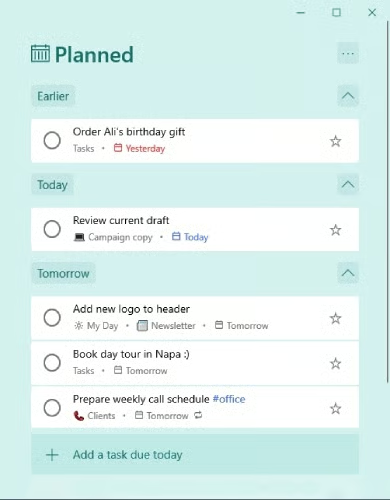
- You need free recurring tasks management: To Do is the only system on this list with free recurring task capabilities. This is an essential feature for to-do lists so users don’t have to repeatedly add must-do activities for things occurring regularly. Sales teams can get excellent value from this feature to ensure they constantly follow up with clients, update lead records, or generate reports.
When To Use an Alternative
- You use non-Microsoft business productivity tools: Teams that use Google or other business productivity software apps should look elsewhere for their to-do list software. Microsoft To Do has relatively basic capabilities to just create and monitor task lists and most of its value is from syncing data with other Microsoft 365 apps.
- Alternative: ClickUp is the best free to-do list app overall that can offer tremendous value regardless of the primary suite of business software used.
- You prefer a simpler task system with a cleaner interface: Users often find Microsoft apps difficult to learn and navigate, especially in the beginning. Microsoft To Do is no exception, as the individual’s menu will fill up quickly with a lot of content related to task lists, notes, and other components that can appear overwhelming to users.
Microsoft To Do Monthly Pricing Plans*
Free Plan
Cost:
- $0
Key Features:
- Task management with list views, color coding, and subtasks
- Note taking in task records
- Automated reminders for tasks
- Recurring tasks
- Data synchronization to Microsoft 365 apps like Outlook
- Personalized day planner tool
- Task list sharing
- Mobile and web application capabilities
- File attachments to task records
*Pricing indicated shows the single Microsoft To Do product. Microsoft To Do is also automatically available with the purchase of the Microsoft 365 Suite products . Pricing reflects pricing info available at the time of publishing. While we update pricing information regularly, we encourage our readers to check current pricing here.
Our Expert Opinion
Microsoft To Do can provide Microsoft-loving teams additional value while using any Outlook or Office 365 applications. In particular, the data sync features are useful for teams to monitor their to-do list while in their email or calendar interfaces. There’s also something to be said that this was the only task management system on this list that could provide free task tracking for recurring activities.
Asana: Best for Project Management
When To Use Asana
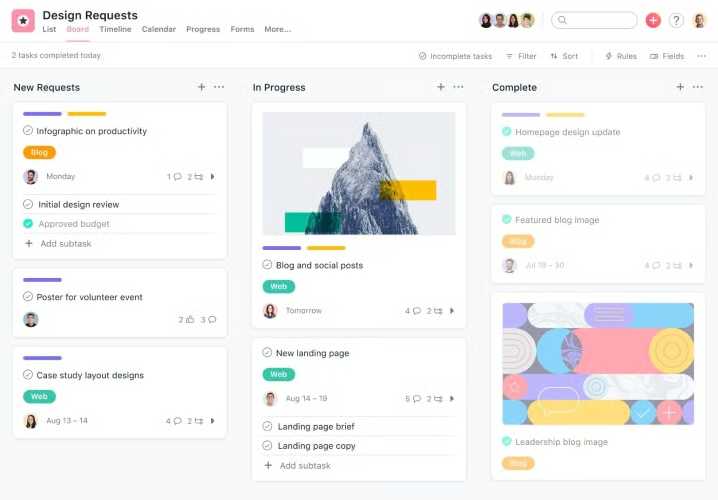
- You want to manage larger-scale projects: Asana is the best to-do list app for those overseeing tasks included in larger initiatives. For $0, up to 15 users can track projects and their associated tasks, assign work and due dates for tasks, and view project progress on a shared calendar view. This could apply to teams that need to manage internal projects or businesses with project-based deliverables, like trade contractors, content producers, or consultants.
- You need free task time tracking features: Many small independent contractors and consultants work at an hourly rate. That said, Asana users can access time-tracking capabilities needed for accurate billing on the free plan using a third-party integration. The app integration marketplace is also available on the Basic plan at no cost for teams to connect with their favorite time-tracking app.
When To Use an Alternative
- You need a broader set of task viewing options for free: One key downside of the free Asana plan is that users can only view tasks as part of a project board view or on a shared calendar. Other options, such as Gantt or timeline require paid plans.
- You want to be able to automate task management for free: To-do list automation is useful as it lets you automatically create, assign, or update task records based on triggers like status record changes or time increments. Asana, unfortunately, does not include any automation capabilities for free.
Asana Monthly Pricing Plans*
Cost:
- $0 for up to 15 users
Key Features:
- Unlimited tasks and projects with status updates monitoring
- Activity logging on boards
- Project briefs, overviews, assignees, and due dates
- Team messaging in boards
- Mobile capabilities
- Time tracking for tasks via integrated tools
- Calendar view for tasks
- File storage on projects
Cost:
- $10.99
Key Features:
- Everything in Basic
- Start dates and times for projects
- Task dependencies
- Task tracking templates
- Timeline, Gantt, and progress viewing for projects
- Custom project milestones
- Web forms in projects for data collection
- Automated workflow builder
- Unlimited dashboards
- Custom data fields and charts
- Project reporting generation
Cost:
- $24.99
Key Features:
- Everything in Premium
- Two-way integration and data sync with Jira
- Custom automation rules between applications
- Integration with Salesforce
- One-click approvals of tasks and workflows on project boards
- Web form automated branching to ask follow-up questions based on specific responses
- Formula-based data fields
- Portfolio management lets you oversee a group of projects
- Workload viewing of projects
- Goal tracking
- Integration with Tableau and Power BI
Cost:
- Contact for pricing
Key Features:
- Everything in Business
- Custom branding for Asana platform
- Admin announcements
*Pricing is based on annual billing on a per-user monthly breakdown. Monthly billing is available for a higher cost. Asana comes with a 30-day free trial. Pricing reflects pricing info available at the time of publishing. While we update pricing information regularly, we encourage our readers to check current pricing here.
Our Expert Opinion
The free Asana to-do list application can serve as an excellent option if you need larger-scale task tracking capabilities, such as project or program management. It offers the best no-cost project tracking features, including unlimited boards, tasks, and assignees; due dates; and file attachments for project records. The project briefs are also useful for providing snapshot summaries of client deliverables, workloads, or other project-based activities in the pipeline.
Airtable: Best for Free Task Viewing Options
When To Use Airtable
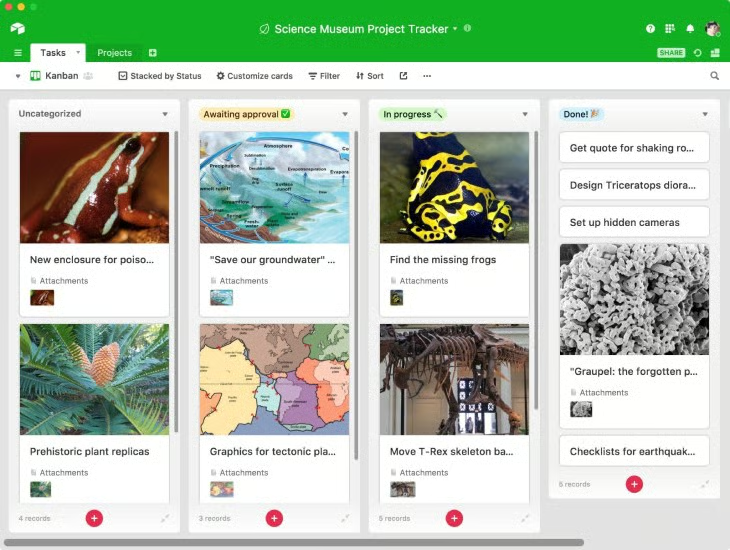
- You want a wide range of free task viewing options: Airtable is a highly dynamic work management tool known for its ability to support viewing options to organize tasks and data records. The Free plan includes up to 1,000 records, which represent tasks or individual data entities, viewable on traditional grid or spreadsheet styles, as well as through web form, Kanban, gallery, and list views.
- You need broad to-do list customization: Airtable offers teams a customizable experience they can tailor to their unique operational and task needs. The most notable feature of this capability is the free interface designer tool that lets you create entire applications using drag-and-drop functionality. Users can design interactive and visual modules to oversee any workflow or to-do list.
When To Use an Alternative
- You need free task tracking templates: Airtable does not offer any templates or premade “bases” until the Enterprise plan. This means users must create their to-do list and task management system entirely from scratch.
- Alternative: ClickUp offers excellent premade board templates for sales, marketing, HR, and other business functions starting on the Free plan.
- You rely on provider customer support for enhanced user experience: Some users are more reliant on software providers offering a wide range of customer support resources to resolve technical issues, understand the features better, and ensure they have the best customer experience possible. Airtable, unfortunately, is limited in service capacity to just email support during business hours and a knowledge base for self-service.
- Alternative: Asana includes robust customer service available 24/7 through phone, live chat, and email channels, plus a range of self-guided resources.
Airtable Monthly Pricing Plans*
Cost:
- $0 for up to five users
Key Features:
- Unlimited “bases” which represent project boards, data tables, or task lists
- Up to 1,000 records per base and per table
- Two-week history tracking on bases
- Grid, calendar, form, Kanban, gallery, and list views for bases and tables
- Custom apps and interfaces on bases through drag and drop design tools
- 100 monthly workflow automations
Cost:
- $20
Key Features:
- Everything in Free
- Up to 50,000 records per base and per table
- One-year history tracking on bases
- Gantt and timeline views
- Built-in extensions in each base which provides native power ups and allows for third-party integrations to expand functionality
- Data sync between different tables
- 25,000 monthly workflow automations
- Custom branded web forms
Cost:
- $45
Key Features:
- Everything in Team
- Up to 125,000 records per base and per table
- Two-year history tracking for bases
- Ability to create base sections to navigate using a sidebar
- Granular interface permission setting on custom applications
- 100,000 monthly workflow automations
- Integration with Jira, Salesforce, and Tableau
Cost:
- Contact for pricing
Key Features:
- Everything in Business
- 500,000 records per base
- Unlimited workspaces
- Three-year history tracking on bases
- 500,000 monthly workflow automations
*Pricing is based on annual billing on a per-user monthly breakdown. Monthly billing is available for a higher cost. Airtable comes with a 14-day free trial. Pricing reflects pricing info available at the time of publishing. While we update pricing information regularly, we encourage our readers to check current pricing here.
Our Expert Opinion
The free Airtable plan is complete with robust system tailorability and multiviewing options for users to monitor their tasks on grid/spreadsheet, calendar, form, Kanban, gallery, and list views. Ultimately, this product is the most dynamic solution to task management because of the versatility and ability to design interactive apps within the platform to meet any project, task, or operational requirements.
Any.do: Best Simple To-do List App
When To Use Any.do
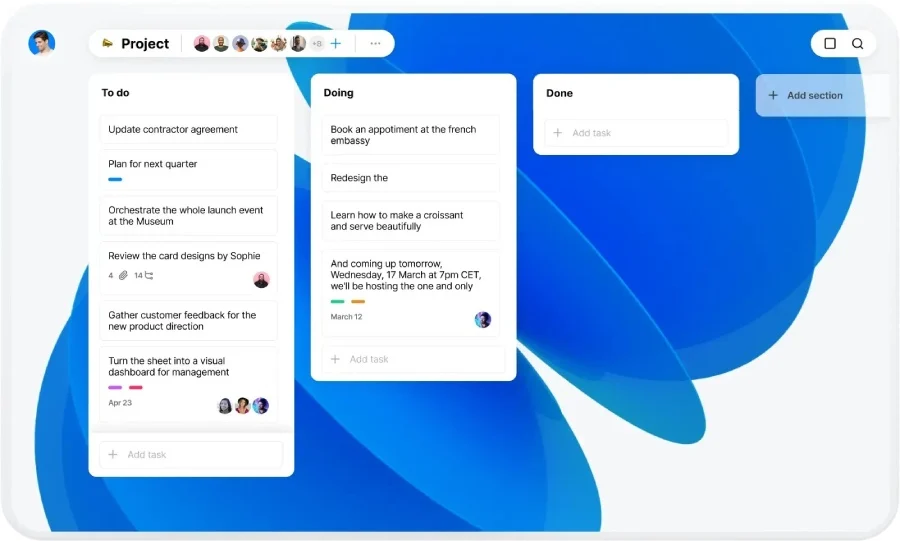
- You need a simple task management tool: Any.do is well touted as a simple to-do list app with a highly intuitive system. It uses a minimal number of modern-looking interface components, which make it especially easy to navigate between tabs. Users also find the basic tools for list management and reminder automations to be a breeze to operate.
- You are a solopreneur: Offering all the fundamental task-tracking capabilities, Any.do can especially benefit solopreneurs and independent contractors who need a solution to organize their day or week. The Personal plan is free for one user and comes with list-design features, task tracking, automated reminders, and the daily planner, which provides users with an hour-by-hour agenda based on task priorities and their schedule.
When To Use an Alternative
- You want broader project management tools for free: Any.do isn’t ideal for no-cost project management as its free plan is limited to just task list capabilities. Tools designed for overseeing projects, large or small, require the Teams plan.
- Alternative: Asana is our pick for the best to-do list app for free project management capabilities.
- You need free team collaboration features: Because the Any.do freemium plan only allows one user, teams wouldn’t be able to use that platform for collaboration as any features for task assignment, comments, or coordination demands the higher-tiered Teams plan.
- Alternative: Todoist is the best free to-do list app for collaborative capabilities—offering a free plan for individuals and a separate free plan for up to 250 unique collaborators.
Any.do Monthly Pricing Plans*
Cost:
- $0 for individual users
Key Features:
- Task management with list tracking
- Automated reminders for tasks
- Calendar view of tasks and events
- Daily planner
- Mobile task tracking capabilities on Apple and Android devices
Cost:
- $3 for individual users
Key Features:
- Everything in Personal
- Recurring task management
- WhatsApp reminders
- Color tagging for tasks
- Third-party integrations with over 5,000 unique apps
- Location reminders that track users and provide preset notifications of specific tasks associated with locations once they’re close to the geographic area
Cost:
- $5 per user
Key Features:
- Everything in Premium
- Team collaboration on workspaces for unlimited team members
- Unlimited project boards to oversee large projects and their tasks or milestones
- Workflow automation with premade templates
- Advanced admin tools and permission settings
*Pricing is based on annual billing on a per-user monthly breakdown. Monthly billing is available for a higher cost. Any.do comes with a 7-day free trial. Pricing reflects pricing info available at the time of publishing. While we update pricing information regularly, we encourage our readers to check current pricing here.
Our Expert Opinion
As simple as to-do apps already are in terms of functionality, Any.do manages to still stand out from the competition in terms of ease of use and interface usability. Individuals can get all the basics they need to oversee task lists for free while ensuring immediate value out of their product through a minimal learning curve. Ultimately, this product will provide one of the best user experiences.
Todoist: Best for Free Collaboration on Projects
When To Use Todoist
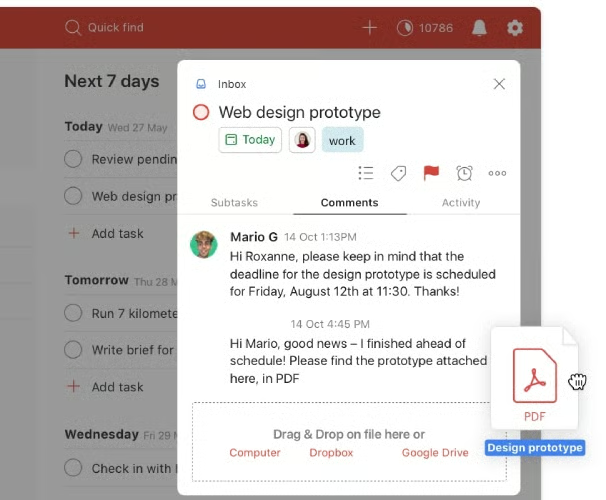
- You want a solid set of free project collaboration tools: Todoist is special in that it offers two separate freemium plans depending on needs. One is for individuals, while another is the Team Starter plan that allows unlimited users, admins, and guests. While products like ClickUp let you coordinate on individual tasks for free, it doesn’t include its project milestone tracking for free. Todoist has free project management and allows you to add up to 250 collaborators to large projects to assign tasks, make comments, and tag users.
- You need an easy-to-use to-do list app: One of the standout attributes of Todoist is the ease of use of the product. Users of any technical skill level can quickly become comfortable with its navigation system and features, thanks to its intuitive and minimalist design. The entire menu is located as a vertical sidebar which keeps the entire interface clean from clunky buttons and icons.
When To Use an Alternative
- You need free task reminders: If you’re someone who needs to get alerted for their upcoming task requirements, you may need to look elsewhere for your free to-do list app. Task reminders are one of the features not available on either of the two freemium plans.
- Alternative: Microsoft To Do and Any.do come with free automated task reminders for those who need that specific feature at no cost.
- You want to manage over five project or task categories: Another limitation of the free Todoist plans is the number of “boards” available. If you’re on the Personal Beginner or Team Starter plan, you’ll be restricted to just five separate projects or task list categories.
Todoist Monthly Pricing Plans*
Cost:
- $0 for one member and up to five guests
Key Features:
- Up to five active projects with one-week history tracking
- File attachments on project and task records
- To-do list tracking with task filtering for up to three views
Cost:
- $0 per member for unlimited admins, members, and guests
Key Features:
- Everything in Personal Beginner
- Up to three or 150 views for task filtering depending on the Personal plan used
- Team collaboration for up to 250 unique collaborators with task assignment, user tagging, and commenting on projects
- Theme customization using a select number of available formats
Cost:
- $4 per member and up to five guests
Key Features:
- Everything in Personal Beginner
- Up to 300 active projects with no time limit on activity tracking
- 150 views for task filtering
- Automated task reminder settings
- Theme customization with up to 15-plus formats to customize your platform
- Automated backup of task files
Cost:
- $6 per member for unlimited admins, members, and guests
Key Features:
- Everything in Personal Pro
- Up to 500 active projects with no time limit on activity tracking
- Up to three or 150 views for task filtering depending on the Personal plan used
- Team collaboration for up to 250 unique collaborators with task assignment, user tagging, and commenting on projects
- Admin and member role setting
- Automated task reminder settings
*Pricing is based on annual billing on a per-user monthly breakdown. Monthly billing is available for a higher cost. Pricing reflects pricing info available at the time of publishing. While we update pricing information regularly, we encourage our readers to check current pricing here.
**Plan is for individual users
***In-beta plan meant for team workspaces and business use
Our Expert Opinion
Offering the best shared to-do list app for teams, Todoist can supply a free and solid way to collaborate on tasks. The platform includes tasks assignment plus user comments with tagging to get someone’s attention, provide updates, and coordinate ideas for up to 250 collaborators. You can also attach files to tasks and projects to ensure resources are accessible to everyone on the team at no cost.
How We Evaluated the Best To-do List App
Frequently Asked Questions (FAQs)
Is there a free app for making lists?
Yes, there are many free apps available for making lists and tracking tasks. The ones that made our best-of list include ClickUp, Asana, and Airtable. There are also ones, like Microsoft To Do, that are native to a suite of other business productivity tools, which make them solid picks if you already use the Microsoft Office 365 suite.
What are the best free apps for making to-do lists?
The best free apps for making to-do lists depend on your specific feature needs and experience with task management software. For example, Asana sticks out for its no-cost project management capabilities while Airtable can offer the most number of unique task viewing options for free. If product simplicity is a requirement, however, we’d recommend Any.do while ClickUp has the most robust free tools and thorough customization options.
Is there an app to keep track of things?
Yes, there are many software applications available, such as ClickUp, Asana, and Any.do, for keeping track of “things” or tasks. These products are also known as task management systems or to-do apps. Users can create and monitor progress on their work and projects while also receiving automated reminders to complete a particular task.
Bottom Line
To-do list apps allow users to oversee tasks associated with a list, project, or business function. The best to-do list apps will be free and include automated reminders, system customization, and the ability to integrate with a host of third-party or native apps. While ClickUp offered the most robust task management platform, other products could be a better fit for your business. Todoist, for example, included the best free team collaboration tools, while Microsoft To Do is great for syncing up with native 365 applications.
