







Customer relationship management (CRM) systems for architects allow these professional firms to manage sales activity and client projects in one system. It’ll have the usual features like deal and lead tracking, as well as specialty tools like proposal generation, project management, and invoicing. The best CRM for architects will offer affordable features that help firms generate new business and deliver quality services along with an intuitive user experience.
After our thorough evaluation, we’ve determined the seven best CRM for architect software options:
- Best specialty architect CRM: JobNimbus
- Easiest to operate: monday CRM
- Best free CRM for architects: HubSpot CRM Suite
- Great option for growing your firm: EngageBay
- Most customizable CRM software for architecture firms: ClickUp
- Best client management system: Zoho CRM
- Best for proposal management: Pipedrive
- Best CRM for Architects Compared
- JobNimbus: Best Specialty CRM for Architects
- monday CRM: Best for Ease of Use
- HubSpot CRM: Best Free CRM for Architecture Firms
- EngageBay: Best for Scaling Revenue
- ClickUp: Best for Tailoring to a CRM for Architect Businesses
- Zoho CRM: Best for Client Management
- Pipedrive: Best for Proposal Management
- Benefits of CRMs to Architecture Firms
- How to Choose a CRM for Architecture
- Frequently Asked Questions (FAQs)
- Bottom Line
Best CRM for Architects Compared
| Provider | Starting Monthly Price per User* | Free Plan? | Our CRM Rating Out of 5 |
|---|---|---|---|
 | Contact for pricing | ✕ | 4.66 |
| Visit JobNimbus | |||
 | $10 | ✕ | 4.61 |
| Visit monday CRM | |||
 | $15 per user, monthly | ✓ | 4.60 |
| Visit HubSpot CRM | |||
 | $13.79 | ✓ | 4.60 |
| Visit EngageBay | |||
 | $7 | ✓ | 4.55 |
| Visit ClickUp | |||
 | $14 | ✓ | 4.54 |
| Visit Zoho CRM | |||
 | $14 | ✕ | 4.36 |
| Visit Pipedrive | |||
*Based on annual billing on a per user, per month basis; monthly billing is also available for slightly higher rates.
JobNimbus: Best Specialty CRM for Architects
When to Use JobNimbus
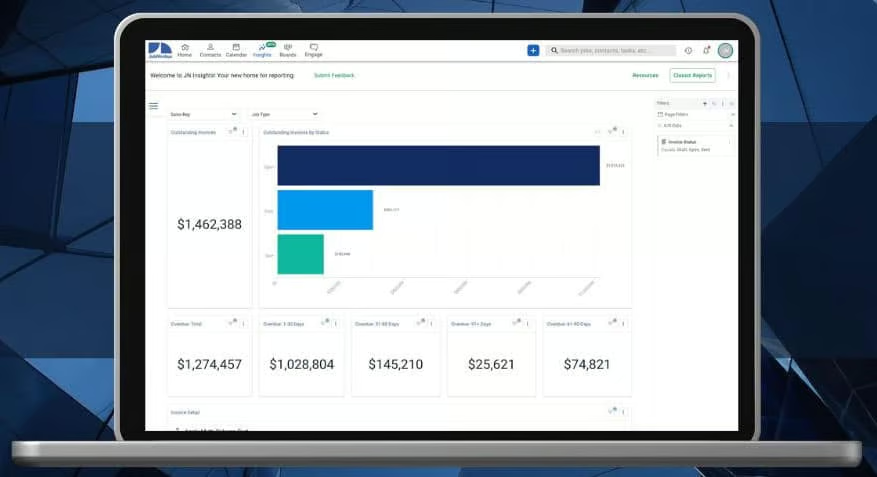
- You prefer a specialty CRM for architects and engineers: JobNimbus is the only industry-specific CRM product on this list built for verticals like roofers, siders, and gutter services. It’s equipped with premade modules that a professional services firm, like an architect and building engineer, could use for their business. This includes lead management, job scheduling, proposal generation, client project management, subcontractor tracking, and invoicing with payment processing.
- You need a solid architecture and office management software: The value of JobNimbus isn’t necessarily just in the sales or project management tools but the back-office capabilities as well. Office managers can use the system to handle finance activities like bookkeeping, invoicing, cost tracking, and work order processing. There are also modules for overseeing subcontractors, sharing work updates with clients via text or email, and budget tracking.
When to Use an Alternative
- You need a free architecture CRM: JobNimbus requires custom pricing for all plans. That said, none of the subscriptions include free-forever options that give startup architecture firms risk-free, no-cost access to CRM features.
- Alternative: HubSpot CRM is our favorite free option that includes solid tools for sales, marketing, and service.
- You want more affordable system customization: One issue with JobNimbus is that the customization features, specifically those for tailoring data fields and tasks for a specific operation, require the high-tiered Established plan. This is not ideal for architects who need to track specific information or have a unique way of doing things at their firm.
- Alternative: ClickUp is a fully tailorable work management system that includes most of its customization capabilities on the Free or low-tiered plans.
JobNimbus Monthly Pricing Plans*
All JobNimbus plans are tier-based and determined by your feature and user capacity needs. Customers must request custom pricing from the provider.
Key Features:
- Unlimited contacts database
- Workflow tracking for jobs on Kanban boards
- Invoicing capabilities with one-click send function
- Payment processing via the built-in JobNimbus Payments; can accept automated clearing house (ACH) and card payments
- General sales and project reporting
Key Features:
- Everything in Early
- Unlimited jobs management
- Custom reporting
- Up to 10 active workflow automations
- User comments and mentions on projects or sales records to facilitate team collaboration
- Integration with QuickBooks for payments and accounting data sync
- Up to five third-party software integrations
Key Features:
- Everything in Growing
- Unlimited jobs workflow tracking on boards
- Expanded automation for unlimited workflows
- Data sync with QuickBooks for multiple business offices or locations
- Unlimited third-party software integrations
- Custom data fields and task types on projects and CRM records
*Each plan offers a 14-day free trial. Pricing reflects info available at the time of publishing. While we update pricing information regularly, we encourage our readers to check current pricing here.
Our Expert Opinion
JobNimbus is a great specialty CRM for managing your entire architecture business in a single platform. The prebuilt modules let sales teams manage leads, proposals, and contact data while the professional architect can oversee their jobs and client to-do task lists. Additionally, office managers have an entire set of admin tools to invoice clients, collect payments, and track finances.
monday CRM: Best for Ease of Use
When to Use monday CRM
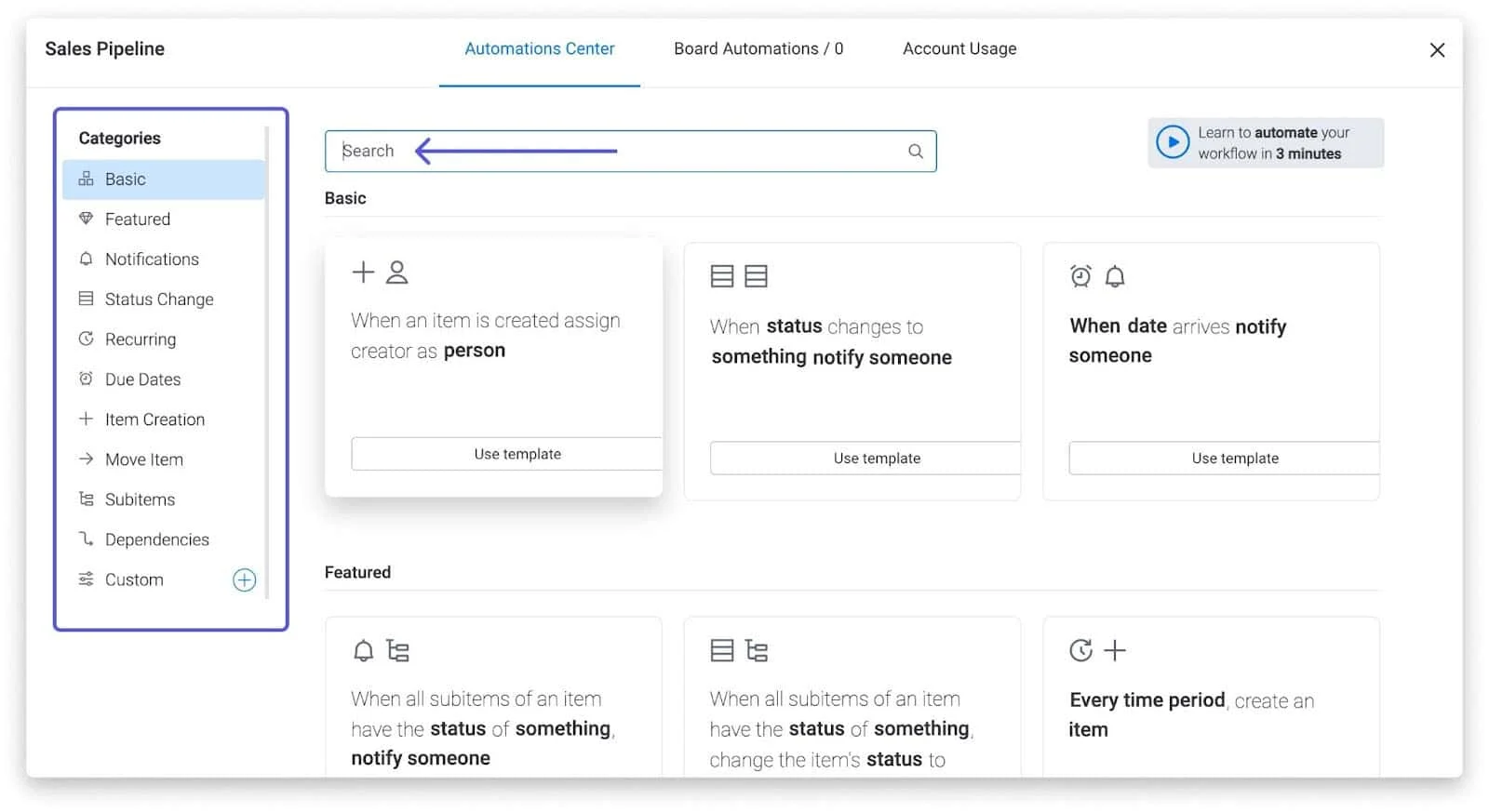
- You prioritize ease of use: Most architects don’t have experience in a sales role and, therefore, have likely never operated a CRM before. monday CRM is intentionally designed as a highly intuitive CRM. Teams can store and update their records through a familiar spreadsheet style and then change viewing options in just one click. It also leverages lots of drag-and-drop functions for design customization and low-code automation that lets you easily create if/then workflows from a drop-down.
- You need to collaborate with team members: Another significant element of monday CRM is the unique team collaboration features for architects to work together on projects or sales deals. It includes user mentions on CRM records, which will notify team members of updates or if someone needs information. It also comes with file editing and sharing in the CRM, plus a collaborative whiteboard to craft ideas.
When to Use an Alternative
- You need a free architect CRM: Unfortunately, monday CRM no longer offers a free-forever plan for users to get no-cost access to the sales features.
- Alternative: We recommend HubSpot CRM as the best free product for architects, which comes with unlimited user access, and free features for sales, marketing, and service teams.
- You want more affordable project management: monday CRM has a dedicated account and clients module that includes project management, onboarding, and revenue collection features. Unfortunately, these are not available until the Enterprise plan, which requires custom pricing.
monday CRM Monthly Pricing Plans*
Cost:
- $10 (priced for three-user minimum)
Key Features:
- Unlimited items like contacts, companies, and tasks stored in the database
- Document attachments in CRM items
- Premade CRM templates for storing lead, contact, account and deal information
- Unlimited custom pipelines
- Kanban viewing of CRM boards
- Web-to-lead capture
- Custom notifications and file sharing with users
- Collaboration features like file editing, whiteboard collaboration, and the updates tool to communicate with users
Cost:
- $14 (priced for three-user minimum)
Key Features:
- Everything in Basic
- Lead, account, and contact management with activity tracking
- Two-way integration with Gmail and Outlook systems to access email features from the CRM
- Deal tracking with custom stages, user deal ownership, and history tracking
- Quotes and invoice generation
- Custom activity logging for sales tasks like calls, emails, meetings, and anything else an architect wants to track
- Workflow automation with low-code design features
- Aircall integration to place and receive calls from the CRM
- PandaDoc and DocuSign integration for getting signatures on sales documents
- Multiple dashboards
- Zoom integration to manage and schedule meetings in the CRM
- Extended board viewing options like timeline, calendar, and map views
Cost:
- $24 (priced for three-user minimum)
Key Features:
- Everything in Standard
- Email templates and custom email signatures
- Email tracking with email deployment automation
- Calendar data sync to Google Calendar
- Integration with marketing tools such as Mailchimp, HubSpot, and Facebook Ads
- Time-tracking on CRM tasks; helps architects monitor billable hours
- Sales analytics and forecasting
- Extended board viewing options like chart view and workload tracker
Cost:
- Contact for pricing
Key Features:
- Everything in Pro
- Advanced account management with client onboarding and renewals tracking
- Revenue collection tracking for CRM accounts
- Client project management on service deliverables
- Integrations with Salesforce and enterprise resource planning (ERP) systems
- Lead scoring
- Data duplication management
- Team sales goal tracking
- Sales operations management tools like rep capacity planning, employee onboarding, and sales materials storage
- Legal requests management for sales contracts
*Pricing is based on annual billing on a monthly per-user breakdown. Monthly billing is available for a higher cost. There is a 14-day free trial for the paid plans. Pricing reflects pricing info available at the time of publishing. While we update pricing information regularly, we encourage our readers to check current pricing here.
Our Expert Opinion
monday.com really changed the game when they released their user-ready CRM system last year. By applying the same design principles that made the provider so prominent in the first place, architects can get access to an intuitive interface and easy-to-learn tools to manage their leads, clients, and projects. While the spreadsheet-style format for data management is great for new users, we can’t give enough kudos to the low-code automation features.
HubSpot CRM: Best Free CRM for Architecture Firms
When to Use HubSpot CRM
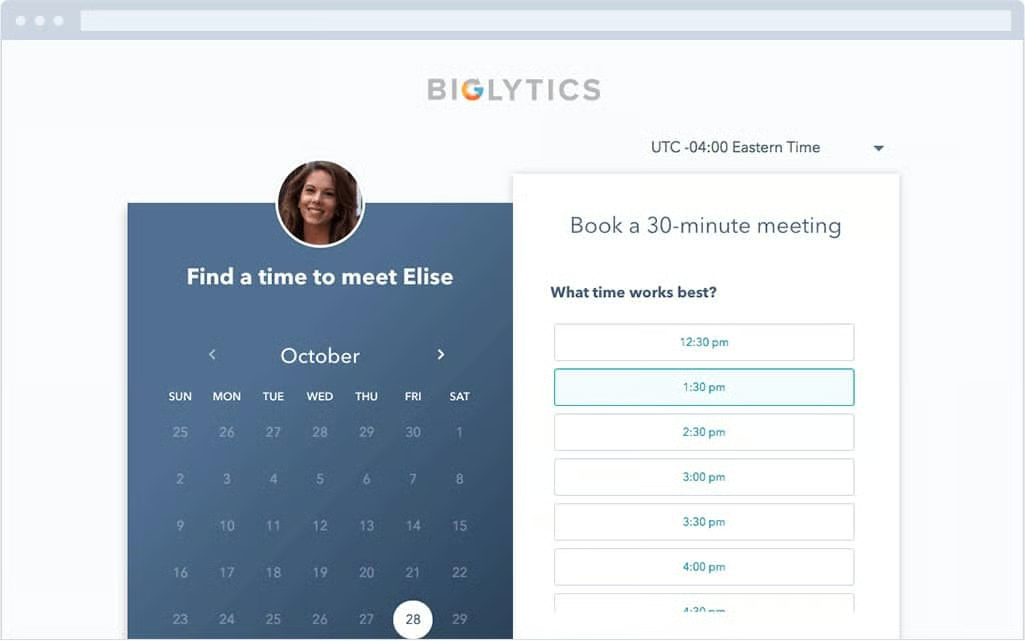
- You need a free architecture CRM: HubSpot is our pick for the best free CRM option for firms that want no-cost access to sales, marketing, and service tools. The freemium plan includes unlimited users and tools useful for architects, like deal tracking, quote generation, and appointment scheduling. Users can also store files, such as design resources, in the CRM or individual records and easily share them with prospects.
- You want easy-to-use features to build your brand: HubSpot CRM Suite has bundled plans that include the Marketing and Content Management System (CMS) Hub and the Sales and Service Hubs. The tools and interface, particularly for the marketing features, will be intuitive to use. Architects with limited CRM experience can leverage HubSpot to educate prospects with a blog or video library, produce leads through email, ads, or social media, and get search engine optimization (SEO) analytics for web traffic.
When to Use an Alternative
- You need true project management features: HubSpot lacks a true project management module for architects and engineers to oversee client deliverables and workflows. The system is limited to task lists you can track, assign, and collaborate on.
- You want a more scalable, cost-friendly solution: While the free plan is excellent, HubSpot isn’t the best option if you’re a growing architecture firm. The Professional plan skyrockets to a whopping $1,080 per month for 5 users ($45 per additional user, monthly) are subscribed.
- Alternative: EngageBay is a solid alternative with the all-in-one sales, marketing, and service modules but for far less.
HubSpot CRM Monthly Pricing Plans*
Cost:
- $0 for 5 users
Key Features:
- Contact and company management
- Activity tracking for CRM records
- App marketplace access for third-party integrations
- Deal tracking on up to one pipeline
- Quote generation
- Documents storage in the CRM plus contact and deal records; users can also easily share files with prospects
- Built-in appointment scheduling
- Ads management for audience creation and generating leads through form submissions
- Mass email marketing with email templates and campaign automation
- Blog management with basic search engine optimization (SEO) suggestions
- Website landing page design tools
- Customer service ticketing for one pipeline
Cost:
- $15 per user, monthly
Key Features:
- Everything in the Free CRM Suite
- Payment processing through automated clearing house (ACH) and Stripe integration for credit card payments; clients can pay through quotes or invoices
- Telephone access from the CRM for up 500 minutes per account, monthly
- Multiple pipelines for ticketing and deal tracking
- Sales automation like user notifications and task assignment based on deal changes
- Call-to-action (CTA) design tools
- Expanded Ads management in HubSpot for creating, deploying, and tracking online campaigns
Cost:
- $1,080 per month for 5 users ($45 per additional user, monthly)
Key Features:
- Everything in Starter CRM Suite
- Social media integrations to manage up to 50 accounts and publish 10,000 monthly posts
- Sales sequences for sending automated email and LinkedIn messages for outreach or follow-ups
- A/B testing on emails and landing pages
- Data duplicate detection
- E-signatures on quotes
- Automatic lead rotation
- Multiple sales teams
- Deal and company scoring
- SEO analytics for web pages
- Multi-blog management
- On-demand video library hosting
- Custom reports with sales forecasting and goal tracking tools
*Pricing is based on annual billing on a per-month breakdown. Monthly billing is available for a higher cost. Each plan offers a 14-day free trial. Pricing reflects info available at the time of publishing. While we update pricing information regularly, we encourage our readers to check current pricing here.
**Pricing uses the monthly CRM Suite costs for individuals and small teams. The provider also offers Enterprise-level products for larger teams for a higher cost. The CRM Suite includes sales, marketing, customer service, content management system (CMS), and operations software in one product. Individual modules can be purchased for lower prices.
Our Expert Opinion
HubSpot CRM is a great solution for developing client relationships and generating leads. Startup architecture firms, in particular, can get lots of value from the free CRM plan that allows them to schedule appointments, store and share design files, track contacts and deals, and generate quotes, all for $0 per month. The free plan also lets you build your brand through a blog and mass email marketing.
EngageBay: Best for Scaling Revenue
When to Use EngageBay
- You want a scalable CRM to grow your firm: EngageBay offers a free-forever option for its CRM system and has cost-friendly paid plans for when your firm grows. Not only are these subscriptions cost-scalable, but they include great sales and marketing features, like appointment scheduling, mass email outreach, deal tracking, and a phone system. There is also social media monitoring to help produce more leads and generate new clients.
- You operate as a revenue operations (RevOps) team: Revenue operations functions, which combine sales, marketing, and service teams into one umbrella, are increasing in popularity. Architecture firms may prefer this route to ensure their messaging, outreach, and business development strategies are in sync. EngageBay offers an all-in-one sales, marketing, and service management system to improve the organization and efficiency of revenue teams.
When to Use an Alternative
- You need project management tools: While awesome for generating and sustaining clients, EngageBay won’t let you manage the work done for clients since it has no project management tools.
- You want lower-priced proposal generation features: EngageBay does allow architects to create sales proposals to prospective clients. This feature, however, is not available until the Growth plan for $45.99 per user, monthly.
- Alternative: Zoho CRM offers its inventory management modules, which include proposal and quote generation, for just $23 per user, per month. If you simply want quote customization features, you can get it from HubSpot CRM for free.
EngageBay Monthly Pricing Plans*
Cost:
- $0 for up to 15 users
Key Features:
- Up to 250 contacts and companies
- 360-degree profile views with record tagging
- Predictive lead scoring
- Custom website pop-ups and online web forms
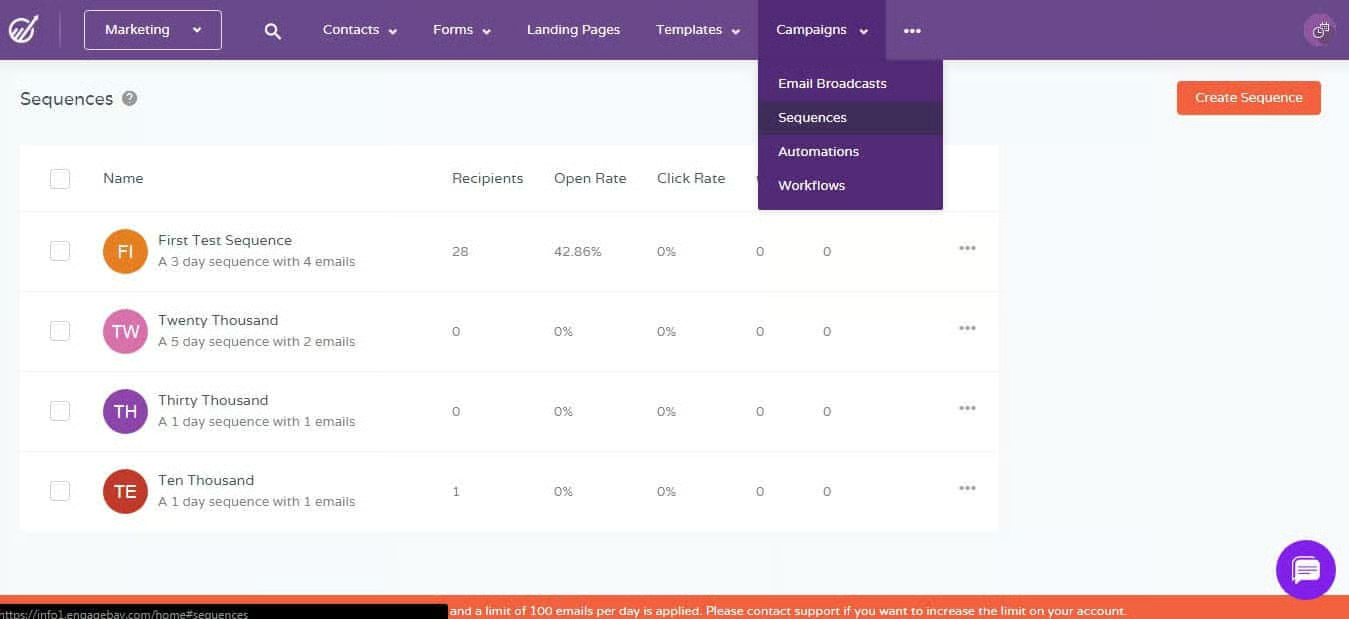
- Email integration with for 1,000 branded emails, stored email templates, and up to two automated email sequences
- Social suite for monitoring social media feeds
- Deal tracking
- Built-in appointment scheduling
- Task management
- Ticket management with up to two ticket views
Cost:
- $13.79
Key Features:
- Everything in Free
- Up to 500 contacts and companies
- 3,000 branded emails
- Custom deal milestones
- Calling minutes to conduct calls from the CRM
- Expanded ticket management with macro one-click automatons, ticket groupings, insertable canned responses, and customer 360-views
Cost:
- $59.79
Key Features:
- Everything in Basic
- Up to 5,000 contacts and companies
- 25,000 branded emails
- Marketing automation
- Workflow automation for sales, marketing, and service modules
- Sales leaderboard tracking and call reports
- Proposal generation and management features
Cost:
- $110.39
Key Features:
- Everything in Growth
- Unlimited contacts and companies
- 50,000 branded emails
- Website analytics
- Custom reporting
- Goal management
- Account-based marketing to plan campaigns and align strategies between sales and marketing departments
- Teams management with hierarchy tracking
*Pricing is based on annual billing on a per user, per month breakdown. Monthly billing is also available for a higher cost and biennial billing is available for a lower cost. Pricing reflects pricing info available at the time of publishing. While we update pricing information regularly, we encourage our readers to check current pricing here.
Our Expert Opinion
EngageBay is a robust CRM solution for architecture firms to grow their book of business. Between the all-in-one sales, marketing, and service modules, teams can produce and retain revenue in the same interface. We also can’t overlook the cost-effectiveness of the tool. Through the free and affordable subscription options, EngageBay makes it easy to scale revenue and operations efficiently.
ClickUp: Best for Tailoring to a CRM for Architect Businesses
When to Use ClickUp
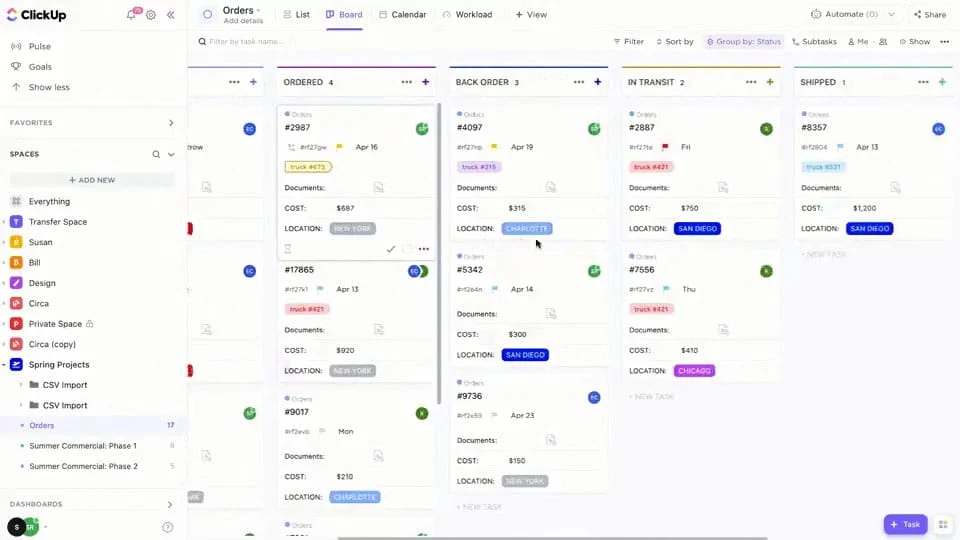
- You want to tailor your CRM for architecture firm needs: ClickUp isn’t a traditional CRM, but rather a work management system for teams to store data and files, track projects or processes, and collaborate. The software is highly customizable for architects to easily create modules that meet their business needs. From managing design projects to collaborating on campaigns to tracking deals, ClickUp lets you configure the product to your operational needs.
- You need a free architect CRM: While great for customization, another value-add for ClickUp is its free plan. Architects can book meetings, monitor task lists, track time on tasks for billable hours, and share files with clients, all at no cost. The Free plan also lets you create up to five unique workspaces for any business need, such as projects or the sales process, as well as do whiteboard collaboration with users and send emails.
When to Use an Alternative
- You want a complete proposal management module: While invoicing is available in the system, ClickUp does not offer a true proposal module where users can easily add CRM data to a template to send, track, and get signatures for. They’re limited to just creating a file manually and sharing it via email with a prospective client.
- Alternative: Pipedrive is our favorite proposal management CRM, which is powered by Smart Docs—enabling users to auto-populate lead data into proposals to easily send for review.
- You need broader marketing tools: Because ClickUp is a work management system, teams can create workspaces to track progress for marketing campaigns and collaborate. However, in terms of actually creating, deploying, and tracking performance for an ad, social media post, blog content, or other marketing campaign, you are limited to just email.
- Alternative: HubSpot CRM has a powerful array of marketing capabilities manageable from the system, including email, social media, blog, video library, ads, and website landing pages and forms.
ClickUp Monthly Pricing Plans*
Cost:
- $0 for unlimited users
Key Features:
- Up to five custom workspaces to manage workflows, store data records, track tasks, and collaborate on activity for any business area, including architecture operations
- File storage and sharing options, including with outside guests like clients
- Unlimited stored records and tasks
- Prebuilt templates to create workspaces
- Custom data fields in workspaces and CRM records
- Appointment booking
- Viewing through the list, board, table, and calendar views, plus up to 100 sessions for Gantt, timeline, workload, and map views
- Built-in whiteboard collaboration on boards with video recording options
- Up to 100 automated workflows per month
- Task management with checklists, time tracking, and user assignment
- Relationship linking, tagging, and priority setting on CRM records
- Integration with Zapier
- Use Gmail and Outlook email in the platform for direct and mass email
Cost:
- $7 per user
Key Features:
- Everything in Free
- Unlimited workspaces
- Up to 1,000 automated workflows per month
- Unlimited sessions for Gantt and map board views
- Team box view that lets you monitor team tasks and work capacity
- Built-in web forms for surveying and collecting data
- Recurring task tracking
- Teams management for up to one team
- Dashboard reporting
- Project milestone tracking
- Team goals management
- ClickUp artificial intelligence (AI) writing assistant to automate content creation, editing, and summarization of documents and written drafts
Cost:
- $12 per user
Key Features:
- Everything in Unlimited
- Unlimited sessions for activity, timeline, workload, and mind maps views
- Branding and customizable web forms
- Unlimited whiteboards
- Up to 10,000 automated workflows per month
- Manage an unlimited number of teams
- Time estimates and time sheet reporting for tasks and workflows
Cost:
- Contact for pricing
Key Features:
- Everything in Business
- Up to 250,000 automated workflows per month
- Unlimited lists, folders, and document tags for each space
- White labeling product options
- Tableau integration
*Pricing is based on annual billing on a per-user monthly breakdown. Monthly billing is available for a higher cost. ClickUp comes with a 14-day free trial. Pricing reflects pricing info available at the time of publishing. While we update pricing information regularly, we encourage our readers to check current pricing here.
Our Expert Opinion
ClickUp empowers architects to turn a work management system into a centralized solution for tracking all business activity. Thanks to its robust customization capabilities, all processes, from sales deals to marketing campaigns to client design projects to back-office tasks, can be overseen in ClickUp. The comprehensiveness of the platform also pairs nicely with the overall cost-friendliness.
Zoho CRM: Best for Client Management
When to Use Zoho CRM
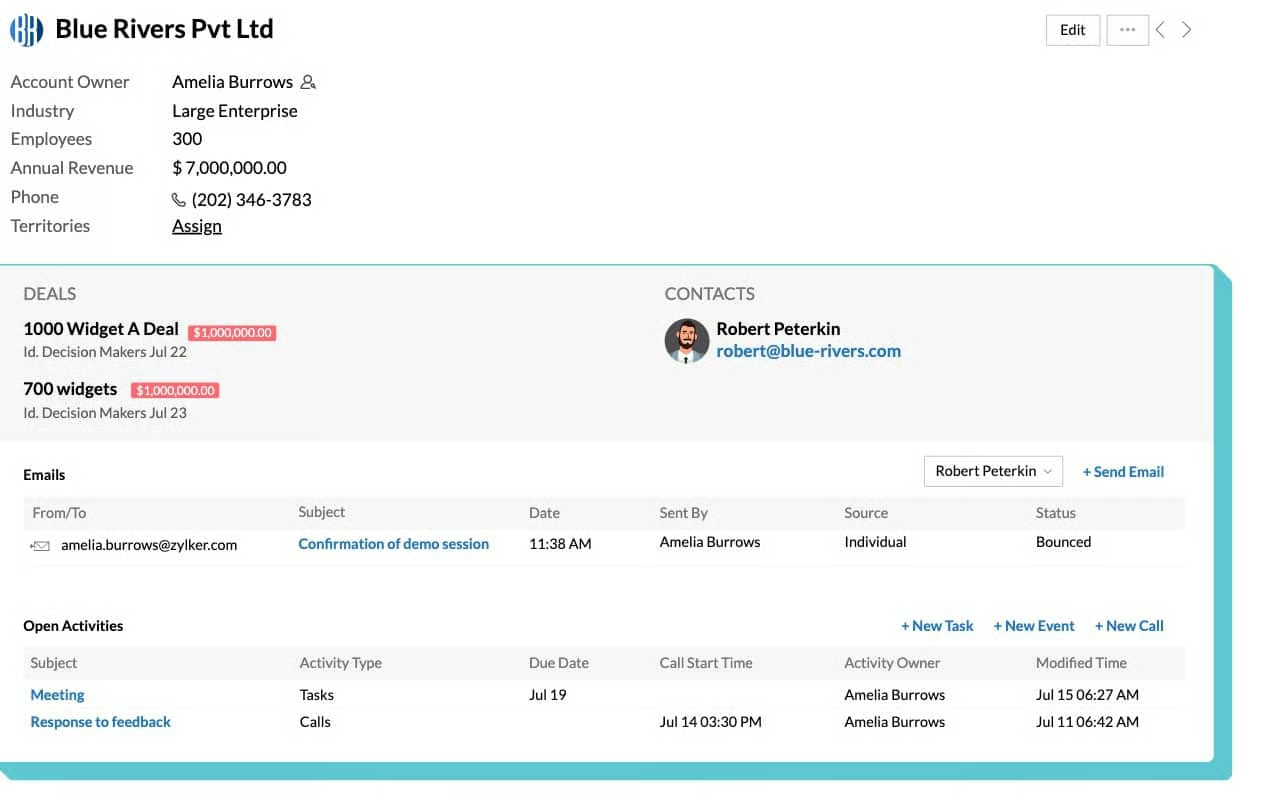
- You need robust tools for client management: Zoho CRM sticks out as a solid system for architects to oversee client services. It has a dedicated account management module to save contact information, track prior activity, and store and share files. There’s also an entire inventory management system for quoting and invoicing projects, which are then saved as activity in account records. Finally, users can schedule appointments and conduct telephone client calls from the CRM.
- You want an advanced but affordable CRM: Zoho CRM is highly acclaimed for its cost-friendly features. There’s a Free plan available for up to three users, plus many scalable paid plans that range from just $14 to $52 per user, per month. The system isn’t just affordable, but robust too. Zoho is an excellent artificial intelligence (AI) CRM system and comes with plenty of automation and data analytics capabilities.
When to Use an Alternative
- You need more architect specialization in your CRM: Zoho is one of the most popular general-use CRMs available. That said, lots of tailoring and integrations are required before you can convert it for architect operational use. It also doesn’t have built-in project management. Users must subscribe to a third-party tool or the native Zoho Projects for that capability.
- Alternative: JobNimbus is the best option if you want premade modules user-ready in your architect CRM.
- You want a simpler CRM product: Zoho has many modules and advanced CRM tools. Because of its robust nature, users find a steep learning curve before getting comfortable with the platform.
- Alternative: monday CRM takes the spot as the best CRM for architects in terms of overall ease of use.
Zoho CRM Monthly Pricing Plans*
Cost:
- $0 for three users
Key Features:
- Lead, account, and contact management with activity tracking
- Documents library for storage and file sharing
- Native integration with Zoho Projects for project management
- Deal tracking for one sales pipeline
- Custom email templates
- Workflow automation
- Standard CRM reporting
Cost:
- $14 per user
Key Features:
- Everything in Free
- Zoho marketplace for third-party CRM integrations
- Custom data fields
- Sales forecasting
- Meeting scheduler
- Third-party integration for using a phone system in the CRM
- Social media integration for monitoring feeds and generating leads
- Google Workspace integration
- Expanded workflow automation for trigger-based CRM record creations, updates, or assignment
- Contact and lead scoring
- Multiple sales pipelines
- Mass and direct email with engagement tracking on email messages
- Custom reports and dashboards
Cost:
- $23 per seat
Key Features:
- Everything in Standard
- Automated duplicate detection
- Mass email scheduling
- Customer support module for case management; includes automated case assignment to specific agents
- Inventory management module for products and pricebooks storage, quote and invoice generation, vendor management, and order processing
- Built-in sales gamification through Zoho Motivator
- Unlimited reports
- Macro automations that trigger automated workflows using user commands instead of preset triggers
Cost:
- $40 per user
Key Features:
- Everything in Professional
- Zia artificial intelligence (AI) tool for task reminders, “ask” options to find CRM information users on command, predications, and performance recommendations
- Data enrichment powered by Zia AI
- Case escalation rules in the customer support module
- Custom CRM modules
- Multiple scoring rules on lead scores
- Territory-based forecasting
Cost:
- $52 per seat
Key Features:
- Everything in Enterprise
- Zia Scores tool that uses AI to automate lead scoring
- 50 sales pipelines
- Unlimited application programming interfaces (APIs)
*Pricing is based on annual billing on a per-user monthly breakdown. Monthly billing is available for a higher cost. Zoho CRM comes with a 15-day free trial for the paid plans. Pricing reflects pricing info available at the time of publishing. While we update pricing information regularly, we encourage our readers to check current pricing here.
Our Expert Opinion
Zoho is the best cost-friendly option if your main priority is supporting and retaining clients. Between the built-in account management module, appointment scheduling, file sharing, and communication tools, this product gives you everything you need to sustain a solid relationship. It also makes it easy to generate quotes for architect design projects and handle invoicing upon completion.
Pipedrive: Best for Proposal Management
When to Use Pipedrive
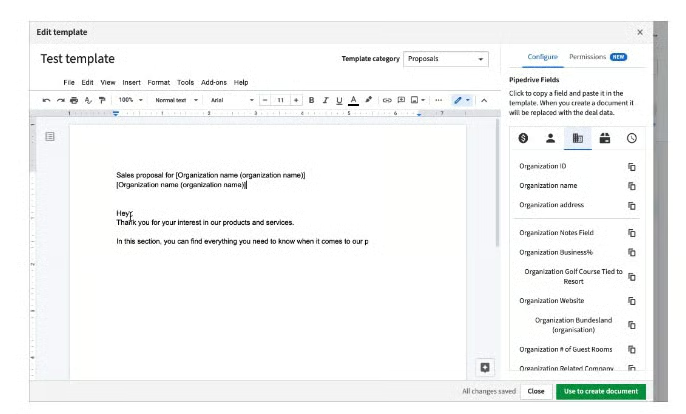
- You need to streamline proposal generation: Proposal generation is one of the most vital stages of the sales process for an architect as it lays out the scope of work, pricing, and solutions to building projects. Pipedrive is the best CRM for creating and sending out sales proposals. It includes Smart Docs, which lets users easily customize templates with content and auto-populate proposals using stored CRM data. Once done, you can send, track, and get signatures for the proposal in just a few clicks.
- You want to stay engaged with your clients: In addition to supporting sales pipeline activity, Pipedrive is a great tool for communicating and coordinating with clients. It has a built-in appointment scheduler, which includes video conferencing, as well as a solid file storage and sharing system. Additionally, teams can automatically keep their profile data up to date using Smart Contact enrichment tools and engage clients via email.
When to Use an Alternative
- You need a free CRM: While it’s not necessarily super-expensive, Pipedrive does not offer any free-forever plan outside of its 14-day free trial.
- Alternative: HubSpot CRM Suite is the best option if you prioritize adopting a free CRM for your architecture firm. We also like ClickUp, particularly for free project management features.
- You want built-in invoicing: After all your hard work on a design project, it’s nice to be able to just invoice directly from the CRM without having to connect it to a third-party tool. Unfortunately for Pipedrive, built-in invoicing is not available, and users must integrate with external apps.
- Alternative: We recommend JobNimbus, monday CRM, and Zoho CRM as the best alternatives with built-in invoicing capabilities.
Pipedrive Monthly Pricing Plans*
Cost:
- $14 per user
Key Features:
- Lead and contact management with activity tracking
- Document storage in CRM records with file sharing options
- Product catalog
- Deal management with rotting indicator and deal pipeline reporting
- Apps marketplace for third-party integrations
- Duplicate detection and merge
- Comments and user mentions on CRM records for team collaboration
- Custom data fields and pipelines
- Activity reporting with company and user sales goals tracking
- Artificial intelligence (AI) sales assistant, which supplies users task updates, reminders, progress notifications, performance tips, and forecast assistance
Cost:
- $39 per seat
Key Features:
- Everything in Essentials
- Two-way email sync for using Gmail or Outlook email systems in the CRM
- Custom email templates and email signatures
- Merge fields which personalized email templates using stored CRM data
- Built-in meeting scheduler with video conferencing options
- Workflow automation
- Smart contact data for auto-enriching contact data using information found online
- Expanded sales reports with recurring revenue tracking
Cost:
- $49 per user
Key Features:
- Everything in Advanced
- Contacts timeline in records for visual activity tracking
- Deal card customization to display key information on a visual sales pipeline
- Smart Docs for auto-populating data on business proposals for sending and tracking; allows users to obtain e-signatures
- Sales team management
- Expanded reporting for tracking custom data fields on sales reports and tracking subscription-based revenue
- Automatic deal and lead assignment based on preset triggers
- Revenue forecasting
Cost:
- $64 per seat
Key Features:
- Everything in Professional
- Built-in project management with Kanban views, tasks and subtask management, and custom project data fields
- Phone support and an implementation program for CRM users
Cost:
- $99 per user
Key Features:
- Everything in Power
- Security rules and permission settings for individual users
- Unlimited reports and sales dashboards
- 100 active workflow automations
- Unlimited teams management capabilities
*Pricing is based on annual billing on a per-user monthly breakdown. Monthly billing is available for a higher cost. Paid plans include a 14-day free trial. Pricing reflects pricing info available at the time of publishing. While we update pricing information regularly, we encourage our readers to check current pricing here.
Our Expert Opinion
Pipedrive has the ability to streamline your entire sales pipeline, especially at the later stages. Its Smart Docs feature is a game changer for how architects manage proposals. By letting you automate proposal generation and send signable documents in one click, teams can save tons of time on this tedious pipeline stage.
How We Evaluated the Best CRM for Architects
Benefits of CRMs to Architecture Firms
By using a CRM that offers niche features useful to architects, like project management and proposal generation, you get the benefit of work centralization. Rather than switching through separate apps to oversee sales operations, marketing campaigns, client design projects, and back-office activity, you can use an architecture CRM and do it all in one platform. It’s also more cost-friendly to get a variety of software in one system compared to many.
How to Choose a CRM for Architecture
When choosing a CRM system for your firm, you should consider your budget capacity and feature needs based on the challenges you want to solve. For example, some architects may want to streamline their proposal management processes, while others are looking to build their brand with email marketing tools. Different CRMs may or may not offer those capabilities. You should also consider your technical experience with a CRM, as certain products are easier to use than others.
Frequently Asked Questions (FAQs)
What is a CRM for architects?
A CRM for architects is a sales management solution that also includes features for operational needs like overseeing design projects, sharing client files, and invoicing. While many general-use CRMs can be customized to fill these needs, teams can also adopt a specialty CRM specifically built for architects.
What is the best CRM for architects?
The best CRM for architects varies depending on product preferences, budget, and feature needs. For example, HubSpot CRM is a great generic product if you primarily want free sales, marketing, and service features. Alternatively, JobNimbus is a solid option if you want an industry-specific CRM built for architect businesses.
What is the best free CRM for architects?
Free CRMs for architects are great as they offer a no-obligation, $0 option for users to access certain features to grow their firm. The best free CRM option overall is HubSpot as it comes with a complete range of no-cost sales, marketing, and service tools to help generate revenue. ClickUp, however, is another solid freemium option—it’s a full work management system that can be customized into a CRM and project tracking tool for architects.
Bottom Line
CRMs for architects enable these firms to oversee sales, marketing, and operational activity in one interface. They’ll include features like project management, invoicing, file sharing, proposal generation, and appointment scheduling, in addition to the typical deal tracking and marketing tools found in most CRMs. While we ranked JobNimbus as the best architect CRM option, other products could be better suited depending on your feature priorities and budget.
