







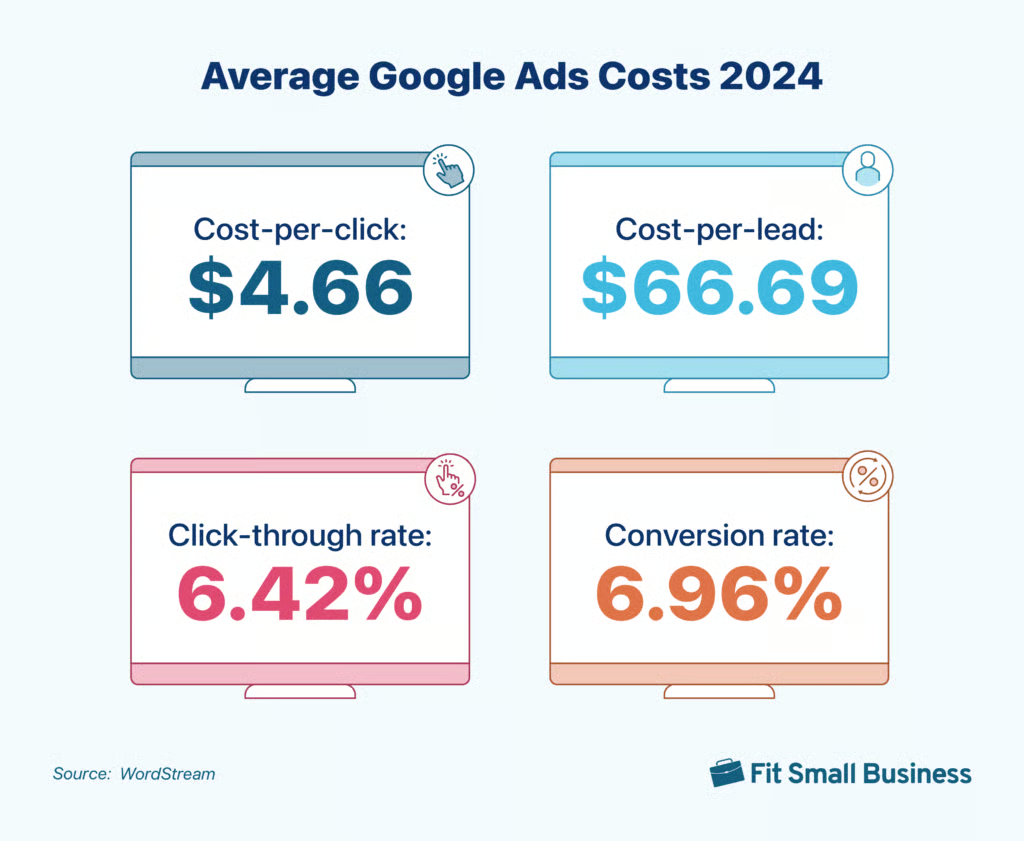
How much does it cost to advertise on Google? In 2024, the average cost is $4.66 per click. However, this varies depending on the keywords your ad is targeting, your industry, and your overall ad campaign budget, among other factors. But one of the best things about Google Ads is that they’re suitable for any budget. If you’re planning on advertising on Google, keep reading to learn all the essential Google advertising costs you need to know.
Google Ads Costs in 2024
The average cost of Google Ads in 2024 is $4.66 per click (CPC), according to WordStream. Meanwhile, the average cost-per-lead or CPL is $66.69. However, it’s important to remember that how much it costs to advertise on Google varies significantly by industry (which we’ll discuss more below). For instance, ads in the legal industry can often run much higher than those in the entertainment industry because of much stiffer competition.
Other essential Google Ad cost benchmarks to keep in mind include click-through rate (CTR) and conversion rate.
How Much Do Google Ads Cost by Industry?
As mentioned, Google Ads prices vary significantly by industry, and the overall average isn’t always the best benchmark when calculating the Google advertising cost for small businesses. For a more accurate number, you’ll need to look at the average for your particular industry.
Here’s a quick look at the average cost-per-click (CPC) and CPL per industry, along with their CTR and conversion rate.
| Industry | Average CPC | Average CPL | Average CTR | Average Conversion Rate |
|---|---|---|---|---|
| Animals & Pets | $3.90 | $34.81 | 7.39% | 12.03% |
| Apparel (Fashion & Jewelry) | $3.39 | $83.10 | 6.13% | 3.33% |
| Arts & Entertainment | $1.72 | $44.70 | 13.04% | 4.22% |
| Attorneys & Legal Services | $8.94 | $144.03 | 5.30% | 5.64% |
| Automotive Repair, Service & Parts | $3.39 | $27.94 | 5.69% | 12.96% |
| Beauty & Personal Care | $3.56 | $48.42 | 6.75% | 8.01% |
| Career & Employment | $4.53 | $117.92 | 6.79% | 5.63% |
| Dentists & Dental Services | $6.82 | $86.49 | 5.38% | 8.36% |
| Physicians & Surgeons | $4.76 | $59.74 | 6.73% | 11.08% |
| Education & Instruction | $4.39 | $71.52 | 6.21% | 7.91% |
| Finance & Insurance | $3 | $75.94 | 7.71% | 2.78% |
| Furniture | $3.29 | $119.10 | 6.50% | 2.53% |
| Health & Fitness | $4.71 | $61.56 | 6.88% | 7.40% |
| Home & Home Improvement | $6.96 | $82.27 | 5.59% | 8.62% |
| Real Estate | $2.10 | $87.36 | 9.20% | 2.91% |
| Restaurants & Food | $2.18 | $29.67 | 8.68% | 8.72% |
| Sports & Recreation | $2.34 | $49.90 | 9.66% | 5.35% |
| Travel | $1.92 | $66.02 | 10.16% | 5.36% |
| (Source: WordStream) | ||||
Factors Affecting Google Advertising Costs
Beyond knowing how much are Google Ads on average, it’s also important to know the factors affecting them. This is because, like other forms of small business advertising, Google Ads operates on an auction basis.
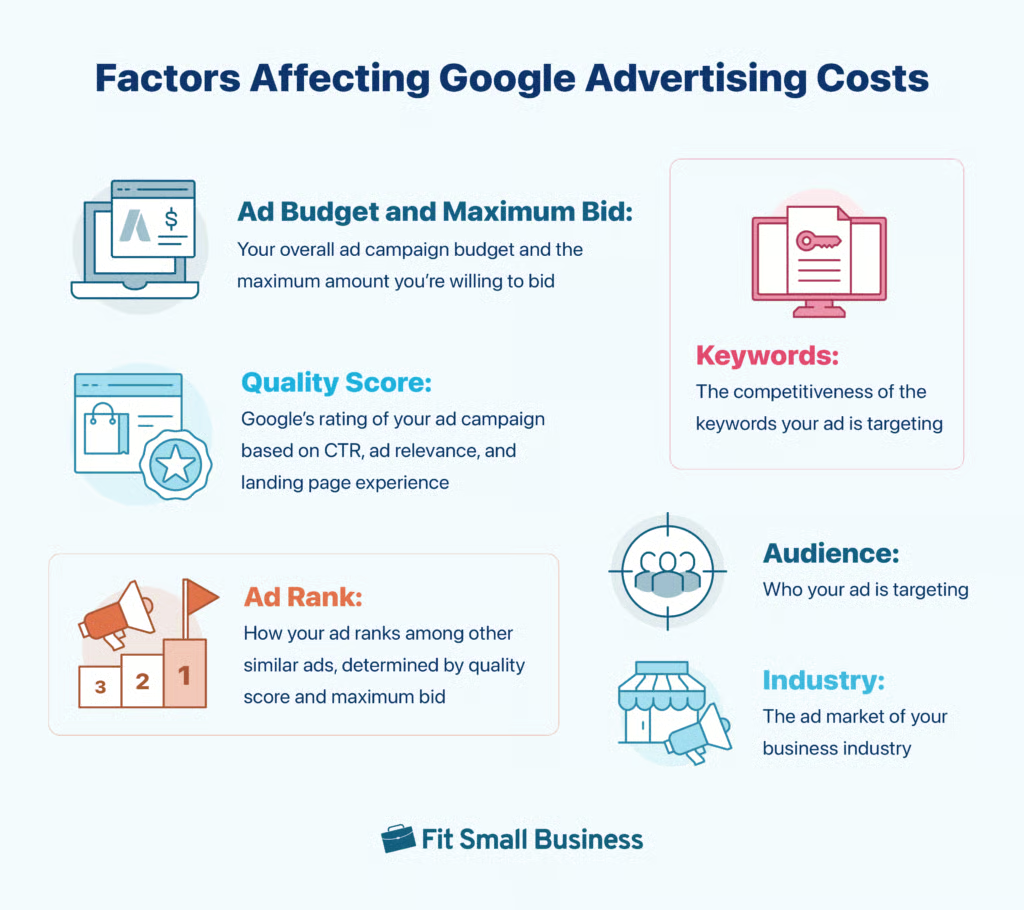
However, unlike a regular auction, the ad that “wins” the best spot isn’t necessarily the highest bidder. Rather, a combination of multiple factors like the ad’s quality, keywords, budget and bid, audience, industry, and other elements influence placement and advertising rates for Google.
Ad Budget and Maximum Bid
Your ad’s budget and maximum CPC bid are two key components you’ll need to fill out when running a Google Ads campaign. The budget is the average amount you are comfortable spending per day over a 30.4-day period (the average number of days per month). Meanwhile, your maximum bid is the highest amount you’re willing to pay for every click on your ad.
Finally, the other figure you’ll encounter is your spending limit. This is the maximum amount you’ll pay per month and is twice the amount of your daily ad budget. For example, if your daily ad budget is $10, your maximum spending limit would be $20 a day. Google does this because if your ad is performing really well, it’ll automatically increase your ad budget to increase clicks and conversions. However, it will never go above your maximum spending limit per day.
Keywords
Google Ad rates are also affected by keywords and their search intent. High-value keywords are costlier because they have high purchase intent (for instance, “coffee near me” has a higher purchase intent than “how to make coffee” and therefore costs higher).
Quality Score
Quality score is Google’s rating of your business based on expected CTR, ad relevance, and landing page experience. Google values customer experience, so if it believes your ad will provide the best information for a specific search query, you’ll have a greater chance of winning that query. The lowest quality score is 1, while the highest is 10.
You can find your Google Ads quality score by logging into your Google Ads account, selecting the campaign and ad group, and heading to the “Keywords” tab.
Ad Rank
Your ad rank is the quality score multiplied by your maximum bid, which is also calculated by Google. The campaigns with the highest ad ranks are the ones shown to web users after a search query.
This formula allows small business owners with modest budgets to compete with larger enterprises and ensures a more equal playing field (aka the highest bidder doesn’t always automatically get the top ad spot).
Audience
Every ad campaign has a target audience, which also affects its average cost. This is because different audience sets react to different ads in different ways.
For example, if a coffee shop targets ads to people who are online in the morning, they’ll likely cost more than if they’re targeted to people online in the evening because coffee drinkers are generally more online and looking for coffee in the morning. Another example is if you target ads to young working professionals in a central business district, they’ll likely cost more than targeting a demographic of retirees in the same area.
Industry
As you probably know by now, your industry plays a vital role in determining your ad spend. The variation of Google Ads costs by industry depends on three main factors:
- The value per conversion of products or services in that industry
- The length of time it takes for a customer to complete a transaction
- External circumstances and trends that affect specific industries
How Much to Bid for Your Google Ads
Now that you know the average cost of advertising on Google, you’re also probably wondering how much to budget for your ad campaigns. The ideal bid varies depending on your campaign type and keywords, but Google recommends starting with $1 as your maximum CPC bid if you’re unsure where to start. According to WordStream, most small to midsize businesses spend between $1,000 and $10,000 monthly on Google Ads.
It’s a safe bet to keep your maximum CPC bid just under your breakeven CPC. Setting it higher can lead to more conversions, but it also has greater risk. Meanwhile, setting it much lower may affect your ad ranking and lead to no conversions at all.
Tips to Maximize Your Google Ads Costs
After knowing how much is a Google ad, the next step is knowing how to maximize your Google Ad spend to create more cost-efficient campaigns. Google Ads aren’t an exact science with one single magic formula, but having the right understanding of how the platform works can help you get the most out of your campaigns. Here are some tips to help you:
- Identify your campaign objectives clearly: The first part of setting up your Google Ads campaign is identifying its objectives, whether that’s gaining more clicks or visits to your physical store. Clearly outlining what you need from each campaign will help you better focus your efforts and avoid wasted ad spend.
- Have a defined target audience: In the same vein, having a defined target audience also helps ensure that your ad reaches the right, relevant people. This includes demographics like age and location, but also their interests, behaviors, purchase intent, and more. One of the biggest benefits of Google Ads is its precise targeting—use it to your advantage.
- A/B test your ads: Once you’re a little more familiar with running Google Ads, you can start doing A/B tests to improve them even further. You can run A/B tests manually by testing a variable on two separate campaigns (like ad copies or landing pages) or by using Google’s A/B testing tool.
- Do keyword research: We mentioned above how keywords play a key role in your ad getting found by the right people. Therefore, it’s a good idea to use keyword research tools to determine the best keywords to target, which, in turn, makes your campaigns more precise and effective.
- Optimize your landing pages: Landing pages are the second step users go through when they click on your ads. And while not all Google Ad campaigns need a landing page, they also determine whether or not your ad gets users to convert. Some ways to optimize your landing pages are by adjusting your copy, visuals, or call-to-action. Find out more about building landing pages.
- Consider ad retargeting: Another benefit of Google Ads is its ability to bring people back to your business via retargeting campaigns. Retargeting campaigns can be a real cost-saver when done well because you’ll be targeting people who are already interested in your business.
Cost of Alternatives to Google Ads
Google Ads may be your best option if you aim to target as many people as possible, but they aren’t your only ones. PPC advertising (aka pay-per-click advertising) covers many platforms that are also worth your consideration, say if you want a more specific audience demographic or have a solid presence on a certain platform. Here are some of the best alternatives to Google Ads and their average costs per click.
| PPC Platform | Average CPC |
|---|---|
| Microsoft (Bing) | $1.54 |
| 97 cents | |
| X (Twitter) | 38 cents |
| YouTube | $3.21 |
| $3.56 | |
| TikTok | $1 |
| Source: WordStream, WordStream | |
Frequently Asked Questions (FAQs)
How much does it cost to put an ad on Google?
In 2024, it costs an average of $4.66 per click and $66.69 per lead for a Google Ad across all industries. However, the cost also varies significantly for each industry because each has its own market. For instance, ads in the legal industry can cost over $8 per click, while ads in the arts and entertainment industry can cost less than $2.
Is it worth it to advertise on Google?
Advertising on Google is worth it if you want to gain new leads, conversions, and website traffic, or even grow your brand awareness, especially within a specific time period. They’re an effective way to reach your desired target audience and get them to complete a certain action like visiting your website or signing up for your newsletter. Many businesses also use Google Ads to promote limited-time campaigns like seasonal promos or event signups.
Can I advertise on Google for free?
No. Unfortunately, there is no way to advertise on Google for free. The only way to advertise on Google without spending out of pocket is by using Google’s free additional ad credits for new customers, which offer an extra $500, $1,000, or $1,500 credits for the first $500, $1,500, or $3,000 ad budget you spend, respectively. Another option is to list your business on Google Business Profile to help it rank among local Google searches, which is completely free.
Bottom Line
Google Ads is one of the most efficient ways to advertise your business compared to other advertising formats—with the right know-how. The important thing to remember when knowing how much does it cost to advertise on Google is that, like all ad systems, it operates on an auction basis that influences its costs. However, on the whole, Google is one of the most cost-effective platforms around, especially given the audience you can reach.
