







Our Microsoft Teams vs Zoom comparison found that both platforms offer free-forever plans, integrations, and high-definition (HD) video conferencing. However, Microsoft Teams beats Zoom because, more than virtual conferencing, it provides large meeting and webinar capabilities and team collaboration features like team chat and Microsoft app integrations. Zoom, on the other hand, is excellent for large video conferences with its user-friendly interface.
- Microsoft Teams: Better for budget-conscious Microsoft suite users wanting a secure virtual workspace
- Zoom: Better for small businesses looking for a free plan with robust video conferencing tools
- Microsoft Teams vs Zoom at a Glance
- Best Alternatives
- Best for Pricing: Microsoft Teams
- Best Free Plan for Meetings: Zoom
- Best for Large Video Conferences: Zoom
- Best for Remote Collaboration: Microsoft Teams
- Best for Apps & Integrations: Microsoft Teams
- Best for Security & Customer Support: Microsoft Teams
- Frequently Asked Questions (FAQs)
- How We Evaluated Microsoft Teams vs Zoom
- Bottom Line
Microsoft Teams vs Zoom at a Glance
| Microsoft Teams vs Zoom Pricing & Plans |  |  |
|---|---|---|
| Price (per User, per Month) | Free, $4 for paid plans* | Free, $14.99 for paid plans |
| Free Trial | 30-day free trial | 30-day Zoom Rooms trial |
| Free Plan | ✓ | ✓ |
| Maximum Meeting Duration | 30 hours | 30 hours |
| Video Participant Capacity | 300 | 500 |
| Screen Sharing | ✓ | ✓ |
| Team Chat | ✓ | ✓ |
| Virtual Backgrounds | ✓ | ✓ |
| Enterprise Grade Security | ✓ | ✓ |
| For More Information | Visit Microsoft Teams | Visit Zoom |
*Pricing is based on Microsoft Teams’ entry-tier plan, Essentials, with annual prepayment.
**Zoom allows quarterly and prepaid billing in one-, two-, and three-year increments.
Best Alternatives
Many businesses use Microsoft Teams or Zoom because the plans are affordable and there are plenty of features to support a remote workforce. However, companies looking for other options that offer all-in-one unified communications as a service (UCaaS), voice, video, and chat solutions, or open application programming interfaces (APIs), may prefer a different tool.
A few Zoom and Microsoft Teams alternatives include the following:
- RingCentral: Add phone capabilities with RingCentral’s voice-over-internet-protocol (VoIP) platform. It has video and audio conferencing, team messaging, file sharing, and on-screen co-annotation capabilities. Learn more about this provider in our expert RingCentral review.
- 8×8: 8×8 is a business phone system with unified communications (UC) features offering phone calls, business and team messaging, and video conferencing. Its most powerful feature is its unlimited calls to up to 48 countries. This solution is best for businesses with internationally distributed teams or frequently doing business overseas. Find out if 8×8 is a good choice for your business by reading our detailed 8×8 review.
- Google Meet: Start or join a video conference for free using Google Meet. Users can share screens, co-annotate documents, and chat in real time. Paid versions include breakout rooms and polling, and seamlessly integrate with Google Workspace. Here’s our comprehensive Google Meet review.
Best for Pricing: Microsoft Teams
| |
|---|---|
Monthly Plans (per User):
| Monthly Plans (per User):
Choose annual billing to save up to 17%. |
Even though both providers offer free versions, Microsoft Teams is far more budget-friendly than Zoom. Users save more than $10 per user, monthly for Microsoft Teams Essentials and Business Basic compared to the Zoom Pro plan. Teams’ Essentials plan hosts up to 300 participants for up to 60 minutes, much higher than Zoom’s Pro plan, which remains at 100 persons for up to 40 minutes.
Teams’ highest plan costs $12.50 per user, monthly for up to 300 meeting participants, unlimited chat messages, and 1TB of cloud file storage. This is outright cheaper than Zoom’s top plan ($250 per user). However, Microsoft Teams only offers an annual subscription, which could get pricey for small businesses. On the other hand, Zoom offers monthly, quarterly, and yearly billing options with a discount.
Best Free Plan for Meetings: Zoom
| |
|---|---|
| Zoom’s free plan comes with 40-minute meeting durations with up to 100 attendees, whiteboard capabilities, team chat, and mail and calendar integration | Microsoft Team’s free version comes with a 60-minute group calling with 100 participants, unlimited chat, tasks and polling features, 5GB of cloud storage, data encryption for meetings, chats, calls, and files |
When it comes to Microsoft Teams versus Zoom’s free versions, both include team chats with file sharing and a maximum participant capacity of 100. Small businesses doing frequent one-on-one meetings are better off with Zoom’s unlimited two-person conferences. Microsoft Teams imposes a 60-minute time limit. Zoom’s free plan includes local recording, waiting rooms, and virtual backgrounds.

Microsoft Teams still offers some great features, e.g., Teams’ group meetings are longer on the free plan, reaching 60 minutes versus Zoom’s 40. Teams’ free plan also comes with 5GB of cloud storage for shared files and media, unlimited chat messages, and supports real-time collaboration using Microsoft 365 applications. Zoom allows co-annotation within documents but doesn’t offer free storage capacity.
Best for Large Video Conferences: Zoom
| |
|---|---|
| Zoom’s paid plans accommodate up to 500 participants (1,000 for those on the Enterprise Plus plan), and social media streaming | Teams offers live captioning, hosts live events up to 10,000 attendees in the E3 plan, and includes social media streaming |
Zoom and Microsoft Teams are on our list of the best video conferencing software, but Zoom is the better choice for large video conferences with an option to increase attendees to 500 or 1,000 people. Zoom’s social streaming feature is part of all subscriptions, and users can store up to 1GB of videos per license in the cloud. Another Zoom advantage is how easy it is to join a meeting. Participants join by clicking one link—no meeting ID, code, or download is required.
Breakout rooms are available in all Zoom plans. Microsoft Teams only unlocks this feature in its top two tiers. What sets Microsoft Teams apart is its tight integration with the entire Microsoft 365 software stack, allowing users to use Microsoft Teams with Microsoft applications seamlessly.
Best for Remote Collaboration: Microsoft Teams
| |
|---|---|
| Includes real-time collaboration in unlimited chat, Microsoft tools integration, email hosting, presence status, 10GB of cloud storage, and up to 1TB of file attachments | Includes a message search function, unlimited cloud storage under the Enterprise plan, presence status, team messaging with presence status and voice messages and images |
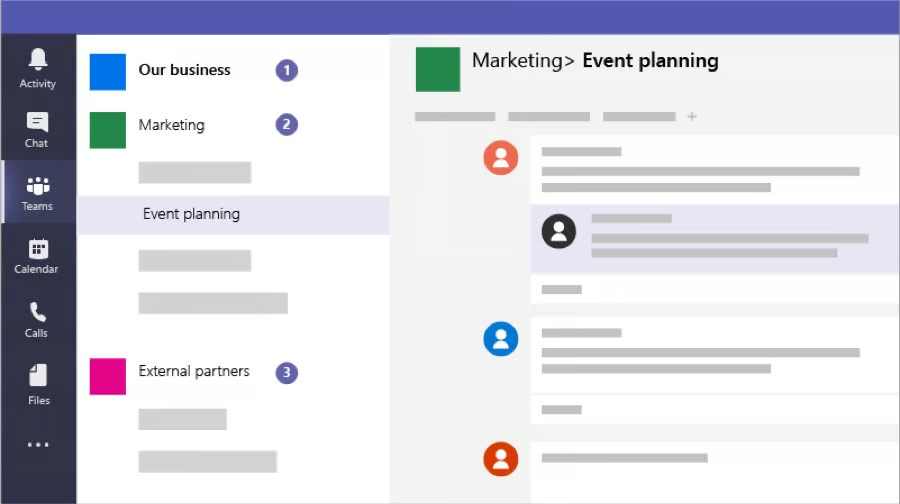
Microsoft Teams earns a top spot for remote teamwork because Zoom is primarily a video conferencing tool. Microsoft Teams is a feature-rich platform combining video conferencing, team chat, and collaboration capabilities. “Together” mode is unique to Microsoft Teams and puts video participants into a shared background.
Other tools, like higher cloud storage limits and email hosting, turn Microsoft Teams into a unified communications (UC) platform. Users communicate via video, email, or chat, make plans using shared to-do lists, and consolidate all chats, lists, and tasks in a single dashboard.
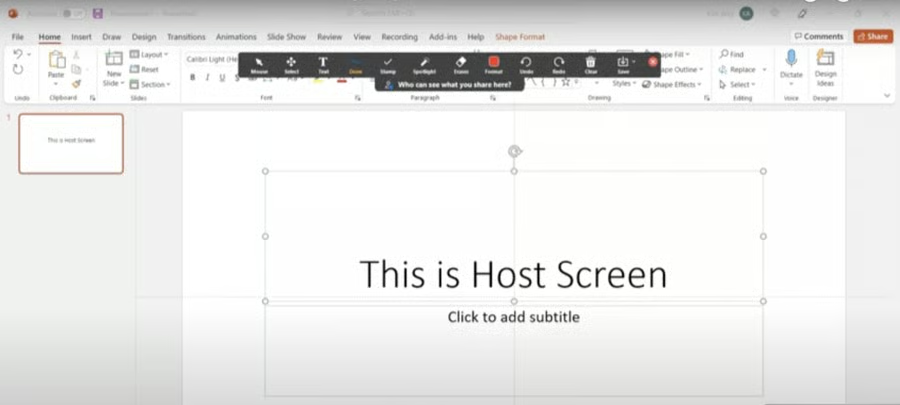
Notably, Microsoft Teams lacks co-annotation during screen sharing, which means you can’t mark up a screen together unless using the whiteboard feature. This is slightly more complicated than Zoom’s simple co-annotation feature.
Best for Apps & Integrations: Microsoft Teams
| |
|---|---|
| Over 1,800 Microsoft third-party application integrations | The Zoom App Marketplace hosts over 1,500 third-party integrations |
While comparing Microsoft Teams vs Zoom in apps and integrations, we found that Microsoft Teams trumps Zoom. This is for the simple reason that paid plans come with Microsoft Office and productivity suite apps. These apps increase your team’s capabilities without purchasing additional software. Microsoft Teams integrates with various productivity, communication, project management, and customer management apps and software.
While Zoom integrates with Microsoft Outlook and thousands of other productivity, calendar, scheduling, and other business apps, it doesn’t have its software suite. Still, many apps connect to Zoom when comparing Teams vs Zoom.
Best for Security & Customer Support: Microsoft Teams
| |
|---|---|
| Teams paid plans include 24/7 phone and web support, an extensive knowledge base and community forum, advanced security features, and a 99.9% uptime guarantee | Zoom paid versions include ticketing and live chat support, phone support (for business plans), comprehensive knowledge base and community forum, advanced encryption, and optional two-factor authentication (2FA) |
Microsoft Teams and Zoom both meet or exceed industry security standards with advanced encryption and multi-channel customer support, including phone, chat, and email options. However, Microsoft Teams wins over Zoom because its extra security and support measures are available at a lower cost and without a minimum number of users. Zoom has a 10-user minimum to unlock single sign-on (SSO), the admin portal, and phone support.
Zoom and Microsoft Teams have something in common—both offer two-factor or multi-factor authentication, but on Teams, this is not optional and cannot be turned on or off. Microsoft Teams plans come with a 99.9% service level agreement (SLA), while Zoom doesn’t mention an SLA in its plan comparisons.
Frequently Asked Questions (FAQs)
Which is easier to use: Zoom or Microsoft Teams?
Zoom is easier to use because it’s dedicated to video conferencing. In contrast, Microsoft Teams is a comprehensive UC platform with team chat, calling, and productivity features. However, Teams has more comprehensive UCaaS features and is deeply integrated with different Office 365 applications. Thus, learning how to use Teams may involve a short learning curve.
Can you use Zoom & Microsoft Teams together?
Yes. Users can integrate and use Zoom and Microsoft Teams without switching platforms. The integration lets you create a meeting in Teams and view it on your Zoom account. Users can initiate meetings or join one using either platform.
Is mobile screen sharing supported on Microsoft Teams or Zoom?
Yes, Microsoft Teams and Zoom allow users to share their screens on iOS and Android phones. Mobile devices have a “Share” button on the bottom of the screen, and tapping will open a list of options, including the source of the files to be shared.
How We Evaluated Microsoft Teams vs Zoom
Microsoft Teams and Zoom offer free plans and paid subscriptions for solopreneurs and small to mid-sized businesses. To come up with an objective Teams vs Zoom comparison review, we identified small businesses’ priorities when choosing a VoIP and video conferencing provider. These include pricing, general features, collaboration tools, and overall ease of use and popularity.
Here’s a complete breakdown of these factors that we considered to evaluate the difference between Zoom and Teams:
- Pricing: We examined the tiered pricing models to determine the monthly and annual cost of Microsoft Teams vs Zoom. We also looked at the availability of free plans, minimum and maximum numbers of users, billing options, and whether annual or volume-based discounts are available.
- General features: We did a Zoom vs Teams features comparison, specifically what the free and paid plans offer. We examined audio and video conferencing limits, in-meeting collaboration tools, and cloud storage. We also considered the types of integrations and apps with subscriptions and the security and customer support channels available to users.
- Ease of use: We looked at Zoom vs Microsoft Teams and how intuitive the interfaces are on the browser or web-based platforms and mobile devices. This included the process for scheduling and starting a video meeting and using features like screen sharing and virtual backgrounds.
- UC teams: We zeroed in on collaboration features and evaluated how the two platforms stacked against each other regarding remote teamwork and collaboration. We scored tools higher for offering team messaging, file sharing, co-annotation, and whiteboards.
- Expert score: Our expert score for this Zoom vs Microsoft Teams comparison considered the unique or standout features, user feedback, and our experience with the platform, and rated the products according to the best overall value for the money.
Bottom Line
Microsoft Teams and Zoom are top team collaboration and web conferencing platforms providing secure services and mobile apps. However, Microsoft Teams is the better option because it allows for a more cost-effective pricing model that includes collaboration features, not just video conferencing capabilities. One of its standout advantages is its seamless integration into Microsoft applications, an ecosystem widely used among small businesses.
However, if you prefer an easy-to-use platform with extensive built-in video conferencing functionality, look no further than Zoom. It offers a free plan with robust features and a modern interface, and it does not require a download to join meetings, which is excellent for external meetings with clients and partners.
