







Parallel testing is the process of running the same payroll in two payroll systems to ensure that both have the same outputs. That means all the information regarding employee net pay, taxes (including year-to-date totals), and withheld benefit premiums reported in the new software aligns with what is reported in the old system.
Parallel payroll testing—which involves documenting your current process, running payroll in a test environment, and evaluating the results, among other steps—ensures your new system is set up correctly, so your first payroll will be correct.
- Step 1: Document Your Current Payroll Process
- Step 2: Gather the Necessary People
- Step 3: Ask for a Payroll Test Environment
- Step 4: Process Payroll as Normal
- Step 5: Gather Reports
- Step 6: Review Results in Both Software
- Step 7: Redo Steps 4–6 for Another Payroll Cycle (If Not Two)
- Step 8: Ask for Help
- Identifying Common Errors & Handling Discrepancies
- Bottom Line
Step 1: Document Your Current Payroll Process
You should document your payroll process from when your previous payroll closes until your current payroll closes. One mistake that happens during testing is only examining the duties of your payroll processor(s). Everything that touches the payroll system needs to be tested, including how benefit elections are entered, along with compensation changes, tax withholdings, employee demographic information, paid time off, and anything else related to your payroll process. This is especially the case if your payroll system is also your HR system.
Ideally, this is an ongoing step, something you update as your payroll processes change. If you don’t have all this documented before changing payroll providers, it may take days or weeks to put this together.
Step 2: Gather the Necessary People
Similar to the first step, everybody with a role to play in the payroll process (benefits, HR, and payroll) needs to be involved in the parallel payroll testing process. At most small businesses, it may be a small team, so be sure to include the backups as well. The individuals involved in the overall payroll process will have the best understanding of a normal payroll process, and they can bring up the items that give them the most trouble.
This step should be done in coordination with your account representative at your new payroll provider. Have everyone sit at their own computer so they can walk through each step, clicking and checking items themselves. This will help them learn the process, spot any potential issues, and raise relevant questions.
Step 3: Ask for a Payroll Test Environment
Most payroll software providers should be able to provide you with the “sandbox,” which is an environment that mirrors the look and feel of payroll software but is used only for learning and testing purposes. It’s essentially a demo setup of your company account. You can practice running as many payrolls as you like without any impact on your actual company books.
Step 4: Process Payroll as Normal
This can be done in two ways:
- You can process your normal payroll and your test payroll simultaneously.
- You can process your test payroll after your normal payroll is finalized.
Many companies do not have the time and resources to process simultaneously, so they test payroll the week after the normal payroll processing is completed. This includes entering personnel changes (e.g., new hires and terminations) and pay period items (e.g., hours worked and bonuses), as well as mirroring your payroll review process (e.g., checks paid outside of payroll and hourly employees’ timecards).
We recommend, if you have the resources, to run both payroll processes simultaneously with your old payroll system as the live, or real, payroll. Running these together will ensure that each step is accurate and final payroll numbers are identical. Using your old payroll system as the live payroll also ensures that if there are any issues with your new system, you still have access to the old system if you need to run additional payrolls.
Step 5: Gather Reports
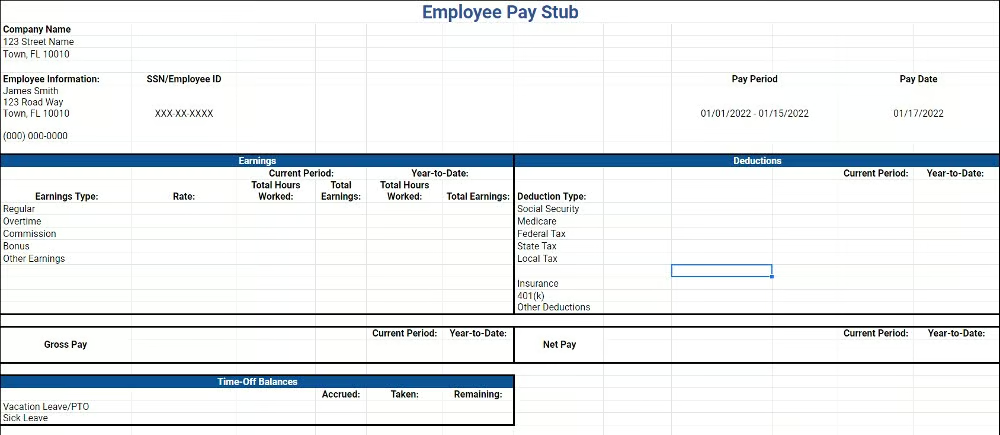
Both payroll software (current and future) should be able to provide you with payroll reports. These reports should indicate payroll totals, individual results for each employee, and sample pay stubs. Try to download reports that are in Excel format and a visually friendly format such as a PDF.
Step 6: Review Results in Both Software
We suggest beginning with your payroll total summary, which includes your gross payroll, net payroll, and total tax amounts.
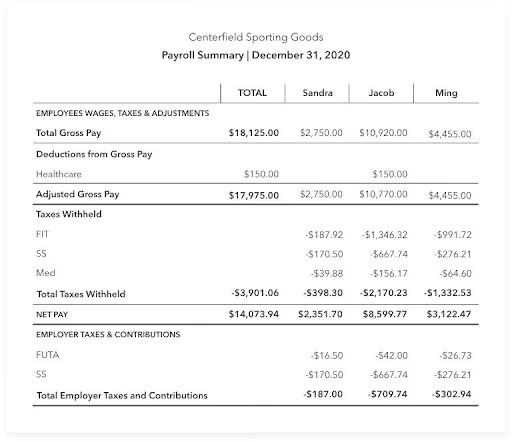
Testing your payroll outputs is crucial. Make sure employee time off is calculated and paid correctly—same for overtime. Make sure retirement fund contributions are correct and taxes are accurate. Also, review the general ledger, line by line, to ensure each output shows the exact same numbers. If those amounts look correct, you can be fairly certain that the testing was successful. We still recommend spot-checking several employees’ pay stubs to confirm your previous results.
If the totals do not match, review the category totals to see which ones are not the same. Once you determine the categories, you can go into the employee details to see which specific cases are different. This information should be investigated and discussed with the new payroll provider if you can’t resolve it.
Some discrepancies are due to the input information not matching, user error, or a different calculation process for the payroll service (we go into more detail on errors and discrepancies below). Once you and your provider figure out the root cause, you need to document it, decide how to account for it moving forward, and retest.
Step 7: Redo Steps 4–6 for Another Payroll Cycle (If Not Two)
Testing multiple payroll cycles ensures results are correct and accounts for any infrequent items (such as commission payments and monthly benefit deductions) before completely switching to the new software.
Step 8: Ask for Help
If your payroll software provider offers implementation services, reach out to your specialist and see if they can be on-call, or schedule a call on your normal payroll processing date just in case.
We do not recommend skipping this step. Your new payroll system will have unique steps and a different user interface than you’re used to. Testing with the help of someone who’s experienced in the system allows you to quickly find items and reports, while also showing you the exact steps you should take for each process. Never be afraid to ask for help even after you’ve been using the system for a long time. Payroll is one of the most important functions of your business and it’s crucial that you get it right every time.
Need step-by-step instructions on changing payroll providers? Check out our guide on how to switch payroll providers.
Identifying Common Errors & Handling Discrepancies
Here are some of the most common errors you will encounter moving to a new payroll system and tips on handling them:
One thing that needs to be checked is current problems in your legacy system. If you are constantly seeing error notices or have mismatched data (e.g., hourly employees with a salaried rate), these items should be fixed before transferring the information into the test system because one system’s method of dealing with errors may be different from another.
We also recommend discussing this with your account representative from your new payroll system. They may be able to quickly review the data and narrow down where the bad data may be coming from in your old system, speeding up your correction process.
Most payroll systems will calculate gross to net payments in a similar way since the rules are provided by the respective federal, state, or local governments. However, some calculations may be different. These items can include vacation accruals, automatic pay, and scheduled deductions. You should schedule a separate call with both your legacy and new payroll system teams to get a breakdown of their setup and do a comparison.
You’ll also want to make sure the system is set up correctly for all states where you have employees. With the sustained increase in remote work, remember that the HR laws you need to follow are the laws in the state where your employees live and work, not necessarily where your company is located. Different states have varying rules on paying out vacation time, overtime calculations, and final paycheck rules. Your new payroll software must be set up to distinguish between employees in different states with different laws.
If the error is due to data entry, now is a good time to determine if your process can be enhanced by your new payroll system or if additional training is needed.
Examples:
- Instead of manually entering payroll data such as garnishments, maybe the information can be loaded in automatically by connecting your payroll and time tracking software. You may also be able to download a spreadsheet from your time tracking software and upload it to the payroll system. While that’s an extra step, it removes human entry from the equation and makes it less likely that errors will occur.
- If bonuses were being miscalculated, perhaps specific training on the one-time pay data system will be beneficial. Many times, errors in these payments can be traced back to taxes. Bonus and commission payments are often taxed differently than regular payroll.
Other Errors. Some differences, such as rounding errors, can be expected, but other errors are significant and cannot be figured out by your payroll processor(s). This needs to be brought to the service team of the new payroll software company to assist.
We also recommend having a strong payroll process that includes a second set of eyes. Depending on the size of your company and the resources available, this can be problematic. However, taking a few extra minutes for someone to verify the payroll data makes it less likely that errors or mistakes will occur. Just make sure this second person is knowledgeable about your payroll processes and understands the confidentiality of the data they’re reviewing. Ideally, this person would work in your finance department.
Also make sure you have a set process to store your payroll records, like employee pay stubs. States often require storage for a certain amount of time, but records are also handy if an employee later comes to you saying they were paid incorrectly.
.cls-1{fill:#155E85;fill-rule:evenodd;}
Need help selecting a solid payroll provider? Check out our top payroll service picks, and visit our guide on finding the right payroll solution to help make a solid decision.
Bottom Line
Redundancy is a key to business efficiency. Payroll software is no different. Parallel payroll testing is an integral part of ensuring that your payroll software change goes smoothly. Gather the right people for testing, load the appropriate information into the new payroll system, be careful to follow your normal payroll process, and have a detailed plan of comparing both payrolls using payroll reports. Through this, you will have minimal disruption when the change is finalized.
Make no mistake, this is a time-consuming and labor-intensive process, but it’s also necessary to ensure absolute accuracy with your payroll. You want your employees to get paid correctly and you want your company to avoid IRS fines and penalties.
