








Wix and Squarespace are two of the top website builders on the market renowned for their affordable all-in-one plans. They offer a large array of prebuilt templates to help you build your site quickly and a beginner-friendly drag-and-drop site editor that eliminates the need for coding or web design experience.
It’s easy to see why the choice of which website builder to use often comes down to Wix vs Squarespace. And while the two are seemingly very similar, Wix stands out for its depth of features and customization capabilities while Squarespace stands out for its more competitive pricing and ease of use.
- Wix: Best for more extensive design freedom and a wider feature set for sellers
- Squarespace: Best for affordability and beginners seeking an easy-to-use site builder
- Wix vs Squarespace at a Glance
- Best Alternatives to Wix & Squarespace
- Best for Affordability: Squarespace
- Best for Features: Wix
- Best for Ease of Use: Tie
- Best for Design & Templates: Wix
- Best for Selling Online: Wix
- Best for Service-based Businesses: Wix
- Best Customer Support: Tie
- How We Evaluated Squarespace vs Wix
- Frequently Asked Questions (FAQs)
- Bottom Line
Wix vs Squarespace at a Glance
 |  | |
|---|---|---|
| Expert Score | 4.7 out of 5Read Our Wix Review | 4.6 out of 5 Read Our Squarespace Review |
| Free-forever Plan | ✓ | ✕ |
| Free Trial | ✕ | ✓ 14 days |
| Starting Monthly Price (billed annually) | $17 | $16 |
| Ecommerce Tools | Start in the Core plan at $29 per month | Start in the Business plan at $23 per month |
| Starting Storage Limit | 2GB | No limit |
| Skill Level | Beginner to advanced | Beginner to intermediate |
| AI Website Generator | ✓ | ✓ |
| Website Templates | 900+ | 110 |
| Built-in SEO Tools | ✓ | ✓ |
| Built-in Email Marketing Software | ✓ | ✓ ($7 per month for up to 500 emails per month) |
| Money-back Guarantee | Within 14 days of purchase | For subscriptions canceled within 14 days of purchase |
| Customer Support | 24/7 via a phone callback service | 24/7 via email and weekdays via live chat |
| Visit Wix | Visit Squarespace |
Best Alternatives to Wix & Squarespace
Wix and Squarespace aren’t the only two capable website builders on the market. Many of the best website builders for small businesses can give you a high-quality, fully functional website, depending on your priorities. For example, Weebly and Shopify are excellent options for building an online store, while Hostinger has a top-of-class AI website builder. Have a look at some of these alternatives before finalizing your platform of choice.
 |  |  | |
|---|---|---|---|
| Best For | Building an online store on a tight budget | Building a website quickly with AI | Advanced ecommerce features |
| Starting Monthly Price | $10 (billed annually) | $2.99 for your first 48 months (renews at $7.99 per month) | $29 (billed annually) |
| Visit Weebly or Read Our Review | Visit Hostinger or Ready Our Review | Visit Shopify or Read Our Review |
Best for Affordability: Squarespace
| | |
|---|---|---|
| Free Plan | X | ✓ |
| Start Monthly Price | $16 (billed annually) $25 (billed monthly) | $17 (billed annually) |
When it comes to affordability, Wix is certainly attractive with its free-forever plan—something that Squarespace doesn’t offer. On the other hand, Squarespace offers a slightly more competitive price for its entry-level plan with annual billing at $16 per month ($25 per month on monthly billing) compared to Wix at $17 per month.
Where the two really begin to differ in price is with their mid- and top-tier plans, which offer users a wider range of features, such as the ability to accept online payments (including recurring payments, tickets, and deposits for services), accept online bookings and reservations, build online courses, and stream video and music. For example, the minimum annual price to build and host an online store that accepts online payments with Wix is $29 per month, while it’s $23 per month with Squarespace.
Of course, online sellers should also consider transaction fees when determining the more affordable solution. Both have a standard fee of 2.9% plus 30 cents for most credit and debit cards, though Squarespace offers ecommerce plans at a higher monthly price with no transaction fees.
Granted, neither Squarespace nor Wix are the most affordable all-in-one website builders on the market. Platforms like Weebly or Hostinger have lower starting plans, for example.
Winner: Squarespace. While Wix has a free-forever entry-level plan, we have to consider each platform’s long-term affordability. Ultimately, the winner in that area is Squarespace, as it allows you to do more for the same price points as Wix’s paid plans, especially for ecommerce businesses.
Best for Features: Wix
| | |
|---|---|---|
| Storage Limit | 2GB+ | No limit |
| Prebuilt Templates | 900+ | 110 |
| Sell Physical Products | ✓ | ✓ |
| Sell Digital Products | ✓ | ✓ |
| Accept Appointments & Reservations | ✓ | ✓ (via Acuity integration) |
| Build Online Courses | ✓ | ✓ |
| Accept Recurring Payments (e.g., subscriptions) | ✓ | ✓ |
| Membership Site Creation | ✓ | ✓ |
| Sync With Marketplaces (i.e., Amazon, Etsy, eBay) | ✓ | ✓ |
| Built-in Invoicing | ✓ | ✓ |
| Built-in Email Marketing Software | ✓ | ✓ ($7 per month for up to 500 emails per month) |
| Built-in Customer Relationship Management (CRM) Software | ✓ | ✕ (only via third-party integrations) |
| Sell Gift Cards | ✓ | ✓ |
| Custom CSS | ✓ | ✓ |
Squarespace and Wix appear to have a near-identical lineup of features, yet the two are not without differences. To start, Squarespace is highly flexible thanks to its long list of integrations, though there are many features and capabilities it does not have out of the box that Wix does (e.g., built-in CRM or appointment scheduler).
This may not make a big difference for many users, but this can make the process of building a new Squarespace site take a bit more time, especially if it means learning new software from third-party integrations.
Native features aside, another key difference that is not as evident is that the depth of features varies by provider, with Wix offering more advanced and flexible features. For example, both have built-in search engine optimization (SEO) tools. But even with a feature as simple as page titles and meta descriptions, Squarespace only allows you to customize certain pages. Wix gives you the freedom to do so on any page.
Winner: Wix. Wix is the clear winner for features thanks to its robust feature set that offers a long list of native tools and advanced features.
Best for Ease of Use: Tie
| |
|---|---|
| Less design flexibility, but it helps beginners stay on track | More intuitive and customizable with a true drag-and-drop editor but more complex |
For years, Wix has stood out for its intuitive drag-and-drop site editor, making it easy for beginners with zero coding knowledge to hit the ground running. Though, as it has grown with an ever-expanding feature set, it has also become more complex. On the one hand, it has a shorter learning curve, and on the other, its interface can be a bit clunky as it’s loaded with features and options.
Speaking of which, Squarespace lacks the extensive design flexibility that Wix offers. But for those new to web design, fewer options can make for a quicker and easier design process. On top of that, Squarespace’s customization limitations in its content block-based site editor—as opposed to Wix’s drag-and-drop site editor—can help ensure that users don’t “color outside the lines” and end up with a poorly designed site.
Ultimately, the best platform for ease of use depends on your comfort level. If you prefer more customization tools for your site, Wix has the upper hand. But if you’re an absolute beginner and want a well-designed site as quickly as possible, Squarespace better fits that description.
Building a Site With Wix
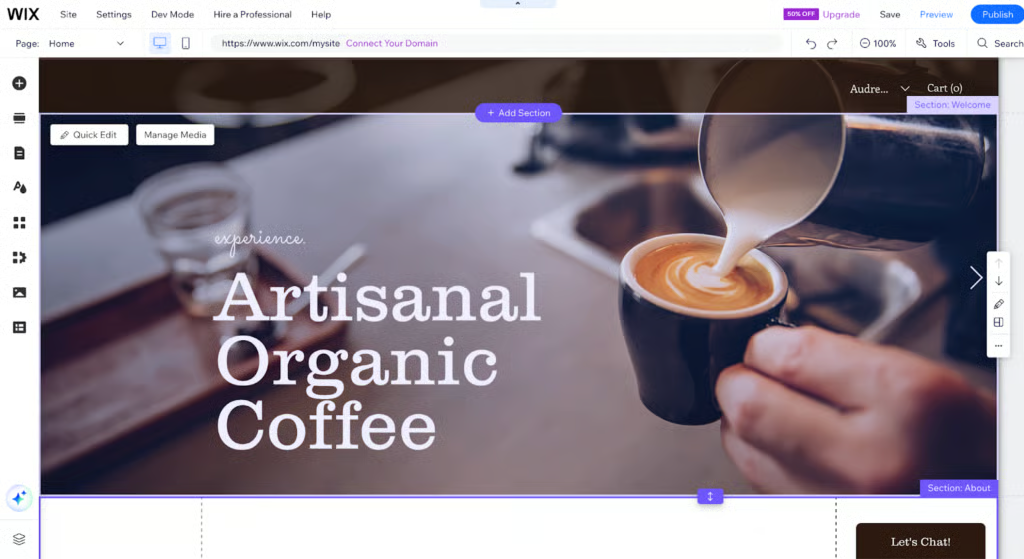
The first step to creating a Wix website is to choose whether you want to use its AI-powered tool or the Wix Editor to build your site from a template. If you opt for the Wix Editor, you’ll have to answer a few questions to help Wix understand your business type and website must-haves before it suggests templates. Once you select a template, you can begin editing.
Editing text, images, background colors, and logos in the Wix Editor is as simple as double-clicking anything you want to change. To add a new section, click on the plus sign on the left menu and choose the element you want to add by dragging and dropping it onto your website. It’s an easy-to-use editor that makes getting started easy. However, such design flexibility makes it easy to over-customize a design and build a site that doesn’t look professional.
Building a Site With Squarespace
Much like Wix, using Squarespace to build a website starts with choosing a template. Granted, with a template library nearly one-tenth the size of Wix’s, the process of choosing might be easier. Once you land on the right template for your site needs and brand style, you can customize it.
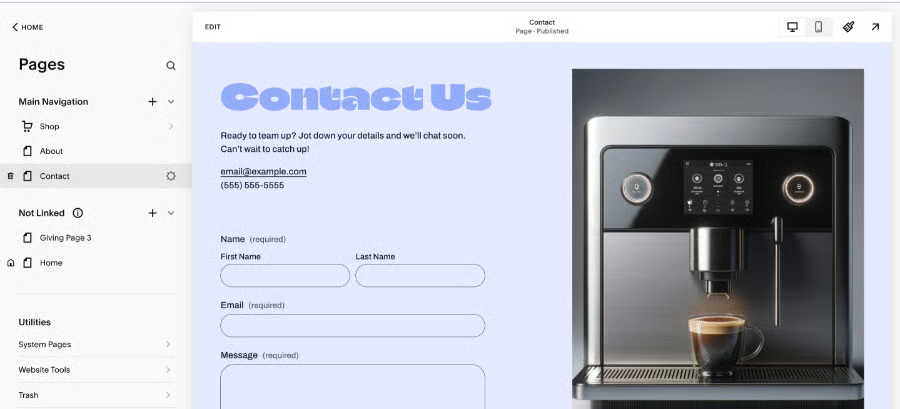
This is where Squarespace has a bit more of a learning curve than Wix. Instead of using an intuitive drag-and-drop site editor, it employs a content block-based editor where users can add, remove, and customize elements (i.e., text, images, buttons) within a block.
Since it has a block-based editor, users have limited flexibility over customizing, changing, or updating elements like text—it’s not as straightforward as simply double-clicking like with Wix. Instead, you must select the text you want to change, select edit, and then change it.
It’s by no means difficult, but it is an example of how Squarespace is not as intuitive and often involves more steps. On the other hand, with fewer customization options, it’s often faster to build a site with Squarespace as it eliminates the potential for over-customization.
Another feature that lends to ease of use is its AI-based Design Intelligence tool, which was created specifically for busy entrepreneurs as part of Squarespace Refresh 2024. Users simply answer a few prompts on their desired aesthetic and must-have functionalities, and it generates a personalized website for your brand.
Winner: It’s a tie. Wix is more intuitive and customizable with a true drag-and-drop site editor. But Squarespace takes a lot of the guesswork out of designing a site, which can help make the process move along more smoothly and quickly for beginners.
Best for Design & Templates: Wix
| |
|---|---|
| 900+ templates cover a wide range of designs from very modern to dated | 110 templates—many of which are award-winning |
The right template makes your life easier as it requires fewer customizations and helps maintain—if not reinforce—your brand presence. A long-standing claim to fame for Squarespace has been its award-winning designs, which were modern and rivaled the aesthetics of what you would expect to see come out of a web design agency. While this remains true, it’s also true that Wix has since come up to speed with very modern and well-designed templates.
For those who have used Squarespace in the past, there’s another major difference in terms of templates. There was once a time when Squarespace allowed users to change templates without losing data, but that’s no longer possible with Squarespace 7.1. Now, if you want to change your website’s look, you’ll have to start again from scratch or customize it via CSS code.
Wix Template Examples
Wix boasts a template library nearly nine times the size of Squarespace’s, but bigger isn’t always better. While it does offer a great deal of good choices, it also offers a number of templates that feel old and outdated.

Wix offers a good variety of clean, simple website templates. 
Some templates are more suited to tech or SAAS businesses. 
Other templates are better for designers and creative professionals.


Squarespace Template Examples
Squarespace’s template designs are more consistent in quality than Wix’s, though you will notice that many of Squarespace’s 110 templates are more or less the same as other templates in its library. So, while many will look different at first glance, upon further inspection, you’ll see they’re more or less the same layout with differing demo content.
However, in terms of design, Squarespace offers several design tools that help users easily build a site that maintains its brand identity. For example, with its AI design tool, users can share brand attributes (i.e., modern, sophisticated, quirky) to generate a site that is customized to your brand.

Squarespace also offers a template selection, although not as diverse as Wix’s—they all tend to have a similar aesthetic. 
Squarespace templates serve a more muted quality overall. 
It’s possible that choosing a Squarespace template will make it harder for your business to stand out.


Winner: Wix. There was a time when Squarespace was the clear winner, but this is no longer the case. Not only does Wix offer users far more templates to choose from, but it offers equally as modern templates and a broader range of design styles to meet nearly any brand or aesthetic.
Best for Selling Online: Wix
| | |
|---|---|---|
| Best For | Selling services | Selling products |
| Starting Monthly Price to Sell Online | $29 | $23 |
| Things to Know |
|
|
Both Squarespace and Wix integrate with major marketplaces, such as Amazon, Etsy, and eBay, enabling you to sync product listings, inventory, and orders. They also integrate with social media platforms, such as Facebook and Instagram, where you can sync products, allow social users to purchase products directly from social media, and advertise products and promotions.
Ecommerce-related features aside, Squarespace’s backend is more streamlined and simplistic than Wix’s, though Wix offers more advanced analytics and data. Overall, Squarespace may be better suited for those seeking a simple—and very well-designed— sales platform. But Wix is better for data-driven ecommerce businesses looking to crunch numbers and leverage sales data to drive more revenue.
Winner: Wix. Though it’s a very close call, Wix wins out over Squarespace for ecommerce. This is because Wix offers more advanced features at a lower price, offering users a better value.
Best for Service-based Businesses: Wix
| |
|---|---|
| Offers specific features and tools for the fitness, hotel, and events industries | More affordable for basic online booking |
If you’re in the service industry, you need more than a basic website builder with generic features. Perhaps you need the ability to accept online reservations and orders, send invoices, sell and host online courses, or stream videos or music.
While the two offer features geared towards enabling service providers, Wix offers a wider range of features—including features designed specifically for certain industries, such as accommodation (hotels and vacation rentals), fitness, events, and online courses.
For example, Wix has more tools designed specifically for restaurants, with tools to take orders and accept payments for online orders, accept online reservations complete with automatic email confirmation, and custom menus.
It also has better features for accommodation providers, with hotel management features like a channel manager so you can connect to platforms such as Airbnb, sell extras and add-ons (i.e., breakfast), offer varying rate plans, offer different room types, and list amenities.
| | |
|---|---|---|
| Recurring Payments | ✓ | ✓ |
| Built-in Invoicing | ✓ | ✓ |
| Built-in Booking System | ✓ | ✓ |
| Create Online Courses | ✓ | ✓ |
| Hotel Management | ✓ | ✕ |
| Restaurant Management | ✓ | ✕ |
| Fitness Management | ✓ | ✕ |
Winner: Wix. Wix is the winner for service providers thanks to its inclusion of industry-specific features.
Best Customer Support: Tie
| |
|---|---|
| Offers live chat help on its website | Offers a callback phone support service |
Wix and Squarespace have different but similar customer support offerings. Both have forums for customers, tutorials and step-by-step guides, robust knowledge bases, and videos. Where the two differ is when you need to speak to an actual person for help.
Wix offers a callback service, so you can get phone support but not on-demand. Its callback service is available 24/7 for English support. Meanwhile, with Squarespace, you get live support by chat between 10 a.m. and 4 p.m. CET, Monday through Friday.
Winner: It’s a tie. Which offers better support depends on your support preferences. Wix offers phone support using a 24/7 callback service. Squarespace offers live chat support, giving users instant access, but it’s limited to weekdays.
How We Evaluated Squarespace vs Wix
At first glance, Squarespace and Wix seem nearly identical, but they are both very nuanced in terms of pricing and features. If you haven’t used either site builder before, it’s a tough decision. So, we tested them and compared the providers head-on.
Price
Site builders make it more affordable than ever to get a professional website. So, we analyzed which provider is more competitively priced for the features most businesses need. To do this, we compared entry-level plans to determine which is cheaper alongside the plans required to sell online, accept recurring payments, and build a membership site.
General Features
It’s not just affordability that makes a site builder great but value for price. Both come packed with a lengthy list of features and extras. Yet what these features will cost you varies by provider. We considered everything from storage and bandwidth to freebies like a free domain, a free Secure Sockets Layer (SSL) certificate, SEO tools, and built-in analytics, as well as more specific features and capabilities, such as the ability to process payments online, book appointments, and sell gift cards.
Niche Features
Every business will have unique needs related to its industry. We considered the capabilities of each platform to see which best meets the needs of businesses, whether they’re restaurants, photographers, dental practices, selling services or products online, or the next tech star.
Ease of Use & Design
Drag-and-drop website builders were designed to make building a site code-free and headache-free. We put each provider’s editing interface to the test to determine which is really more intuitive and user-friendly. We also considered which requires a shorter learning curve and the quality of its templates.
Support
In an ideal world, you’ll never need support, but should you find yourself in need, great support is vital. We looked at the availability of customer support from each provider, including its support channels (i.e., phone, live chat, email) and hours of operation to determine which was better.
Expert Opinion
Sometimes, you simply need to spend a lot of time using each platform to know which is best. So, we included our own expert opinion, given our first-hand experiences using Squarespace and Wix. We factored in our thoughts on value for the price, quality of features, ease of use, and popularity.
Frequently Asked Questions (FAQs)
Which is better: Wix or Squarespace?
Wix and Squarespace are both solid website builders, but in general, Wix is better for those who are looking to create a highly customized design as its drag-and-drop site editor is more flexible than Squarespace’s content block editor, and it offers a greater depth of industry-specific features for online sellers and service providers. On the other hand, Squarespace is better for those looking for a fast way to build an affordable website with little to no web design experience.
What is the downside of Wix?
The downside of Wix is that its storage limits are relatively low compared to Wix alternatives and web hosting solutions, which can lead to a slowly loading website and a higher bounce rate. It’s also not the most affordable website builder on the market—and it’s less flexible—compared to content management systems (CMS) like HubSpot or less expensive options like Weebly.
Do professionals use Squarespace?
Squarespace is the CMS of choice for a wide range of use cases, industries, and business sizes, including professionals. Not only does it enable businesses to easily build and launch a professional-quality website, but they can also manage and update it in-house—without a web developer. It also offers several features and tools professionals need to run and grow their businesses, such as built-in marketing tools, invoicing, online bookings and reservations, accounting, and payment processing.
Bottom Line
Deciding between Squarespace vs Wix will depend on your skill level, time, budget, needs, and goals for your small business website. If you’re not sure which to choose, take both platforms for a test drive—Wix has a free plan, while Squarespace has a 14-day free trial—to see which feels most attuned to your needs.
On the whole, while both are simple enough to navigate, Wix has the upper hand for site features, while Squarespace is 100% beginner-friendly. If you need a site with all the necessary tools and capabilities, go with Wix. But if you want one with visually stunning designs that promote your brand, Squarespace can get you there.
