








Wave and Square are both small business-friendly software with built-in payment processing and invoicing tools. However, Wave is primarily an accounting software whereas Square is a point-of-sale (POS) system. So when comparing Wave vs Square, we look at the main functionality that each software provides.
We recommend:
- Wave: Best for freelancers and contractors accepting payments via invoice
- Square: Best for small merchants also needing a POS system
Wave vs Square Quick Comparison
Wave is Best For
- Freelancers/gig workers: Wave allows individuals to have multiple business profiles with a single account, and it has built-in accounting software to automatically prepare financial reports. There are no monthly fees or long-term contracts.
- Professionals who collect payments via digital invoice: Wave offers advanced invoicing features at no extra monthly or transaction cost.
- Merchants who don’t need in-person payments: Wave only supports remote payment processing via payment links or invoices.
Square is Best For
- Small businesses that require POS software: Square Payments is built-into Square’s POS software and offers free features to start accepting payments in minutes.
- Merchants looking for a free merchant account: Square offers zero monthly fees to access its POS software and payment processing feature. It also provides basic plans for ecommerce and invoicing tools.
- Multichannel payment processing: Square allows merchants to accept credit card, digital, and ACH payments in-person, online, and from a virtual terminal.
 |  | |
|---|---|---|
| Main Function | Our Wave Payments Review | Our Square Payments Review |
| Monthly Fee | Accounting | Point of Sale |
| In-person Transaction Fee | $0 | From $0 |
| Online Transaction Fees | N/A | 2.6% + 10 cents |
| Keyed-in Transaction Fee | From 2.9% + 60 cents | 2.9% + 30 cents |
| Contract | N/A | 3.5% + 15 cents |
| Average Payout | Month-to-month | Month-to-month |
| Mobile App | 2 business days Instant: Undisclosed fee | Next business day Same-day: 1.75% |
| Integrations | Invoicing+Receipts | Invoicing Point-of-Sale Teams |
| Hardware | Limited | Good |
| Ease of Use | N/A | Proprietary card readers and POS terminals |
| Customer Service | Very good | Very good |
|
| |
Both Wave and Square are ideal for startups and small businesses with low-volume sales. Both also offer free invoicing tools and a payment processing service locked into each provider’s system. However, Square as a payment processor is compatible with more business types while Wave is limited to merchants that only need invoicing and remote payment functionalities.
This glaring difference allowed Square payments to stand out, while Wave did not make it in our evaluation of the best online payment processors. That said, Wave offers better invoicing and recurring billing tools that are completely free, with features that Square and other top merchant processors would charge extra for.
Wave vs Square Pricing
| | |
|---|---|---|
| Monthly Software Fee | $0(Accounting) | $0–$69(POS) |
| In-person Transaction Fee | N/A | 2.6% + 10 cents |
| Online Transaction Fees | 2.9% + 60 cents | 2.9% + 30 cents |
| Keyed-in Transaction Fee | N/A | 3.5% + 15 cents |
| Amex Surcharge | +0.5% | N/A |
| ACH Transaction Fee | 1% ($1 minimum fee) | 1% ($1 minimum fee) |
| Cross-border Fee | $0 | $0 |
| Chargeback Fee | $15 refundable | Waived up to $250/month |
| Instant Payout Fee | Not disclosed | 1.75% |
| Hardware | N/A | From $0–$799 |
| Visit Wave | Visit Square |
Winner: Square
If you are a retailer, restaurant owner, or service-based professional on a budget that needs a POS system, then Square’s free forever features can provide great value. You can practically launch your business and start selling without any upfront cost for POS software or payment processing with Square.
What you get with a Square Free Plan:
- Basic POS software
- Payment processor
- Website builder with SEO tools
- First magstripe credit card reader
- Unlimited customizable invoice, estimates, and contracts
- Mobile POS app
- Employee time tracking
The cost to upgrade to Square’s paid plan is from $29–$69 per month for POS software and from $10–$799 for hardware. Additional business management tools like advanced invoicing, recurring billing, and marketing start at $5.
When to Use Wave
Use Wave if you only need to accept payments via invoice or recurring billing and your business does not require you to have a physical location to entertain customers. Wave’s mobile app-based invoice management service is a useful alternative if you are always on the go.
What you get with a Wave Free Plan:
- Multiple business profiles
- Unlimited accounting partners and collaborators
- Full accounting tools
- Mobile invoicing app
- Payment processor
- Full invoicing and recurring billing integrated with accounting
- Ecommerce integrations
Upgrades to Wave’s paid plans focus mostly on accounting features such as payroll management that starts at $20 to $40 per month and accounting consulting or coaching from $149 per month. Curiously, Wave’s business software app is free unless you subscribe to it receipt image-capturing feature, which costs $8 per month.
Wave vs Square Invoicing
| | |
|---|---|---|
| Our Wave Payments Review | Our Square Payments Review | |
| Monthly Fee | $0 | $0–$20 |
| Unlimited Invoicing | ✓ | ✓ |
| Recurring Billing | ✓ | Paid plan |
| Stored Card Payments | ✓ | ✓ |
| Invoice Customization | ✓ | Paid plan |
| Payment Methods | Credit/Debit cardACHApple PayStored card payments | Credit/Debit cardACHGift cardsBuy Now, Pay LaterStored card payments |
| Estimates and Subscriptions | ✓ | Subscriptions requires a paid plan |
| Integrated Bookkeeping | ✓ | Third party |
| Visit Wave | Visit Square |
Winner: Wave
Wave’s advantage over Square (and most top merchant processors) is that it offers a completely free invoicing and recurring billing service. All the customization options you would look for—adding custom fields including tipping methods, creating estimates and multiple subscription plans, saving templates and invoices for recurring billing, and converting estimates into invoices are all included.
Square on the other hand, will charge you $20 monthly to get invoice customization and use recurring billing features. Along with free integrated bookkeeping, solo professionals and contractors can maximize their revenue with only credit card processing fees to worry about.
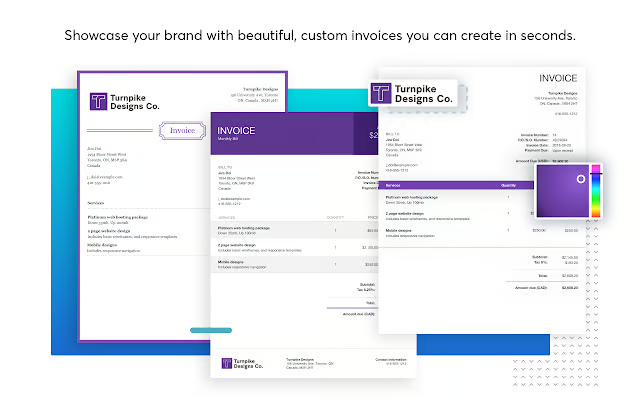
Custom invoices are completely free with Wave. (Source: Wave) 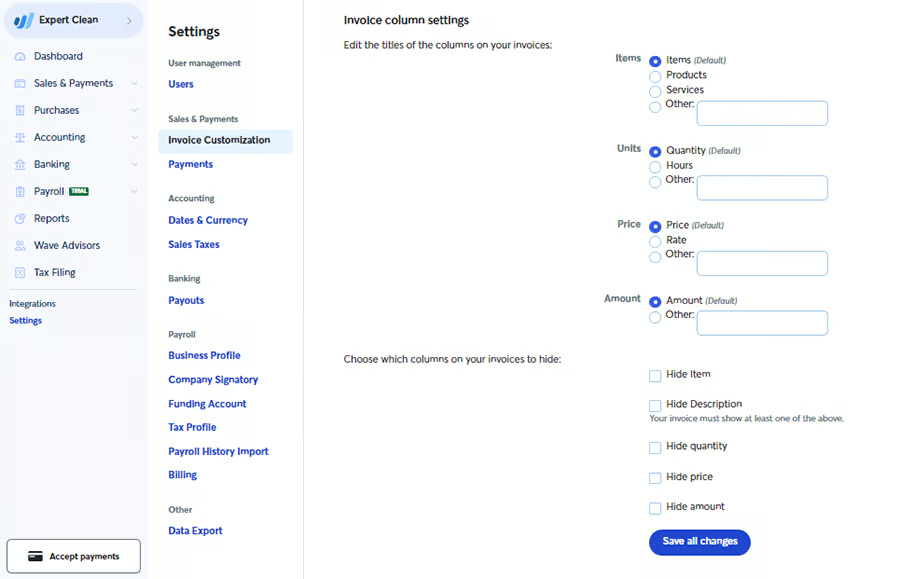
You can add and remove custom fields, and save templates for future use. (Source: Wave) 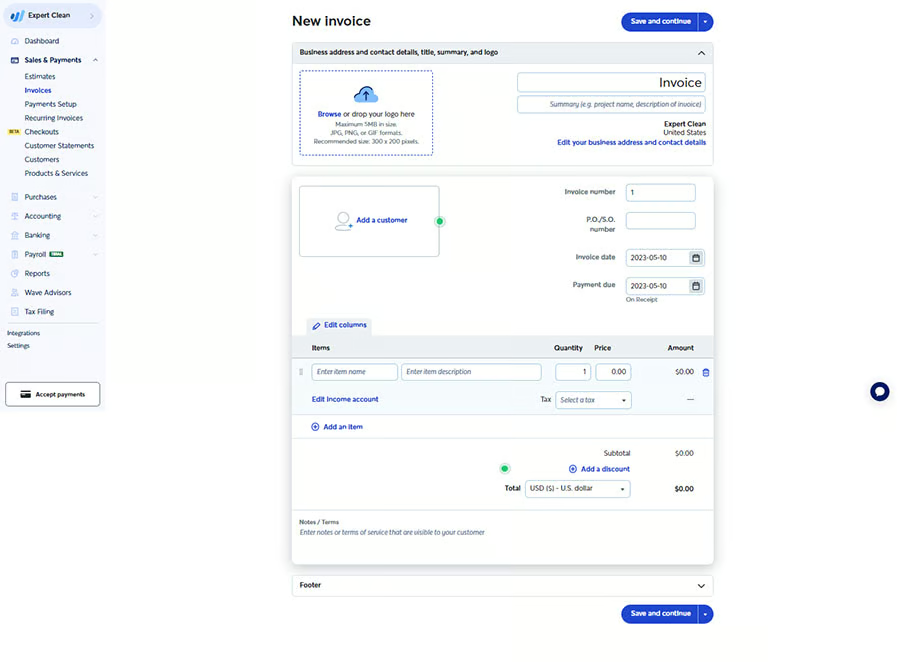
Pull customer information from Wave’s customer directory or add a new customer profile directly from the invoice page. (Source: Wave) 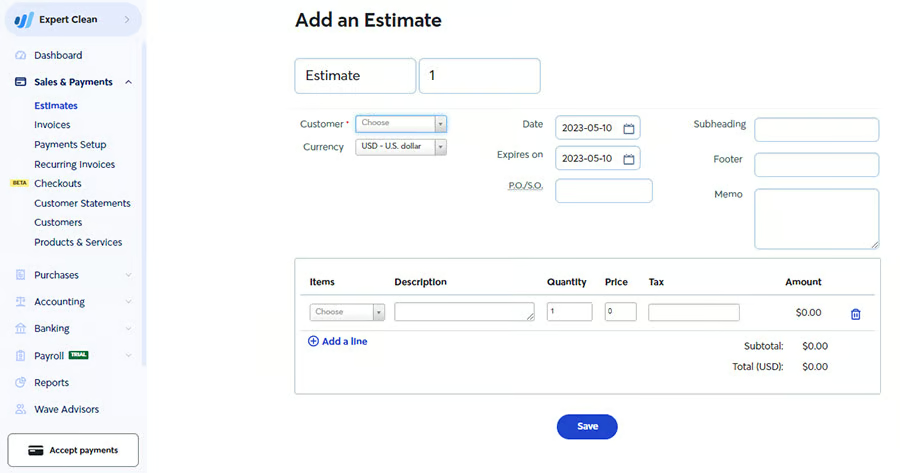
Create single or multiple estimates you can send to customers and convert them into an invoice instantly once the customer chooses a plan. (Source: Wave) 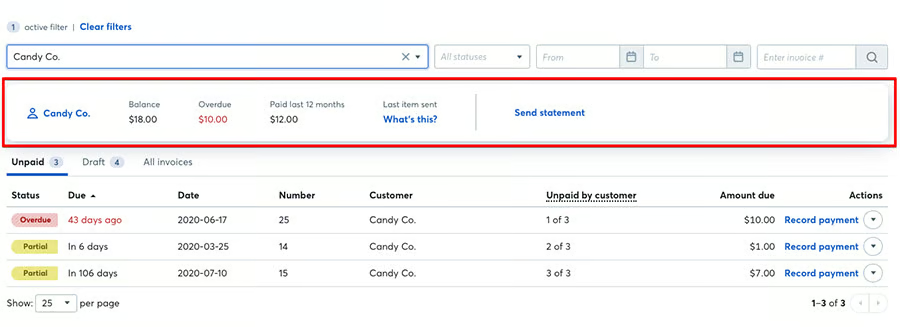
Your invoice dashboard is integrated with Wave’s bookkeeping tools for automatic reporting. (Source: Wave)


When to Use Square
If you are a retailer or run a food-based business that requires invoicing (such as caterers) and /or shipping, then Square is the better option. While Wave does have a product management feature, it lacks customization tools retailers would need. Meanwhile, Square’s invoicing custom fields include options like shipping, and they integrate with Square’s more robust inventory feature. In addition to more payment methods, you can also create custom contracts for your subscription plans with Square.
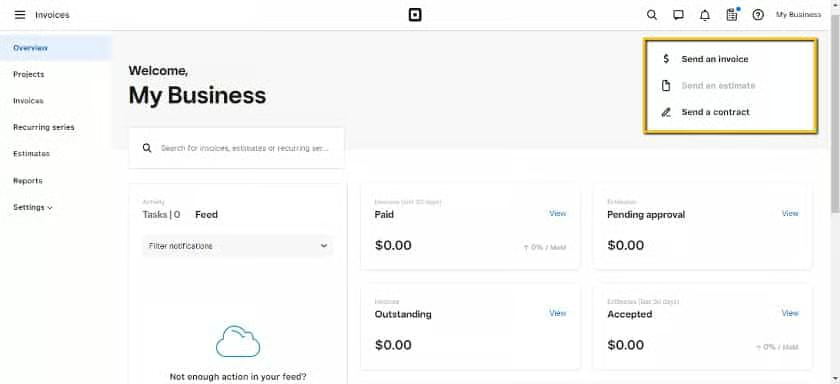
Square’s invoicing dashboard is more robust and offers additional functions such as creating a contract, but will cost merchants $20/month to use. (Source: Square) 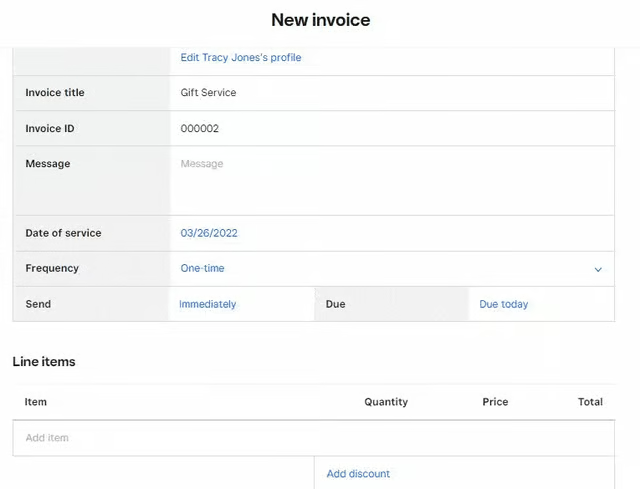
Create, save, and customize templates for single use invoice on Square. (Source: Square) 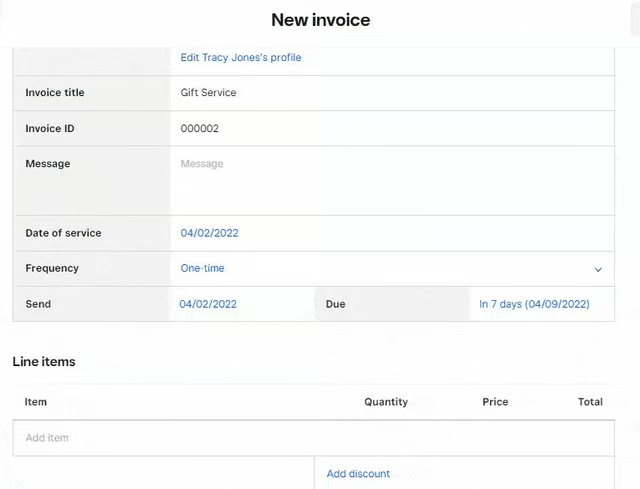
Recurring invoice templates provide additional functions such as adding a recurring schedule and option for automatic payments for customers with stored card information. (Source: Wave)


Wave vs Square Payroll
| | |
|---|---|---|
| Our Wave Payments Review | Our Square Payments Review | |
| Monthly Fee | $20 for self service state$40 for tax service states | $0 for contractors$35 if employing full-time staff |
| Per Full-time Employee | +$6 | +$6 |
| Per Contractor | +$6 | $6/contractor |
| Payout Options | Bank | BankCheckCashApp |
| Remote Access | Employee Portal via WebMobile App | Connected Employee Employee Mobile App |
| Tax Forms | ✓ | ✓ |
| Multistate Payroll | ✓ | ✓ |
| Automatic Tax Filing | For 14 states | ✓ |
| Visit Wave | Visit Square |
Winner: Square
Square is clearly the more cost-effective solution for businesses that work with employees, whether full time or contractual. It has scheduling, as well as tips and commission tracking, which Wave does not have. Also unlike Wave, Square does not charge a monthly fee if you only have contractual hires. Square also offers more payout method options and provides merchants with a free mobile app to manage payroll tasks on the go.
Additional Square Payroll features:
- Tip and commission tracking
- Employee access to Benefits
- Employee Pay on demand via Cash App
- Employee shift scheduling w/ Square team management.
- Team messaging via app
- Worker’s compensation insurance
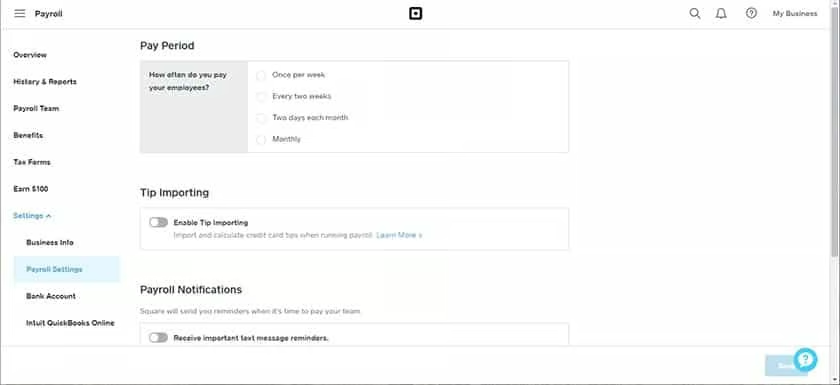
Square’s payroll management settings offer various customization options such as tip importing, payroll notifications, and payout methods. (Source: Square) 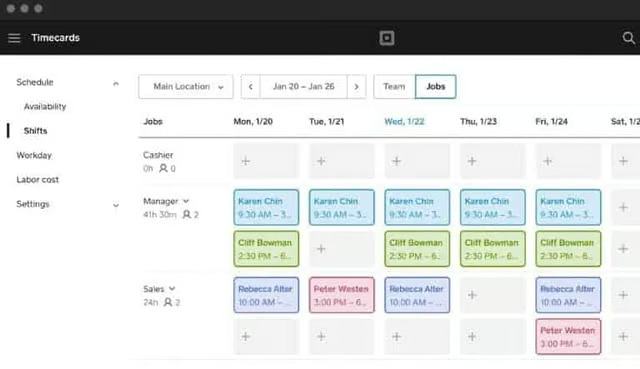
Every free Square account also comes with basic team management tools that have time tracking and payroll reporting functionalities. (Source: Square) 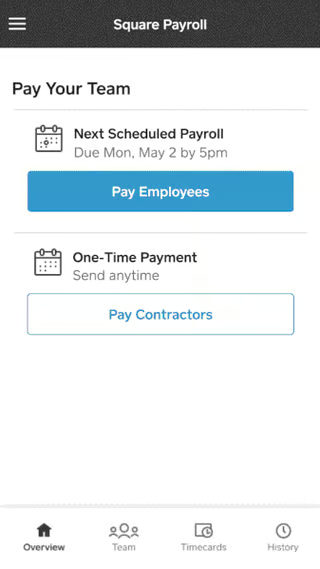
Square provides employers and employees with a free mobile app where they can communicate and workers can track their attendance, pay stubs, and schedules. (Source: Square)


When to Use Wave
WIth its own accounting integration, Wave stands out in terms of tax reporting and compliance. However, since these features are available at a higher plan ($40), it may not be encouraging for small merchants, considering Square also provides automated tax filing (Wave can do this only for 14 states) and payroll expert resources at no extra cost. This brings us back to our recommendation of Wave for solo professionals, gig workers, and contractors. Merchants can still access all of Wave’s payroll features while paying only $20/month—considerably less than Square’s monthly fee.
Additional Wave payroll features:
- One-click payout
- Automatic payroll journal entries
- Workers’ compensation insurance
- Customizable payroll expense reporting
- Priority customer support
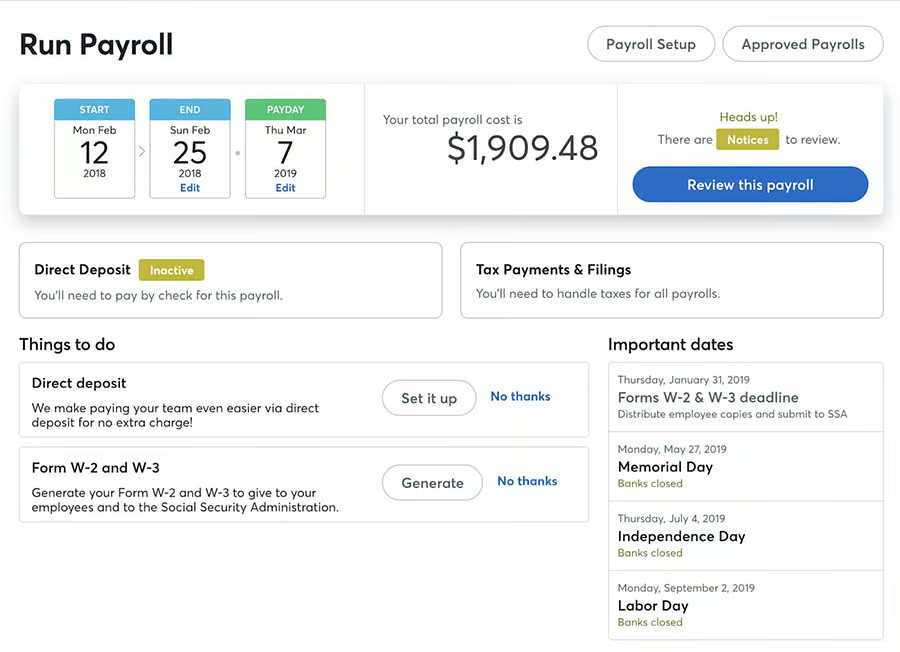
Wave provides you with a comprehensive payroll dashboard that displays pending tasks, payout records, and more. (Source: Wave) 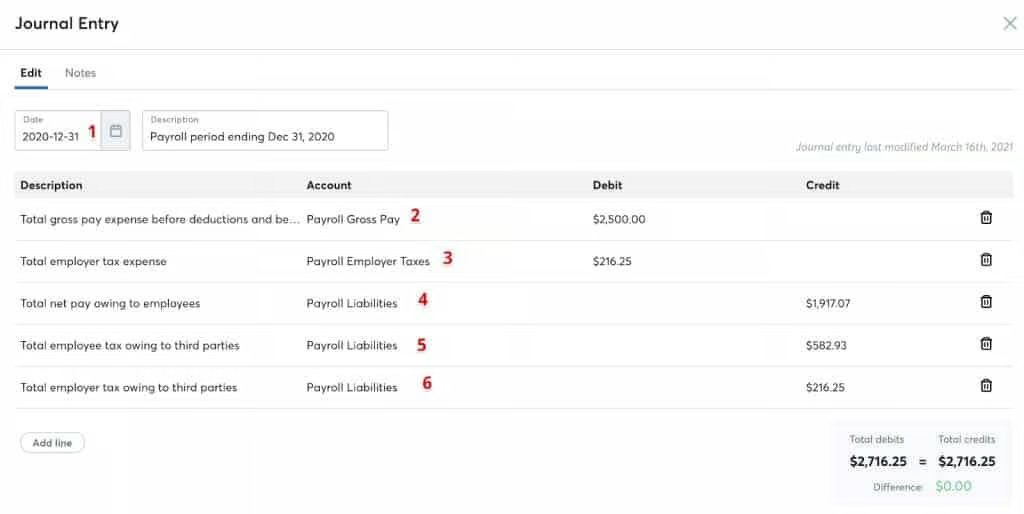
Integration with Wave Accounting ensures that payroll records are automatically updated and included in financial reports. (Source: Wave)


Wave vs Square Reporting
When to Use Wave
Wave’s reporting features are largely tied to its accounting service. This means that invoice records automatically update account receivables, payroll payouts create instant adjustments to expense and accruals, and product records reflect both services rendered and company supplies purchased. If you are a solo professional, having Wave’s accounting integration removes the heavy, repetitive compliance tasks, leaving you more time to attend to clients.
When to Use Square
With Square, reporting is more segmented according to business type. So, while you can create multiple business profiles, Square does not have Wave’s capability to create an aggregated report of your businesses. What Square can do, though, is provide you with omnichannel business reporting. Any adjustments to sales and inventory are automatically synced in one report regardless if you have more than one location, or if you sell on multiple platforms (in-store, online store, social media, mobile, etc.).
Square’s sales reporting features are basic compared to other top merchant processors. In retail, for example, you only get sales data plus cost of goods sold, profit margin, and vendor sales if you upgrade to a Square Retail paid plan. On the other hand, you can use Square to generate smaller reports tracking cash, tips and commissions, and low-stock alerts.
Wave vs Square Integrations
Winner: Square
Square offers a better range of integration options starting with its own suite of add on products. You will also find a diverse range of third-party integrations such as self-order kiosks and delivery management apps that will allow Square to scale with the business. Aside from its proprietary add-ons, Square also has an app marketplace for its software partners, giving it a clear lead against Wave both by numbers and a variety of integrations.
Square integration options:
- Square POS software
- Square Payments
- Square Invoicing
- Square Online
- Square Payroll
- Square Team Management
- Square Marketing
- Square Business Checking
- Square Loyalty
- Square Cash App
- Afterpay (BNPL)
- Third-party integrations from Square Marketplace
When to Use Wave
Wave, with its suite of financial services, is a popular choice among small nonprofits, hobbyists, startups, and solo professionals looking for more individualized accounting management software. It does have a few third-party integrations for project management and ecommerce.
Wave integration options:
- Wave Payroll
- Wave Invoicing
- Wave Payments
- Wave Money
- Google Sheets
- BlueCamroo
- Ecommerce platforms (via Zapier)
Wave vs Square Ease of Use
| | |
|---|---|---|
| Our Wave Payments Review | Our Square Payments Review | |
| Approval | Not required | Not required |
| Contract Length | Pay-as-you-go | Pay-as-you-go |
| Customization Options | Simple custom settings | Simple custom settings |
| Funding Speed | Developer API | Developer API |
| Chargeback Management | 2 business daysInstant with fee | Next business daySame-day with fee |
| Fraud Protection | By email | ✓ |
| Customer Support |
|
|
| Language Supported |
|
|
| Visit Wave | Visit Square |
Both Wave and Square are payment facilitators so merchants only need to sign up for an account but will not be subjected to an approval process. Once you have provided all the necessary information, you are free to start sending out invoices and accepting payments. However, the common downside for all merchants with payment facilitators is that they are more prone to account holds and frozen funds. Learn more about merchant accounts.
That said, payment facilitators are the most ideal for startups and small businesses because of simple pricing and often zero monthly fees. So in order to decide between Square vs Wave, we focus on getting the most out of features such as more control over chargeback and fraud management.
What Users Say About Wave Payments
Wave is more popular as an accounting and financial services platform but users all agree that the free advanced invoicing and payment processing are some of Wave’s standout features. Other users find Wave a bit lacking primarily because it does not support in-person payments.
More user feedback:
- Completely free invoicing platform
- Helpful automated bookkeeping
- Limited to local US merchants
- Extra fees for payroll and tax filing
What Users Say About Square Payments
Square has already built itself a core client base that loves its all-in-one business management system. However, while there are so many available options for merchants to grow with Square, some merchants can still point out missing customization features even with the paid plans.
More user feedback:
- One of the best all-in-one POS and payments platforms
- Good value and reasonable fees
- Some customizations require an upgrade to paid plan
- Reports of frozen funds and account holds
How We Evaluated Wave vs Square
First hand experience is important in order to build a concrete comparison between two small business-friendly solutions like Wave and Square. I created demo merchant accounts for each and tested their payment options, customization settings, and other business management features such as product catalog, customer directory, invoicing, and integrations. Using the live platform also allowed me to evaluate the overall user experience.
Wave and Square are compared based on the following criteria:
- Value for money: As both Wave and Square offer a free merchant account I wanted to know which payment processor offers more value with zero upfront cost. Fortunately, Wave and Square’s forever-free plan offers unlimited invoicing and payment processing volume. The free features include customizations where Wave stood out for invoicing and recurring billing tools.
- Pricing: Transaction fees comprise a majority of the cost of doing business for small and startup businesses. This is why I compared Wave and Square’s online credit card processing rates. Square emerged as the cheapest with a lower fixed fee and no surcharge for Amex transactions.
- Payment features: Here, I evaluated the available payment methods and payment options on Wave and Square. While Square won in variety and flexible options, Wave’s invoicing and recurring billing tools stood out.
- Business management features: I went through Wave and Square’s business management functions and found that both providers have similar payroll features that I went into detailed comparison above. Square is the clear winner here, across all business management tools except for accounting.
- Ease of use: I compared my overall user experience on Wave’s and Square’s platforms, from sign-up to testing its reporting tools. I also took a closer look at their integration options where Square really stood out. Finally, I wanted to find the latest user feedback to determine which of Wave’s and Square’s functions real-life users like the most, and which aspect of their service have recently improved (if any).
Wave vs Square Frequently Asked Questions (FAQs)
These are some of the most common questions we get about Wave vs Square.
What is the difference between Square and Wave?
The most significant difference between Square and Wave is their primary use. Square is, first of all, a POS system, among other things, that comes with a built-in payment processor. Wave, on the other hand, is more popular as an accounting platform with free invoicing and payment processing tools.
Can I use Square with Wave?
No, not directly. Although, you can integrate Square with Wave if you have a Zapier account.
Is Square invoicing free?
Not entirely. Square does offer a free basic invoicing plan that comes with simple customizations. You will need to upgrade to a paid plan to access recurring billing, add custom fields, and access custom layouts. Project management functionality is also available in the paid plan.
Bottom Line
A closer look at Square vs Wave will show that there are more differences between the two providers than there are similarities. However, merchants who often compare Wave vs Square are likely trying to look for the best invoicing service. Wave definitely is the clear winner in this category for providing a full free advanced invoicing and recurring billing solution. However, if you are looking for more versatility and room to grow with the same payment processor, then Square is the best choice.
