








Blogging is the most central strategy in content marketing. It builds your credibility, establishes you as a subject authority, and helps earn you backlinks, in turn helping your site get discovered. If you’re looking to grow your business’ digital presence, there’s no question that blogging should be one of your main strategies—it’s a simple and cost-effective method that can bring many long-term benefits when done right.
But every effective blogging strategy needs a good set of blogging tools. As a content marketer myself, I’ve experienced a world of difference when publishing blogs using efficient blog tools versus using basic run-of-the-mill platforms. I’ve battled with many content management systems, design tools, and more—and no two blogging platforms are equal. That said, here are some of the traits to look out for when choosing the best blogging tools to grow your website.
- A reliable publishing platform with scheduling features
- A user-friendly blog design platform
- Sizable storage and bandwidth
- An analytics dashboard that lets you make strategic decisions
- Marketing tools like search engine optimization (SEO) or social media publishing that help promote your content
These are the basic features you’ll need to build a sound blogging strategy for your content marketing, and the tools for blogging on this list have them all—and more. In all, here are our top picks for the best blog tools for small businesses, plus more details on each below.
- Best for small businesses overall: DreamHost
- Best for beginners: Wix
- Best for visual and creative blogs: Squarespace
- Best for lead generation: HubSpot
- Best blog marketing tools: GoDaddy
- Best for ecommerce businesses: Weebly
- Best artificial intelligence (AI) tools for blogging: Hostinger
- Best Blogging Tools at a Glance
- DreamHost: Best Blog Tools for Small Businesses Overall
- Wix: Best Blogging Tools for Beginners
- Squarespace: Best for Visual & Creative Blogs
- HubSpot: Best for Lead Generation
- GoDaddy: Best Blog Marketing Tools
- Weebly: Best for Ecommerce Businesses
- Hostinger: Best AI Tools for Blogging
- Frequently Asked Questions (FAQs)
- Bottom Line
Best Blogging Tools at a Glance
| Blogging Tool | Expert Score Out of 5 | Starting Cost per Month | Free Plan |
|---|---|---|---|
 | 4.92 | $2.59* | ✕ |
| Visit DreamHost | |||
 | 4.87 | $16 | ✓ |
| Visit Wix | |||
 | 4.62 | $25 | ✕ |
| Visit Squarespace | |||
 | 4.55 | $20 | ✓ |
| Visit HubSpot | |||
 | 4.52 | $9.99* | ✓ |
| Visit GoDaddy | |||
 | 4.18 | $10 | ✓ |
| Visit Weebly | |||
 | 4.06 | $2.49* | ✕ |
| Visit Hostinger | |||
*First year cost per month with annual payment; renews at higher rate
DreamHost: Best Blog Tools for Small Businesses Overall
Shared Starter Plan: $2.59 monthly*
- 1 blog website with free custom domain for one year
- Drag-and-drop site builder with blog templates
- SEO recommendations
- Content personalization
- Blog analytics
- Unlimited blog posts and landing pages
Shared Unlimited Plan: $3.95 monthly*
- Unlimited websites with free custom domain for one year
- Drag-and-drop site builder with blog templates
- SEO recommendations
- Content personalization
- Blog analytics
- Unlimited blog posts and landing pages
- Custom email domain
Managed WordPress Plan: $16.95 monthly*
- 1 fully managed website with custom domain for one year
- Drag-and-drop site builder with blog templates
- SEO recommendations
- Content personalization
- Blog analytics
- Unlimited blog posts and landing pages
- Custom email domain with unlimited email
*Billed annually, or pay a higher cost month-to-month
- Drag-and-drop website builder
- 200+ website templates
- Custom domain
- Unlimited blog posts and landing pages
- Content personalization
If you’re looking for a reliable, all-in-one blogging platform to build your content strategy on, DreamHost is our top recommendation. DreamHost is a website hosting and building platform with robust blogging tools, from web hosting to website design, but it’s also simple enough for even complete beginners with zero experience to use. And, with plans starting at less than $3 a month, it won’t break your bank.
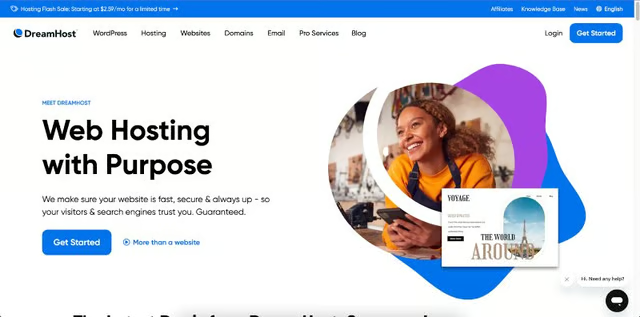
DreamHost is one of the best blogging software around for small businesses. (Source: DreamHost) 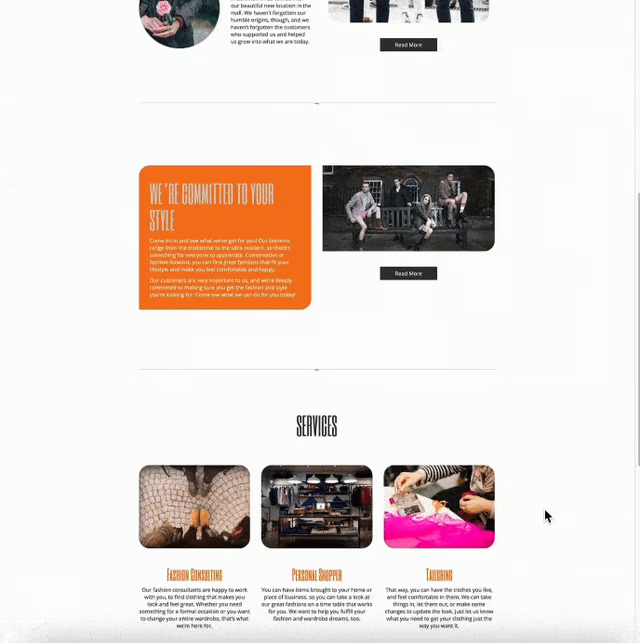
An example of a website template by DreamHost (Source: DreamHost)


On DreamHost, you can purchase website hosting or a custom domain if you already have a blog and are looking to upgrade it to something more professional. Or, you can build your blog site from scratch using its drag-and-drop website builder or have a completely custom website built for you by professionals—although this is a far more costly option. Plus, DreamHost also offers marketing and management services to fully optimize your site.
However, a main drawback with DreamHost is that there is no free plan or even a free trial to see if it’s the right fit for your business—you’ll need to sign up for a plan to access all its blogger tools. Still, all its plans are relatively small business-friendly, with lots of value for your money (for instance, at $2.59 monthly, you get a full blog with a custom domain). This makes it our overall top recommendation for the best blogging tools for your small business.
Wix: Best Blogging Tools for Beginners
Free Plan: $0
- Unlimited websites with Wix domain and branding
- Drag-and-drop editor and AI site builder
- 800+ website templates, including dozens for blogs
- Unlimited blog posts
- 500 MB storage and bandwidth
- Website analytics
- Tools for SEO, digital ads, email and social media marketing
Light Plan: $4.50 monthly*
- Unlimited websites with Wix branding and custom domain
- Up to 4 lead gen forms
- Drag-and-drop editor and AI site builder
- 800+ website templates, including dozens for blogs
- Unlimited blog posts
- 500 MB storage and 1GB bandwidth
- Website analytics
- Tools for SEO, digital ads, email and social media marketing
Unlimited Plan: $12.50 monthly*
- Unlimited websites with custom domain and no Wix branding
- Up to 10 lead gen forms
- Drag-and-drop editor and AI site builder
- 800+ website templates, including dozens for blogs
- Unlimited blog posts
- 10GB storage, unlimited bandwidth, and 1 hour for video
- Tools for SEO, digital ads, email and social media marketing
- Advanced SEO listing and site analytics
*Based on annual billing, or pay a higher cost month-to-month
- Drag-and-drop editor and AI website builder
- 800+ website templates
- Custom domain
- Unlimited blog posts
- Lead gen forms
- Marketing tools for SEO, email, social media, and ads
If you’re completely starting out building your small business website and blog, Wix is the blogging tool we recommend. With hundreds of modern and well-designed website templates (including dozens for blogs), a beginner-friendly, drag-and-drop website editor, and a full-featured free plan, it’s a great starting point for any website beginner. Even with limited experience, you’ll be able to build a professional-level business blog.
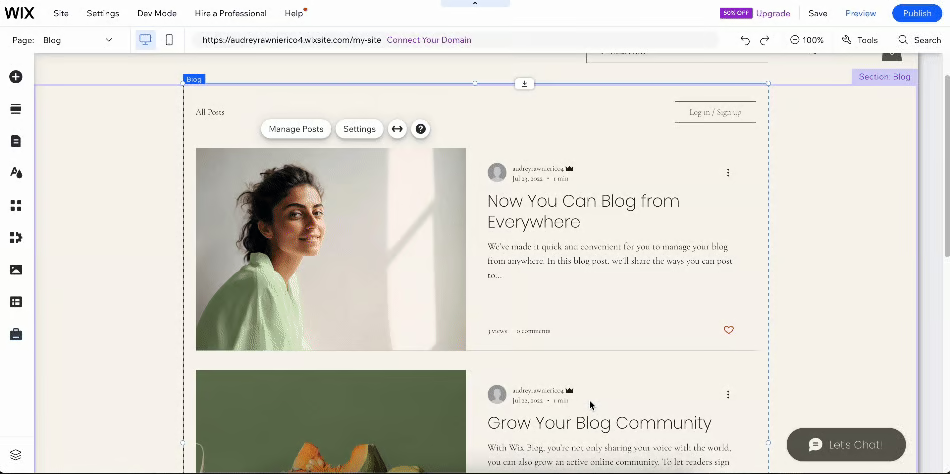
Wix offers an easy-to-use, drag-and-drop blog builder. (Source: Wix) 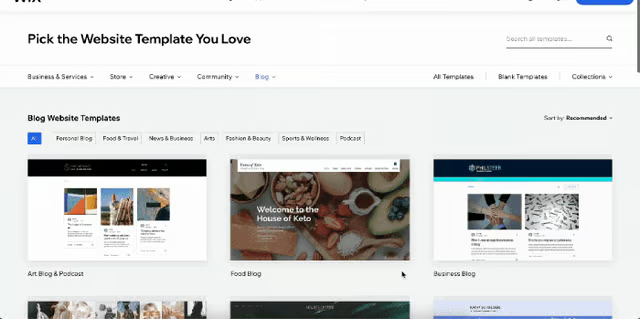
Choose from dozens of blog templates to get started (or use the AI site builder). (Source: Wix)


To build your blog on Wix, you’ll only need to sign up for an account, then either build your site in the drag-and-drop site editor or use its artificial intelligence (AI) to generate a completely custom site for you—both are available on the free plan. Wix also has several blog templates you can start with. You also get web hosting, hundreds of landing pages, unlimited blog posts, analytics, and if you subscribe to a paid plan, a custom domain.
On the marketing side, Wix’s sites also have built-in tools for SEO, digital ads, and email and social media marketing. The areas it lacks the most are email hosting and content personalization for your blogs, which are what rank it slightly lower than DreamHost, along with a slightly smaller storage space.
However, Wix is still one of the best free blogging tools for beginners around, thanks to its easy-to-use interface and affordable prices—check it out today to see if it’s a suitable fit for your content marketing strategy, or find out more about how to build a website on Wix.
Squarespace: Best for Visual & Creative Blogs
Personal Plan: $16 monthly*
- 1 blog website with a custom domain
- Drag-and-drop site editor with 165 website templates
- Unlimited storage and bandwidth
- SEO and email marketing
- Email hosting with Google Workspace
- Basic website analytics
Business Plan: $23 monthly*
- 1 blog website with a custom domain
- Drag-and-drop site editor with 165 website templates
- Unlimited storage and bandwidth
- SEO and email marketing
- Email hosting with Google Workspace
- Advanced website analytics
- Basic ecommerce features
*Billed annually, or pay a higher cost month-to-month
- 165 modern website templates (including for photography or art blogs)
- Drag-and-drop website builder
- Email hosting with Google
- Tools for SEO and email marketing
- Ecommerce features
If you want to build a more creative and visual-centric blog (for instance, a photography portfolio or lifestyle blog), Squarespace has the best blogging tools for your objectives. Squarespace has some of the most modern and well-designed website and blog templates that anyone can customize to create an eye-catching and functional blog in under an hour—even complete beginners.
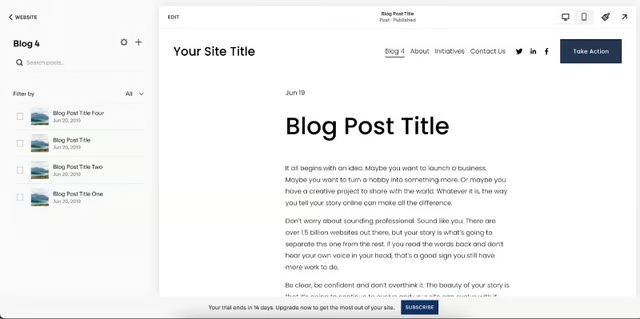
Publish blog posts inside Squarespace’s drag-and-drop editor. (Source: Squarespace) 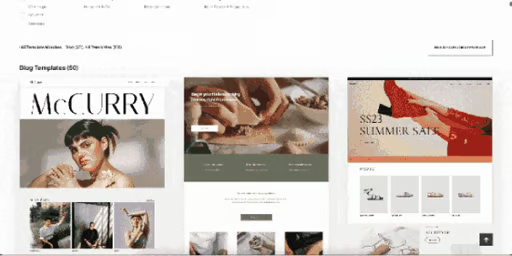
Choose from 50 professionally designed blog templates. (Source: Squarespace)


What’s also great with Squarespace is that even if its templates are all well-designed and ready to publish, you can still easily customize them to fit your branding in the drag-and-drop editor. You also get a custom domain free for one year, unlimited bandwidth with up to 30 minutes of video storage, email hosting with Google, and access to its AI content creation tools—which can be helpful for creating your blog content.
However, Squarespace does not have a free plan, and its plans are generally more costly compared to others like Hostinger or DreamHost. For example, its first plan starts at $16 monthly and only includes the most basic website essentials (e.g., no ecommerce and limited marketing features).
And, you’ll need to purchase a separate plan for each website you create, unlike others that grant you hundreds or even unlimited websites on all paid plans. If you’re looking for more full-featured blog tools with similar design capabilities, you’ll likely get more value with Hostinger.
Still, if you’re a beginner and are looking to build a visually appealing blog quickly and easily, Squarespace has some of the best blog writing tools. Start with one of its 50 blog templates, then customize it with your branding and have your blog live in less than an hour. To find out more about Squarespace, check out our guide and video tutorial on how to build a Squarespace website, or visit Squarespace to get started.
HubSpot: Best for Lead Generation
Free Plan: $0
- 1 blog website with HubSpot branding
- Drag-and-drop website builder with 100 templates
- Connect 1 domain and subdomain
- Lead gen forms, CRM tool, landing pages, email marketing
- Basic SEO recommendations
- Standard website analytics
- Up to 2,000 monthly email sends and 1 email automation
Marketing Hub Starter Plan: $20 monthly*
- 1 blog website with HubSpot branding
- Drag-and-drop website builder with 100 templates
- Connect 1 domain and subdomain
- Lead gen forms, CRM tool, landing pages, email marketing
- Basic SEO recommendations
- Standard website analytics
- 5x your marketing contacts limit for email sends
- Up to 10 email automations
Marketing Hub Professional Plan: $800 monthly*
- Up to 100 blog websites with no HubSpot branding
- Drag-and-drop website builder with 100 templates
- Connect 1 domain and unlimited subdomains
- Lead gen forms, CRM tool, landing pages, email marketing
- Advanced SEO recommendations
- Custom website analytics
- 10x your marketing contacts limit for email sends
- Unlimited marketing automations
*Billed annually, or pay a higher cost month-to-month
- Drag-and-drop website builder
- 100 website templates
- Lead gen forms with CRM tool
- Tools for SEO and email marketing
- Marketing automations
If the ultimate goal of your content marketing is to generate more leads, there are few better-equipped blogging tools than HubSpot. Long regarded for its suite of powerful business tools, HubSpot has features for everything from blogging to campaign management and more. But it stands out most for its lead generation forms, even on its free plan—making HubSpot one of the best tools for bloggers looking to collect new leads.
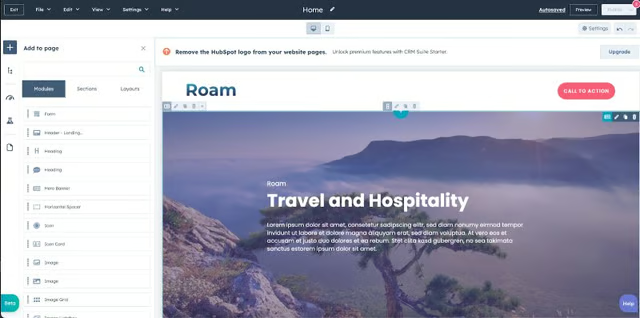
Build your blog using HubSpot’s drag-and-drop editor. (Source: HubSpot) 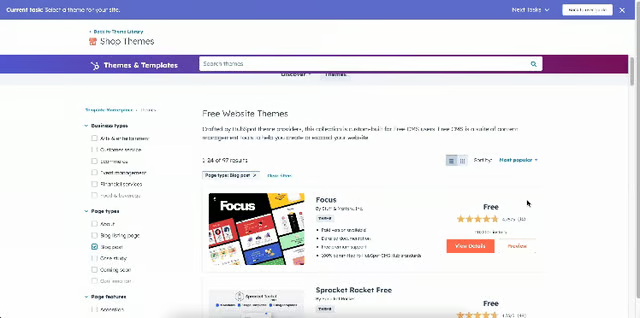
Browse from nearly 100 website templates. (Source: HubSpot)


On HubSpot, you can easily build your website using the drag-and-drop builder and one of its 100 templates, most of which support blogs. Publish unlimited blog posts and up to 20 landing pages on the free plan (or up to 10,000 on paid plans), and add lead generation forms, email marketing, and live chat for free. Plus, HubSpot has a built-in customer relationship manager (CRM) that lets you easily keep track of all your leads and contacts.
If you upgrade to a paid plan, you get far more powerful software that includes marketing automations, SEO, and social media marketing, and no HubSpot branding on your blog. However, HubSpot’s paid plans can be costly, with the Professional plan going up to $800. Still, if you’re on a budget and need tools to generate leads, HubSpot’s free and Starter plans have all the essentials you need—visit HubSpot today to get started.
GoDaddy: Best Blog Marketing Tools
Free plan: $0
- 1 website with GoDaddy domain
- Email and social media marketing
- Creative studio
- 150+ website templates
- Basic analytics
Basic Plan: $9.99*
- 1 website with custom website and email domain
- Email and social media marketing
- 150+ website templates
- Creative studio
- Ecommerce tools
- Connect with Google Analytics
*Billed annually, or pay a higher cost month-to-month
- Website generator
- 150+ website templates
- Tools for email and social media marketing
- Creative studio with video editor
- Ecommerce tools
Building an effective blogging strategy also means promoting your blogs through content marketing methods like email marketing and SEO. The platform with the best blogging tools for all these and more is GoDaddy. Like other website builders, GoDaddy has blog publishing tools built into its platform, but it also stands out for its marketing tools for SEO, email marketing, social media, and digital ads—the first two of which are even available on the free plan.
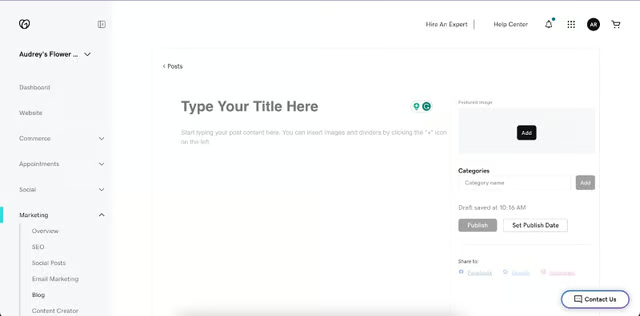
GoDaddy has a built-in blog publisher plus tools to market your blog on email, social media, and digital ads. (Source: GoDaddy) 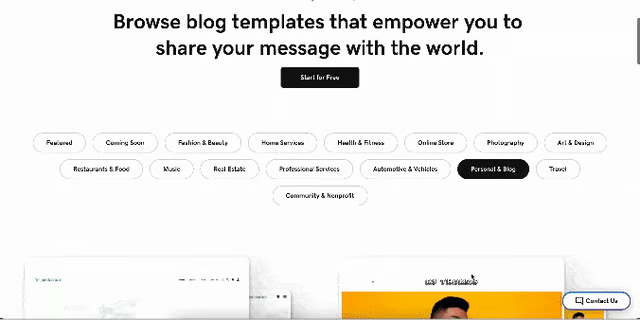
Choose from 150-plus templates, including 50 for blogs. (Source: GoDaddy)


All these tools mean that GoDaddy is your best bet if you’re looking to build a full-scale content marketing strategy for your business. After publishing your blog, you can optimize it for search engines. Then share it with your community via email, social media, or even digital ads. GoDaddy even has a creative studio (which also has a video editing platform) to design social media posts.
The main disadvantage with GoDaddy is that its editor isn’t a drag-and-drop tool, so your design options are more limited than with platforms like Hostinger or Squarespace. Another drawback is that the free plan doesn’t come with SEO tools—you’ll need to upgrade to a paid plan to access them. And, all its plans have a limited number of blog posts, unlike Wix or Weebly.
However, on the whole, if you already have a full content marketing strategy in mind and just need the right tools to carry it out, GoDaddy is one of your best options. Try it out starting with a free plan, then upgrade for full access to its marketing tools. Or find out more in our guide on how to build a GoDaddy website.
Weebly: Best for Ecommerce Businesses
Free plan: $0
- Unlimited blog websites with Weebly branding and domain
- Website generator with 8 blog templates
- Unlimited blog posts and landing pages
- Tools for SEO, email marketing, and social media
- Basic website analytics
- Lead gen forms
- Ecommerce store for physical goods
Personal Plan: $10 monthly*
- Unlimited blog websites with custom domain
- Website generator with 8 blog templates
- Unlimited blog posts and landing pages
- Tools for SEO, email marketing, and social media
- Basic website analytics
- Lead gen forms
- Ecommerce store for physical and digital goods
Professional Plan: $12 monthly*
- Unlimited blog websites with custom domain
- Free domain for 1 year
- Website generator with 8 blog templates
- Unlimited blog posts, landing pages, and storage
- Tools for SEO, email marketing, and social media
- Advanced website analytics
- Lead gen forms
- Ecommerce store for physical and digital goods
*Based on annual billing, or pay a higher cost month-to-month
- Website generator
- 100+ website templates
- Unlimited blog posts, landing pages, and storage
- Custom domain
- Marketing tools for SEO, email, and social media
- Ecommerce tools
Weebly stands out from other small business blogging platforms for its strong suite of ecommerce features. With Weebly, you can set up a blog and build an ecommerce store for your business all on the same platform, even on the free plan. This makes it the best blogging tool if your content marketing strategy’s goal is to boost sales on your online store.
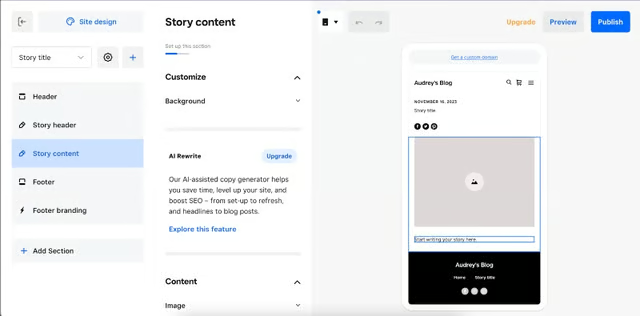
Design your blog easily using Weebly’s site generator. (Source: Weebly) 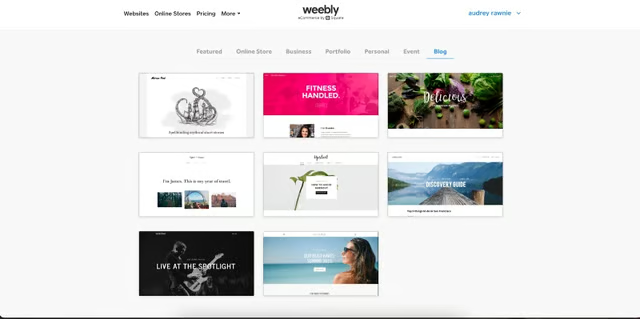
Choose from eight blog templates (Source: Weebly)


On Weebly’s free plan, you can also get web hosting, SEO, and lead capture forms. If you subscribe to a paid plan, you can also register a custom domain for your site. Plus, all plans also come with unlimited blog posts, landing pages, basic website analytics, and a dashboard to view form submissions.
However, unlike with other platforms, Weebly’s website builder isn’t a drag-and-drop platform, so design options can be limited. There are also fewer website templates in general, so if a fully custom and branded blog is important to your business, Hostinger or Wix might be your better option. Conversely, this also makes it a suitable choice if you have limited design experience and want to set up your blog quickly and easily.
On the whole, if you’re looking for an all-in-one blogging tool to build your blog and online store without breaking the bank, there are few better options than Weebly. Sign up today with a free plan to get started.
Hostinger: Best AI Tools for Blogging
Premium Plan: $2.49 monthly
- Up to 100 websites with custom domain
- Drag-and-drop builder or AI site generator
- 100GB storage and unlimited bandwidth
- Email hosting
- Standard security
Business Plan: $3.49 monthly
- Up to 100 websites with custom domain
- Drag-and-drop builder or AI site generator
- 200GB storage and unlimited bandwidth
- Email hosting
- Advanced security
- WordPress AI tools for blog writing
Cloud Startup Plan: $8.99 monthly
- Up to 300 websites with custom domain
- Drag-and-drop builder or AI site generator
- Unlimited storage and bandwidth
- Email hosting
- Advanced security
- WordPress AI tools
- Dedicated IP address
- Drag-and-drop and AI website builder
- 140+ website templates
- Up to 100 websites on the first plan
- Custom domain
- Unlimited storage and bandwidth
- Email hosting
- AI content creation tools
The rise of artificial intelligence (AI) has brought with it many benefits for small businesses, and one of the biggest is in helping build professional-level websites quickly and easily. Hostinger is one of the best cases of this: it’s one of the most full-featured website builders around, but it stands out particularly for its suite of AI tools—both for website building and content creation. This makes it our overall top pick for the best AI-powered blogging tool.
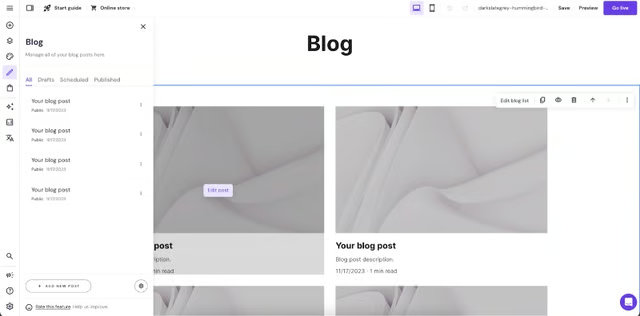
Build your blog in Hostinger’s drag-and-drop editor. (Source: Hostinger) 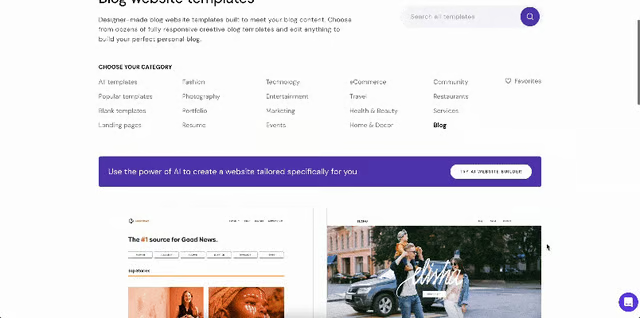
Choose from 16 blog templates, or use Hostinger’s AI site builder. (Source: Hostinger)


Another aspect of Hostinger we like is a selection of plans that are small business budget-friendly. Starting at just $2.49 monthly (billed annually), you can build up to 100 blog sites with email hosting and up to 100GB storage—and you even get a free custom domain for one year. You can also build your blog using its AI site generator, or you can start with one of its professionally designed templates. Either option helps you build a modern, business-ready website.
On its higher plans, Hostinger has AI content creation tools that can help simplify your blog creation process, along with advanced ecommerce and security features. The main downside is that Hostinger has no free plan (unlike Wix or Weebly), so it isn’t the best option if you’re a beginner or still testing out different tools. We recommend Hostinger if you already have a set content strategy and if you want to use AI tools to build multiple blog sites.
Try out Hostinger’s AI tools and build up to 100 blog websites starting at $2.49 monthly. You can also find out more about Hostinger in our Hostinger website tutorial and Hostinger review.
How We Compared & Ranked Providers
The platforms above offer some of the best blogging tools you can use to grow your small business’ brand presence. But not all tools are equal—some offer more value on the free plan, like built-in digital marketing tools, while others have stronger design features that help you build a fully branded blog. To help you decide the best fit for your business, here are the criteria we used to rank the best blog tools.
Every business runs on a marketing budget, and building your blog should only cost a fraction of it at the most. We only considered blog tools that offer free or low-cost plans with high value. Most also offer both monthly and annual billing options to suit your needs.
All blogging tools need all the essential features to build a fully functional and well-designed blog. These include a publishing platform with scheduling features, a high limit for blog posts, a custom domain, a user-friendly website builder with modern blog templates, and built-in app integrations. All the tools above have all or most of these features.
The best blog creation tools also have features that go beyond the basics and help you create the best blog strategy for your business. These include marketing features like page optimization, dynamic content personalization, and email marketing. Other helpful features are AI content writers that simplify the content creation process or advanced blog analytics to help refine your strategy. We ranked the tools with these features higher on the list.
The best software to write blog posts should also be simple enough for beginners to build a professional-level blog. Tools that offered comprehensive customer support, such as 24/7 service hours, live chat and phone support, and a knowledge base with tutorials, were ranked higher on the list.
Finally, we also personally tested each blogging tool to see if they delivered on their promises and were the right fit for small businesses. All the tools above have website builders that let you set up a blog in under an hour, pricing plans that offer good value and won’t break your bank, and are easy enough to use even if you have zero website-building experience.
Frequently Asked Questions (FAQs)
What is the best blogging tool?
The best blogging tool according to our research is DreamHost. It offers all the blog tools you need, from a beginner-friendly website builder, professionally designed blog templates, website hosting, and a free custom domain for one year. Plus, it also has helpful tools for marketing your blog, including SEO recommendations, content personalization, and email marketing—all at affordable price points starting at $2.59 monthly.
Is WordPress the best tool for blogging?
WordPress is the best tool for blogging if you already have considerable experience with online content publishing. Otherwise, if you’re a complete beginner, WordPress’ features can be complex, and you’ll likely find a better match with DreamHost, Wix, or Squarespace instead. These platforms offer all the essential tools to build and market your blog, and are all beginner-friendly.
What are the downsides of using WordPress for blogging?
The biggest downside of using WordPress for blogging is that it’s not a beginner-friendly interface. If you’re completely new to blogging and want to set up your blog immediately, WordPress’ tools may be too complicated. Another drawback is that WordPress’ templates aren’t as well designed as those from other platforms, and because it’s a free-for-all platform, it’s more prone to security risks.
Bottom Line
One of the most important decisions when building your brand’s blog strategy is choosing the right tools that support your objectives and help your small business grow. The blog SEO tools above have some of the best tools in the industry for these and more. But our choice of the platform with the best blogging tools is DreamHost. It has all the essentials to build a blog—plus extra features to help market it, all at small business-friendly pricing.
