







When I first experimented with social media marketing nearly a decade ago, I relied on native tools like Facebook’s Boost Post feature. It worked, but costs added up quickly, and managing content across platforms was cumbersome. The best free social media scheduler should simplify that work with reliable publishing, a visual calendar, useful content tools, and enough free capacity for regular posting.
Today, free social media scheduling tools make that process far easier and more manageable. To find the right options for small businesses, I tested six tools based on ease of use, supported platforms, scheduling limits, analytics, automation features, and overall value. I focused on tools with free plans that are genuinely practical for day-to-day workflows — not just limited trials. After comparing the top options, Buffer stood out as the best overall because it is beginner-friendly, easy to manage, and flexible enough for ongoing social media planning.
Provider | Best for… | Starting paid price, billed annually |
| Buffer | Scheduling across multiple social networks | $5/channel/month |
| Metricool | Free analytics and competitor tracking | From $20/month |
| Meta Business Suite | Facebook and Instagram management | Free |
| Planable | Team content reviews and approvals | $33/workspace/month |
| CoSchedule | Promoting blog content on social media | $19/user/month |
| Mailchimp | Combining email and social campaigns | $13/month |
- Best Free Social Media Schedulers Compared
- What does a social media scheduler do?
- Buffer: Best free social media scheduler across multiple social network
- Metricool: Best for free analytics and competitor tracking
- Meta Business Suite: Best for Facebook and Instagram management
- Planable: Best for team content reviews and approval
- CoSchedule: Best for promoting blog and website content
- Mailchimp: Best for email-led social campaigns
- A few honorable mentions that didn’t make the cut
- Methodology: How I evaluated the best free social media scheduling tools
- 6 things to consider when choosing a free social media scheduler
- Bottom line
Best Free Social Media Schedulers Compared
| Provider | Renewable free scheduling | Free social analytics | Free AI content assistance | My expert score out of 5 |
| Buffer | ✓ | ✓ | ✓ | 4.63 |
| Metricool | ✓ | ✓ | ✓ | 4.52 |
| Meta Business Suite | ✓ | ✓ | ✕ | 4.38 |
| Planable | ✕ | ✕ | ✓ | 4.11 |
| CoSchedule | ✓ | ✕ | ✓ | 3.72 |
| Mailchimp | ✕ | ✕ | ✕ | 3.41 |
Why you can trust Fit Small Business
How I chose the best free social media schedulers
I evaluated the best free social media tools based on how effectively they help small businesses create, organize, and schedule content. I compared each provider’s free-plan limits, supported networks, publishing tools, analytics, engagement features, usability, and support resources. I also considered practical usefulness, feature quality, upgrade value, user reputation, and pricing transparency. Where possible, I tested core workflows and verified official pricing and documentation to distinguish renewable free plans from limited allowances and temporary trials. Learn more in my full methodology below.
What does a social media scheduler do?
Honestly, it just makes your job as a social media manager easier. At the very least, a social media scheduling platform can schedule your posts in advance across various social media platforms.
A good one can also help plan content on a calendar, and a really good one can even help you with content creation, for instance, through a content creation platform or an AI caption draft generator. Some platforms can also measure your posts’ analytics and track their progress over time.
A social media scheduler is like your second-in-command, running your social media campaigns. A fair warning, though: All the tools in this list are free social media scheduling tools, so expect them to have certain limitations, at least on their free plans, like a limited number of scheduled posts or social media accounts you can connect to. However, I’ve tested and verified that they're all genuinely capable and free social media schedulers.
Why I chose Buffer
Buffer is still my favorite free social media scheduler and the platform I personally come back to most often. It’s easy to set up, genuinely beginner-friendly, and gives you enough functionality to manage day-to-day social media planning without immediately forcing you into a paid plan. The free version supports up to 10 scheduled posts per channel across three social accounts, which is enough for many small businesses just building a consistent posting workflow.
What I especially like about Buffer is how simple it makes content planning. Its calendar view makes it easy to map out posts weeks in advance, while the Ideas tab is surprisingly useful for organizing future content, saving post concepts, and keeping campaign ideas in one place. As someone who has managed social media content manually before, I find that workflow much more practical than juggling notes apps, spreadsheets, or random draft folders.
The biggest limitation is analytics. While Buffer does include basic post insights, more advanced analytics and engagement monitoring tools are reserved for paid plans. Still, because the paid upgrade starts at a relatively low cost compared with many competitors, Buffer remains one of my overall favorite and most practical best social media marketing tools for small businesses.
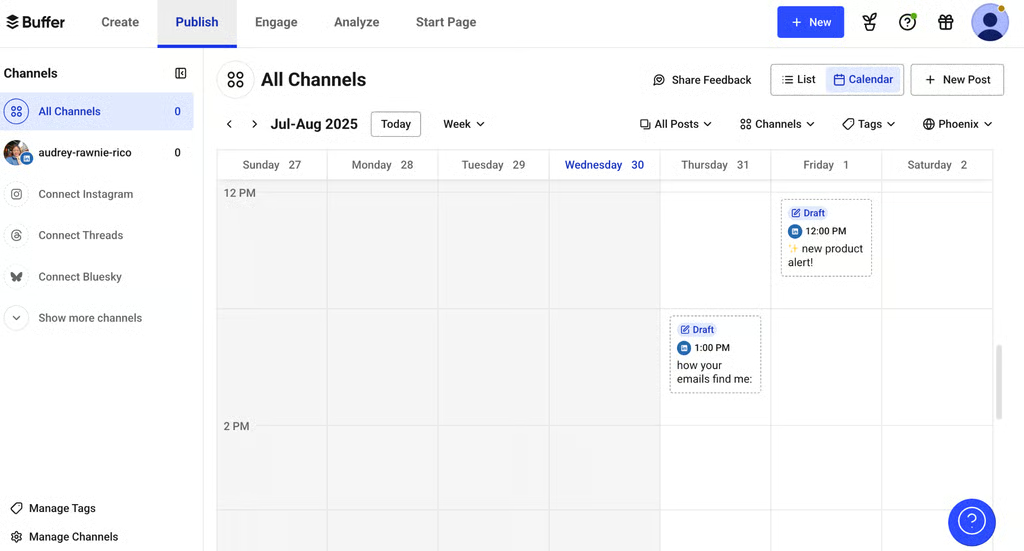
Buffer’s social media content calendar is super intuitive and helpful for scheduling posts. (Source: Buffer) 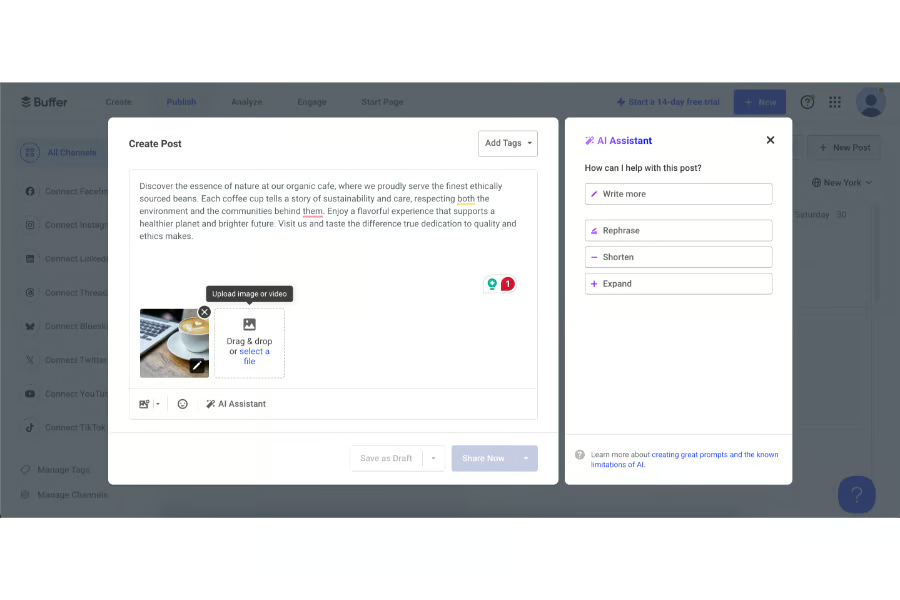
It also has an AI caption assistant… (Source: Buffer) 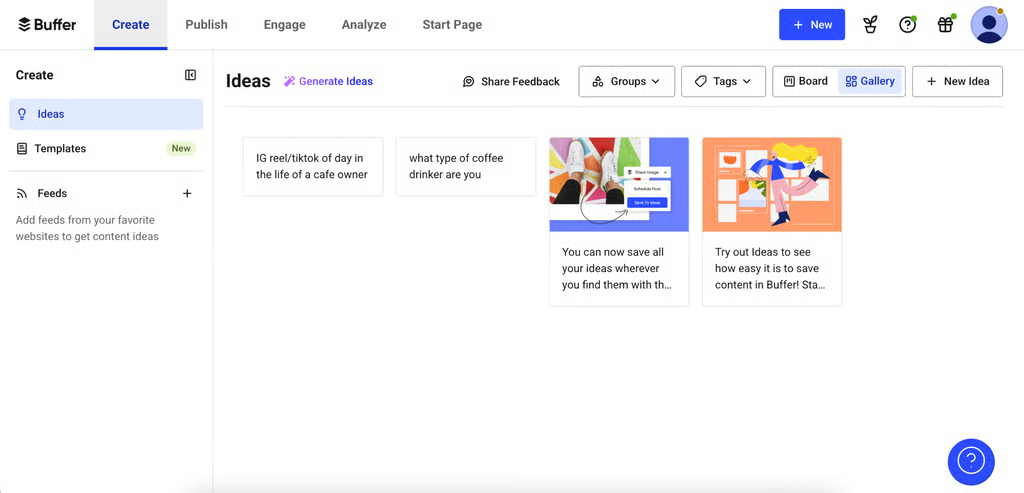
…And a content ideas board (that’s much handier and more organized than a notebook). (Source: Buffer)


Key freemium features
- Multichannel scheduling: Connect up to three social channels and manage their publishing queues from one dashboard.
- Visual publishing calendar: Review upcoming posts and adjust your content schedule without switching between platforms.
- Platform-specific posts: Customize captions and media for each social network from the same workflow.
- AI Assistant: Draft captions, generate ideas, and repurpose content for different channels.
- Basic performance insights: Review recent post results to see which content resonates with your audience.
Buffer pricing
Free | Essentials | Team | |
| Monthly price, billed annually | $0 for 1 user | Starts at $5/user for 1 channel | Starts at $10/user for 1 channel |
| Monthly price, billed monthly | $0 for 1 user | Starts at $6/user for 1 channel | Starts at $12/user for 1 channel |
Free trial: 14 days
Why I chose Metricool
Metricool ranks just behind Buffer for me because its free plan offers more analytics tools than most competitors. Many free social media schedulers limit reporting unless you upgrade, but Metricool includes performance analytics and competitor tracking right away, which makes it far more useful for businesses that want to measure results, not just schedule posts.
What I especially like is how easy it makes performance tracking. You can quickly view audience growth, engagement rates, top-performing content, audience demographics, and competitor activity on a single dashboard, all presented in clear, easy-to-understand graphs. I also found its competitor tracking useful for spotting content gaps and identifying what types of posts perform well in your niche.
Metricool also includes a visual content calendar, AI caption assistance, and recommended posting times based on your connected platforms. The interface is not quite as beginner-friendly as Buffer’s, and the scheduling workflow can feel a little busier at first. Still, for businesses that care as much about analytics as scheduling, Metricool is one of the strongest free social media scheduling tools I tested.
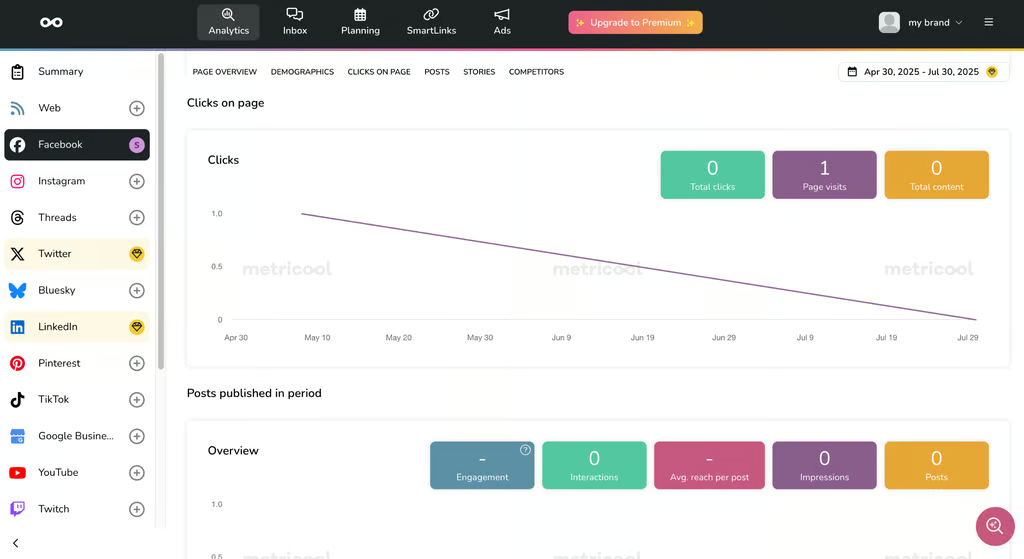
Metricool’s standout feature: social analytics, even on the free plan. (Source: Metricool) 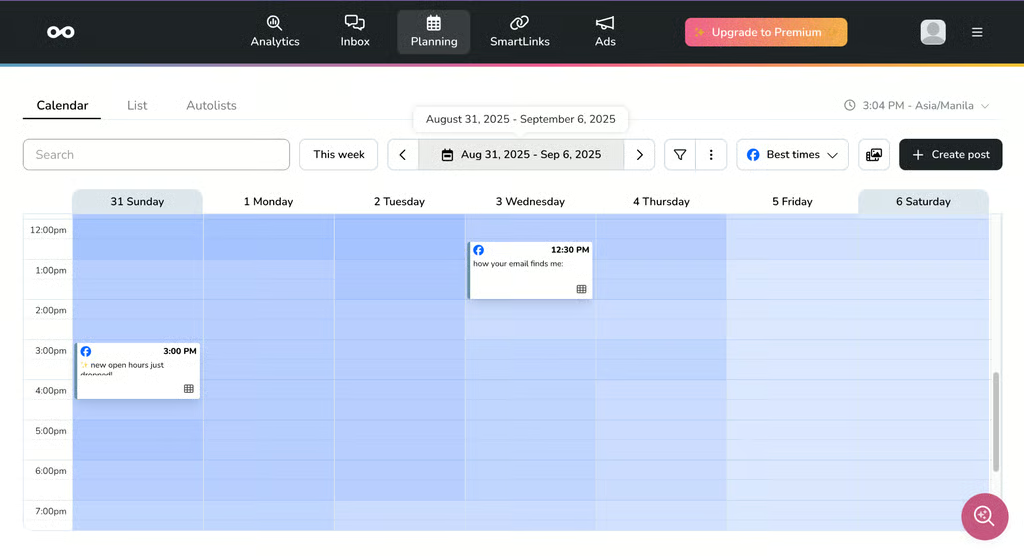
There’s also a social media content calendar. (Source: Metricool)


Key freemium features
- Social media analytics: Monitor engagement, audience growth, demographics, and content performance using 30 days of data.
- Competitor analysis: Track up to five competitor profiles and benchmark their social performance against yours.
- Content planner: Schedule up to 20 posts per month across supported social networks using a visual calendar.
- Best-time recommendations: Find suggested publishing times based on when your audience is active.
- AI Social Media Assistant: Generate and refine captions with five AI credits per month.
Metricool pricing
Free | Starter | Advanced | Custom | |
Monthly pricing, billed annually | $0 | From $20 | From $53 | Custom |
Monthly pricing, billed monthly | $0 | From $25 | From $67 |
Why I chose Meta Business Suite
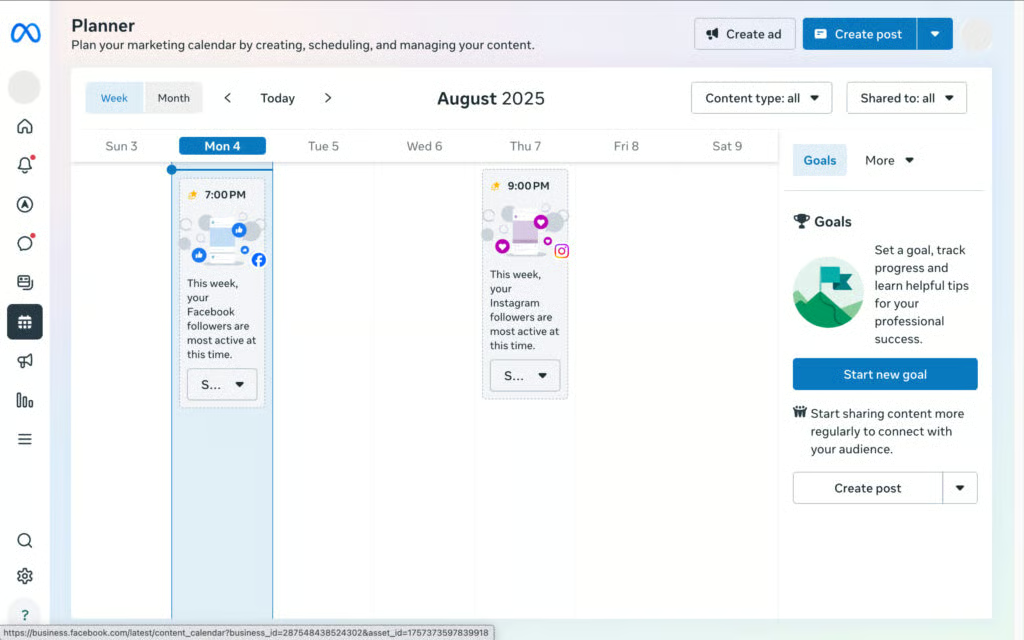
I have a long history with Meta Business Suite, and my experience with it is honestly mixed. On one hand, it’s still one of the most powerful free tools available for Facebook and Instagram management. It offers unlimited scheduling, built-in ad tools, and some of the most detailed native analytics I’ve used, including audience behaviors, engagement trends, organic versus paid reach, and post interactions.
On the other hand, it’s still one of the more frustrating platforms to navigate. I’ve been using Meta’s business tools since around 2018, and the interface changes often enough that features sometimes end up buried in entirely different menus. Compared with more streamlined social media schedulers, the workflow can feel unnecessarily complicated, especially if you only need straightforward scheduling tools.
Because of that, I now use Meta Business Suite more as an analytics and research platform than my primary scheduler. I still rely on it to monitor Facebook and Instagram performance because the level of detail in Meta’s native insights is difficult for third-party platforms to match. But for everyday content planning and scheduling, I generally prefer tools with cleaner workflows and easier content calendars.
Key freemium features
- Facebook and Instagram scheduling: Schedule posts, Stories, and Reels from one dashboard.
- Content planner: Organize scheduled and published content using a visual calendar.
- Performance insights: Monitor reach, engagement, follower growth, and audience demographics.
- Unified inbox: Manage Facebook and Instagram messages and comments in one place.
- Team access: Assign permissions for publishing, customer engagement, and performance reporting.
Meta Business Suite pricing
Meta Business Suite is 100% free and accessible to anyone who handles a Facebook page.
Why I chose Planable
Planable has one of the cleanest and most intuitive interfaces of all the free social media schedulers I tested. Its content calendar is easy to navigate, scheduling posts feels straightforward, and the platform supports multiple major social media channels and accounts. It also includes collaboration and approval tools that make it especially useful for teams managing campaigns together.
The feature I found most useful was the live post mockups, which let you preview exactly how posts will appear before they go live. That may seem minor, but it’s something many social media scheduling platforms still do inconsistently, especially across different post formats and platforms. I found it particularly helpful for checking layouts and visual consistency before publishing campaign content
The biggest drawback is the free plan limit. Planable only allows up to 50 total scheduled posts, so it functions more like a generous free trial than a long-term free scheduler. Because of that, I think it works best for short-term campaigns, seasonal promotions, or temporary content planning rather than ongoing daily social media management. Still, for businesses that prioritize collaboration, approvals, and visual post planning, Planable is one of the more polished tools I tested.
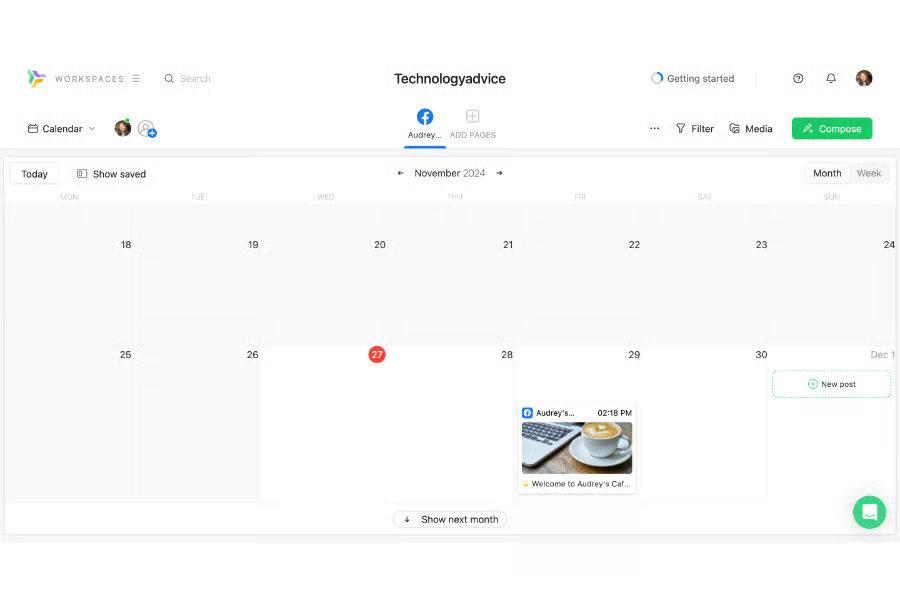
Planable’s content calendar is simple and efficient, but only supports 50 total posts. (Source: Planable) 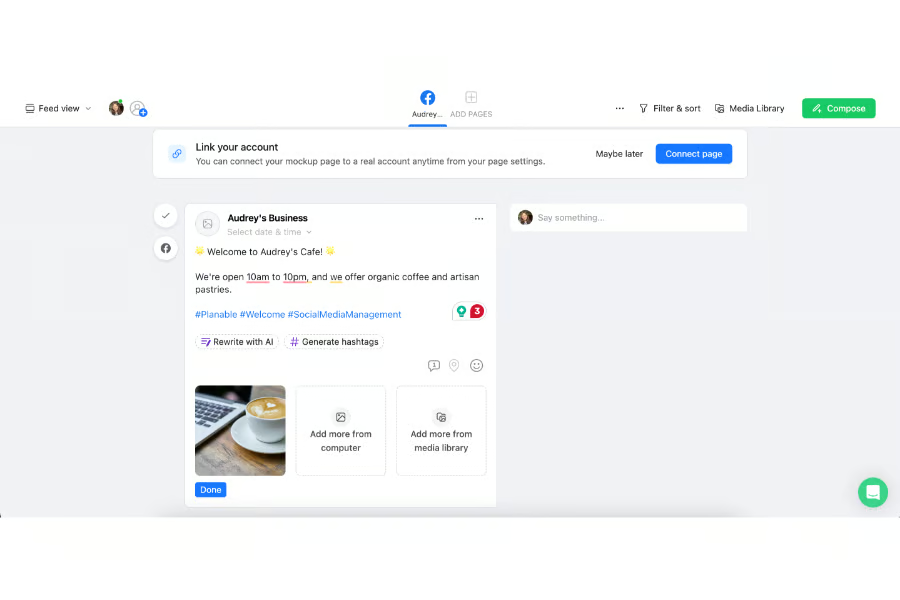
Its best feature by far is the live post mockup. (Source: Planable)


Key freemium features
- 50-post allowance: Create and schedule your first 50 posts without a time limit or credit card.
- Visual content calendar: Arrange campaign posts and review the publishing timeline in one place.
- Live post previews: Check how copy, images, and videos will appear before publishing.
- Multichannel publishing: Prepare content for nine major social platforms from one workspace.
- AI content tools: Generate captions, rewrite copy, and create hashtags for campaign posts.
Planable pricing
Free | Basic | Pro | Enterprise | |
| Monthly price, billed annually | $0 | $33/workspace | $49/workspace | Ciustom |
| Monthly price, billed monthly | $0 | $39/workspace | $59/workspace |
Why I chose CoSchedule
CoSchedule feels more like a marketing campaign management platform than a traditional social media scheduler. In my testing, it stood out most for businesses that regularly publish blog content because it combines social scheduling with content marketing tools, including blog post planning, keyword assistance, and campaign organization features.
What I found especially useful was its marketing campaign planner, which lets you organize long-term campaigns with task lists, deadlines, and scheduled social posts in one place. That setup can be particularly helpful for promoting events, product launches, or seasonal campaigns. I also like its first-comment scheduling feature, especially now that engagement in comment sections plays such a major role in social media visibility.
The biggest drawback is usability. Compared with simpler platforms like Buffer, CoSchedule has a steeper learning curve and a busier interface with more menus and navigation layers. Its social scheduling features also are not significantly stronger than other tools on this list. Still, for businesses that manage blogs alongside social media campaigns, CoSchedule offers more content planning and campaign organization features than most free social media schedulers I tested.
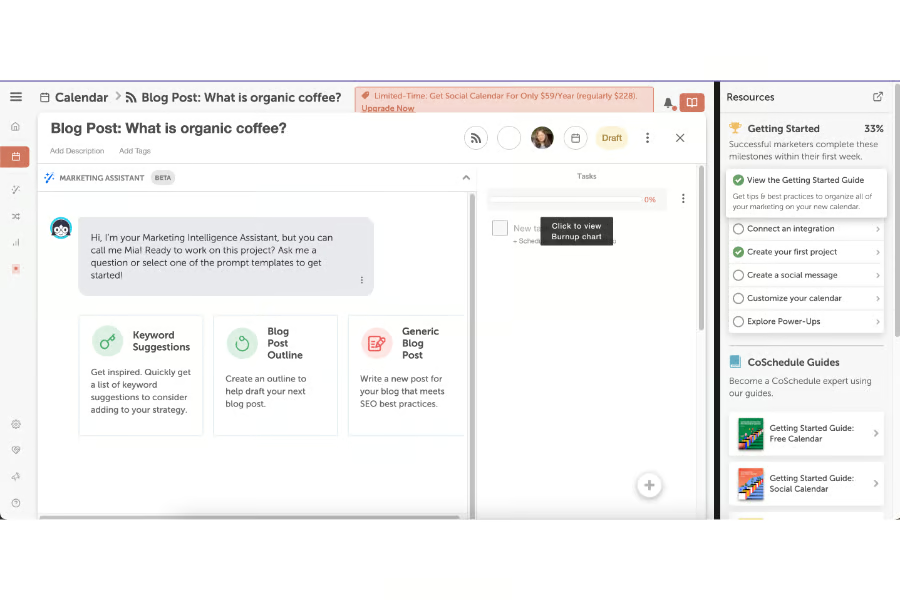
CoSchedule’s AI content assistant helps draft blog posts. (Source: CoSchedule) 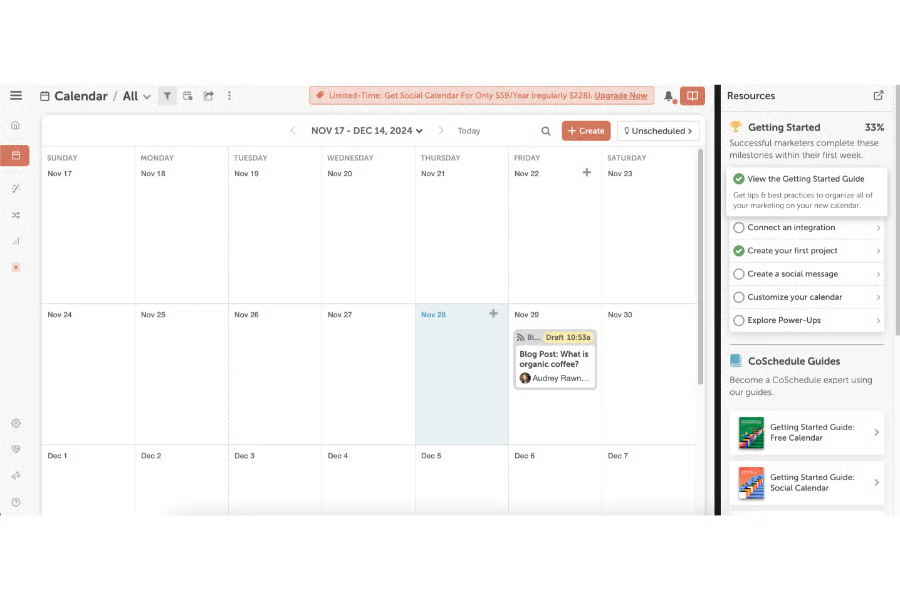
There’s also a marketing campaign calendar-slash-planner. (Source: CoSchedule)


Key freemium features
- Social campaigns: Group messages promoting the same blog, podcast, event, or resource.
- Reusable sharing templates: Create repeatable promotion schedules for newly published content.
- Drag-and-drop calendar: Move projects and automatically reschedule their related social messages.
- Best-time scheduling: Publish messages at recommended times for engagement.
- First-comment scheduling: Schedule a first comment with supported Facebook, Instagram, and LinkedIn posts.
CoSchedule pricing
Free Calendar | Social Calendar | Agency Calendar | |
| Monthly price, billed annually | $0 for 1 user | $19/user | $59/user |
| Monthly price, billed monthly | $0 for 1 user | $29/user | $69/user |
Why I chose Mailchimp
Mailchimp has long been one of my preferred email marketing platforms, and over the years, it has steadily expanded its social media tools as well. Like most Mailchimp products, the interface is straightforward and beginner-friendly, so creating and publishing social posts feels relatively easy even for first-time users. I also like its built-in integrations with Canva, Shutterstock, and Giphy, which make content creation more convenient without constantly switching between platforms.
The biggest limitation is that Mailchimp’s free plan does not include scheduled social posting. You can publish posts directly to Facebook, Instagram, and X, but scheduling posts in advance requires upgrading to a paid plan. It also does not offer a dedicated content calendar, so the planning experience feels more limited compared with platforms like Buffer or Planable.
As a standalone social media scheduler, Mailchimp is not as robust as other tools on this list. However, for small businesses already using Mailchimp for email campaigns, it offers a convenient way to manage both email and social media marketing from one platform without adding another tool to the workflow.
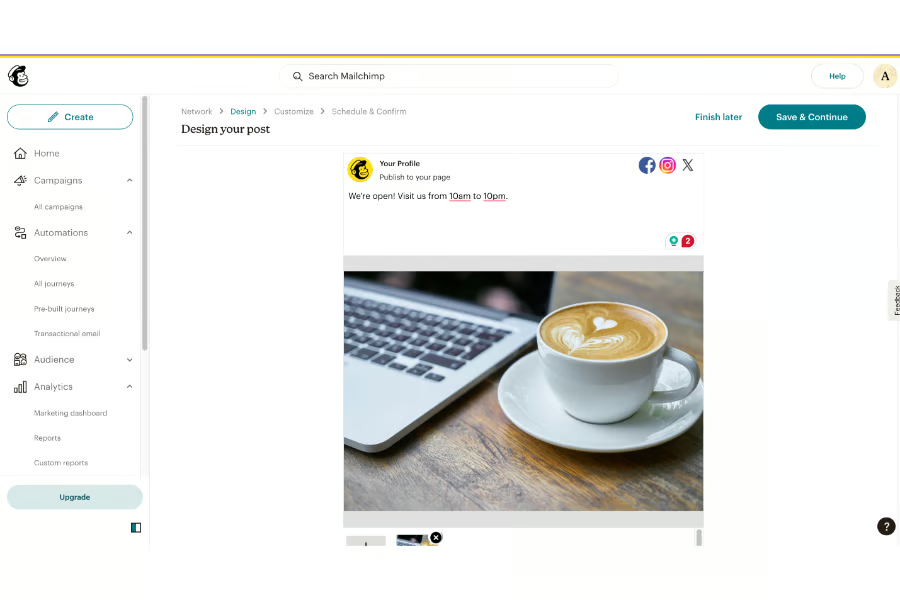
MailChimp’s social media tools let you post simultaneously to Facebook, Instagram, and X. (Source: MailChimp) 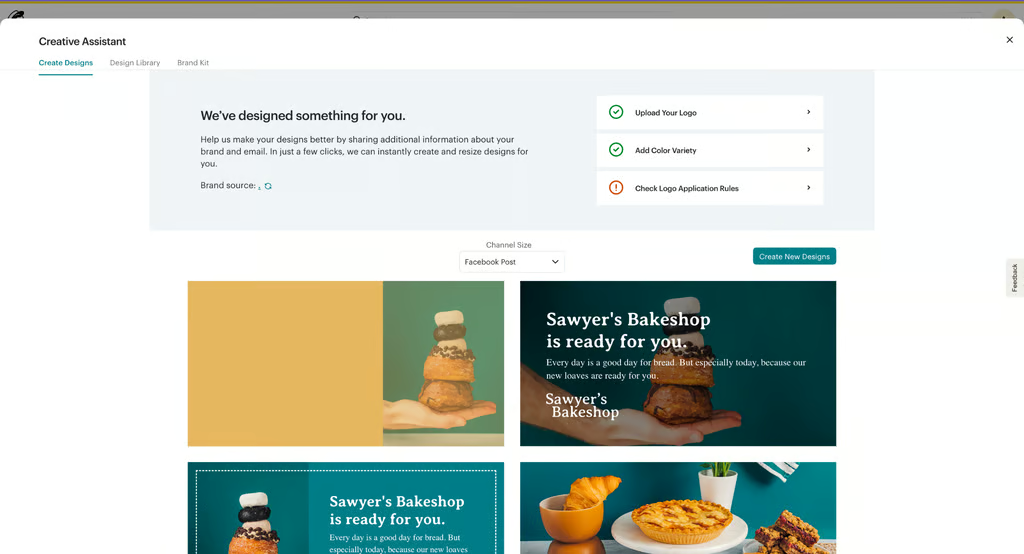
It also has an AI content generator, though imperfect. (Source: MailChimp)


Key freemium features
- Immediate publishing: Post directly to connected Facebook Pages and Instagram business profiles.
- Cross-platform posting: Publish to both supported social networks from one builder.
- Platform-specific customization: Adjust the copy, images, and profile for each network.
- Email-linked social posts: Share related social content alongside an email campaign.
- Social reporting: Review views, reach, likes, comments, and shares after publishing.
Mailchimp pricing*
Mailchimp Marketing plans | Free | Standard | Essentials | Premium |
| Monthly price for the first 12 months | $0 | $6.50 | $10 | $175 |
| Regular monthly price | $0 | $13 | $20 | $350 |
*Billed monthly.
A few honorable mentions that didn’t make the cut
I looked at a good many platforms, old and new, to compile the list above. A few that I looked at that, unfortunately, didn’t make the cut, for various reasons, are SocialOomph, Zoho Social, and Outfy. While these all allow social media scheduling, they fall short in other areas, like other social media tools or interface navigation.
- SocialOomph: A free tool that allows unlimited social media scheduling (even bulk post scheduling), but requires significant coding before you can connect your social media accounts and start posting. It’s also a very unintuitive, difficult-to-navigate platform overall.
- Outfy: A new platform that uses AI to generate video promotional posts for social media. Unfortunately, it’s exclusively for ecommerce brands and can only accommodate up to four scheduled posts at a time. It also doesn’t have any extra social media tools beyond creating and posting AI-generated content.
- Zoho Social: This would have otherwise been another great tool for Zoho’s suite, but its free plan is, ultimately, just too limited. It doesn’t allow scheduling posts in advance or access to the content calendar, and it only allows one account.
Methodology: How I evaluated the best free social media scheduling tools
I evaluated the best social media tools based on how well they help small businesses create, organize, and schedule content without paying. Since “free” can mean a renewable plan, limited allowance, or temporary trial, I verified what each provider actually includes before scoring it.
- Free-plan value (30%): I prioritized renewable free scheduling, then compared post limits, supported networks, connected accounts or brands, and included user seats.
- Publishing and content tools (25%): I assessed visual calendars, automatic publishing, multimedia support, AI content tools, network-specific customization, bulk or recurring scheduling, and mobile publishing.
- Analytics and engagement (15%): I reviewed free analytics, reporting history, best-time-to-post recommendations, social inboxes, comment management, competitor tracking, hashtag tools, and link-in-bio features.
- Ease of use and support (15%): I considered setup, navigation, calendar usability, mobile access, support channels, and the quality of each provider’s tutorials and help center.
- Expert score (15%): Drawing on my experience as a social media marketer, I evaluated each platform’s practical usefulness, feature quality, upgrade value, user reputation, and pricing transparency.
Where possible, I tested core workflows firsthand, including connecting social accounts, creating posts, navigating content calendars, scheduling content, and reviewing analytics. I also checked official pricing pages and documentation to distinguish genuinely free scheduling from paid features and limited trials.
6 things to consider when choosing a free social media scheduler
The tools above are my personal best picks, but the right one for your business will ultimately come down to your specific needs, comfort level, and social media resources. All the tools above have the basic ability to schedule and publish posts on social media.
Where they differ is in the smaller details, like their integrations or analytics, which is why it’s important to keep those in mind when choosing the best free social media scheduler.
- What other social media tools might you need? Some platforms also offer extra tools in their plans, like competitor analysis or inbox management. See if these features are helpful to your wider social media strategy. For example, if your focus is generating and nurturing leads, inbox management tools will likely be helpful.
- What are your long-term social media goals? Social media as a marketing strategy isn’t going away anytime soon, which means you’ll also need to think about your social media presence for the road ahead. Think about your goals a year or five years down the line so you can choose a platform that can also support those goals.
- Which social media platforms are you focusing on? You might have noticed that not all the social media schedulers above support all social media platforms. Keep in mind the platforms where you want to build your social media presence before finalizing your decision.
- How comfortable are you with social media marketing tools? Not all scheduling platforms are entirely beginner-friendly. Some will take a learning curve, or might have more advanced tools you may not even need. Evaluate your comfort level with different management platforms so you can choose one that works with you.
- What integrations do you need? What tools are currently in your marketing tech stack? You’ll ideally want a platform that can easily integrate with the tools you currently have. For instance, if you use Google Drive to store files, platforms like Buffer and Mailchimp already integrate with it.
- How do you track and measure results? Not all platforms offer social media post analytics. In fact, most only offer them on paid plans, and only offer the basics like engagement rates and impressions. Not all of them integrate with Google Looker Studio for creating reports. Consider how you plan to (or already) track your social media growth.
Frequently asked questions (FAQs)
Is there a free Instagram scheduler?
Yes. Meta Business Suite lets businesses schedule Instagram and Facebook content for free. You’ll need an Instagram professional account connected to a Facebook Page.
Buffer, Metricool, and CoSchedule also provide free Instagram scheduling, but they limit the number of posts, channels, or accounts you can manage.
What is the best free social media management tool?
Buffer is my top choice because it offers straightforward scheduling, broad platform support, and a beginner-friendly interface. Its free plan supports up to three channels and 10 queued posts per channel.
Metricool is better for analytics. Its free plan includes 50 scheduled posts per month, competitor tracking, and performance reporting, although LinkedIn and X require a paid plan.
Can I schedule posts across multiple platforms for free?
Yes. Buffer, Metricool, CoSchedule, and Planable support free multichannel publishing with different restrictions.
Buffer is best for ongoing scheduling, while Planable’s 50-post lifetime limit makes it more suitable for short campaigns. Meta Business Suite supports unlimited free publishing but only for Facebook and Instagram.
What should I look for in a free social media scheduler?
Focus on the features that affect your daily workflow:
- Supported social networks
- Connected account limits
- Monthly or lifetime scheduling limits
- Calendar and post-preview tools
- Analytics and engagement management
- AI-assisted content creation
- Paid-plan cost when you need to upgrade
A generous posting allowance offers little value if the scheduler does not support your primary channels.
How far in advance should I schedule social media posts?
Scheduling one to two weeks ahead works well for most small businesses. It provides time to review content while leaving room for timely announcements, promotions, and trending topics.
Review scheduled posts regularly to ensure they remain accurate and relevant.
Bottom line
The best free social media scheduler depends on the platforms you use, how often you publish, and whether you need analytics, content creation, or collaboration tools. Compare each plan’s limits on channels, connected accounts, and scheduled posts before deciding.
After testing each platform, I found Buffer to be the best overall for its straightforward multichannel scheduling and practical free plan. Metricool is the better option for analytics, while Meta Business Suite works best for businesses focused solely on Facebook and Instagram.
Related articles:
Social Media Marketing Tips That Actually Work
How to Create a Social Media Marketing Strategy for Small Businesses
14 Tips to Increase Social Media Engagement With Better Posts
