







CloudTalk is a call center solution equipped with unlimited call queueing and international numbers, ideal for teams that want to strengthen customer support for a global audience. While it’s an excellent tool, it lacks omnichannel support, robust auto-dialers, advanced artificial intelligence (AI) tools, and native workforce engagement features. Its pricing is affordable, but you’ll easily find a CloudTalk alternative with cheaper subscription plans.
We rounded up several voice-over-internet-protocol (VoIP) and Contact Center as a Service (CCaaS) platforms and compared them to CloudTalk to help you decide which alternative solutions to get for different business requirements. Based on our research, these are the top solutions:
- 8×8 Contact Center: Best overall alternative for its robust omnichannel support
- Freshdesk: Solid choice for budget-conscious teams
- Kixie: Top option for teams running telemarketing campaigns
- Aircall: Best for companies wanting to extend their contact center’s functionalities
- Talkdesk: Solid choice for those needing advanced AI capabilities
- RingCentral Contact Center: Top option for companies prioritizing improved agent productivity
- Dialpad: Ideal for businesses offering 24/7 customer support services
- CloudTalk & Best Alternatives at a Glance
- 8×8 Contact Center: Best for Robust Omnichannel Support
- 8x8 Contact Center
- Freshdesk: Best CloudTalk Alternative for Affordability
- Freshdesk Contact Center
- Kixie: Best for Telemarketing Campaigns
- Aircall: Best for Extending the Contact Center’s Functionality
- Talkdesk: Best for Advanced AI Features
- RingCentral Contact Center: Best for Improved Agent Productivity
- Dialpad: Best for Companies Offering 24/7 Customer Support
- Bottom Line
CloudTalk & Best Alternatives at a Glance
| CloudTalk & Best Alternatives | Monthly Starting Price (Per User) | Key Features | Free Trial | FSB Rating |
|---|---|---|---|---|
 | $25 |
| 14 days | 4.39 out of 5 |
| Visit CloudTalk | ||||
 | $85 |
| Not available (N/A) | 4.19 out of 5 |
| Visit 8x8 Contact Center | ||||
 | Free; $18 |
| 21 days | 4.06 out of 5 |
| Visit Freshdesk | ||||
 | $35 |
| 7 days | 4.05 out of 5 |
| Visit Kixie | ||||
 | $40 |
| 7 days | 3.98 out of 5 |
| Visit Aircall | ||||
 | $75 |
| N/A | 3.95 out of 5 |
| Visit Talkdesk | ||||
 | Customized quote |
| N/A | 3.78 out of 5 |
| Visit RingCentral Contact Center | ||||
 | Customized quote |
| N/A | 3.59 out of 5 |
| Visit Dialpad | ||||
8×8 Contact Center: Best for Robust Omnichannel Support
How It Compares to CloudTalk
- CloudTalk has a 99.99% uptime service level agreement (SLA), while 8×8 offers 99.999% uptime guarantee. CloudTalk’s SLA is also locked behind its highest-tier package, while 8×8 offers such in all its contact center packages.
- 8×8 has a queued callback feature, while CloudTalk doesn’t.
- Both providers have call whisper and barge features.
- Unlike CloudTalk, 8×8 has a video conferencing feature that accommodates up to 500 participants.
8×8 Contact Center is the best overall CloudTalk alternative thanks to its extensive omnichannel support capabilities. It has automatic call distribution (ACD) and IVR systems that make inbound call management more efficient. Its business phone system, one of our top picks for small business VoIP services, allows unlimited international calling to 48 countries. But aside from voice capabilities, 8×8 enables customer service via digital channels.
Connect your email, chat, short messaging service (SMS), social media, and messaging apps (namely WhatsApp, Viber, and WeChat) to the contact center and resolve customer concerns on their preferred channel. You won’t miss anything regardless of how stakeholders communicate since you have visibility in all channels.
The robust omnichannel contact center, however, comes with expensive subscription plans. Its entry-level package is $85 per user. If that’s beyond the budget of your small team, it’s best to choose Freshdesk, which offers a free version and a starter package at $18 per user, monthly.
8×8 Contact Center Monthly Pricing at a Glance
Business Communication Plans*:
- X2: $28 per user for unlimited voice calling to 14 countries, call queues, multi-level auto-attendant, and hotdesking
- X4: $57 per user for 8×8 Frontdesk, call monitoring, and supervisor analytics
*Pricing is based on monthly billing; save up to 23% with annual billing.
Contact Center Plans:
- X6: $85 per user for 8×8 Agent Workspace, skills-based routing, post-call survey, and 99.999% platform-wide uptime SLA
- X7: $110 per user for omnichannel routing and co-browsing
- X8: Customized quote for auto-dialer, quality management, and speech analytics
8×8 Contact Center Features
- Customer surveys: Collect feedback from customers immediately after talking to them. Given this information, it’s easy to recognize high-performing agents and identify training opportunities.
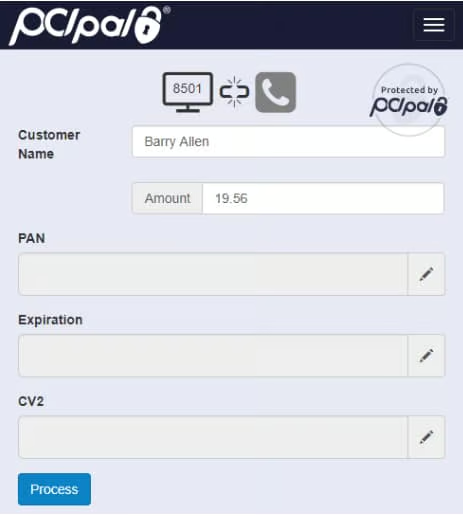
- 8×8 Secure Pay: This payment processing tool lets businesses automate payment collection in an IVR environment. Customers can rest assured that their financial information remains confidential, given the minimal involvement of human agents.
- Auto-dialer: Improve the efficiency of telemarketing campaigns by maximizing the preview, progressive, and predictive dialers. With less manual work on dialing, agents focus on improving how they communicate with customers.
Freshdesk: Best CloudTalk Alternative for Affordability
How It Compares to CloudTalk
- CloudTalk only allows unlimited concurrent calls in its third-tier subscription package, while Freshdesk has this feature in its free version.
- Unlike CloudTalk, Freshdesk supports BYOC.
- CloudTalk offers the business hours routing feature in its second-tier plan priced at $30 per user a month, while Freshdesk has it in its entry-level paid package, which costs $15.
- Both providers offer access to application programming interfaces (APIs).
Freshdesk earned the top spot in the list of the top call center phone systems. Among the best CloudTalk alternatives listed here, Freshdesk is the only one with a free version, making it the most suitable option for teams with a limited budget. The free version packs useful call management and agent productivity features, including unlimited concurrent calls, inbound caller ID, call notes, and customizable greetings and messages.
The provider’s entry-level paid plan is affordable. For $18 per user, per month, you’ll have access to voicemail drop, click-to-call extension, basic call queues, business hours routing, and external number routing.
However, one disadvantage of choosing Freshdesk is that you must choose the most expensive package, priced at $83 per user a month, to unlock omnichannel routing. With this rate, it’s better to choose 8×8, which offers more robust features than Freshdesk for a slightly higher fee of $85.
Freshdesk Monthly Pricing at a Glance*
- Free: $0 for unlimited concurrent calls, answer in the browser, call blocking, and customizable greetings and messages
- Growth: $18 per user for call forwarding, click-to-call extension, queue transfer, and 2,000 free incoming minutes
- Pro: $47 per user for BYOC, after-call work, power dialer, and 3,000 free incoming minutes
- Enterprise: $83 per user for call transcriptions, speech-enabled IVR, omnichannel routing, and 5,000 free incoming minutes
*Pricing is based on monthly billing. The entry-level plan’s rate is reduced from $18 to $15 when you choose the annual billing arrangement.
Freshdesk Features
- Holiday routing: Create a separate routing plan for customers who call during holidays. Even when your team isn’t in the office, your team members will get messages promptly and can address all customer calls.
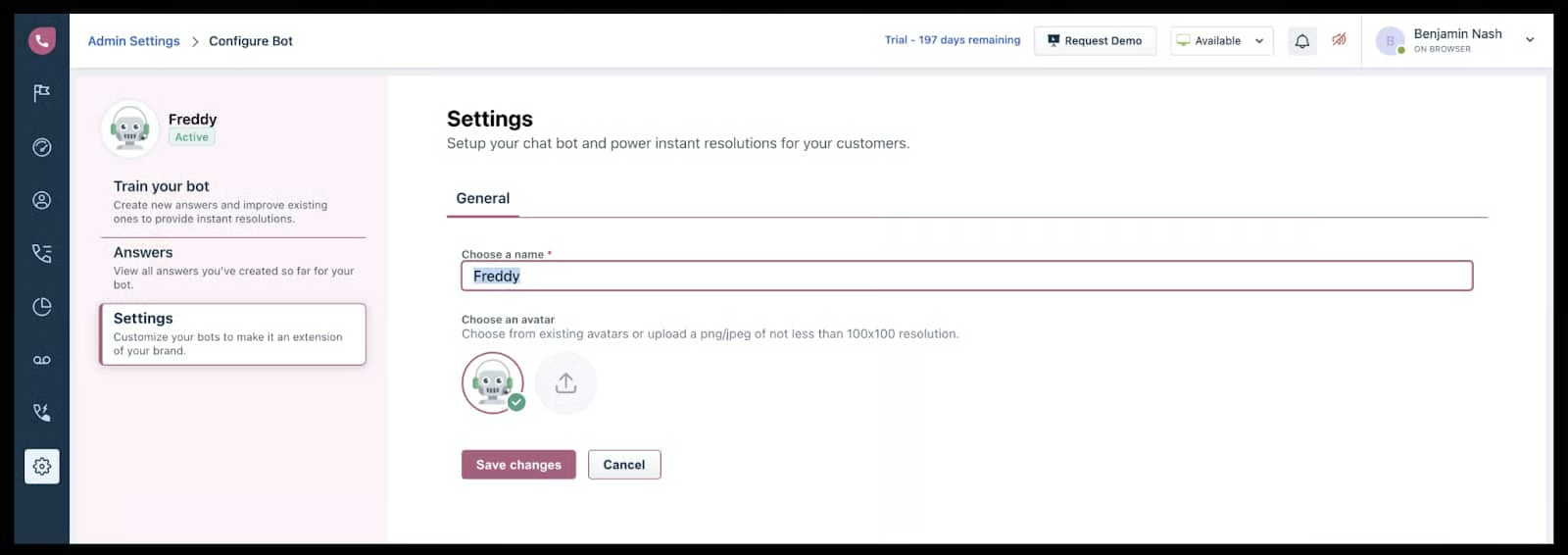
- Smart answer voicebot: Have your call center system answer frequently asked questions without the assistance of a live human agent. The voicebot offers round-the-clock customer service and has a voice of its own.
- Customer interaction history: Get a full view of the customer’s entire interaction history, from their first inquiry to the most recent. This helps in addressing concerns as it offers the full context of requests.
Kixie: Best for Telemarketing Campaigns
How It Compares to CloudTalk
- Unlike CloudTalk, Kixie features a sales leaderboard that makes it easy to see high-performing agents.
- Both providers offer access to developer API support.
- Unlike CloudTalk, Kixie automatically creates a new lead profile in the customer relationship management (CRM) system when agents dial customers that aren’t in the database yet.
- Kixie charges .07 cents per text message sent to United States (U.S.) and Canada numbers. On the other hand, CloudTalk doesn’t have published rates on SMS services.
If you run several telemarketing campaigns, Kixie is the ideal CloudTalk alternative because it features robust auto-dialers. Its power dialer dials up to 10 numbers simultaneously and ensures that agents are only connected to the contacts who pick up the calls.
The call center software features ConnectionBoost, combining three calling tools in one: local presence, progressive caller ID, and spam detection. Local presence gives you access to 50,000-plus phone numbers, while the caller ID switches your phone number each time you call, ensuring you don’t use the same number for outbound calls.
The spam detection feature automatically replaces your numbers when they’re flagged as “spam” after several calls. All of these increase the likelihood of customers answering their phones. However, these auto-dialer features are only available starting at the third-tier subscription plans, which costs $95 per user. Aircall offers its outbound dialer tool in its second-tier plan priced at $70 per user.
Kixie Monthly Pricing at a Glance
- Integrated: $35 per user for IVR, ring groups, sales leaderboard, and new lead creation
- Professional: $65 per user for the automated lead caller, ConnectionBoost, developer API access, and third-party integrations
- Outbound Power Dialer: $95 per user for single-line power dialer, multi-line power dialer, and automatic answer detection
- Enterprise: Customized quote for custom automations, auto-dialing, and text messages, API developer support, and free and unlimited solutions engineering
Kixie Features
- Parallel calls: If you need to contact someone while on an active call, Kixie allows you to put the existing call on hold and place that second call. Use this when you need to clarify or confirm information with a team member for a concern a customer raised.
- Missed call alerts: Incoming calls that go unanswered go straight to voicemails. To ensure that you don’t overlook resolving these missed calls, Kixie sends an alert via email.
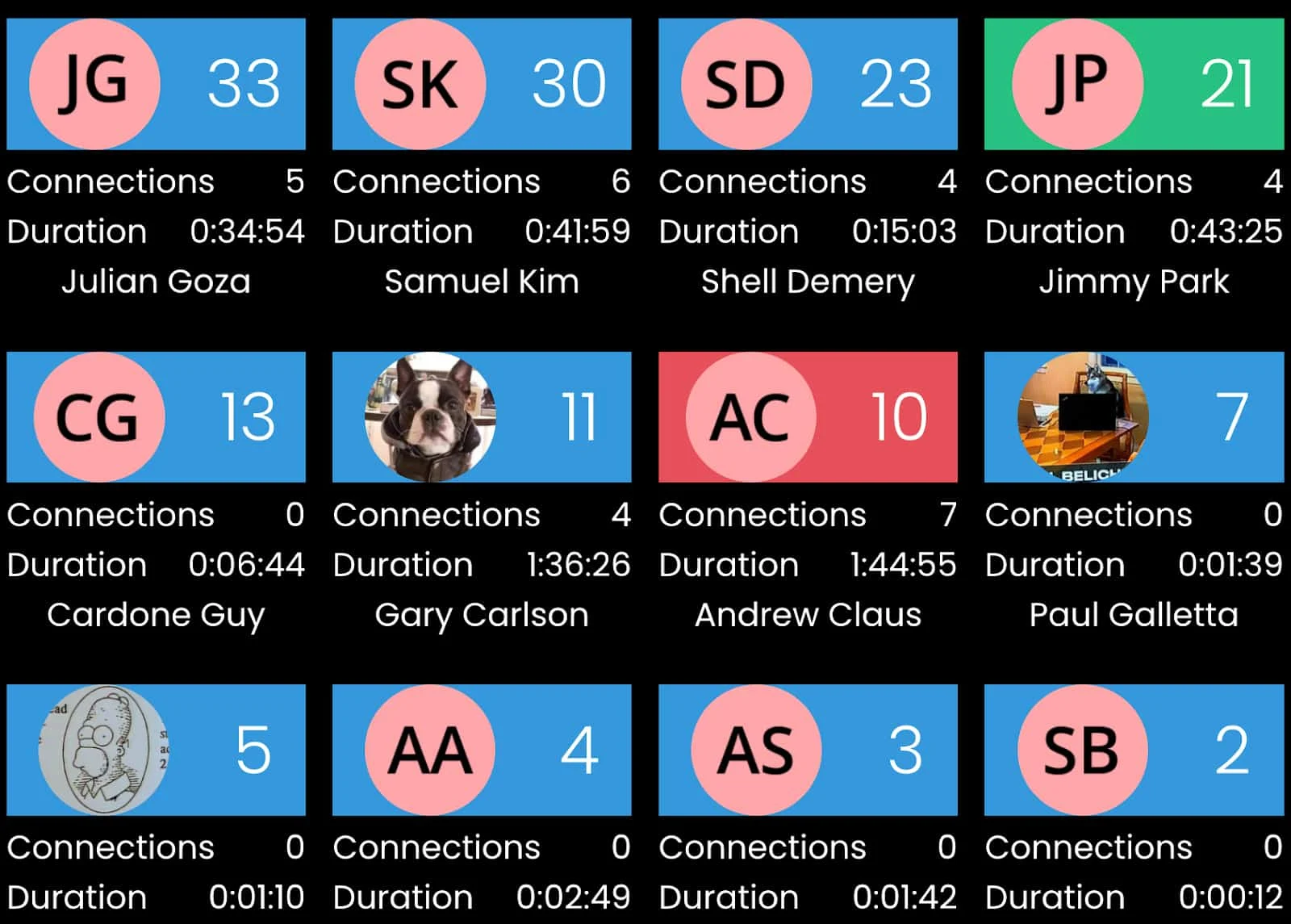
- Sales leaderboard: Promote healthy competition among agents by making their performance statistics visible in your call center system. The sales leaderboard shows the agent’s name and photo, call duration, total connections, and the total number of calls.
Aircall: Best for Extending the Contact Center’s Functionality
How It Compares to CloudTalk
- While both providers offer one free phone number in their subscription plans, CloudTalk is limited to local numbers. Aircall allows businesses to secure a toll-free number.
- Aircall lets users access up to one year of call recordings in the entry-level plan, while CloudTalk’s starter package only stores recordings for up to a month.
- Both providers have voicemail-to-email features.
- The minimum number of users on Aircall is three. On CloudTalk, the minimum is one.
Aircall is among the best CloudTalk competitors in the market, given its extensive set of third-party integrations. It allows users to further extend their call center system’s functionality, seamlessly working with over 100 business apps, including popular customer relationship management (CRM) systems like Pipedrive, Salesforce, Zendesk Sell, SugarCRM, and Zoho CRM.
While Kixie also integrates with several platforms, Aircall connects with more one-click integration solutions, like Zapier, Integrately, Make (formerly Integromat), and Tray.io. With Aircall’s robust integrations complementing your existing tech stack, it’s easier for your team to incorporate the call center software into existing workflows. It’s also a plus that the provider offers API developer support. Note, though, that this feature is only available in the highest-tier package.
While Aircall boasts extensive integrations, it doesn’t support international calling. If this is an essential feature for you, consider 8×8 instead. The provider allows unlimited calling within 48 countries.
Aircall Monthly Pricing at a Glance*
- Essentials: $40 per user for call queueing, ring groups, one-year access to call recordings, and basic analytics
- Professional: $70 per user for queue callback, unlimited access to call recordings, call whisper, and advanced analytics
- Custom: Customized quote for custom analytics, access to API developer support, and single sign-on
*Pricing is based on monthly billing; save up to 29% with annual billing.
Aircall Features
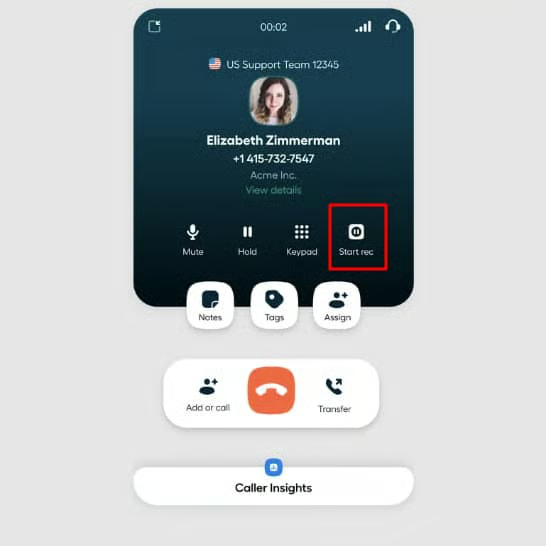
- Time-based routing: Enable team members to set their working hours to ensure that calls are distributed only to available agents. This ensures that no call goes unanswered.
- Pause-resume recording: When a customer needs to share confidential information, agents are able to pause the call recording. However, note that this feature is disabled after you transfer a call.
- Call queueing: Create a more positive waiting experience in the queue by playing custom hold music or business announcements for customers. Give callers the option to request a callback.
Talkdesk: Best for Advanced AI Features
How It Compares to CloudTalk
- Unlike CloudTalk, Talkdesk has a chatbot that addresses customers’ questions and concerns 24/7.
- CloudTalk offers a workforce management (WFM) tool via Playvox integration, while Talkdesk has a native WFM system.
- Unlike CloudTalk, Talkdesk features a business process automation designer, which helps boost the overall productivity of the contact center team.
- Both providers offer unlimited call recording.
If you want your contact center operations to be more efficient with the help of artificial intelligence (AI), Talkdesk is the best alternative to CloudTalk. The platform has plenty of AI features, including the AI Trainer, which allows human agents to improve AI models on their own, even without coding know-how.
Training AI improves the suggestions agents see on their dashboards during a conversation with a customer. To facilitate the training, team leaders revisit sentences and add improvements to them. Over time, the AI learns better the intent of speech and the meaning behind words. Other AI tools include the following:
- Virtual agent: A chatbot that engages with customers’ questions and concerns.
- Interaction analytics: Collects, transcribes, and evaluates all customer interactions, offering meaningful insights for performance improvement.
- Agent assist: Coaches agents about the next steps during live customer conversations
One downside of choosing Talkdesk, however, is that the mobile app isn’t available in the entry-level subscription plan. Its starter package is more expensive than other providers listed here. If you want to empower your remote team with a mobile app at no additional cost, choose Kixie, as it offers its mobile app in the base-level plan for only $35 per user, per month.
Talkdesk Monthly Pricing at a Glance
- CX Cloud Essentials: $75 per user for voice engagement, IVR, real-time and historical reporting, and AI-powered assistant
- CX Cloud Elevate: $95 per user for digital engagement, quality management, screen recording, and mobile app access
- CX Cloud Elite: $125 per user for custom reporting, compliance monitoring, and performance management
- Experience Clouds: Customized quote for industry-specific features
Talkdesk Features
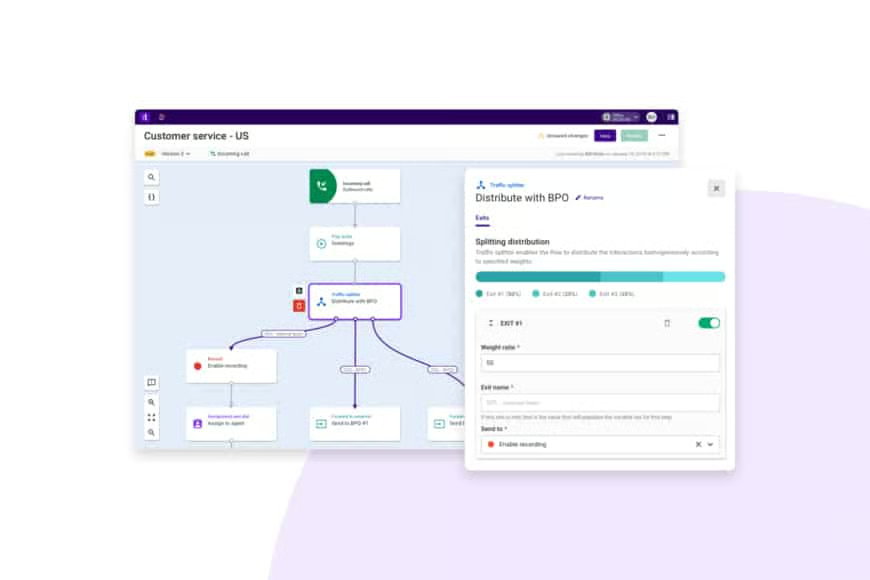
- Talkdesk Studio: Map out the customer journey by using the visual flow designer. The studio is equipped with a text-to-speech tool that announces to callers the menu options for reaching different departments within the company.
- Feedback: Launch an IVR survey after a call. Talkdesk presents survey data through a live feedback stream, helping you see an overview of the net promoter score (NPS), average customer satisfaction score (CSAT), and response rates.
- Screen recording: Know how your agents handle customer inquiries by capturing what happens on their screens. Play the recording, take notes, and coach for improvement.
RingCentral Contact Center: Best for Improved Agent Productivity
How It Compares to CloudTalk
- CloudTalk features a power dialer, while RingCentral offers predictive, progressive, and preview dialing modes.
- Unlike CloudTalk, RingCentral has a built-in workforce management solution.
- CloudTalk only allows call recordings, whereas RingCentral has a screen recording feature for agent performance evaluation.
- While both providers offer APIs, RingCentral is more transparent in its range of features, offering more than 300 APIs for third-party integrations.
RingCentral is a reliable provider of VoIP solutions, earning the top spot in our list of the best business phone systems. Its contact center platform makes for a great alternative to CloudTalk when you prefer a solution that has dedicated tools for improving agent productivity. RingCentral Contact Center’s workforce engagement management tools help improve team performance, enabling managers to evaluate contact center activities.
The performance management dashboards, for instance, display statistics pulled from customer accounts, CRM platforms, and other back-end business systems. By looking at these stats, you’ll understand better how contact center operations affect your bottom line. RingCentral Contact Center also features gamification where agents get badges, rewards, and challenges, inspiring motivation and better productivity.
Meanwhile, interaction analytics lets you search keywords in conversations and identify trends in customer concerns. This will inform and help improve your agent spiels, creating a better, more pleasant customer experience.
Unlike Kixie, though, RingCentral Contact Center’s auto-dialer features aren’t included in its plans. It’s available as an add-on, which means paying an additional fee to access this tool.
RingCentral Contact Center Pricing at a Glance*
- Essentials: Customized quote for ACD with skills-based routing, advanced IVR, click-to-call, and APIs
- Standard: Customized quote for advanced video recording and omnichannel routing
- Premium: Customized quote for quality management and screen recording
- Ultimate: Customized quote for workforce management and performance management
*All plans include integrated RingCentral MVP capabilities, including free domestic calling, global number procurement and management, and collaboration tools. Interaction analytics, feedback management, auto-dialers, and CRM integration adapters are available as add-ons.
RingCentral Contact Center Features
- SmartAssist by Amelia: This chatbot is equipped to handle various functions, including managing schedules, rescheduling deliveries, answering billing inquiries, and arranging payments.
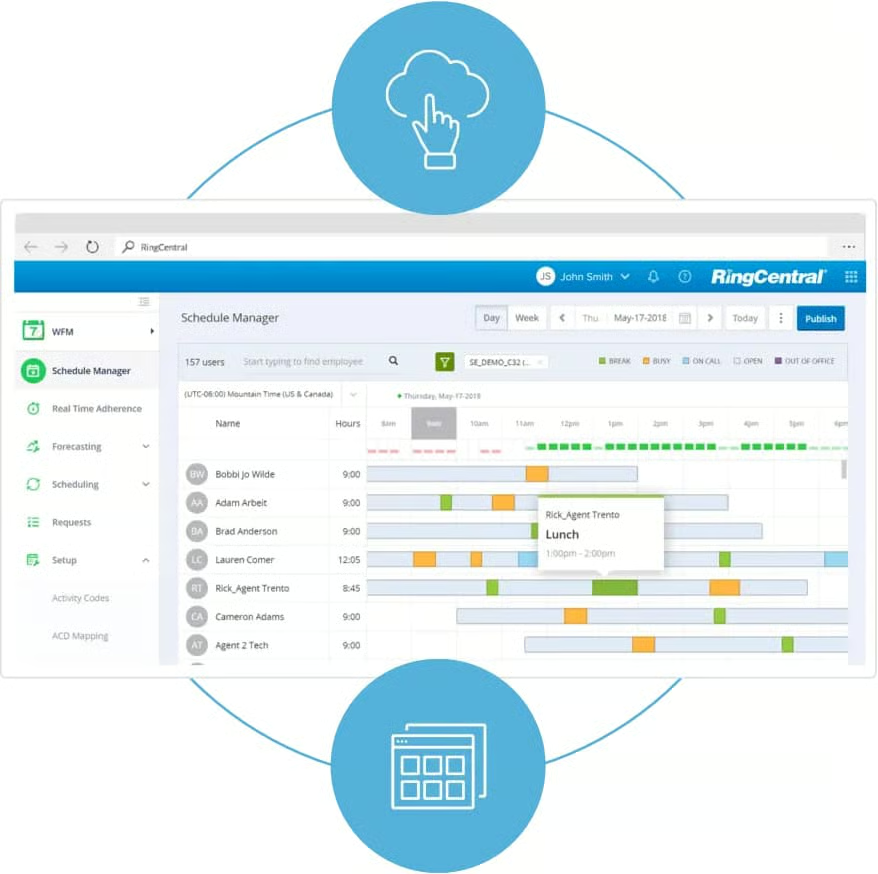
- Workforce management: Create fair and efficient schedules for your agents and enable them to perform better. This tool especially benefits organizations with members scattered across different locations, helping teams be aligned on work hours and days.
- Smart routing: Reduce customers’ waiting time by directing them to the most qualified agents for their concerns. Aside from skills-based routing, RingCentral Contact Center features data-driven routing, collecting information from the IVR or CRM system to know the best agent for each customer.
Dialpad: Best for Companies Offering 24/7 Customer Support
How It Compares to CloudTalk
- Both providers offer SLA in their most expensive subscription packages.
- CloudTalk is limited to voice capabilities, while Dialpad offers omnichannel support for businesses.
- Dialpad offers real-time agent recommendations and speech coaching, while CloudTalk doesn’t.
- Unlike CloudTalk, Dialpad’s contact center services comply with Health Insurance Portability and Accountability Act (HIPAA).
With its 100% uptime guarantee, Dialpad is the most suitable contact center platform for companies providing 24/7 customer support. The provider owns its media infrastructure and has a round-the-world network operations center (NOC), making uninterrupted services possible. When you choose this platform, you won’t have to worry about scheduled maintenance downtimes putting off customer service delivery.
Like Talkdesk, Dialpad has various AI features that help improve contact center operations. For one, it has customer sentiment tracking, where AI analyzes conversations in real time and lets managers know if customers have a pleasant or negative experience. Supervisors are then able to make swift decisions for improving customer service even before the call ends.
While Dialpad is extremely reliable and AI feature-rich, it only works with a limited number of third-party business tools. If you want a platform with robust integrations, Aircall is a better option.
Dialpad Pricing at a Glance
- Pro: Customized quote for a maximum of 25 hold queues, automatic callers in queue, advanced analytics and reporting, and third-party integrations
- Enterprise: Customized quote for unlimited hold queues, custom callers in queue, and custom analytics and reporting
Dialpad Features
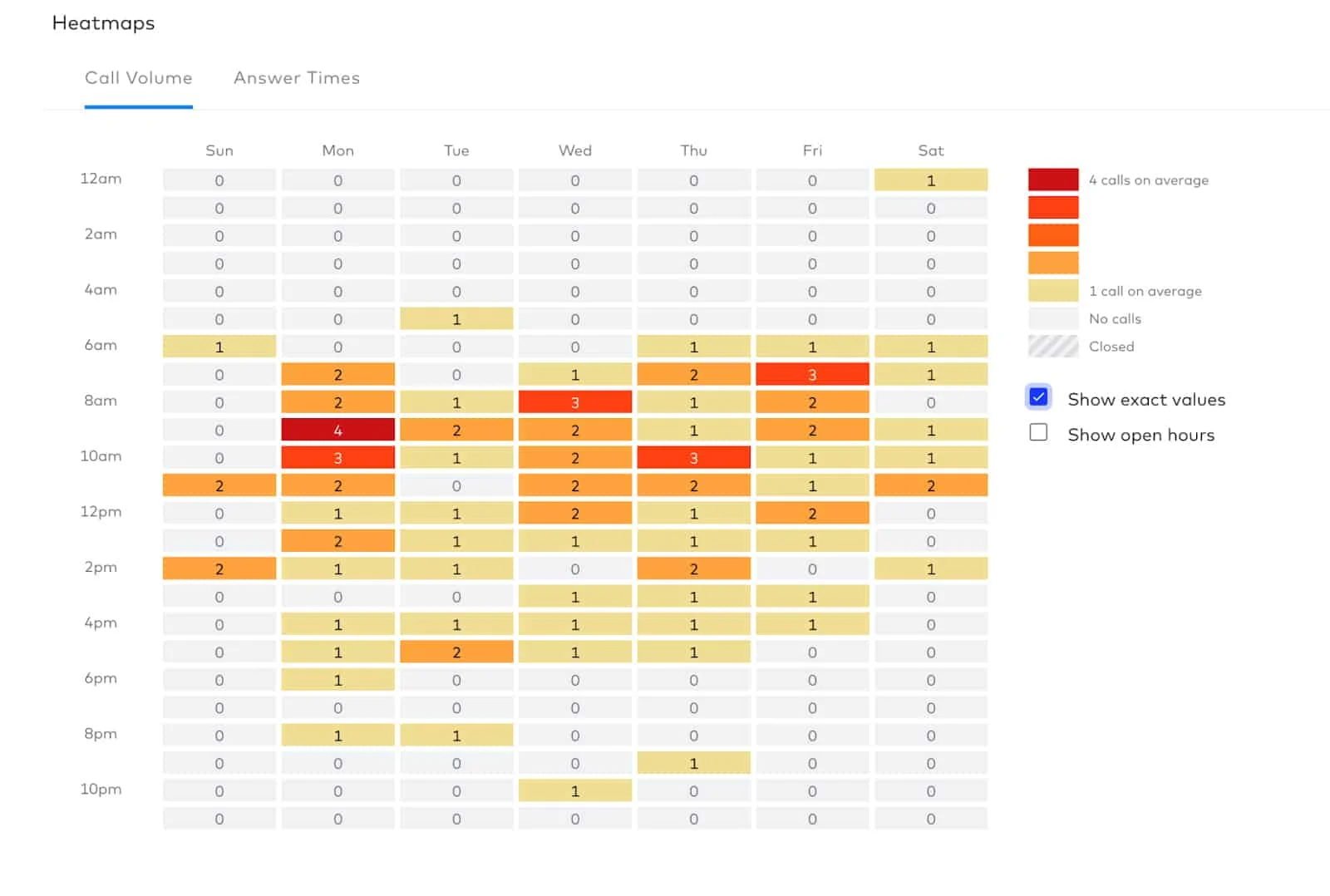
- Agent activity heatmaps: Learn about call volume patterns in your contact center to create a team schedule accommodating customer demands.
- Omnichannel engagement: See all customer interactions across all channels in one place. Add web chat, Facebook, Instagram, Twitter, WhatsApp, and SMS to your contact center, so customers don’t have to repeat inquiries and concerns when moving from one platform to another.
- Chatbot: Plug in your knowledge databases, such as website, CRM, and ticketing system, to the conversational AI tool to ensure that it handles customer queries accurately. With this, your live agents are able to focus on more complex concerns.
How We Evaluated the Best CloudTalk Alternatives
Bottom Line
CloudTalk is a great communications solution for businesses that want to improve inbound and outbound call management. However, those looking for more robust features, such as omnichannel engagement, AI tools, and auto-dialers, should explore alternative platforms.
Among the CloudTalk substitutes we reviewed, 8×8 Contact Center stands out for its excellent omnichannel support, allowing different digital channels to be plugged into the platform. On top of that, it features various outbound dialing modes and uses advanced AI in its analytics tools. Sign up for 8×8 Contact Center today.
