





.jpg?w=288)

The Shopify Starter plan offers a streamlined and budget-friendly way to start selling online without the need to launch a full ecommerce website. It’s easy to set up and allows you to sell unlimited products, manage inventory, and process payments. At just $5/month, it’s an affordable and surprisingly capable option for lightweight selling.
That said, its 5% transaction fee is steep, and the plan doesn’t include a standalone storefront or key marketing tools like discount codes or abandoned cart emails. Those limitations make it hard to scale beyond casual selling.
While it doesn’t have a separate rating on G2 or Capterra, user sentiment on Reddit is generally positive. Some users say it’s great for testing product ideas or running small pop-up shops. Others point out its limited growth potential and lack of flexibility for building a brand. Overall, it’s best suited for niche or low-volume sellers who prioritize simplicity and low cost. As mentioned, Shopify Starter costs $5 per month and comes with a three-day free trial and a $1/month offer for the first three months.
Shopify Starter plan overview
| Supported Business Types |
|
|---|---|
| Standout Features |
|
| Monthly Fees | $5 per month |
| Contract Length | Month to month No discounts for annual subscriptions |
| Free Trial | 3-day free trial, and $1 per month for three months |
| Customer Support | 24/7 live chat, email, and phone |
| Payment Processing Options | Shopify Payments and more than 100 payment processors |
| Payment Processing Fees | Online credit card rates: 5% + 30 cents In-person credit card fees: 5% |
Is Shopify Starter right for you?
Who the Shopify Starter plan is right for:
- Sellers who have previously built websites and sell sporadically and in limited quantities: If you already have a website and offer new products every now and then, Shopify Starter lets you link directly to checkout pages without the need for a full ecommerce store setup.
- Sellers who have their audience primarily on social platforms, such as creators or influencers: Bloggers, vloggers, and influencers can monetize their links in bio by directly linking to product pages under the Shopify Starter plan using Linkpop. Customers also check out directly from Linkpop.
- Aspiring businesses who want to test products and markets first: Those who want to have a feel of their market can test products by offering them on social platforms, through direct messaging with friends and colleagues, and in-person using Shopify Starter.
When to use an alternative:
- Businesses that need a full standalone store: Those that need an ecommerce platform complete with website pages are better off subscribing to any of Shopify’s higher-paid tiers. Alternatively, there are other free ecommerce website builders like Square Online and Big Cartel that let you have a website and store under a free plan.
- Businesses that want lower transaction costs: Again, upgrading to Shopify’s paid plans lowers transaction costs to the standard rate (2.9% + 30 cents per transaction) if you are using Shopify Payments.
Shopify Starter plan alternatives
| Best For | Monthly Fee From | |
|---|---|---|
 (Basic, Grow & Advanced plans) | Small businesses with solid plans to scale | $39 |
| Visit Shopify | ||
 | Businesses with brick and mortar as their primary sales channel and needing basic online store functionality | Free; $29 |
| Visit Square Online | ||
 | Businesses that already have an existing website | Free; $19 |
| Visit Ecwid | ||
Our comparisons of Shopify Starter vs other software
Shopify Starter user reviews
| Users Like | Users Dislike |
|---|---|
| Easy setup — ideal for beginners and quick product launches | Limited features — no discount codes or abandoned cart recovery |
| Great for testing ideas without committing to a full store | No access to apps or storefront customization |
| Works well for social media and messaging-based selling | High transaction fees for what's offered |
In Reddit discussions, users generally see Shopify Starter as a niche tool for lightweight selling. One commenter called it “handy if you’re just trying to sell something quickly or test an idea,” especially if you’re using social media as your main sales channel. Several users emphasized that it’s great for “low-volume sales” or “pop-up shops” where a full storefront would be overkill.
However, many users also pointed out what’s missing. A common complaint is the inability to offer discount codes or use apps — features they consider essential for scaling. One person noted that once you try to grow, “you’ll hit a wall fast.” The 5% transaction fee also drew criticism, with one user saying it eats into margins quickly if you’re doing more than a handful of sales.
My expert take: I agree with most of what Reddit users are saying. Shopify Starter is genuinely helpful if you’re just starting out or testing the waters. But it’s not built for long-term growth. You’ll likely outgrow it quickly if you want to run promotions, collect emails, or customize your storefront. It’s a great starter tool — just know you’re paying for simplicity, not scalability.
Shopify Starter pricing
Shopify Starter costs $5 a month — no hidden fees and fixed. You get no discount if subscribing for a year ($60). It is a straightforward, no-fuss plan to get selling online right away. Similar to other Shopify plans, you can get a free three-day trial and extend it for three months for just $1/month.
Its transaction fees are the following:
- Online credit card rates: 5% + $0.30 USD
- In-person credit card fees: 5%
It is important to note that Shopify Starter’s transaction fee is at 5% — higher than fees in Shopify’s standalone site plans.
The transaction fees might be a dealbreaker for those that have a good-enough online sales volume, so upgrading to any of Shopify’s plans (Basic at $39/month, Shopify at $105/month, and Advanced at $299/month) is a better decision. You can calculate fees and pricing on our ultimate guide to Shopify pricing.
Shopify Starter features
I signed up for a free trial to explore and test the platform features for my Shopify Starter plan review. During my review, I found that one has access to the following features under the plan:
- Unlimited products for selling, which equates to unlimited product and checkout pages
- Shopify order management and integrated fulfillment networker
- A very basic set of website pages—homepage, contact page, 404 page–on top of product and shopping cart pages
- Ability to directly link product pages to Linkpop (a link-in-bio tool that helps you sell products with shoppable links)
- Ability to sell products via Shopify Inbox (chat)
- Full backend tools — product and inventory management, tax rates, and more (similar to other Shopify plans, except for marketing features)
- Ability to use Shopify’s full suite of order management tools: Shopify Shipping and Shopify Fulfillment network for all product storage (an incredible value)
- Reports and analytics
You cannot build a full standalone store under the Shopify Starter plan, but you can brand your pages. To do so, go to your Shopify dashboard > Settings > Brand. You can set up the following:
- Your logo and brand colors (primary and secondary)
- A cover image (a key image that shows off your brand in profile pages and apps)
- Your slogan or brand statement (up to 80 characters)
- A short description of your business often used in bios and listings (up to 150 characters)
- Social links (Facebook, Twitter, Pinterest, Instagram, TikTok, Tumblr, Snapchat, YouTube, Vimeo)
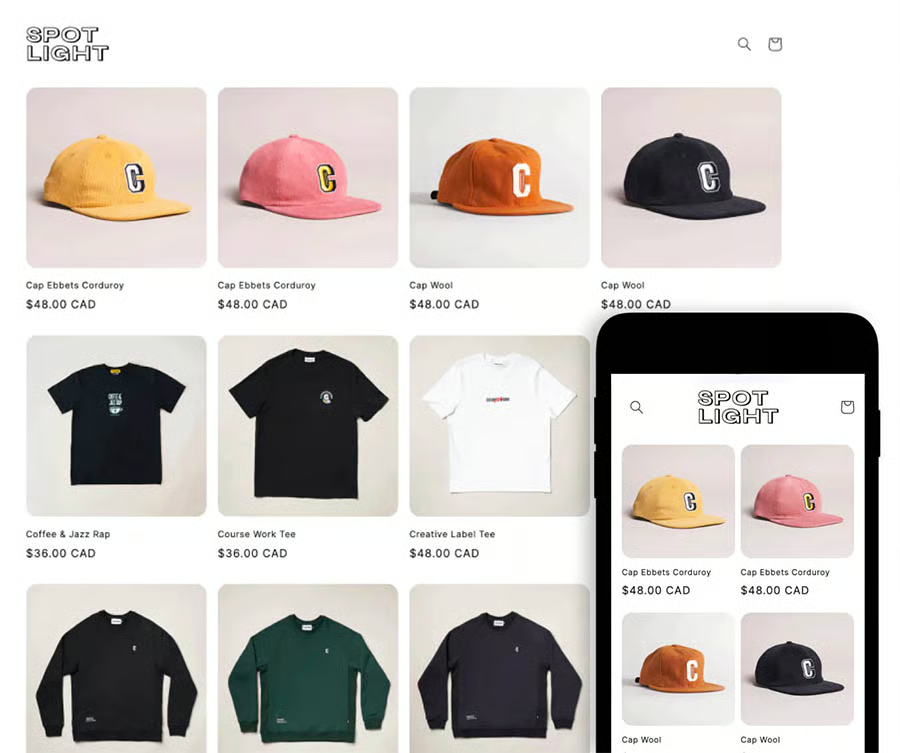
The only theme you can work with under the plan is the Spotlight theme. You won’t be able to do anything with the theme, save for setting up your branding options (which you already have under Brand settings).
Under the Shopify Starter plan, your store address will be under a Shopify subdomain (myshop.myshopify.com). Whenever someone visits the URL, they will see your online storefront like below. I liken it to Ecwid’s Instant Site, a single landing page that allows customers to view your products all at once.
Sell anywhere — in-person and online
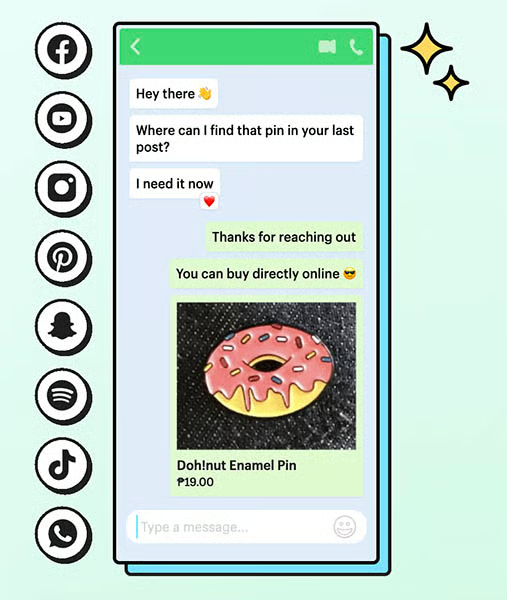
Shopify Starter lets you share product links that take people directly to checkout pages (as in the image below). Use these links to share on direct messages, such as WhatsApp, Instagram, Messenger, and everywhere else.
When someone clicks through your shared product link, they’re redirected to the product page where they can check out, add more products (by browsing your storefront), and make a payment for the item using Shopify Checkout.
You can also sell in-person, using Shopify’s basic point of sale, POS Lite. Just download the Shopify POS app on your smartphone or tablet to sell products in person. You can instantly accept payments using Tap to Pay on an iPhone or buy any of the available card readers from Shopify.
Related:
Monetized links through Linkpop
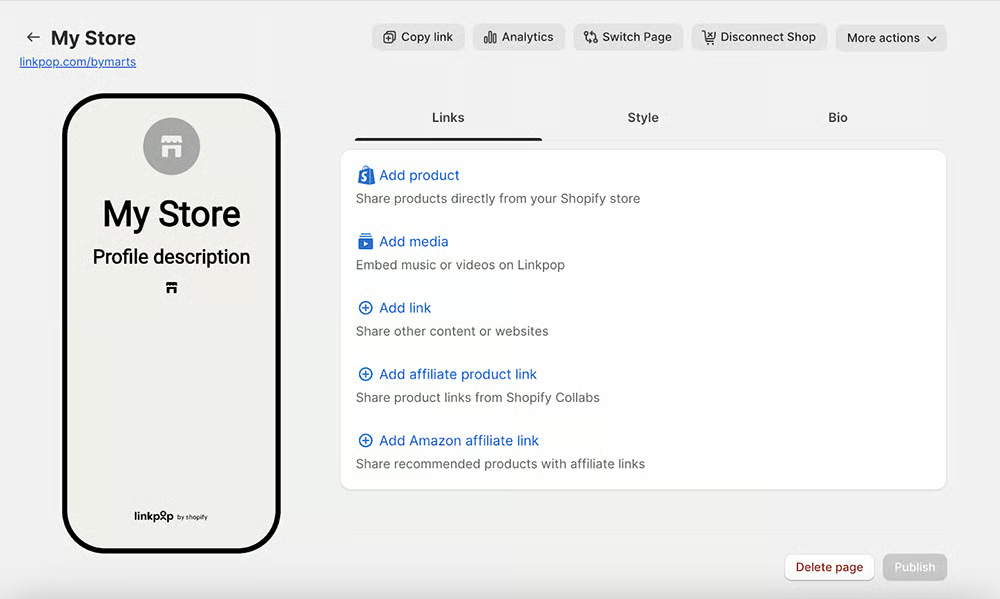
Social media bios are limited to just one link, which is extremely limiting for most users. Enter Linkpop, a free Shopify tool that lets you make a shoppable landing page accessible through social media apps. You can use Linkpop to link to your other social media profiles, share links to your sale items, new blog posts, or opt-in forms, and sell products using shoppable links.
Under Shopify Starter, you can add Linkpop as a sales channel from your Shopify dashboard and directly link your products to it. You set up Linkpop directly inside your Shopify dashboard, too.
When I tested the feature, I found it easy to add to my Shopify dashboard. Setting up my Linkpop bio was quick. I can also brand my Linkpop to my shop’s colors, customize my bio, and — as shown in the image below — add products from my Shopify store as well as add a lot of other links.
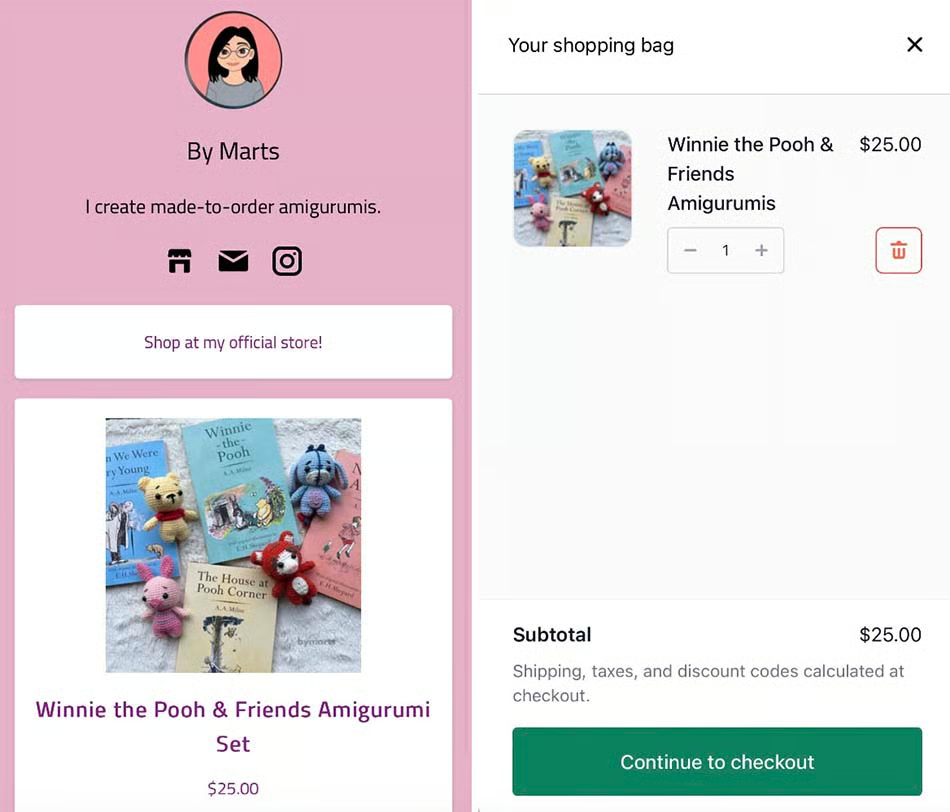
I set up my Linkpop to test checking out product links and found I can check out straight from Linkpop, which I found impressive as a shopper.
Order management
While Shopify Starter’s features are limited on the front end, Shopify still gives you full access to ecommerce tools on the back end, such as product management, inventory, and order fulfillment.
Your dashboard is the same as those under the higher Shopify plans, save for other marketing features. You can easily set up your products, track inventory, and fulfill orders.
What is really impressive is that even under this plan, you can use the Shopify Fulfillment Program. Just pay a monthly fee to have Shopify store, pick, pack, and ship products for you. Note that this is just one way of fulfillment — you can send the order to a warehouse, dropshipper, or print-on-demand location, or package and ship the product yourself.
Sales reports & analytics
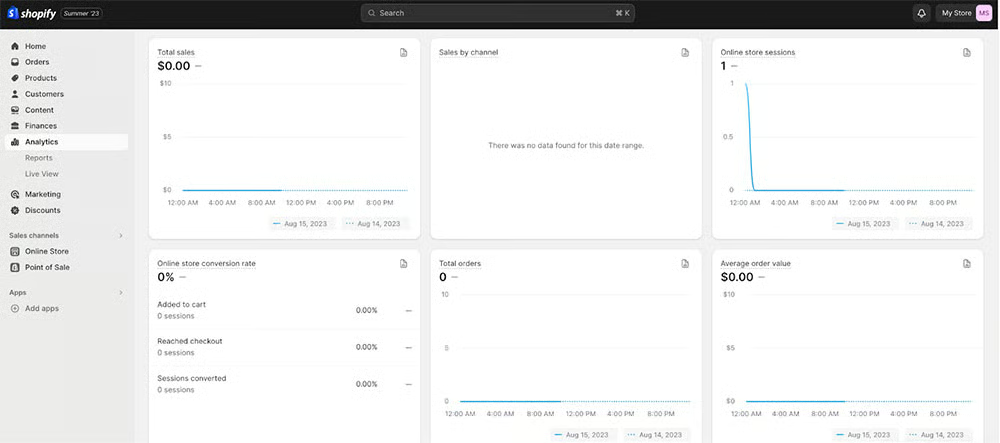
You can also track your business performance using reports. The Starter plan includes an analytics page, financial reports, product analytics, Live View, acquisition reports, inventory reports, behavior reports, and marketing reports. You don’t get as many advanced reports compared to Shopify’s higher plans, but these reports are enough to notice trends for you to strategize your marketing.
Note that your Linkpop also comes with analytics reports, including the number of clicks each of your links received.
Shopify Starter ease of use and customer support
Shopify Starter is one of the most user-friendly tools I’ve used for selling online. From signup to setup, everything is designed with beginners in mind. During my test run, I found it incredibly simple to navigate the dashboard, add products, and link them to Linkpop. The interface is clean and intuitive; you won’t need a technical background to figure things out.
While it doesn’t offer a full standalone website, you still get basic page templates like a homepage, contact page, and product pages. Customization is limited to brand settings —you can add your logo, choose brand colors, write a short description, and connect social profiles. The default Spotlight theme is the only one available, and it’s fixed in layout, but it does a decent job of presenting your products with a clean look.
Every backend feature — from product setup to tax settings and shipping —is accessible through a unified menu. Shopify OS 2.0 makes editing product details or checking orders feel seamless. Even though the Starter plan is the most basic option, you still get access to Shopify’s robust order and inventory management tools, plus basic analytics to track performance.
If you run into issues, Shopify offers excellent support. I like that the help center encourages self-service first with how-to guides, video tutorials, and community forum answers. But if you need real help, you can reach a support agent 24/7 via chat, email, or phone. In my experience — and echoed in countless user reviews — Shopify’s support team is responsive, professional, and knowledgeable.
Methodology
To evaluate the Shopify Starter Plan, I signed up for a free trial and tested all available features over several days. I explored its backend tools, product and checkout setup, integration with Linkpop, and in-person selling via POS Lite. I also reviewed Shopify’s help center and customer support responsiveness.
In addition to hands-on testing, I analyzed real user sentiment by reviewing Reddit threads where sellers shared their unfiltered experiences using the plan. I paid close attention to how users leveraged Shopify Starter for different business needs, such as creators selling through DMs or vendors running pop-up shops.
I supplemented my review with official Shopify documentation to verify pricing, support tools, and feature access. No vendor compensation influenced my analysis.
Frequently asked questions (FAQs)
Can I build a full website with the Shopify Starter Plan?
No. You don’t get a customizable storefront or access to Shopify’s theme editor. You’re limited to basic pages and a Shopify-hosted product page with your branding on a subdomain (e.g., yourshop.myshopify.com). If you need a full website, you’ll need to upgrade to the Basic plan or higher.
Can I sell digital products with Shopify Starter?
Yes, you can sell digital products—even on the Starter Plan. Just set up the item in your admin without shipping requirements (uncheck “This product requires shipping”). To deliver the files, you can use Shopify’s free Digital Downloads app, which sends download links to customers automatically after purchase.
Can I upgrade later without losing my store data?
Absolutely. You can upgrade to any of Shopify’s higher-tier plans at any time. Your products, customer information, and order history will stay intact. Upgrading also unlocks features like discount codes, custom domains, and marketing tools.
Bottom line
If you are serious about online selling, Shopify Starter isn’t the best option for you. I’d recommend going with Shopify’s Basic plan. At $39 a month, you get a full standalone store and built-in marketing tools that can help set up your online store for success.
I would recommend the Starter plan for influencers, content creators, bloggers, YouTubers, and those wanting to get their feet wet in online selling. For $5/month, you can sell products without much overhead costs and promote them anywhere — via DM, social media, and other websites. Once sales grow, consider upgrading to a Shopify Basic plan. It will be worth more than your initial investment.
Sign up for a three-day Shopify free trial, and extend your trial for three months for just $1/month today.
User review references:
https://www.reddit.com/r/shopify/comments/1esm6lz/does_the_shopify_starter_plan_work/
https://www.reddit.com/r/shopify/comments/y50rrw/what_exactly_does_shopifys_5_starter_plan_have_is/
