








Social customer relationship management (CRM) involves using strategies, workflows, and tools to oversee customer interactions on social media platforms. Using a CRM and social media solution, you can personalize your campaigns, track brand mentions, schedule posts, and generate valuable insights in one space. Learn more about what social CRM can do for your business and the top solutions worth exploring.
What Is Social CRM Software Used For?
Social CRM software functions similarly to a traditional CRM. However, it taps into modern social media platforms, like LinkedIn, Facebook, Instagram, X, and others, to provide their services where their customers are most comfortable.
Through its contact management capabilities, sales intelligence, marketing tools, etc., the software lets you target certain demographics or even specific customers without requiring them to sign up for your service or purchase a product from your store. It also makes it easy to keep previous customers engaged over time.
Top Benefits of Social CRM
With over 5 billion social media users across the globe in 2024, it makes sense that an organization would target social media—not only as a way to advertise their products but also to connect with current and potential customers in fun and exciting ways. And that’s where social customer relationship management (CRM) comes into play.
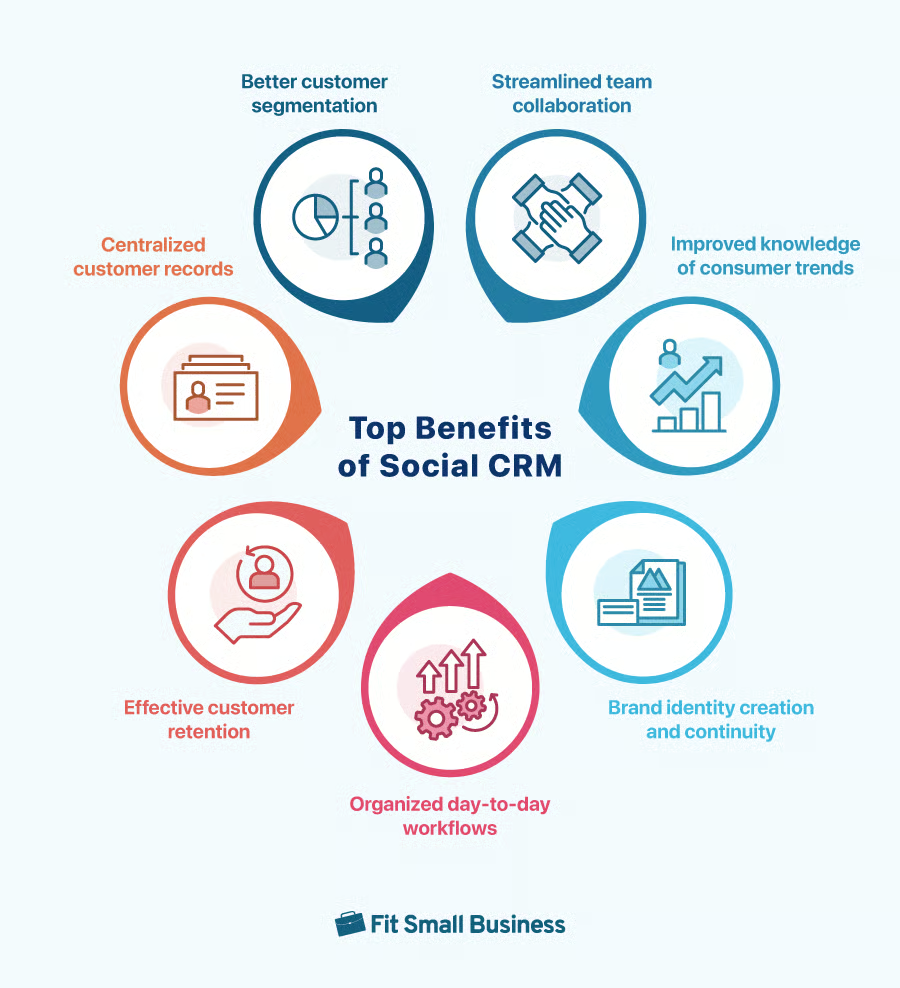
Your organization can benefit from a social media CRM in various ways. From categorizing customers and automating workflows to promoting your brand and creating a repository of customer data, there’s a lot you can do with a modern solution. Here are the key advantages of social CRM you shouldn’t miss:
- Facilitating customer segmentation: The process of categorizing current and potential customers according to their needs, behaviors, or preferences—customer segmentation makes it easy to run targeted ad campaigns to specific groups.
- Streamlining team collaboration: By embracing the social media platforms that your team already uses, social CRM makes it easy to communicate and collaborate with teammates in one system.
- Improving knowledge of consumer trends: Learning about the trends and patterns of modern consumers lets you know what products you should develop, when you should launch them, and how you should advertise them.
- Creating a brand identity and continuity: Social CRM benefits extend to brand recognition. Social media is a great tool to create and promote your brand identity, company culture, and mission statement, and most CRM platforms provide this kind of continuity.
- Strengthening day-to-day workflows: Some CRM solutions for social media provide marketing and sales cycle automation by analyzing customer trends and interactions, thus streamlining the entire process and bolstering profitability.
- Improving customer retention: Modern social media can be used to engage customers, provide service as needed, and build a reputation based on trust.
- Centralizing customer records: Storing all of your customer records within a centralized platform helps your sales representatives when it comes to nurturing and pursuing new leads, closing deals, and following up with new or prospective clients.
While CRMs for socials are geared more toward social media activities, there is quite a bit of crossover with traditional CRM solutions. However, specific social CRM features can set tools apart from the larger umbrella of CRM functions.
Differences Between Traditional & Social CRM Solutions
Traditional CRM software is focused on moving customers through the organization’s sales pipeline as efficiently as possible. In this sense, it’s more of a general tool for sales and marketing above all else.
A CRM for social media, on the other hand, is a customer-centric tool that focuses on cultivating strong customer relationships that should transition into profitable customer accounts. While the ultimate goal of both traditional and social CRM platforms is to close deals and increase sales across the board, it’s not necessarily the first priority when utilizing a CRM for social media.
Specifically, some of the most notable differences include:
- Core functionality: Most traditional CRMs make generous use of automation to streamline customer interaction during the sales process, while social CRMs rely on genuine sales rep-customer engagement.
- Customer communications: Traditional CRMs follow a strict set of standardized emails, telephone calls, and other communications. Social CRMs use the communication channels where their customers are the most active and accessible.
- Marketing and promotions: Marketing via a traditional CRM may rely on click-through rates (CTR) on paid advertisements, webpages, and email campaigns with a compelling call to action (CTA) to measure marketing success. Meanwhile, the effectiveness of marketing activities through social CRMs depends on engagement metrics, such as likes, comments, and number of shares.
- Staff responsibilities: While traditional CRMs revolve around analytical and process-driven activities, CRMs for social channels are driven by online content creation and development.
- Customer service and support: In most traditional settings, customer service is provided in a private exchange. With social CRMs, however, a lot of inquiries and resolutions are made in public.
In short, CRMs for social media tend to value quality over quantity. By nurturing leads, engaging customers on a one-on-one basis, and catering to their individual needs, most social media CRMs can result in sales numbers that are just as good—if not better—than their more traditional counterparts.
Examples of Social Media CRM Platforms
Finding the best CRM for social media outreach, lead generation, and client nurturing depends on your business needs. Many social CRM software can accommodate various sales strategies.
However, several social CRM examples will tell you that not all social media CRMs are created equal as others provide more robust, case-specific tools designed to power up your social sales strategies. Check out our top picks for CRM solutions for social media below.
 |  |  |  | |
|---|---|---|---|---|
| Best For | Tracking social media interactions | Lead generation from social media platforms | Implementing engagement and prospecting strategies | Social media campaign management |
| Key Features |
|
|
|
|
| Pricing* | Free plan: Up to 5 usersPaid plans: Ranging from $15 to $150 | Free plan: Up to 3 usersPaid plans: Ranging from $14 to $52 | Paid plans: $24.90 | Free plan: Up to 15 usersPaid plans: Ranging from $13.79 to $110.39 |
| Learn More | Our Expert HubSpot CRM Review | Our Expert Zoho CRM | No Review Yet | |
| Visit HubSpot CRM | Visit Zoho CRM | Visit Nimble | Visit EngageBay | |
| *Based on annual billing; monthly billing is available for slightly higher rates. | ||||
If you wish to expand your choices beyond the providers mentioned above, check out our guide on the best social CRM software. Take the quiz to further narrow down your options suitable for your social marketing processes.
Setting Up & Implementing a Social CRM in 5 Steps
The process of setting up and implementing a CRM for social media should be familiar to anyone who has already set up a traditional CRM. Although there are a few key differences, much of the process is identical.
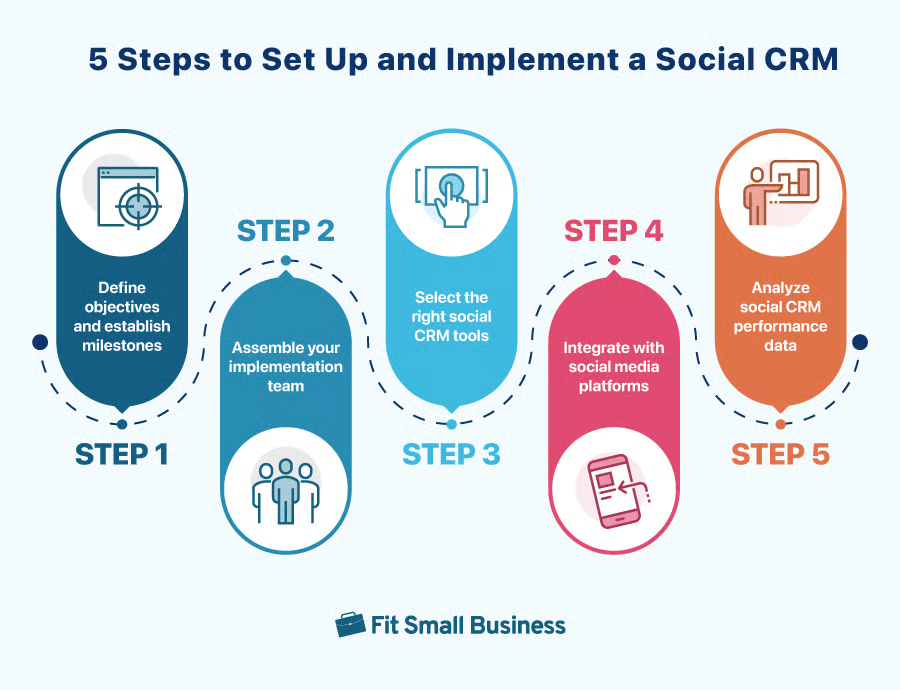
Step 1: Define Objectives & Establish Milestones
Start by defining objectives and establishing milestones for your CRM for social media. What do you hope to achieve with your CRM with social media integrations? When do you want to start using your new platform? Answering questions like these will give your entire team clear objectives, standards, and benchmarks for success.
Step 2: Assemble Your Implementation Team
Now that you have a goal in mind, it’s time to assemble your initial implementation team. This doesn’t necessarily have to be the sales, marketing, or customer support staff who will be using the platform. If you have a dedicated IT team at your disposal, they might be the best option for the initial implementation. Just make sure they’re available to train your end-user employees after the platform is all set up and ready to go.
Step 3: Select the Right Social CRM Tools
Make sure to select the tools needed to achieve the goals you have in mind. In some cases, this might require the implementation of additional tools, such as a social listening platform to monitor posts that contain your brand name, the names of your competition, or any other custom keywords you’ve set. Other times, this functionality might be included within your CRM. If you’re unsure as to what tools you’ll need, ask your implementation team.
Step 4: Integrate With Social Media Platforms
Once you’ve decided on a social media CRM and assembled your implementation team, it’s time to begin integrating your CRM and social media channels. The exact process varies from platform to platform, and the integration timeline depends on how many social media accounts your organization currently maintains.
Step 5: Analyze Social CRM Performance Data
Don’t forget to monitor and analyze your performance data over the course of time. Some CRMs for social media offer built-in data analytics, which might even include artificial intelligence (AI) or machine-learning capabilities. Other times, you’ll need to find a third-party analytics solution.
Frequently Asked Questions (FAQs)
While social CRM platforms aren’t much different from traditional CRM options, many professionals have some questions surrounding their cost, usability, and availability.
What social media sites should my organization use?
The exact social media sites you choose to integrate with depends on your organizational needs and your target demographics. While many entrepreneurs and business professionals prefer LinkedIn, many consumers are most active on Facebook. Sites like Instagram, X (formerly Twitter), and TikTok can also be used to launch innovative marketing campaigns and interact with customers.
How much does a social CRM cost?
CRMs for social media platforms tend to vary in price based on their features or the number of users who will be accessing the platform. The top social CRMs range in price from $14 per user, per month to $25 per user, per month, but make sure to check with the representative of your chosen platform for any potential discounts, like annual pricing, that may be available.
What is the best social CRM available today?
The best social customer relationship management software available today is the one that offers the perfect blend of social customer relationship management features without exceeding your budget. Certain platforms target specific needs or goals, such as HubSpot CRM monitoring social media activities and Nimble streamlining your outreach process.
Bottom Line
As modern social media platforms continue to evolve, so too will CRM systems. Today’s social CRM solutions are already equipped with tools that make it easy for sales reps to generate leads without spending too much time, jumping from one social media channel to another. With more technology being added to CRM solutions, like generative artificial intelligence (AI), it’s only a matter of time before CRM systems become the ultimate tool for social media sales strategies.
