







Wrike is a popular project management solution that offers teams a centralized platform for planning, tracking, and completing their work. While Wrike helps increase efficiency and productivity, its file storage offering is limited, and its free plan lacks advanced features. We have explored popular Wrike alternatives that provide scalable plans, comprehensive collaborative tools, and unlimited storage.
Based on our research, these are the leading Wrike alternatives and competitors:
- ClickUp: Best overall Wrike alternative
- monday.com: Best for custom and prebuilt templates
- Zoho Projects: Best for affordability
- Trello: Best for workflow automation
- Jira: Best for software development
- Asana: Best for team collaboration
Why You Can Trust Us
- Why Look for a Wrike Alternative
- Comparing Wrike to the Best Alternatives
- ClickUp: Best Overall Wrike Alternative
- monday.com: Best for Custom & Prebuilt Templates
- Zoho Projects: Best for Affordability
- Trello: Best for Workflow Automation
- Jira: Best for Software Development
- Asana: Best for Team Collaboration
- Frequently Asked Questions (FAQs)
- Bottom Line
Why Look for a Wrike Alternative
Wrike is an excellent project management tool for professionals and small teams looking for basic task management features. While many advanced features are accessible on higher-tier plans, the Free plan comes with email integration and notifications, custom Kanban and table views, smart search, and artificial intelligence (AI)-recommended tasks.
| PROS | CONS |
|---|---|
| Customizable project views, like Kanban and Gantt charts | Annually billed plans instead of monthly |
| Work Intelligence for automation, analytics, and editing | Capacity planning only available on the Pinnacle plan |
| Over 400 integrations with third-party applications | Less intuitive than other software |
| Resource management tools like workload charts and assignments | Limited file storage across plans, with additional fees to expand |
At the same time, many users critique the platform for its steep learning curve and lack of intuitive interface. Wrike falls behind its competitors in importing documents like Excel spreadsheets, updating software, and monthly pricing. Therefore, looking for a Wrike alternative is best when you need an affordable and easy-to-use project management platform with unlimited storage or monthly plans.
- Software Advice: 4.3 out of 5 based on 2,722 reviews
- G2: 4.2 out of 5 based on about 3,728 reviews
- TrustRadius: 8.3 out of 10 based on around 1,441 reviews
- Gartner: 4.5 out of 5 based on 379 reviews
Comparing Wrike to the Best Alternatives
| Wrike & Its Competitors | Monthly Starting Price | Key Features | Our Score out of 5 |
|---|---|---|---|
 | $10 |
| 4.06 |
| Visit Wrike | |||
 | $10 |
| 4.85 |
| Visit ClickUp | |||
 | $12 |
| 4.76 |
| Visit monday.com | |||
 | $5 |
| 4.68 |
| Visit Zoho Projects | |||
 | $5 |
| 4.43 |
| Visit Trello | |||
 | $8.60 |
| 4.34 |
| Visit Jira | |||
 | $13.49 |
| 4.24 |
| Visit Asana | |||
ClickUp: Best Overall Wrike Alternative
How It Compares to Wrike
- Wrike’s free plan doesn’t have automation or Gantt charts, which ClickUp offers
- Wrike’s free plan includes 2GB storage space, much higher than ClickUp’s 100MB inclusion
- Unlike ClickUp, Wrike offers enterprise-grade security on all plans
Our Expert Opinion
When comparing popular Wrike competitors, I found that ClickUp is the best, thanks to its affordable subscription plan and team collaboration tools. It allows team members to edit documents simultaneously in real time, minimizing tedious back-and-forth. Compared with Wrike, the platform offers workflow automation on the free plan, which lets you schedule recurring tasks and send status updates.
ClickUp provides image and PDF proofing features and in-app recording. It uses its private documents feature to help you find and manage your workspace documents. It also includes an automated intelligence (AI) add-on called ClickUp Brain, which offers summarized action items and writing support. Additionally, you can choose how you view your data using various project views, including Gantt charts and mind maps.
However, ClickUp’s free plan only provides 100MB of storage, while Wrike offers 2GB. While Wrike offers enterprise-grade security, ClickUp provides two-factor authentication across plans. If you need more storage and security features, monday.com’s free plan comes with two-factor authentication and 500MB of storage.
Pricing
- Free: Free for 100MB of storage, calendar view, unlimited tasks, real-time chat, and native time tracking
- Unlimited: $10 per user/month for unlimited storage, guests with permissions, email in ClickUp, and artificial intelligence (AI) compatibility
- Business: $19 per user/month for unlimited teams, advanced dashboard features, and workload management
- Enterprise: Custom pricing for white labeling, team sharing for spaces, and live onboarding training
Standout Features
- Mind maps: Use mind maps to plan and organize projects and ideas. See how things flow by drawing connections between tasks. Map out your workflow and share your mind map with team members.
- Automation: Save time and energy by streamlining your routine tasks. Choose from 100-plus prebuilt automations and customize them based on your operational needs. Examples of automation include assigning tasks, moving statuses, and posting comments.
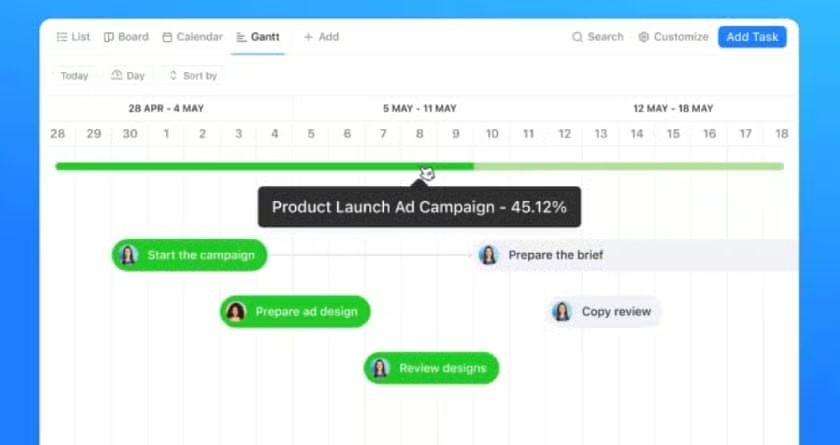
- Gantt charts: Track progress and deadlines in real time with Gantt chart views. This project view visualizes each step of your workflow and identifies key stakeholders.
User Reviews
- Software Advice: 4.6 out of 5 based on 4,326 reviews
- G2: 4.7 out of 5 based on 9,973 reviews
- TrustRadius: 8.5 out of 10 based on 1,278 reviews
- Gartner: 4.2 out of 5 based on 178 reviews
monday.com: Best for Custom & Prebuilt Templates
How It Compares to Wrike
- Wrike’s Free plan comes with unlimited users, while monday.com’s Free plan only has two seats
- 24/7 support is included on all monday.com paid plans, while Wrike requires a Premium support subscription
- Neither plan offers automation features in their free plans
Our Expert Opinion
monday.com is one of the best Wrike competitors because of its extensive library of over 200 templates tailored for various industries and more than 20 column types. Users can modify these prebuilt templates to meet their specific needs or explore monday.com’s template bundles, which consist of two to three connected boards with preset automations and views in the template center.
Additionally, users on the Standard plan and above can customize their favorite boards into templates, making monday an excellent platform for team collaboration. Despite its breadth of collaborative features, like a whiteboard and free viewers, some plans lack access to additional integrations. For example, the Free and Basic plans don’t come with third-party integrations, while premium integrations are only available through the Enterprise plan.
Although monday offers extensive help center resources and training, programming automations and new features can be daunting for some users. As an alternative, I recommend Asana for easy automation and access to third-party integrations. The platform integrates with thousands of applications, including Microsoft Teams, Google Drive, and Mailchimp.
Pricing*
- Free: Up to two seats, three boards, unlimited documents, messages, and updates with 200-plus templates.
- Basic: $12 per user/month for unlimited seats and free viewers, prioritized customer support, and 5GB of storage
- Standard: $14 per user/month for multiple view options, guest access, 250 monthly automation and integrations, and up to five combined boards
- Pro: $24 per user/month for 100GB file storage, private boards, time tracking, 25,0000 monthly automation and integrations, and up to 10 combined boards
- Enterprise: Custom pricing for multilevel permissions, enterprise-scale automation and integrations, advanced reporting and analytics, and up to 50 combined boards
*Pricing is based on monthly subscriptions; annual discounts are available.
Standout Features
- Free viewers: All paid plans have unlimited free viewers, allowing you to share and provide read-only access to data within your account. This allows for maximum visibility of documents while limiting edit and modification access.
- Time tracking: Add a time tracking column to any board and click on the time clock when you start, pause, or end the task. This feature lets you view how much time was spent on specific tasks.
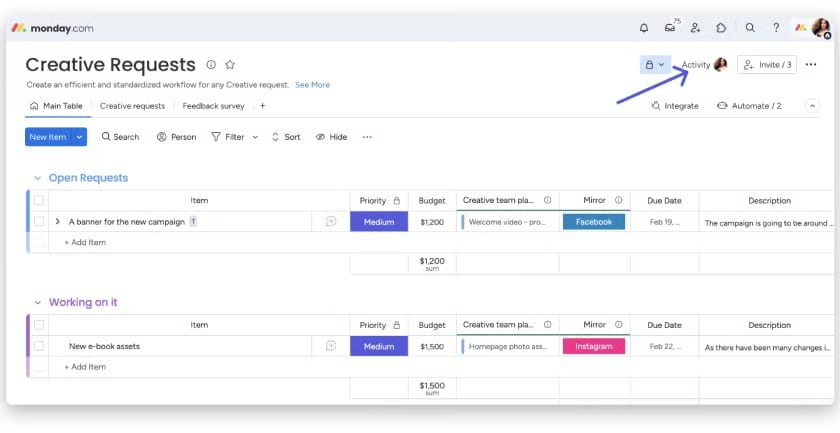
- Activity log: View all changes to a board and keep team members accountable for project updates with the user activity log. The information displayed changes depending on your plan, with insight into automations and permission changes.
User Reviews
- Software Advice: 4.6 out of 5 based on 5,260 reviews
- G2: 4.7 out of 5 based on 12,545 reviews
- TrustRadius: 8.5 out of 10 based on around 4,789 reviews
- Gartner: 4.5 out of 5 based on 266 reviews
Zoho Projects: Best for Affordability
How It Compares to Wrike
- Simple migration from Zoho Projects to Wrike
- Wrike’s free plan only offers 2GB of storage, while Zoho Project starts at 5GB
- Wrike is best suited for larger teams and businesses, while Zoho Projects is best for small to midsize businesses
Our Expert Opinion
Zoho Projects is our best Wrike alternative for affordable plans. It offers three plans, beginning with a free plan and scaling up to an enterprise plan for only $10 a month. The free plan provides essential project management features like Gantt charts, customizable templates, document sharing, and project feeds. Most of these features work well for small teams that are getting started with tracking tasks and establishing workflows.
The highest tier plan includes advanced features, such as AI and milestone tracking, specifically designed for teams that depend on automated workflows. The paid plans also offer in-depth issue tracking, which provides detailed reports on any problems you may encounter on a project, including system bugs. If you want to switch to Zoho Projects, the platform provides easy migration from most project management providers, like Jira, monday.com, and Wrike.
Although Zoho Projects offers many of the same features as other platforms, it only includes three plans, making it less scalable than other providers. If you want more plans and features, check out monday.com. It offers five plans, from free to enterprise, including three midtier plans that provide unique features and tools that pinpoint specific business needs.
Pricing
- Free: Up to five users, three projects, subtasks, whiteboard, and 5GB of storage space
- Premium: $5 per user/month with prebuilt project templates, time-tracking, blueprints, and unlimited projects
- Enterprise: $10 per user/month with two-factor authentication, Zia artificial intelligence features, and custom roles and statuses
Standout Features
- Blueprint editor: This drag-and-drop function streamlines team collaboration and automates repetitive tasks. It also makes designing custom workflows with task assignments and process management easier.
- Milestone tracking: Use project checkpoints to identify essential steps along your timeline. This ensures you meet your goals and deadlines for more efficient project completion.
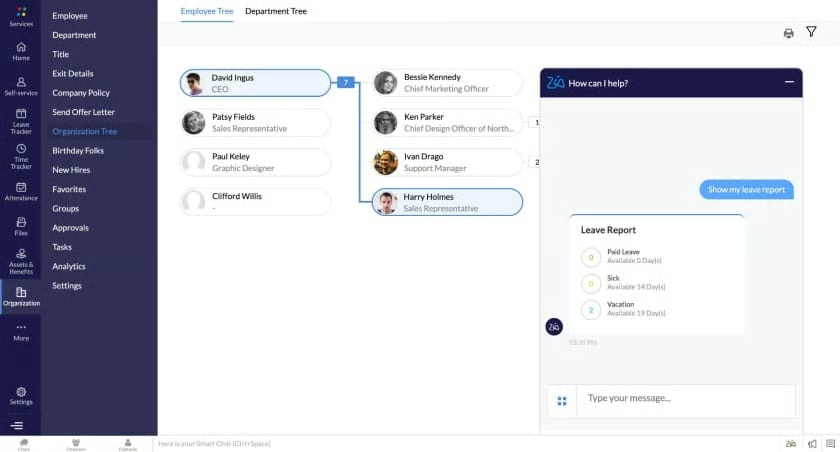
- Zoho Zia: The AI assistant can always answer questions and deliver industry-specific business insights. Use Zia to search your workspace for helpful information or recommend the next steps in a complex process.
User Reviews
- Software Advice: 4.5 out of 5 based on 710 reviews
- G2: 4.3 out of 5 based on about 453 reviews
- TrustRadius: 8.2 out of 10 based on around 121 reviews
- Gartner: 4.2 out of 5 based on 296 reviews
Trello: Best for Workflow Automation
How It Compares to Wrike
- Both providers offer unlimited users with Free plans and a free trial
- Trello lacks Gantt functionality, while Wrike provides this feature
- Neither Wrike nor Trello offer annual discounts
Our Expert Opinion
Among the best Wrike alternatives, Trello is our recommended platform for workflow automation because of its built-in automation features and breadth of integrations. Across plans, Trello offers unlimited boards and power-ups to design and view multiple workflows for more efficient collaboration and project management.
The first two plans offer valuable features for solopreneurs and small teams, while the highest-tier plans are designed for cross-functional collaboration and effective workspace management. For example, the Premium plan includes a workspace view that visually represents project timelines and calendars. It also provides templates to help replicate the formats your team uses the most.
Additionally, the Enterprise plan includes organization-wide project planning with high-level visibility and admin controls. However, it does not have robust analytics and reporting features. For more advanced business analytics and reporting, try ClickUp. It has granular time estimates, built-in time tracking, goals folders, and custom exporting.
Pricing
- Free: Free for up to 10 boards, unlimited power-ups, unlimited storage (10MB per file), custom background and stickers, unlimited activity log, and two-factor authentication
- Standard: $5 per user/month for unlimited boards, advanced checklists, unlimited storage (250MB per file), saved searches, custom fields, and unlimited boards
- Premium: $10 per user/month for multiple view options, collections, simple data export, and 1,000 workspace command runs
- Enterprise: $17.50 per user/month for unlimited workspaces, organization-wide permissions, multiboard guests, attachment permissions, and single sign-on features
Standout Features
- Advanced checklists: Break down complex tasks and projects into detailed steps and assign them to colleagues with due dates for each item. This puts everyone on the same page and clearly outlines who is doing what task and by when.
- Butler automation: Set up rules, automations, and commands on Trello boards to reduce repetitive work. Create automation using natural language and give your butler things to do. For example, calendar commands run in set intervals or due date commands based on upcoming or past due dates.
- Card covers: Customize and design your Trello boards using card covers and colors. Users can upload photos or use images from the Unsplash Gallery to set front cover displays on Trello cards.

User Reviews
- Software Advice: 4.5 out of 5 based on 23,279 reviews
- G2: 4.4 out of 5 based on 13,628 reviews
- TrustRadius: 8.1 out of 10 based on around 2,843 reviews
- Gartner: 4.3 out of 5 based on 229 reviews
Jira: Best for Software Development
How It Compares to Wrike
- Wrike offers unlimited users, which Jira does not
- Jira has reporting features across plans, while Wrike only offers reports on the highest-tier plans
- Wrike and Jira both offer Kanban board viewing for work visualization
- Jira has a more complicated interface and is not as intuitive for new users as Wrike
Our Expert Opinion
Of all the Wrike alternatives in our guide, Jira is your best option for any software development project. Jira was initially developed as a bug-tracking tool that helps manage backlogs and offers process visualizations. Therefore, it excels in troubleshooting by tracking everything as an issue broken down into tasks and stories.
Throughout the software development process, you can use Jira to create detailed reports that help you see where your project is moving forward and where you need to pivot. Create over 15 reports at each stage, from planning to issue tracking and resolution, including templates for scrum teams and Kanban flows.
Despite its range of reporting features, Jira doesn’t offer unlimited storage with all its plans. Its free and entry-level plans come with 2GB and 250GB of file storage, respectively. If you require unmetered file storage, check out Asana. All plans have unlimited storage but a 100 MB per-file limit.
Pricing
- Free: Free for up to 10 users, unlimited project boards, 100 automations, and reporting and insights
- Standard: Starts at $8.60 per user/month for up to 50,000 users, 250GB of storage, and external collaboration
- Premium: Starts at $17 per user/month for unlimited storage, Atlassian Intelligence (AI), project archiving, and 24/7 support for critical issues
- Enterprise: Custom pricing for unlimited automation rule runs, advanced security features, centralized user subscriptions, and 24/7 Enterprise support
Standout Features
- Data residency: With Jira, you can control where your in-scope product data is hosted. Specifically, software users can choose whether data is globally distributed or held within a predefined geographic location, such as the US or Europe.
- Sandbox: Use this workspace to test and experiment with products and apps before releasing them. This feature is beneficial for mobile applications or software developers.
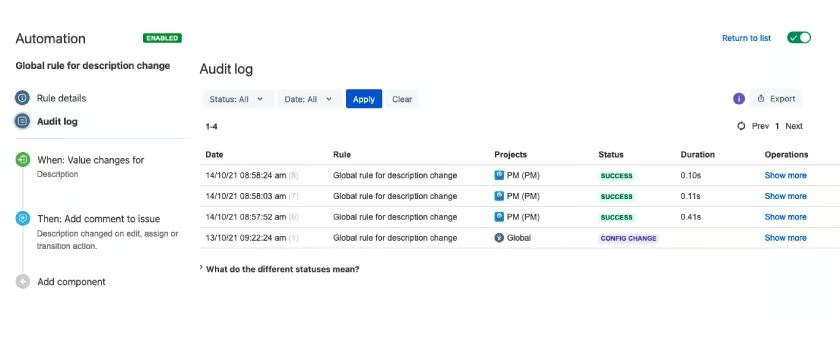
- Audit logs: This feature allows you to track and examine the history of changes made to your site. It is helpful when you need to record changes or refer to edit history to troubleshoot a concern.
User Reviews
- Software Advice: 4.4 out of 5 based on 14,854 reviews
- G2: 4.3 out of 5 based on 6,016 reviews
- TrustRadius: 8.2 out of 10 based on around 3,437 reviews
- Gartner: 4.4 out of 5 based on 2,251 reviews
Asana: Best for Team Collaboration
How It Compares to Wrike
- Asana offers multifactor authentication across plans, while Wrike only offers 2-factor authentication on the highest-tier plans
- Wrike is relatively easy to use, but its interface is not as intuitive as Asana
- Wrike’s free plan offers unlimited users, but only Asana’s Enterprise plans have unlimited users
- Each Wrike plan has storage limits, while Asana’s plans have unlimited storage
Our Expert Opinion
As a competitive alternative to Wrike, Asana is the preferred choice for team collaboration. It offers features such as progress tracking, workflow builders, and task dependencies. Multiple scheduling options, including timelines, Gantt charts, and calendars, allow you to easily assign and reassign priorities. Additionally, Asana provides access to over 100 integrations, including Slack and Microsoft 365, facilitating seamless communication across teams.
You can also use Asana’s automations to distribute work and track time to stay on top of activities and deadlines. The automation features are supported by Asana AI to create smart goals, projects, and charts that automate manual work and free up team members to complete more complex tasks.
Unfortunately, Asana only allows users to assign a task to one person. If you need to assign multiple users to activities and tasks, try monday.com. You can assign team members as tasks or item owners and add more using the People column. Guest access is also available for people outside your organization without giving them access to your entire system.
Pricing
- Free: Free for unmetered file storage (100MB per file) and unlimited tasks, projects, messages, and activity logs
- Premium: $13.49 per user/month for workflow builder, unlimited dashboards, advanced search, and unlimited free guests
- Business: $30.49 per user/month for portfolios, workload, custom rules builder, proofing, and forms branching and customization
- Enterprise: Custom pricing for user provisioning and deprovisioning, data export and deletion, custom branding, and priority support
- Enterprise +: Custom pricing for unlimited users, audit log API, data loss prevention, and HIPAA compliance
Standout Features
- Projects: Organize tasks related to specific projects using a blank sheet, template, or imported spreadsheet. To make it easier to identify your projects, use custom icons or upload a photo to replace the default icon.
- Manual triggers: Instead of waiting for automations to trigger a task, Asana allows you to initiate actions manually. This feature will enable you to move tasks across the project workflow for more efficient collaboration and deadline completion.
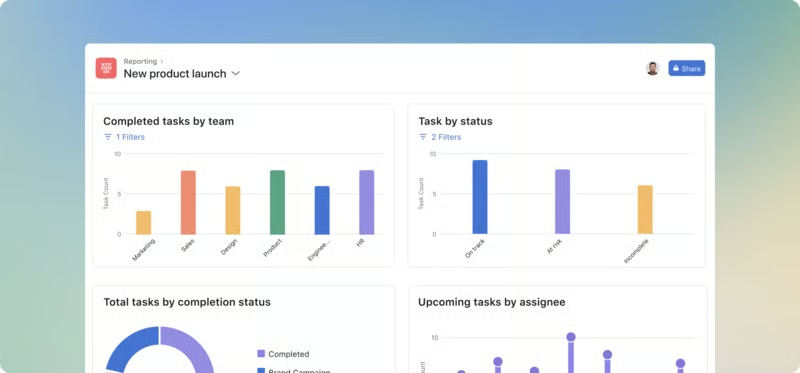
- Dashboards: Look at real-time charts that showcase key performance indicators for your projects. Collect data to manage goals and understand where there are barriers to progress and delays.
User Reviews
- Software Advice: 4.5 out of 5 based on 13,154 reviews
- G2: 4.4 out of 5 based on 10,591 reviews
- TrustRadius: 8.5 out of 10 based on around 2,638 reviews
- Gartner: 4.6 out of 5 based on 319 reviews
How We Evaluated the Best Wrike Alternatives
Frequently Asked Questions (FAQs)
What is Wrike similar to?
Wrike is similar to monday.com, ClickUp, and Trello, which specialize in project management for businesses of all sizes. Like Wrike, these tools are known for their task management, team collaboration, workflow automation, and artificial intelligence features.
What makes Wrike different?
Wrike differs from other project management platforms because of its robust features and resource management tools. Specifically, Wrike includes standard features like dynamic project views, time-tracking, and collaboration tools. It also provides advanced features like workload management, multilingual support teams, and advanced data encryption.
What is the difference between Asana and Wrike?
Wrike and Asana are both project management solutions, but based on our review, each provider has their strengths. Asana is better for small to medium teams looking for collaboration tools. Comparatively, Wrike is better for larger teams because of its low-cost plans for unlimited users.
Bottom Line
The best Wrike alternatives for small businesses offer unlimited storage, extensive third-party integrations, advanced analytics, and robust productivity tools. Moreover, these solutions offer cost-effective plans for professionals and small businesses. After assessing Wrike competitors, ClickUp is our top recommendation because of its extensive project management features and affordability. To learn more, sign up for ClickUp’s free plan today.
