








AccountEdge is locally installed accounting software that lets you create and send invoices to your customers, manage purchases and expenses, and track inventory. Starting at $20 per month, it offers strong value compared with other desktop options I’ve reviewed.
I appreciate its robust banking and inventory features, but it uses a more traditional approach with its flowchart-based navigation. Features are organized within command centers, which may not be that intuitive to those used to cloud-based solutions. However, with some patience and practice, it becomes easy to use and functional. See if it’s worth considering through my detailed AccountEdge review.
Why You Can Trust Fit Small Business
Deciding Factors
| Monthly Pricing |
|
|---|---|
| Annual Pricing | ✕ |
| Free Trial | 30 days; no credit card required |
| Standout Features |
|
| Ease of Use | Moderate—due to outdated user interface |
| Customer Support | Self-help guides, free email support, and live chat (additional $10 per month for phone support) |
| Average User Review Ratings |
Use Cases
- Businesses operating in areas with unreliable internet: As locally installed software, AccountEdge doesn’t require the internet to run. This allows you to work and continue on your accounting tasks uninterrupted, regardless of connectivity in your area.
- Companies working with experienced bookkeepers: Given its outdated interface and flowchart-based navigation, the platform can be advantageous for businesses with experienced in-house bookkeepers. They are likely familiar with desktop accounting processes and can effectively navigate and use the platform without needing extensive external support.
- Businesses managing multiple entities: You can add and manage as many company files as needed without any additional fees.
- Companies needing robust inventory management features: AccountEdge provides advanced inventory tracking features, such as the ability to manage inventory across multiple locations and build items and kits.
- AccountEdge Alternatives & Comparison
- AccountEdge Reviews from Users
- AccountEdge Pricing
- General Features
- Banking & Cash Management
- A/P Management
- A/R Management
- Project Accounting
- Sales & Income Tax Management
- Inventory Management
- Reporting
- Mobile App
- Integrations
- Usability
- Frequently Asked Questions (FAQs)
- Bottom Line
AccountEdge Alternatives & Comparison
| Monthly Pricing | Banking | Project Accounting | Inventory Management | Mobile App | Usability | |
|---|---|---|---|---|---|---|
 | From $20 | 4.9★ | 3.4★ | 3.9★ | ✕ | 2★ |
 | $38 to $275 | 5★ | 4.6★ | 3.9★ | 4★ | 4.5★ |
| Visit QuickBooks Online | ||||||
 | $0 to $249 | 4.9★ | 4.7★ | 5★ | 5★ | 2.7★ |
| Visit Zoho Books | ||||||
 | $23 to $70 or custom | 1.3★ | 4.3★ | ✕ | 3.5★ | 1.5★ |
| Visit FreshBooks | ||||||
| Rating Explanation: 5★: Excellent; 4★: Very good; 3★: Good; 2★: Fair; 1★: Poor; ✕: Unavailable | ||||||
| Best For | Learn More | |
|---|---|---|
| Businesses preferring cloud-based software:I recommend QuickBooks Online, our best cloud accounting software, so that you can access your data anywhere from an internet-enabled device. This is something you can’t do with AccountEdge, as it’s installed locally. | Read our QuickBooks Online review |
| Businesses needing a powerful mobile accounting app: If you often manage your business on the go and need a mobile app that can keep up with you, I strongly recommend Zoho Books. Unlike AccountEdge, it has a mobile app that allows you to invoice customers, track billable time, receive payments, and capture expense receipts on the go. | Read our Zoho Books review |
| Companies requiring robust project management features: If you need the ability to generate quotes and estimates and manage project profitability, you should consider FreshBooks. AccountEdge also has basic project features, but there’s no option to create and manage estimates. | Read our FreshBooks review |
AccountEdge Reviews from Users
4.18 / 5
| Users Like | Users Dislike |
|---|---|
| Great when you have accounting experience | Plenty of bugs |
| Customizable reports | Unresponsive customer support |
| Integrates with Shopify | |
Users haven’t left recent AccountEdge reviews as of this writing, but here’s a summary of older feedback, plus my expert insights:
- One user who left a positive AccountEdge review mentioned that it’s a good accounting platform if you have accounting experience. I couldn’t agree more, considering the solution’s complex nature. If you have basic accounting knowledge, you should be able to learn how to use it without much trouble.
- Another reviewer likes that it can generate customizable reports. I explored its reporting feature and agreed that reports can be customized by choosing what data to include. However, I didn’t see any customizations in terms of the look and layout of the reports.
- Someone who left negative feedback complained that there are plenty of bugs whenever a new update is released.
- Other users pointed out that it’s difficult to contact a customer support agent. I can’t vouch for this, but I believe that the quality of support varies depending on the approach of the agent assigned to you.
- Another reviewer appreciates that AccountEdge integrates with Shopify, allowing them to better manage and update their inventory; they can keep their stock levels accurate across both platforms without manual entry.
Here are the average AccountEdge review scores I gathered from top review sites:
Fit Small Business Case Study
The Fit Small Business accounting team formulated an internal case study to see how AccountEdge stacks up against its top three competitors, QuickBooks Online, Zoho Books, and FreshBooks. Below is the result of the case study.
Touch the graph above to interact Click on the graphs above to interact
- ACCOUNTEDGE PRO $20 PER MONTH
- QUICKBOOKS ONLINE PLUS $99 PER MONTH
- ZOHO BOOKS PRO $50 PER MONTH
- FRESHBOOKS PREMIUM $60 PER MONTH
Based on the chart, AccountEdge’s biggest strengths lie in value (pricing), banking, and reporting. However, it is generally weaker than Zoho Books and FreshBooks in terms of feature set, but it beats FreshBooks in inventory management. Its main drawback is its lack of mobile accounting, which was aced by Zoho Books. Additionally, AccountEdge didn’t do well in terms of overall usability, especially when compared with QuickBooks Online.
AccountEdge Pricing
4.60 / 5
AccountEdge is more affordable than most desktop software, making it a cost-effective solution for small and midsize businesses. However, users having to pay an additional fee to use bank feeds and access phone support cost AccountEdge points in my evaluation of the category.
The AccountEdge pricing table below sums up the available subscription options:
| AccountEdge Pro | AccountEdge Network Edition | AccountEdge Hosted | |
|---|---|---|---|
| Monthly Pricing | $20 | $30 | $50 |
| Number of Users | 1 | 2 | 1 |
| Deployment Type | Desktop | Desktop | Cloud |
| Customer Support | Live chat |
You can also purchase add-ons, including:
- Payroll
- Telephone support: $10 per month
- Workstation licenses
- Bank feeds
- AccountEdge Connect
- AccountEdge WebPay
- Credit Card Processing
- Customized business checks and forms: Custom-priced
General Features
4.00 / 5
AccountEdge falls short in some essential areas. For instance, it doesn’t allow me to import beginning balances into the system, which could be important if I transition from another accounting software. This limitation can cause additional setup time and possible inaccuracy during transition. Also, I can’t give my accountant direct access to my data unless I upgrade to the hosted version, which adds to the overall cost.
However, the program provides the necessary tools I need to set up my company files effectively. I can manually enter the initial balances of my accounts and import my chart of accounts directly into the software. During setup, I could customize various aspects of my company file, including setting up my business details—like company name, address, and contact information.
Banking & Cash Management
4.88 / 5
I would have awarded AccountEdge a perfect mark if bank feeds had been free and the bank reconciliation process had been more streamlined. When reconciling transactions, I can’t pause and resume my work without losing progress—something I can do with most modern cloud software like QuickBooks Online.
Additionally, the bank statement details are not shown alongside my accounting records and are instead accessed by clicking the Bank Statement button. This requires more manual toggling, as compared with other software like Xero, which displays a side-by-side view of your bank statement and accounting records for easier matching.
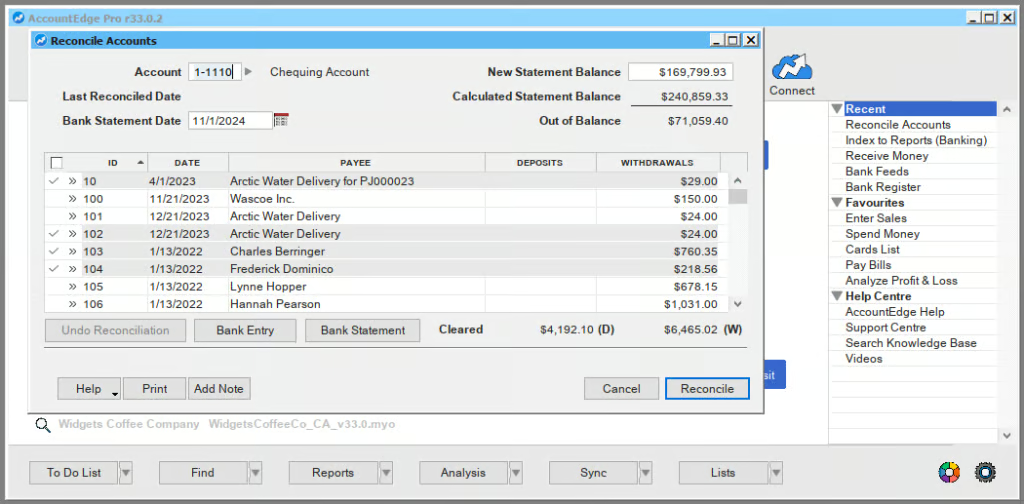
Despite AccountEdge’s weaknesses, the platform provides many useful tools to help manage bank transactions, including receiving payments, entering deposits, tracking petty cash expenses, and transferring money between accounts. You can import your transactions manually if you don’t want to connect your bank or credit card accounts.
A/P Management
3.38 / 5
The program has good A/P management features, but I encountered some issues. For example, it doesn’t allow me to capture expense receipts, which I can do in most cloud-based software like QuickBooks Online.
And while I can pay bills directly from the software, the Pay Bills screen only allows me to pay vendors by check or electronic payments. If I need to pay a bill using a credit card, I need to enter the bill payment through the Spend Money screen in the Banking module.
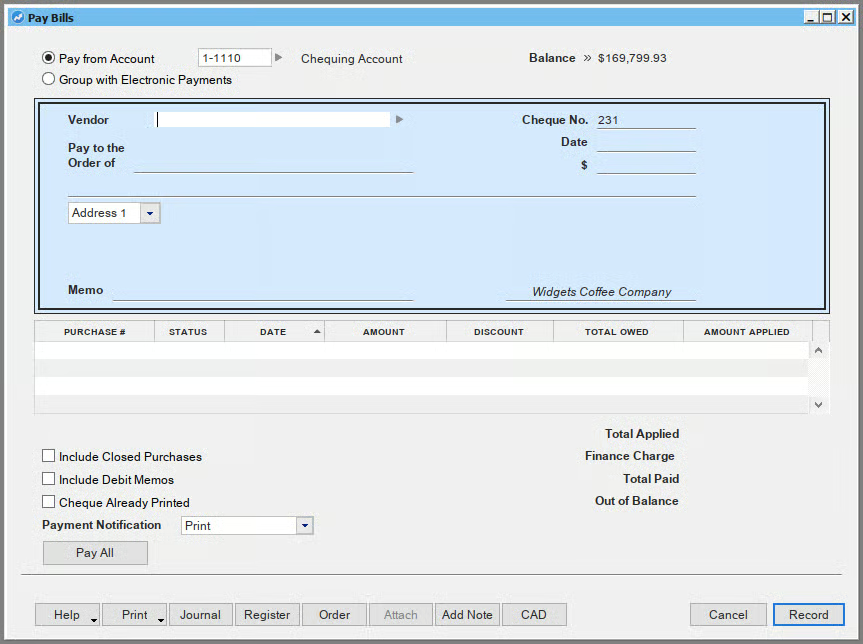
To help track outstanding bills, you can use the Purchases register, which shows a list of all A/P transactions, including quotes, orders, open bills, and closed bills. Click on the Open Bills tab to show the outstanding bills you owe to your vendor.
A/R Management
4.44 / 5
AccountEdge took a slight hit in my evaluation of A/R management because the invoicing process isn’t that streamlined and lacks some advanced A/R features, such as a vendor portal. I also don’t find the invoicing process smooth. For example, I have to use two different screens for creating and emailing or printing the invoice.
To create a new invoice, I need to use the Enter Sales window and then switch to the Print/Email invoices window to send or print the invoice. I prefer to use QuickBooks Online since the invoicing screen allows me to directly email the invoice to my customer or print it if needed. Also, I don’t see a preview button, so I don’t know how my invoices look when emailed to customers.
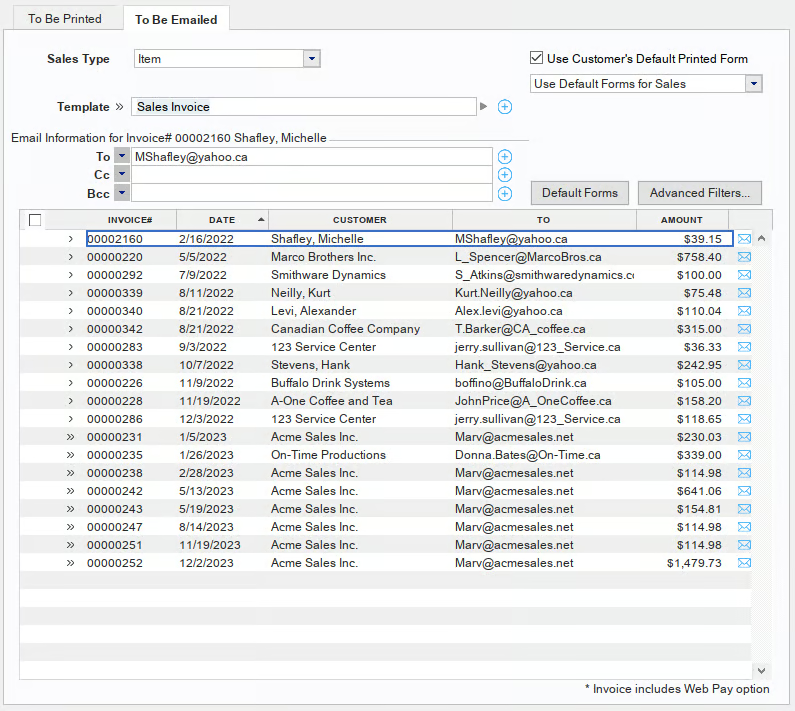
Additionally, invoices in AccountEdge aren’t that professional-looking. I was able to upload my company logo and choose from several default forms—but I couldn’t change the invoice color and personalize the customer message.
However, I still like many things about AccountEdge’s A/R features. For example, it allows me to easily track outstanding invoices and run aging reports to identify customers behind on payments. I can also use it to bill clients for advanced payments, track retainer balances, and apply retainers to future invoices.
Project Accounting
3.40 / 5
AccountEdge took a hit in my evaluation of project accounting features primarily because it doesn’t allow users to create estimates—which are an essential part of project management. Also, there’s no dedicated command center for project management. To create a job or project, you need to click on Jobs under Lists from the menu bar located at the top of the screen.
However, it offers some features that—while not part of my evaluation—are commendable and provide value to users. For instance, it allows me to set up project templates with cost and revenue budgets, log expenses and time entries against projects, generate profitability reports, and bill clients from project records.
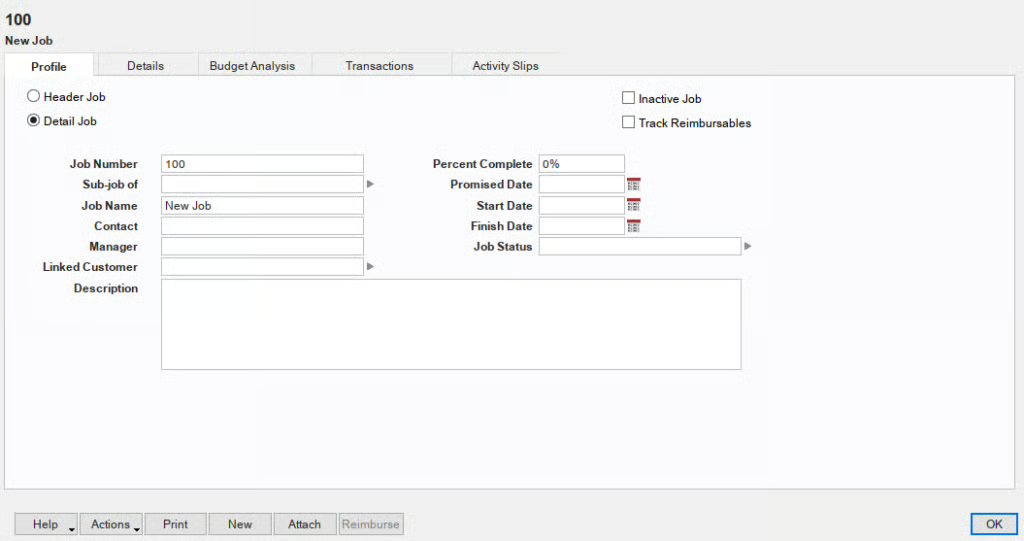
If you require a more comprehensive project management solution, which includes the ability to create estimates, check out our roundup of the best project management software.
Sales & Income Tax Management
3.43 / 5
You can create and manage sales taxes in AccountEdge, but you have to manually set up sales tax codes for various tax rates and jurisdictions. This is acceptable, but I would have appreciated it more if the platform could automatically calculate sales tax rates based on the customer’s location.
Additionally, you can’t pay sales tax electronically or file sales tax returns through the software. This means you must handle these tasks manually or through another platform.
Check out our roundup of the best tax software for small businesses if you need to automate these tax processes.
Inventory Management
3.90 / 5
The only downside I found in AccountEdge in terms of inventory management is that I can’t view inventory levels on purchase orders. This can cause problems like overordering and stockouts. Despite this weakness, there are many inventory management features I love in AccountEdge. It allows me to track and monitor the COGS, set up pricing based on average or last cost, and make adjustments if needed.
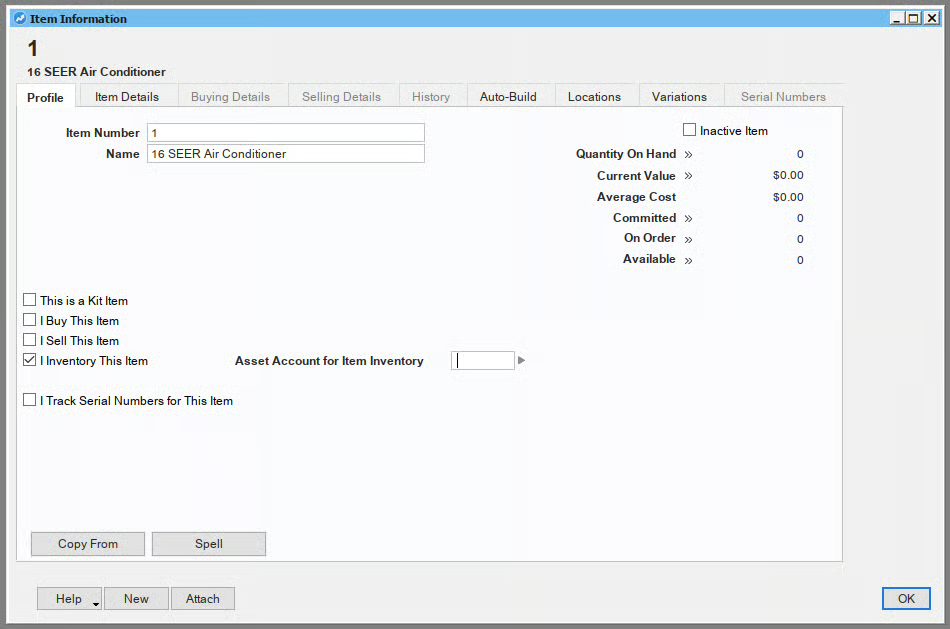
You can create a new inventory item using the Items list window under the Inventory command center. When you create an item, you can choose to buy, sell, or inventory the item. If you have bundled products or assemblies where multiple components are sold as a package, you can also create a kit item.
It also provides advanced tools, such as the ability to track inventory by location and build items and kits for businesses that purchase and sell bundled packages. You can also run reports on inventory status, valuation, location-specific stock levels, and pricing analysis.
AccountEdge is by far the best value I’ve found for accounting software that includes solid inventory accounting. Most value-minded software will not separate your inventory costs into COGS and cost of inventory on hand.
Reporting
5 / 5
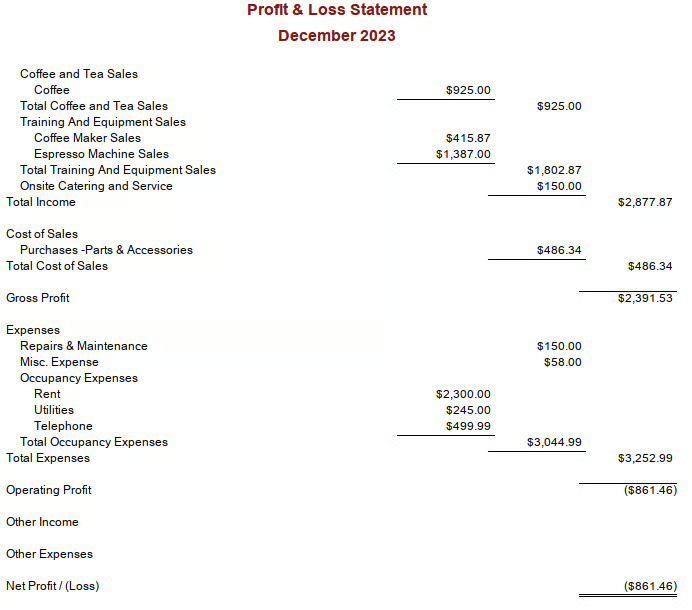
The range of available reports in AccountEdge is impressive. I can generate detailed financial statements, P&L reports, balance sheets, A/P and A/R aging reports, and more. Also, I appreciate that it offers department-level reporting, which lets users track their business by different attributes, such as product lines and locations where your business operates.
While I appreciate the overall reporting functionality, I hope the provider considers making its reports more visually appealing and professional. When I created a sample report, the output wasn’t as polished as I had hoped.
Mobile App
0.0 / 5
AccountEdge has no dedicated mobile app, which isn’t surprising given that it’s a locally installed software. If mobile accounting is important to you, consider Zoho Books, which leads our roundup of the best mobile accounting apps.
Integrations
4.25 / 5
The only reason AccountEdge didn’t ace this criterion is that it has no sales tax integration. This would have been a huge feature for those who need automated sales tax calculations and compliance.
However, it still provides built-in and third-party integrations for many core business functions, like payroll, electronic bill pay, and time tracking. For example, it has a built-in payroll integration, which lets you manage unlimited employees. Additionally, the AccountEdge Connect integration enables your customers to pay you online.
Usability
1.95 / 5
I evaluated AccountEdge’s usability based on four sub-categories: ease of setup, ease of use, customer support, and the availability of bookkeeping assistance.
Ease of Setup
AccountEdge has a New Company File Assistant wizard that helped me set up my company. I was able to quickly set up my company file, but I wish there was also an option to enter a beginning balance, which would have been helpful if I was transitioning from another accounting system. Also, I had to install the system first, making the setup process a bit time-consuming.
Ease of Use
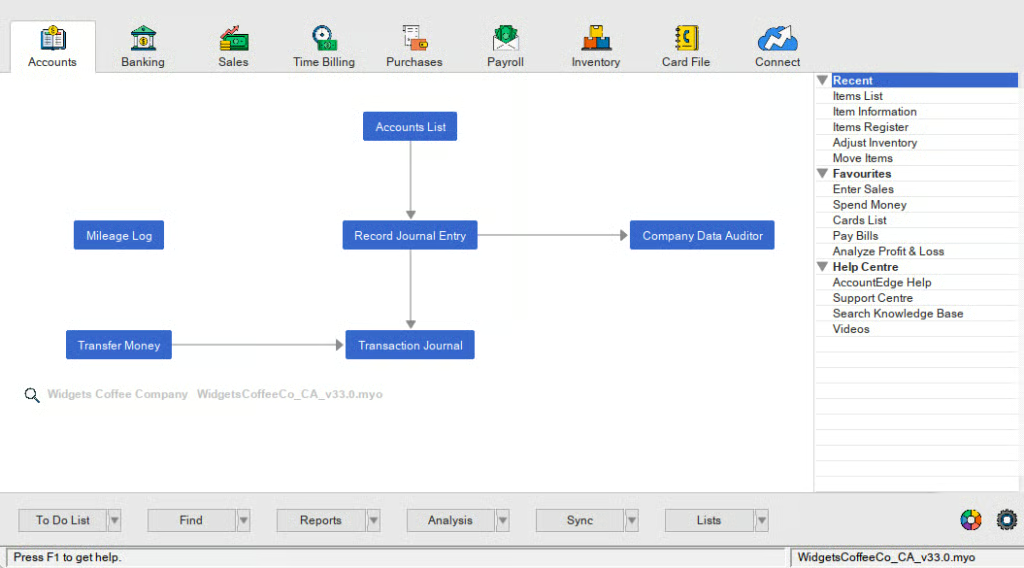
Many users may find AccountEdge’s UI outdated compared with modern, cloud-based accounting software. The interface relies on flowcharts and desktop-based navigation, which can feel less intuitive for new users.
Also, some of the features aren’t that intuitive. For example, when I first created an item, I didn’t figure out why the name field was locked right away. It turns out that I needed to enter the item number first and press Enter before I could add the name and other details.
Here’s what AccountEdge Pro’s dashboard looks like:
Customer Support
AccountEdge scored poorly in customer support, as users only have access to email support. If you wish to talk to an agent over the phone, then you have to pay an additional fee of $10 a month. Given its complexity, it’s highly likely that new users will require phone support to navigate through the platform and troubleshoot issues.
If you aren’t willing to spend extra, you can talk to customer support via live chat or browse through AccountEdge’s online resources. For minor issues, you might appreciate the vast number of resources available online, from setup guides to troubleshooting tips and videos.
Bookkeeping Assistance
There’s an AccountEdge directory where you can find experts for bookkeeping support, but there are only around 40 of them. These options may be enough for some, but I wish it were more extensive, similar to QuickBooks Online ProAdvisors, which consists of thousands of certified experts. Additionally, it would be beneficial if the provider considered adding a built-in or integrated bookkeeping service for users.
How I Evaluated AccountEdge
The Fit Small Business accounting team developed an internal rubric to evaluate small business accounting software. I used that to assess AccountEdge’s value, features, usability, and more.
I evaluated pricing by looking at transparency, upgrade costs, and the overall value delivered at each tier. I reviewed vendor pricing pages to confirm whether full pricing, add-ons, and plan limitations are publicly disclosed or gated behind sales conversations. I also compared the cost of upgrading between tiers using a cost-per-feature formula that estimates how much additional functionality each upgrade unlocks relative to price increases.
In addition to subscription costs, I assessed free trials, cancellation policies, and available discounts to understand how easy it is for businesses to test and exit a platform. These factors help determine whether the software delivers clear, predictable pricing and reasonable value as companies grow.
I analyzed how reliably each platform performs essential accounting tasks such as maintaining the general ledger, managing payables and receivables, reconciling bank transactions, tracking inventory, handling fixed assets, and calculating sales tax. I examined whether the system enforces true double-entry accounting, updates financial reports in real time, and provides audit trails for transaction changes.
I also looked at how efficiently businesses can manage vendor bills, issue invoices, reconcile bank feeds, and generate tax or financial reports without manual workarounds. When possible, I reviewed product documentation and walkthroughs to understand how these workflows function in practice. Platforms scored higher when they automate core accounting tasks while maintaining reliable financial accuracy.
I evaluated how effectively each platform reduces manual accounting work through automation. This included reviewing approval workflows, recurring transactions, bulk processing tools, AI-powered features, and the ability to consolidate multiple entities. I looked for tools that automate routine processes such as recurring invoices, scheduled journal entries, or batch transaction imports.
I also examined whether AI tools provide meaningful operational insights, predictive categorization, or anomaly detection rather than simple rule-based automation. Systems scored higher when automation reduced repetitive accounting tasks while maintaining transparency and user control.
I compared reporting capabilities by analyzing how easily businesses can generate financial statements, analyze performance trends, and build custom reports. I reviewed the flexibility of standard financial reports such as the balance sheet, income statement, and cash flow statement, along with the ability to filter, segment, and export data.
I also evaluated dashboard tools, KPI tracking, and the ability to drill down from summary reports into transaction-level details. For more advanced analytics, I looked for forecasting tools, profitability analysis, and integrations with external analytics platforms. Platforms scored higher when reporting tools supported both daily financial oversight and deeper business analysis.
I reviewed how each system protects financial data and maintains accountability within accounting workflows. This included evaluating audit trails, user permissions, period locks, and authentication methods such as two-factor authentication or single sign-on.
I also looked at how clearly systems track user activity and prevent unauthorized changes to financial records. Platforms with stronger monitoring tools, access controls, and compliance readiness scored higher in this category. These features help ensure financial accuracy while protecting sensitive accounting data.
I evaluated how easily each accounting platform connects with other business tools and scales as operational complexity grows. This included reviewing integrations with payroll systems, expense tracking tools, banking providers, e-commerce platforms, and CRM software.
I also examined whether the platform supports multi-currency transactions, APIs for custom integrations, and multi-entity accounting structures. Platforms that integrate easily with operational systems and support higher transaction volumes scored higher. These capabilities help ensure the software can continue supporting a business as it expands.
I assessed usability by examining how easily non-accountants can complete common accounting tasks. I looked at the number of steps required to create invoices, enter bills, reconcile bank accounts, and generate reports. I also reviewed interface design, navigation clarity, mobile capabilities, and the availability of prompts or error guidance during workflows.
Platforms scored higher when they allowed users to complete common accounting tasks quickly with minimal training. These usability factors are important for small businesses that manage accounting internally.
Frequently Asked Questions (FAQs)
Can I use AccountEdge online?
Yes, and you can do so by purchasing the hosted version, AccountEdge Hosted, which is available for $50 monthly per user.
Can I use AccountEdge for multiple companies?
Yes, it allows you to manage unlimited company files.
Does AccountEdge include payroll?
Yes, it includes integrated payroll, which costs $20 per month for unlimited employees.
Bottom Line
If you are looking for affordable desktop accounting software with a powerful feature set, I recommend considering AccountEdge. It’s a solid choice, especially if you are working with an experienced bookkeeper who is comfortable navigating its complex user interface.
User review reference:
[1]Software Advice
[2]G2
