








There’s no stopping the meteoric rise of artificial intelligence (AI) across all types of business software. But AI isn’t just reserved for tech spaces anymore—it’s also a valuable tool to help small businesses with public relations (PR). Case in point: AI press release generators make creating press releases quick and easy and get you PR and media coverage in no time. There are dozens of apps available; to help you choose, we rounded up the best below.
- Overall best AI press release generator: MarketersMEDIA
- Best free press release creator: TinyWow
- Best all-in-one content generator: Hypotenuse AI
- Best for fast press release creation and distribution: EIN Presswire
- Best AI copywriting assistant: Copy.ai
- Best AI media relations platform: PressHook
- Best keyword-optimized generator: Easy-Peasy AI
- Best for multiple press release outputs: HyperWrite AI
- Best AI Press Release Generators at a Glance
- MarketersMEDIA: Best AI Press Release Generator Overall
- TinyWow: Best Free Press Release Generator
- Hypotenuse AI: Best All-in-one AI Content Generator
- EIN Presswire: Best for Fast Press Release Creation & Distribution
- Copy.ai: Best AI Writing Assistant for Polishing PR Copy
- PressHook: Best AI Media Relations Platform
- Easy-Peasy AI: Best Keyword-optimized PR Generator
- HyperWrite AI: Best for Multiple Press Release Outputs
- How We Evaluated the Best AI PR Generators
- What an AI Press Release Generator Is & Best Practices
- Frequently Asked Questions
- Bottom Line
Best AI Press Release Generators at a Glance
| Free Plans Include | Paid Plans From | Learn More | |
|---|---|---|---|
 |
| $99/month | Visit MarketersMEDIA |
 |
| $5.99/month | Visit TinyWow |
 |
| $24/month | Visit Hypotenuse AI |
 |
| N/A | Visit EIN Presswire |
 |
| $36/month | Visit Copy.ai |
 |
| $249/month | Visit PressHook |
 |
| $4.99/month | Visit Easy-Peasy AI |
 |
| $19.99/month | Visit HyperWrite AI |
*Credits refer to the number of press releases you can generate.
MarketersMEDIA: Best AI Press Release Generator Overall
While MarketersMEDIA doesn’t offer any additional AI content creation tools (like a copywriter or image generator), it has the most detailed and comprehensive AI press release writer. Unlike other tools that use simple and generic prompts, MarketersMEDIA has fields for your specific press field type, your contact information, and more.
Here are the features MarketersMEDIA has to offer:
- Press release generator with three free daily credits
- Press release distribution services
- Press release report
- Wordmiles credit system to unlock more features (think video embeds, white labels, and more)
MarketersMEDIA’s generator has a free plan, which allows you three free credits daily. For unlimited press releases, you’ll need to subscribe to its Unlimited AI plan—see more details below:
Unlimited AI Plan
Monthly cost: $99
- Generate unlimited press releases
- Unlimited word count and revisions
- 7+ press release use-cases
- 30+ press release types
- 100+ press release languages
- Email and chat support
MarketersMEDIA is one of the most professional and detailed press release generators in the industry. Its PR generator clearly pinpoints all the essential information your press release will need, including what you’re announcing, your contact details, and more. Plus, it uses the correct format for press releases. You get three daily credits free, plus distribution services as an add-on and even press release analytics—making it our top pick overall.
To use the generator, simply sign up for an account, and you’ll immediately get access to the AI press release generator. Then, enter some details, including its release date, use case (purpose), and type. For example, if your press release’s use case is to share insight, your press release type can be to announce a new study or a crisis response, and so on. You’ll also need to add your company’s details and contact information.
To test MarketersMEDIA’s capabilities, we tasked it to create a press release announcing the publishing of this article. Here’s what it created:
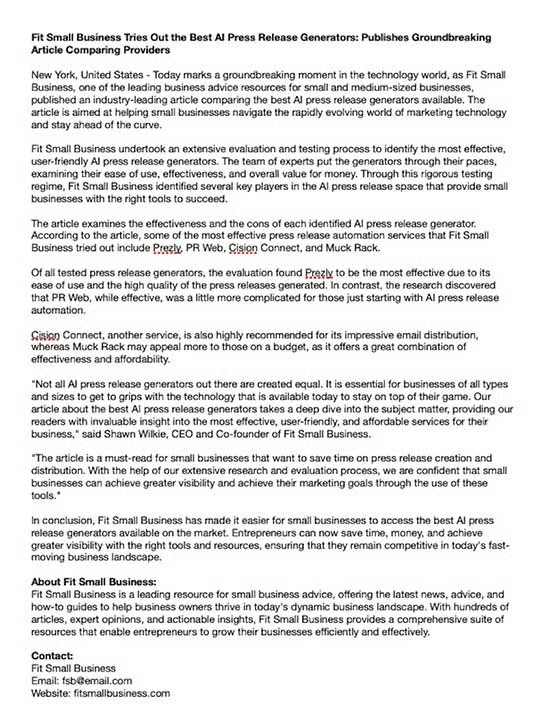
On Copyleaks, this press release was found to have a 99.2% probability of being AI-generated. Meanwhile, Hemingway gave it a grade of 14 (Poor), and Semrush’s writing assistant scored it a 5.4 out of 10 for readability, tone, search engine optimization (SEO), and originality. However, Grammarly detected it to be completely plagiarism-free.
On the whole, MarketersMEDIA generates comprehensive and professional press releases. The content generated will be automatically put into the correct format, including elements like your press release boilerplate. Having your story in the format used by the media makes it easier (and thus more likely) for journalists to provide additional coverage. It also makes your brand’s PR look professional.
TinyWow: Best Free Press Release Generator
TinyWow’s best feature is its completely free and easy-to-use PR generator. But it also boasts a considerable arsenal of AI content writing tools, as well as other image and video features.
Here are the tools you’ll find on TinyWow:
- Press release generator
- Article, blog post, email, and social media copywriter
- Blog outline and blog idea generator
- AI image generator plus image editing tools (e.g., remove background, compress image, etc.)
- Document converter for CSV, PDF, XML, and JSON formats
- Video compressor, converter, and downloader
TinyWow is completely free, but you can upgrade to remove ads and CAPTCHA for $5.99 monthly.
TinyWow has the quickest press release generation process out of any other on this list—simply type in your business name and a sentence about your announcement, and out comes a full press release within an instant. It’s also free with no sign-up needed, making it our top free PR generator overall.
With TinyWow, you’ll only need to visit their website and choose the press release generator to access and use it. While it’s free to use all their AI tools, including their AI blog writer, headline generator, and more, do expect to see many ads and answer some CAPTCHA prompts. If you want an ad-free experience, you can upgrade for $5.99 a month.
Here’s the sample press release TinyWow generated:
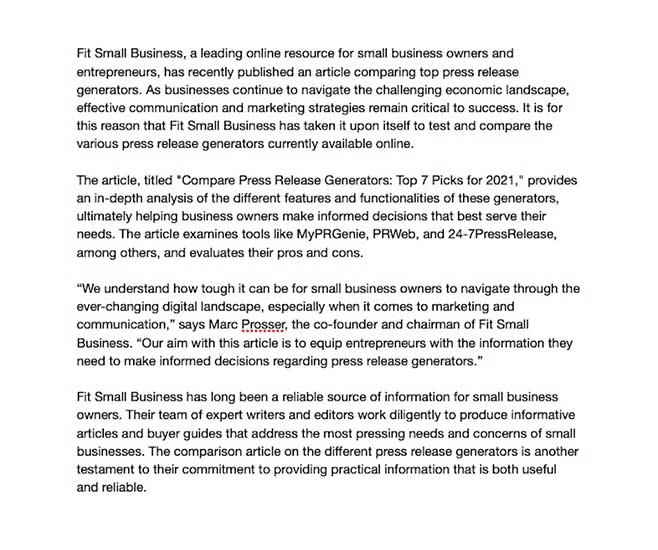
Given that TinyWow only required one sentence in its prompt for our press release, it’s not surprising that its generated press release isn’t as comprehensive or professionally formatted as some others on this list. For example, it doesn’t include a headline or boilerplate section. On the bright side, Copyleaks only detected a 71% probability for AI, and Grammarly found zero plagiarism matches.
However, Hemingway ranked it “Poor” and Semrush gave it a 4.2 out of 10 (mediocre), which means you’ll need to do some considerable editing. Despite these, if you’re on a tight budget and need a good starting point for your press release, TinyWow is a capable candidate.
Hypotenuse AI: Best All-in-one AI Content Generator
Hypotenuse AI’s comprehensive arsenal of AI tools is its best feature by far. You can generate nearly everything from press releases and blog posts to social media captions, website copies, and more.
Here are Hypotenuse’s standout features:
- Generator for press releases, blog posts, and emails
- Generator for Instagram and LinkedIn captions, Google and Facebook ads, and YouTube titles and descriptions
- For websites: headlines and slogans, landing page copy, titles and descriptions, and bios
- AI writing assistant to rewrite, summarize, and simplify content
- AI chatbot
- Bulk document generator
- AI image generator
- Press release headline generator
| Starter | Growth | |
|---|---|---|
| Monthly Cost* | $24 | $49 |
| Credits | 100 | 350** |
| Words | ~25,000 | ~87,500 |
| AI Content Generator for Press Releases & More | ✓ | ✓ |
| AI Image Generator | 200 | Unlimited |
| Bulk Product Descriptions | ✓ | ✓ |
| Plagiarism Checks | ✕ | 25 |
| Users | 1 | 5 |
| Monthly Credit Rollover | ✓ | ✓ |
*Annual billing, or pay a higher cost month-to-month
**You can also upgrade to 700 credits for $90 per month
Hypotenuse AI is one of the most comprehensive AI content writers for everything from press releases to product descriptions. While it generates a lengthy press release with three drafts, testing shows that it still is clearly AI-generated, which means the content generated will need considerable editing. This makes Hypotenuse AI the best tool if you need an all-in-one AI generator for multiple content types, but are still willing to do some edits afterward.
As with any other AI content generator, you’ll only need to type in a few prompts—in this case, for the press release generator, type in your company name and description, then add the most important points of your press release. When tested, Hypotenuse AI generated three drafts, so we chose the first one—here’s what it created:
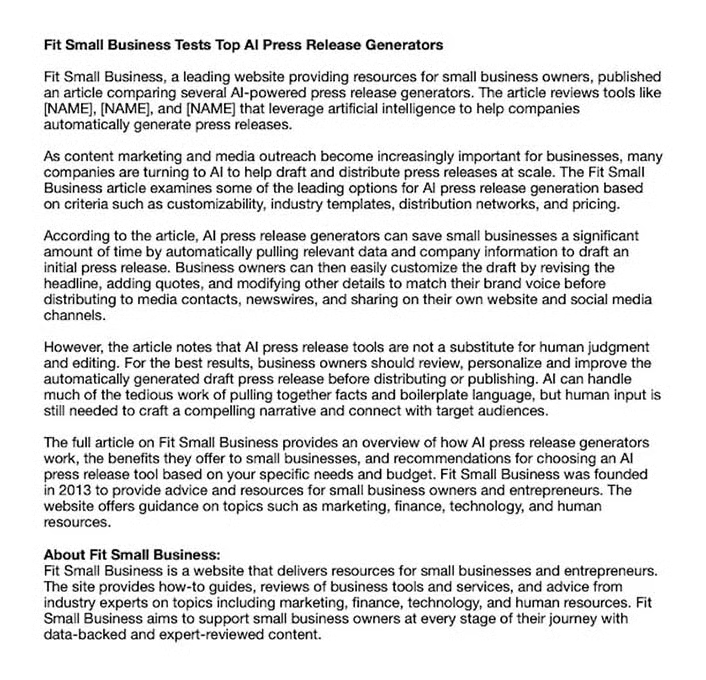
On Copyleaks, it garnered a 99.9% probability for AI, while it received a grade of 16 (Poor) on Hemingway and 4.3 out of 10 on Semrush. Finally, Grammarly detected a 2% possibility of plagiarism—one sentence was copied directly from a different article. Still, if you want a comprehensive AI content creator and have no issues doing some editing, Hypotenuse AI is definitely worth a try.
EIN Presswire: Best for Fast Press Release Creation & Distribution
Unlike others on this list, EIN Presswire’s PR generator is a straightforward content generator—simply type in details about your press release story, then it’ll automatically generate a story, which you can edit and send out within the same platform. On the negative side, it doesn’t offer any other helpful tools like a copywriter or image generator, like Hypotenuse AI.
Here are the best features of EIN Presswire’s AI press release creator:
- Free, easy-to-use platform
- A free plan with 25 daily press releases
- Press release distribution services as add-ons
EIN Presswire’s AI press release generator is completely free to use, and you get up to 25 press releases daily. You’ll only need to pay if you avail of their distribution services, which follow standard pricing:
| Basic | Pro+ | Corporate | |
|---|---|---|---|
| Cost | $99.95 | $399 | $999 |
| Press Release Sends | 1 | 5 | 25 |
| Word Limit | 700 | 1,000 | 2,500 |
EIN Presswire is one of the most well-established PR services; it’s even on our list of the best press release services for small businesses. It’s no wonder they’ve come out with an AI press release generator of their own. What’s more, it even offers 25 free press releases daily. Because of its ease of use and distribution services for your press release, it’s our top pick if you need a press release created and sent out quickly.
After logging in, type in a description of your press release story in the box—the more detailed, the better—then click “Generate Your Press Release.” In the next screen, you can edit your press release further or generate a new one if you aren’t satisfied with its first draft. Once you’re satisfied with your content, you can also have it sent out to EIN Presswire’s network of journalists within the same platform.
Here’s a sample press release generated by EIN Presswire:
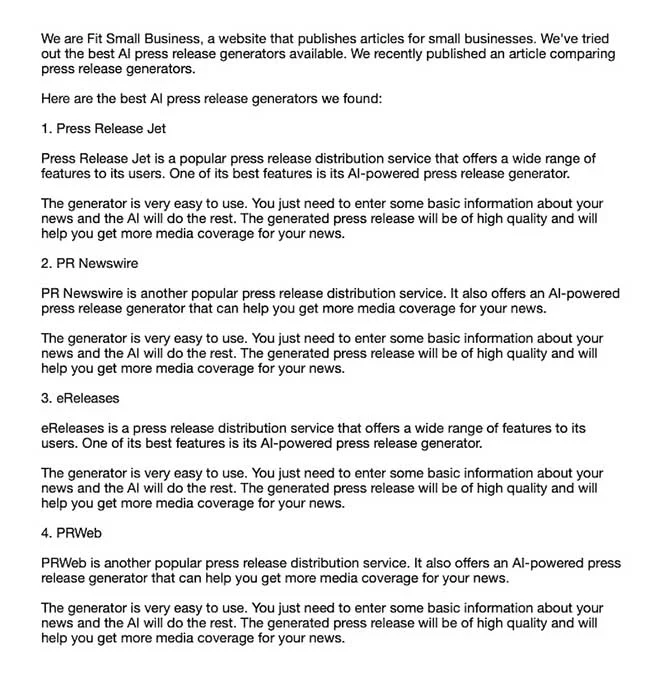
When put to the test, the press release garnered an 86.8% AI-generated probability on Copyleaks, which is significantly lower than most others. On Hemingway, it got a Grade 5 (Good) grade and 4.0 out of 10 on Semrush. However, it got an 8% plagiarism score on Grammarly, meaning it matched three separate articles on the internet.
In all, EIN’s PR generator is concise and well-written, following press release best practices, and it gets bonus points for being completely free. However, when using this service, be sure to do plagiarism checks and follow press release best practices for formatting before sending your document out.
Copy.ai: Best AI Writing Assistant for Polishing PR Copy
Copy.ai also boasts a host of AI content generators that can create long-form blog content as well as short-form copies like Facebook and Instagram captions, and even job descriptions and short stories. Content-wise, it’s one of the most comprehensive by far, with over 90 different types of content in its toolkit.
Here are Copy.ai’s best features:
- Content generator for press releases, blogs, website copies, social media content, emails, and dozens more
- AI chatbot
- Infobase to save your generated copies
- Unlimited projects
| Free | Pro | |
|---|---|---|
| Monthly Cost* | $0 | $36 |
| Content Generator for Press Releases & 90+ Other Content Types | ✓ | ✓ |
| No. of Words per Month | 2,000 | Unlimited |
| AI Chatbot Use | ✓ | ✓ |
| Unlimited Projects | ✓ | ✓ |
| 29+ Languages | ✕ | ✓ |
| Users | 1 | 5 |
*Annual billing, or pay a higher cost month-to-month
What makes Copy.ai’s tool unique is that it isn’t a one-click generator. Instead, you build your story as you go by generating sections of your press release at a time—first your intro, then your body, and so on, and then it generates dozens of ways to write your content. It essentially acts as a copywriting assistant for your press release, so it’s a good tool if you already have a press release draft that only needs some extra polishing.
Copy.ai is one of the best AI content writers on the market, and its PR generator is no exception. You get dozens of content generators for everything from website copies to blog posts, and the platform is straightforward to use. It will, however, take more time to create documents as it generates section by section instead of all at once. Conversely, this also means you have more chances to customize your content.
Here’s a sample press release generated using Copy.ai:
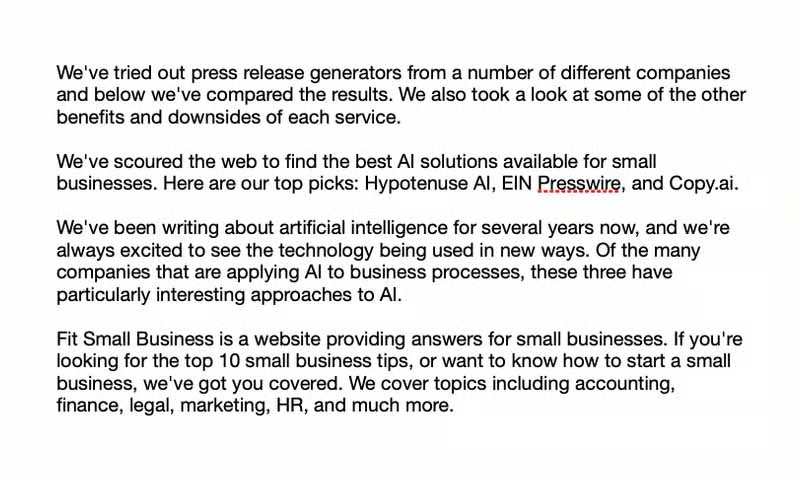
On Copyleaks, Copy.ai’s press release scored a 70.8% probability for human—the highest on this list. On Hemingway, it scored a Grade 9 (Good) for readability, while it got a 100% originality score on Grammarly. However, it only scored 4.5 out of 10 on Semrush. While these scores are generally high, it’s likely because Copy.ai is less a content generator per se than an AI copywriting assistant that polishes up existing content.
PressHook: Best AI Media Relations Platform
PressHook is unique for being more than an AI-powered PR generator—it’s a full media relations platform where you can create press releases and media kits, and build relationships with journalists.
Here are all of PressHook’s best features:
- GPT 3-powered press release generator with three free daily credits
- AI Media kit and media pitch generator
- Media relations-building and contact management platform
- Access to 1,000+ publications
- AI-curated media lists
- Media monitoring and analytics
- Dedicated account manager on the highest plan
PressHook offers an AI press release generator free of charge with three daily credits. For unlimited press releases and access to their media relations platform, upgrade to one of their paid plans below.
| Basic | Pro | Premium | |
|---|---|---|---|
| Monthly Cost* | $249 | $499 | $3,000 |
| Unlimited AI Press Releases & Media Pitches | ✕ | ✓ | ✓ |
| Unlimited AI Media Kits | ✓ | ✓ | ✓ |
| Media Relations Platform | ✓ | ✓ | ✓ |
| Editorial Calendar | ✓ | ✓ | ✓ |
| Media Monitoring & Trend Reports | ✕ | ✓ | ✓ |
| Dedicated Account Manager | ✕ | ✕ | ✓ |
*Annual billing, or pay a higher cost month-to-month
We like how simple it is to create a press release on PressHook. Simply type in your story’s key details, such as your subject and main message, and you’ll instantly get a concise but comprehensive press release story complete with a title, summary, and contact details.
But more than being a press release AI platform, PressHook is also a media network platform connecting businesses with journalists, so it’s the best tool for building PR relationships. Signing up to the platform not only gives you access to its AI press release generator, but it also connects you with the company’s database of over 1,000 media publications.
Once you visit PressHook, you’ll immediately be able to use the PR generator even without signing up. Answer the prompts about your company name and description, add your press release’s subject and key points, and your contact person’s details. You’ll have three free press release credits per day. To access PressHook’s media relations platform and other features, you’ll need to sign up for an account and choose a paid plan.
Here’s an example of a press release generated by PressHook:
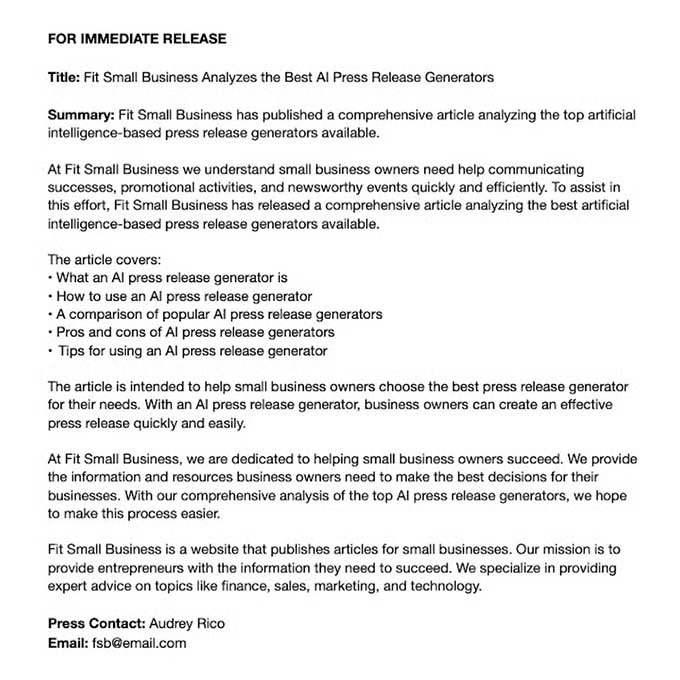
Copyleaks gave PressHook’s press release a 58.2% probability of being written by a human—but it also detected some AI content. On Hemingway, it received a Grade 10 (OK), and Grammarly found it to be 100% original. Semrush also gave it a 5.2 out of 10. This makes PressHook one of the best in terms of content quality. If you want a platform for building a press release and connecting with journalists, this is the option for you.
Easy-Peasy AI: Best Keyword-optimized PR Generator
Easy-Peasy AI’s standout feature is that it automatically includes keyword optimization when it generates your press release, which significantly increases your chances at being discovered online. But it also has a host of other AI content generation tools, such as a GPT-4 chatbot, an image generator, and more.
Here are Easy-Peasy AI’s best features:
- AI generator for press releases, blogs, social media captions, digital ads, and more
- GPT-4-powered AI chatbot
- AI image generator
- Content rewriter
- AI audio transcription tool
- 35+ languages
| Free | Basic | Starter | Unlimited | |
|---|---|---|---|---|
| Monthly Cost* | $0 | $4.99 | $8 | $20 |
| PR Generator | ✓ | ✓ | ✓ | ✓ |
| Words per Month | 3,000 | 10,000 | 25,000 | Unlimited |
| Types of AI-generated Content | 80+ | 90+ | 100+ | 100+ |
| AI Image Generator | ✕ | 25/month | 50/month | 250/month |
| GPT-4-powered AI Chatbot | ✕ | ✓ | ✓ | ✓ |
| Content Summarizer | ✓ | ✓ | ✓ | ✓ |
*Annual billing, or pay a higher cost month-to-month
Easy-Peasy AI stands out for including keywords as part of its press release generator prompts—something missing from the others on this list. The press releases it generates will automatically include your chosen keywords. This makes it the best platform for keyword-optimized press releases.
Easy-Peasy AI also stands out for its affordability. With paid plans starting at $4.99 a month, it’s one of the cheapest platforms on this list, and you get access to several tools, including its content generator, GPT-4-powered chatbot, and more.
After creating an account, you’ll enter your dashboard, where you can access its press release generator. Type in your company name, press release details, keywords, and tone, and it’ll automatically generate your press release.
Here’s a sample press release generated by Easy-Peasy AI:
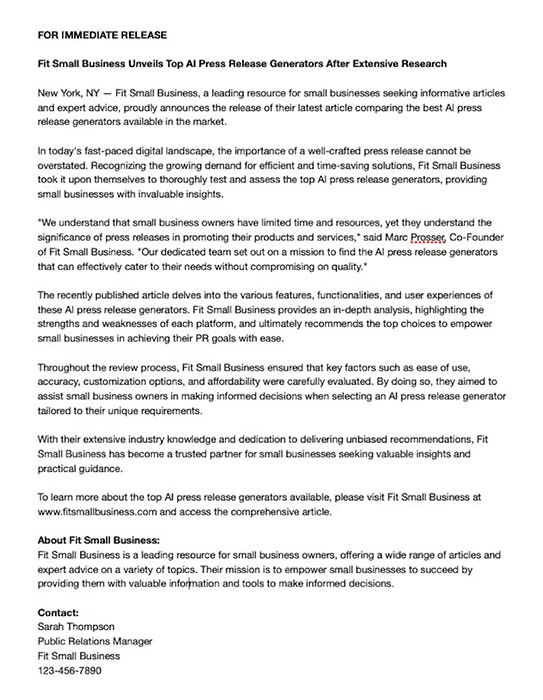
On Copyleaks, Easy-Peasy AI’s press release was found to have an 83.9% probability of being AI-generated. Hemingway gave it a grade of 14 (Poor), and Grammarly detected a 2% plagiarism match, while Semrush gave it a score of 5.4 (mediocre). This means you’ll likely need to do some checks and editing if you use this press release generator. Still, for its low prices and robust features, it’s a good starting point for any small business.
HyperWrite AI: Best for Multiple Press Release Outputs
HyperWrite’s AI press release creator is only one of its dozens of AI content generation features, which also include tools from speech and scriptwriters to greeting card message generators and more. What’s more, you can access all these tools for free on a free plan with 30 combined credits per month (15 generates and 15 rewrites).
Here are the tools you’ll find in HyperWrite AI:
- Press release generator
- All-around AI writer (Flexible AutoWrite)
- Content rewriter
- Content summarizer
- Outline generators for essays, social media posts, and speeches
- Manuscript creator for sales pitches, videos, and more
- Blog post writer
- Idea generator for everything from startups to greeting cards
- Social media caption writer
- Ad copywriter
| Free | Premium | Ultra | |
|---|---|---|---|
| Monthly Cost | $0 | $19.99 | $44.99 |
| Content Generations | 15/month | Unlimited | Unlimited |
| Content Rewrites | 15/month | Unlimited | Unlimited |
| AI Writing Assistant | 500 suggestions/day | Unlimited | Unlimited |
| Chrome Extension | ✓ | ✓ | ✓ |
| Long-term AI Memory & Priority Support | ✕ | ✕ | ✓ |
With most platforms, one query equals one press release draft—but that isn’t the case with HyperWrite AI. From one prompt, it’ll generate three separate drafts, all of which are unique and well-written. You can even choose if you prefer long-form or short-form content, as well as the complexity of your article. Overall, it’s a great choice if you want multiple press release options to choose from, or even if you want to mix and match paragraphs to create something new.
HyperWrite AI has a free plan, but you’ll need to sign up for an account, which allows you 15 generations per month. This also grants you access to its extensive suite of AI tools, including its flexible AI writer (AutoWrite) and content summarizer, a speech and manuscript generator, and more. Simply choose a tool, type in your prompts, and you’ll have a few drafts generated in seconds.
Here’s the press release generated by HyperWrite:
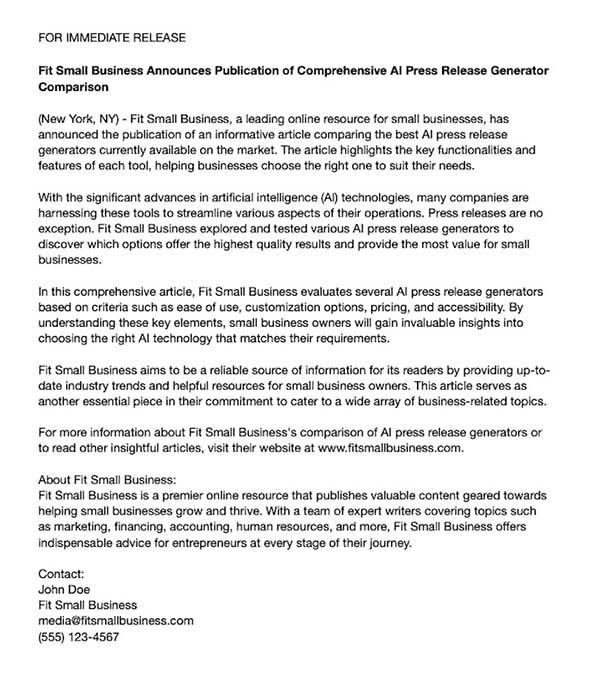
Copyleaks gave HyperWrite a 74.2% AI probability, while on Hemingway, it scored a grade of 13 (OK). Meanwhile, Semrush gave it a score of 4.9 out of 10, and Grammarly detected no plagiarism. While these scores aren’t perfect, they’re generally above average, and HyperWrite generates several drafts, which allows you to mix and match paragraphs to create an all-around better press release.
How We Evaluated the Best AI PR Generators
With dozens of AI-powered press release and content generators available—and more AI tools evolving every day—choosing the best for your business requires some standards and metrics for evaluation. In evaluating the best tools using AI for PR above, here are the criteria we used:
- Free use of the press release generator
- Press release quality and format
- Additional features (e.g., more AI tools, distribution services, and so on)
- Cost of plans
- Score based on Copyleaks, Hemingway, Grammarly, and Semrush
- Ease of use
What an AI Press Release Generator Is & Best Practices
A press release generator is any software or platform that automatically creates a press release for your business following your prompts. As with the platforms above, these prompts usually include details about your business and your press release’s story, and can include additional info like the specific type of press release you need (e.g., product launch, crisis response, etc.), the search engine keywords you want to rank for, and more.
PR generators can save you considerable time and effort in creating press releases to grow your brand presence. For many of these platforms, it’ll only take a few seconds to create your press release, which you’ll only need to further tweak and refine before sending them out to media outlets.
For best results when using a press release generator, here are some best practices to keep in mind.
- Have your business’ main objectives in mind: The press release maker you choose depends on your business’ primary needs and objectives. For example, if you want a comprehensive PR generator with distribution services, MarketersMEDIA is a good choice. On the other hand, if you’re only looking to polish up an existing write-up, Copy.ai might be your better option.
- Write down the main points of your press release: Every press release generator will require at least a prompt or two about the press release you want, so be sure to note them down beforehand. Write one sentence describing your company, then write another two or three about the key points of your announcement.
- Test your press release for plagiarism and readability: AI is still a continually evolving technology with many areas to improve on. To evaluate the platforms above, we checked them for plagiarism and readability—we recommend that you do the same before sending your document to the media. Some tools that can help are Grammarly, Hemingway, and ProWritingAid.
- Edit your story generously: Naturally, the next step after evaluating your press release is to make edits where necessary. Most often, you’ll need to edit plagiarized sentences, rewrite some sentences for conciseness, or put your announcement into the proper format (e.g., AP style press release formatting). You’ll also need to trim it to any word count limit you need to follow, and add elements like a boilerplate and media contact.
- Make your final copy unique: In addition to editing needed to improve readability, SEO, and ensuring your copy is plagiarism-free, you need to make your final version original. Do this by making the angle of your story crystal-clear and then adding quotes, unique details about your business, statistics, a custom boilerplate tailored to your audience and the journalists you hope to interest, and embedded multimedia.
For more guidance, read our article explaining what makes a good press release and how you can make sure your announcement stands out.
Frequently Asked Questions
What is the AI tool to write a press release?
Numerous AI tools are available to write a press release. Some of the best include MarketersMEDIA for a comprehensive press release, or TinyWow for a completely free tool. Other great platforms are PressHook and EIN Presswire if you want built-in distribution services. With these platforms, you’ll only need to answer a few prompts to generate an automatic press release.
How to create a press release?
You can create a press release by yourself by writing your own story and following the proper press release format, or you can hire a press release service to create and distribute one for you if you have the budget. You can also use an AI press release generator—such as those above—to generate one, then edit and refine it before sending it out to media outlets.
What are the parts of a press release?
The essential parts of a press release include a headline, a dateline (“for immediate release” or “embargoed for release”), a date and location, your business logo and contact details, your press release story, and a boilerplate. Optionally, you can also include a subheadline, summary, and a call to action.
Bottom Line
The rise of AI has granted small businesses new opportunities to quickly and easily expand their brand presence, and the AI press release generators above are a good starting point. Each platform is unique, and the best choice depends on your specific needs and priorities. However, for an overall PR generator combining quality and service and attainable prices, our top pick goes to MarketersMEDIA, which combines a good amount of both.
