







The best video conferencing software offers a suite of virtual meeting features, such as screen sharing, cloud recording, live transcription, and noise reduction. It is straightforward to set up and access for users across skill levels. Most providers offer a free plan for small teams and businesses on a budget, but monthly paid plans start as low as $2 per user. Based on our expert evaluation, here are the best video conferencing solutions for different business needs and budgets:
- RingCentral: Best overall, feature-rich video conference software
- Microsoft Teams: Best for all-in-one video meetings and team collaboration
- Zoom: Best for simplicity and user-friendliness
- Google Meet: Best for security and privacy protection
- BlueJeans: Best for audio and video quality
- Webex Meetings: Best for hybrid meeting rooms
- Zoho Meeting: Best low-cost platform for meetings and webinars
- Best Video Conferencing Software at a Glance
- Which free conference call service is right for you?
- RingCentral Video: Best Overall Video Conferencing Software
- Microsoft Teams: Best for Collaborative Workspace
- Zoom: Best for User-friendly Interface
- Google Meet: Best for Security Capabilities
- BlueJeans: Best for Audio & Video Quality
- Webex Meetings: Best for Hybrid Teams
- Zoho Meeting: Best for Low-cost Meeting & Webinar Solution
- Frequently Asked Questions (FAQs)
- Bottom Line
Best Video Conferencing Software at a Glance
| Best Video Conferencing Software | Monthly Starting Price (per User) | Key Features | Free Plan | FSB Rating |
|---|---|---|---|---|
 | $14.99 |
| ✓ | 4.64 out of 5 |
| Visit RingCentral | ||||
 | $2* |
| ✓ | 4.63 out of 5 |
| Visit Microsoft Teams | ||||
 | $14.99 |
| ✓ | 4.50 out of 5 |
| Visit Zoom | ||||
 | $5.40 |
| ✓ | 4.31 out of 5 |
| Visit Google Meet | ||||
 | $12.49 |
| ✓ | 4.30 out of 5 |
| Visit BlueJeans | ||||
 | $14.50 |
| ✓ | 4.23 out of 5 |
| Visit Webex Meetings | ||||
 | $2 |
| ✓ | 4.06 out of 5 |
| Visit Zoho Meeting | ||||
*Billed annually
Take our quiz to find out which video conference software best fits your needs.
Which free conference call service is right for you?
Which free conference call service is right for you?
Answer a few questions about your business, and we'll give you a personalized product match.
Question 1 of 4
When choosing a video conferencing provider, what do you prioritize?
RingCentral Video: Best Overall Video Conferencing Software
RingCentral Video Monthly Pricing (per User)*
- Pro: Free for up to 100 attendees, 24-hour meeting length, 10 hours video recording, waiting room, virtual background, live transcriptions, noise cancellation, and breakout rooms
- Pro+: $14.99 for 200 attendees, 100 hours of video recording, delegate scheduling, end-to-end encryption, app integrations, and advanced analytics
*Pay annually and save up to 20%
RingCentral Video is our overall best software for video conferencing due to the feature-rich nature of both its free and paid plans. While most competitors unlock more video meeting tools in higher tiers, RingCentral Video’s free version includes everything you need to host and collaborate in meetings. For example, meeting hosts and participants have access to chat functionality, recording capabilities, and even unique features like advanced meeting insights.
One of our top-recommended web conferencing software, RingCentral Video includes advanced analytics for tracking meeting performance, usage, and adoption. It enables admins to monitor teams or departments with low video usage and the actions employed during meetings.
On the downside, this provider requires a higher degree of setup and admin control. This can be overwhelming for small teams with basic video calling needs. Zoom is the go-to video meeting platform for businesses prioritizing ease of use and familiarity. Its intuitive meeting controls reduce the learning curve involved during the setup and configuration process.
RingCentral Video Features

- Meeting insights: Uses conversational intelligence to gather key information covered in a meeting, including the meeting summary, keywords, transcripts, and video highlight reels.
- Filter playback by speaker: Sort speakers by name or the amount of talk time to instantly review the recording and find relevant content by a specific speaker.
- Remote support: Allows meeting participants to request remote desktop control when the host or another participant is sharing their screen. The participant can use their touchpad, mouse, or keyboard to control the presenter’s desktop remotely.
Microsoft Teams: Best for Collaborative Workspace
Microsoft Teams Monthly Pricing (per User)*
- Free: Free for 100 attendees, one-hour meeting length, screen sharing, custom backgrounds, English captions, noise suppression, 5GB cloud storage, unlimited chat, and tasks
- Essentials: $2 for 300 attendees, 30-hour meeting length, and 10GB cloud storage
- Microsoft 365 Business Basic: $3 for 30 languages for live captions, meeting transcripts, breakout rooms, 1TB cloud storage, and app integrations
- Microsoft 365 Business Standard: $10 for webinar hosting and desktop version of Microsoft apps
- Microsoft 365 Business Premium: $22 for advanced security, access and data control, and cyberthreat protection
*All plans are paid annually.
Microsoft Teams is our recommended video call software for companies looking for a dedicated workspace integrated with video meetings. It primarily works as a team collaboration platform that includes team messaging, file sharing, and task management. Create group chats, assign tasks, schedule meetings, and collaborate on documents in real time within one application.
Integration with Microsoft 365 makes Teams a great fit for companies that actively use Microsoft 365 products (e.g., Word, Excel, and PowerPoint) and want a single workspace for all business tasks. All plans include access to web versions of Microsoft productivity apps, while desktop versions are available in the Business Standard plan.
The compartmentalized structure of Teams makes it a less suitable option for users who are new to virtual collaboration. For ease of use, a better alternative would be Zoom, the most user-friendly software for video conferences. This provider has earned a reputation for its simplicity and reliability amid the rise of remote work.
Microsoft Teams Features
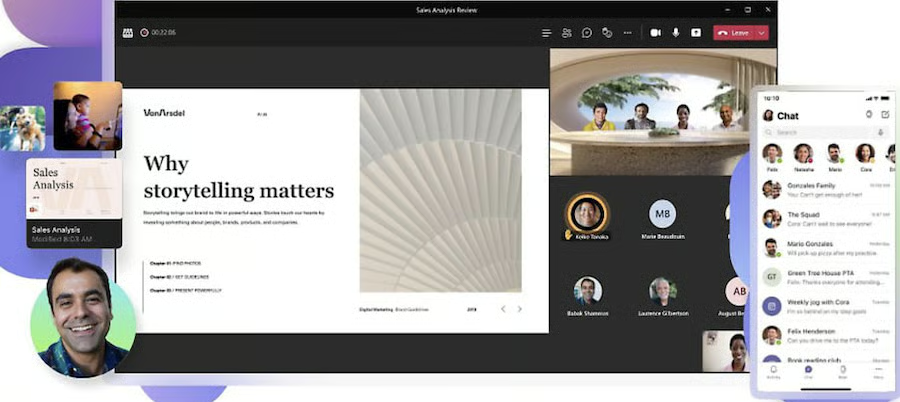
- Loop components: Allow meeting participants to brainstorm, provide feedback, and share ideas right within the meeting chat in a single, shareable message.
- External guests: Enable people outside of your organization to join your meetings directly through their web browser. Simply share your meeting link with anyone with a valid email address.
- Collaborative annotations: Use the built-in Microsoft Whiteboard feature to draw, react, and type directly to shared content during a Teams meeting.
Zoom: Best for User-friendly Interface
Zoom Monthly Pricing (per User)*
- Basic: Free for 100 attendees, 40-minute group meetings, screen sharing, breakout rooms, co-annotation, remote control, multi-share, basic whiteboard, local recording, team chat, and automated captions
- Pro: $14.99 for 100 attendees, 30-hour meeting length, 5GB cloud storage, polling, co-host, streaming, and reporting
- Business: $19.99 for 300 attendees, unlimited whiteboards, recording transcripts, and branding
- Business Plus: Contact sales for a quote, 10GB cloud, translated captions, and phone system features
- Enterprise: Contact sales for a quote, 1,000 attendees, and unlimited cloud storage
*Get up to 16% discount by paying yearly.
The Zoom meeting platform has quickly earned its popularity through its exceptionally user-friendly interface. With its intuitive controls and seamless setup, Zoom appeals to companies that value simplicity and ease of use. Whether you’re using it from a browser or app, all the features are accessible below the video feed, including mute, participant list, chat, screen sharing, recording, and app integrations.
For telemedicine use, Zoom is one of the few video conferencing programs with medical device integration functionality. As a Health Insurance Portability and Accountability (HIPAA)-compliant video calling system, it allows medical professionals to treat patients virtually while following security protocols and ensuring patient data is protected.
Among providers in this list, Zoom has the lowest group meeting duration for its free plan, with a session limit of 40 minutes. If you need a longer meeting length but don’t want to purchase a paid plan, consider a Zoom alternative like RingCentral Video. This provider lets you host meetings for up to 24 hours with up to 100 participants. For meetings with absolutely no time limits, try BlueJeans.
Zoom Features
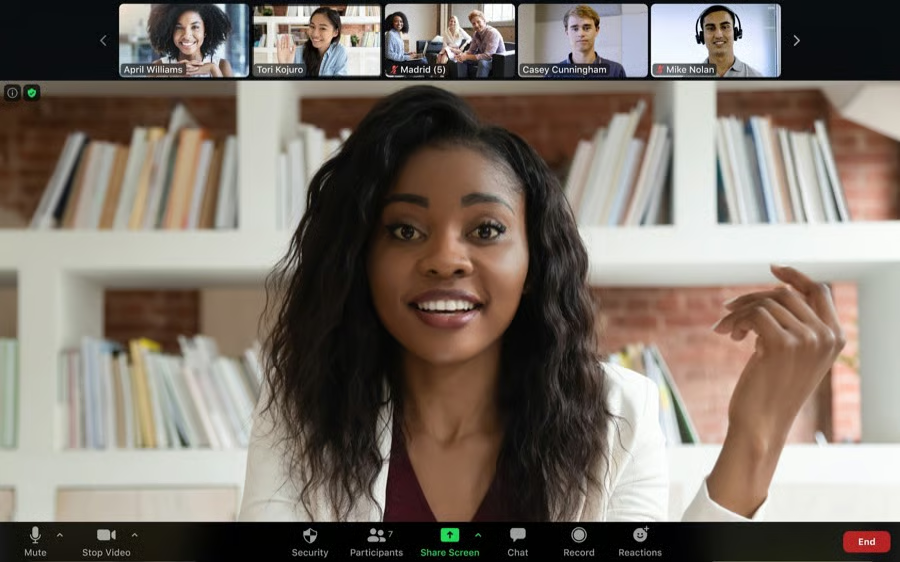
- Recurring meetings: Schedule meetings with repetitive occurrences so each session has the same meeting ID and configured settings. Meetings can be in daily, weekly, or monthly intervals.
- Join before host: Allow participants to enter the meeting before the host joins or if the host cannot attend the meeting. They can also claim the host control to manage participants and record the meeting.
- Immersive view: Place up to 25 meeting participants onto a single virtual background. The host can adjust the seating arrangements as needed.
Google Meet: Best for Security Capabilities
Google Meet Monthly Pricing (per User)*
- Free: Free for 100 attendees, one-hour meeting limit, and whiteboard
- Business Starter: $5.40 for 100 participants, 24-hour meeting length, and international dial-in numbers
- Business Standard: $10.80 for 150 attendees, noise cancellation, polling, Q&A, hand raising, breakout rooms, and 2TB cloud storage
- Business Plus: $18 for 500 participants, attendance tracking, and 5TB cloud storage
- Enterprise: Contact sales for a quote, 1,000 participants, and livestreaming
- Free trial: 14 days
*Google Meet is included in the Google Workspace subscription plan.
Google Meet employs a variety of counter-abuse protections to ensure meetings are safe. These include anti-hijacking measures, multiple two-step verification options, and advanced protection programs. Video meetings work entirely in a browser to limit the attack surface and prevent the need to roll out frequent security patches.
Google Meet is developed for Google users needing an integrated video meeting platform. A free version is available for Google account owners, with access to a suite of productivity services, such as Docs, Gmail, Sheets, and Calendar. Instantly join meetings or present what you’re currently working on. Purchasing any Google Workspace plan unlocks additional features like noise cancellation and breakout rooms.
A major disadvantage of Google Meet is it has plenty of missing features, including meeting insights, annotations, and third-party integrations. If you’re looking for a well-rounded video conferencing platform, check out RingCentral Video. A leading unified communications provider, RingCentral offers all the tools you need to help your teams collaborate effectively.
Google Meet Features
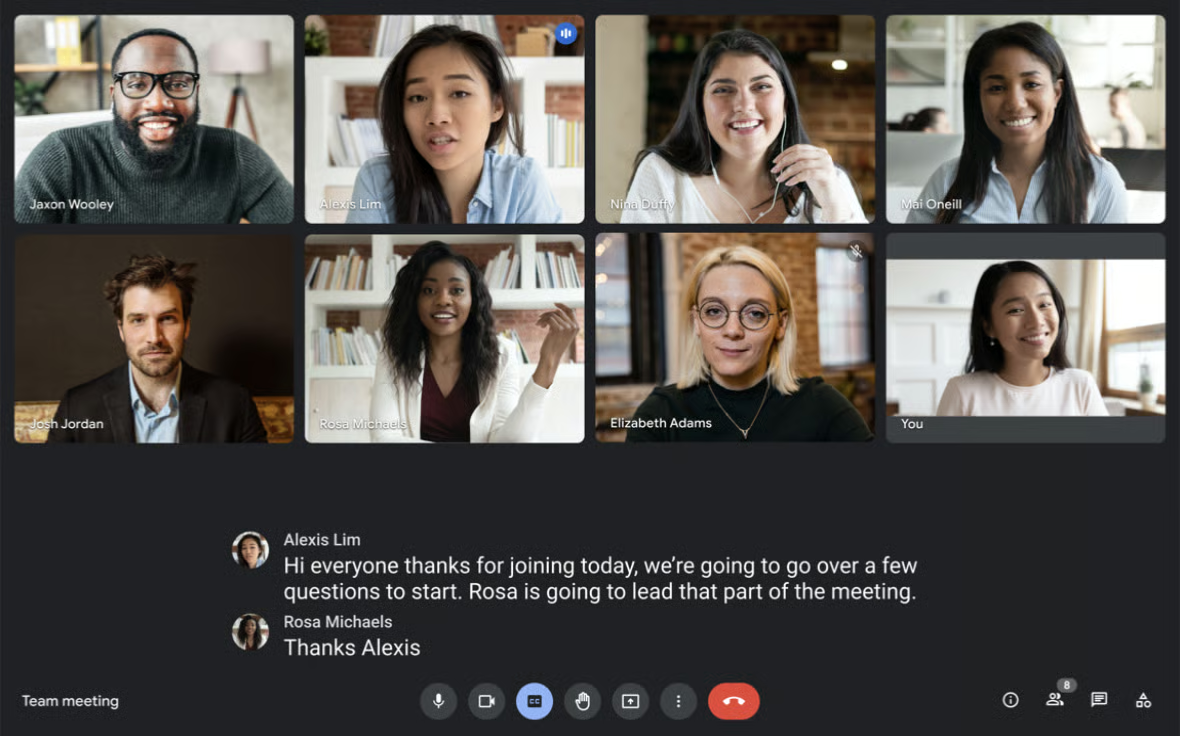
- Custom background: Limit distractions and keep meetings fun by choosing from a variety of virtual backgrounds, such as immersive, static, seasonal, custom images, and filters.
- Adjustable layouts: Automatically switches the video meeting layout to display the most active speaker or content. Customize the layout in four ways: auto, tiled, spotlight, and sidebar.
- Calendar and email integrations: Google Meet directly integrates with Gmail, Google Calendar, and Microsoft Outlook, so you can easily send invitations and join meetings without opening the Google Meet app.
BlueJeans: Best for Audio & Video Quality
BlueJeans Monthly Pricing*
- Basic: Free for 25 attendees and unlimited meeting duration
- Pro: $12.49 for 150 attendees and 25 hours of recording
- Enterprise: $17.49 for 300 attendees, unlimited recording, closed captioning, and live transcription
- Free trial: 14 days
All plans include annotation, file sharing, virtual backgrounds, hand raising, polling, screen sharing, breakout rooms, in-meeting chat, and calendar integrations.
*Discounted annual plans are available.
BlueJeans has partnered with Dolby Voice to ensure the audio quality of its meetings is exceptionally clear, minimizing issues like broken audio and phone echoing. Spatial audio suppresses background noise, makes conversations easy to understand, and maintains consistent volume. It supports high-definition (HD) video with a resolution of up 720p HD for BlueJeans App/Rooms, while content can reach up to 1080p.
Like RingCentral Video, BlueJeans offers a feature-rich free version on top of its unlimited meeting length. You get all the key features, such as in-meeting chat, screen sharing, and even calendar integrations with Google Calendar and Microsoft Outlook. The catch is you can only invite up to 25 participants.
BlueJeans lags behind when it comes to integrations, as it only connects with 48 apps. If your business wants to connect multiple third-party software with a fully integrated video conferencing platform, try Zoom. This provider integrates with over 2,000 apps, including popular platforms for ecommerce, project management, and productivity.
BlueJeans Features
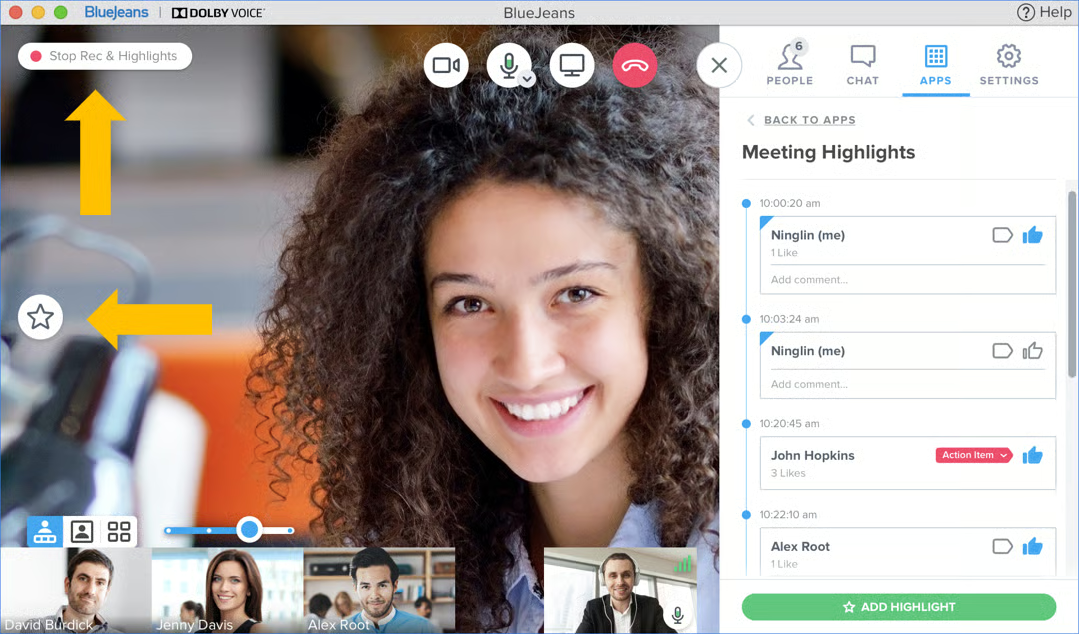
- Interactive video tiles: Click on a participant’s video tile to access features that enable interactivity between two attendees. Turn on spotlight, send them a direct message, pin them to specific locations, and even view their local time.
- Restricted meetings: Add a layer of security when scheduling a meeting. Meeting access can be restricted to invited participants or teams with a BlueJeans account.
- Weatherperson mode: Allows presenters to layer their video feed over their content without using a green screen. Aside from slides, they can also position themselves in front of any content.
Webex Meetings: Best for Hybrid Teams
Webex Monthly Pricing (per User)*
- Free Plan: Free for 100 attendees, 40-minute meeting length, whiteboard, noise removal, local recording, virtual backgrounds, screen sharing, calendar integration, and team chat functionality
- Meet Plan: $14.50 for 200 attendees, 24-hour meeting length, 10GB cloud storage, closed captions, polling, Q&A, post-meeting transcripts, and file sharing
- Enterprise: Contact sales for a quote, 1,000 attendees, unlimited cloud storage, and simultaneous interpretations
*Save more with annual billing
Webex Meetings is a video conference software specifically built for hybrid work—offering an array of hybrid work platforms (Webex Rooms Series and Webex Board) to improve the meeting experience for those attending virtually and in person. It uses artificial intelligence (AI) to deliver innovative and engaging collaboration features, such as interactive polling, people-focused views, immersive sharing, and real-time translation.
Webex Room Series and Webex Board are hardware-as-a-service solutions, which can be purchased on a monthly subscription basis. They include features that automatically detect the participant speaking, cut out disruptive noises, and use a wide-angle lens to ensure all participants in a meeting room are visible in the video.
Similar to Microsoft Teams, Webex works as a collaboration suite that includes calling, messaging, meetings, webinars, and event management in one unified platform. Pricing starts at $25 per user, monthly. If you’re on a budget, you’re better off with Microsoft Teams, with monthly plans starting at only $2 per user, billed annually. At a much lower cost, you get a complete workspace platform with rich collaboration tools.
Webex Meetings Features

- Webex smart audio: Uses advanced noise removal technology to eliminate background noises, such as pets, noisy keyboards, doorbells, or people talking. It also includes speech enhancement to enhance your voice quality during meetings.
- Interactive polling: Webex integrates with Slido to drive meaningful engagement during meetings. Live polling features include open-text feedback, word cloud, and pop quiz.
- Digital whiteboard: Bring teams together to ideate, brainstorm, and co-create with an easy-to-use online whiteboard. Draw, write, upload images, and use shapes, sticky notes, and emojis for a rich collaboration experience.
Our Webex review provides more in-depth information about its available plans, feature set, and alternatives.
Zoho Meeting: Best for Low-cost Meeting & Webinar Solution
Zoho Meeting Monthly Pricing*
- Free: Free for 100 attendees, one-hour meeting length, screen sharing, file sharing, hand raising, analytics and reporting, virtual background, and whiteboard
- Meeting
- Standard: Starts at $2 for 10 attendees, 10 session recordings, 24-hour meeting length, virtual background, polling, remote control, and co-branding
- Professional: Starts at $3 for 10 attendees, meeting widget, multiple co-hosts, and advanced analytics
- Webinar
- Standard: Starts at $9 for 25 attendees, 24-hour webinars, recording, and co-branding
- Professional: Starts at $19 for 25 attendees, 24-hour webinars, post-webinar analytics, and livestreaming
*Annual billing is available.
Zoho Meeting stands out for its free version, offering meetings and webinar features not found in other providers’ free plans. From moderator controls, registration reports, and automated email, you get all the basic features you need to facilitate a one-hour virtual event. It includes rich customization features that let you embed meeting links for registration on your company website and design email invitations based on your target audience.
For more advanced access, premium plans are scalable and priced affordably based on participant capacity. This puts Zoho Meeting on our list of the best free screen sharing software.
Zoho Meeting strictly integrates with the entire Zoho ecosystem. This includes Zoho CRM, Projects, Calendar, Campaigns, and Bookings, making it a one-stop for all your Zoho business apps. However, if you want to connect your video call software with multiple third-party services, consider Zoom or Webex.
Zoho Meeting Features
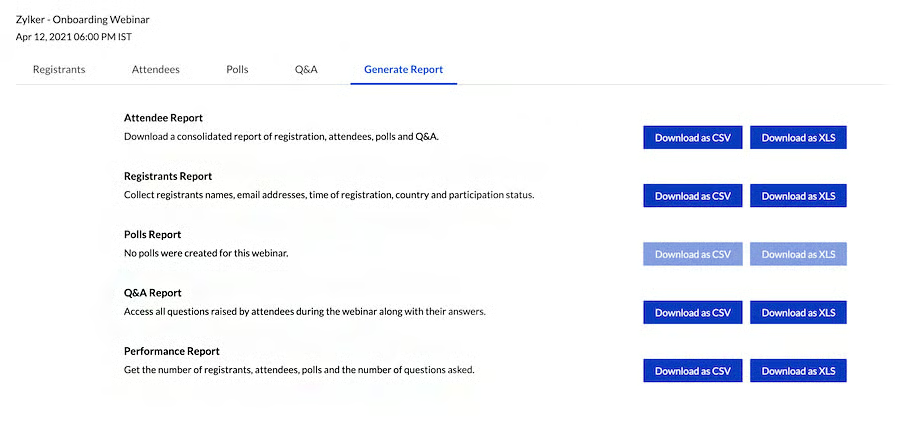
- Multiple email reminders: Send a single reminder or multiple emails at different intervals before the meeting starts. Customize your email by adding branding and dial-in numbers.
- RSVP and reminders: Collect RSVPs from invited participants so you know who will be present at the meeting. Re-plan and edit the meeting based on who will be attending.
- Mobile screen sharing: Share your Android and iOS screens and collaborate with your teams from anywhere.
How We Evaluated the Best Video Conferencing Software
We examined various video conferencing tools that provide free and paid subscriptions, mobile and desktop apps, artificial intelligence (AI) capabilities, and webinar features. We rated each provider according to price and features to develop scoring criteria showing overall value and ease of use. Learn how we evaluated the best video conferencing software by clicking on the tabs below:
We reviewed the prices of all video conferencing plans, including discounts for annual prepayment and multiple user subscriptions. Plus, we looked for the length of the free trial and the number of features included in the free plan.
We examined each provider’s general features, including the type of video meeting features in the base plan, screen sharing, breakout rooms, whiteboard, and automated captions. We also prioritized solutions with a full-featured mobile app and a high uptime guarantee.
For niche features, we considered a provider’s cloud recording capability, virtual backgrounds, simultaneous screen sharing, and team collaboration tools. Similarly, we awarded additional points for the various software integrations supported.
We assessed each provider’s user-friendliness by testing it and checking user reviews from reliable websites. We considered if there are learning curves during the setup and configuration phase.
We checked each provider’s customer support channels, including phone, live chat, email, help desk, and community forum. Additional points are given if all support channels are available 24/7.
We assessed each provider’s overall quality and performance by looking at its standout qualities and value for money. We also considered their level of popularity and user-friendliness.
Frequently Asked Questions (FAQs)
What is the best video conferencing software for large-scale meetings?
Microsoft Teams allows a maximum of 1,000 participants with access to interactive meeting features, while meetings with up to 1,000 to 20,000 attendees have view-only capabilities. You need to create the meeting using webinars or live events in Teams to access these features.
What is a hybrid meeting room?
A hybrid meeting room involves the use of hardware and software technology to create a conferencing session designed to connect participants from both office and remote locations. Remote attendees who join the conversation via a video conferencing platform are viewable through video display technology, while in-person attendees sit together in a traditional meeting room.
Is Zoom safe to use in 2023?
Yes. While Zoom has had plenty of security issues in the past, it has managed to solve its biggest flaws, particularly “zoombing.” The platform now employs a wide array of security features, such as meeting lock, waiting rooms, passcodes, and encrypted meetings.
Bottom Line
As more companies turn to video conferencing instead of face-to-face meetings, teams need feature-rich, reliable, secure, and user-friendly video conferencing apps. While many solutions exist, the best video conferencing software for your business comes down to your budget, required participant capacity, and the features your team needs.
Based on our criteria, RingCentral Video earned the highest rating. It provides a free and feature-rich video conferencing solution, and the paid plan boosts meeting capacity from 100 to 200 participants. Try out the free video app or start a 14-day free trial of RingCentral MVP today.
