








Call whispering is a voice-over-internet-protocol (VoIP) feature that lets managers listen to an active call between an agent and a customer and talk to the agent simultaneously without the customer knowing. It benefits customer service teams by speeding up issue resolution, empowering new agents, and making coaching easier for managers. In this article, we’ll explore further what call whisper is, how it works, and which business phone systems have it.
How Call Whispering Works
The call whispering process can be summed up in these steps: Find the call you want to listen to, join the conversation as an admin or through key codes, and click the “Whisper” option to talk directly to the agent. Here’s a more detailed look at the process:
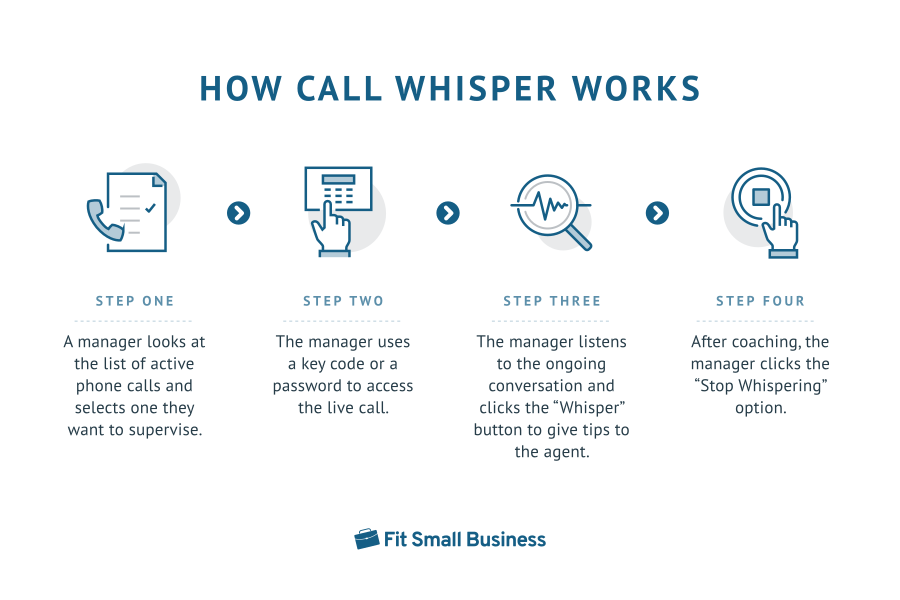
- A manager looks at the list of active phone calls and selects one they want to supervise.
- The manager uses a key code or password to access the live call. The agent may hear a special tone, indicating that someone is monitoring the call.
- The manager listens to the ongoing conversation and clicks the “Whisper” button to give tips to the agent.
- After coaching, the manager clicks the “Stop Whispering” option.
VoIP Features Similar to Call Whispering
Part of explaining call whisper is differentiating it from other business VoIP features with similar function and purpose. Call monitor, barge, and takeover are often confused with call whispering. Refer to the table below to familiarize yourself with each tool’s functions and best use cases.
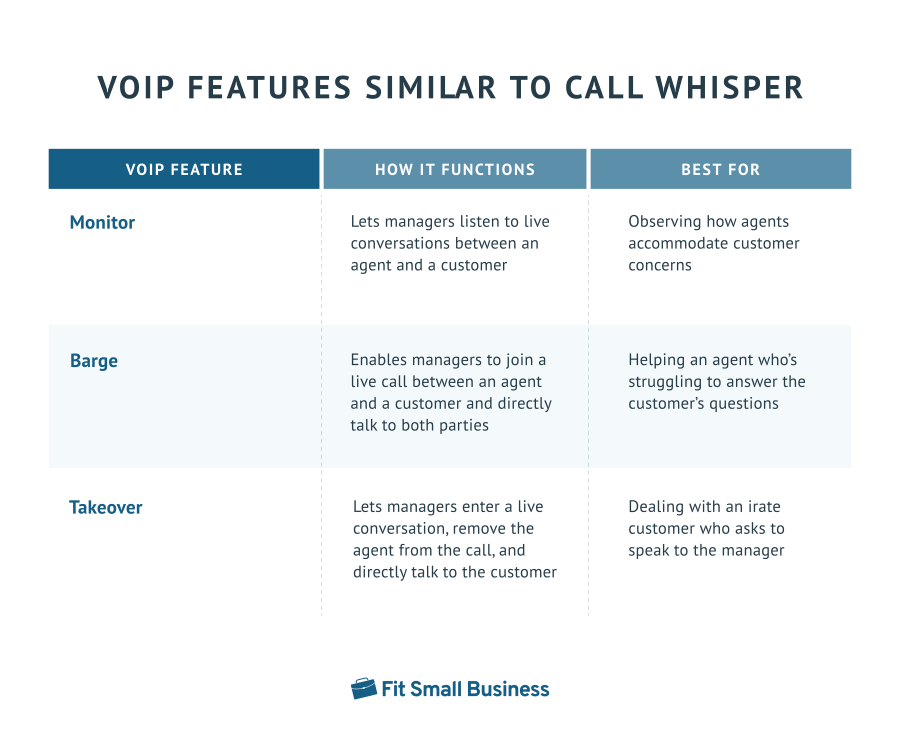
In summary, call monitor is more limited than whisper, as it only allows listening in to conversations. Barge, on the other hand, lets managers be actively present in calls, essentially creating a three-way call, whereas, in whisper, the manager’s participation is more discreet.
Finally, takeover offers team leaders sole control of the conversation, enabling them to completely remove the agent from the call to address the customer directly. Familiarize yourself with the call whisper meaning and differences from other VoIP capabilities to maximize its use.
Advantages of Call Whispering
Whisper is a valuable tool for improving the overall efficiency of operations as it helps streamline call handling and accelerates customer service delivery. These are the specific ways it benefits businesses:
Gives New Agents a Confidence Boost
New company representatives still learning the ins and outs of the company’s products and services will benefit from a call whisper service facilitating timely advice from managers. Team leaders provide quick answers to customers’ questions, removing the need for agents to consult colleagues and put the caller on hold.
Aside from actual knowledge, new agents receive real-time coaching on handling pressure, while offering quick solutions to customer concerns. Ultimately, the advice from team leaders helps representatives become more confident as they get used to the job.
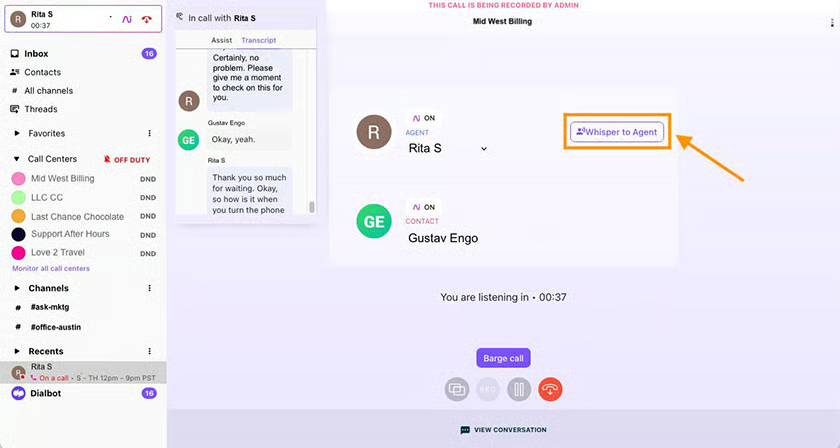
Dialpad AI Contact Center displays the “Whisper to Agent” button in an active call that managers are listening to. The platform’s built-in artificial intelligence (AI) tool offers real-time transcripts of the conversation, helping team leaders better understand the context of discussions.
Aside from whisper, the system has call monitor, barge, and takeover features. If you plan to use the provider’s business phone platform, read our comprehensive Dialpad review to better understand our rating and its features.
Facilitates Continuous Training for Long-time Agents
Long-time agents likewise benefit from managers using whisper, as the monitoring session encourages them to perform well. With a supervisor on the call, they’re compelled to apply best practices: comply with the spiels, be more attentive to the caller’s needs, and resolve concerns within the first call. While doing this, they get more communication tips and have someone point out mistakes that spoil the customer experience.
Helps Managers Support Struggling Agents
A classic call whisper example use case is coaching agents who take longer than usual to resolve a customer concern. Team leaders observe how representatives handle actual calls and offer feedback for improvement. As struggling agents overcome hurdles, the entire team becomes more productive, satisfying performance metrics and achieving collective goals.
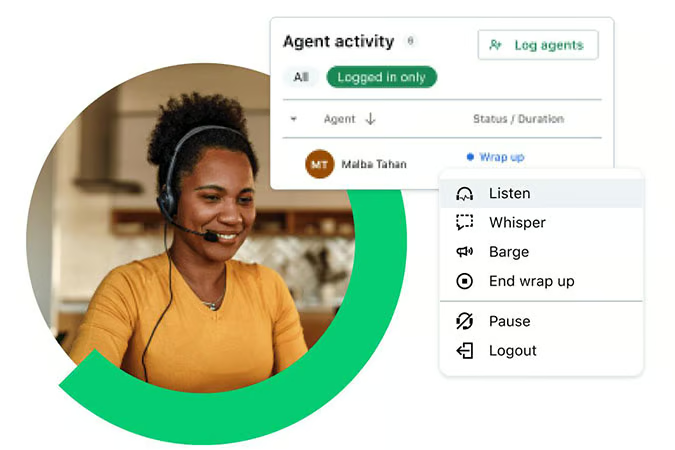
GoTo Contact Center allows managers to view agents’ statuses and call duration, helping them know which ones may need assistance. Note that only admins have permission to use whisper and other monitoring tools. But, as an admin, you have the option to extend access to these features to any user or user group.
In case you’re interested in a unified communications platform to sustain customer service operations, consider GoTo’s phone system. Read our comprehensive GoTo Connect review.
Disadvantages of Call Whispering
While a call whisper system offers many benefits for agents and managers alike, it also has drawbacks. It’s important to be aware of these disadvantages to better manage the use of the feature in your operations.
May Cause Distractions
Since whisper allows managers to speak discreetly while a conversation is ongoing, representatives may get distracted. They might not fully understand the context of the customer’s concern or the manager’s advice. As the agent isn’t fully present in the dialogue, customer service is affected. To minimize distractions during the call, provide succinct instructions to agents.
Delay Agent Response
Some new agents may depend on the manager’s advice to address customer concerns, delaying talking to the caller to listen intently to the instructions. This spoils the customer experience, especially when the person on the other end of the line prefers quick responses to urgent issues. To avoid overly dependent agents, offer sufficient training—targeting skill and knowledge gaps.
VoIP Providers With Call Whispering
If you think call whispering’s benefits outweigh its disadvantages, adopt or switch to a call center or business phone system with this call monitoring feature. Most providers offer this capability in their higher-tier subscription packages, so be sure to check the inclusions of the plans you choose. Below are some VoIP providers with whisper:

To use RingCentral’s whisper, you must first create a call monitoring group. Once created, these groups are accessible under the Heads-up Display (HUD) tab in the Phone Settings. Hover over the individual extension you want to listen to find the “Monitor active call” button. A pop-up will appear with call monitoring options, including whisper.
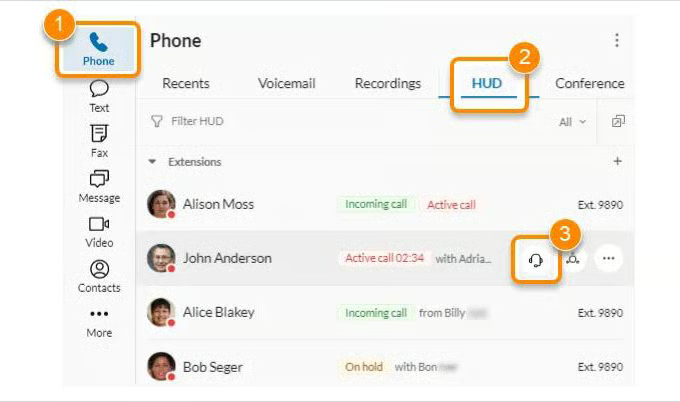
RingCentral’s call monitoring features are available in its Advanced subscription plan, which costs $35 per user monthly. Before subscribing to this VoIP provider, refer to our RingCentral review to determine if it suits your communication needs.

Vonage’s call monitoring dashboard contains a list of users with whisper permissions. Clicking on one of those extensions, you’ll see the specific configurations when supervising a call. For example, you have the option to set an extension PIN, which managers will key in to activate whisper and enable legal disclaimers, letting agents know that someone is monitoring the call.
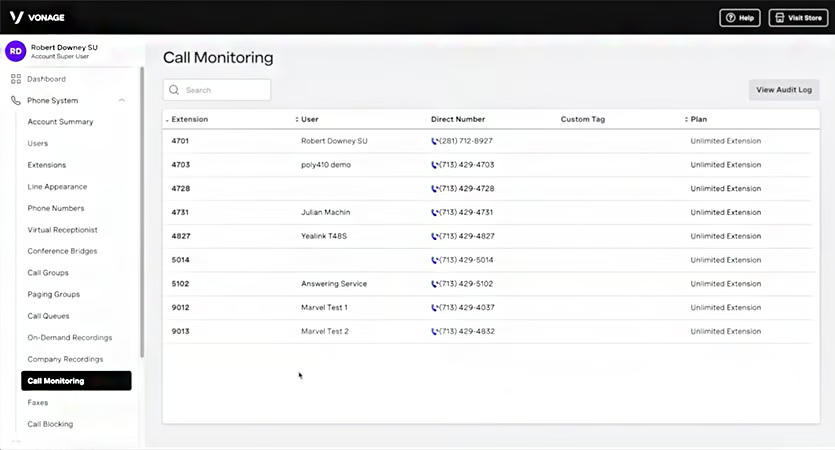
Vonage’s call monitoring service costs $50 monthly, an add-on to your monthly subscription plan. Learn the pros and cons of using this VoIP provider in our Vonage review.

Similar to RingCentral, 8×8 requires users to set up barge-monitor-whisper (BMW) groups to activate call monitoring. Each group has a BMW admin, those authorized to listen in to conversations. You have the option to require passwords when managers monitor calls. To observe in actual calls and whisper to agents, the group admin must dial <*9> or <*W> on their desk phone or softphone.
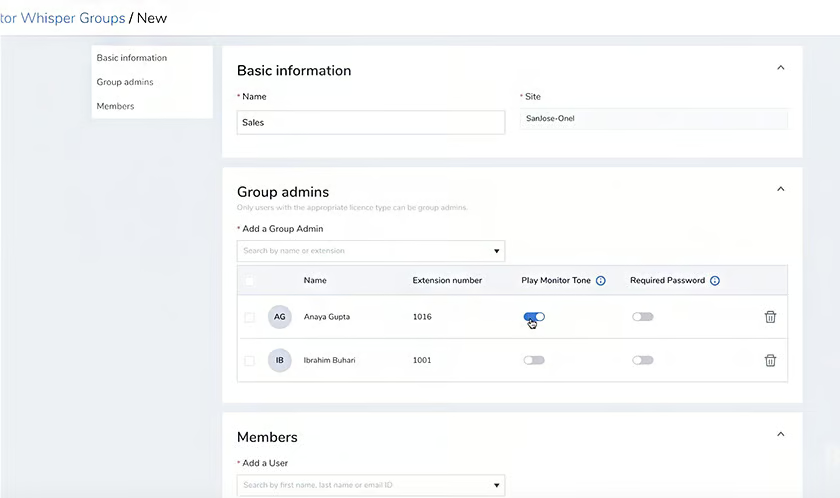
Businesses must choose 8×8’s X4 plan to unlock barge, monitor, and whisper capabilities. The monthly package costs $57 per user. Our 8×8 review should help you learn if this VoIP solution is right for you.
Frequently Asked Questions (FAQs)
What is a call whisper message?
A call whisper message is a brief announcement a customer service representative hears before being connected to a call. The message contains information about the caller, including their location, reason for calling, and account number. It helps the agent better prepare for the conversation.
What is a whisper tone in a call center?
The whisper tone is a special tone that the agent hears when someone is monitoring their call. The business phone system 8×8 has this feature, but it’s off by default and must be configured in the BMW group settings.
Can you use whisper on a desk phone?
Yes, you must know the appropriate star code to activate it. On RingCentral, press *81, followed by the extension number to enable whisper.
Bottom Line
Call whispering promotes better agent productivity, as they receive timely advice and feedback from managers. It helps resolve callers’ concerns more efficiently, thus keeping the team on track to hitting performance goals and creating a more pleasant customer experience.
Now that you know what call whisper is and how it benefits businesses, consider our top pick for the best call center monitoring software, RingCentral. Try the platform risk-free for 14 days.
