


Call handling is the process of managing inbound and outbound calls within a business. This includes deciding how calls are answered, what happens if callers are put on hold, and what call data gets logged during a call. With proper implementation, businesses can maintain a positive brand image, provide better customer service, and increase productivity. In this article, we answer the question “What is call handling?” and explore its benefits and best practices.
RingCentral, a leading provider of business phone systems, is known for its complete call management features such as multi-level auto-attendant, answering rules, and call forwarding. Its custom answering rules offer flexibility on how you prefer incoming calls to be handled during business hours, after hours, or by multiple condition rules.
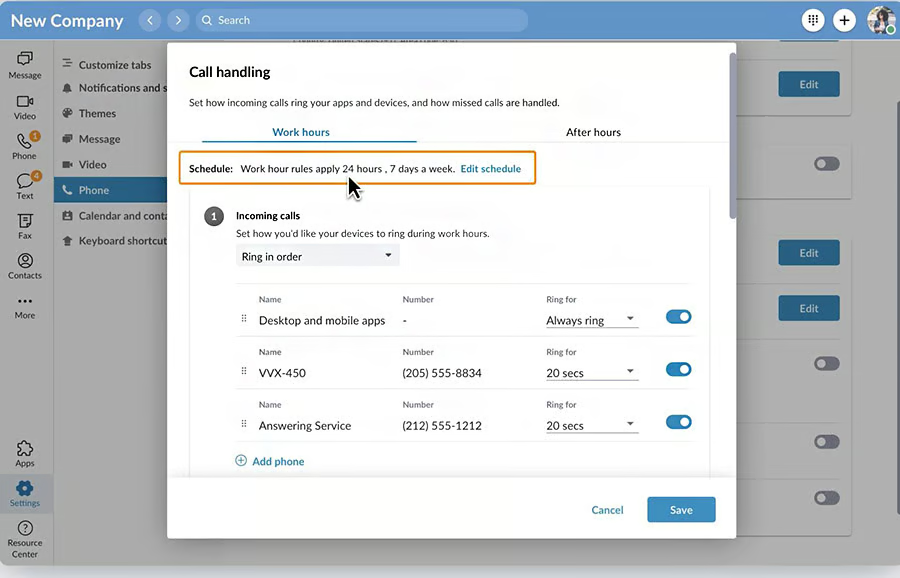
How Call Handling Works
Call handling involves all the steps taken when a call comes in or when placing an outgoing call. It can be incredibly simple or complex, depending on the company or the caller’s needs.
Here’s an overview of how it works based on each business phone feature:
| Business Phone Feature | Call Handling Function |
|---|---|
| Call Routing | A caller is directed to a specific person or department based on their response to a series of call menus or prompts. |
| Call Forwarding | Configuring this feature lets you redirect incoming calls to another phone number. |
| Call Parking | Call parking lets you place an active call on hold in the cloud so another team member can pick it up. |
| Call Screening or Blocking | Identifies the inbound caller and takes the appropriate action, whether to accept, block, or forward the call to another number. |
| Call Whisper | Call whisper is a call monitoring tool that allows managers to communicate with an agent during an active call without the caller hearing it. |
| Business Hours | Manage and route incoming calls based on business schedule, after-hours, or holidays. |
| Call Transfer | Call transfer involves redirecting a live phone call from one agent to another. |
Best Call Handling Solutions
Voice-over-internet-protocol (VoIP) solutions have different sets of phone features, enabling businesses to implement call management effectively. Check out our top five providers:
| VoIP Providers | Monthly Starting Price (per User) | Key Features | Free Trial | Learn More |
|---|---|---|---|---|
 | $30 |
| 14 days | RingCentral Review |
| Visit RingCentral | ||||
 | $30.95 |
| 7 days | Nextiva Review |
| Visit Nextiva | ||||
 | $32 |
| 14 days | GoTo Connect Review |
| Visit GoTo Connect | ||||
 | $34(fixed rate; not per user) |
| 7 days | Grasshopper Review |
| Visit Grasshopper | ||||
 | $14.99 |
| ✕ | Phone.com Review |
| Visit Phone.com | ||||
Inbound vs Outbound Call Handling
Inbound call handling involves the process of managing incoming calls directed to your business. They typically come from customers who need assistance or have questions about your product or service. Call routing systems automatically transfer incoming calls to the right agent or department. Companies utilize self-service tools and intelligent call routing to enable callers to resolve basic inquiries themselves without waiting to connect to a live agent.
Outbound call handling, on the other hand, covers all the processes of making an outgoing call to a customer or anyone who isn’t part of your organization. These involve sales pitches, telemarketing, surveys, customer verifications, and subscription renewals. Automated dialer software is used to automate the process of making calls and keep track of who has been called.
Benefits of Proper Call Handling
Call handling provides numerous benefits for businesses that rely heavily on phone communication. It builds a good first impression, opens up sales opportunities, and enhances team productivity. To further explore its benefits, here are other reasons your business needs an effective call management strategy:
Improves Team Productivity
Handling large volumes of routine calls affects team productivity as agents spend most of their time answering basic queries and transferring calls to different departments. Having a call handling system in place ensures all repetitive tasks are handled accordingly without the help of live agents.
Enhances Customer Experience
Setting your own call answering rules enables customers to reach your business line at their preferred time. Plus, intelligent routing helps customers reach the right agent or department for faster resolutions. This ensures rapid response times and a more consistent caller experience.
Cuts Costs & Reduces Resources
Instead of deploying several agents to answer calls 24/7, investing in a call handling service streamlines workflow and automates routine tasks. This helps to reduce operational expenses and the cost per call resolution.
Empowers Data-driven Decisions
The information provided by your phone system delivers key insights into the entire customer journey. Through call analytics, you understand how well your company handles its calls and which areas you need to focus on to enhance lead generation, support, and customer service.
Call Handling Best Practices
There are some techniques to follow to ensure the successful management of inbound and outbound calls. Consider the following call handling best practices for a better call experience:
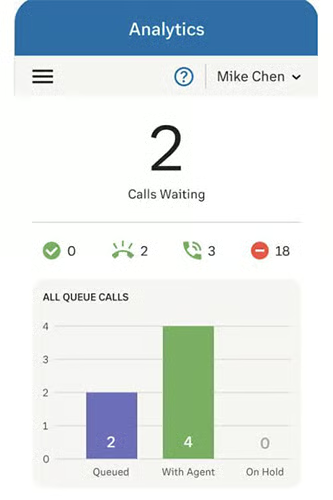
- Monitor key metrics: VoIP solutions include reporting and analytics tools to gauge the effectiveness of your call management process. It uses metrics and key performance indicators (KPIs) to provide necessary insights about the call volume, customer satisfaction, and length of calls. The collected information will help you reevaluate and make necessary adjustments to improve the call handling experience.
A complete business phone system like RingCentral uses powerful analytics features to effectively monitor usage statistics. Reports come in multiple customizable options, so you get complete control over the metrics and KPIs you want to monitor.
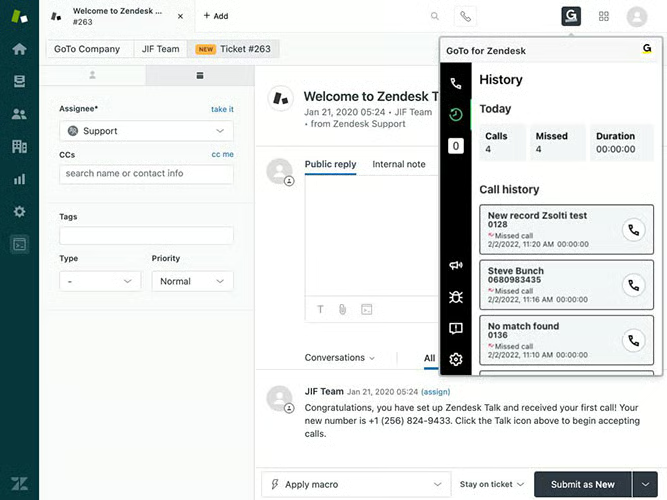
- Utilize app integrations: Integrating your phone system with your third-party apps allows quick access to customer information and real-time call data. During a call, the agent can use the customer relationship management (CRM) integration to retrieve the customer’s profile, past purchases, and troubleshooting history. This enables agents to anticipate the caller’s needs and improve average handle time (AHT).
GoTo Connect is a VoIP service provider that readily integrates with popular CRM systems like Zendesk, Salesforce, and Zoho. As calls come in, you’ll receive call notifications right within your CRM platform, including a full context of the caller’s existing record.
- Use call scripts: Call scripting serves as a ready source of information for phone operators and aids in the consistency of phone conversations. This helps enhance the efficiency and speed of call management since they won’t have to waste time searching for solutions to give to the customer. However, make sure not to rely heavily on the script and create room for personalization.
- Implement follow-ups: Encourage agents to take notes after a call to set follow-up reminders and gather data about customers that will help them improve their service. There are callers with open cases or just repeat callers who need to be identified. Managers should use call monitoring tools and review call recordings to identify areas to improve call management.
Frequently Asked Questions (FAQs)
What are the essential skills for handling customer calls?
Call handling requires essential customer service skills, including the ability to communicate professionally. Agents need to maintain a positive tone, establish personalized interaction, and have technical proficiency in the company’s products and services. When dealing with angry customers, agents have to stay calm to ensure the complaint is dealt with properly.
How are calls handled when all phone lines are busy?
Companies have the option to place a call on queue, transfer it to voicemail, or provide a callback function. Note that the acceptable wait time is within two minutes, and anything longer than that negatively affects customer satisfaction. Whatever your strategy, it’s important to ensure calls are not left unattended, and callers are given other options instead of making them wait.
What is the average handle time in a call center?
The industry standard for average handling time (AHT) is six minutes and 10 seconds. Achieving this metric can be tricky because agents should find the balance between speed and quality of customer service. Hitting the AHT benchmarks regularly might mean agents are rushing through calls without addressing the caller’s needs, while those with longer AHTs may not have the right tools or skill set to handle customers’ concerns.
Bottom Line
Today’s customers have high expectations when they do business via phone calls. This is where call handling becomes a critical aspect of providing exceptional customer service. With the right phone solution and best practices, companies will be able to leave a positive impression and create a positive customer experience.
